Adobe brings Photoshop, Express and Acrobat to ChatGPT for free image and PDF editing


24 Sources
24 Sources
[1]
Adobe brings Photoshop, Express and Acrobat features to ChatGPT | TechCrunch
Adobe is doubling down on its strategy of using AI to bring more users into its product ecosystem. The company on Wednesday said it is adding features from Photoshop, Express and Acrobat to ChatGPT, letting users ask the chatbot to use these apps to edit images, modify PDFs, or animate elements. So users can now tell ChatGPT to use Photoshop to edit specific parts of images; remove or blur the background; adjust exposure, brightness, and contrast; or apply various effects. The chatbot will also give you an option to modify the intensity of effects using sliders. With support for Express, ChatGPT now lets users tell it to do stuff like fetch existing designs from its library, put together themed creatives, animate elements, and edit designs. And with Acrobat's PDF editing capabilities, ChatGPT can do things like merge files, edit or extract text or tables within a file, and do more. If at any point you don't feel like struggling with ChatGPT, you get an option to continue working inside Adobe's apps to finish the job yourself or use features that are not available within ChatGPT. Adobe said these features will be available globally. While features from all three Adobe apps are available on ChatGPT's desktop, web and iOS apps, only Adobe Express is currently supported on ChatGPT for Android. The company says support for Photoshop and Express is coming soon. Adobe has shipped many AI-powered features and products this year. In October, the company released AI assistants for Express and Photoshop, and also teased a cross-app assistant, dubbed Project Moonlight. It's unclear if Open AI and Adobe have a revenue-sharing arrangement, or OpenAI started supporting third-party apps inside ChatGPT in October, launching with Canva, Spotify, Expedia and Figma. But as more companies work to bake in their apps within the popular chatbot, the challenge for companies will be getting people to use their app instead of a rival's inside ChatGPT. For instance, you can use both Canva and Photoshop to edit images with the chatbot, but if you don't use either of these apps, you might not have a preference.
[2]
Photoshop in ChatGPT Fixes a Big AI Image Editing Pet Peeve
Three Adobe apps -- Photoshop, Adobe Express and Acrobat -- are coming to ChatGPT, the company announced on Wednesday. The integration means anyone can edit their photos in ChatGPT using the editing tools native to Adobe's apps, no ChatGPT or Adobe subscription required. The Adobe apps in ChatGPT will feel familiar to anyone who has used them before: Photoshop can edit your photos, Express can create graphic designs and Acrobat can manage your PDFs. These are third-party app integrations, so you can find them by clicking Explore under GPTs in the main side menu. Or you can simply add the name of the Adobe app you want to use at the beginning of your prompt, bolded. This integration is aimed at ChatGPT (not Photoshop) users. While the Adobe apps in ChatGPT will give you more editing firepower, they won't have the range or granular level of controls that, say, the regular version of Photoshop has -- something that professional creators want and need. It's likely going to be most useful for people who are already creating in ChatGPT and want to level up their work. While reviewing OpenAI's AI image generator in ChatGPT, I found it was fine for quick mock-ups but lacked essential creative controls. Using Photoshop fixes that. (Disclosure: Ziff Davis, CNET's parent company, in April filed a lawsuit against OpenAI, alleging it infringed Ziff Davis copyrights in training and operating its AI systems.) When you edit photos with Photoshop in ChatGPT, you will see a small pop-up window; sliders will appear in the upper right corner. This is where the hands-on control comes in. You can manually adjust those sliders to edit your photo. If you ask Photoshop to brighten a photo, for example, it will provide sliders to adjust the exposure. You can also apply visual effects, like glitch or glow, to your photos. Adobe Express, the company's Canva competitor, can be used to create editable designs, like flyers, invitations and posters. Acrobat in ChatGPT should be able to preserve your PDF's formatting while editing, combining or otherwise maneuvering your documents. When you use the Adobe apps in ChatGPT, Adobe's software is ultimately the one that's running the show to edit your photos or create your documents. ChatGPT is simply the interface or platform you can use to access them. ChatGPT isn't entirely regenerating your photos; it's editing them as you would in Photoshop. Adobe has been heavily focused on generative AI over the past few years. Most recently, it announced it was adding AI chatbot-like assistants to the regular versions of Express (out now) and Photoshop (still in beta). It also teased its latest AI image model, Firefly Image Model 5, at Adobe Max, its annual creative conference. AI audio is also a growing area, as the company released new AI tools to generate soundtracks and dialogue.
[3]
You can edit images with Adobe Photoshop in ChatGPT now - it's easy and free
Adobe Photoshop is such a powerful image editing tool that it can be intimidating to use, even for the simplest of edits, like blurring a background. Now, a new integration with ChatGPT apps makes editing an image as easy as entering a conversational prompt into the chatbot. On Wednesday, Adobe launched its Adobe apps for ChatGPT, giving users access to Adobe Photoshop, Express, and Acrobat directly within ChatGPT. The perks of the approach are that the AI will complete your task, whether it's adjusting the lighting of a photo in Photoshop, creating a holiday party invitation in Express, or merging two documents in Acrobat. Also: Stop using ChatGPT for everything: The AI models I use for research, coding, and more (and which I avoid) The best part is that the experience is available to all ChatGPT desktop, web, and iOS users for free globally, starting today. Here is everything you need to know, including live demos and suggestions for why I think you'll want to try it out. Similar to using other ChatGPT apps, to activate any of the Adobe apps for ChatGPT, select the app from the textbox by clicking the (+) icon. Again, because it's free for users, there is no subscription or Adobe app downloading requirement. You also don't have to log in to Adobe, and there are no limits inside ChatGPT. Also: Gemini vs. Copilot: I tested the AI tools on 7 everyday tasks, and it wasn't even close Once selected, you can enter the conversational task for what you want done, which depends on the app you are using. ChatGPT will then get to work on the final product. In one of the Photoshop demos, the demonstrator typed in the prompt "convert the image to BW" and added an image from a trip to Japan. Then, the app opened right within the ChatGPT interface and produced the image in black and white. Particularly notable was that the AI included controls, such as a slider widget, which the demonstrator used to adjust the exposure, dark values, and white values directly within ChatGPT. In another example, he uploaded a second image, asking the chatbot to "add some effects," which produced different options, such as a "glitch" effect, which could be customized within the chatbot and adjusted. Also: Want better Gemini responses? Try these 10 tricks, Google says The editing in ChatGPT follows the non-destructive editing conventions used in Photoshop, allowing users to click the "Open in Photoshop" button to open the image in Photoshop on the web, with the edits preserved as editable layers. The Adobe Express integration in ChatGPT is similar to the Canva integration, which I tested at launch in October and enjoyed. If you are unfamiliar with Adobe Express, it is a platform for creating visual content, including flyers, social media posts (photo and video), documents, web pages, presentations, logos, and more. With the ChatGPT integration, you can now create this content using a text prompt. In the demo, after entering the prompt "retro and festive" ideas for a holiday party, the tool generated an on-theme flyer template. To edit the components, such as the background color and text details, the demonstrator could use other follow-up conversational prompts. If the tech works as seamlessly as in the demo upon release, this integration will provide an advantage over the Canva app, which, at the time of launch, required manual editing in Canva for the most accurate results. While the capabilities in Adobe Acrobat are perhaps the simplest, it is a helpful use case. Now users can merge PDFs, directly edit text, and even adjust formatting and commenting using ChatGPT. Also: Want to ditch ChatGPT? Gemini 3 shows early signs of winning the AI race In the demos I saw of all three use cases, the AI did the tasks well. You can also use the technology to redact sensitive materials.
[4]
ChatGPT can now use Adobe apps to edit your photos and PDFs for free
Adobe is giving ChatGPT users some new capabilities for designing and editing their work without having to switch apps. New apps for Photoshop, Acrobat, and Adobe Express are launching today directly in ChatGPT, allowing users to create designs or adjust photos and PDFs by describing what they want. The Adobe apps are free to use, and can be activated by typing the name of the app alongside an uploaded file and conversational instruction, such as "Adobe Photoshop, help me blur the background of this image." ChatGPT users won't have to specify the name of the app again during the same conversation to make additional changes. Depending on the instructions, Adobe's apps may offer a selection of results to choose from, or provide a UI element that the user can manually control -- such as Photoshop sliders for adjusting contrast and brightness. The ChatGPT apps don't provide the full functionality of Adobe's desktop software. Adobe says the Photoshop app can edit specific sections of images, apply creative effects, and adjust image settings like brightness, contrast and exposure. Acrobat in ChatGPT can edit existing PDFs, compress and convert other documents into a PDF format, extract text or tables, and merge multiple files together. The Adobe Express app allows ChatGPT users to both generate and edit designs, such as posters, invitations, and social media graphics. Everything in the design can be edited without leaving ChatGPT, from replacing text or images, to altering colors and animating specific sections. If ChatGPT users do want more granular control over a project they started in the chatbot, those photos, PDFs, and designs can be opened directly in Adobe's native apps to pick up where they left off. Adobe's ChatGPT apps are available globally across desktop, web, and iOS. The Adobe Express ChatGPT app can also be used on Android devices, with Android support for Photoshop and Acrobat "coming soon," according to Adobe. This follows OpenAI launching app integrations for ChatGPT in October, with an app for the Express-rivalling Canva design platform available since that launch. OpenAI had started to test promotions for these integrated apps in chats, but disabled the feature last week following complaints that the messages resembled ads. Bringing Adobe's Creative Cloud apps directly into ChatGPT could help both services to fend off competition from Google's Gemini AI, which introduced its own image editing capabilities in May. This is also the latest step in Adobe's plan to roll out agentic AI solutions that allow its creative apps to be used more conversationally, removing some of the skill barriers required for photo editing and design.
[5]

Adobe Photoshop Comes to ChatGPT. Edit Your Pics for Free Inside the Chatbot
Adobe is adding limited versions of Acrobat, Express, and Photoshop to ChatGPT, meaning you can use OpenAI's chatbot to edit photos, design projects, modify PDFs, and more. The new integrations are now available to all ChatGPT users. Activate them by referring to the individual app in your prompt. For example, ask for "Adobe Photoshop to brighten a photo" with an attachment included, and you'll be given an example of what it can do. You only need to refer to the tool once per interaction; follow-up prompts will default to the Adobe tool you previously selected. If prompts aren't yielding the desired results, Adobe's tools will offer limited versions of their manual editing tools, such as sliders to adjust brightness, exposure, contrast, and more. "For anyone who wants the full power and precision of Adobe's tools, it's seamless to move from ChatGPT into Adobe's native apps and pick up right where they left off," Adobe notes. Adobe Express can help ChatGPT users with design projects to create a more professional look. Adobe recommends asking it to fill in text, replace images, or animate elements. It also says you can use Express to rethink the design of your project and generate new ideas. On PDFs, you can use ChatGPT to extract data, edit files, or merge and convert other file types into PDFs. The new ChatGPT-based apps are now available on the desktop, web, and iOS. Express is also available on Android; Acrobat and Photoshop are coming to Google's platform "soon." OpenAI first launched app integrations in ChatGPT with partners such as Shopify and Etsy back in October, and since then, it's added tools like Instacart and Target. Last week, OpenAI rolled back some functionality after users said some recommendations looked like ads. Disclosure: Ziff Davis, PCMag's parent company, filed a lawsuit against OpenAI in April 2025, alleging it infringed Ziff Davis copyrights in training and operating its AI systems.
[6]

ChatGPT Can Now Use Photoshop and Other Adobe Apps for Editing
You don’t need a passion for graphic design to use Adobe’s biggest image and document editing tools anymore. Starting today, Photoshop, Express, and Acrobat are integrated into OpenAI’s ChatGPT. The new integrations will allow users to tap into Adobe’s editing tools using plain-language prompts. “Now hundreds of millions of people can edit with Photoshop simply by using their own words, right inside a platform that’s already part of their day-to-day,†said Adobe President of Digital Media David Wadhwani in a press release. This is the latest move in OpenAI’s push to bring apps into its chatbot, making it function more like an operating system. In October, OpenAI announced that users would be able to use services like Canva, Figma, Spotify, and Zillow on the platform. At the time, it also teased app integrations from other partners, like Peloton, DoorDash, and Uber were also coming soon. For Adobe, this expands its recent AI strategy. Earlier this year, the company introduced an agentic AI assistant on Photoshop and a more conversational AI assistant to Adobe Express and Adobe Firefly. Now, it’s bringing its tools to ChatGPT and its 800 million users. ChatGPT users can now upload images and just include “Adobe Photoshop†in their prompt to start making edits to a photo. They can adjust specific parts of an image and fine-tune settings like brightness, contrast, and exposure, as well as add creative effects by typing what they want. After each edit, users can click on the image, and a slider appears to adjust the intensity of the edit or effect. Adobe Express, the company’s program for creating graphics like flyers, logos, and posters, works similarly on ChatGPT. For example, users can type a prompt like “Adobe Express, help me create an invitation for my dance party.†Then, they can pick from Adobe’s library of templates and ask ChatGPT to make further edits to the graphic’s copy, layout, and images. Finally, Acrobat on ChatGPT lets users edit PDFs, merge files, convert documents, and even redact sensitive information directly via the chatbot. Users will still need to open Adobe’s actual software programs, each of which has a web browser version, for more extensive edits. While these integrations are currently free to use, that may not always be the case. But for now, expect a very limited experience. People who use ChatGPT to generate images may find the addition of Adobe's tools inside the platform itself to be useful, but the kind of granular control one gets from the pricey apps will still be out of reach, and everyone should expect strange hallucinations to be introduced into their edits from time to time. There are tons of photo editing apps available for your phone that can probably give you more control. But if you just want to boost the saturation of an image, this will probably do what you need. The integrations with Adobe Express and Acrobat may prove to be more handy for everyday folks, right now. Photoshop, Express, and Acrobat for ChatGPT are now available on desktop, web, and iOS. Android users only have access to Express at the moment, but support for Photoshop and Acrobat is coming soon.
[7]

Adobe Photoshop, Express, Acrobat available for free on ChatGPT - 9to5Mac
Starting today, features from three of Adobe's flagship products will be natively integrated into ChatGPT, for free. Here's how it works. Adobe has just announced that starting today, ChatGPT users will be able to send natural language prompts to edit images, create animations, and manage, merge, extract, or edit text and content from PDFs using Adobe Photoshop, Adobe Express, and Adobe Acrobat. The company says that while these features are a great way to present the capabilities of its products to users who don't necessarily know how to use their full-blown tools, they also offer a faster way to make quick edits, even for pro users. Here is Ely Greenfield, Chief Technology Officer and Digital Media business at Adobe, on today's release: Our innovations in agentic conversational interfaces are making it possible to bring Adobe's apps to third-party platforms like ChatGPT, where hundreds of millions of people already work every day. By making Photoshop, Adobe Express, and Acrobat available in ChatGPT, we're giving users an accessible way to do creative work -- editing vacation photos, creating event invitations, transforming documents -- while delivering the precision and control that define Adobe's tools, all inside the chat. This builds on the foundational investments we've made in AI assistants across our own apps and allows us to meet customers where they already are as working with AI agents become the starting point for accomplishing everyday tasks. And for anyone who wants the full power of our tools it's seamless to move from ChatGPT into our native apps. With this integration, you can upload an image to ChatGPT and prompt it to do something like , and Photoshop will edit the image right from ChatGPT. If you're not happy with the result, you'll be able to further adjust it manually using sliders for brightness, contrast, and exposure, much like in the actual Photoshop app. With this integration, ChatGPT and Photoshop can also identify elements within the image, and even use Photoshop in cases where the user doesn't explicitly mention it in their prompt. So you could say something like , and Photoshop within ChatGPT will do just that. Alternatively, you can ask for effects, such as glitch, glow, tritone, halftone, dither, mosaic, and motion blur, and you'll be presented with the edited image, in addition to effect-specific sliders and adjustments for better control of the end result. Interestingly, this is another situation where you'll be able to ask something as generic as , and you'll get a preview of multiple Photoshop effects to pick from and further customize. And if you need to take things a bit further, you can click on the "Open in Photoshop" button on the top right-hand corner of the interface. This will open the web-based version of Photoshop directly from ChatGPT, retaining all the adjustment layers that Photoshop automatically applied on ChatGPT. With this integration, you can input a prompt such as . Adobe Express will generate multiple options, based on Adobe's library of professional designs. Once you select your favorite, you can ask for specific changes, such as . Adobe Express within ChatGPT will work on these adjustments, one at a time. Once you're happy with the result, you can actually ask for an animated version of the card, with something as generic as and Adobe Express will present a few options. Alternatively, you can also open it in a web-based version of Adobe Express to access a fully layered, editable version of the asset, where you can add the final tweaks yourself. With this integration, you can upload any PDF, so you can manually edit or format the text with the same editing tools as the full-blown Adobe Acrobat. Alternatively, of course, you can ask ChatGPT for help to tweak the text, just as you would with any other attached document. With this integration, you can also tell ChatGPT that you want to use Acrobat to merge multiple PDFs, and it will automatically present you with a drag-and-drop interface. From there, you'll be able to reorder the PDFs, or tweak the details inside any document before saving everything as a single document. You can also extract text or other data, compress documents, or save a new full-quality version of the PDF, just like on the full-blown Adobe Acrobat app. All the features rolling out today are free to all 800+ million ChatGPT users worldwide. Here is Adobe on the availability across platforms: Adobe Photoshop, Adobe Acrobat, and Adobe Express are free in ChatGPT and available starting on 12/10 on ChatGPT desktop, web, and iOS. Adobe Express for ChatGPT is also available on Android, with support for Photoshop and Acrobat for ChatGPT on Android coming soon. The company also says that this is just the beginning, as it plans to add new capabilities to its apps on ChatGPT in the coming weeks. What do you think of these integrations? Let us know in the comments.
[8]

I tried Photoshop in ChatGPT -- it's an awesome free AI superpower
Adobe just launched a whole suite of editing products into ChatGPT, and the best bit is that they are available for free. I decided to give Photoshop in OpenAI's chatbot a try, opting to see if it's really better than opening up my app just to remove the background from a product image to create a header image at work. I don't like to exaggerate, but honestly, I'm so impressed with this new addition to ChatGPT that I want to shout about it from the rooftops. And that's not all. OpenAI's chatbot now works with Express and Acrobat, too! In fact, it's so great that I've decided to write about the best 3 new additions now available thanks to Adobe's ChatGPT integration - and best of all, you don't need to pay a fee. To enable these features in ChatGPT open Settings, then Apps & Connectors, and enable each Adobe product. I've used Photoshop for years, and I still find half the tools confusing, so being able to type "brighten the face" and get a perfect adjustment feels like cheating. ChatGPT taps into proper Photoshop tools, so the edits actually look good, not like AI slop. You can fix exposure, sharpen details, add effects, or tidy up messy backgrounds. If you want more control, sliders pop up so you can fine-tune things. It's the sort of quick edit that normally takes five minutes, done in five seconds. The best bit, however, is being able to remove the background from images in a split second without the need for any extra software. Simply type "Adobe Photoshop remove background", upload an image, and click go. Easy peasy. I'm constantly making quick graphics for articles, and Adobe's Express ChatGPT integration shocked me the most. You can ask ChatGPT to create a design, pull in templates from Adobe Express, and adjust everything on the fly - fonts, colors, images, animations, the lot. It's perfect if you want something that looks polished but don't have the time to mess around in another app. The whole thing happens right where you're already chatting, which makes the workflow feel weirdly natural. I followed Adobe's example to create a Christmas party invite, and something that would've taken me a good hour now can be done in a split second - impressive. This one might be less glamorous, but it's easily the feature I'll use the most. Acrobat tools are now built into ChatGPT too, so you can fix PDF text, edit images, merge documents, extract data, compress huge files, and even redact sensitive info. It turns all the annoying little work tasks into quick voice or text-based commands. I decided to test it out by uploading a PDF draft of an article I wrote, and thanks to Acrobat, I was able to edit directly from within the PDF, something I've always wanted to be able to do in ChatGPT. This addition to ChatGPT might be less flashy than Photoshop's inclusion, but I think a lot of people will fall in love with this newfound ability.
[9]

You Can Now Edit Images Using Photoshop Inside ChatGPT
Adobe has brought tools from Photoshop, Adobe Express, and Acrobat into OpenAI's widely used conversational AI platform, ChatGPT. Adobe's new apps for ChatGPT promise to combine ChatGPT's straightforward conversational AI with Adobe's "industry-leading" creative tools. Adobe says it is now even easier for everyone to edit photos and transform documents, all without leaving ChatGPT. "We're thrilled to bring Photoshop, Adobe Express and Acrobat directly into ChatGPT, combining our creative innovations with the ease of ChatGPT to make creativity accessible for everyone," says David Wadhwani, president, digital media, Adobe. "Now hundreds of millions of people can edit with Photoshop simply by using their own words, right inside a platform that's already part of their day-to-day." As Adobe notes, ChatGPT has 800 million regular users, making it a massive platform for Adobe's creative editing and productivity tools. This is not Adobe's first foray into agentic AI, as the company itself is developing ways to implement it inside Photoshop. With today's update, photographers get a hint of what Adobe might have in mind, albeit inside a non-Adobe platform. Adobe notes its development in agentic AI, noting that it showed off its AI Assistants for Photoshop and Adobe Express at the recent Adobe MAX event. Adobe describes these tools as "empowering everyone to create using their own words and refine results using the company's world-class tools." Adobe also recently previewed an AI assistant for its generative AI platform, Firefly. Accessing Adobe Photoshop, Express, and Acrobat inside ChatGPT is very simple. ChatGPT users simply type the app's name followed by an instruction. For example: "Adobe Photoshop, help me blur the background of this image." ChatGPT then automatically surfaces Photoshop and guides the user through the editing action. Inside ChatGPT, users can edit and improve their photos using Photoshop, create personalized designs with Express, and transform and organize their documents with Acrobat. "By delivering intuitive actions in ChatGPT, Adobe is expanding access to its most popular apps, reaching new audiences where they already work. For anyone who wants the full power and precision of Adobe's tools, it's seamless to move from ChatGPT into Adobe's native apps and pick up right where they left off," Adobe claims. Photoshop, Express, and Acrobat are now available in ChatGPT on desktop, web, and iOS. The Adobe implementation is free to ChatGPT users. Adobe Express for ChatGPT is also available on Android, and Android support for Photoshop and Acrobat inside the conversational AI platform is coming soon.
[10]

Adobe Photoshop launches in ChatGPT
OpenAI's efforts to make ChatGPT the everything app are getting help from the internet's leading editing tools, with the launch of a new chatbot-Adobe Photoshop integration. The partnership will let users harness the natural language processing power of ChatGPT to do the photoshopping for them, like fine tuning details, blurring backgrounds, and applying custom effects. It's an effort to "make creativity accessible for everyone," Adobe digital media president David Wadhwani wrote. "Now hundreds of millions of people can edit with Photoshop simply by using their own words, right inside a platform that's already part of their day-to-day." ChatGPT users can also access Adobe Express, the company's all-in-one content creation tool, and document manager Adobe Acrobat directly in chats, with the option to have ChatGPT generate and edit PDFs or customize premade documents with your personal information. Adobe has been exploring AI-assisted content generation over the last year, which included the recent debut of AI assistants for Photoshop and Adobe Express. Meanwhile, OpenAI has pivoted to more consumer-facing products, like its new collaboration with grocery delivery service Instacart. Under the partnership, Instacart subscribers will be able to use ChatGPT to meal prep, shop, and order groceries at their request. The AI giant has been in a "code red," according to CEO Sam Altman, amping up its output and retooling its popular model in response to increased industry competition and declining users -- the business is also facing multiple lawsuits.
[11]

You can now use Adobe's photo and PDF editing tools inside ChatGPT
What's happening? Your ChatGPT just turned into a mini editing studio. Adobe has made Photoshop Express and Acrobat tools free to use directly inside ChatGPT, allowing users to modify images or work on PDFs without opening a separate app. Here is what you can do inside a chat: Edit photos using Photoshop Express features such as cropping, background removal, retouching, filters, and adjustments. Edit and organize PDFs through Acrobat, including the option to merge, add comment, sign, redact sensitive details, or convert files. Get AI help from ChatGPT while working, like asking for design ideas, content suggestions, or layout fixes. How these tools work inside ChatGPT Adobe's tools can be launched directly inside a chat, simply by uploading a file and typing what you want done. You can say something like "Adobe Photoshop, help me blur the background of this image," and the app activates within the same conversation. Once it is running, you can keep asking for changes. Depending on the request, Adobe may show different versions for you to pick from or provide small interface elements you can adjust yourself. For example, Photoshop Express can surface sliders for brightness, exposure, or contrast so you can fine-tune an image right inside ChatGPT. Recommended Videos The Acrobat features inside ChatGPT work the same way, but the feature requires being logged into your Adobe account to save or export files. Using the tools inside ChatGPT itself does not cost anything. These tools easily cover everyday image edits and document tasks, but for complex editing, you'll still be better off switching to the full Adobe apps. Nevertheless, this update turns ChatGPT into a useful workspace for people who deal with documents or images daily. It takes workflows that normally need multiple apps and compresses them into one chat window, making creative and document work feel more conversational than technical.
[12]

I Tried Photoshop in ChatGPT, and It Went Better Than I Expected
David Nield is a technology journalist from Manchester in the U.K. who has been writing about gadgets and apps for more than 20 years. Generative AI tools continue to improve in terms of their photo editing capabilities, and OpenAI's latest upgrade brings Adobe Photoshop right inside your ChatGPT app window (alongside Adobe Acrobat for handling PDFs, and Adobe Express for graphic design). It's available to everyone, for free -- you just need a ChatGPT account and an Adobe account. As per Adobe, the idea is to make "creativity accessible for everyone" by plugging Photoshop tools directly into ChatGPT. The desktop version of Photoshop already comes with plenty of generative AI features of its own, so this is AI layered on top of more AI -- but is it actually useful? Adobe Photoshop, Adobe Express and Adobe Acrobat are available now inside ChatGPT on the desktop, on the web, and on iOS. At the time of writing, you can also get Adobe Express inside ChatGPT for Android, with Photoshop and Acrobat "coming soon." To weigh the capabilities of the new integration, I tested it in a desktop web browser. To get started, all you need to do is type "Photoshop" at the start of your prompt: ChatGPT should recognize what you're trying to do, and select Adobe Photoshop as the tool to use for the next prompt. You'll also need to click through a couple of confirmation dialog boxes, and connect an Adobe account (if you don't have one, you can make one for free). With all the connections and logins completed, Photoshop is then added to the overflow menu in the prompt box, so just click on the + (plus) to select it. You can start describing what you want to happen using the same natural, conversational language you'd use for any other ChatGPT prompt. You do need to also upload an image or provide a public link to one -- if you don't do this before you submit your prompt, you'll be asked to do it after. You don't need to know the names of all the Photoshop tools: Just describe what you want to happen and the relevant tools will be selected for you. One example Adobe gives is using the prompt "make my image pop," which brings up the Bloom, Grain, and Lens Distortion effects -- and each one can be adjusted via sliders on screen. It's actually quite simple to use. If you do know the name of the tools you want, you can call them up by name, and the classic brightness and contrast sliders are a good place to start. You can either say something like "make the picture brighter" or "adjust the image brightness" -- both will bring up an overlay you can use to make brightness adjustments, but if you use the former prompt, the image will already have been made a little brighter. ChatGPT and Photoshop let you add edit upon edit as needed, and you can save the image at any stage. There's also the option to open your processed file in the Photoshop web app whenever you like: This web app uses a freemium model, with advanced features requiring a subscription, and seems to be what the ChatGPT integration is largely based on. Adobe offers a handy ChatGPT prompts cheat sheet you can browse through, which gives you a good idea of what's possible, and what you're still going to need Photoshop proper for. Note that you can specify certain parts of the image to focus on (like "the face" or "the car") but this depends on Photoshop-in-ChatGPT being able to correctly figure out where you want your selection to be. It needs to be pretty obvious and well delineated. When I tried cutting out objects and removing backgrounds, this worked well -- but then I had to turn to Photoshop on the web to actually drop in a different background. There's no way to work with layers or masks here, and you can't remove people or objects from photos, either. Sometimes, however, you do get a spool of "thinking" from ChatGPT about how it can't do what the user is asking for. I was able to apply some nice colorizations here, via prompts like "turn all the hues in this image to blue," and I like the way ChatGPT will give you further instructions on how to get the effect you want. You can even say "show some examples" and it gives you a few presets to choose from -- all of which can be adjusted via the sliders again. The ability to run prompts like "turn this into an oil painting" or "turn this into a cartoon" are useful too, though the plug-in is limited by the effects available in Photoshop for the web: You'll be directed to the closest effect and advised how to tweak it to get the look you want. Actually, some of these effects work better in ChatGPT's native image editor, which maybe explains why Adobe wanted to get involved here. If ChatGPT's image manipulation gets good enough, then Photoshop is no longer going to be needed by a substantial number of users: ChatGPT can already remove people and objects from photos, for example, quite effectively. What it's not quite as good at is some of the basic adjustments (like colors and contrast) that Adobe software has been managing for years. For quick, basic edits you want to type out in natural language -- especially where you want to adjust the edits manually and need advice on what to do next -- Photoshop inside ChatGPT is a handy tool to be able to turn to, especially as it's free. For serious edits, though, you're still going to want to fire up the main Photoshop app, or maybe even shun Adobe altogether and make use of ChatGPT's steadily improving editing tools.
[13]

Adobe Brings Photoshop, Express and Acrobat to ChatGPT | AIM
The tools are available free to ChatGPT users on desktop, web and iOS. Adobe on December 10 announced that it has launched Photoshop, Adobe Express and Adobe Acrobat inside ChatGPT, giving the platform's 800 million weekly users the ability to edit images, create designs and work with documents through simple conversational instructions. The tools are available free to ChatGPT users on desktop, web and iOS. Adobe Express is available on Android, with Photoshop and Acrobat for Android launching soon. Adobe said the integration brings its leading creative and productivity apps to a platform widely used for everyday tasks, allowing users to enhance photos, design invitations, and transform documents without leaving ChatGPT. "We're thrilled to bring Photoshop, Adobe Express and Acrobat directly into ChatGPT, combining our creative innovations with the ease of ChatGPT to make creativity accessible for everyone," said David Wadhwani, president of digital media at Adobe. "Now hundreds of millions of people can edit with Photoshop simply by using their own words, right inside a platform that's already part of their day-to-day." Users can access these tools by typing the name of the Adobe app along with an instruction. For instance, typing "Adobe Photoshop, help me blur the background of this image" will open Photoshop inside the chat and guide them through the process. Photoshop inside ChatGPT allows adjustments to parts of an image, control of brightness, contrast and exposure, and use of effects. Adobe Express enables users to browse templates, update text and images and add animations. Acrobat lets people edit PDFs, extract text or tables, merge files, compress documents and redact sensitive details. The rollout builds on Adobe's recent work in conversational AI, including the launch of Acrobat Studio earlier this year and AI Assistants for Photoshop and Adobe Express. Adobe also previewed an AI Assistant for Adobe Firefly that will help creators move ideas across multiple Adobe apps.
[14]

ChatGPT's latest upgrade makes image editing easier than ever
Creative software getting AI features left and right isn't something new at all. In fact, it's practically been a recurring theme across the entire industry. Today, Adobe just took a step further by making an announcement that will completely transform how (and where) people use its most famous apps. Adobe brings Photoshop, Express, and Acrobat directly into ChatGPT Today, Adobe announced its new "Adobe apps for ChatGPT," where it's bringing three of its most popular apps directly into ChatGPT: Photoshop, Acrobat, and Adobe Express. With this integration, you'll essentially be able to do tasks you'd normally perform in these standalone apps directly inside ChatGPT without switching tabs or needing to open separate software. With Photoshop for ChatGPT, you can handle all the quick adjustments you'd usually hop into the full app for through simple prompts. For instance, you can make object-specific edits, blur backgrounds, add effects like Glitch and Glow, and handle basic tasks like exposure and color corrections without leaving ChatGPT. Right within the ChatGPT thread you're using, you'll also get adjustable sliders and intuitive controls for fine-tuning your edits, making it easy to see changes in real time without ever opening Photoshop itself. However, there will also be an option to quickly open the image you're working on in the full Photoshop app, letting you access advanced tools and features whenever you need them. With Adobe Express for ChatGPT, you can pull up relevant templates based on whatever you're working on, and then tweak them according to your needs. For instance, say you want to create a quick Christmas card. You can head to ChatGPT, open a new thread, and say something as simple as "I want to create a Christmas card, use Adobe Express," and it will pull up relevant templates for you to customize. Similar to how you can open an image you're editing in ChatGPT in the full Photoshop app, you can also open your Adobe Express project in the full Express interface if you want access to more advanced design tools or prefer completing what you're working on in the traditional workspace. With Acrobat for ChatGPT, you can handle a bunch of document manipulation tasks within the ChatGPT interface, like editing PDFs within the chat, extracting text or tables, organizing and merging files, compressing files, and even redacting sensitive details! In the demo, they dropped their cover letter, resume, and references into the chat and asked GPT to merge it all into a single, neatly formatted PDF. The best part is, instead of just blindly performing the tasks you ask it to, GPT prompts you for input and confirmation along the way, making sure everything looks exactly how you want before finalizing the document. Adobe mentions that all apps are available in ChatGPT "for free." Photoshop, Express, and Acrobat for ChatGPT are all available starting today on ChatGPT desktop, web, and iOS. Express for ChatGPT is available on Android, and the remaining two are coming soon as well.
[15]

ChatGPT Can Now Complete Tasks in Adobe Photoshop, Express and Acrobat
PDF creation and editing is now possible within Adobe Acrobat Adobe announced support for ChatGPT apps on Wednesday, making its Photoshop, Express, and Acrobat platforms available within the artificial intelligence (AI) chatbot. This means, the chatbot users can now perform certain tasks in Adobe's platforms without ever having to open the applications. Notably, apps in ChatGPT was first announced in October at OpenAI's DevDay 2025 event. Some of the notable platforms that are already supported by the chatbot include Booking.com, Canva, Coursera, Expedia, Figma, Google Drive, Spotify, and Zillow. Adobe Apps Now Support ChatGPT In a newsroom post, the software giant announced that Adobe Photoshop, Adobe Express, and Adobe Acrobat can now be accessed from within ChatGPT. Put plainly, it is an agentic capability, that lets the chatbot connect to Adobe's platform via specific connectors, and then it can perform tasks on the app. The entire experience is guarded with permissions and authentications, so an user cannot access Adobe apps of someone they do not have credentials of. "We're thrilled to bring Photoshop, Adobe Express and Acrobat directly into ChatGPT, combining our creative innovations with the ease of ChatGPT to make creativity accessible for everyone. Now hundreds of millions of people can edit with Photoshop simply by using their own words, right inside a platform that's already part of their day-to-day," said David Wadhwani, president, digital media, Adobe. Adobe highlighted that this support is available to all ChatGPT users, including those on the free tier. The apps are currently only supported on the chatbot's desktop, web, and iOS interfaces. On Android, users can acces Adobe Express, but it will take some time before Photoshop and Acrobat are supported on the operating system. Coming to what users can control, Adobe says that they will be able to edit and uplevel images in Photoshop with simple text prompts. This includes adjusting a part of an image, fine-tuning brightness, contrast and exposure, apply effects, and more. ChatGPT can also browse through Adobe Express' design catalogue, fill in text, replace images, animate designs, and even edit and iterate existing designs. Finally, Acrobat will let them edit PDF, extract text or tables, organise and merge multiple files, compress files, and convert them into PDFs.
[16]

ChatGPT Gets More Creative and Productive
With ChatGPT, users can now do more when it comes to editing images, or imagine. ChatGPT, an OpenAI AI (artificial intelligence) chatbot has become more creative with the latest update. OpenAI recently released the ChatGPT 5.2 model and it is not only more efficient in coding, reasoning, and math, but also integrates more platforms to improve creativity output for the users. With ChatGPT, users can now do more when it comes to editing images, or imagine. Read More - Apple 5th Official Store in India Now Live With the latest update, ChatGPT can now hook directly into the Adobe Express, Acrobat, and Adobe Photoshop. This will let users tweak the images, PDFs, and build quick graphics without ever needing to leave the chat window. Here's how users can simply connect/activate the Adobe Tools: Once the tools are connected, they will be available for you to use in the chats. You can just use the tools by asking for them in the prompt. For example, if you upload an image to the chat, and ask ChatGPT to brighten the image, it will do it for you by popping up the sliders for exposure, highlights, and shadows. In fact, you can ask for a more stylized look and you will get options for tone, grain or dithering. What's cool is that ChatGPT will be calling real Photoshop operations through Adbobe's MCP backend. Read More - OnePlus 15R Ace Edition India Launching in India on this Date For basic stuff, this is a great addition. This will not only boost creativity for the users, but will also improve productivity, which will go a long way. With time, we can see more abilities coming to the chatbot to improve the workflow for the users.
[17]

Adobe Unveils Photoshop, Express and Acrobat for ChatGPT to Simplify Editing
Adobe also previewed an upcoming AI Assistant for Adobe Firefly that will empower creators to quickly turn their ideas into finished content by working across multiple Adobe apps and beyond. Adobe launched Adobe Photoshop, Adobe Express and Adobe Acrobat for ChatGPT, bringing its industry-leading creative and productivity apps to the platform's 800 million users. Adobe apps for ChatGPT build upon the company's innovation in agentic AI, enabling everyone to easily enhance vacation photos, design event invitations and create polished, professional documents simply by describing what they want to achieve with their words. By combining the power of Adobe's creative technology with ChatGPT's conversational interface, Adobe apps for ChatGPT make creativity accessible for everyone.
[18]

Adobe Lets Users Design and Edit Using ChatGPT | PYMNTS.com
By completing this form, you agree to receive marketing communications from PYMNTS and to the sharing of your information with our sponsor, if applicable, in accordance with our Privacy Policy and Terms and Conditions. Adobe Photoshop, Adobe Express and Adobe Acrobat will be directly available on the artificial intelligence (AI) startup's chatbot, Adobe announced Wednesday (Dec. 10), letting users ask ChatGPT to create designs or edit photos and PDFs. "Adobe apps for ChatGPT build upon the company's innovation in agentic AI, enabling everyone to easily enhance vacation photos, design event invitations and create polished, professional documents simply by describing what they want to achieve with their words," the company said in a news release. "By combining the power of Adobe's creative technology with ChatGPT's conversational interface, Adobe apps for ChatGPT make creativity accessible for everyone." To access Adobe's apps in ChatGPT, users can just type the name of the app followed by an instruction. That means someone who wanted to blur the background of an image with Photoshop could type: "Adobe Photoshop, help me blur the background of this image." From there, ChatGPT would automatically surface the app and use contextual understanding to guide the user through the action, the release said. The launch follows OpenAI's debut of the ChatGPT's app-integration ecosystem in October. allowing ChatGPT users to use apps to get answers to their questions. Adobe added that this launch builds on its efforts to develop innovations tied to agentic AI and the Model Context Protocol (MCP). The MCP, PYMNTS wrote last month, is an open standard introduced by Anthropic late last year to make AI systems more useful in real-world business settings. At its base, MCP permits AI models such as Claude, ChatGPT or Gemini to securely connect to business tools, databases and workflows. "This foundational integration layer allows AI to move beyond generating passive insights and become an active enterprise agent that retrieves live operational data, updates records, and performs actions within approved systems," the report added. Adobe announced in October that apps like Photoshop, Lightroom, Premiere and Illustrator would now include an AI assistant powered by agentic AI to deal with repeatable tasks and surface personalized recommendations. As PYMNTS wrote at the time, this and other product rollouts demonstrate "how enterprise tech is doubling down" on AI in "workflows, infrastructure expansion, and developer enablement across creative, business and cloud ecosystems." Days later, Adobe held its annual conference, where it sought to reassure investors as the company faces competitors such as Canva and OpenAI's Sora. Shantanu Narayen, the firm's CEO, told Bloomberg Television that his company's stock is undervalued because the market is focused on semiconductors and training AI models.
[19]

Adobe rolls out Photoshop, Express, and Acrobat for ChatGPT
Adobe has launched Photoshop, Adobe Express, and Acrobat for ChatGPT, making the company's creative and productivity apps available to the platform's 800 million users. The integration allows users to edit images, design content, and manage documents directly through ChatGPT using simple text prompts. The apps use agentic AI and the Model Context Protocol (MCP) to provide step-by-step workflows within the chat interface. Users can enhance photos, design invitations, and manage documents without switching to separate applications. The launch builds on Adobe's previous AI initiatives, including Acrobat Studio, AI Assistants for Photoshop and Adobe Express introduced at Adobe MAX, and a preview of an AI Assistant for Adobe Firefly. The company has shared that users can achieve precise results by providing clear and specific instructions and working step by step. Prompts begin with the app name, for example: , followed by additional instructions such as applying effects or adjusting elements. Examples provided by the company include: The company recommends breaking complex edits into separate prompts and using interactive sliders in ChatGPT to fine-tune adjustments. Adobe Photoshop, Adobe Express, and Acrobat for ChatGPT are free for all ChatGPT users and available globally on desktop, web, and iOS. Adobe Express is also available on Android, with support for Photoshop and Acrobat on Android coming soon. Speaking on the launch, David Wadhwani, President, Digital Media, Adobe, said:
[20]

Photoshop is now in ChatGPT for free (kind of)
While Adobe's been investing heavily in its own generative AI tools, it's also taken a change in direction this year. It began incorporating third-party AI models into Firefly Boards and Photoshop. Now it's launched another first, making Photoshop available in ChatGPT - kind of. The move marks massive change for Adobe since it's the first time it's made access to Photoshop available in a third-party product - and for free too. The focus is on simplicity and ease of access, allowing anyone to edit images without leaving ChatGPT. Functionality is pretty limited, but, yes, you can ask it to 'make your image pop'. Some may say Photoshop in ChatGPT is Photoshop in name alone. It feels like a simple mobile editing app, lacking the precision and the advanced layering, masking and brush tools of the desktop software. Users of OpenAI's chatbot can add effects like Glitch and Glow, adjust brightness and contrast or edit specific parts of an image using a combination of text prompts. Adobe says there should also be a slider to adjust the intensity of any effect. Adobe's also launched Adobe Express for ChatGPT, which includes the app's design library and allows templates to be customised and designs to be animated in the chat. There's also Acrobat for ChatGPT to allow PDF editing. Why's Adobe doing this? Well, ChatGPT reports having over 800 million weekly users, many of whom may be new to Adobe, so this seems like another part of Adobe's move to broaden its user base beyond professional artists and designers. The aim seems to be to help the software retain its household name status at a time when the future of creative software is being transformed by AI tools. According to Adobe, Adobe apps for ChatGPT build on the company's recent innovation in agentic AI, which have seen it develop an AI assistant for Photoshop. This, it says, will make creativity more accessible for everyone. The move follows Canva's decision to make Affinity free at the end of October. Some found that move puzzling from a business point of view, but the free access to Affinity may win it more custom from disgruntled Adobe users while serving as an advert of Canva's own AI tools, which require a subscription. Accessing Adobe's apps in ChatGPT requires you to upload an image to the chatbot and then type the name of the app followed by an instruction. For example, to blur the background of an image with Photoshop in ChatGPT, you could type: "Adobe Photoshop, blur the background of this image." ChatGPT should automatically use the Photoshop integration and use contextual understanding to guide you through the action. After applying each adjustment or effect, you should be able to click on the selection to change the intensity using sliders. You'll need to have a ChatGPT account. While the new tools are available with the ChatGPT free plan, the generations can be quite slow. Image generations are faster with ChatGPT plus.
[21]

Adobe Brings Photoshop, Express & Acrobat to ChatGPT in Big AI Push
Adobe has integrated three of its most popular applications directly into ChatGPT, enabling users to edit photos, design visuals, and work with PDFs using simple text prompts. The move will now make advanced creative and productivity tools more accessible to non-professionals, particularly those who have never previously used . "By merging the power of Adobe's creative technology and the conversational interface of ChatGPT, the creativity of all people is within reach in Adobe apps for ChatGPT," the company said in a blog post.
[22]

Adobe brings photoshop, express and acrobat to chatgpt users By Investing.com
SAN JOSE, Calif. - Adobe (NASDAQ:ADBE) launched three of its creative and productivity applications - Photoshop, Express and Acrobat - on ChatGPT Wednesday, making them available to the platform's reported 800 million weekly users. The software giant, currently valued at $144.13 billion with shares trading at $344.32, continues to leverage its dominant position in the creative software market with this strategic expansion. The integration allows ChatGPT users to access Adobe's editing tools directly within chat conversations without switching to separate applications. Users can perform tasks such as blurring photo backgrounds, adjusting image settings, creating designs, and editing PDF documents by typing simple instructions. To access the tools, users type the application name followed by their request, such as "Adobe Photoshop, help me blur the background of this image." The system then guides users through the editing process. "Now hundreds of millions of people can edit with Photoshop simply by using their own words, right inside a platform that's already part of their day-to-day," said David Wadhwani, president of digital media at Adobe, in a press release statement. The new integration builds on Adobe's previous work with conversational AI experiences and its Model Context Protocol. Earlier this year, the company introduced Acrobat Studio and AI Assistants for several of its applications. The Adobe apps for ChatGPT are available free to ChatGPT users globally starting today on desktop, web and iOS platforms. Adobe Express is also available on Android, with Photoshop and Acrobat for Android coming soon. Users who require more advanced features can transition from the ChatGPT interface to Adobe's native applications to continue their work. This development represents Adobe's strategy to introduce its creative tools to new audiences by meeting users on platforms they already use regularly. In other recent news, Adobe has announced its acquisition of Semrush in an all-cash transaction valued at approximately $1.9 billion, or $12 per share. This acquisition is expected to enhance Adobe's digital marketing capabilities. Piper Sandler has maintained its Overweight rating on Adobe with a price target of $470 following the acquisition announcement. Additionally, Bernstein SocGen Group has reiterated an Outperform rating with a price target of $508. Analysts have adjusted their price targets for Adobe ahead of its upcoming fourth-quarter fiscal 2025 earnings report. Stifel has lowered its price target to $450, maintaining a Buy rating, while Barclays has reduced its target to $415, keeping an Overweight rating. TD Cowen continues to hold a Hold rating with a price target of $420, noting expectations for modest growth deceleration in 2026. Barclays anticipates Adobe to report approximately $571 million in Neural Network Digital Media annual recurring revenue for the final quarter, with potential upside based on positive web traffic indicators. This article was generated with the support of AI and reviewed by an editor. For more information see our T&C.
[23]

ChatGPT with Photoshop and Acrobat lowers Adobe's learning curve, here's how
For years, the biggest competitor to Adobe Creative Cloud has not been another software company. It has been the sheer intimidation factor of its own interface. Opening Photoshop for the first time presents a user with a cockpit of panels, layers, and tools that can feel overwhelming. With the launch of Photoshop, Acrobat, and Express directly within ChatGPT, Adobe has effectively removed the interface from the equation. By allowing users to bypass complex menus in favor of natural conversation, the company is using generative AI to flatten the learning curve. This has historically walled off its professional tools from the general public. Also read: Sam Altman's ChatGPT parenting advice is a disaster in mixed messaging The primary way this integration lowers the barrier to entry is by solving the translation problem. Previously, a user needed to know the specific technical terminology to achieve a result. If you wanted to soften a background, you had to know what a Gaussian Blur was and how to use the selection tool to isolate the subject. That required studying tutorials or memorizing workflows. With this update, the user intent becomes the only requirement. A user can simply type a request to blur the background, and the AI agents translate that natural language into the specific backend commands required to execute the edit. Adobe is utilizing agentic AI to bridge this gap. Unlike standard chatbots that might just explain how to do something, these agents actually perform the task. When a user uploads a photo to ChatGPT and asks for a glitch effect or a brightness adjustment, the system accesses the actual Photoshop engine to process the image. This is critical for beginners because it provides immediate positive reinforcement. Instead of struggling through a multi-step process, the user sees their request happen instantly. For Acrobat users, tasks like redaction or file merging are handled with a single sentence. It turns a productivity task into a simple delegation. Also read: OpenAI's ChatGPT can now edit your images using Adobe Photoshop: Here is how While the chat interface handles the heavy lifting for basic tasks, it also functions as a set of training wheels for the full software suite. The integration includes a hand-off feature that allows users to start a project in ChatGPT and then transition seamlessly to the native Adobe apps on desktop or mobile. This creates a much friendlier on-ramp for new users. They can begin their creative journey in a familiar text environment where they feel comfortable. The integration is available now for free to all ChatGPT users. It currently supports Photoshop, Acrobat, and Express on desktop, web, and iOS. Android users currently have access to Adobe Express, with support for the other apps arriving soon. By placing these tools inside a platform that millions use weekly, Adobe is ensuring that the next generation of creators starts their journey by asking for what they want rather than learning a UI.
[24]
OpenAI's ChatGPT can now edit your images using Adobe Photoshop, here's how
Adobe has brought three of its most popular apps, Photoshop, Adobe Express, and Acrobat, directly into ChatGPT. This means you can now ask ChatGPT to edit photos, create designs, or work with PDFs simply by describing what you want. The goal is to make creative and productivity tools easy for everyone, even if you've never used Adobe software before. "By combining the power of Adobe's creative technology with ChatGPT's conversational interface, Adobe apps for ChatGPT make creativity accessible for everyone," Adobe said in a blogpost. Also read: Android users can now share live video in emergencies, but there's a catch Also read: US attorneys general warn OpenAI, Google and other AI giants to fix delusional chatbot outputs Photoshop, Adobe Express, and Acrobat for ChatGPT are free and available now on ChatGPT for desktop, web, and iOS. Adobe Express is also available on Android, with Photoshop and Acrobat support coming soon.
Share
Share
Copy Link
Adobe is integrating Photoshop, Express, and Acrobat directly into ChatGPT, allowing users to edit photos and PDFs using conversational AI prompts. The integration is free for all ChatGPT users globally, requiring no Adobe subscription or app downloads. Users can adjust image brightness, apply effects, create designs, and merge PDFs—all within the chatbot interface.
Adobe ChatGPT Integration Brings Professional Editing Tools to Millions
Adobe announced Wednesday that it is bringing features from Adobe Photoshop, Adobe Express, and Acrobat directly into ChatGPT, marking a significant expansion of the company's AI-driven strategy to attract users into its product ecosystem
1
. The ChatGPT integration allows users to edit images in ChatGPT, modify PDFs, and create graphic designs using simple conversational AI prompts—all without requiring a subscription to either ChatGPT or Adobe2
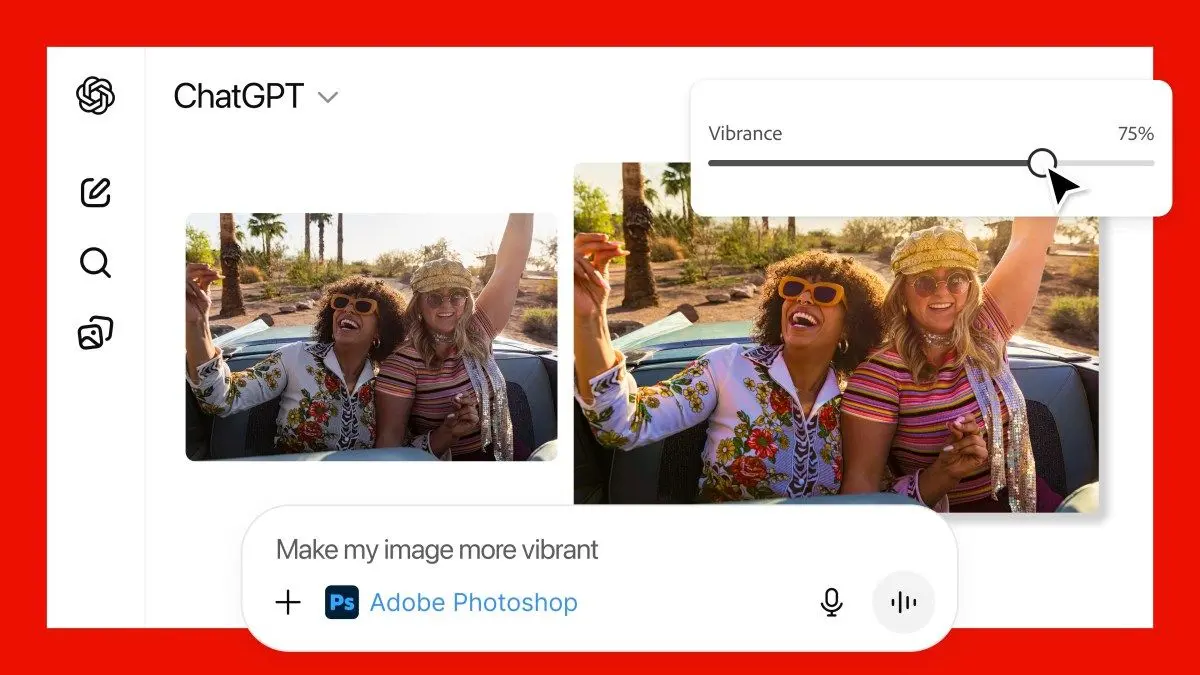
.The integration addresses a persistent challenge in AI image editing by providing hands-on controls that chatbot-generated images typically lack. Users can now tell ChatGPT to use Adobe Photoshop to edit specific parts of images, remove or blur backgrounds, adjust exposure, brightness and contrast, or apply various effects
1
. What sets this apart from standard ChatGPT image generation is the inclusion of manual slider controls that appear in the interface, allowing users to fine-tune adjustments with precision2
.
Source: TechCrunch
How Adobe Apps in ChatGPT Work with Conversational Prompts
Activating the Adobe apps in ChatGPT is straightforward. Users simply type the name of the app alongside their request, such as "Adobe Photoshop, help me blur the background of this image"
4
. Once activated, follow-up prompts automatically default to the selected Adobe tool without needing to specify the app name again5
.The free image editing capabilities extend beyond basic adjustments. In demonstrations, Adobe showed how user prompts like "convert the image to BW" instantly produced black-and-white versions with customizable slider widgets for adjusting exposure, dark values, and white values
3
. Users can also request effects like glitch or glow, with the AI providing multiple options that can be customized within the chatbot interface3
.Adobe Express and Acrobat Expand ChatGPT's Creative Capabilities
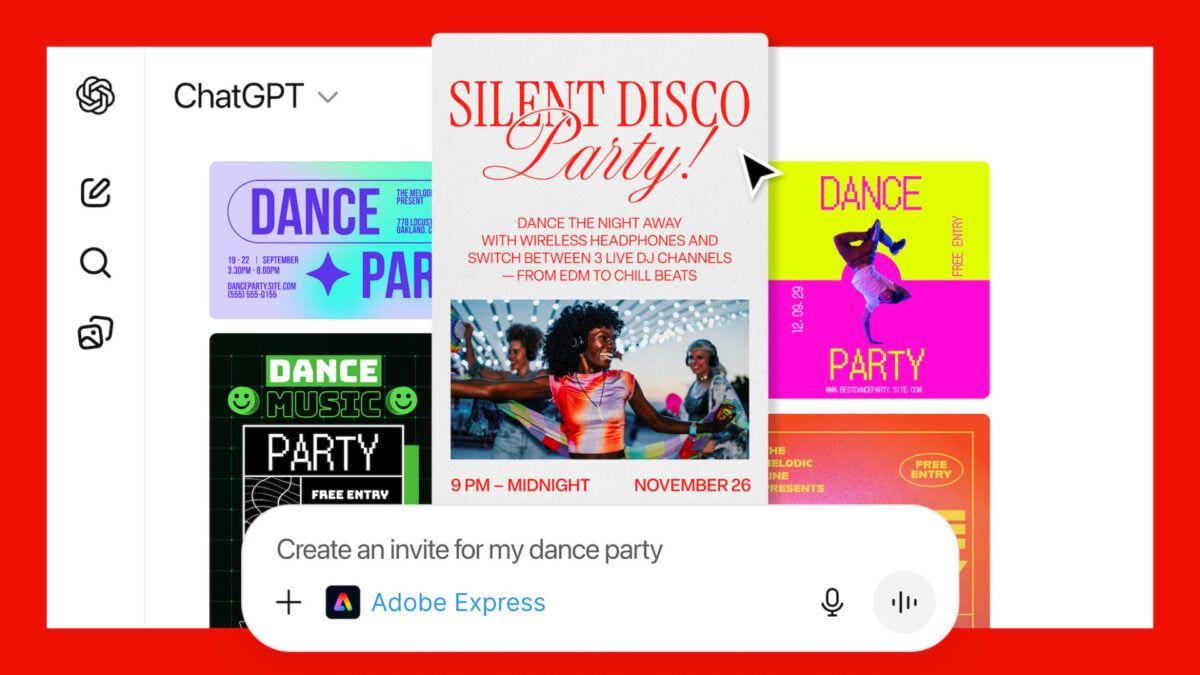
Adobe Express, the company's competitor to Canva, enables ChatGPT users to generate and edit designs including flyers, invitations, posters, and social media graphics
4
. Users can fetch existing designs from the library, create themed creatives, animate elements, and modify text, images, and colors without leaving ChatGPT1
. This integration may provide advantages over existing app integrations like Canva, which at launch required more manual editing for accurate results3
.
Source: Gizmodo
For PDF manipulation, Acrobat's capabilities in ChatGPT include merging files, editing or extracting text and tables, compressing and converting documents into PDF format, and even redacting sensitive materials
3
4
. Adobe notes that Acrobat can preserve PDF formatting while editing or maneuvering documents2
.Related Stories

Non-Destructive Editing and Seamless Transition to Native Apps
The editing in ChatGPT follows non-destructive editing conventions used in Adobe Photoshop, meaning users can click an "Open in Photoshop" button to transfer their work to Photoshop on the web with edits preserved as editable layers
3
. This seamless transition allows users to start projects in ChatGPT and move to Adobe's native apps for more granular control when needed4
.When using Adobe apps in ChatGPT, Adobe's software ultimately runs the editing operations while ChatGPT serves as the interface or platform to access them
2
. This means ChatGPT isn't regenerating photos but editing them as users would in Photoshop, providing more predictable and controlled results.Availability and Strategic Implications for Generative AI Competition
The Adobe apps in ChatGPT are available globally across desktop, web, and iOS platforms starting today
3
. Adobe Express is currently supported on ChatGPT for Android, with support for Adobe Photoshop and Acrobat coming soon to the platform1
. There are no limits on usage inside ChatGPT, and users don't need to log in to Adobe3
.This integration represents the latest step in Adobe's rollout of agentic AI solutions that make Creative Cloud apps more conversational, removing skill barriers traditionally required for photo editing and design
4
. The move could help both Adobe and OpenAI fend off competition from Google Gemini, which introduced its own image editing capabilities in May4
.OpenAI first launched app integrations in ChatGPT in October with partners including Canva, Spotify, Expedia, and Figma
1
. As more companies integrate their apps within the chatbot, the challenge becomes getting users to choose their app over competitors—for instance, both Canva and Adobe Photoshop now offer image editing within ChatGPT1
.Adobe has heavily focused on generative AI throughout the year, recently releasing AI assistants for Adobe Express and Photoshop, teasing a cross-app assistant called Project Moonlight, and unveiling the Firefly Image Model 5 at Adobe Max
2
. Whether OpenAI and Adobe have a revenue-sharing arrangement remains unclear1
.References
Summarized by

Navi
Related Stories
OpenAI's Vision: Transforming ChatGPT into an AI-Powered Operating System
07 Oct 2025•Technology
OpenAI's GPT-4o Image Generator: A Leap Forward in AI-Powered Visual Creation
27 Mar 2025•Technology
OpenAI Unveils GPT-5: A Game-Changing AI Model with Enhanced Capabilities and Reduced Hallucinations
08 Aug 2025•Technology

Recent Highlights
1
Google Maps unveils Ask Maps with Gemini AI and 3D Immersive Navigation in biggest update
Technology
2
Three Tennessee teens sue xAI over Grok AI creating child sexual abuse material from real photos
Policy and Regulation

3
Meta plans to cut 20% of workforce as AI spending reaches $600 billion, mirroring broader tech trend
Business and Economy
Recent Highlights
Today's Top Stories




Your Daily Dose of Curated AI News
Don’t drown in AI news. We cut through the noise - filtering, ranking and summarizing the most important AI news, breakthroughs and research daily. Spend less time searching for the latest in AI and get straight to action.

