Adobe Premiere Pro gets AI tools that track objects 20x faster and streamline editing workflow


6 Sources
6 Sources
[1]
Adobe unveils new AI-powered video editing tools for Premiere
Adobe has announced updates for Premiere and After Effects, including new AI-powered tools that are meant to speed up your video editing tasks. In Premiere, the company's video-editing software, it has unveiled a new AI-powered Object Mask feature that lets you easily pick and track persons or objects moving through your video clips. You simply have to hover over that object and click to generate a mask overlay in seconds. While the mask is supposed to be accurate from the start, you can adjust and resize it as needed. Adobe says the feature uses its own AI model for the feature and that the processing happens on-device. It also says that it doesn't use your activities and data to train its models. The company has also given its Shape Mask tool an upgrade. You can generate its redesigned Ellipse, Rectangle and Pen masks directly from the toolbar. Further, it updated their controls to make moving or adjusting the masks more precise. The masks can now also track objects on your video clips 20 times faster than their predecessors, which means you won't have to keep such a close eye on the status bar. Another new Premiere update lets you easily bring media from from Firefly Boards, Adobe's AI-powered digital canvas, into the program. In addition, Adobe Stock is now fully integrated within Premiere. For After Effects, Adobe has rolled out an update that lets you import SVG files that are commonly used in Illustrator. You can now also build graphics and photorealistic objects inside images with 3D parametric meshes, consisting of cubes, spheres, cylinders, cones, toris and planes, within the visual effects software.
[2]
Adobe adds AI-powered Object Mask to Premiere Pro, plus more
After Effects receives new features including SVG file import and parametric 3D mesh objects, with all AI processing handled locally for user privacy. Adobe has unveiled several new AI-powered features for its Premiere Pro and After Effects video editing and effects software, Engadget reports. Premiere Pro introduces a new AI-powered Object Mask tool that makes it possible to quickly select and track people or objects in moving footage. By holding the mouse pointer over an object and then clicking, a mask is automatically created in a few seconds, which can then be adjusted manually if necessary. Adobe says all processing takes place locally on the user's computer and that the material is not used to train the company's AI models. At the same time, Premiere Pro's existing mask tool just got a performance boost and can now track objects up to 20 times faster than before. Workflows will also be simplified through better support from Adobe's AI-based Firefly Boards, while Adobe Stock is now fully integrated into Premiere Pro. After Effects is also being updated with new features that enhance graphics and 3D work, including support for importing SVG files and new parametric 3D mesh objects.
[3]
Adobe Premiere introduces new AI tools to streamline your editing workflow
Creating masks of complex moving objects is now a whole lot easier. After adding a dedicated space for YouTube Shorts creation in the Premiere app for iOS last year, Adobe has now announced major updates for Premiere and After Effects on desktop, with new AI-powered tools designed to speed up video editing. According to Adobe, the latest update for its video editor introduces an Object Mask feature that leverages AI to help users easily create masks of complex moving subjects. With this tool, users can simply hover over a subject and click to generate a mask, instead of manually drawing around it with the pen or shape tools. After making a general selection using the new tool, users can "add or subtract areas from the Object Mask using fast lasso and rectangular editing tools and easily adjust the mask with feathering and resizing controls." Essentially, the Object Mask feature takes the grunt work out of creating masks while still giving users the flexibility to fine-tune the result. AI-powered masking runs locally in Premiere Adobe says that this tool uses a new assistive AI model developed in house that runs entirely on-device. This means users can generate masks without sending footage to the cloud, which should result in faster performance while keeping projects private. The company adds that it does not use customer data to train the model, reinforcing its focus on privacy. Recommended Videos The update also improves the Shape Mask tool, letting users generate redesigned Ellipse, Rectangle, and Pen masks directly from the toolbar. It even refines mask controls, allowing for more precise movement and adjustments. Adobe claims the updated masks can now track objects in video clips 20 times faster. Furthermore, the update makes it easier for users to import media from Firefly Boards, Adobe's AI-powered digital canvas, and integrates Adobe Stock within Premiere, streamlining access to licensed assets. The After Effects update adds support for importing SVG files and introduces 3D parametric meshes, allowing users to build graphics and photorealistic objects using customizable shapes like cubes, spheres, cylinders, cones, toris, and planes. The new Premiere and After Effects updates are already rolling out, and users can install them via the Creative Cloud app.
[4]
Adobe launches AI-powered Object Mask for Premiere Pro
Adobe introduced new AI-powered tools for Premiere and After Effects, intended to accelerate video editing workflows. Premiere received a new AI-powered Object Mask feature, allowing users to select and track individuals or objects in video clips by hovering and clicking to generate a mask overlay. Adobe stated this feature utilizes its proprietary on-device AI model, with processing occurring locally without user activity or data contributing to model training. Users can adjust and resize the initial mask. Premiere's Shape Mask tool was also upgraded, enabling the generation of redesigned Ellipse, Rectangle, and Pen masks directly from the toolbar. Their controls were updated for precise mask movement and adjustment. These masks now track objects 20 times faster than previous versions. Additionally, Premiere now facilitates importing media from Firefly Boards, Adobe's AI-powered digital canvas, and integrates Adobe Stock fully. After Effects received an update allowing the importation of SVG files, commonly used in Illustrator. The software also introduced the capability to construct graphics and photorealistic objects within images using 3D parametric meshes, which include cubes, spheres, cylinders, cones, tori, and planes.
[5]

Adobe Brings New Capabilities to Premiere Pro and After Effects
Firefly Boards have also been integrated with Premiere and After Effects Adobe announced new product integration and capabilities ahead of the Sundance Film Festival. The San Jose, California-based software giant announced that its Premiere Pro is being integrated with the Firefly platform, bringing access to a large number of artificial intelligence (AI) models and capabilities to the video editing platform. Additionally, both Premiere and After Effects are getting new tools and features to help professionals create and edit videos with ease and more precision. Specifically, After Effects is getting new tools focused on 3D effects and animation creation. Adobe Brings New Capabilities to Premiere Pro and After Effects In a press release, the software giant announced innovations to make the post-production workflow easier and more seamless for creators and video editors. These capabilities will be rolled out to Adobe Premiere Pro, After Effects, and Firefly Boards this week with the 26.0 update. Timing the announcement with the Sundance Film Festival, set to kick off on January 22, Adobe cited the annual Sundance Institute survey, claiming that 85 percent of entrants this year used its Creative Cloud applications to create and edit their videos. "We're thrilled to see so many filmmakers creating their stories with Adobe's industry-leading tools," said Deepa Subramaniam, vice president of product marketing, creative professionals, Adobe. "The creative community inspires everything we do, and we're committed to advancing AI video tools with new innovations and investments for the next generation of storytellers." The biggest update comes to Premiere Pro, which can now connect with the Adobe Firefly app to access AI models from Adobe, Google, OpenAI, Runway, and more. Those working on the platform will be able to access both AI models and the tools for design, imaging, video, audio, and motion creation, without switching between the two apps. The company claims that this capability will make the post-production workflow more seamless for professionals. Coming to the non-AI innovations being added to Adobe Premiere and After Effects, the company is making the Object Selection and Mask tools more intuitive, making tracking complex subjects faster and simpler. Redesigned Ellipse, Rectangle, and Pen masks are also being added to offer more creative control to users. Adobe is also integrating Firefly Boards with the two platforms to allow professionals switch seamlessly between ideation and visual planning to direct execution, as assets can be shared. Notably, Firefly Board is an AI-powered platform which offers collaborative creation planning. Additionally, new Adobe Stock integration within Premiere Pro will let professionals browse, preview, and import more than 52 million clips directly within the platform. Coming to After Effects' exclusive features, Adobe is upgrading the 3D Parametric Meshes with new spot and parallel shadows. More than 1,300 free substance 3D materials are also being added that can be applied to meshes to create realistic motion graphics. Text Animator is also being improved with support for keyframes, expressions, and flexible controls for titles and templates. Finally, a new tool will let users import Scalable Vector Graphics (SVG) as native shape layers, allowing professionals to preserve editable gradients and transparency.
[6]

Adobe Premiere's Latest Update Uses AI to Improve Masking Features
Adobe Premiere Update Brings AI-Powered Masking for Faster, Cleaner Edits Adobe has officially launched Adobe Premiere version 26.0, incorporating AI-based tools that will remove one of the toughest tasks in video editing: manual rotoscoping. Released on January 20, 2026, shortly before the Sundance Film Festival, Adobe Premiere's new update prioritizes both speed and accuracy. The standout feature is the AI object mask that comes with a supportive artificial intelligence model for subject detection. The update greatly simplifies complex workflows by helping editors isolate moving subjects with just a single click. Using on-device processing, the software delivers faster performance while maintaining strict user data privacy standards.
Share
Share
Copy Link
Adobe rolled out major updates for Premiere Pro and After Effects, introducing AI-powered video editing tools designed to accelerate post-production workflows. The flagship Object Mask feature uses on-device AI to automatically track moving subjects, while enhanced Shape Mask tools now perform 20 times faster. The updates also integrate Adobe Firefly Boards and provide direct access to AI models from Google, OpenAI, and Runway.
Adobe Premiere Pro Introduces AI-Powered Object Mask for Faster Video Editing
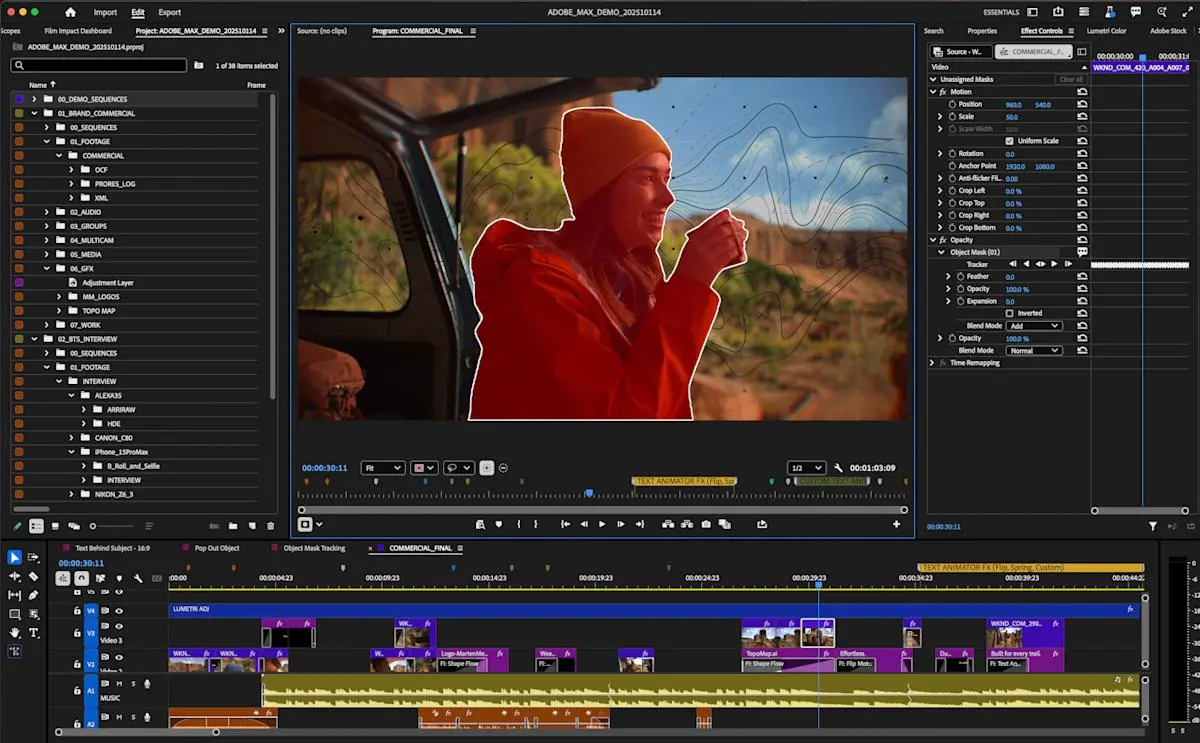
Adobe has announced significant updates for Adobe Premiere Pro and After Effects, unveiling AI-powered video editing tools designed to accelerate workflows for creative professionals. The centerpiece of these new capabilities for Premiere Pro is an Object Mask feature that leverages AI tools to simplify the complex task of selecting and tracking moving subjects in video footage
1
. Users can now hover over any person or object in their video clips and click to generate a mask overlay in seconds, eliminating the tedious manual work of drawing around subjects with pen or shape tools3
. After making the initial selection, editors retain full creative control through fast lasso and rectangular editing tools, along with feathering and resizing controls to fine-tune the result3
.
Source: Engadget
On-Device AI Model Prioritizes User Privacy and Local Processing
Adobe emphasized that the Object Mask feature runs on an on-device AI model developed in-house, with all processing occurring locally on the user's computer
1
. This approach to local processing means users can generate masks without sending footage to the cloud, resulting in faster performance while maintaining project privacy3
. The company reinforced its commitment to user privacy by stating it does not use customer activities and data to train its AI models2
. This stance addresses growing concerns among creative professionals about how their work might be used in AI training datasets.Shape Mask Tool Delivers 20x Performance Boost for Object Selection and Tracking
Beyond the new Object Mask capability, Adobe upgraded its existing Shape Mask tool with substantial performance improvements. The redesigned Ellipse, Rectangle, and Pen masks can now be generated directly from the toolbar with refined controls for more precise movement and adjustments
1
. Most notably, these updated masks can now track objects in video clips 20 times faster than their predecessors4
, dramatically reducing wait times and allowing editors to streamline editing workflow without constantly monitoring progress bars1
.
Source: Digital Trends
Related Stories

Adobe Firefly Boards Integration Connects Ideation to Execution
The updates also strengthen Adobe Firefly Boards integration with Premiere Pro, enabling seamless transitions between creative planning and direct execution
5
. Adobe Firefly, the company's AI-powered digital canvas platform, now allows professionals to easily import media from Firefly Boards directly into Premiere1
. More significantly, Premiere Pro can now connect with the Adobe Firefly app to access AI models from multiple providers including Google, OpenAI, Runway, and Adobe itself5
. This integration gives editors access to tools for design, imaging, video, audio, and motion graphics creation without switching between applications, making the post-production workflow more seamless5
.
Source: Gadgets 360
Adobe Stock Integration and Updates for After Effects
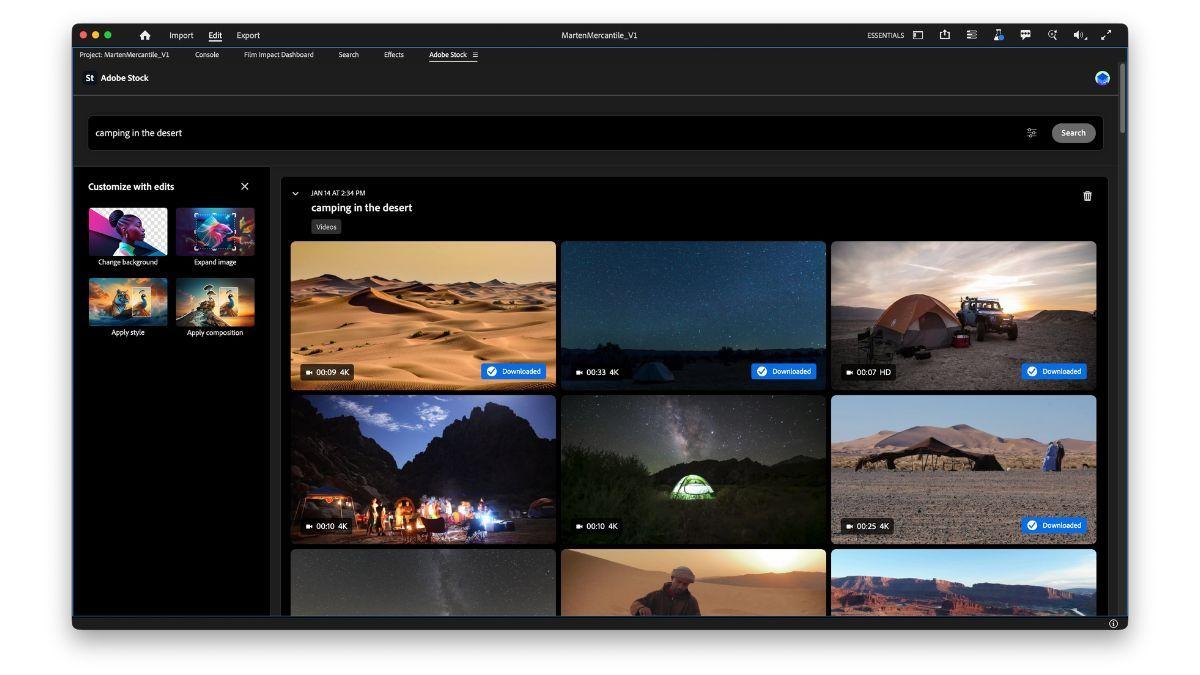
Adobe Stock is now fully integrated within Premiere Pro, allowing professionals to browse, preview, and import from more than 52 million clips directly within the platform
5
. The updates for After Effects focus on enhancing 3D capabilities and graphics work. The visual effects software now supports SVG file import, commonly used in Illustrator, enabling users to import Scalable Vector Graphics (SVG) as native shape layers while preserving editable gradients and transparency5
. After Effects also introduces 3D parametric meshes consisting of cubes, spheres, cylinders, cones, toris, and planes for building graphics and photorealistic objects1
. Adobe is upgrading these meshes with new spot and parallel shadows, plus access to more than 1,300 free Substance 3D materials that can be applied to create realistic motion graphics5
. These new capabilities for Premiere Pro and After Effects are rolling out this week with the 26.0 update via the Creative Cloud app3
. Timed with the Sundance Film Festival, Adobe cited the annual Sundance Institute survey showing that 85 percent of this year's entrants used Creative Cloud applications5
. "We're thrilled to see so many filmmakers creating their stories with Adobe's industry-leading tools," said Deepa Subramaniam, vice president of product marketing at Adobe5
.References
Summarized by

Navi
[4]
Related Stories
Adobe Introduces AI-Powered Search and Caption Translation in Premiere Pro Beta
23 Jan 2025•Technology

Adobe Premiere Pro Unveils AI-Powered Video Editing Tools, Including 4K Generative Extend
02 Apr 2025•Technology

Adobe Premiere Pro's New Features Revolutionize Color Grading and Video Editing
10 Sept 2024

Recent Highlights
1
AI chatbots validate you too much, making you less kind to others, Stanford study reveals
Science and Research

2
Anthropic's Claude Code Source Leak Reveals Hidden AI Agent Plans and Extensive System Access
Technology

3
Judge blocks Pentagon from branding Anthropic a security risk over AI safety guardrails dispute
Policy and Regulation

Recent Highlights
Today's Top Stories









Your Daily Dose of Curated AI News
Don’t drown in AI news. We cut through the noise - filtering, ranking and summarizing the most important AI news, breakthroughs and research daily. Spend less time searching for the latest in AI and get straight to action.

