OpenAI launches Your Year with ChatGPT, a Spotify Wrapped-style recap for AI chatbot users


11 Sources
11 Sources
[1]
ChatGPT Gets Spotify Wrapped-Style Year-End Review
Imad is a senior reporter covering Google and internet culture. Hailing from Texas, Imad started his journalism career in 2013 and has amassed bylines with The New York Times, The Washington Post, ESPN, Tom's Guide and Wired, among others. 'Tis the season for year-end recaps from the online services you frequent. The latest entry: Your Year with ChatGPT, a look back at your interactions with the AI chatbot, in the spirit of Spotify Wrapped. Available now in the US, UK, Canada, Australia and New Zealand for all users across the web and mobile devices, it looks at your queries to pull together the biggest themes and curiosities in a pastel-colored package. Your Year with ChatGPT also gives awards with certain attributes and ranks them in various archetypes against other ChatGPT users. For example, I got an inventor award and recognition as a "navigator" archetype, which accounts for 22.9% of users. That makes sense, given how much time I spent investigating how ChatGPT functions, both as a thing itself and in comparison with other chatbots like Claude and Gemini. I do some serious stress-testing of these AI tools. The year-end review also generated an AI image of all my interests. To get a Your Year with ChatGPT, you have to have "reference saved memories" and "reference chat history" turned on. You also needed to use ChatGPT a minimum number of times to trigger the feature. Your Year with ChatGPT isn't available for Team, Enterprise or Education accounts. ChatGPT maker OpenAI is following in the well-trod footsteps of year-end reviews from other tech companies. Spotify Wrapped is the buzziest, with users eager to sharing their results on social media. It's prompted some creators to film their own parody wrapped videos showcasing their dismal dating lives. YouTube too latched onto the trend with Recap, showcasing the creators that users watched most throughout the year and where they landed against all viewers. Other end-of-year rewinds include Google Search, Google Photos, Apple Music, PlayStation and Steam. (Disclosure: Ziff Davis, CNET's parent company, in April filed a lawsuit against OpenAI, alleging it infringed Ziff Davis copyrights in training and operating its AI systems.)
[2]
ChatGPT launches its version of Spotify Wrapped - how to get your year-end review
You can only reference saved memories and chat history if you are signed up. With less than two weeks left in the year, OpenAI is launching a new recap experience called Your Year with ChatGPT, which provides insight into your interactions with the chatbot over the past year. The Spotify Wrapped-like experience, launched on Monday, presents users with high-level themes of their ChatGPT interactions, as shown in the image at the top of the article. OpenAI said the experience was "designed to be lightweight, privacy-forward, and user-controlled." It is available to all users, including those with free accounts. All users need to do is open ChatGPT on iOS, Android, or the web to have the experience automatically triggered. If it doesn't appear, users can trigger the experience themselves by asking ChatGPT for "Your Year with ChatGPT." (Disclosure: Ziff Davis, ZDNET's parent company, filed an April 2025 lawsuit against OpenAI, alleging it infringed Ziff Davis copyrights in training and operating its AI systems.) Also: How well does ChatGPT know you? These simple prompts can reveal a lot There is a caveat. For the experience to work, you need to have had Reference saved memories and Reference chat history enabled. If you, like me, have these features disabled due to privacy concerns, you will receive an error message stating that you need to enable these features to access the recap, as it requires the ability to reference your past conversations. If you used Temporary Chat, that content will also not be included within the recap experience. You can still turn Memory on and access your own personalized recap, but this may take some time to fully appear, as it needs content to reference. If you don't see it and have it turned on, it could be because the feature is still being rolled out to you, you haven't reached the minimum activity threshold, you are using a Team Enterprise or Education account, or you live in an unsupported country, OpenAI said. Beyond this experience, there are other ways you can learn about what ChatGPT knows about you. For example, people have been using simple prompts to get ChatGPT to provide them with an analysis of their character, chatting patterns, growth, and more. The more you talk with the chatbot, the more insightful the analysis will be, as it has more data on you.
[3]
Even ChatGPT Has a Year-End Recap Now: Here's Everything It Tells You
Spotify Wrapped-style year-end recaps are no longer limited to just music streaming. The trend has moved on to professional-networking site LinkedIn, ride-hailing and food delivery app Uber, and now ChatGPT. OpenAI rolled out a new "Your Year with ChatGPT" recap to summarize how you interacted with the chatbot. It provides themes that describe your personality, insights on the number of messages you have sent, how many images you generated, how high you rank among top users, your chattiest day, and more. The experience opens with a short, poetic summary of the topics you seemed most interested in. That is followed by a statistical slide and then an archetype. The latter is a combination of an avatar and a title meant to describe the kind of person you are, based on your chats. Next comes a set of adjectives that the chatbot thinks suit your personality the best. Finally, it delivers an AI-generated image summing up your 2025, followed by a one-line, positive forecast for your 2026. Tap the screen once to clear the fog and read the message. There's also a prompt box at the bottom, where you can ask more questions about your year with ChatGPT. You can also seek suggestions to improve your use of the chatbot. At launch, OpenAI says the experience is rolling out in English to users in the United States, United Kingdom, Canada, Australia, and New Zealand. I am in India and I could still find the recap, so it may be rolling out to more regions. It's available for Free, Plus, and Pro users who have their Memory and Reference Chat History features enabled. Unfortunately, it won't be available for those on Business, Enterprise, or Edu plans. You need to meet a minimum activity threshold to get the year-end recap. If otherwise, you'll only see basic chat stats. For eligible users, the recap will appear on the homepage itself. You can go through the slides once, and then access them again from the left-hand sidebar. Disclosure: Ziff Davis, PCMag's parent company, filed a lawsuit against OpenAI in April 2025, alleging it infringed Ziff Davis copyrights in training and operating its AI systems.
[4]
OpenAI's "Your Year with ChatGPT" recap is rolling out now
Ever since end-of-year recap season began this year, one thing I've seen consistently across all social media platforms is people asking for a ChatGPT Wrapped. Given that practically every service the average person uses ended up launching a year-in-review, it only makes sense that people would want a recap for the one AI that's been part of nearly every conversation this year. While many have attempted to make their own using specific prompts, OpenAI has officially stepped in and announced its first-ever Spotify Wrapped-style review: Your Year with ChatGPT. OpenAI launches its first year-in-review for ChatGPT As noted in ChatGPT's release notes, OpenAI is rolling out its personalized end-of-year recap: Your Year with ChatGPT. The experience is designed to help users reflect on how they interacted with ChatGPT throughout the year and will highlight high-level themes from your conversations. The review will also include statistics about your ChatGPT usage throughout the year. Like other end-of-year recaps we've seen this year, ChatGPT's take adds a quirky and creative spin. It includes a "Your Year in Poetry" page, which generates a short poem based on your interests and conversation history. Another way OpenAI is personalizing the recap is by giving out "awards" based on your ChatGPT usage. To be able to view Your Year with ChatGPT, you will need to have both Memory and Reference Chat History features turned on. You'll also need to meet a minimum activity threshold, which OpenAI doesn't seem to have publicly disclosed. OpenAI explains that if you don't meet this threshold and have limited activity, you'll only be able to see "basic chat statistics." This experience is currently only available in English in the United States, United Kingdom, Canada, Australia, and New Zealand. TechCrunch explains that while you'll be able to find the recap within the ChatGPT app, "it won't be forced on users or opened automatically." You can also access it by tapping the plus (+) sign when you're in a ChatGPT thread and then asking ChatGPT to "show me my year with ChatGPT." The Your Year with ChatGPT recap is rolling out gradually throughout the day and will be available to Free, Plus, and Pro users on both the mobile and web experience. If you're on a Business, Enterprise, or Edu plan, you unfortunately will not have access to this feature.
[5]

OpenAI is rolling out a Spotify Wrapped-style recap for ChatGPT users
Karandeep Singh Oberoi is a Durham College Journalism and Mass Media graduate who joined the Android Police team in April 2024, after serving as a full-time News Writer at Canadian publication MobileSyrup. Prior to joining Android Police, Oberoi worked on feature stories, reviews, evergreen articles, and focused on 'how-to' resources. Additionally, he informed readers about the latest deals and discounts with quick hit pieces and buyer's guides for all occasions. Oberoi lives in Toronto, Canada. When not working on a new story, he likes to hit the gym, play soccer (although he keeps calling it football for some reason🤔) and try out new restaurants in the Greater Toronto Area. The year-end recap trend has finally reached the one place that it previously hadn't -- the world of generative AI. The tool that took the world by storm late in 2022, OpenAI's ChatGPT, has released a yearly recap that not only explores the chats and ideas that shaped your year, but also quantifies your total chats, messages sent, images generated, and more. Related What is ChatGPT? Learn what ChatGPT is, how it works, what you can do with it, and how much it costs to use OpenAI's most advanced AI chatbot Posts By Alan Truly The AI giant announced the recap rollout on X (via TechCrunch), encouraging users in the US, UK, Canada, New Zealand, and Australia to check out their ChatGPT habits from last year. My yearly recap is visible on the web and on the ChatGPT mobile app. If available for you, the ChatGPT interface will highlight a "Your Year with ChatGPT" banner right at the bottom. Tap on the banner (mobile) or the accompanying 'Try it' button to trigger the recap. Although I don't use ChatGPT much, the recap did tell me that I was one of the first 0.1 percent of users to try out the AI chatbot in its early days. The recap also told me the number of em dashes ChatGPT and I have exchanged, my chattiest day this year, and more! Not available to every ChatGPT user The app also generates a custom poem to describe your year, complete with your 'chat style,' an award, an archetype, and a unique image summarizing your year. Subscribe to our newsletter for more ChatGPT-year insights Curious for deeper analysis? Subscribe to the newsletter for clear, expert coverage of generative AI features -- from yearly recaps to settings and user implications -- concise explanations and context that make these developments easier to follow. Subscribe Subscribe to our newsletter for more ChatGPT-year insights Curious for deeper analysis? Subscribe to the newsletter for clear, expert coverage of generative AI features -- from yearly recaps to settings and user implications -- concise explanations and context that make these developments easier to follow. Subscribe By subscribing, you agree to receive newsletter and marketing emails, and accept Valnet's Terms of Use and Privacy Policy. You can unsubscribe anytime. Some things to note: Only available to users that have reference saved memory and reference chat history turned on. Only available to users in the US, UK, Canada, New Zealand, and Australia. Available on the latest app version. Not available for Team, Enterprise, or Education accounts. If you're eligible to receive a yearly recap but don't see the banner, try asking ChatGPT for "Your Year with ChatGPT." If that doesn't help either, try later in the day.
[6]

ChatGPT now offers a year-in-review -- 7 prompts to turn it into a 'Wrapped'
With a few smart prompts, you can turn it into a deeply personal, surprisingly revealing ChatGPT Wrapped With so many apps offering some kind of year-end review, it only makes sense for OpenAI to drop one, too. Today, ChatGPT quietly rolled out a built-in year-end recap called Your Year with ChatGPT. If you've used ChatGPT regularly and have had your memory enabled all year, you may have already seen it. The recap is a curated snapshot of how you interacted with ChatGPT over the past year. It highlights broad themes, usage patterns and moments meant to reflect how the AI supported your work, creativity or daily life. It's essentially ChatGPT's version of a highlight reel or Spotify's Wrapped. Although interesting and genuinely well done -- mine started off with a poem -- it's also limited. You can't customize categories or separate work from personal life, and you don't see how your prompting has evolved. So after reading my recap, I did what any curious power user would do: I asked ChatGPT to go deeper. With the right prompts, that high-level recap turns into something much closer to a true ChatGPT Wrapped -- complete with stats, habits, highlights, chaos and even goals for next year. Here's how to do it: Start with this prompt to set the tone and pull everything together. Prompt: Analyze my queries from this year and create a fun 'ChatGPT Wrapped' summary. Include categories like my top topics, most-used prompt style, funniest question, most chaotic question, most productive session, and any surprising habits you find. Format it like a Spotify Wrapped slide deck. This expands the official recap into something far more personal. Instead of generic themes, you get insight into how you actually used ChatGPT -- and what that says about you. I love seeing some of my favorite prompts. In one slide, ChatGPT showed me a few of the funniest ones. If the first prompt gives you vibes, this one gives you data. Prompt: Look at my overall conversation patterns this year and categorize my prompts into buckets (ex: productivity, AI testing, personal life, journalism, parenting, creative writing, budgeting, etc.). Rank them by frequency and give me percentages. This is where things get eye-opening. Many people assume ChatGPT is mostly a work tool -- until they see how often it shows up in their personal life, late-night brainstorming or stress spirals (guilty!). It was really interesting to see how I use ChatGPT broken up into percentages. One of the most overlooked parts of using AI is that you get better at it. Prompt: Compare the way I prompted ChatGPT at the beginning of the year vs. now. What patterns, skills, or sophistication changed? Highlight what I'm better at, what became more efficient, and what new behaviors emerged. ChatGPT can identify changes in clarity, structure, confidence and efficiency -- essentially mapping your AI learning curve over the year. This is a great way to see how you've improved your prompts over the year. This is where the recap gets entertaining. Prompt: Based on my interactions, list 10 standout moments: smartest, funniest, most unhinged, most emotional, most technical, most mom-life, most Tom's Guide-worthy, biggest win, biggest surprise, and one moment that deserves its own award. If ChatGPT was there for big wins, bad days or your toughest questions you'd never Google, this prompt captures all of it in one scrollable list. This prompt scratches the same itch as screen-time summaries or fitness recaps. Prompt: Create a stats page with things like: total estimated prompts, longest streak, busiest day/time of year, my signature prompt style, topics I revisited, and the weirdest rabbit hole I went down. Some numbers are estimated, but the patterns are accurate enough to feel strangely validating -- and sometimes humbling. This prompt goes beyond stats and summaries. Prompt: Write a narrative summary of my year using ChatGPT -- almost like a memoir chapter. Highlight themes, recurring challenges I brought up, projects I completed, and the overall arc of my AI usage. Instead of isolated moments, you get a narrative. Stress, creativity, productivity, curiosity -- it all gets woven into a story the official recap doesn't attempt to tell. Finally, use everything you've learned to look forward. Prompt: Analyze my behaviors and suggest creative, productivity, wellness, writing, and AI-related goals for next year. Make them actionable, realistic, and tailored to the patterns you see. Because these goals are based on how you actually used ChatGPT, they're far more realistic than generic New Year's resolutions. ChatGPT's Year in Review is pretty good, but if you want to make it even better and more personal, these prompts help explain how you think, why you use AI the way you do and what changed over the year. If ChatGPT played any role in your work, creativity or personal life in 2025, this is one of the most revealing ways to look back -- and one of the easiest experiments you can try before the year ends.
[7]

ChatGPT recapped your personal AI habits in 2025. Here's how to see yours.
ChatGPT is giving your chatbot conversations the Spotify Wrapped treatment, launching personalised end-of-year recap Your Year with ChatGPT. In the spirit of the holidays, perhaps this is a good opportunity to reflect on your AI use. Launched today, Your Year with ChatGPT is a personalised summary of how you've used the generative AI chatbot throughout the past year. This includes statistics such as the number of messages sent, chats you've had, images generated, and "em-dashes exchanged." Similarly to Spotify Wrapped's clubs, Your Year with ChatGPT also gives out "awards" determined by your behaviour. These vary depending upon what you primarily used ChatGPT for, whether it was to brainstorm business ideas, generate images, or for any other purpose. Some users are already sharing their superlatives such as "Most Likely to Automate His Entire Personality" and "Most Likely to Automate His Own Thought Process." There's a lot to unpack there. Your Year with ChatGPT's wrap up also features an AI-generated poem and comes illustrated by AI-generated images, including a pixel graphic based on your interests. Just as with other end-of-year wrap ups, these graphics are intended to be saved and shared, helping you tell everyone exactly how much you relied on AI in 2025. This Tweet is currently unavailable. It might be loading or has been removed. To see Your Year with ChatGPT, either access ChatGPT in your web browser, or open the ChatGPT app on Android or iOS (first ensuring that it's up to date). From there, you should see Your Year with ChatGPT prominently promoted on the home page, which you can select to see your summary. OpenAI states that you can also just ask ChatGPT to "show me my year with ChatGPT" in the same way you would make any other request of the AI chatbot. Of course, Year with ChatGPT does require you to have used the chatbot enough that there is actually data to collate. Users must also have "reference saved memory" and "reference chat history" turned on in their ChatGPT settings. Your Year with ChatGPT is available to free users as well as those with a Plus or Pro subscription, though not everywhere. The feature is only being rolled out to users in the US, U.K., Canada, Australia, and New Zealand. OpenAI states that it will be rolling out Your Year with ChatGPT throughout the day, so if you don't see yours yet you may simply need to check back later.
[8]

ChatGPT's year-end recap offers a snapshot of how you used it in 2025
You'll also get a personalized poem and pixel-style artwork based on your chats. ChatGPT is joining the likes of YouTube, Apple Music, Google Photos, and Spotify by rolling out a personalized year-end summary that looks back at how users spent their time with the chatbot in 2025. The new feature, called "Your Year with ChatGPT," lets users revisit the chats and ideas that shaped their year. OpenAI announced the feature in a recent post on X, revealing that it's rolling out to users in the US, UK, Canada, New Zealand, and Australia "who have reference saved memory and reference chat history turned on." Once it's live, users in these regions will see a "Your Year with ChatGPT" banner in the chat interface, and tapping on it will open the summary. Alternatively, users can tap the + button and use the prompt "show me my year with ChatGPT" to access the year-end summary. The recap will include an overview of themes discussed over the year, alongside chat stats like busiest chat day, total conversations, number of messages sent, etc. Beyond stats and chat history ChatGPT's year-end summary will also highlight a chat style based on the user's writing or speaking habits and offer an "archetype" based on how they used the chatbot. Furthermore, it will include an AI-generated poem, a personalized pixel-style artwork inspired by user activity, an award tied to usage patterns, and predictions hinting at how users might use ChatGPT in 2026. Recommended Videos The feature is available across all ChatGPT tiers, including the free version. While year-end summaries are largely playful, ChatGPT's implementation offers users a snapshot of how they are increasingly weaving the AI into their daily routines. From quick questions to brainstorming sessions to longer work-focused conversations, the summary gives them an easy way to reflect on the role the chatbot played in their everyday lives and workflows over the course of the year.
[9]

ChatGPT rolls out personalised 2025 recap for millions of users
"Your Year with ChatGPT" tracks your total messages, AI-generated images, chattiest day, and even your em-dash usage. Move over, Spotify Wrapped - there's a new end-of-year recap in town, from one of the most popular AI chatbots: ChatGPT. ChatGPT maker OpenAI rolled out "Your Year with ChatGPT", its first-ever year-in-review for users in the United Kingdom, United States, Canada, Australia, and New Zealand. Think of it as a digital diary, but instead of your embarrassing Spotify listening history, it's more your late-night existential ramblings and the questionable life advice you've begged from a chatbot. The feature is available to everyone with free, Plus, or Pro plans - provided you've got "reference saved memories" and "reference chat history" switched on, and you've reached a minimum conversation threshold. Like Spotify Wrapped, ChatGPT's version comes with eye-catching graphics and personalised awards based on how you've used the bot this year. It kicks off with a poem designed to capture the "vibe" of your year. The recap then serves up stats like total messages sent, images generated, your chattiest day, and how many em-dashes you and the chatbot exchanged. Some users have already shared theirs online, with many shocked at just how many messages they've sent - and how alarmingly dependent they've become on AI. One user wrote in a Reddit post: "I knew I had a problem with how much I used ChatGPT but did not realise how bad it was until I saw this, I think I need to reflect & work on myself 💀." Thus, while it's quite fun to see all these stats, this might also be the perfect moment for us all to reflect on our AI habits - whether it's our tendency to overuse it, or, at the very least, our eagerness to spill personal details to it - especially in light of last month's news that OpenAI confirmed a data breach. If you're now panicking about how much your ChatGPT knows about you, don't worry. The memory settings are on by default, but you can turn them off. Just head to Settings, Personalisation, and then Manage Memories. Here you can toggle off memory-related features or selectively delete anything you'd rather your chatbot forget.
[10]

ChatGPT Gets Spotify Wrapped-Like End-of-Year Experience
It presents summary stats and quirky awards based on user activity OpenAI announced the Your Year in Review feature for ChatGPT on Tuesday. Inspired by Spotify Wrapped, it is a personalised year-in-review experience for the app, which highlights the recurring themes from the conversations users have had with the artificial intelligence (AI) chatbot throughout the year. The feature is currently limited to select markets and only in the English language, but accessible to all ChatGPT users irrespective of their subscription tiers. Your Year With ChatGPT According to OpenAI, Your Year With ChatGPT is an optional feature that reflects on how users have interacted with the AI chatbot in 2025. The feature is said to present summary statistics about their usage over the course of the year, highlighting high-level themes from conversations. OpenAI's new Your Year With ChatGPT feature It outputs a summary of the themes users explored, their frequently asked queries, and their search patterns. Users are presented with quirky awards on the basis of their activity. The company says using Your Year With ChatGPT requires having reference saved memory and reference chat history features turned on, as it leverages both to collate insights from conversations. They must meet a minimum activity threshold as well. If the activity is very limited, the feature will only present basic chat statistics. Lastly, users need to ensure that they are running the latest version of the ChatGPT app on Android or iOS. The feature will show up automatically in the ChatGPT app as a banner on the home page, as per OpenAI. Alternatively, users can also tap the + icon and select the Your Year with ChatGPT option from the list, which will show a summary of the year. This recap is presented in a card-like format and can be shared with others on social media. Your Year With ChatGPT is available to Free, Plus, and Pro users of the app. OpenAI said that it is rolling out in Australia, Canada, New Zealand, the UK, and the US. However, Gadgets 360 can confirm that it is visible to ChatGPT users in India, too, via the aforementioned methods.
[11]

ChatGPT Unveils a Spotify Wrapped-Style Yearly Recap, with One Key Limitation
ChatGPT Introduces Annual Usage Recap Inspired by Spotify Wrapped, With a Restriction Every year-end digital recap has emerged as a trend among social media networks to help people understand how technology is integrated into their daily lives. Taking this trend further, OpenAI has presented Your Year with ChatGPT, a yearly report that highlights the AI user interaction throughout 2025. The report merges usage statistics with custom insights and creative storytelling. The service does not merely focus on figures but also interprets your conversations as a story and entertains them with exciting awards, drawings, and thoughtful moments. Curious which topics defined your year, or what kind of ChatGPT 'personality' emerged from your countless prompts, questions, and ideas? This sense of discovery is the reason why the recap is so easily shareable and unforgettable.
Share
Share
Copy Link
OpenAI has rolled out its first year-end recap feature called Your Year with ChatGPT, offering users a personalized review of their interactions with the AI chatbot throughout 2024. The Spotify Wrapped-style experience includes conversation themes, usage statistics, user archetypes, AI-generated poetry, and custom images, available now to eligible users in select countries.
OpenAI Introduces Your Year with ChatGPT Recap
OpenAI has officially joined the year-end recap trend with the launch of Your Year with ChatGPT, a personalized year-end review that summarizes user interactions with the AI chatbot throughout 2024
1
. The Spotify Wrapped-style experience rolled out on Monday to users in the United States, United Kingdom, Canada, Australia, and New Zealand, presenting insights into ChatGPT usage in a pastel-colored, shareable format2
. The feature analyzes queries to pull together conversation themes and curiosities, offering a creative spin on how people have engaged with the platform over the past year3
.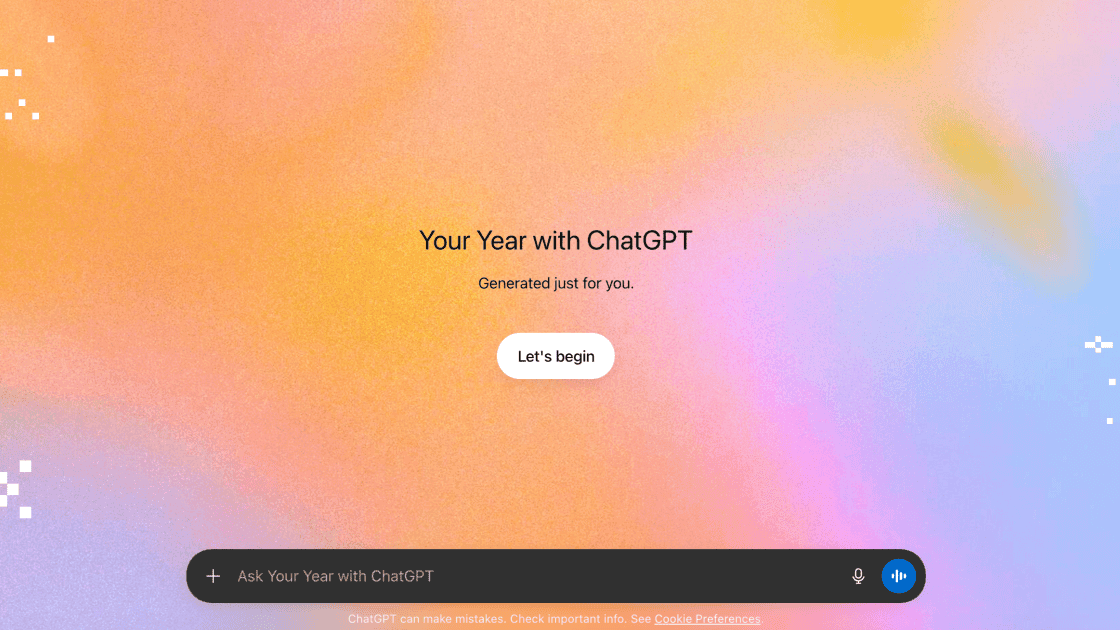
Source: PC Magazine
How the ChatGPT Recap Works
The review of ChatGPT interactions opens with AI-generated poetry that captures the essence of topics users explored most frequently throughout the year
4
. Following the poetic introduction, users receive detailed usage statistics including the total number of messages sent, images generated, their chattiest day, and how they rank among top ChatGPT users3
. OpenAI assigns user archetypes based on conversation patterns—for instance, a "navigator" archetype accounts for 22.9% of users—along with personalized awards that reflect specific attributes and usage patterns1
.The experience also generates an AI-generated image that visually represents all the user's interests from the year, followed by a one-line positive forecast for 2026
3
. Users can tap through the slides once and then access them again from the left-hand sidebar, with a prompt box at the bottom allowing further questions about their ChatGPT year or suggestions to improve usage3
.
Source: ZDNet
Eligibility Requirements and Privacy Considerations
To access Your Year with ChatGPT, users must have both the Memory feature and Reference Chat History enabled in their settings
2
. Users who have disabled these features due to privacy concerns will receive an error message stating they need to enable them to access the recap, as it requires the ability to reference past conversations2
. Content from Temporary Chat sessions will not be included in the recap experience2
.The feature is available to Free, Plus and Pro users who meet a minimum activity threshold, though OpenAI has not publicly disclosed the specific threshold required
4
. Users with limited activity will only see basic chat statistics rather than the full personalized insights4
. Notably, the recap is not available for Team, Enterprise accounts, or Education accounts1
.Related Stories

Accessing the Personalized Year-End Review
Eligible users can access the ChatGPT recap by opening the app on iOS, Android, or web, where the experience should automatically trigger
2
. If the recap doesn't appear automatically, users can manually trigger it by tapping the plus sign in a ChatGPT thread and asking for "Your Year with ChatGPT"4
. The interface will display a "Your Year with ChatGPT" banner at the bottom, with a "Try it" button to launch the recap5
.OpenAI designed the experience to be "lightweight, privacy-forward, and user-controlled," ensuring it won't be forced on users or opened automatically
4
. The feature is rolling out gradually throughout the day, so some eligible users may need to check back later if they don't immediately see it5
.Why This Matters for AI Users
The launch of Your Year with ChatGPT reflects how deeply integrated AI chatbot tools have become in daily workflows and creative processes. By providing conversation themes and statistics, users gain visibility into their usage patterns and can identify areas where the AI chatbot has influenced their productivity, learning, or creative exploration. The personalized insights offer a mirror to how individuals are adapting to AI-assisted work and communication.
For OpenAI, this feature represents a strategic move to increase user engagement and social sharing, following the successful model of Spotify Wrapped, which has become a viral phenomenon across social media platforms
1
. Other tech companies including YouTube, Google, Apple Music, LinkedIn, Uber, PlayStation, and Steam have launched similar year-in-review experiences1
. The trend signals a broader shift toward quantifying and celebrating digital interactions as meaningful parts of modern life.
Source: Tom's Guide
Looking ahead, these recaps may evolve to offer more granular insights into how AI tools are shaping professional development, creative output, and problem-solving approaches. As AI adoption continues to expand, tracking user interactions could inform both individual learning paths and broader platform improvements, making the ChatGPT recap more than just a novelty—it's a window into the evolving relationship between humans and AI.
References
Summarized by

Navi
[4]
[5]
Related Stories
ChatGPT Extends Memory Feature to Free Users: Enhancing Personalization and Continuity
04 Jun 2025•Technology

ChatGPT Unveils Personalization Features: Custom Traits, Project Organization, and Task Reminders
18 Jan 2025•Technology

ChatGPT at Three: How OpenAI's Chatbot Revolutionized Information Discovery
29 Nov 2025•Technology
Recent Highlights
1
OpenAI Releases GPT-5.4, New AI Model Built for Agents and Professional Work
Technology
2
Anthropic sues Pentagon over supply chain risk label after refusing autonomous weapons use
Policy and Regulation

3
OpenAI secures $110 billion funding round as questions swirl around AI bubble and profitability
Business and Economy

Recent Highlights
Today's Top Stories





Your Daily Dose of Curated AI News
Don’t drown in AI news. We cut through the noise - filtering, ranking and summarizing the most important AI news, breakthroughs and research daily. Spend less time searching for the latest in AI and get straight to action.

