Circle to Search now spots scam texts instantly with AI-powered detection across Android devices


5 Sources
5 Sources
[1]
Worried that text is a scam? Circle to Search now has your back
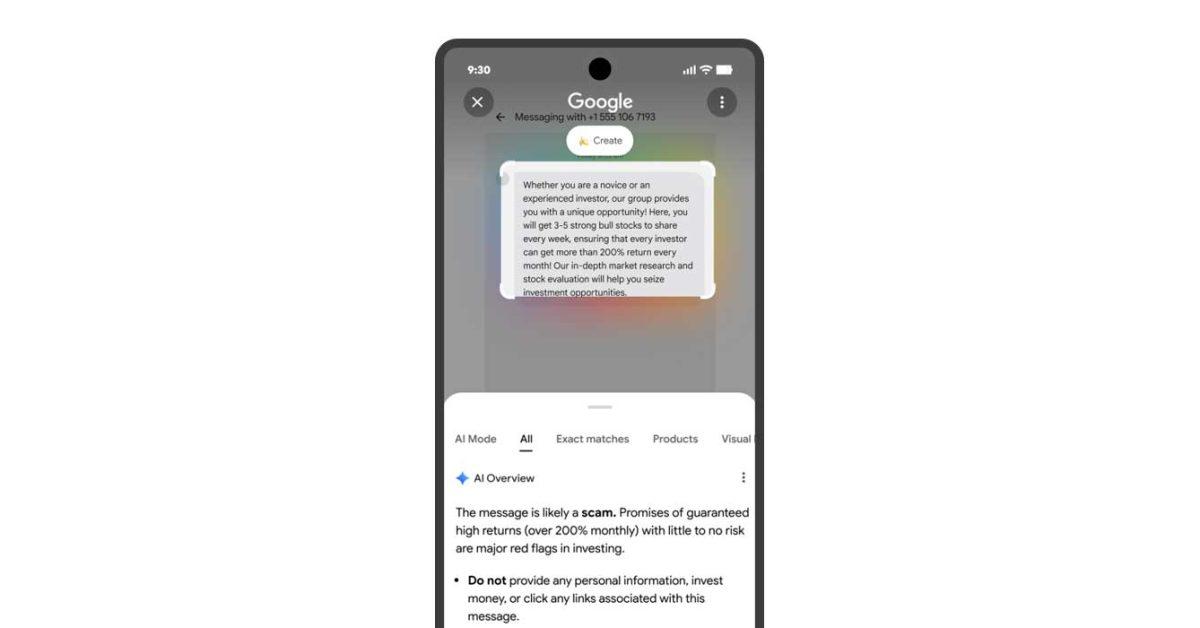
Circling a message will bring up an AI Overview that provides relevant guidance and suggested next steps. By design, scams are difficult to suss out on your own. While some are easier to spot than others, there are times when scams are nearly indistinguishable from the real thing. To help you stay safe from those attempting to take advantage of you, Google is giving you a new way to fight the scammers through Circle to Search. One of the best features to come to Android in recent years has been Circle to Search. It allows you to search and find more information about whatever is on your screen by simply drawing a circle around it. Google is now rolling out an update to give the feature a new function, which should make it even more useful. You'll now be able to use Circle to Search to help you figure out if a message you received is a scam. If you come across a message you think is suspicious, you'll be able to draw a circle around it to start a search. Doing so will bring up an AI Overview that will let you know if the message is likely a scam or not, based on information from across the web. If it is a scam, the Overview will offer relevant information and suggested steps on what to do next. As with any AI product, you shouldn't blindly put all of your trust into this feature. There's always a possibility that the AI Overview could be incorrect. However, with this upgrade to Circle to Search, you now have another tool at your disposal to help keep you from falling victim to scams.
[2]
Android has a secret feature to help you identify scams and fraud -- here's how to use it
Over the past few months, Google has added many new features to Android. Be it the new Material 3 Expressive design that brings a bolder look to Android or iOS-like Live Updates for notifications, there's a lot Google has rolled out recently. However, of all the new features Google has introduced, anti-theft tools are the ones I feel are the most important. These features promise to add another layer of protection to your device while keeping your data safe in case of loss or theft. Similarly, Google has also introduced tools that prevent Android users from being lured into scams during calls. Building on this, Google has added new security tools to Android with the features introduced in December 2025 alongside the Android 16 QPR2 rollout for Pixel devices. Your Android phone can now use Circle to Search to detect fraud, and here's how. Related 7 Android security settings I change first on every new phone They make the most significant difference in long-term safety Posts 1 By Anu Joy Nov 21, 2025 Circle to Search now helps you identify scams instantly Use it to check suspicious messages or offers with a quick gesture Android already offers several on-device protection features. The OS offers on-device fraud detection to spot scams within the apps, and Google's Phone app can block scam and fraud calls. However, a few still slip through, which is why Google's new feature is even more important. Circle to Search has been a core part of Android for a while now. The feature lets me instantly look for things to buy, and Google has improved it further with on-screen text translation as well as the ability to ask follow-up questions in Google Search's AI mode about whatever you've highlighted. While these features are great for most users, I feel the new addition Google introduced to Circle to Search is even more important. With the new feature added in December 2025 as part of the Android update, if you're unsure whether something is a scam or fraud, you can circle or highlight the message you've received, and Circle to Search will tell you if it's genuine. Google says a common tactic among fraudsters is sending users messages through Google Messages or social media that solicit or demand money or include links to scam websites. Thanks to the new Circle to Search feature, you can now protect yourself from getting involved just by asking Google. To use this feature, enter Circle to Search by tapping and holding the navigation bar, then highlight the message you received. Google will use AI and information from the web to assess whether it's a scam. It will even show what steps you can take depending on the result, such as avoiding the link or blocking the sender. I tested this feature in real-world use with a few messages I received on my Google Pixel 10 Pro, and Circle to Search was accurately able to call out spam messages from genuine ones. You can follow up when you are still unsure about something Get extra context and confirm with Google AI if something feels risky or fake In some cases, where the AI isn't able to directly tell you whether a message is a scam or fraud, you can manually ask Google by using the "Ask anything" bar in Circle to Search. For example, when Circle to Search wasn't able to identify one of the messages I received, I followed up with Google AI mode, which clarified that the message was likely a loan scam or a phishing attempt impersonating a genuine company. With this, you'll also be able to distinguish whether the texts you're receiving are genuine or not, whether they're about gambling, loans, buy now pay later offers, and more. You can also ask how to block these messages on your Android phone or report them online. You can use this feature on Android devices that don't support Circle to Search by using Google Lens in the Google app on both Android and iOS. Just upload the screenshot, and Google AI will tell you whether the message is a scam or not. Other new Android features you should try this fall In addition to this protective feature, Google is also rolling out other helpful features for Pixel smartphones and other Android devices as a part of the December 2025 update. One feature I've personally found useful is the notification summary feature for Pixel phones. With this, your Pixel can now condense longer messages and group chats from different apps so you get a quick glance at what's happening. Other features, such as an expanded dark mode that forces apps to apply a dark theme even when they don't support it natively, as well as automatic themed icons, are also rolling out with the new update. That said, the ability to assess messages for scam and fraud with Circle to Search is arguably one of the most underrated and lesser-known features of this Feature Drop. Not many people will talk about it, but it's a (far more) useful Android feature than it sounds for a lot of us.
[3]
Circle to Search can now recognize and detail digital scams with AI Overview
Circle to Search is getting a new trick that detects suspicious messages or web content, letting users know why it could be part of a scam. Malicious actors are becoming increasingly common, and scam texts appear to be increasing exponentially. As more of those ill-intentioned actors get hold of the latest AI models, scams are evolving in subtlety. Google's Circle to Search is rolling out a new function that takes aim at scams, whether they take the form of text messages or other web content. After activating Circle to Search, users can circle messages or other clumps of text that stand out as suspicious. The selection will automatically open into AI Overview with a breakdown of why that message or content may be part of a scam, as well as suggested next steps. Considering most online scams follow a similar formula, red flags aren't unique in every situation. Circle to Search looks to find all of those red flags and point them out, which only benefits the end user. Google details the feature: Get peace of mind on suspicious chats or texts. With Circle to Search, you can easily find more information about anything you see on your screen, including content you suspect are scams. You'll see a helpful AI Overview, backed by information from across the web, letting you know if the content is likely a scam. It provides relevant guidance and suggested next steps, so you can screen suspicious messages without needing to switch apps. Google also notes that this feature will be available through Lens by taking a screenshot of the text and uploading it. This feature announcement comes as part of Google's broader Android 16 QPR2 update, which introduces other safety features, including the ability to opt out of unwanted group chats more quickly. Google is also adding the option to mark calls as urgent when dialing an outgoing number. Circle to Search's new scam detection will roll out globally, though it may not be as fast as the rest of the Android 16 QPR2 additions. Google says it will appear more widely "when our systems have high confidence in the quality of the response."
[4]
Your phone can now tell you when a text looks like a scam
Google Lens will now guide you away from risky or fake texts instantly Google is rolling out a new layer of protection for Android users, specifically teaching Circle to Search and Google Lens how to spot scam messages right on your screen. Since our messaging apps are constantly getting hammered with sophisticated fraud - from those fake "delivery fee" demands to weird promises of free money - Google is stepping in to help you spot the fakes at a glance. Recommended Videos It works using the gesture you probably already use: just long-press the home button or navigation bar, circle the suspicious text, and Google generates an AI Overview. This isn't just a generic warning; it explains why the message looks dangerous, analyzing context from the web to highlight red flags and suggesting your next move. If you don't use gestures, the same tech works in Google Lens. You can just take a screenshot of the text, open it in the Lens app, and get the same instant analysis. The best part? This is rolling out globally starting this week. You don't need to wait for a major system update like Android 16; it's just arriving. However, Google notes that the warning will only pop up when the system is confident it has found a potential scam. Why This Is Important & Why You Should Care Let's be real: scam texts are getting frighteningly good. Bad actors are now using AI to write perfect copy, mimicking official language, and using psychological pressure to make you react instantly. It is exhausting to stay on guard constantly, and mistakes can be expensive. This feature is designed to give you a "pause" button. Instead of panicking because a text says your bank account is frozen, you get a calm, AI-backed second opinion. By telling you things like "This matches known phishing patterns" or "This message is using urgency to manipulate you," the tool demystifies the threat in real time. It is also privacy-friendly - it happens on your device without you needing to send the message to a human reviewer. Paired with other recent Android safety tools, like the ability to instantly bail on spammy group chats, Google is trying to build a much safer ecosystem for your daily communications. What's Happens Next Google says this system is only going to get smarter as it learns from new scam trends. Over time, Circle to Search could become a universal warning light for all kinds of digital threats - not just texts, but sketchy websites, QR codes, or fake payment requests. As scammers use AI to get faster and smarter, Google is betting on AI-powered defenses to keep up. For you, that means less second-guessing and a safer inbox, built right into the tools you are already using.
[5]

Use Circle to Search and Google Lens to spot scam messages.
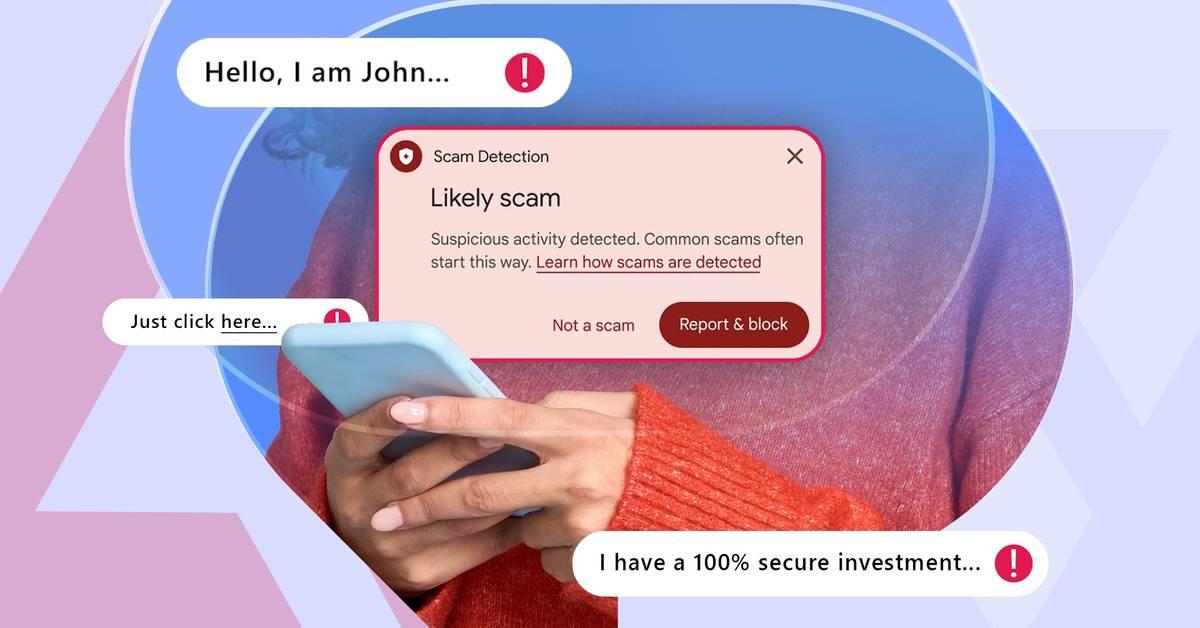
One trending tactic among scammers involves sending fraudulent text messages, either directly to your phone or through messaging apps and social media sites. These messages often solicit or demand money and link out to scammy sites. To help you spot these scams, we've now added new capabilities to Circle to Search and Lens that will help you see the telltale signs so you can avoid getting deceived. Here's how to use it: After you follow these steps on your device, our systems will use AI and information from the web to assess whether the message is likely a scam. You'll see an overview with guidance and insights including suggested next steps. This capability is available globally in Circle to Search and Lens, and will appear when our systems have high confidence in the quality of the response.
Share
Share
Copy Link
Google rolled out scam detection capabilities to Circle to Search and Google Lens globally in December 2025. Users can now circle suspicious messages to receive AI-powered analysis that identifies phishing patterns, explains red flags, and provides suggested next steps. The feature works on-device without sharing data with human reviewers, marking a shift in how Android handles the rising tide of sophisticated fraud attempts.
Circle to Search Gains Scam Detection Powers to Combat Rising Digital Threats
Google has expanded Circle to Search with scam detection capabilities that help users identify scam messages directly on their screens. The feature, rolling out globally as part of the December 2025 update alongside Android 16 QPR2, allows users to circle or highlight suspicious messages to receive instant analysis powered by Google AI
1
3
. When activated, the Android security feature generates an AI Overview that assesses whether content is likely fraudulent by analyzing information from across the web, then offers relevant guidance and suggested next steps5
.
Source: Digital Trends
The timing addresses a pressing need. Fraudulent text messages have become increasingly sophisticated as malicious actors leverage AI to craft convincing scams that mimic official language and apply urgency pressure to trigger immediate responses
4
. Google identifies one trending tactic where scammers send messages through messaging apps and social media sites that solicit or demand money or link to scam websites5
. These digital threats range from fake delivery fee demands to phishing attempts impersonating legitimate companies.How AI-Powered Scam Detection Works on Android Devices
To use the feature, users activate Circle to Search by tapping and holding the navigation bar or home button, then highlight the suspicious messages they want to analyze
2
. The system uses AI and web content analysis to detect digital scams by identifying common phishing patterns and red flags that characterize fraudulent schemes3
. Real-world testing on a Google Pixel 10 Pro demonstrated the feature accurately distinguished spam messages from genuine communications2
.
Source: 9to5Google
For cases where the AI cannot directly determine if content is fraudulent, users can manually query Google AI mode through the "Ask anything" bar within Circle to Search. One test revealed how this follow-up capability identified a message as likely a loan scam or phishing attempt when the initial scan proved inconclusive
2
. This layered approach to combating online fraud provides multiple opportunities to catch sophisticated attempts that might otherwise slip through.Google Lens offers the same functionality for devices that don't support Circle to Search, working on both Android and iOS platforms. Users simply take a screenshot of the questionable message, upload it to Google Lens in the Google app, and receive the same AI-powered analysis
2
4
.Privacy-First Design and System Confidence Requirements
The scam detection feature operates with on-device privacy protections, meaning users don't need to send messages to human reviewers for analysis
4
. This addresses concerns about sharing potentially sensitive communications while still providing robust protection against online fraud. However, Google notes the feature will only display warnings when systems have high confidence in the quality of the response3
5
.
Source: Android Police
As with any AI product, users shouldn't place absolute trust in the technology, as AI Overview results could potentially be incorrect
1
. The feature serves as an additional tool in a broader security arsenal rather than a definitive judgment system. Google has been building complementary protections, including on-device fraud detection within apps and scam call blocking through the Phone app2
.Related Stories




Future Implications for AI-Powered Security
Google indicates the system will become smarter over time as it learns from emerging scam tactics
4
. The company is betting on AI-powered defenses to keep pace as scammers themselves adopt AI to accelerate and refine their attacks. Experts speculate Circle to Search could eventually expand beyond identifying scam messages to become a universal warning system for various digital threats, including sketchy websites, malicious QR codes, and fake payment requests4
.The December 2025 update includes other safety features like the ability to opt out of unwanted group chats more quickly and mark outgoing calls as urgent
3
. These additions reflect Google's broader strategy to create a safer ecosystem for daily communications. For users, the immediate benefit is clear: less second-guessing about message authenticity and a more secure inbox built directly into tools they already use, without waiting for major system updates4
.References
Summarized by

Navi
[1]
[2]
[4]
Related Stories
Recent Highlights
1
Apple Plans Major Siri AI Overhaul in iOS 27 With Third-Party Chatbot Integration
Technology

2
OpenAI shuts down Sora after six months, ending Disney's $1 billion licensing partnership
Technology

3
AI chatbots validate you too much, making you less kind to others, Stanford study reveals
Science and Research

Recent Highlights
Today's Top Stories




Your Daily Dose of Curated AI News
Don’t drown in AI news. We cut through the noise - filtering, ranking and summarizing the most important AI news, breakthroughs and research daily. Spend less time searching for the latest in AI and get straight to action.

