Google's Gemini gains screen automation to control Android apps and perform tasks for you


6 Sources
6 Sources
[1]
Gemini gets one step closer to controlling other apps on your Android phone
Google could refer to the functionality as "screen automation." AI agents are the hottest trend in tech, and the increasing momentum leaves no room for doubting that your mobile devices will soon be controlled by them. Back at I/O 2025, Google demonstrated how it plans to put Gemini in charge of controlling your phone for you. This was dubbed Project Astra and showed Gemini's capabilities at not just viewing the text and media on your phone, but also scrolling and tapping when needed, basically displaying a spectrum of agentic force in action to help you with simple tasks. While Project Astra is still in its development phase, we're seeing evidence detailing how it might work.
[2]
Google wants Gemini to start using your Android apps
Rajesh started following the latest happenings in the world of Android around the release of the Nexus One and Samsung Galaxy S. After flashing custom ROMs and kernels on his beloved Galaxy S, he started writing about Android for a living. He uses the latest Samsung or Pixel flagship as his daily driver. And yes, he carries an iPhone as a secondary device. Rajesh has been writing for Android Police since 2021, covering news, how-tos, and features. Based in India, he has previously written for Neowin, AndroidBeat, Times of India, iPhoneHacks, MySmartPrice, and MakeUseOf. When not working, you will find him mindlessly scrolling through X, playing with new AI models, or going on long road trips. You can reach out to him on Twitter or drop a mail at [email protected]. Google has been working on Gemini's agentic capabilities, enabling it to carry out actions on our behalf. It recently rolled out an AI-powered Auto Browse feature in Chrome for users on its AI Pro or Ultra tiers. The company is also working on bringing similar capabilities to Gemini on Android, letting it control apps directly on your phone. A new report now sheds more light on this feature. Gemini has already made many complex tasks faster and easier. But this is just scratching the surface of what's possible, as the AI will eventually evolve to take actions on our behalf. A teardown of the latest Google app beta (v17.4) by 9to5Google details how the "Get tasks done with Gemini" feature will work. Codenamed bonobo, it will initially be available as a Labs feature, with the ability to book rides and place orders through screen automation. In practice, this could let you ask Gemini to book an Uber to your office or order dinner from Uber Eats without ever opening the app yourself. Reportedly, Gemini's agentic capabilities will only work in "certain apps" initially. Given that app UIs change frequently, it makes sense for Google to initially limit Gemini's screen automation feature on Android to a small set of apps. Beyond food delivery and ride-hailing, early support could be limited to first-party Google apps. The feature will require at least Android 16 QPR3 to work, since Google has laid the groundwork for screen automation with this release. You will always remain in full control While you can ask Gemini to carry out tasks on your behalf, you'll remain in full control and can manually stop or take over at any time. The strings in the code provide more insight into the feature and the privacy implications. Google notes that, "When Gemini interacts with an app, screenshots are reviewed by trained reviewers and used to improve Google services if Keep Activity is on." AP Recommends: Subscribe and never miss what matters Tech insights about everything mobile directly from the Android Police team. Subscribe By subscribing, you agree to receive newsletter and marketing emails, and accept our Terms of Use and Privacy Policy. You can unsubscribe anytime. Google will also warn users not to enter payment information into Gemini Chats and to use screen automation during emergencies. While not mentioned, Gemini's agentic capabilities on Android could be limited to users on the Pro and Ultra tiers. The company will most likely announce this feature in beta alongside the release of Android 16 QPR3 in March.
[3]
Google Gemini could soon control Android apps on your phone -- but here's why I won't be partaking
Agentic capabilities are one of the next big things in AI, and would see AI agents working more independently and without as much direct user involvement. Naturally, Google is hard at work trying to boost the agentic features in Gemini, and a new report details how this would see the AI assistant controlling apps on Android devices. This may be exciting news for some, but as someone who remains skeptical of AI and handing over too much control to machines, this is the last thing I want running on my phone. This upgrade was spotted in the latest version of the Google app beta (v17.4) by 9to5Google. Dubbed "Get tasks done with Gemini," the idea is that Google's AI will offer "screen automation" in "certain apps". Effectively meaning you will be able to hand over certain functions to Gemini rather than having to do it all yourself. According to the report, this will initially be available as a Labs feature that can book ride shares or place orders on your behalf. Though it will presumably expand to other apps and services in the future. The uncovered code also warns that "Gemini can make mistakes" and that the user is "responsible for what it does on [their] behalf, so supervise it closely." Users will also be given the option to manually take over at any time. This last point is where many of my reservations lie, and two more comment strings further cement my dislike of this whole idea. Those strings confirm that the screenshots Gemini takes when it interacts with an app "are reviewed by trained reviewers and used to improve Google services if Keep Activity is on." The comments also note that users should not "enter login or payment information into Gemini chats" and that they should "Avoid using screen automation for emergencies or tasks involving sensitive information." Which makes sense, because your interactions with Gemini aren't private. Not if you have your activity history saved, at any rate. I've always made it clear that I don't really give a hoot about AI on my phone. Some of the features are genuinely quite useful, particularly the photo edits, but I have absolutely zero enthusiasm for all the other features and functionality that phone companies are cramming into their devices. Not just for obvious privacy reasons, but also because I genuinely prefer getting things done myself. Regardless of whether it takes me a few seconds longer or if I have to physically walk across the room to grab my phone, it's not exactly a burden I need to outsource to Gemini, Alexa, Siri or any number of other AI assistants that may be available. In my experience, using my voice doesn't always feel like I'm saving time anyway. By the time I've got Gemini to actually get what I wanted done, I could have been halfway done if I just did it myself -- and without having to shout "Hey Google" for it to figure out I need assistance. And while comparing Gemini to Siri isn't exactly fair, given how weak Apple's voice assistant actually is, the issues my wife has with Siri only increase my resolve in this argument. The number of times she has to shout "Hey Siri" just to set an alarm is, frankly, ridiculous. Not to mention the fact that doing stuff myself means I stay fully in control of the whole process. I see all the options available and have complete control over anything that actually gets done, with no room for misinterpretation. Plus, should anything actually go wrong, I only have myself to blame. No shifting it onto a faceless machine, or the people who designed it. No matter how much I don't like over-reliance on AI in my own life, that's not going to stop stuff like this from happening. Google is going to keep pumping out new and more advanced features for Android, even if they are initially locked behind a premium subscription. I imagine it won't be long before AI has infiltrated phones to the extent that they'll be able to do just about everything for you. Heck, we already have devices that promise to do this for you, and even if the current AI bubble bursts, it feels as inevitable as Thanos snapping his fingers. Seeing how readily people have adopted AI into their daily routine, against my better judgment, Google would be crazy not to. All I can do is make sure all the superfluous stuff I don't like is switched off -- as I've done with the Pixel 10's Magic Cue feature. I anticipate that "Get stuff done with Gemini" will eventually end up in that same pile when it launches. And I imagine I'll be in the minority.
[4]
Google's Gemini could soon do work for you
A new screen automation upgrade may let AI complete tasks inside apps on Android. Google is reportedly building a significant upgrade for its generative AI assistant Gemini that could shift it from being primarily a conversational helper to something closer to a real-life work agent. In a recent beta teardown of the Google app code by 9to5Google, developers uncovered strings pointing to a feature known internally as "screen automation". It suggests that Gemini could soon take direct actions on your behalf inside certain Android apps, such as placing orders or booking rides, without requiring the user to manually tap through screens. While Gemini already powers conversational tasks like drafting emails or generating research plans, this upgrade appears poised to let it literally interact with app interfaces, tapping buttons and navigating screens to finish tasks you'd typically do yourself. Early evidence from the beta suggests these capabilities will initially be limited to a handful of supported apps and will emphasize user supervision, with Google warning that "Gemini can make mistakes" and that users remain responsible for actions taken on their behalf. How this upgrade moves AI from assistant to agent The concept behind screen automation is a major step toward giving AI more autonomy in everyday digital workflows. Instead of just suggesting what you could do, Gemini may soon execute those choices directly inside apps for you. Early code strings from Google's beta also indicate privacy precautions, such as advising users not to enter login or payment information into AI chats and warning that screenshots may be reviewed to improve the feature. Google already offers some agent capabilities through its Gemini Agent platform in Workspace and web, where AI can handle complex workflows and coordinate across services, but screen automation could bring those abilities directly into smartphones and daily app use. If these features roll out widely, it could mark a shift in how people interact with mobile devices, from tapping and swiping themselves to giving AI tools permission to act on their behalf. That may make everyday routines easier, but it also raises questions around control, security, and oversight, especially when automation touches sensitive tasks like bookings or financial orders. Recommended Videos Google is reportedly positioning these upgrades as optional and supervised, letting users stop or override Gemini at any time. For now, though, the screen automation feature remains in development and has yet to arrive in stable releases.
[5]

Gemini could start booking rides and placing orders in apps - Phandroid
Google's cooking up a major upgrade for Gemini that would let the AI assistant actually do things for you instead of just answering questions. New code discovered by AssembleDebug in the Google app beta points to a feature called "screen automation" that could handle tasks like ordering food or booking rides directly inside Android apps. The feature showed up in version 17.4 of the Google app beta under the internal codename "bonobo." According to the discovered strings, Gemini screen automation will be able to "help with tasks, like placing orders or booking rides, using screen automation on certain apps on your device." So instead of opening Uber yourself and tapping through the booking process, you'd just tell Gemini to book you a ride to the office and it handles everything. This would work by letting Gemini see and interact with your screen the same way you do. It could launch apps, navigate menus, and tap buttons on your behalf. The feature appears tied to Android 16 QPR3, which is one of Google's quarterly platform releases that adds features after a major Android version ships. Google's not hiding the risks here. The beta code includes several warnings about using Gemini screen automation. Users who have "Keep Activity" turned on will have screenshots reviewed by trained human reviewers to improve Google's services. Google also advises against entering login details or payment info into Gemini chats and warns against using the feature for emergencies or sensitive tasks. There's also a disclaimer that "Gemini can make mistakes" and users remain responsible for what the AI does on their behalf. You'll be able to stop Gemini at any point and take back manual control if needed. It's unclear which apps will support this initially. The leaks mention ordering and ride-booking as examples, which suggests apps like Uber, Lyft, Uber Eats, and DoorDash could be first in line. But Google hasn't confirmed anything yet, and the feature will likely start with limited app support before expanding. This isn't Google's first attempt at letting AI control devices. The company already rolled out Gemini computer use for desktops last year. Gemini's been replacing Google Assistant across Google's ecosystem, so giving it more capabilities makes sense as the company pushes its AI strategy forward.
[6]

Gemini May Soon Be Able to Directly Control Apps on Your Android Phone
Google warns users not to enter payment information into Gemini chats Google has been working to improve Gemini's agentic capabilities, allowing the AI to perform actions on users' behalf. The tech giant now seems to be gearing up to enable Gemini to take direct actions for users on Android. New codes spotted in the latest Google app beta offer a glimpse into the upcoming functionality. The code strings indicate that Gemini could soon let users place online orders and book rides without requiring direct interaction with the phone. The feature could expand to support additional actions over time. Google May Let Gemini Perform Tasks in Apps on Your Behalf During an APK teardown of the Google app version 17.4 beta, 9to5Google discovered new Gemini agentic features that are currently in development. The Labs feature, known as "Get tasks done with Gemini," is reportedly shown with strings explaining that "Gemini can help with tasks, like placing orders or booking rides, using screen automation on certain apps on your device." The strings in the Google app reportedly reveal the feature's internal codename, "bonobo". It may be referred to as "screen automation" on Android devices. This feature is expected to require Android 16 QPR3, and it could be available in "certain apps." Google will reportedly caution users that "Gemini can make mistakes". The company reportedly warns that users remain responsible for actions carried out on their behalf. Users will be able to stop the agent at any time and take over a task manually. The code strings also reveal that Google will alert users about potential privacy implications, as screenshots are reviewed by trained reviewers and used to improve Google services, while Keep Activity is enabled. Google also warns users not to enter payment information into Gemini chats. It also advises users against using screen automation for emergencies or tasks involving sensitive information. Google has been bringing more abilities to the Gemini recently. Last month, the company expanded the conversational Gemini support in Google Maps to more navigation modes. This integration allows walkers and cyclists to get hands-free assistance on their route. It also enables users to finish a few tasks as sending text messages.
Share
Share
Copy Link
Google is developing screen automation capabilities for Gemini that would let the AI agent control other apps on Android devices. Codenamed bonobo, the feature will initially handle tasks like booking rides and placing orders through Uber and food delivery apps. Users maintain full control with manual override options, but privacy concerns emerge as screenshots may be reviewed by human reviewers.
Gemini Evolves Into an AI Agent With Screen Automation
Google is building a major upgrade for Gemini that transforms the AI assistant from a conversational helper into an autonomous work agent capable of performing tasks on behalf of users. A beta teardown of the Google app version 17.4 by 9to5Google reveals a feature called "screen automation" that would let Gemini control other apps directly on Android devices
2
. Codenamed bonobo internally, this capability represents a significant leap in AI agent capabilities, allowing Gemini to interact with Android app interfaces by tapping buttons and navigating screens just as a human would4
.
Source: Tom's Guide
The functionality builds on Project Astra, which Google demonstrated at I/O 2025, showcasing Gemini's ability to view text and media on phones while scrolling and tapping when needed
1
. This AI assistant upgrade shifts Gemini from simply suggesting actions to actually executing them inside apps without requiring users to manually tap through screens.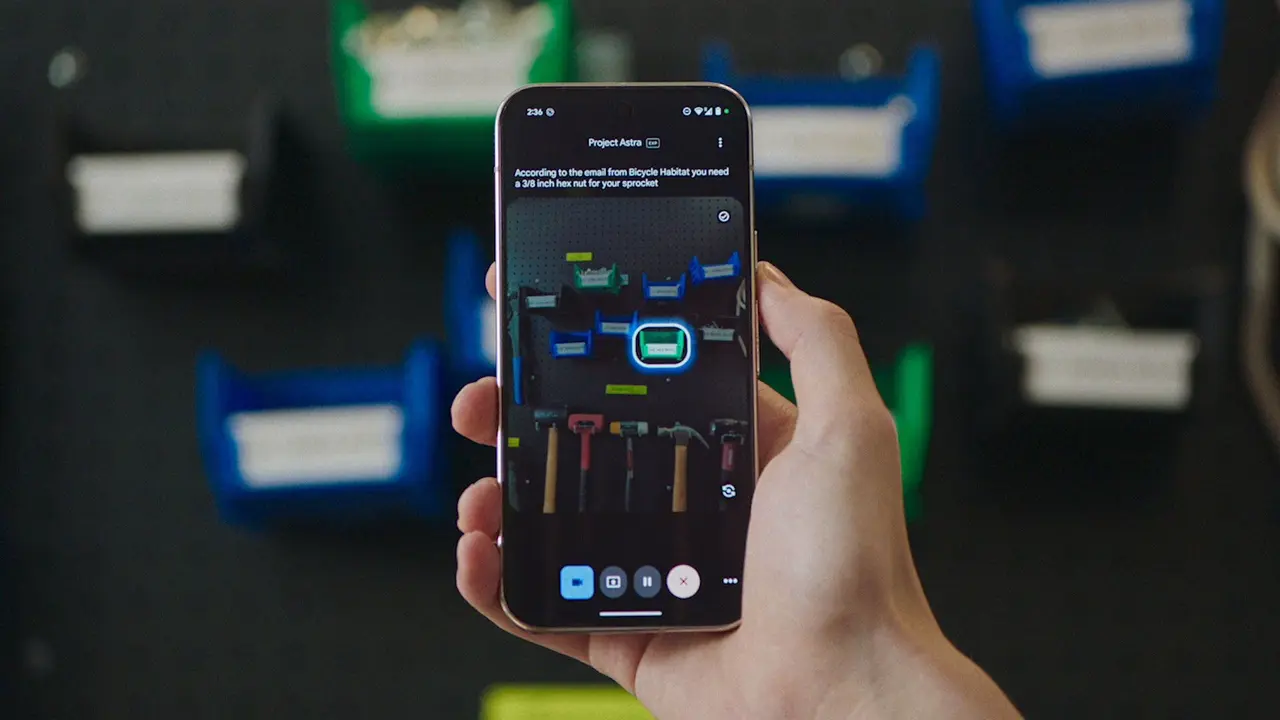
Source: Android Authority
Booking Rides and Placing Orders Through Voice Commands
Initially, screen automation will focus on practical everyday tasks like booking rides and placing orders through certain apps. Users could ask Gemini to book an Uber to the office or order dinner from Uber Eats without ever opening the apps themselves
2
. Early support will likely include ride-hailing services like Uber and Lyft, along with food delivery platforms such as DoorDash and Uber Eats5
.Google plans to roll out the feature as a Labs feature initially, limiting AI taking actions to a small set of Android apps. This cautious approach makes sense given that app UIs change frequently, and Google needs to ensure reliable performance before expanding compatibility. Beyond ride-hailing and food delivery, early support could extend to first-party Google apps where the company has more direct control over interface stability
2
.Android 16 QPR3 Lays Technical Groundwork
The screen automation feature requires at least Android 16 QPR3 to function, as Google has laid the necessary technical groundwork in this quarterly platform release
2
. This requirement means the feature won't arrive immediately but will likely launch alongside Android 16 QPR3 in March, according to reports. The timing suggests Google is taking a measured approach to ensure the underlying infrastructure supports reliable agentic functionality.Related Stories

Privacy Concerns and User Supervision Requirements
While the autonomous work agent capabilities sound convenient, they raise significant privacy concerns. Code strings discovered in the beta reveal that when Gemini interacts with an app, screenshots are reviewed by trained reviewers and used to improve Google services if Keep Activity is enabled
2
. These human reviewers will analyze how Gemini performs tasks, creating a feedback loop for improvement but also introducing potential privacy implications.Google includes several warnings in the feature documentation. Users are explicitly advised not to enter payment information into Gemini chats and to avoid using screen automation during emergencies or for tasks involving sensitive information
2
. The code also warns that "Gemini can make mistakes" and emphasizes that users remain responsible for what the AI does on their behalf, requiring close supervision3
.Crucially, users maintain user control throughout the process. Google has designed the system to allow manual intervention at any time, letting users stop Gemini or take over manually whenever they choose
2
. This safeguard addresses concerns about surrendering too much autonomy to AI assistants.Implications for Mobile AI and User Adoption
If screen automation rolls out widely, it could fundamentally change how people interact with mobile devices, shifting from direct tapping and swiping to delegating tasks to AI agents
4
. The feature may initially be limited to users on Gemini Pro and Ultra tiers, following Google's pattern of reserving advanced AI features for premium subscribers2
.However, adoption may face resistance from users skeptical about handing over control to machines. Some Android users prefer maintaining direct control over their devices and completing tasks themselves, viewing AI automation as an unnecessary layer that introduces potential errors and privacy risks
3
. The success of screen automation will depend on whether Google can demonstrate reliable performance while addressing legitimate concerns about security, oversight, and the implications of letting AI agents handle sensitive workflows like bookings or financial orders.References
Summarized by

Navi
[1]
[2]
[3]
[4]
Related Stories
Google Gemini Set to Revolutionize Android 16 with Advanced In-App Task Automation
22 Nov 2024•Technology

Google's Gemini AI Set to Revolutionize Personal Assistance with Enhanced Data Integration and App Connectivity
02 May 2025•Technology

Google unveils AppFunctions to let Gemini automate tasks across Android apps
26 Feb 2026•Technology
Recent Highlights


Recent Highlights
Today's Top Stories












Your Daily Dose of Curated AI News
Don’t drown in AI news. We cut through the noise - filtering, ranking and summarizing the most important AI news, breakthroughs and research daily. Spend less time searching for the latest in AI and get straight to action.

