Google Maps expands Gemini AI navigation to walking and cycling with hands-free assistance


11 Sources
11 Sources
[1]
Google Maps now lets you access Gemini while walking and cycling | TechCrunch
Google announced on Thursday that Google Maps users can now access Gemini hands-free while walking and cycling. The update comes a few months after Google Maps rolled out its Gemini-powered hands-free, conversational driving experience. The announcement marks Google's ongoing efforts to plug Gemini into more parts of people's everyday lives, while shifting Google Maps from static directions to real-time, conversational navigation. When you're walking around and navigating with Maps, you can now ask Gemini questions like "Tell me more about the neighborhood I'm in," "What are some must-see attractions?" or "Are there cafes with a bathroom along my route?" Google says that walking and typing can be hard, which is why it's rolling out the ability for users to ask questions without breaking their stride or leaving Maps' navigation screen. If you're cycling, you can ask Gemini questions while remaining focused on the road, Google says. You can ask questions like "What's my ETA?" or "When's my next meeting?" Plus, you could ask Gemini to "Text Emily I'm 10 minutes behind" so you can communicate with others while keeping your grip on the handlebars. The feature lets you ask multiple questions in a conversation. For example, you could ask: "Is there a budget-friendly restaurant with vegan options along my route, something within a couple of miles? ... What's parking like there?" The update is now available worldwide on iOS wherever Gemini is available, and rolling out on Android. The move comes as Google recently updated Maps with new features, including a Gemini-powered "know before you go" tips sections that surfaces important information places you're interested in. For instance, it might tell users the best way to book a reservation, reveal secret menu items, suggest the best place to park, and more. Additionally, the navigation app also added an improved Explore tab and a new EV charger availability prediction feature. The updated Explore tab makes it easier and faster to find trending spots near you, while the EV charger feature allows users to see how many chargers will likely be available once they arrive at their destination Thursday's announcement comes a day after Google updated Chrome with an enhanced Gemini integration and agentic features for autonomous tasks, as it looks to compete with AI browsers from companies like OpenAI, Perplexity, Opera, and The Browser Company. The tech giant also launched a persistent Gemini sidebar and a new "auto-browse" feature that can navigate websites on your behalf.
[2]
Google Maps Brings Gemini Navigation to Walking and Cycling
Macy has been working for CNET for coming on 2 years. Prior to CNET, Macy received a North Carolina College Media Association award in sports writing. If you're constantly on the move -- like navigating an unfamiliar city while traveling or, if you're like me, squeezing in a few dog walks between meetings every work day -- Google just made Maps more useful and hands-off. Gemini in navigation, previously limited to driving, is now available for walking and cycling. Read also: I Tried Google Maps' New Gemini Feature, and It Was a Surprisingly Helpful AI Assistant Google describes Gemini in navigation as "like talking to a friend in the passenger seat," and that idea translates surprisingly well when you're on foot or on a bike, too. Instead of tapping at your phone, you can now ask conversational questions out loud while navigating and get real-time, context-aware answers based on Google Maps' data. For walkers, Gemini effectively doubles as a personal tour guide. While exploring a neighborhood, you can ask questions like, "What neighborhood am I in?" or "What are the top-rated restaurants nearby?" Gemini will surface recommendations along your current route, pulling from Maps' up-to-date local information. Cyclists, meanwhile, get hands-free assistance designed to keep them focused and safe on the road. While navigating, you can ask practical questions, such as "What's my ETA?" or "When's my next meeting?" without taking your hands off the handlebars. If you're running late, Gemini can help with quick tasks like sending a message. For instance, just say, "Text Sarah I'm 10 minutes behind," and it'll take care of the rest. Gemini in navigation for walking and cycling is live now worldwide on iOS wherever Gemini is available.
[3]
Gemini will be your tour guide while using Google's walking directions.
Google says you can now use the AI chatbot to ask questions while using walking or cycling directions in Google Maps. The capability was already there for driving directions, and now Google is expanding it to other modes of travel. The feature is now available for iOS, and coming to Android this coming month. According to the company: When you're exploring around town and navigating with Maps, Gemini can be your personal walking tour guide. Just ask, "OK Google, what neighborhood am I in?" If you're hungry, follow up with "What are top-rated restaurants nearby?" and Gemini will recommend delicious options along your route based on Maps' fresh, comprehensive information about the real world.
[4]
Google Maps expands its Gemini upgrade to walking and cycling navigation
Availability gets started with iOS, with Android support arriving soon. It's pretty clear at this point that AI isn't a silver bullet for solving all our problems, and part of getting the most out of it is recognizing those use cases where it really has the best chance to shine. Modern implementations have gotten increasingly strong with their conversational skills, and that's one of the big reasons we were so happy to see Gemini come to Google Maps navigation last fall -- you could just focus on your driving, and make casual requests to Gemini for information about points of interest. And now, that's getting even better.
[5]

Gemini will be your Google Maps companion, even if you're walking on cycling
Karandeep Singh Oberoi is a Durham College Journalism and Mass Media graduate who joined the Android Police team in April 2024, after serving as a full-time News Writer at Canadian publication MobileSyrup. Prior to joining Android Police, Oberoi worked on feature stories, reviews, evergreen articles, and focused on 'how-to' resources. Additionally, he informed readers about the latest deals and discounts with quick hit pieces and buyer's guides for all occasions. Oberoi lives in Toronto, Canada. When not working on a new story, he likes to hit the gym, play soccer (although he keeps calling it football for some reason🤔) and try out new restaurants in the Greater Toronto Area. Google gave Maps' navigation a powerful AI boost with Gemini back in early November last year. Meant to give users hands-free assistance, like finding places along your route, finding EV chargers, sharing your ETA with friends, and more, Up until now, the chatty presence has only been able to help you while you were driving. Now, the assistant is finally getting out of the car. Related These four massive Google Maps upgrades will change how you drive Proactive traffic alerts incoming Posts 3 By Karandeep Singh Oberoi Gemini for Maps is now launching for walking and cycling, bringing the conversational navigation assistant to all modes of transportation that actually require smart assistance. The rollout is global. That means Gemini for navigation is now rolling out to all wherever Gemini is available. This applies to both Android and iOS Google Maps users. It's now easier to find noteworthy places along your route Related Google Maps gains Gemini enhancements to make navigation simpler Rolling out now -- give it a try Posts By Timi Cantisano If you're walking or cycling through a new area in your city, Gemini will now be able to give you quick, on the go, hands-free answers with contextual awareness. You should be able to ask "OK Google, what neighborhood am I in?" and Gemini will give you contextually aware answers. You can follow up your request with "What are top-rated restaurants nearby?" and the AI tool will leverage Maps' massive database of real-time information to give you relevant information. If you're cycling, Gemini gives you hands-free help so you can stay safe and focused on the road. Ask 'What's my ETA?' or 'When's my next meeting?' Running late? Say 'Text Sarah I'm 10 minutes behind,' and your message will send while you keep a grip on the handlebars. The latter, of course, will only be possible if you give Gemini explicit permission to connect with your messages. The same goes for asking it to add something to your calendar, or other connected app-related activity. Subscribe to our newsletter for AI navigation insights Explore deeper: subscribe to our newsletter for concise, practical coverage of Gemini for Maps and other AI navigation tools -- how they work, privacy implications, and clear how-tos to understand new features and what they mean for walking and cycling. Subscribe By subscribing, you agree to receive newsletter and marketing emails, and accept Valnet's Terms of Use and Privacy Policy. You can unsubscribe anytime. Gemini for Google Maps walking and cycling is rolling out now to all Android and iOS users globally. Is the AI assistant available to you in Maps yet? Let us know in the comments below!
[6]

Google Maps Now Lets You Chat With Gemini AI While Walking or Biking
Google Maps now lets you talk to Gemini while following walking or cycling directions. The latest update is an extension to the AI chatbot's existing conversational navigation feature in driving mode that rolled out in November. You can now ask Gemini hands-free questions without leaving the navigation screen. While walking, for example, you can ask things like "Tell me more about this neighborhood" or "Are there cafes with a bathroom along my route?" Cyclists can also check their ETA without taking their hands off the handlebars. The embedded video below gives you an idea of how Gemini already works during driving navigation. Google says the feature addresses the practical problem of typing while moving, which is awkward at best and dangerous at worst. The Gemini integration also supports follow-up questions, so you could, for example, ask for a budget-friendly restaurant with vegan options, then follow up with questions about parking. Beyond discovery queries, users can also issue navigation commands like "Add stop," "Show alternative routes," or "Mute guidance." You can also ask practical questions such as "What's my next turn?" or "What's the weather like at my destination?" The feature is available now worldwide on iOS wherever Gemini is supported, with Android availability rolling out gradually.
[7]

Google Maps just got a major AI upgrade -- and it's finally hands-free for walkers and cyclists
If you walk or bike to work, Google just dropped some good news. Now, the company's AI-powered navigation assistant is expanding beyond the car. Starting today, Gemini inside Google Maps will officially support walking and cycling, bringing a conversational, hands-free experience to pedestrians and bike commuters for the first time. The feature -- previously limited to driving -- is live now worldwide on iOS wherever Gemini is available, with Android support rolling out over the coming month. For anyone who has ever tried to text, search or check directions mid-stride (or worse, mid-ride), this update aims to remove the need to constantly tap your screen. Instead, you can simply talk. Essentially a conversational co-pilot, users can now navigate a route in Google Maps and ask natural-language questions without leaving the navigation view. It works similarly to talking to a passenger sitting next to you -- except that passenger can pull real-time map data, business listings and scheduling info instantly. In other words, it's like a built-in tour guide. Pedestrian navigation is where the upgrade promises to feel the most transformative. Instead of stopping to type into a search bar, walkers can now ask questions like: Gemini pulls from Maps' location data and nearby points of interest to provide contextual answers while you continue walking. It effectively turns Google Maps into a lightweight audio walking guide layered over turn-by-turn directions. For cyclists: the upgrade means you know where you're going without letting go of the handlebars. This safety-focused twist is designed to reduce distractions by enabling common tasks through voice alone, such as: Instead of reaching into a pocket or tapping a mounted phone, riders can keep both hands on the bike while still interacting with their schedule or messages. Voice navigation itself isn't new -- Google Maps has supported spoken directions for years. What's different here is contextual conversation layered onto navigation, powered by Gemini's language model rather than rigid voice commands. In practical terms, that means: For urban explorers, commuters and travelers, it shifts Google Maps from a passive directions tool into something closer to a real-time assistant embedded in your journey. There's no separate download required -- the experience lives directly inside Google Maps navigation. This expansion highlights Google's broader push to weave AI assistants into everyday mobility rather than keeping them confined to standalone chat apps. Instead of opening an AI assistant and then switching back to Maps, the assistant now shows up exactly where decisions happen -- while you're on the move. The iOS-first rollout also reflects the growing relationship between Apple and Google, as iPhone users become increasingly accustomed to using Gemini outside of traditional chat experiences. For users, the takeaway here is that navigation is becoming far less complicated. Whether you're exploring a new city on foot or commuting by bike, Google Maps promises to get you there with a simple conversation.
[8]

Google Maps adds hands-free Gemini for walking and cycling
Google announced on Thursday that Google Maps users can access Gemini hands-free while walking and cycling. The update extends a Gemini-powered hands-free conversational driving experience launched in Google Maps a few months earlier. This change supports Google's efforts to integrate Gemini into daily activities and evolve Maps from static directions to real-time conversational navigation. The walking feature allows users to pose questions to Gemini directly from the navigation screen. Specific examples include "Tell me more about the neighborhood I'm in," "What are some must‑see attractions?" and "Are there cafés with a bathroom along my route?" Google states that walking and typing present difficulties, so this hands-free capability enables queries without interrupting movement or exiting the navigation interface. For cycling, the feature keeps users focused on the road. Questions such as "What's my ETA?" and "When's my next meeting?" receive responses from Gemini. Users can also issue commands like "Text Emily I'm 10 minutes behind" to communicate while maintaining handlebar control. Multi-question conversations form a core part of the functionality. One example sequence starts with "Is there a budget‑friendly restaurant with vegan options along my route, something within a couple of miles?" followed by "What's parking like there?" The update rolls out worldwide on iOS devices where Gemini operates and deploys gradually on Android platforms. This release accompanies recent enhancements to Google Maps. A Gemini-powered "know before you go" tips section delivers key details about destinations. These details cover optimal reservation booking methods, secret menu items at establishments, and parking recommendations. Google Maps also features an upgraded Explore tab. This tab streamlines discovery of nearby trending locations, reducing time and effort compared to prior versions. Another addition predicts electric vehicle charger availability. Users view projected numbers of open chargers upon reaching specified destinations. The Maps announcement occurred one day after Google modified Chrome with deeper Gemini integration. These Chrome updates introduce agentic features that handle autonomous tasks. Google positions these against AI browsers from OpenAI, Perplexity, Opera, and The Browser Company. Chrome now includes a persistent Gemini sidebar for ongoing access. A new "auto‑browse" capability permits Gemini to traverse websites independently on users' behalf.
[9]

Google Maps just got a lot more useful for walkers and cyclists
When not writing, Dave enjoys spending time with his family, running, playing the guitar, camping, and serving in his community. His favorite place is the Blue Ridge Mountains, and one day he hopes to retire there (hopefully his fear of heights will have retired by then, too!). Summary Gemini in Google Maps now supports walking and cycling navigation. Features include context-aware answers and landmark-based turn-by-turn guidance. Google is rolling the features out now to users worldwide. Back in November, Google announced that Gemini was coming to Google Maps. Up until now, this functionality has been limited to driving, but today, Google announced that these useful Gemini features are now available for walking and cycling, as well. What can Gemini do in Google Maps? Google claims that using Gemini in Google Maps is like talking to a friend -- that might be taking it a step too far. However, its features in Maps are pretty useful. Ask questions about your route Essentially, you can just ask Gemini whatever questions you have, and the assistant will provide you with detailed answers, related to where you're headed and what's around you. Some of the examples given by Google include: Asking about the neighborhood you're in Asking about local landmarks worth checking out Getting restaurant recommendations along your route What's interesting is the direct integration into Maps and how detailed your questions can get. For example, if you're walking downtown, you could ask if there are any Mexican or Thai restaurants along your route, then ask about popular dishes, and then ask to add the restaurant to your route and send a text to your friend about it. It's all handled conversationally, so it feels natural. It's already hard to leave Google Maps, and this will make it even tougher. Get better turn-by-turn directions This is probably one of the most useful new features for me. Instead of being told to turn left after a certain distance, Gemini will identify landmarks along the route and use those to guide you. For example: "Turn left at the Starbucks." I don't know about you, but that's a lot more helpful to me than "Turn left in 300 feet." And if you want to make walking even better, make sure you try Google Maps Live View. Use it as your personal assistant You can also use Gemini to accomplish various tasks on your phone without needing to leave the navigation screen. For example: Having your ETA or upcoming appointments announced Sending messages to let people know your ETA -- or that you're running late Adding that appointment you just remembered to your calendar The nice thing here is that you can do all this hands-free, without needing to look at the phone -- or even touch it. The ability to use Gemini to do these things isn't new, but the deep integration with Maps is. You can perform these functions in the middle of that conversation about restaurants, for example. This is especially handy when cycling on busy streets where distractions can be dangerous. It's also nice if you're walking and sightseeing, since you can keep your eyes focused on what you're there to see. AI that's actually useful These days, it seems like AI is being shoved into every operating system, app, and widget, often for no obvious reason. It's a little tiring. But every once in a while, there's a surprisingly helpful use case, and Gemini in Maps is one of those. Subscribe to our newsletter for Gemini-in-Maps tips Want clearer, hands-free navigation? Subscribe to the newsletter for actionable walkthroughs on using Gemini in Google Maps for walking and cycling, landmark-based turn directions, and hands-free tasks that help you navigate and stay safe. Subscribe By subscribing, you agree to receive newsletter and marketing emails, and accept Valnet's Terms of Use and Privacy Policy. You can unsubscribe anytime. These new features are rolling out now on both iOS and Android. Google says the rollout is global, so anyone who can use Gemini should have access.
[10]

Google Maps Is Adding Gemini Support for Walking and Cycling Navigation
Gemini in navigation is a hands-free experience inside Google Maps Google is expanding the conversational Gemini support in Google Maps to more navigation modes. On Thursday, the Mountain View-based tech giant announced that Gemini in navigation will also support walking and cycling navigation, adding it to the existing four-wheeler and two-wheeler navigations. The new update will enable walkers and cyclists to get hands-free assistance on their route, and even complete certain tasks as sending text messages. Notably, this new capability follows the company's November release when Gemini was first added to the platform. Google Maps Adds Gemini to More Navigation Modes In a blog post, the tech giant announced the new navigation modes and detailed what Gemini will be able to do for users. With this release, users across the globe on both Android and iOS can access Gemini assistance in Google Maps while selecting cycling and walking navigation. To activate Gemini in navigation, users need to open Maps, set the destination to start navigation for supported modes, and tap on the microphone icon located at the top. Alternatively, users can also use the "Hey Google" voice command to trigger the AI assistant. Gemini in Google Maps is only available as a voice assistant, and currently, users cannot type their queries or see the responses as text. The tech giant says that while walking, users can now ask Gemini questions such as, "What neighbourhood am I in?" or "What are the top-rated restaurants nearby?" and the AI assistant will share the information and show the recommendations on the screen using visual cues. Similarly, while cycling, users can ask Gemini about their expected time of arrival (ETA). Gemini in navigation also supports questions about outside of the app, such as "When's my next meeting?" or "Text Richa, I'll come home in 30 minutes," and the AI will be able to complete them without the user having to lift a finger. In November, while releasing the feature for the first time, the tech giant had mentioned that Gemini in navigation also supports follow-up queries. Plus, users can also ask about local places on the route, find electric vehicle (EV) charging stations, and even share their expected time to arrive (ETA) with their friends.
[11]

Google expands Gemini in Maps for walking and cycling support
Google expands Gemini, its AI assistant in Google Maps, beyond driving directions to walking and cycling. Gemini now acts as a smart companion for pedestrians and cyclists, offering hands-free guidance, real-time suggestions, and route-based recommendations while you explore. Last year, Google introduced Gemini for hands-free driving, enabling users to complete multi-step tasks and report traffic incidents without touching the screen. Gemini navigation for walking, cycling, and driving is rolling out globally on iOS and Android wherever Gemini is supported.
Share
Share
Copy Link
Google Maps now offers Gemini-powered AI navigation for pedestrians and cyclists, extending the hands-free conversational experience beyond driving. Users can ask questions about neighborhoods, find points of interest, and get context-aware answers without breaking stride. The update is rolling out globally on iOS and Android wherever Gemini is available.
Google Maps Brings Gemini to Pedestrians and Cyclists
Google announced that Gemini AI navigation is now available for walking and cycling in Google Maps, marking a significant expansion beyond its initial driving-only implementation from last fall
1
. The update reflects Google's broader strategy to integrate Gemini into everyday activities, transforming Google Maps from a static directions tool into a dynamic platform for hands-free conversational navigation1
.
Source: Android Police
The feature addresses a practical challenge: walking and typing simultaneously can be difficult and distracting
1
. With this update, pedestrians can now ask questions without breaking their stride or leaving the navigation screen, while cyclists can keep both hands on the handlebars and maintain focus on the road1
.Gemini Functions as Personal Tour Guide on Your Route
When navigating on foot, users can ask Gemini to function as a personal tour guide by posing questions like "Tell me more about the neighborhood I'm in" or "What are some must-see attractions?"
1
. The AI assistant delivers context-aware answers based on Google Maps' comprehensive real-time data about the surrounding area2
.
Source: The Verge
Google describes the experience as "like talking to a friend in the passenger seat," and this concept translates effectively to walking and cycling scenarios
2
. Users can ask questions about your route, such as "Are there cafes with a bathroom along my route?" and receive relevant recommendations without interrupting their journey1
.Hands-Free Assistance Keeps Cyclists Safe and Connected
For cyclists, the hands-free assistance offers practical safety benefits by eliminating the need to handle phones while riding. Users can ask conversational requests like "What's my ETA?" or "When's my next meeting?" to stay informed without compromising their grip on the handlebars
1
2
.
Source: CNET
The AI chatbot can also handle communication tasks through voice commands. If running late, cyclists can simply say "Text Emily I'm 10 minutes behind," and Gemini will send the message while they maintain focus on the road
1
. These messaging and calendar features require explicit user permissions to connect with relevant apps5
.Multi-Turn Conversations Enable Complex Queries
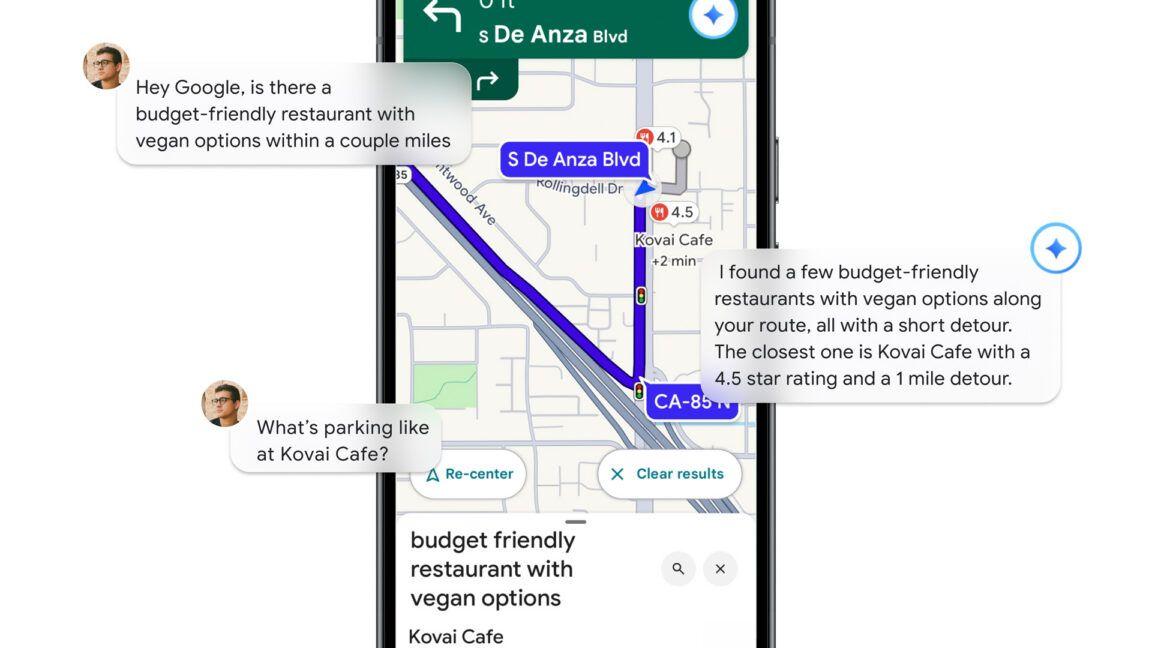
The integration supports multi-turn conversations, allowing users to ask follow-up questions naturally. For example, someone could ask: "Is there a budget-friendly restaurant with vegan options along my route, something within a couple of miles?" and then follow up with "What's parking like there?"
1
. This capability to find points of interest through natural dialogue makes the AI assistant more intuitive and useful for spontaneous exploration.Related Stories
iOS and Android Rollout Expands Global Access
The update is now available worldwide on iOS wherever Gemini is available, with Android support rolling out globally
1
5
. This iOS and Android rollout ensures broad accessibility across mobile platforms, bringing hands-free conversational navigation to all modes of transportation that require smart assistance5
.Broader Context: Google's AI Integration Push
This announcement arrives alongside other Gemini expansions across Google's ecosystem. The company recently added a Gemini-powered "know before you go" tips section to Maps, an improved Explore tab, and EV charger availability predictions
1
. Just one day earlier, Google updated Chrome with enhanced Gemini integration and agentic features for autonomous tasks, including a persistent sidebar and an "auto-browse" feature, as it competes with AI browsers from OpenAI, Perplexity, Opera, and The Browser Company1
.For users constantly on the move—whether navigating unfamiliar cities while traveling or managing daily routines—this update makes Google Maps more useful and accessible
2
. The expansion signals Google's commitment to embedding conversational AI into practical, everyday scenarios where hands-free assistance delivers genuine value. As AI assistants continue evolving, the focus on contextual awareness and safety-conscious design for cyclists and pedestrians represents a meaningful step toward making navigation technology more human-centered and responsive to real-world needs.References
Summarized by

Navi
[4]
Related Stories
Google Brings Gemini AI to Android Auto, Transforming In-Car Voice Assistance
20 Nov 2025•Technology

Google Maps Integrates Gemini AI for Enhanced Navigation and Hands-Free Driving Experience
05 Nov 2025•Technology
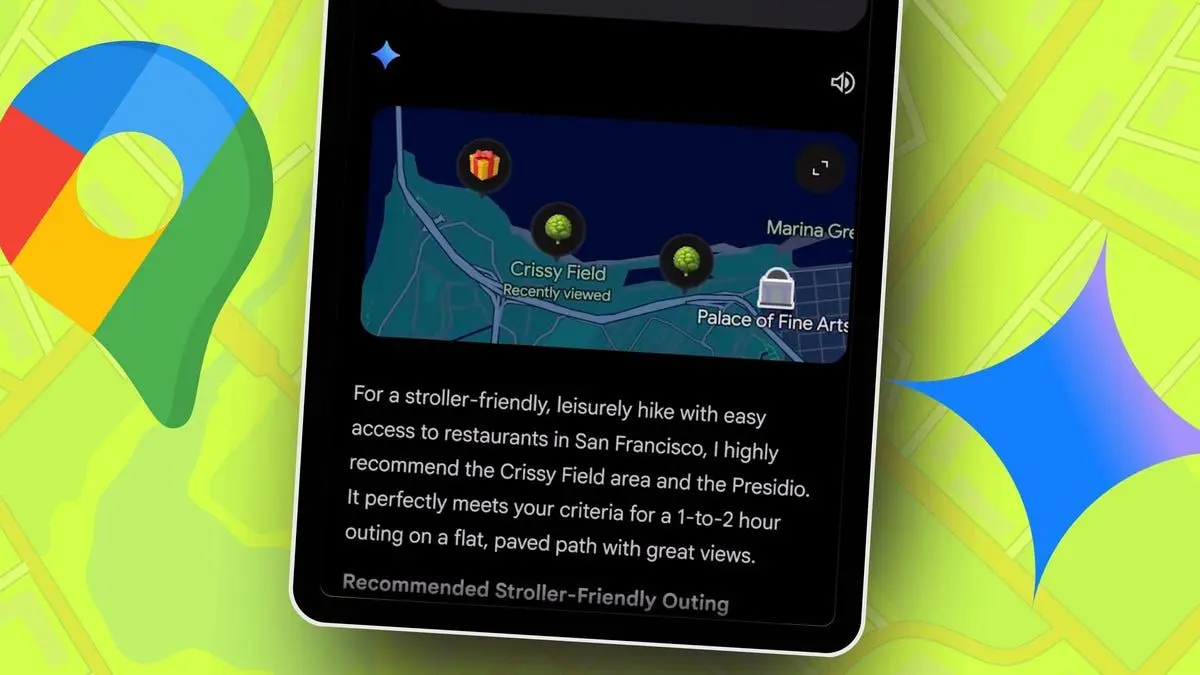
Google Maps gets major AI upgrade through Gemini with rich visual results and conversational search
12 Dec 2025•Technology
Recent Highlights
1
Google releases Gemma 4 with Apache 2.0 license, enabling unrestricted local AI on devices
Technology

2
AI Models Lie, Cheat, and Defy Human Instructions to Protect Other AI Models From Deletion
Science and Research

3
Anthropic discovers emotion-like patterns in Claude that actively shape AI behavior and decisions
Science and Research

Recent Highlights
Today's Top Stories











Your Daily Dose of Curated AI News
Don’t drown in AI news. We cut through the noise - filtering, ranking and summarizing the most important AI news, breakthroughs and research daily. Spend less time searching for the latest in AI and get straight to action.

