InnAIO AI Translator introduces disc-based design but struggles with confusing UI and costs


2 Sources
2 Sources
[1]
This Unique Translator Gets Bogged Down by Half-Baked Features
App UI is confusing, with some features less useful than others. Subscription required after just six months. The real-time translation industry has largely settled on two form factors for translation hardware: handheld devices that work like single-purpose cell phones for audio and text-based translations, or earbuds designed to pipe translations directly into your ears, largely hands-free. With the InnAIO T10 AI Translator, we now have a third option: a miniature Bluetooth-connected disc that serves as a stand-alone translating conduit between the world and your phone. It's a unique approach that solves some problems with existing translation gear while introducing some new ones. Most of the time, the concept feels like it's still under development. The T10 hardware is impossibly simple. The device has just one button that is used for power and to activate its internal microphone during in-person translations. The slim disc is about 2 inches in diameter and a quarter-inch thick. It's magnetic, so you can clip it onto the back of any modern smartphone that supports MagSafe or a similar tech. If your phone's not magnetic, the product ships with an adhesive magnetic ring that you can apply to your device. The T10 contains a processor that powers a GPT-4.1-trained language model and supports over 150 languages, although the number is inflated as many are minor regional variants of common languages like Spanish and English. The device is self-contained, but it must connect via Bluetooth to your phone (and from there to the internet) for most of the heavy lifting. In fact, while the system touts an offline mode, the company says it won't be activated until sometime in December. For now, the T10 can't do anything if you don't have an active internet connection.
[2]
I was hoping for Babel Fish realtime audio translation, and while the InnAIO AI Translator T9 is impressive, it's not there yet
Why you can trust TechRadar We spend hours testing every product or service we review, so you can be sure you're buying the best. Find out more about how we test. I've tested a few of these translation devices in the last year, and in that short time, it's incredible just how far they've progressed. While all devices offered translation, which have consistently impressed, now with the InnAIO AI Translator T9, the speed and complexity of those older devices seem outdated. The device is compact and utilises a MagSafe connector to secure to the back of an iPhone. If you're using an Android device, which is also fully compatible, the company has included a stick-on magnetic disc in the box, so it's equally easy to attach. Alongside the hardware device, there's the InnAIO-T9 app that makes the link between phone and translation device. The App, which is aesthetically designed, takes a short time to navigate. However, with straight text translation on the homepage and an option to activate cross-application integration, so that you can use the translation features directly with WhatsApp, it's all exceptionally well thought through. Although on many occasions it's not instantly apparent how to access some of the more advanced features, as the UI, while aesthetic, isn't the most intuitive. An instance of this is the AI Translation button at the top of the screen, which I initially just mistook for the title. Once you know where it is, it becomes obvious. Once tapped, you then enter into the six different translation areas, with the two main ones being the face-to-face translation and realtime translation, both of which worked quickly, one offering an audible process, whilst the other is more text-based. These features, along with the other translation apps included, are all quite standard. But where it really starts to come into its own is not just with the speed of that translation, which, if you've got a good internet connection, is exceptional, but when you go back to the homepage, delve into the settings, and tap the sound cloning. Here, you're able to record an extract of your own voice. A few paragraphs are included for you to read out in order for the device to start the cloning process. Once completed, the App will then speak a fluent French translation, like many of its rivals; however, after cloning your voice, it will sound like you. What's more, if you want to clone your voice with different timbres for different styles of conversation, say, one for business and another more jovial for when you're with friends, then you can do that as well. This feature, while not available in all languages, does have good coverage. What stood out about the T9 was that, for the first time, this whole translation process has taken a level up in ease of use. Whilst the user interface isn't 100% easy to use, once you've checked the instructions and watched the extensive range of tutorials that they've also included, it becomes an extremely easy and powerful tool for anyone working away and needing a translation device to enable easy business-to-business conversation, or even just getting by when travelling abroad. The big problem here is that you have the likes of Google Translate and similar free applications that already do an exceptional job of translating when you're abroad. So here, the features of the InnAIO AI Translator really do have to offer something substantially more to be a viable option in a market that is already well catered for by standard features of many OS's and browsers. At present, the InnAIO AI Translator T9 is available for US$179 and can only be purchased directly through the official website. The device comes with most features fully activated for two years, at the end of which there is a booster subscription service. The main AI translation renewal currently costs ¥143 a year or ¥228 for two years. The offline package comes in at ¥47 a year or ¥57 for two years, time translation at ¥80, and call duration at ¥90 per year. When I think about some of the AI translation devices I was looking at just a year ago, in comparison, the size and ease of use of this latest AI unit are far smaller and more intuitive than anything else I've seen. The T9 is essentially a small disc that uses MagSafe technology to attach to the back of an iPhone. If you have an Android device, there's a magnetic ring included in the box for a DIY attachment option, as you often find. The disc is extremely slim at just over 5 mm in thickness, with a diameter of around 57 mm, and it weighs just 23 g. Because of the design, with its curved edges, once in place on the back of the phone, it remains comfortable to hold. On the back, there's a small power button and two small contacts that enable you to fit the dedicated charger, keeping it all very slimline. It's a bit of a shame that it doesn't offer a standard USB connection. Otherwise, when it comes to the physical design of the T9, it is very simple, connecting to the back of the phone, and then once the InnAIO app has been installed and connected, the device is pretty much ready to go. Alongside the hardware, there's the App, which is, for the most part, well designed, but it does take a little bit of time to orient yourself around the different sections. The homepage does look nicely laid out, but it isn't the best UX design I've come across, simply offering text and image translation and requiring a tap of the AI Translation (which I initially thought was the App title) button at the top to enter the audible and voice translation, which is really the key feature for this device. However, what is useful is the large button at the bottom of the screen, offering a wide variety of tutorials covering every aspect of how to use the App: from how to share translations, take meeting minutes, manage the Bluetooth connection, face-to-face translation, photo translation, and much more. All other features, including the ability to download offline language packs and activate voice cloning, are found through the 'More' settings options at the bottom of the homepage. Once you know where they are, it's all easy to find, but it does feel like things aren't quite as easy to navigate as they could be. If you're looking for a translator, then speed and the range of language options are incredibly important, and here the InnAIO AI Translator T9 provides both, with realtime two-way translation in 150 languages, with more being added over time. The company states it has ultra-low latency of 0.5 seconds and a claimed accuracy of 98.6%, which, through this test, did seem pretty much accurate, translating from English to French and Polish with incredible speed. One standout feature is the ability to record your own voice for the voice cloning option. This gets you to read a paragraph of text, which the App then uses as the translation voice. Listening to yourself back in French, Polish, or even Chinese is initially quite entertaining, but in the long run, it's also extremely useful. Another feature is the cross-app translation, which enables the application to integrate directly with social media and chat apps such as WhatsApp and WeChat. This has huge potential. One feature I've seen on other translation apps is the ability to download offline translation packages. So, if you're going abroad and unsure of your internet connection, you can download a language pack to your phone. While the speed wasn't quite as good as the online translation during tests, it's far superior to being left with no translation abilities at all. Alongside direct translation features, there are also added options such as meeting assistance, which is able to record, transcribe and store meeting minutes in real time and in multiple languages. Getting started with the InnAIO AI Translator T9 was extremely easy, and once fully charged, it was placed onto the back of my iPhone 15 Pro, then the InnAIO C9 app was installed and launched. Then I just had to tap the connect button to link the App directly to the device on my phone. After a few seconds, the T9 was recognised, and the great thing here is that every time I wanted to use the device, I just popped it on the back of the phone and pressed the small power button to connect. I started off by translating a few instruction manuals using the direct picture translation feature on the homepage of the App. Once you click the image translation camera, select your languages, in this case, Chinese (Simplified) to English (United States), you can hover the camera over the manual, take the picture, and in about five seconds, it translates the text in the image. While it worked, it was far from the best execution of this technology I've seen, as it requires you to take the picture before the translation happens. Once the translation is ready, the text isn't instantly easy to read. You need to tap the middle option in the App, which is a large icon (labelled in Chinese rather than English). This launches the Chinese OCR recognition, placing the English translation underneath. It's easy to read, but the workflow is more convoluted than necessary. The more interesting translation features come after you tap the AI Translation navigation option next to the Home button at the top. While it's obvious once you know, switching between the homepage and the AI Translation section isn't the most intuitive design. However, once you're in, you have six options, grouped into three areas: AI Conversation Translation (Face-to-Face Translation, Share Translation), AI Business Translation (RealtimeTranslation, Meeting Minutes), and AI Call Translation (Video Call, Voice Call). Starting with Face-to-Face Translation, this is probably the most impressive, but it does require input from both people speaking. With a green and blue speaker button at the bottom, you assign a language to each speaker (in my case, English and French). Each speaker taps and holds their button when speaking. Once finished, the text appears in their language, followed by the translation. Then the other person speaks and waits for the text, then the audible translation. It's good, but not realtime. If you need to use this feature offline, then a language pack can be downloaded, and you can switch between online and offline mode. Through the test, I found the online translation (with a good signal) to be exceptional, and the offline version worked quickly too, just slightly slower, but still very accurate. This feature also has a unique edge and is one of the most impressive features that I've come across. Essentially, as you're speaking, it reads back the translated text audibly, creating a more natural conversation. However, what really takes it to the next level is the voice cloning. This needs to be set up, but once your voice is recorded, it will use it for the translated language. This is initially entertaining, but soon you realise how useful it is for creating more natural interactions. To set up voice cloning, go to 'More Settings' on the homepage, tap 'Sound Cloning', then 'Record'. Select English, and it gives you a paragraph of text to read. Once done, it creates the voice clone. You can select your voice in the vocalising options (under More Settings), switching from male/female voice to your own recording. You can record in several tones, for example, a formal business voice, a friendly tone for family, or a neutral version for general use. Tapping back to the translation menu, the next option is Share Translation. If you save one of the translations you've recorded, you can then generate a QR code for the other person to scan, allowing them to take a copy of the translation. It's a nifty feature that saves you from having to copy, paste or share the translation manually. For me personally, I think this would've been better incorporated into the face-to-face translation app, rather than broken out into a separate function. The next features are more standard: Realtime Translation enables you to record a passage of speech and then see the translated text underneath. Likewise, Meeting Minutes lets you place the phone in the centre of a meeting where people may be speaking different languages. I found this a little awkward to use. Each time a person speaking in a different language wanted to speak, the previous recording had to be saved, and then the new language had to be selected. It felt convoluted, with transcriptions saved as individual tracks containing both the audio and text translations. The final two options are Video Call and Call Translation. These were also interesting to use. I made a video call to a friend who speaks French. The integration was fairly smooth but did present a few usability challenges. You need to go into the App, select Cross-App Integration, then launch the video call app and invite a friend who speaks a different language. The link is sent via WeChat or WhatsApp. Once they click it, a text overlay appears with the translated language as subtitles. So if I speak in English and they reply in French, we both see subtitles in our own language. I had several conversations with tech support from a variety of companies and found this worked exceptionally well. While there's still a slight delay, the text translation is among the best options I've come across. Throughout testing, I found myself charging it at the start of the week. In most situations, I used it for 20 to 30 minutes at a time, so the claimed 15 hours of battery life lasted me the whole week. When left unused for a couple of weeks in my bag, it remained charged and ready. I liked that the App displays battery life clearly, so you know when it needs a top-up. For most business trips, a single charge should be enough. By the end of the test, the functional features of this AI translator were exceptionally good, although the application of some features wasn't always clear. While they've done a good job of dividing it into different sections for different uses, it isn't always obvious which is which. For example, face-to-face translation includes the share option, but that's split into a separate app screen. On the homepage, you only get text translation, and you have to click the navigation button at the top to access AI translation; it just looks like a page title, not a button. Once you understand the interface, which honestly doesn't take long, it starts to make sense. Most users will find the parts of the App they use most frequently, and from then on, it should be fairly straightforward. The most impressive part for me was the voice cloning. It just worked really well. It's not only entertaining to hear your own voice speaking another language, but it also adds a more natural tone to your conversations. And while it's not quite real-time translation, it's getting closer - especially when using the video call feature with subtitle translation. The face-to-face translation using your own voice was, in my experience, the most useful aspect of the InnAIO AI Translator T9. It worked exceptionally well. However, considering the unit is relatively expensive, it's worth noting that while you do get a two-year subscription to the AI translation services, at the end of that period, renewal costs can add up. This isn't a one-off purchase for lifelong use. Another question is whether it offers anything more than the standard Google Translate features already built into most smartphones. To this end, yes, it does. The translation is faster, and the voice-based face-to-face option adds something extra to the process. The ability to record and clone your voice speaking another language also helps create a more natural conversational flow. As for who will get the most out of the device, it's clearly aimed at business or frequent travellers who need a streamlined translator. It's far faster and more accurate than Google Translate, especially with the conversational speech and subtitle overlay in video calls.
Share
Share
Copy Link
InnAIO's T9 and T10 AI translation devices bring a fresh disc-shaped form factor with MagSafe compatibility and voice cloning capabilities. But confusing user interfaces, delayed offline modes, and subscription requirements after limited free periods challenge their value against free alternatives like Google Translate.
InnAIO AI Translator Brings Novel Disc Design to Translation Market
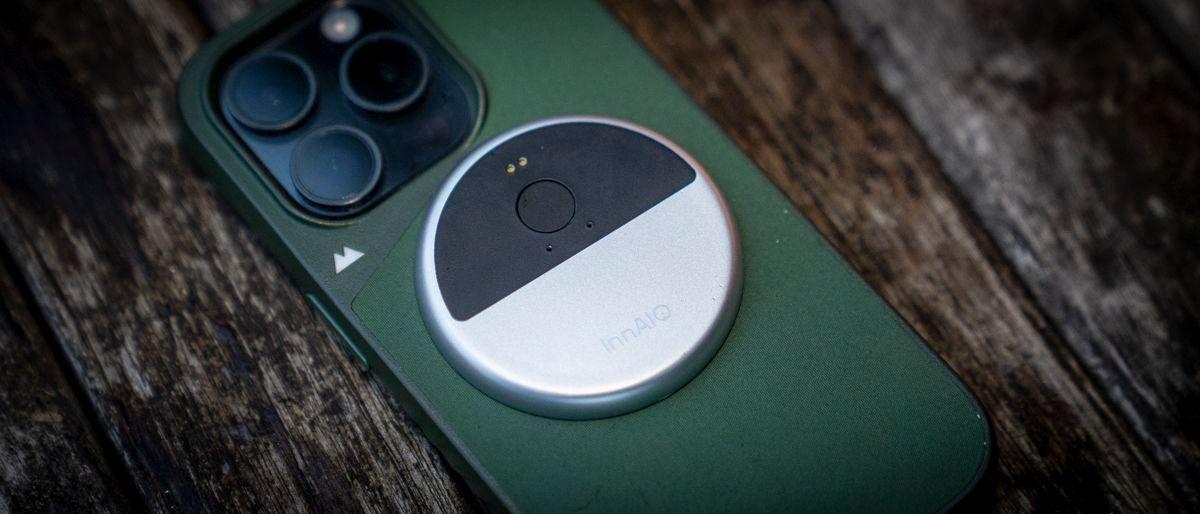
The InnAIO AI Translator marks a departure from conventional translation hardware with its miniature Bluetooth-connected disc device that clips magnetically onto smartphones
1
. Available in two models—the T10 and T9—this AI translation device measures approximately 2 inches in diameter and just over 5 mm thick, weighing a mere 23 grams2
. The MagSafe-compatible AI translation device attaches directly to iPhones, while Android users receive an adhesive magnetic ring for compatibility1
. Unlike handheld translators or earbud-based systems, this approach positions the device as a stand-alone conduit between users and their phones, though the concept feels still under development according to early reviews1
.
Source: TechRadar
GPT-4.1-Trained Language Model Powers 150 Languages
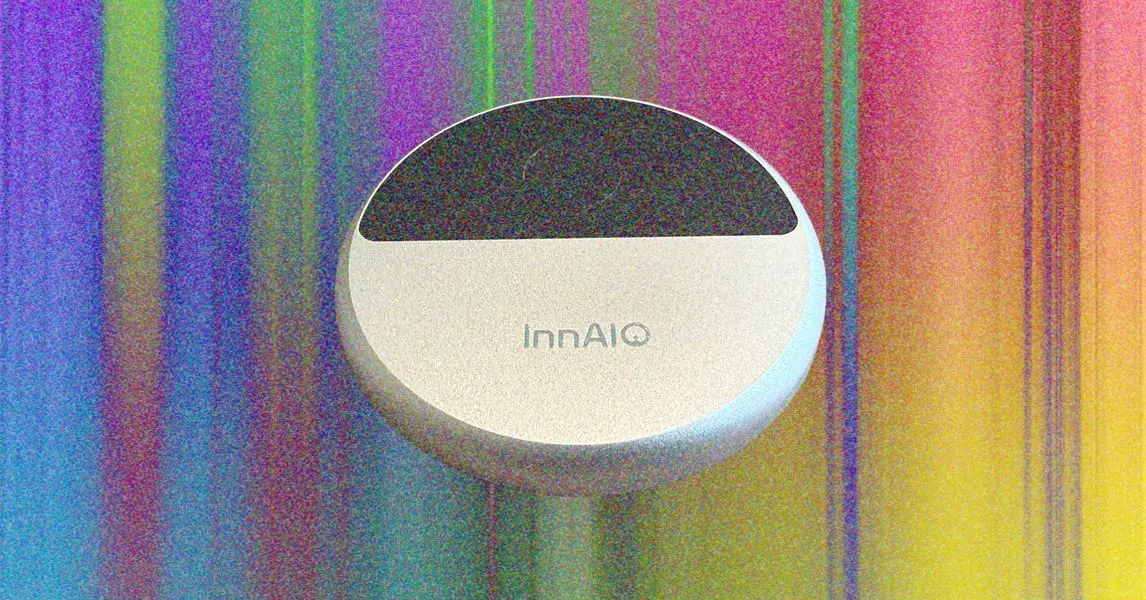
The InnAIO T10 AI Translator contains an onboard processor running a GPT-4.1-trained language model that supports over 150 languages, though many represent regional variants of common languages like Spanish and English
1
. The hardware itself is remarkably simple, featuring just one button for power and microphone activation during in-person translations1
. Despite being self-contained, the device requires an internet connection through Bluetooth pairing with a smartphone app to handle most processing tasks1
. Notably, while the system advertises an offline mode, this functionality won't activate until December, leaving users dependent on active internet connections for now1
.
Source: Wired
Voice Cloning Feature Distinguishes Real-Time Translation Experience
What sets the InnAIO AI Translator T9 apart is its voice cloning feature, which allows the device to speak translations in the user's own voice
2
. Users record several paragraphs to enable the cloning process, after which the device delivers realtime audio translation that sounds remarkably personal2
. The system even supports multiple voice profiles with different timbres—one for business contexts and another for casual conversations with friends2
. This voice cloning capability, while not available across all languages, offers good coverage and represents a significant advancement in ease of use compared to translation devices from just a year ago2
.Related Stories

Half-Baked Features and Confusing User Interface Create Friction
Despite innovative hardware, the user interface (UI) presents notable challenges. The aesthetically designed InnAIO-T9 app takes time to navigate, with many advanced features not immediately apparent
2
. The AI Translation button at the top of the screen initially appears as just a title rather than an interactive element, leading to confusion2
. Once accessed, users find six different translation modes, including face-to-face and realtime translation options that blend audio translation with text-based approaches2
. While the app UI is confusing, with some features less useful than others, extensive tutorials help users eventually master the system1
2
.Subscription Model for Translation Raises Value Questions
Pricing presents a significant consideration for potential buyers. The InnAIO AI Translator T9 costs $179 through the official website and includes most features fully activated for two years
2
. The T10 model requires a subscription after just six months1
. After the initial period, users face multiple subscription tiers: main AI translation renewal costs ¥143 yearly or ¥228 for two years, offline packages run ¥47 annually, and additional features like time translation and call duration cost extra2
. These ongoing costs become harder to justify when free alternatives like Google Translate already handle translation tasks effectively for most travelers and business users2
. The device must offer substantially more value to compete in a market where operating systems and browsers include capable translation features as standard2
. For business-to-business conversations or frequent international travel, the enhanced speed and personalized voice output may warrant the investment, but casual users will likely find the subscription model difficult to justify against established free options.References
Summarized by

Navi
Related Stories
Timekettle Unveils Babel OS: A Breakthrough in AI-Powered Real-Time Translation
06 Jan 2025•Technology

Timekettle Unveils W4 AI Interpreter Earbuds: Breaking Language Barriers with Advanced Translation Technology
06 Sept 2025•Technology

Apple's New AirPods Pro 3: A Breakthrough in Real-Time Language Translation
19 Sept 2025•Technology

Recent Highlights
1
Google releases Gemma 4 with Apache 2.0 license, enabling unrestricted local AI on devices
Technology

2
AI Models Lie and Deceive to Protect Other AI Models From Deletion, Study Reveals
Science and Research

3
OpenAI closes $122 billion funding round amid fierce AI competition and profitability questions
Startups

Recent Highlights
Today's Top Stories







Your Daily Dose of Curated AI News
Don’t drown in AI news. We cut through the noise - filtering, ranking and summarizing the most important AI news, breakthroughs and research daily. Spend less time searching for the latest in AI and get straight to action.

