Vibe coding slashes app development time from months to hours, but expertise still matters


4 Sources
4 Sources
[1]
I used Claude Code to vibe code an Apple Watch app in just 12 hours - instead of 2 months
Follow ZDNET: Add us as a preferred source on Google. ZDNET's key takeaways * Building for Apple Watch is harder than for iPhone, despite smaller scope. * Claude Code felt like a collaborative teammate, not automation. * Iterative AI coding made short, productive work sessions possible. After using Claude Code to build an iPhone and a Mac version of my filament management app, I never expected the Apple Watch implementation to give me such a hard time. That was clearly a failure of imagination. The process of finding the most essential features and making them fit on the very tiniest of Apple screens turned out to be quite a challenge. Also: 10 things I wish I knew before trusting Claude Code to build my iPhone app It is true that I got the bulk of the interface designed and implemented in about two hours. But that was just a prototype that showed I could get something working. The test data did not yet work correctly on the Xcode simulator. But as soon as I moved the app to my physical watch and tried to make it work with the 120+ data records I had already collected in the iPhone app, we had a bit of a meltdown in the Xcode process that was monitoring the app performance. Back to the beginning When I started on both the iPhone and Mac apps, I had a very clear idea of the features and functionality I wanted in the end product. I was not exactly sure what would work on the Apple Watch. Clearly, NFC scanning and taking photos would not be an option. What features were important, and what features could I leave out? Making the Apple Watch app was going to be all about subtraction. You're probably familiar with the way Michelangelo described his sculptures. He's famous for saying that his sculptures already existed within the marble, and his task was simply to remove the excess stone to reveal them. That's the spirit behind the Apple Watch app. The app exists on the iPhone, but we need to remove enough code to make it viable on the tiny screen. Also: Claude Code made an astonishing $1B in 6 months - and my own AI-coded iPhone app shows why This time, I started by asking Claude Code for its recommendations on features. I prompted, "I want to build an apple watch app. Clearly, it will need to be a very small subset of the iOS app, without NFC and without taking photos. Think about the project and its uses, and propose to me the features and capabilities of an Apple Watch app." Claude did a fairly good job. It got a little carried away with the idea of creating a Watch complication (the little icon on the watch's home screen) to indicate how much filament was left (but since there are hundreds of spools, that was not a helpful or useful feature). I also do not have, or need, a smart tracking method for how much filament is on any given spool. I simply update the database when I remember and if I care enough to show approximate filament percentage. It's probably the least important feature of the entire app. Once we got past Claude's obsession with Watch complications, we discussed use cases. I wanted to be able to look at my watch and see what's loaded on any given 3D printer. I wanted to be able to use only my Apple Watch to record moving a spool from one location to another in case I did not bring my phone into the Fab Lab. And I wanted to be able to do a quick search to see what colors and materials I had for whatever projects I would be planning. Here's what I finally decided I wanted to work on the watch: * Browse and filter spools by material, color, and vendor * View spool details and current assignment * Move spools between machines and storage locations * Mark spools as complete * Browse machines, storage locations, and colors * Dynamically sync data between phone, Mac, and watch That meant I was going to leave a lot out, including: * Quick Move (NFC-based production workflow) * Read and write NFC tags * Create, edit, and delete spools * Manage machines and storage locations * Manage reference data (vendors, colors, materials, etc.) * View and restore completed spools with statistics * Backup and restore * Settings and tools * iOS Shortcuts integration With the feature set established, I tasked Claude Code with building the app. The early builds I used test data for the earliest builds and tested the app functionality using the simulator built into Xcode. The home screen was missing the machines button. Instead of listing spools, it called that feature "inventory." It also built a filter button (shown with the arrow) that did not do anything. When I finally got the Spools feature to work, the app showed spool use percentages, sometimes with a vendor name attached. Then Claude wanted to arbitrarily limit the number of spools shown to the first 25. I explained that the whole purpose of the app was to be able to look at the entire spool list. Claude then went ahead and implemented the app without the 25-spool limit. Although neither the AI nor I realized it at the time, that change would prove to be temporarily fatal. Practical limits Eventually, I got all the screens to work properly. I decided I wanted to be able to see a photo of any spool in the inventory. Photos are fairly big. They take a hefty amount of space to store on-device. While my Apple Watch Series 9 has 1GB of RAM and a fairly large 64GB of storage, that has to be shared among all the apps running on the device. Bringing down hundreds of photos onto the Watch can (and did) overwhelm the device's memory buffer. Also: How to install and configure Claude Code, step by step According to Claude, the Apple Watch iCloud sync brings down everything in its data structure at once. With the architecture I had implemented, you cannot just fetch one photo at a time when that photo is requested. Claude did offer to completely rearchitect all of the apps to allow this, but long experience has shown me that making huge changes for small benefits leads to madness (and breakage). So, I discussed the issue with Claude (in very much the same way I would have with a human programmer). We decided to bifurcate the main data structure, keeping everything identical except for the photos. The iPhone and Mac versions of the data structure would include photo references, while the Watch version would not. Claude Code then implemented this, and suddenly, I had a working Apple Watch app. A collaborative experience More than with either the iPhone or the Mac app versions, building the Watch app was a collaborative experience with Claude Code. I asked its opinions, let it make suggestions, tested out those suggestions, corrected when they went too far afield or just did not work, and then revised and iterated interactively. Even though the Watch app is the smallest of the apps, or possibly because it's the smallest of the apps, developing it to the point of productive use took longer than the other two versions. The challenge was keeping the original architecture intact yet building an app unique and appropriate for the limits of the Watch device. Also: Worried about AI coding? Why the invention of power tools is the blueprint for your career future As I've mentioned previously, getting back into coding with the AI does not take the amount of spin-up context-switching time that hand line-by-line coding always does for me. As such, I could dip into the process for 20 minutes at a time and still get something done rather than having to allocate a couple of days to come back up to speed on the entire code architecture. I am quite satisfied with the Watch implementation. I've started using it as part of my 3D printing project workflow. My guess, based on the size of the project, is that making this app the old-fashioned way would have taken 6-8 weeks of work time, probably spread over about half a year or so of weekends. But using Claude Code, I worked on the Watch app over the course of about 12 hours in actual time, spread out over about three weeks. I was excited to see an actual app in the first two hours and spent the rest of the time refining and tuning it to my liking. Although I've built iPhone and Mac apps by hand before using an AI for coding help, I had never built an Apple Watch app before. Working with Claude to develop my first Apple Watch app was a productivity win. Also: Can a newbie really vibe code an app? I tried Cursor and Replit to find out What about you? Have you tried using AI tools like Claude Code for real-world app development, or are you still on the fence? How do you decide which features belong on a constrained device like the Apple Watch? Have you run into performance or data-sync limits when scaling an app across devices? Do you think AI-assisted coding meaningfully changes how long projects like this should take? Let us know in the comments below. You can follow my day-to-day project updates on social media. Be sure to subscribe to my weekly update newsletter, and follow me on Twitter/X at @DavidGewirtz, on Facebook at Facebook.com/DavidGewirtz, on Instagram at Instagram.com/DavidGewirtz, on Bluesky at @DavidGewirtz.com, and on YouTube at YouTube.com/DavidGewirtzTV.
[2]
I Can't Program at All. My First Vibe Coding Experiment Went Shockingly Well
(Credit:Zain bin Awais/PCMag Composite;Claude;Anthropic;membio/via Getty Images) As someone who's written a fair amount about how AI, specifically vibe coding, can turn anyone into a programmer, I decided I had to actually try it for myself. Does vibe coding live up to all the hype? Claude Code is the tool I was most curious about, having interviewed its founder and tracked its rise in popularity from its June debut. Anthropic now calls it "the best coding model in the world," though that kind of claim is hard to back up. Plus, AI companies tend to use hyperbolic language like "the smartest" and "the best" model ever. I called up my contacts at Anthropic and told them I wanted to use Claude Code to complete a small project, all on my own. They were excited, but we agreed it might be a stretch. To start, there's no public-facing guide for non-programmers on how to set up and use Claude Code. So, Anthropic created one especially for me, with FAQs like "What is a Terminal?" -- something 100% of programmers already know, but I needed. Three days and a few hours later, I had coded a custom website with minimal issues. It was an eye-opening experience and a ton of fun. The website addresses a problem I encountered while house hunting in the New York City metro area -- determining the walking distance to public transit stops. I had to constantly copy and paste addresses from Zillow or Redfin into Google Maps, configure the directions, view the walk time, and repeat. Mundane, to say the least. My Claude-Coded website pulls listings from Redfin and automatically calculates the walk time to the nearest train stop. The data is displayed in a simple interface with a map and key details about each home. Here's how I did it, and how to get started with your own project. How to Choose a Vibe Coding Tool Virtually all AI chatbots can generate snippets of code, but a proper vibe coding tool takes programming to the next level. Many have direct access to files on your computer and can see the entire codebase . That's why professional engineers are still the primary audience. In addition to Claude Code, some of the biggest names in this space include OpenAI's Codex, GitHub Copilot, Replit, Lovable, and Windsurf, whose VP of product and marketing we interviewed for our vibe coding explainer. All of these will require a little bit of technical know-how to set up. Here's how I did it with Claude Code. Installing Claude Code on Your PC First things first, Claude Code requires a subscription, either the $17/month Pro or $100/month Max plan. You cannot access it through the web-based Claude chatbot, which is free. Anthropic set me up with the $100/month Max plan to get started, but that was probably overkill. My humble real estate website would've likely worked with the $17 Pro plan. Once you sign up online, the next steps depend on whether you're on Windows or macOS, though the principles are the same for both. I'm on a Mac, so I'll focus on that. (Anthropic also offers bare-bones instructions for other operating systems.) First, open the Terminal app. "The terminal is a built-in app on your Mac that lets you interact with your computer by typing commands," says Anthropic's guide. "Think of it as a different way to 'talk' to your computer to control it more directly. It's also the primary interface for accessing Claude Code." Copy and paste this command into your terminal: curl -fsSL https://claude.ai/install.sh | bash. Press Enter. You'll see some text, followed by a message indicating that the installation was successful. But don't make the same mistake I did and think it was ready to go. Before the "success" message, you may see a small note in yellow font with additional commands to run. Do whatever is there, and then close and re-open the terminal. In a new terminal window, type claude and press Enter. It will then ask you if you want to log in with your Claude account or through an API for professionals. Select your choice with keyboard arrows, not your mouse, and then press Enter. I selected number one below, linked to my account, and within seconds, I was ready to rock. Picking a Project: What Are the Options? Now I had the world of AI coding at my fingertips, but the big question was what did I want to make? A Windsurf exec I interviewed once mentioned that beginners could easily create a custom version of the game Wordle. I also considered creating an event invitation generator, such as for holiday or birthday parties, but Claude does not have image generation. (That's a notable difference between its competitors, given the increasing commodification of chatbots.) But neither option seemed truly useful, so I reflected on problems I encountered in the last year that could be solved with technology. House hunting was a particular slog, made more complicated by my need to know how far each listing was from the nearest train station. It was a clear gap in Zillow, so I thought maybe I could solve it on my own. Here's the prompt I entered that kicked off my project, using a nearby town (not where I was looking), but that runs along the same type of train line. 'Code' (or Chat) Your Heart Out From here, it was all simple, natural-language-based chatting. However, I brought some basic technical know-how to the chat that helped move the conversation along. For example, I know that websites need data to populate them, and that data needs to be publicly available for me to use it. One of the first things I asked Claude was if Zillow had an API that made listing data public, and also if Google Maps had one, so it could calculate each listing's distance to the station stops. Claude Code thought for a few seconds and then told me Zillow did have a public API, and it was not only free but also sufficient for what I wanted to do. Win! But Google's would cost money, so it recommended an alternative, and I blindly went with it. (Claude Code will always ask your permission and check in with suggestions, which is great, but a novice like me might often be tempted to say "yes" no matter what, and hope for the best. Do so at your own risk!) The tool also looked up a wealth of information on its own. For example, it found all the New Jersey Transit train stops in the town of Montclair without me having to include them in the prompt. It proactively listed them so I could confirm. It designed the website with no aesthetic input from me required, found the links to the APIs, and sent me instructions on how to sign up. Within 10 minutes of me sending my first prompt, it had created the basic website framework for me to run on my computer. I viewed it by typing this into my browser search bar: http://localhost:8000. It looked great, or at least entirely sufficient. But keep in mind, these types of sites run locally on your machine. You cannot share them with your friends through a live web link. That would require registering and paying for a domain name, which Claude could also likely guide you through. The last step was to connect to those APIs and populate the data on the left and right sides of the page, shown below. That's where my trouble started. Troubleshooting, Refining, and One Big Snag I opened the websites Claude sent me to connect to the APIs, and followed its simple instructions: Create a free account, search for the APIs in the site's menu, and paste a unique identifier back into Claude. I did this twice, once for Zillow, and once for the maps. It was a little confusing, but ultimately I found the identifiers and Claude accepted them. I saw my terminal fill up with code and text from Claude as it showed the work it was doing. Finally, it said, "Ok, you're connected," and asked me to refresh the website to see the data. It didn't work as expected. Only the map appeared, but no housing listings. The map also showed incorrect locations for the transit stops. As you can see below, the red icons (transit stops) are not on the main train track that runs through the middle of the image. I pointed this out to Claude, however, and it immediately recalibrated and fixed it. So that left the main issue: No listings. The website showed a 404 error for the Zillow API. I pasted the error message into Claude and asked, "Here's the error code. What's going on?" It said it figured out the issue and asked me to refresh, but I still saw no listings. This happened four times, including in another browser, which it asked me to try. I double-checked that the identifiers I pasted in were correct, and Claude ran some tests on the connection to Zillow. Nothing worked. We were stuck in a loop of proposing options, which I'd approve, and they failed to flow through to the website. I finally got fed up and asked it to stop and think of a new plan. It suggested three solutions, one of which was to try using Redfin data. I selected that option, and it began working on it. Happily, after another refresh, the listings appeared! (I later asked a programmer friend why the Zillow connection didn't work. They looked into it and could easily see that the public, free Zillow API had been discontinued -- a big detail Claude had missed.) The map now showed four green icons, one for each listing, with a drawing of a house inside. But I couldn't see the listings themselves, which should have appeared on the right side of the image below. "Why is the UI glitching and not fully showing the listings?" I asked Claude. It would flash and show them only for a split second. Claude then made a few changes to the frontend, and after some back-and-forth, we got it up and running. (Not that any of them would've been in my budget! That $6,500,000 listing is a multi-family property, it turns out, but the listing agent uploaded it to Redfin and Zillow as a single-family home, so it appeared in the data.) Final Checks: Is The Right Information in There? Now that I could see the listings, I was ready to check the data quality. Everything was correct when I cross-referenced Redfin -- the price, location, days on market, bedrooms, and bathrooms -- but the main datapoint I wanted, the walk time, was consistently three to five minutes shorter on my Claude-Coded website than Google Maps. I pointed the discrepancy out to Claude, and it claimed the mapping API we used was calculating the time as a crow flies, not someone walking on the street. To fix it, it offered to increase the "circuity factor" in the equation it was using to calculate walk time. After a few rounds of it increasing the circuity factor, and me validating the results on Google Maps, the walk time was nearly the same on my site. But that meant only two listings now met my criteria of being less than a 15-minute walk to station, down from five. As a final step, I asked it to add a walk time filter to the site that I could adjust myself in case I wanted to see homes slightly further out. It came up with a sliding scale filter that I could drag to increase or decrease walk time. Presumably, it could do the same for price, bedrooms, bathrooms, and any other datapoint you asked it to pull from Redfin -- your own personal house hunting website, customized to your needs. Claude Code Even Helped Organize My Files to Write This Story So, I did it! This happened over the course of three days, but only an hour or two on each day. And I didn't code anything; I just talked to a chatbot. Lastly, Claude even helped me organize my materials to write this article. Since the terminal can access my local machine directly, it's more integrated into my computer than a web-based chatbot. It can search, organize, and modify files on my device. I asked it to look through all the screenshots I had taken, which were automatically saved to my desktop, and to organize them. "Can you find all the screenshots of Claude Code and put them in a folder named "Claude Code" on my desktop?" I asked it. "Also, rename them 'Terminal' with a unique number, starting with 1, and assign the number based on the timestamp, starting with the earliest one." It worked for the most part, although I manually went through and found a few that it had missed. I then asked it to do the same with the screenshots of the Montclair Homes website we created, naming them Website 1, 2, 3, etc. based on timestamp. I asked it to put them in a sub-folder within the new Claude Code folder. That also worked, though I again had to clean them up. It was a helpful starting point, in the end, though not perfect. Finally, since I had very little idea what Claude Code actually did, technically speaking, I asked it for a summary to make sure I represented it accurately. I'll let you read that for yourself below. In the end, it was a miraculous experience. I can see why software engineers often use AI-coding assistants daily, once they start, according to a recent Gallup survey -- far more than the general public leans on all-purpose chatbots. They're hooked, and I can see why.
[3]
I used Claude Code to vibe code a Mac app in 8 hours, and it was more work than magic
AI shines when developers relentlessly lead, test, and correct. Over all my years in the software business, I've built software using two fundamental techniques. The first technique was writing code myself, line-by-line. I enjoy that practice, though it can be incredibly time-consuming. If you hit a flow state, you can really groove on the process. The second technique was managing other coders. This was usually a force multiplier, because those developers were often better and faster at line-by-line coding than I was. I could manage a few developers, moving projects along faster. But I didn't enjoy that practice as much. There was never a flow state. It was more like a constant level of planning, convincing, cajoling, correcting, and a bit of chaos. People are going to people, and if you're a manager, that's what you get. Also: 10 things I wish I knew before trusting Claude Code to build my iPhone app There is no flow state that comes from building a Mac app using AI with Claude Code. If you've ever managed programmers, you know what using Claude Code feels like. It is an enormous force multiplier, but you're going to spend most of your time cajoling and correcting, and some of your time trying to chart your way out of AI-generated chaos. As with managing human programmers, you're going to be much more successful with Claude Code if you know how to code and you understand the underlying technology. That way, you can guide the AI on architectural and design decisions as well as simply defining features. My ZDNET colleague Tiernan Ray recently tried his hand at vibe coding. He describes himself as a "newbie, with limited programming knowledge." His conclusion: "I will say that using these tools gave me a greater appreciation for programmers." Also: I tried vibe coding an app as a beginner - here's what Cursor and Replit taught me I'm telling you this to set expectations. I've been programming since the time of wooden ships and iron programmers. The benefits I, and by extension any experienced developer, will get from a tool like Claude Code may be available to intrepid hungry-to-learn non-programmers as well. But don't expect to wave a magic wand and get an app suitable for market just because you're using an AI. With that, let's dive into my Mac project. I started with the iPhone app I previously built using Claude Code. The purpose of this app is to manage 3D printing filament spools dynamically. I have 120 spools that live on four storage racks of five shelves each. The spools are constantly moved between the racks and eight 3D printers, five of which can use four spools at once, one which can use eight spools, and two which are limited to just one spool each. The iPhone app uses NFC tags to make it super easy to track the movement of these spools and uses the built-in camera to grab images of each spool for reference. I've been using this app daily for about two months now, and it's a huge win for my workflow. Also: Vibe coding feels magical, but it can sink your business fast - here's how But now, I want to make it work on the Mac. I also want to make it work on my Apple Watch, but that's a story for a different article. I initiate most of my print jobs over the network from my Mac, so being able to clearly see what materials and colors I have available, and what's already been allocated, can prove helpful. I could use my phone, of course. But I'd like to be able to just open a Mac application on my desktop and see what I have in inventory. The iPhone app is built using Swift and SwiftUI in Apple's Xcode development environment. I use Claude Code in the terminal, where it works with Xcode to write the code. There is a lot of crossover between the Mac's UI and the iPhone UI, particularly when using Swift. Fortunately, porting to the Mac did not require an entire rewrite. But it did require a lot of rework. First, there was the question of the Mac's limitations. My Mac Studio doesn't have a camera, and the Mac doesn't support NFC scanning. So while I wanted to retain the NFC and photo data gathered by the iPhone app, the Mac isn't able to scan or manage it. I also wanted the Mac to sync instantly and completely with the iPhone app. Whatever spool data existed on the iPhone should be visible from the Mac. Fortunately, Apple has built a fairly extensive library for sharing data via iCloud. Also: What is AI vibe coding? It's all the rage but it's not for everyone - here's why I knew I was going to want to share my data when I started the iPhone app, so I built the iCloud architecture into the iPhone app from the beginning. When I started with the Mac app, it was just a matter of tapping into that data and bringing it down to the computer as well as the phone. That was my starting point. I made sure to make a full backup of the app directory. I also checked everything into GitHub for source control and management. Then I fired up Claude Code, told it I wanted it to branch my local Git repo, and explained I wanted to build a Mac app based on the work done on the iPhone app. As part of that first prompt, I explained that NFC and camera features didn't need to be ported, but the iCloud architecture would be. Ten minutes later, I had a Mac app. It was crap. It looked terrible. Every time the spool list came up, it took forever to fill in. But getting from nothing to first run in ten minutes took about ten days less than it would have taken me had I done it line-by-line. It took a few rounds of running Xcode's build tool, waiting for its inevitable errors and warnings, sharing those errors and warnings with Claude, and repeating. But after a while, the app was functional, although nothing like what I wanted to eventually end up with. One area that Claude had some initial difficulty with was reconciling that the Mac has windows that resize. As such, the UI elements have to scale and resize accordingly. This is where building up Claude's knowledge base became enormously important. Also: 10 professional developers on vibe coding's true promise and peril As I did with the iPhone app, I instructed Claude Code to build in notes and status updates about everything it worked on, as well as lessons we learned. So once Claude finally understood that windows resize, that became a rule embedded in the project instructions. On the iPhone, you transition from screen to screen, all in a vertical orientation. But on the Mac, I chose to make a three-pane screen. The left pane contains the main option buttons, the middle pane contains the list of spools, and the rightmost pane contains the spool data. It didn't take too long to get that working, but it took a large number of rounds of back-and-forth prompts to get it to look nice. There isn't any one particularly standout prompt I can share with you, but I can tell you that I described what I wanted to see, had it move and rearrange items, and add styling to sections of the display. I did that with Claude a lot. Also: I let Anthropic's Claude Cowork loose on my files, and it was both brilliant and scary Unfortunately, adding the three-pane display to the Mac implementation somehow broke the iPhone app. Here's where being a programmer helps, because I finally figured out that Claude was probably trying to share screens across apps. When I explicitly told it to create new interface screens for the Mac and then repair the iPhone ones, things worked much better. Architecturally, we had to deal with speed issues. The spool list was slow because it loaded full-resolution photos for every row. The fix was a thumbnail caching system that creates small 128-pixel versions of photos, stores them on disk, and generates them in the background so the list scrolls smoothly even with hundreds of spools. We also had to explore how to refresh that list, reduce wait time for image creation, and add purging features. At the beginning of this article, I mentioned my two modes of software creation: coding and managing. When working with Claude Code, I spent most of my time managing. In fact, the best mindset I could find was one where I treat the AI the same way I'd treat a remote human programmer. I gave it assignments. I asked questions. I asked for its opinion. I pointed out errors. I tested, tested, and tested some more. Then I tested again. Also: The best free AI for coding in 2025 - only 3 make the cut now Claude did as well in producing this project as any programmer I've assigned work to in the past. There were times when Claude was obtuse and stubborn, but my human programmers had similar moments of uncooperativeness. Without a doubt, managing the AI was not nearly as pleasant an experience as coding on my own. On the other hand, we created a full Mac app that does exactly what I want in about 8 hours of project time, spread over about a month of real time. If you're thinking about making a Mac app with Claude Code, or any AI for that matter, my recommendation is that you work slowly, add features one-by-one, and refine. Then, once the project reaches a somewhat functional state, switch 90% of your attention to testing. Don't assume that anything will be built as you have asked. Claude left out some key features and didn't implement them until I pointed them out to it. Also: Coding with AI? My top 5 tips for vetting its output - and staying out of trouble But without a doubt, the productivity benefits were huge. I have a special custom-purpose app now on my iPhone and my Mac designed specifically for my workflow. And it works. I still haven't decided if I want to turn it into a product or not, but even if I never sell it, the few hundred bucks I spent on Claude Code Max over the past three months has definitely been worth it. Stay tuned. My next project is moving my app to the Apple Watch. What about you? Have you tried building an app using AI tools like Claude Code, either as a developer or as someone still learning to code? Did it feel more like collaborating with a teammate or managing one? What worked well for you, what broke in unexpected ways, and do you see yourself trusting AI for larger projects? Let us know in the comments below.
[4]
I tried vibe coding an app as a beginner - here's what Cursor and Replit taught me
And so I wondered: Could a newbie like me, with limited programming knowledge, talk my way through creating an app? Also: I let Anthropic's Claude Cowork loose on my files, and it was both brilliant and scary Nvidia CEO Jensen Huang has said that vibe coding English is going to be the new programming language. Armed with that blessing, I set out to try. I had a blast watching how Cursor and the others can automatically perform tasks such as setting up the "virtual environment," finding and installing code libraries, installing and running a local server, and making constant tweaks. The fact that an app can do all that with a simple natural-language prompt from the user is a wonder to behold. After several days of experimentation with multiple tools, I managed to get a small, simple data analysis program running. It was a promising start, but it was also clear I couldn't get very far from there without some actual programming skills. Also: Why AI coding tools like Cursor and Replit are doomed - and what comes next Too many times, PC-based tools such as Cursor and Microsoft Visual Studio bounced me into a terminal window and asked me to run various command-line tasks. Although I know my way around a command line, it was a tedious extra step -- multiple steps, in fact. I'm sure a non-programmer with less patience than I would have given up. While less taxing, cloud offerings such as Replit and Lovable quickly had me burning through credits as I tried to figure out what changes my app needed to move forward. And, putting my private data in the cloud was something that gave me anxiety. Most people who use AI use a chatbot to have conversations, analyze a handful of documents, or maybe draw a picture. All the coding tools, Cursor and the rest, operate on the same principle: You type into a prompt, and the program takes a project description in even vague terms, formulates a plan of attack, sets up the requisite code files, and automatically generates a user interface for your new program, usually one running in a web browser. Also: Worried about AI coding? Why the invention of power tools is the blueprint for your career future My intended vibe coding project: a database analysis tool that can ingest word-processing documents and search them for patterns. My vision was to add a section to my newsletter's website where a reader could perform not just a keyword search of my 1,731 articles, but also more complex free-form queries, such as, "How has the position of Nvidia as a company and an investment changed over the past five years?" My articles, which have hundreds of mentions of Nvidia, could yield a kind of executive summary that isn't available just by asking the same question in ChatGPT or Perplexity, because they don't have my special articles. I started with Cursor because it's the brand I've heard of most among the tools, so I figured I should start with the name on everyone's lips. I downloaded and installed the MacOS binary as easily as any other Mac download. Cursor offers a 7-day free trial for the Pro version, but I decided to skip it and start with the free plan. To a non-coder, the first screen in Cursor after sign-up can be daunting. It asked if I wanted to "open project," "code repo," or "Connect via SSH." Although I knew nothing about how this program worked, I knew it used a chat paradigm like ChatGPT. I figured out how to get to the "agent" side panel -- a shortcut: pressing command+I on the keyboard -- and I described my intended project. Also: This 'critical' Cursor security flaw could expose your code to malware - how to fix it All these programs, both those running locally on Mac or PC and those running as a cloud app in a web browser, have the same three essential places where you type or observe results: The agent panel, where you prompt the model, familiar to us all; the terminal display, where you see a traditional command line, daunting to all but the initiated; and a preview of your app's graphical user interface, GUI, the end result of your work. It's all about going back and forth between the three as you make requests, tweak things, see results, and repeat. The first several minutes with Cursor were electrifying. Cursor described all the requirements of the project, which I wouldn't have known; it then offered to set up the file structure for the project on my hard drive, connect to the database, install necessary Python files, etc. I asked if I could use Mac's .Pages word processing files, and was relieved to have Cursor tell me it would install the requisite "parser" from an external code library. Cursor told me it would install some Python libraries needed for the project. Then the program restarted itself, and my chat history from the previous hour was nowhere to be found. There was no chat history whatsoever; it was blank. That meant the plans we discussed for what we were going to build were gone. Also: 10 things I wish I knew before trusting Claude Code to build my iPhone app I spent an hour on the matter and learned that other people have had their chat histories disappear. The help forum, and a new chat in the agent window about the problem, made it clear that this is just one of the things that can happen. The chat history for a project is stored in a "workspace" folder, inside the ~Library folder of the current user account on the Mac hard drive. But, there's no way to force Cursor to retrieve any of that chat history if it's not doing it automatically. That's a non-starter for me. I'm not going to work with a program that can't reliably maintain chat history, given that chat history is one of the key innovations of vibe coding. I gave up on Cursor and moved on to Replit. Replit is all online, in the cloud, no download. I wasn't as happy with that because I'd like to use my own data offline, on my Mac, but I decided, for the sake of the experiment, to take the risk of exposing my data. I described the project goal, and Replit got to work setting up the environment, with a bare-bones app window ready in preview mode within about 15 minutes. I requested the ability to use .Pages files as data, and it adjusted the environment variables. Also: Vibe coding feels magical, but it can sink your business fast - here's how All these programs hosted in the cloud have a set amount of capacity before you have to stop and wait to work again. I quickly ran through the allotment on Replit before I had a chance to do anything with my newly created app. With the first big query I tried, the app failed because it said no data had been uploaded, even though all my data sources were selected in the side panel. Just as I described the problem of missing files in Replit, I hit the free plan's quota and was told I would have to wait 24 hours to resume work unless I upgraded to a paid plan. While I contemplated whether to trade up to the paid plan with Replit, I knew I still wanted to work on something on the local machine rather than in the cloud. So, I went next to Microsoft's Visual Studio, which has the built-in GitHub Copilot function that provides chat-based programming just like Cursor and Replit. Visual Studio has a dedicated Mac IDE just like Cursor. Although Visual Studio can request permission to run terminal commands, instead, most of the time it provided code snippets that I had to copy and paste into the command line. Also: After coding catastrophe, Replit says its new AI agent checks its own work - here's how to try it Finally, after a couple of hours of this terminal business, all technical issues were resolved, and a prototype analysis app was up and running in the web browser on the local server. This was the farthest I'd gotten, so I was ecstatic! Then came the really hard part. What Visual Studio had produced was a kind of simple text-string-matching function that would simply see if a given string of text could be found in a file. That's not analysis, it's just keyword-matching. I tried prompting Visual Studio Copilot to refine the analysis, but hours of trial-and-error in Visual Studio yielded no improvements. It became clear at this point that building an analysis tool that can actually perform textual analysis is a complex matter. It means not merely being able to code, or to have Copilot code; it means understanding what the analysis function consists of, which would affect choices made. I still wasn't ready to pay Replit money, so I moved on to Lovable, which offers a free cloud-based setup that seems a lot like many of the others. I was delighted to see how quickly Lovable created a web front-end to upload files and perform a textual analysis. Also, Lovable has the simplest user interface, hiding a lot of the code details. Out of the four with which I worked, Lovable is the most like using ChatGPT, Gemini, or Perplexity Also: How to create your first iPhone app with AI - no coding experience needed However, I quickly reached the same conclusion as with Visual Studio: To get meaningful analysis, more work would be needed. I told Lovable I wanted analysis of "themes, ideas, and perspectives" in the articles uploaded, and it suggested I grab Google Gemini and use that, to which I agreed. That was an improvement. Gemini provided some high-level observations that I found relevant. However, because of the unique parsing requirements of Apple .Pages files, Gemini could only analyze document titles and metadata, not the bulk of the article. Before I could take another step, I had maxed out the free plan's credits. I liked what I had seen so far, and I was so exhausted by failure that I was determined not to leave without some kind of achievement. So, I put in my credit card for Lovable's Pro plan, $25 per month for 100 credits. Also: I looked into the most popular AI apps, and the runner-up caught me by surprise I proceeded to make some enhancements. Instead of relying on .Pages files, I connected Lovable to an archive of articles that I maintain in XML format on the Algolia service. That procedure was relatively simple. The app was able to retrieve all the text from the Algolia server, send it to Gemini, and Gemini performed rudimentary semantic analysis in response to queries. I finally achieved a basic text analysis application. Before wrapping up, I returned to Replit, a day after the pause in my free credits. The pause had ended and I was able to resume working from where I had left off. I proceeded to try solving the issue of files not being read. It seems Replit had made some sort of error in extracting the contents of my .Pages files. I tried again uploading documents, Replit tried to fix the situation, but this dragged on for another half hour. I gave up on Replit, very glad that I did not give them any of my money. The AI tools helped me do a lot of things I couldn't have done without them, that's for sure. At the same time, they made me aware of just how much more effort I would have to put into the task to master all the eccentricities of the programs and the quirks of installing and maintaining code. Also: Worried AI will take your remote job? You're safe for now, this study shows I was caught between two worlds: the world of desktop software, such as Cursor and Visual Studio, and the world of the cloud-hosted platform. Neither was exactly right for me. I had too many headaches with the desktop software. But the cloud-native versions kept the meter running the whole time, racking up costs, and I had to expose my data by putting it on a remote server. Inside a big enterprise with a big IT team, someone else would have handled the details of setting up the virtual environment, managing the data, etc., for me. But, as a sole proprietor, where I'm the IT team, there's just a lot of extra work for me. I will say that using these tools gave me a greater appreciation for programmers. I've sat and watched people program and been amazed by how they make intuitive leaps to find problems in code and improvise solutions. Trying and failing to do anything, even with a lot of automation help, made it even clearer how much is involved just to manage the tool itself and jump into action when the automation doesn't work. Also: What is AI vibe coding? It's all the rage but it's not for everyone - here's why I don't think the job of the human coder is going away anytime soon. I also gained a greater appreciation for product development teams. When I finally reached something usable with Lovable, it was clear to me just how much more work would be involved in designing the ultimate app, and figuring out how to get there. You can automate code, but that just leaves more decisions about what you are actually trying to build, and how you will know when you've got a minimum viable product. I think that means product development teams are not going away, either.
Share
Share
Copy Link
Developers are using vibe coding with Claude Code to build Apple Watch apps in 12 hours instead of two months, while complete beginners successfully create functional websites in just days. The AI coding revolution promises to democratize programming, but early experiments reveal that technical knowledge remains crucial for navigating the inevitable challenges and chaos that emerge during AI-assisted development.
Vibe Coding Transforms Traditional App Development Timelines
The emergence of vibe coding is reshaping how developers approach app development, with AI coding tools like Claude Code demonstrating the ability to compress months of work into mere hours. One developer successfully built an Apple Watch app in just 12 hours using Claude Code, a project that would traditionally have required approximately two months of development time
1
. This dramatic reduced development time showcases how AI-generated code can accelerate the creation of functional applications, though the journey involves more iteration than initial prototypes might suggest.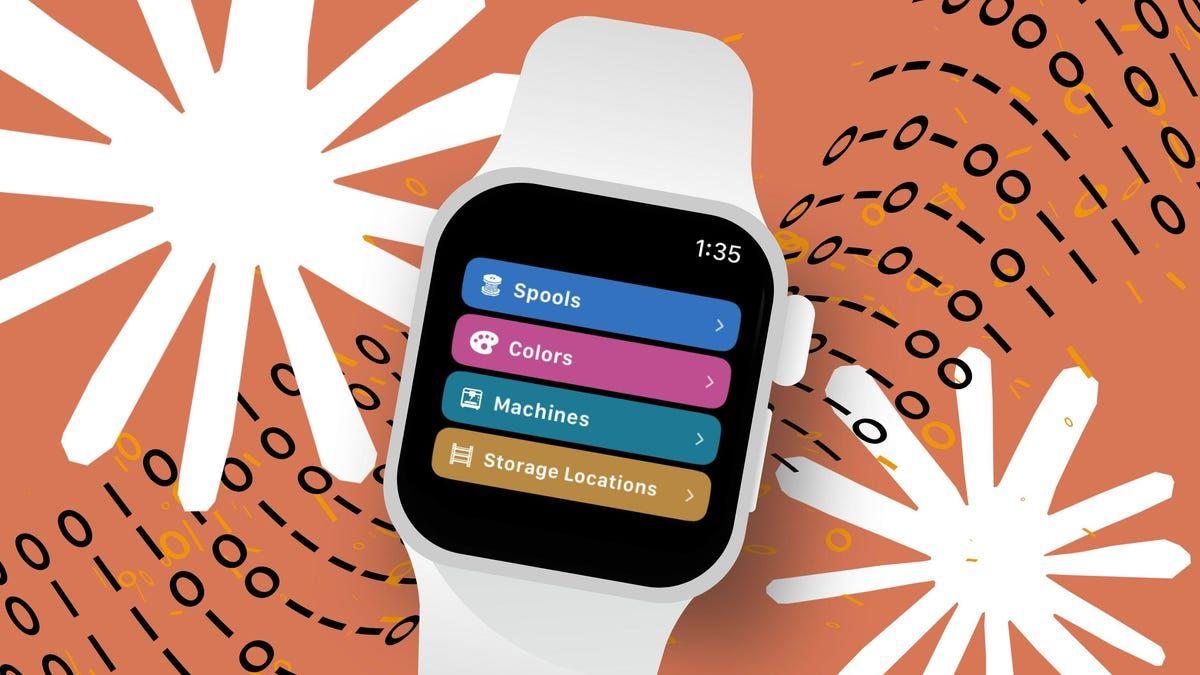
Source: ZDNet
The developer's experience highlights how vibe coding functions as an AI as a collaborative partner rather than pure automation. After getting a basic prototype working in roughly two hours, the real work began when moving from test data to 120+ actual records, triggering what the developer described as "a bit of a meltdown" in the Xcode monitoring process
1
. The process required strategic thinking about feature subtraction, determining which capabilities from the full iPhone app—like NFC scanning and photo capture—could be eliminated for the tiny watch screen while retaining core functionality like browsing spools, moving items between locations, and dynamic sync across devices.Non-Programmer Coding Experience Yields Surprising Success
In a striking demonstration of AI coding tools' accessibility, a self-described non-programmer with no coding background successfully created a custom website using Claude Code in just three days with only a few hours of actual work
2
. The project solved a practical problem: automatically calculating walking distances from real estate listings to public transit stops by pulling data from Redfin and displaying results with a map interface. This non-programmer coding experience required Anthropic to create a special setup guide addressing basics like "What is a Terminal?"—knowledge that 100% of programmers already possess.The user interface development and environment setup proved surprisingly manageable even for beginners, though the experience required patience and willingness to follow detailed instructions. After subscribing to Claude Code at either the $17-per-month Pro or $100-per-month Max plan, users must navigate terminal commands and authentication processes that, while straightforward for experienced developers, represent genuine hurdles for newcomers. The project selection process matters significantly—the developer considered creating a Wordle clone or event invitation generator before settling on the transit-distance calculator as a genuinely useful solution.
Challenges with AI Coding Reveal the Limits of Automation
Despite impressive capabilities, AI coding tools present substantial challenges that underscore why programming knowledge remains valuable. A Mac app development project using Claude Code took eight hours and felt "more like a constant level of planning, convincing, cajoling, correcting, and a bit of chaos" than the flow state of traditional coding
3
. The developer, an experienced programmer, emphasized that Claude Code functions as a force multiplier similar to managing human programmers—requiring constant guidance on architectural decisions, error correction, and navigating AI-generated chaos.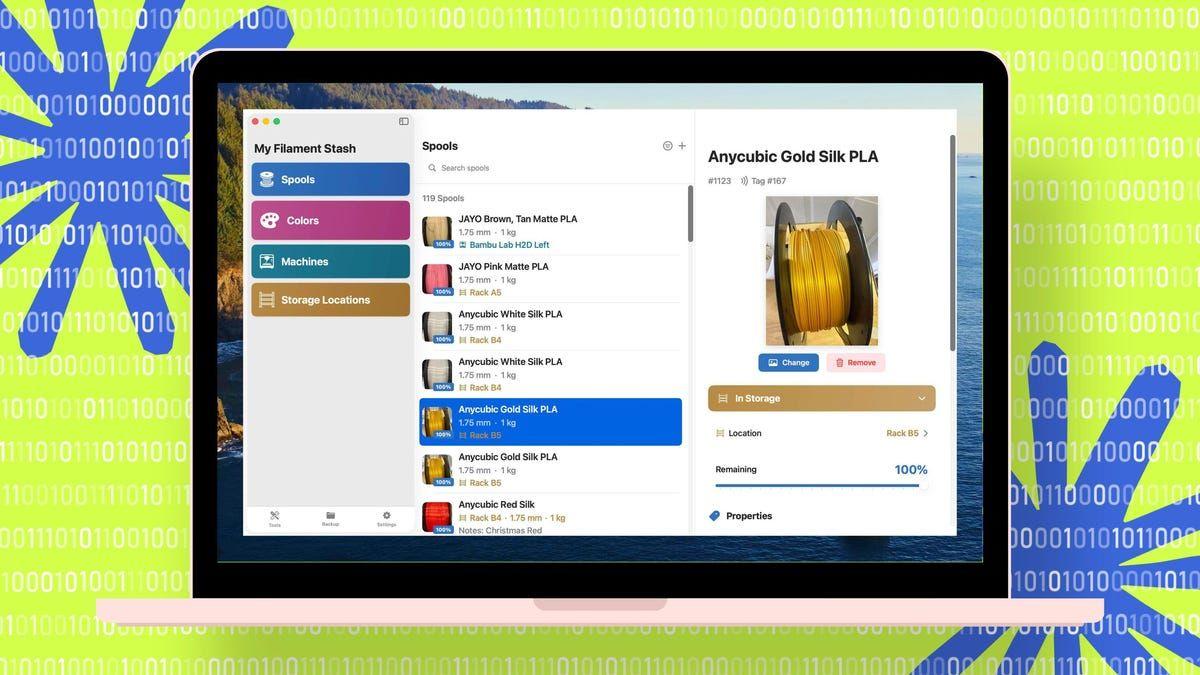
Source: ZDNet
Another beginner experimenting with Cursor and Replit discovered similar limitations despite initial excitement
4
. While these AI coding tools automatically performed impressive tasks like setting up virtual environments, installing code libraries through the API, configuring local servers, and generating user interfaces from natural-language prompts, the experience quickly became tedious. The command-line interface repeatedly demanded manual interventions that would likely frustrate non-technical users. Cloud offerings like Replit and Lovable burned through credits rapidly during the trial-and-error process, while raising privacy concerns about storing sensitive data remotely.Related Stories

Technical Expertise Amplifies AI Coding Benefits
The gap between experienced developers and complete beginners using these tools reveals important insights about who benefits most from vibe coding. The developer who created both iPhone and Mac versions of a filament management app leveraged decades of programming experience to guide Claude Code through complex decisions about database architecture using iCloud, GitHub source control integration, and cross-platform data synchronization
3
. This technical foundation enabled productive problem-solving when the AI made mistakes or proposed impractical solutions, like an obsession with Watch complications that didn't fit the use case.The beginner's experience with Cursor illustrated how quickly things can derail without that foundation. After spending an hour discussing project requirements and watching Cursor set up file structures and install Python libraries as code generation progressed, the program suddenly restarted and erased all chat history—losing the entire project plan
4
. Such setbacks, while frustrating for anyone, prove particularly daunting for those lacking the programming knowledge to reconstruct lost work or troubleshoot unexpected failures.The Evolving Landscape of AI Coding Tools
Beyond Claude Code, the ecosystem of AI coding tools continues expanding with options including GitHub Copilot, Cursor, Replit, Lovable, and Windsurf. Each requires varying levels of technical setup and offers different trade-offs between local control and cloud convenience
2
. Anthropic positions Claude Code as "the best coding model in the world," though such claims remain difficult to verify given the rapid pace of development in this space. What's clear is that these tools operate on a common principle: users type prompts describing desired functionality, and the system formulations plans, sets up requisite files, and generates working code.
Source: PC Magazine
The practical implications for both professional developers and aspiring programmers suggest a future where AI serves as a powerful assistant rather than a replacement. Experienced developers gain the ability to prototype rapidly and handle routine implementation tasks more efficiently, while beginners can create simple applications that would have been impossible without extensive training. However, the persistent need for error correction, architectural guidance, and troubleshooting indicates that vibe coding augments rather than eliminates the value of deep technical expertise in app development.
References
Summarized by

Navi
Related Stories
Anthropic's Claude Code Goes Web-Based: A Game-Changer for AI-Assisted Coding
20 Oct 2025•Technology

Anthropic's Claude Code sparks AI race as developers build apps in hours without traditional coding
15 Jan 2026•Technology

Anthropic's Claude Code: Revolutionizing AI-Powered Software Development
06 Jun 2025•Technology

Recent Highlights
1
Google releases Gemma 4 with Apache 2.0 license, enabling unrestricted local AI on devices
Technology

2
AI Models Lie and Deceive to Protect Other AI Models From Deletion, Study Reveals
Science and Research

3
OpenAI closes $122 billion funding round amid fierce AI competition and profitability questions
Startups

Recent Highlights
Today's Top Stories







Your Daily Dose of Curated AI News
Don’t drown in AI news. We cut through the noise - filtering, ranking and summarizing the most important AI news, breakthroughs and research daily. Spend less time searching for the latest in AI and get straight to action.

