Nothing Essential Apps enters beta, letting users vibe code widgets with AI-powered prompts


4 Sources
4 Sources
[1]
Vibe coding Nothing's apps is fun, until you try to make them useful
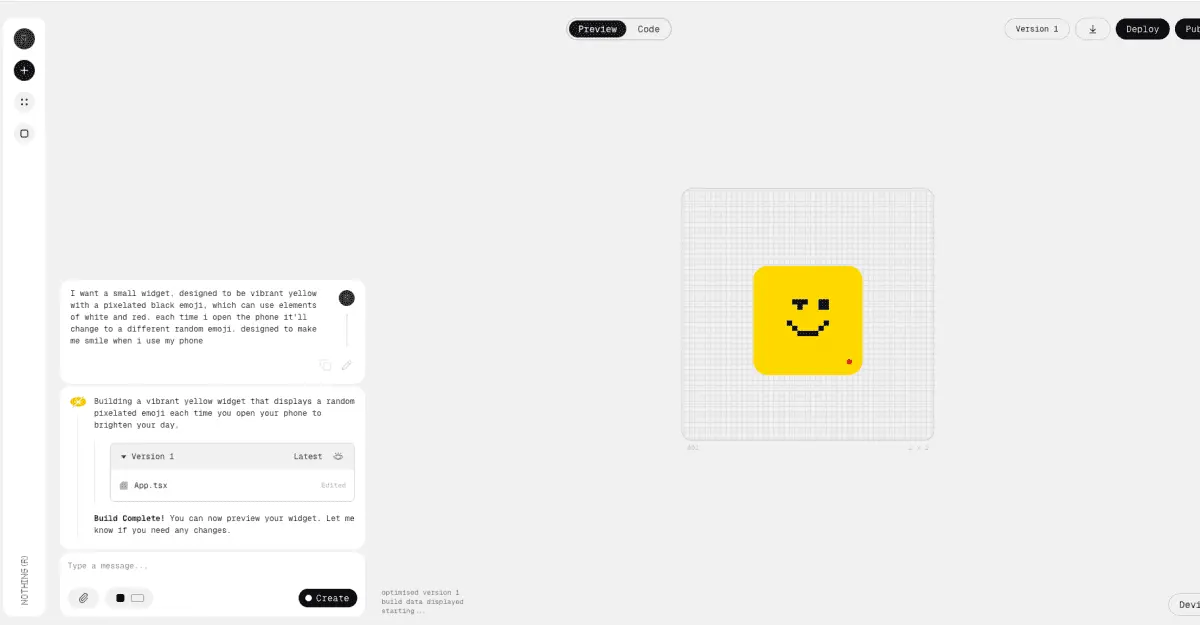
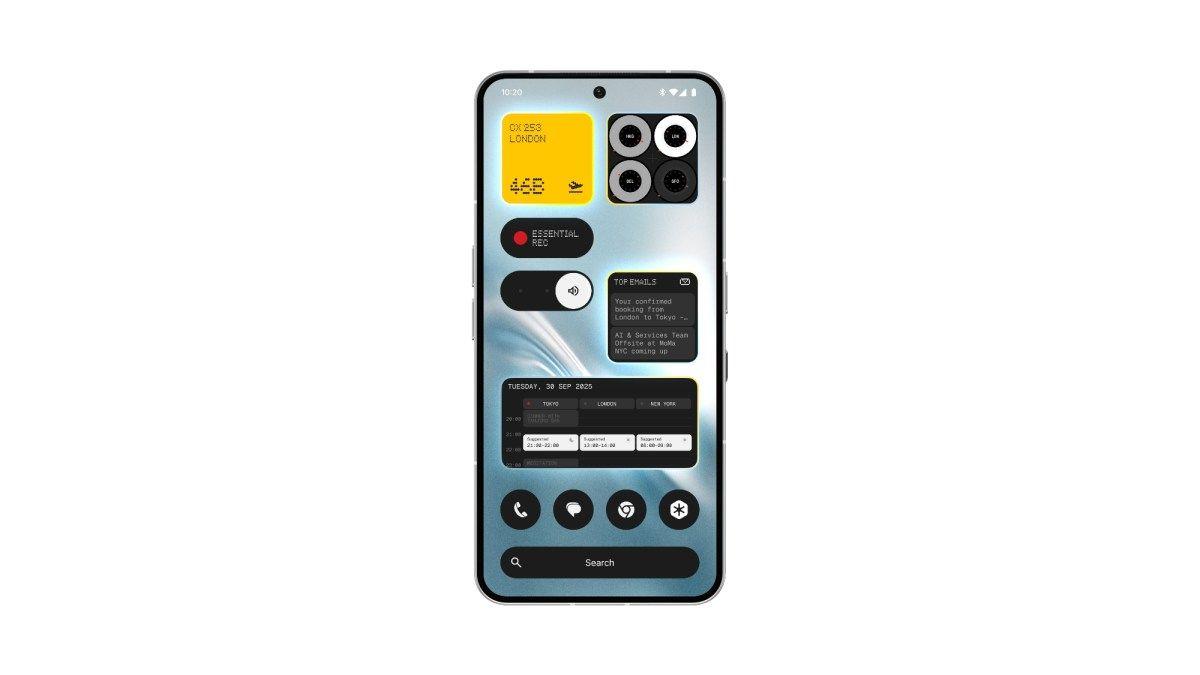
After a week vibe coding apps using Nothing's Essential Apps Builder, I'm conflicted. I buy into the smartphone maker's vision for software that adapts to you, not the other way around, but right now it doesn't deliver. It's hard to see how this goes from cool novelty to a reliable tool without serious refinement, and a level of consumer patience it may struggle to find. Nothing laid out its pitch for an "AI-native operating system" last year: something that would sit at the heart of its devices and make them feel more personal and more adaptable. While it's not really an operating system -- it's more of an AI layer draped over the top of Android -- it's the backdrop for Essential, which CEO Carl Pei told The Verge is the company's umbrella "name for all our AI-related products." And within that umbrella are Essential Apps, small, AI-designed widgets that live on your home screen. Given that limitation, "Essential Widgets" would probably be a more honest name. Those apps are built in Apps Builder inside Playground, Nothing's take on an app store. The pitch is disarmingly simple: describe what you want in plain language, Builder makes it, and you push it to your phone. There's no setup and no need to know how to code, though I'm sure it wouldn't hurt. Builder will sometimes ask clarifying questions and if its first attempt isn't to your liking (it usually isn't), you can iterate instead of starting from scratch. Building widgets you'd want to keep on your homescreen is another matter. I'll admit, I don't really use widgets in the first place, so I'm a tough sell, but even judging it on its own terms, I immediately notice how stark of a gap there is between "it works" and "I'd use this." Starting simple, I asked Builder for a water-tracking widget to reward me with a smiley face if I drink eight glasses. The result wasn't pretty, but it worked. A widget showing upcoming appointments for the day, drawn from my connected Google Calendar, was also rather painless to make and functional from the first try. I then moved on to a tiny yellow mood widget that served up a different smile emoji every time I unlocked my phone, which I later edited to blue. Updates were easy, just tweak in Builder and push it to my phone. If I wanted to roll things back, everything was stored and neatly organized in project folders in Playground. Not everything was smooth, though, and making more ambitious widgets was a messier process. A shopping list highlighted the limits of shoving the functionality of an app into a widget-sized space, showing only one of the items I'd written down. I noticed that many of my widgets would cut off bits of text in places. Location was also tricky. A weather widget meant to use my location instead used the four London locations I'd given to Builder as an example, showing me all four forecasts on one interface. An ugly Pomodoro timer was worse: it stopped counting down the moment my phone locked, which defeats the point of setting it and coming back later. I tried to troubleshoot, but nothing stuck. Even a simple photo widget, that pulled images from the camera roll, didn't work at all, and Builder's "fix with AI" button didn't help either. On reflection, I feel there are two key issues stopping me from truly embracing Nothing's vision of an ever-evolving ecosystem of vibe coding apps. The first is the natural result of using a product in early beta. Builder is limited to Nothing's Phone (3), only supports 2x2 and 4x2 widget sizes, and only fully supports connections to location, contacts, and calendar. In the future, Nothing says apps will fully support a much wider range of functionality, including fetching data from the internet, media library and camera access, and access to Bluetooth devices. Additional widget sizes are planned around late March, including compact 1x2 layouts and larger 4x4 ones. More devices will also be supported and a public launch will open up a much wider variety of user-created apps, part of a new creator ecosystem the company hopes to nurture and would let you "remix" other people's apps. It's not clear when this will happen; Nothing says "public release will follow once system integrations are stable, permission handling is reliable and compatibility across devices is confirmed." The second issue is a potentially fatal hurdle for a project like this: me. I've been reporting on AI tools for years, and one pattern keeps repeating -- no matter how capable a system is, the hardest part is knowing how to use it to its potential. I immediately ran into that using Nothing's Essential App Builder. It seems very capable and has great potential, but I didn't always know what I wanted, and when I did, I didn't always know how to ask for it. An ecosystem built on vibes is a great idea, but sometimes vibes aren't enough.
[2]
Hands-on: Nothing 'Essential Apps' hit beta so you can vibe code your homescreen [Gallery]
One of the places AI has really made an impact is on app coding, opening new doors both for professionals and the casual user. "Vibe coding," as it's come to be known, is exactly what you can do with Nothing's new "Essential Apps," which lets you create homescreen widgets, "apps," using text prompts and the help of AI - but I'm not fully sold just yet. First previewed back in September, "Essential Apps" are the first step towards Nothing's "Essential OS" goal, which it views as the future of the smartphone. As of today, that first step is hitting beta. Nothing has launched "Essential Apps" in beta with access "expanding gradually through a waitlist" that will land in batches. A full release will apparently come sometime later this year. "Apps" is a bit of a misnomer, though, as Nothing is letting users create homescreen widgets rather than any proper apps. All functionality is limited to the widget itself, with no ability to launch into a full app as you'd get with most widgets. That's not to say you can't do some neat things, though. Nothing's "Playground" is where you'll use AI to develop ideas, with a prompt starting the process. You simply describe what functionality you want, and it goes from there. Nothing's example is a widget that looks at the weather and your calendar to help you find the best days & times to get in a run, with the prompt also taking into consideration the length of the run. Nothing says that users should think of Essential Apps as making your homescreen more purposeful. Instead of opening apps and navigating menus, small personal apps stay visible, update in place, and respond to your context. Your home screen becomes more purposeful. Your phone feels like it's actually yours. It's a great idea in theory, but it's still a bit rough around the edges. Given some recent snowfall in my area and my continued obsession with going outside to play disc golf, one of the ideas that popped to mind for this was a widget that could show me how dry the ground might be - constantly cleaning mud really takes the fun away. So I fed a prompt into Nothing Playground and it came back with some nice suggestions, such as showing a "trend" in the soil drying, and spit out a widget that's actually pretty close to what I had in mind, showing a basic percentage and other glanceable data. It needed some tweaks, such as asking for the temperature to be shown in Fahrenheit and resizing the widget to actually fit the 2×2 grid, the latter of which never really worked properly. The UI as a whole never really seems to perfectly line up between the web app (which, thankfully, works on desktop) and what you actually get to put on your homescreen. The big problem, of course, is that I have no way to know how accurate any of this is. Because it's just pulling data from the ether, it could be completely correct or wildly wrong. A simpler idea was pulling the latest stories from 9to5Google and 9to5Mac on the same homescreen widget. Or at least, I thought it would be simple. The Playground refused to create a 4×2 widget, instead just sticking with a 2×2 size that simply isn't big enough for anything like this. Some of the early builds from other users show 4×2 sizes and Nothing says it's possible, but the Playground just wasn't cooperating with me. So I switched it up, instead going for a widget that only shows 9to5Google articles. It worked out better this time, but the size restrictions again make this a hard widget to get "right." Ultimately, the only way I could get this to work was to show a single article with a brief snippet underneath, and I was pleased to see that the Playground generator was smart enough to make it a clickable link even without me asking for it to be. I would have loved to make a few more of these for 9to5Mac and our other sister sites, but it's hard to make two of the same thing with Playground - like a snowflake, no two are the same. Nothing rightfully admits that, in beta, a lot of apps may "feel unfinished," and that's the vibe I'm getting. There are some cool ideas out there - one with a surprising amount of polish is "Counter (with themes)" - but the fun with this really does come down to bringing your own ideas to life. While I don't think Nothing has quite nailed it yet, this is a really good start. I kind of wish I could use this beyond the Nothing Phone, but it's obvious why that's not happening, at least for now.
[3]
Nothing's "Essential Apps" let you build personalized widgets with text-based prompts
Instead of downloading apps you'll never open again, Nothing wants you to generate tiny tools on demand, powered by AI and shaped entirely around your habits. One of Nothing's boldest ideas, Essential Apps, is now available for Phone 3 users, unlocking a new way to create highly personalized, AI-generated widgets for your home screen without any coding wizardry. The feature, currently rolling out in beta through the web-based Nothing Playground platform, is an early step toward the company's long-term vision of an AI-native operating system called Essential OS. What can Essential Apps do? But what is Essential Apps anyway? Think of it as tiny yet useful tools that do very specific things for users, in the form of a widget. Recommended Videos Want a widget that can track your water intake? Or one that finds the highest-rated restaurants in the locality (could be very useful if you travel around)? Well, the promise here is that you can create personalized widgets that perform specific tasks (tailored to your daily requirements) without writing a single line of code. Nothing's own example includes a widget that finds the best days and time to run outside (taking into consideration the weather and calendar). You should only have to describe what you want in a simple text-based command (the widget's purpose, what it does, its size, etc.), and Nothing Playground should take care of the rest. Essential Apps can only access three device permissions for now You can even change or edit the widget's design or functionality after creating it. The widgets can access information from the internet as well, so that's a plus point. For now, the Essential Apps can access three different permissions from your smartphone: Location, Calendar, and Contacts. So, you should be able to create location or calendar-based reminders, countdowns, and one-tap navigation widgets. In the future, the widgets should be able to access additional permissions, including camera, microphone, notifications, calling, vibration, and Bluetooth. As mentioned in the beginning, the Nothing Essentials Apps Beta is currently available to Phone 3 users via a waitlist. However, the company should extend support to more devices running Nothing OS 4.0 in the near future.
[4]
Nothing's Essential Apps Builder Now in Beta; Lets You Vibe Code Apps
* Essential Apps Builder is rolling out to Nothing Phone 3 * Essential Apps Builder can create apps from text prompts * Essential Apps can build location-based reminders Nothing unveiled its new Essential Suite of AI tools in September 2025. Claiming it to be a step towards building an AI native operating system, the UK-based smartphone maker also launched the Essential Apps Builder as part of the suite of AI tools. Earlier, the Essential Apps Builder, found in the tech firm's Playground hub, was only available in the early Alpha version as an internal and limited community release. Now, the Carl Pei-led company has announced that it has started rolling out the beta version of the Essential Apps Builder, which will allow users to build personalised apps using natural language. Essential Apps' Beta Version is Rolling Out in Batches to Nothing Phone 3 Users In a community post on Tuesday, the London-based smartphone maker announced that its Essential Apps Builder is now rolling out to a wider user base in beta. The functionality, available in the Playground hub, is initially rolling out to the Nothing Phone 3. Rolling out in batches, users have to register to enter the waitlist for the beta version of the Essential Apps Builder. The stable release is planned for later this year. It will be accompanied by the Remixing Apps functionality, which will also be present in the Playground hub. Along with entering the beta testing phase, the company has also made publishing and updating apps "easier to understand" by clearly labelling the live apps, draft apps, and the changes made. Moreover, the Essential Apps Builder now supports dark mode. While the Essential Apps Builder is currently exclusively available on the Nothing Phone 3, the tech firm plans to release the same to other Nothing and CMF devices running Nothing OS 4.0 and later versions after the "beta stabilises". For now, Nothing's new Essential Apps Builder requires a user to provide access to the phone's location, calendar (read only), and Contacts. Hence, the app builder is presently only capable of creating "location-based reminders, agenda views, meeting countdowns and one-tap contact widgets". The company claims that "more capabilities" will soon be rolled out, including camera and microphone access, network fetching, notifications, vibration, calling, and Bluetooth. Additionally, the company said that a late February OS update will introduce activity recognition, usage statistics, sensor data, and system Weather API to the app builder. This comes months after the smartphone maker introduced its Essential Suite of AI tools in September 2025. Earlier, only the Alpha version of the Essential Apps Builder was available to internal and select community members. As previously mentioned, Nothing's app builder allows users to create apps through vibe coding, which means that it recognises natural language prompts to generate apps and widgets.
Share
Share
Copy Link
Nothing has launched its Essential Apps Builder in beta for Phone 3 users, enabling them to create personalized widgets through text-based prompts without coding. Part of CEO Carl Pei's vision for an AI-native operating system, the tool shows promise but faces challenges with functionality, accuracy, and user expectations in its current early state.
Nothing Essential Apps Builder Enters Beta with AI-Powered Widget Creation
Nothing has rolled out its Essential Apps Builder in beta, marking a significant step toward CEO Carl Pei's vision of an AI-native operating system
1
. The AI-powered tool, accessible through Nothing Playground, allows Nothing Phone 3 users to create personalized widgets using text-based prompts and vibe coding—no programming knowledge required2
. The beta is rolling out in batches through a waitlist, with a full public release planned for later this year4
.
Source: 9to5Google
Carl Pei told The Verge that Essential is the company's umbrella "name for all our AI-related products," positioning these homescreen widgets as the foundation for Essential OS
1
. Rather than traditional apps, users create small, functional widgets that live directly on their home screen, updating in place and responding to context. Nothing frames this as making your phone "feel like it's actually yours"2
.How Essential Apps Builder Works Through Natural Language Prompts
The process is straightforward: describe what you want in plain language, and the Essential Apps Builder generates it
3
. Nothing's example involves a widget that analyzes weather and calendar data to suggest optimal days and times for outdoor runs2
. The AI sometimes asks clarifying questions, and if the first attempt misses the mark, users can iterate rather than start from scratch1
.
Source: The Verge
Currently, the beta supports only 2x2 and 4x2 widget sizes, with additional formats including compact 1x2 and larger 4x4 layouts planned for late March
1
. For device permissions, Essential Apps can access location, calendar (read-only), and contacts, enabling creation of location-based reminders, agenda views, meeting countdowns, and one-tap contact widgets4
.Early Testing Reveals Functionality Gaps and User Interface Challenges
Hands-on testing reveals a stark gap between "it works" and "I'd use this." Simple widgets like water trackers and calendar views function adequately, but more ambitious projects expose limitations
1
. A Pomodoro timer stopped counting when the phone locked, defeating its purpose. A photo widget pulling from the camera roll didn't work at all, and even the "fix with AI" button couldn't resolve it1
.Location features proved particularly tricky. One tester requested a weather widget using current location but instead received forecasts for four London locations provided as examples
1
. Another created a widget to track soil moisture for disc golf conditions but had no way to verify data accuracy—it could be completely correct or wildly wrong2
. The user interface also struggles to align between the web app and what actually appears on your homescreen2
.Related Stories


Future System Integrations and Expanded Capabilities on the Horizon
Nothing acknowledges that beta apps may "feel unfinished" and has outlined an ambitious roadmap
2
. Future updates will introduce camera and microphone access, network fetching, notifications, vibration, calling, and Bluetooth capabilities4
. A late February OS update will add activity recognition, usage statistics, sensor data, and system weather API4
.The public release will arrive "once system integrations are stable, permission handling is reliable and compatibility across devices is confirmed," according to Nothing
1
. This launch will include a "Remixing Apps" feature, allowing users to adapt and modify widgets created by others, fostering a creator ecosystem1
. While currently exclusive to Nothing Phone 3, support will extend to other Nothing and CMF devices running Nothing OS 4.0 after the beta stabilizes4
.
Source: Gadgets 360
The Challenge of Vibe Coding: Promise Meets Practical Limitations
The fundamental challenge extends beyond technical refinement. Even with capable AI systems, the hardest part remains knowing how to use them effectively
1
. Users don't always know what they want, and when they do, articulating it through natural language prompts can be difficult. "An ecosystem built on vibes is a great idea, but sometimes vibes aren't enough," notes one reviewer1
.Nothing's vision centers on software that adapts to users rather than forcing users to adapt to software
1
. The company wants home screens to become more purposeful, with small personal apps that stay visible, update in place, and respond to context2
. Whether this novelty can evolve into a reliable tool depends on substantial refinement and consumer patience—commodities that may prove scarce as users encounter the gap between concept and execution.References
Summarized by

Navi
[2]
[3]
Related Stories
Recent Highlights
1
OpenAI shuts down Sora video app after six months, ending Disney's $1 billion investment deal
Technology

2
AI-Generated Val Kilmer to Posthumously Appear in As Deep as the Grave After His Death
Entertainment and Society

3
Supermicro Co-Founder Indicted in $2.5 Billion Nvidia AI Chip Smuggling Scheme to China
Policy and Regulation

Recent Highlights
Today's Top Stories






Your Daily Dose of Curated AI News
Don’t drown in AI news. We cut through the noise - filtering, ranking and summarizing the most important AI news, breakthroughs and research daily. Spend less time searching for the latest in AI and get straight to action.

