Nvidia releases DLSS 4.5 with enhanced AI upscaling as 6x frame generation waits until spring


4 Sources
4 Sources
[1]
Nvidia Proves It Still Has the Best Software for Better-Looking Games
While 6x frame gen won’t be here until spring, better AI upscaling is more than welcome. Nvidia’s latest version of its Deep Learning Super Sampling technology, aka DLSS, hit the scene early Wednesday. With the latest update in tow comes a slightly redesigned upscaler that is now better than ever, at least for most games. If you were hoping that you would be able to push your frame rates to ludicrous levels, you’ll need to wait. DLSS 4.5, which Nvidia announced back during CES 2026 last week, incorporates a new version of the existing transformer model upscaler. The original transformer model was a major part of the DLSS 4 update from 2025, which took an AI model trained on gameplay to generate the look you should see at higher resolution. Upscalers like DLSS take a frame at a lower resolution and massage it so it appears at a higher resolution, which enhances the visual resolution to the size your display supports while improving performance. With AMD and Intel nipping at its heels, Nvidia felt it needed to show up with even more frame generation software for 2026. Instead, the latest update proves that small enhancements make a bigger difference than the oft-touted “fake frames.†The big update for DLSS 4.5 is only perceivable when glancing at small environmental details. Previous versions of DLSS had a hard time picking up on minute environmental effects, like sparks from a fire. DLSS 4.5 is supposed to bring those details back. Plus, 4.5 should help sharpen textures and eliminate ghosting around some environmental details, where an image would appear to bleed from frame to frame. I tested DLSS 4.5 on a Framework Laptop 16 packed with a GeForce RTX 5070 laptop GPU. This is one of Nvidia’s lower-end graphics cards with only 8GB of VRAM. DLSS makes more of a difference for players running cheaper gaming rigs than for platforms with higher-end specs. I used a 1440p monitor for my testing, as the RTX 5070, especially the laptop version, isn’t going to enable a quality experience at 4K resolution. I compared DLSS 4 and DLSS 4.5 in games like Marvel’s Spider-Man II, Black Myth: Wukong, and The Outer Worlds II. The updated Nvidia app now allows players to override the DLSS model for supported games. The preset “L†and “M†models are both based on DLSS 4.5. “L†is for ultra-performance mode built for trying to hit 4K resolution, though “M†should fit more players’ needs who just want better performance in games at below 4K. DLSS 4.5 is a big step up. In Black Myth: Wukong, I saw a bump up to around 50 fps and even 60 fps in some scenes with the same graphics settings using the model M preset compared to DLSS 4, which hovered between 45 and 48 with very high graphics settings and ray tracing set to medium. Those promised graphical effects, like sparks coming off of fires, are indeed real. Latency with frame generation is marginally better with the update as well. In Spider-Man 2, running at medium settings with ray tracing set to high, I saw few performance improvements, though foliage appeared slightly sharper running DLSS 4.5. The one place I saw a drop in performance was in Outer Worlds II, which took a small hit looking at the same scene. However, I noticed that ground foliage and distant plants appeared sharper, even while using the same graphics settings. The small performance drop would necessitate some fine-tuning with DLSS settings to reach a higher standard frame rates, but I would take higher fidelity any day of the week. Small graphical enhancements are one thing, but Nvidia’s promising to maximize your monitor’s refresh rate with its new 6x frame gen capabilities. That will also spark a new “dynamic†frame gen mode, which will modify the frame gen between 4x and 6x to try and maximize your display’s refresh rate. Currently, you won’t find an override for 6x frame generation in the Nvidia app. In a message sent to Gizmodo, Nvidia said the dynamic frame gen plugin will be available to developers through the DLSS Multi Frame Generation Streamline Plugin this spring. For now, we’re stuck with the current 4x model. Dynamic mode makes sense. It pushes the frame rate to what your monitor is technically capable of. The one thing that Nvidia constantly fails to mention is that players actually need playable frame rates before they enable frame gen. You can get by with around 50 fps, but for fewer visual hiccups, you want at or close to 60 fps. There’s a certain point where frame gen is a tradeoff between performance and latency.
[2]
Deciphering DLSS 4.5: I tested Nvidia's new upscaler and figured out when to use Model L or M
DLSS 4.5 is out of beta and available to use by everyone. Make sure you update your Nvidia app and GPU drivers and it's all yours across all the games that already support DLSS 4! Just open the app to update or download it manually here. But after testing it over the past few days since going eyes-on for the first time at CES 2026, I'll say it can get confusing to figure it all out. So with that in mind, I want to share the results of all my testing and answer two key questions: * When should I use DLSS 4.5? * What is the difference between Model L and Model M? But first, an explainer. What is DLSS? Deep Learning Super Sampling is one of Nvidia's showcase pieces of AI trickery that extracts better performance from your games. To do so, it will render a game on the GPU at a lower resolution and use a neural network trained on the game to upscale to a higher resolution. While from the get-go, you can use an automatic mode in most games, which chooses what's best based on the specs of your PC, there are four modes to pick from: * Quality: This renders the game closest to native resolution (normally around 66-70% of resolution). * Balanced: Finding the mix between getting the best possible textures and frame rates, this will render the game at 58% of your targeted resolution. * Performance: One step down to maximize frame rate, this will often go for 50% of the resolution. * Ultra performance: And if you want to go all out on frames, ultra performance will target 33.3% of the total resolution being rendered by the GPU. These can come with a penalty, and these are usually ghosting (faint outlines around moving objects as DLSS fights to keep up with what's happening on-screen), shimmering (brightly lit objects being a little bit blown out), overdone AI sharpness at times and rendered detail in the background not being clear until you get closer to it. In terms of model-naming: * Model K = DLSS 4 * Model L = DLSS 4.5 targeted at ultra performance mode * Model M = DLSS 4.5 targeted at performance mode and above When should I use DLSS 4.5? Put simply: use it if you're opting for performance modes. Nvidia has been clear in saying that's what this model is targeting, and when put through testing at higher quality modes like balanced or quality, you're not getting any noticeable uplift in image quality but a lower frame rate. By the way, all these tests are done with frame generation turned off. Meanwhile, if you do move to performance, you only get taxed a little, but the image is much more stable with reduced ghosting around objects, better distant detail and less shimmering. Model L vs Model M In my testing across several games (and after speaking to Nvidia), here's how to choose between the models: * Model M: This is the model that's been trained more for clarity, so this one is recommended for performance mode -- driving for more detailed graphics. * Model L: This is better for ultra performance. You still get taxed in image quality, but nowhere near as much as you see in DLSS 4. You can see as much in Cyberpunk 2077. The differences are subtle, but in the sharpness of the lamps and the heatwaves coming up from the food cart and distorting the bottles, you can see a little more ghosting and jagged edges in Model L over Model M. My recommendation to you is that if you are focused on ultimate fidelity, stick with Model K (DLSS 4). Model L is mightily impressive, but DLSS 4.5 Model M is the better all-rounder that Team Green has confirmed will improve over time into quality and balanced modes. But that transition is still in progress to my eyes. My next steps So where will my testing take me next? Well, first off, I've been hearing that the more advanced acceleration parts of this new transformer model have a bigger penalty on GPUs older than the RTX 50 series. I'm in the process of calling in some older cards and gaming laptops to put this to the test. But let's get weird, too. I've tested the features you'll get out of the box, but if you know anything about me, I'm a bit rogue when it comes to testing -- pushing the theory behind new tech to its extreme. In the behind-closed-doors Q&A, Nvidia CEO Jensen Huang talked about how "more and more computation" could be done on "fewer and fewer pixels." Put simply, DLSS on steroids is where Huang sees all of this heading. I'm setting up what's needed (DLSS Tweaks) to put this theory to the test -- seeing how it looks to render a game at 360p and upscale to 4K. I've seen some of my friends do this, and the results are...well, they're a mess if you want to play using the settings. But when you think about what's happening (a neural network analyzing the picture and upscaling everything), it's a mindblowing preview of the progress being made towards this vision. Watch this space. I'll be back with more. Follow Tom's Guide on Google News and add us as a preferred source to get our up-to-date news, analysis, and reviews in your feeds.
[3]
I hate to agree with Nvidia about an AI thing, but come on, PC gamers -- it's time to stop whining about 'fake frames' and take the free performance boosts
DLSS 4.5 has arrived! Yes, Nvidia revealed yet another upgrade to its performance-boosting software suite at CES 2026 in Las Vegas last week, and it goes beyond just an iterative improvement to the resolution-upscaling tech at the core of DLSS: we're also getting a new level of Multi Frame Generation (MFG), which takes us from the current top 4x mode to 6x frame-gen. For the uninitiated (although I doubt you clicked on this article if you don't know what frame generation is), what this essentially means is that only one in six frames is actually computed and rendered by your graphics card when playing, with the other five interpolated and inserted by a complex AI model running locally on your Nvidia GPU. In other words, going from 4x to 6x should theoretically give you a 50% boost to your average framerate. In practice, frame-gen isn't quite that impressive - at least, not from what I've seen during my own testing with the RTX 5060 and RTX 5070. You'll get a boost, but it varies massively depending on a range of factors, including the other specs of your build, the target resolution of your monitor, the DLSS mode being used, and the graphical settings of the game you're playing. It does work, even if you're unlikely to get the perfect lab-tested performance results Nvidia likes to tout. I should immediately address the fact that frame-gen has proven to be a highly divisive topic within the PC gaming community. Some merely consider it to be a useful tool for boosting performance; others decry the involvement of AI, calling the interpolated images 'fake frames', or view it as another crutch (like DLSS upscaling itself) that allows developers to skimp on proper optimization for the PC versions of games. I do consider these concerns valid, and when frame generation first debuted with DLSS 3 I wasn't too impressed. I'm not violently anti-AI (though I do have my reservations about how it's used), but frame-gen seemed a bit like a pipe dream - especially since it's locked to newer RTX GPUs, removing any potential benefits for those running on older hardware. And looking at the current spiking prices of PC components due to AI demand, the accessibility of this tech... isn't great. But Nvidia has now had three major DLSS updates to get a handle on its frame-gen tech, and it's starting to feel like we might need to collectively admit that it's not actually a Big Bad Evil Thing. With the reveal of the new 6x MFG mode in the DLSS 4.5 update, my first thought wasn't 'oh, 6x sounds great' - instead, I thought 'huh, I should give 2x another go.' As my favorite YouTuber loves to say, let's get to the numbers! With the RTX 5060, at 1440p output resolution with DLSS set to Balanced and frame-gen off, I was getting about 40 frames per second on average in Alan Wake II at the Medium graphics preset. Turn frame-gen on to 2x mode, and that average bumped up to 55fps, with extremely minimal loss in visual clarity - nothing that would impact my enjoyment of the game in the slightest. 4x mode took my framerate into triple digits - but unfortunately, this did impact how the game actually looked. Despite the reported framerate being much higher (according to Nvidia's own app overlay, since Alan Wake II lacks a built-in fps counter), the game felt worse to play; ghosting, blurring, and artifacting were immediately visible, combined with a slight but noticeable input latency that - while not rendering a single-player game like this unplayable - would definitely be a problem in a faster-paced title. Avowed gave me similar results. At 2x I wasn't really able to register much of a difference in visual sharpness or glitching, despite a hearty framerate boost of about 25fps on average, but cranking MFG up to 4x turned the screen into a blur-scape of Dali-esque proportions. Doom: The Dark Ages fared better, but I still felt like 4x was struggling a little to maintain good clarity during busy moments (which is most moments, since it's Doom), while 2x and 3x looked consistently great. Jumping up to the RTX 5070, the difference was even more significant. Frame-gen relies on the base framerate produced by the GPU to perform better; you're obviously going to see a more significant boost if you're rocking a more powerful GPU to start with. If you're already struggling with sub-30fps, frame-gen isn't going to save the day. But if you're starting comfortably above 60, as the 5070 did in Alan Wake II, you're going to get a more significant boost. Turning on 2x frame-gen took me from a 66fps average all the way up to 90, and again, it still looked fantastic. Switching on ray-tracing caused the framerate to take a significant hit, but 2x FG kept it above a stable 60fps, which is fine for a single-player game like this. Avowed hit 100+ fps with 2x mode, again with virtually no visual issues. Yes, 4x was still wonky in some games, though it's a bit less horrible than it is on the 5060. But that's okay - much like the earlier generation of DLSS, there's still work to be done here, and we shouldn't decry the base version of Nvidia's FG tech because of that. It's also important to bear in mind that MFG depends partially on developer implementation; it's still relatively early days for the tech's use within the wider gaming industry, and we can likely expect it to improve as it becomes more normalized. After all, DLSS upscaling itself wasn't an overnight success. Gamers are a fickle bunch, sure, and we typically approach each new technology with caution - but Nvidia's own usage data shows that the vast majority of PC gamers with RTX GPUs are now regularly utilizing DLSS. So if 2x FG combined with DLSS can get you a decent framerate bump at no extra cost, why wouldn't you use it? As Nvidia CEO Jensen Huang said during his CES keynote, "computing has been fundamentally reshaped" by the arrival of modern AI, and that doesn't have to be a universally bad thing. Of course, Nvidia is somewhat responsible for the present situation of the GPU market, so there's a rather delicious paradox here where Team Green is pushing impressive new AI-powered software that few people can actually use because it requires hardware that is currently all being sucked up... to power AI software. Back on topic... I don't expect 6x MFG to blow me away when I first get to test it out. When you consider that frame-gen in its most basic 2x form is essentially producing a single interpolated frame to insert between every two frames your GPU spits out, it's easy to imagine that visual accuracy is going to take a hit when you suddenly start trying to AI-generate five frames to cram in there instead. But I'm going to be patient with Nvidia on this one, and I won't hear any more slander about 2x FG. I think it's about time we put the whole 'fake frames' thing to bed, honestly. I mean, it's not like the regular frames are hand-made by Tibetan artisans from only the finest naturally-sourced pixels. If you can see them, they're real enough. And if your PC game runs like crap without upscaling and frame-gen? That's not on Nvidia - that's on the game devs, sorry.
[4]
NVIDIA DLSS 4.5 Super Resolution: Full Guide, Image Quality Analysis & Performance Impact
NVIDIA DLSS 4.5 is the latest version of its machine learning based (ML) temporal upscaling and frame generation technologies, officially released for all GeForce RTX GPU users via updates to the NVIDIA app and with support from their latest Game Ready driver in January 2026 (temporal upscaling part only). At its core, DLSS (Deep Learning Super Sampling) has long been a staple for PC gamers with RTX GPUs wanting to strike a balance between high performance and crisp visuals by rendering games at lower resolutions and using a deep neural network to upscale them to higher resolutions with minimal loss to visual fidelity. The headline feature of DLSS 4.5 is its second-generation transformer model for Super Resolution (AKA temporal upscaling), which is a more advanced deep neural network trained on a much larger dataset that should, in theory, deliver significantly improved image reconstruction, anti-aliasing, and temporal stability compared to the first-generation transformer model. This would entail game rendering with finer edges, sharper details, and reduced visual artifacts (like shimmering and ghosting) in many titles, especially when using performance-oriented presets with more aggressive upscaling. Because this transformer model operates directly in linear space with more context awareness, it can preserve high contrast lighting and complex details more faithfully than previous models. Alongside Super Resolution, DLSS 4.5 introduces a major overhaul to ML-powered frame interpolation with Dynamic Multi-Frame Generation (MFG) and a new 6X MFG mode, aimed exclusively at RTX 50 series GPUs, and coming later in spring 2026. The new update to DLSS MFG promises up to five additional generated frames per rendered frame, with the added ability to dynamically alter the amount of generated frames - from none up to 5 - in order to hit a specific framerate target, which is especially useful in high refresh rate monitors. While the frame generation features will roll out gradually, DLSS 4.5 Super Resolution is available right now in hundreds of supported games, and it arguably represents a compelling leap forward in ML-powered temporal upscaling quality and flexibility. In this article, we'll focus on the Super Resolution portion of DLSS 4.5 -- how it differs visually from previous versions, how to enable it for testing, what real-world image quality gains or losses you can expect in certain games, and its performance impact vs the previous transformer model. What Is DLSS 4.5? A Technical Breakdown At a high level, DLSS 4.5 builds on DLSS 4 by upgrading the Super Resolution model to a second-generation transformer model with further enhancements to temporal upscaling fidelity, and further improving their Multi-Frame Generation technology by allowing for up to 5 generated frames, alongside the ability to dynamically alter the amount of generated frames to hit a certain performance target. DLSS 4.5 Super Resolution One of the core pillars of DLSS 4.5 is an updated transformer model for Super Resolution, AKA the temporal upscaling (or upsampling) part of the suite of DLSS technologies. Second-generation transformer model Unlike earlier upscalers that used convolutional neural networks (CNNs) or first-gen transformer models, DLSS 4.5's improved transformer model has been retrained on a much larger, high-fidelity dataset of game data and built with significantly more compute capacity. The result is a model that (in theory): * Better understands spatial and temporal detail in a scene, including lighting, edges, and motion vectors, thus potentially leading to finer detail reconstruction. * Provides improved temporal stability, meaning potentially less shimmering, fewer ghosting artifacts, and more consistent image quality during motion. * Potentially handles high contrast elements like neon reflections and bright highlights with more accuracy because it works directly in linear color space rather than a compressed or logarithmic domain. According to NVIDIA engineers, this new transformer model has roughly five times the inference compute requirement (meaning when executing the actual temporal upscaling algorithm on the GPU) of the previous model, and it intelligently uses both pixel sampling and motion vector data from the game engine to recreate a higher quality image. In real-world terms, that means potentially sharper anti-aliasing, better motion clarity, and improved lighting fidelity compared to the previous DLSS 4 SR model. Performance vs quality trade-offs While the new model demands more tensor cores (AKA the hardware units that accelerate AI inference algorithms on NVIDIA RTX GPUs) compute than earlier versions -- particularly on older RTX GPUs -- on newer RTX 40 and 50 Series GPUs, it benefits from FP8 precision acceleration, helping mitigate the greater performance cost while still potentially delivering superior upscaled visuals. Since its launch in CES 2026, DLSS 4.5 Super Resolution has been made available in over 400 supported games via the NVIDIA app, spanning RTX 20, 30, 40 and 50 Series GPUs, with easy integration controlled via Model Presets such as Preset M (designed for use with Performance mode upscaling) and Preset L (designed for use with Ultra Performance mode upscaling). DLSS 4.5 Dynamic Multi-Frame Generation Beyond temporal upscaling, DLSS 4.5 also expands NVIDIA's Multi-Frame Generation technology, which is their ML-powered frame interpolation tech that's designed to insert extra generated frames between rendered ones, boosting smoothness at the cost of extra latency and potentially visible visual artifacts. Although the full rollout of Dynamic MFG and 6X modes is scheduled for spring 2026, the core principles behind the technology are already well documented. 6X Multi-Frame Generation Mode DLSS 4.5 introduces a new 6X Multi-Frame Generation mode (up from the previous max 4X MFG mode), which can generate up to five extra frames for each rendered frame. This can significantly increase perceived smoothness on high refresh monitors (especially 240 Hz and up), notably in GPU-heavy workloads like real-time path-traced games, provided the pre-MFG base framerate is high enough to mitigate any added latency and visual artifacting from the AI-generated frames. Dynamic Multi-Frame Generation Whereas earlier DLSS 4 MFG tech was more static in its frame generation rate (for example fixed 3X or 4X modes), DLSS 4.5 adds Dynamic Multi-Frame Generation, a system that adapts the number of generated frames from zero up to five in real time based on the balance between your GPU's performance and your display's refresh rate (or an arbitrarily chosen framerate limit). In practical terms: * If your GPU is struggling to hit your target refresh rate/FPS, Dynamic MFG will generate more frames to compensate, thus improving your game's visual smoothness. * When the GPU workload eases, it scales back the number of generated frames in order to provide an optimal balance of visual smoothness, system latency, and visual cleanliness. Just like DLSS Frame Generation and the previous MFG version before it, Dynamic MFG works in conjunction with NVIDIA's render/system latency reduction technology known as Reflex Low Latency, which is required to keep game responsiveness under control with MFG active. Their combined effect is a more flexible, real-time optimized approach to frame interpolation that scales with your hardware and target refresh rate, assuming your base framerate is high enough and that you're using it in suitable games. How to Enable & Use DLSS 4.5 Super Resolution DLSS 4.5 Super Resolution is now available to all GeForce RTX users via the latest NVIDIA App update and optionally (but preferably) with the latest GeForce Game Ready driver installed. With this update, NVIDIA has refined how Super Resolution Presets are applied, making it easier to leverage the improvements of the second-generation transformer model across your games and applications. Updating the NVIDIA App and graphics driver Before enabling DLSS 4.5 Super Resolution in your games, make sure that both your NVIDIA App (which should be automatically updated upon launch) and graphics driver are up-to-date. Just like with the previous DLSS 4 SR model, the new DLSS 4.5 SR model is delivered via Presets (M and L), which can be enforced from the "DLSS Override - Model Presets" setting in the NVIDIA App, either globally or on a per-game basis. Once you've updated the NVIDIA App and your graphics driver: "Recommended", the new preferred Super Resolution override setting In prior versions of the NVIDIA App, this override menu used a Preset labeled "Latest" to automatically select the most recent DLSS SR model/Preset combinations available. With DLSS 4.5, NVIDIA has replaced that option with a new Preset called "Recommended". This change is designed to match the appropriate Super Resolution model to your selected quality mode. It works in the following way: * Model M gets applied to Performance mode (50% per resolution axis). * Model L becomes the preferred option for Ultra Performance mode (33% per resolution axis); * Model K gets used in the other SR modes, which include DLAA (100% per resolution axis), Quality (67% per resolution axis), and Balanced (58% per resolution axis). Using the "Recommended" option ensures that the NVIDIA App override will choose the best DLSS Super Resolution transformer model/Preset combo for the applied upscaling mode. This approach provides more flexibility in terms of balancing out upscaling fidelity and cost. Do note, however, that pre-RTX 40 Series GPUs (RTX 20 Series and 30 Series GPUs) will greatly underperform with both new DLSS 4.5 2nd gen transformer Presets, as their tensor cores do not support ML inference with FP8 precision. Verifying the feature in-game Once you've set up your SR overrides, you can double-check which upscaling Preset is active by enabling the NVIDIA App's in-game performance overlay, which you first need to access and set up by hitting the hotkey combo of ALT+Z, then accessing the "Statistics" menu, which is located at the bottom of the overlay settings interface: Then, once in the "Statistics" menu, enable the on-screen display overlay by toggling on the "Show statistics in heads up display" setting, then choose either "DLSS" or "Custom" in the "Statistics view" option. What you want to show in the overlay is the "Super Resolution Model Override (SR Model OVR)" indicator, as that's what will tell you which SR Preset is currently active/being overridden in your game. If you've chosen the "Custom" overlay view, then you'll have to scroll down in the overlay options and make sure that the "SR Model OVR" indicator is ticked, in order for it to be shown. Finally, launch a game where you want to check your current DLSS Super Resolution mode override settings, and make sure that the NVIDIA App overlay is showing the SR model that you're expecting. Important note: The new DLSS SR 4.5 upscaling model is incompatible with DLSS Ray Reconstruction at the moment, and using DLSS RR alongside it (via a Preset override from the NVIDIA App, for example) will simply run the game with the older DLSS RR combined upscaling/denoising model, which is still on the first-generation transformer architecture. Visual Comparisons: DLSS Super Resolution 4.5 in Action To get a clear picture of how DLSS 4.5 Super Resolution stacks up against DLSS 4 SR, we need to perform visual comparisons that combine both static screenshots and side-by-side video footage -- that is slowed down to 50% playback speed -- at various resolutions and upscaling mode/Preset combinations, because still images alone often miss what really matters in motion, such as shimmering, ghosting, disocclusion artifacts or temporal instability that become visible only when game frames are moving. Static shots can be useful for isolated detail, but real-world gameplay visual fidelity is best judged in motion. We'll be exploring these comparisons in five modern games: Assassin's Creed Shadows, Black Myth: Wukong, Grand Theft Auto V Enhanced, Cyberpunk 2077, and Horizon Zero Dawn Complete Edition. Each of these five games is using a different game engine, and thus is liable to potentially highlight both the strengths and weaknesses of DLSS SR's ML-based temporal upscaling approach. Cyberpunk 2077 (1080p) Static screenshots: https://imgsli.com/NDQzMTc2 Video footage: Assassin's Creed Shadows (1440p) Static screenshots: https://imgsli.com/NDQzMTc3 Video footage: Black Myth: Wukong (1440p) https://imgsli.com/NDQzMTk0 Video footage: Grand Theft Auto V Enhanced (4K) Static screenshots: https://imgsli.com/NDQzMTk1 Video footage: Horizon Zero Dawn Complete Edition (4K) Static screenshots: https://imgsli.com/NDQzMTk3 Video footage: Analysis of the image quality comparisons In the static screenshots image quality comparisons, we can see that the new DLSS SR 4.5 model brings extra detail, crispness, and especially sharpness to the image, oftentimes resulting in a detailed albeit oversharpened image output. However, the main strength of the new second-gen transformer upscaling model is its ability to upscale from a lower resolution input, and this is reflected in NVIDIA's choice to recommend Preset M for Performance mode and the even heavier and more visually impressive Preset L, which is meant to be used with Ultra Performance mode and has actually made it very viable to use at 4K and above output resolutions, and sometimes even 1440p -- depending on the game scene -- at least in our subjective opinion. On the other hand, in the video footage image quality comparisons, we can see that the new upscaling model does bring visual quality improvements in motion, such as less ghosting, shimmering, and disocclusion artifacts, and also more temporal stability. Unfortunately, it's still not perfect, as we also saw it sometimes exacerbate foliage rendering artifacts that were already present with Preset K and even introduce visible and distracting flickering in foliage. With that said, the new model does indeed shine in the higher performance upscaling modes (Performance and Ultra Performance) and sometimes allows matching the visual quality of higher quality upscaling modes from the previous state of the art upscaling model, not to mention being able to overall best the often lackluster temporal upscaling/anti-aliasing solutions that are included in most modern game engines, even when running at native resolution. Performance Considerations Across multiple community reports and early testing, DLSS 4.5 Super Resolution tends to impose a higher performance cost than DLSS 4 SR's 1st gen transformer model because the new 2nd-gen model uses significantly more tensor core compute for its enhanced image reconstruction. The added compute burden can lead to noticeable performance reductions versus DLSS 4 SR at the same upscaling mode, especially on older RTX GPUs that lack FP8 precision support. To measure the performance differences between DLSS SR 4.5 vs 4 across all upscaling modes (including the native resolution DLAA mode), we will be performing benchmarks using CapFrameX in Black Myth: Wukong at a resolution of 2560x1440 and using the High graphics Preset, on a system that is equipped with an NVIDIA GeForce RTX 4090 GPU, and is also fully updated software wise. We have obtained the following results: DLAA mode performance comparison (Preset M vs Preset K) Quality mode performance comparison (Preset M vs Preset K) Balanced mode performance comparison (Preset M vs Preset K) Performance mode performance comparison (Preset M vs Preset K) Ultra Performance mode performance comparison (Preset L vs Preset K) From the aforementioned performance comparison benchmarks between DLSS 4.5 SR and its predecessor in Black Myth: Wukong at 1440p, we can surmise that the new upscaling model is indeed heavier to run on the GPU, and that the greater the rendering resolution, the greater the performance impact! Tip: You can experiment with the various DLSS SR model/Preset combinations in your games and attempt to strike an optimal balance between performance and perceived visual fidelity in your specific game/scenario. For example, you might find that in some cases, DLSS SR Preset M Performance mode might look about the same as SR Preset K Quality mode in some games/scenes, while actually outperforming it in terms of raw framerates. Final Words Across the games tested in this article, DLSS 4.5 Super Resolution delivered noticeable improvements in visual quality compared to its predecessor. In many cases, we saw sharper anti-aliasing, improved temporal stability, and reduced ghosting and shimmering, particularly in fast-moving scenes or high contrast lighting scenarios. However, the latest DLSS 4.5 SR model is far from perfect, as we also saw overly sharpened visuals, increased flickering, and boiling in foliage rendering in certain games. However, those gains came with real performance trade-offs. Unlike older upscaling models that often increased performance with minimal quality cost, DLSS 4.5 SR's more advanced upscaling model demands significantly more AI compute grunt, especially on GPUs without FP8 acceleration. Community tests have found considerable performance drops on RTX 20 and 30 Series GPUs versus DLSS 4 SR, particularly at higher quality modes, making it harder to justify the visual uplift on those older GPUs unless image quality is your utmost priority. Visually, the new Super Resolution model did not universally eliminate all artifacts: in some games, certain details still felt overly sharpened or exhibited minor reconstruction errors. These regressions are typical of cutting-edge AI upscaling models at launch and suggest that while DLSS 4.5 SR often surpasses DLSS 4 SR in fidelity, it isn't a perfect replacement in every scenario. Real-world testing in multiple titles remains essential to picking the right Preset for your games and preferred visual profile. Looking ahead, the ecosystem of DLSS 4.5 continues to expand. Dynamic Multi-Frame Generation and the new 6X MFG multiplier -- coming later in spring 2026 for RTX 50 Series GPUs -- promise to further improve MFG's usefulness, especially on high refresh rate monitors in the most suitable games. In summary, DLSS 4.5 Super Resolution represents a meaningful visual step forward, offering clearer images and improved motion clarity that most players will appreciate in supported titles. However, there are performance costs (especially on older hardware) and occasional visual regressions that mean it won't be the best choice in every situation or game. Follow Wccftech on Google to get more of our news coverage in your feeds.
Share
Share
Copy Link
Nvidia launched DLSS 4.5, introducing a second-generation transformer model for AI upscaling that delivers sharper textures and reduced ghosting in games. While the new Model L and M presets show measurable improvements in performance modes, the highly anticipated 6x Multi Frame Generation capability won't arrive until spring 2026. Testing reveals DLSS 4.5 makes the biggest difference for mid-range GPUs running at 1440p resolution.
Nvidia DLSS 4.5 Launches with Second-Generation Transformer Model
Nvidia released DLSS 4.5 in early January 2026, delivering an updated version of its Deep Learning Super Sampling technology that focuses on refining AI upscaling rather than expanding frame generation capabilities
1
. The update, announced at CES 2026, incorporates a second-generation transformer model for Super Resolution that has been trained on a significantly larger dataset of game footage4
. This AI-powered upscaling system renders games at lower resolutions before using neural networks to upscale them to higher resolutions, enhancing visual fidelity while maintaining optimal gaming performance.
Source: Wccftech
The DLSS 4.5 upscaling technology marks a shift in Nvidia's approach, prioritizing improved image reconstruction over the "fake frames" controversy that has surrounded Multi Frame Generation (MFG) features
3
. According to Nvidia engineers, the new transformer model requires roughly five times the inference compute of the previous version but delivers better spatial and temporal detail understanding, leading to sharper anti-aliasing and reduced visual artifacts4
.Understanding Model L and Model M Performance Differences
The updated Nvidia app now allows GeForce RTX GPU users to override DLSS models in supported games, with two new presets based on DLSS 4.5
1
. Model L targets ultra-performance mode, designed for players attempting to reach 4K resolution, while Model M focuses on performance mode and above, prioritizing clarity and detailed graphics2
.Testing conducted on a Framework Laptop 16 equipped with a GeForce RTX 5070 laptop GPU with 8GB of VRAM revealed notable improvements in Black Myth: Wukong, where the Model M preset delivered framerates jumping from 45-48 fps with DLSS 4 to around 50-60 fps with DLSS 4.5 at very high graphics settings with ray tracing set to medium
1
. In Marvel's Spider-Man II running at medium settings with ray tracing set to high, foliage appeared sharper with DLSS 4.5, though performance improvements were minimal .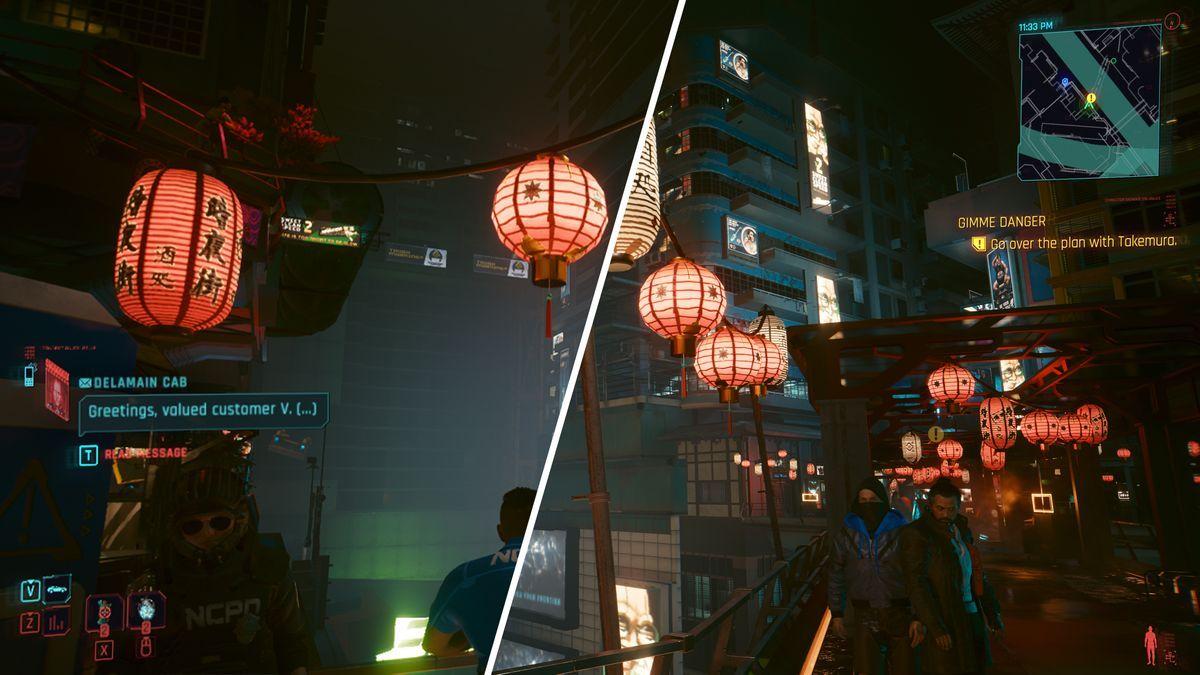
Source: Tom's Guide
Additional testing revealed that DLSS 4.5 performs best when using performance modes rather than quality or balanced settings
2
. Players focused on ultimate fidelity may want to stick with DLSS 4, as the new model shows reduced ghosting around objects, better distant detail, and less shimmering primarily in performance modes2
.Frame Generation Capabilities and Spring 2026 Timeline
While DLSS 4.5 brings immediate improvements to AI upscaling, the promised 6x Multi Frame Generation mode remains unavailable until spring 2026
1
. This Dynamic Multi-Frame Generation feature, exclusive to RTX 50 series GPUs, will dynamically adjust frame generation between 4x and 6x modes to maximize display refresh rates1
. Nvidia confirmed the dynamic frame gen plugin will be available to developers through the DLSS Multi Frame Generation Streamline Plugin this spring1
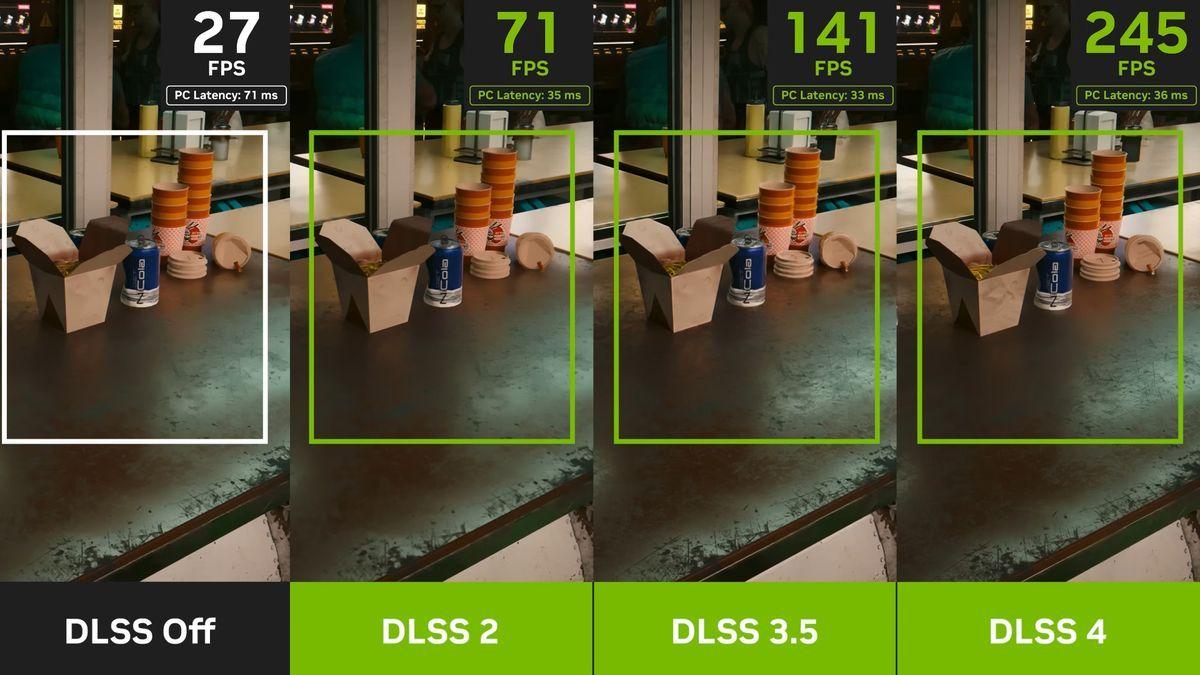
.Current testing with existing frame generation modes shows that 2x frame gen provides free performance boosts with minimal visual degradation. On the RTX 5060 at 1440p output resolution with DLSS set to Balanced, Alan Wake II jumped from 40 fps to 55 fps average with 2x frame generation, with extremely minimal loss in visual clarity
3
. However, 4x mode introduced noticeable ghosting, blurring, and input latency issues3
.
Source: TechRadar
Nvidia CEO Jensen Huang discussed the company's vision for gaming performance, suggesting that "more and more computation" could be done on "fewer and fewer pixels"
2
. This approach positions DLSS as central to future gaming performance optimization, though questions remain about how older RTX GPUs will handle the increased computational demands of the advanced transformer model2
.Related Stories

Image Quality Gains and Hardware Considerations
The second-generation transformer model in DLSS 4.5 works directly in linear color space rather than compressed domains, enabling more accurate handling of high-contrast elements like neon reflections and bright highlights
4
. This results in finer edge rendering, sharper details, and improved temporal stability compared to the first-generation transformer model4
.DLSS makes more of a difference for players running cheaper gaming rigs than for platforms with higher-end specs
1
. Environmental details like sparks from fires, which previous DLSS versions struggled to capture, now appear more prominently, while texture sharpness has improved and ghosting around environmental details has been reduced1
. On newer RTX 40 and RTX 50 series GPUs, FP8 precision acceleration helps mitigate the greater performance cost of the enhanced model while delivering superior upscaled visuals4
.References
Summarized by

Navi
[2]
Related Stories
Nvidia DLSS 4.5 launches with 6x frame generation and dynamic mode for RTX 50 series GPUs
31 Mar 2026•Technology

Nvidia unveils DLSS 4.5 with 6x Frame Generation and improved AI upscaling at CES 2026
06 Jan 2026•Technology
Nvidia DLSS 4.5 brings AI upscaling improvements to all RTX GPUs, but older cards may struggle
14 Jan 2026•Technology

Recent Highlights
1
AI chatbots validate you too much, making you less kind to others, Stanford study reveals
Science and Research

2
Anthropic's Claude Code Source Leak Reveals Hidden AI Agent Plans and Extensive System Access
Technology

3
Judge blocks Pentagon from branding Anthropic a security risk over AI safety guardrails dispute
Policy and Regulation

Recent Highlights
Today's Top Stories









Your Daily Dose of Curated AI News
Don’t drown in AI news. We cut through the noise - filtering, ranking and summarizing the most important AI news, breakthroughs and research daily. Spend less time searching for the latest in AI and get straight to action.

