SwitchBot AI Art Frame turns text prompts into wall art, but AI gaffes reveal limitations


2 Sources
2 Sources
[1]
This AI-Powered Photo Frame Turns Your Words Into Art (or Slop)
SwitchBot's AI Art Frame, which comes in 7.3-. 13.3,- and 31.5-inch sizes, is desk- and wall-mountable. Its E Ink Spectra 6 display is like that of the Kindle Paperwhite; its nonreflective screen produces no glare and looks a lot like actual printed material. To get your ideas or photo into the frame, you use the SwitchBot app on your phone. Unlike Samsung's 4K The Frame TV, which has partnerships with more than 80 galleries and museums and over 800 artists to curate art for Frame owners to display at home (some for free, or unlimited art for $5 per month or $50 per year), the SwitchBot AI Art Frame can display pretty much any image. But those images may be full of AI gaffes. The AI is powered by Nano Banana, Google's AI model for image generation, also known as Gemini 2.5 Flash Image. (More specifically, Nano Banana supports the AI Studio function in the SwitchBot app, and is what actually generates images.) It also costs money: After a 30-day trial, you have to pay $4 per month for the ability to generate up to 400 images, not including those you upload from your own photo library or the free ones in the SwitchBot Gallery. The app can save up to 10 of your favorite images, but that limitation didn't slow me down. Once you generate something suitable for framing using the app, you tap Sync to send the image wirelessly via Bluetooth to the Art Frame. The image can take a few minutes to materialize because the process cycles through color as it creates the image. If you like an image you can opt to save it to your phone's photo library. The frame itself has rechargeable batteries that SwitchBot says should last up to two years per charge, so it doesn't need to be plugged in, unlike many photo frames. I started by asking for images of a red panda playing in the snow and goats falling over (after which I specified that I wanted baby goats), and then I simply told it to create a scene from a "disaster movie." Everything came up exactly the way I expected it to. But then things got weird and wildly entertaining. When I decided to see what other disaster-movie scenes the app could create, it gave me a movie poster with the typo-title Apocalyopse Now and then another titled Global Colcapse. That's right: AI is a notoriously bad speller. Next, I asked it to create a Led Zeppelin poster, which came out looking like bad carnival-mirror art -- and that would have been awesome, but again, the spelling was off. Despite the fact that I had spelled the band name correctly in the prompt, the AI could not spell "Zeppelin," actually spelling it three different ways on three different tries. Since I was on a roll, I asked it to show a picture of me, which I didn't think would be a big ask since my photo is readily available on the web. Yet for SwitchBot's AI, it turned out to be a big ask. The result definitely wasn't me at all. But I'm flattered that the five images the engine came up with had me so put-together, looking like a LinkedIn profile pic. The AI Art Frame wasn't all AI slop, though, and it was able to deliver accurate photos of people much more famous than I am, such as Tom Cruise, Beyoncé, Keanu Reeves, Harrison Ford (and I love that on the first try, he popped up as Indiana Jones), Zendaya, and Dolly Parton. I even created one specifically of Dolly playing the guitar. I was less successful in getting the engine to show Meryl Streep or Betty White, but both results were close. And it couldn't create accurate photos of Weird Al (although it got the accordion), Mr. Rogers (it got the sweater), or, most baffling, Denzel Washington. Strangely, the system is able to create images that include copyrighted content (even though SwitchBot's User Agreement says it's prohibited), but it's not very good at the task. I asked for a picture of Walt Disney surrounded by Disney characters. I noticed Mickey (two of them), Donald Duck, Winnie the Pooh, and some other familiar faces, but others were nightmare fuel straight out of The Island of Dr. Moreau, such as a two-headed version of Chip and Dale. When I shared the image in Slack, my coworkers enjoyed pointing out mistakes like they were playing an adult version of Highlights magazine's Hidden Pictures. I also tried to re-create actual works of art, and while the styles were present, something was always off. The Mona Lisa had the proper number of fingers, but Girl with a Pearl Earring was more like some girl, and definitely not Vermeer's Girl. Dali's The Persistence of Memory included a random melted face, which popped up again on a second attempt. And several versions of Botticelli's The Birth of Venus always had key elements missing. Aside from the subject matter, the quality of the images the frame projected was merely good, not great. I actually found most to be a bit on the dark side -- and again, not just in terms of the subject matter. I asked SwitchBot if there was a way to adjust the brightness. Representatives said no, but it was intentional, in order to mimic the texture of actual paper.
[2]
Switchbot AI Art Frame review: E-paper meets artificial intelligence
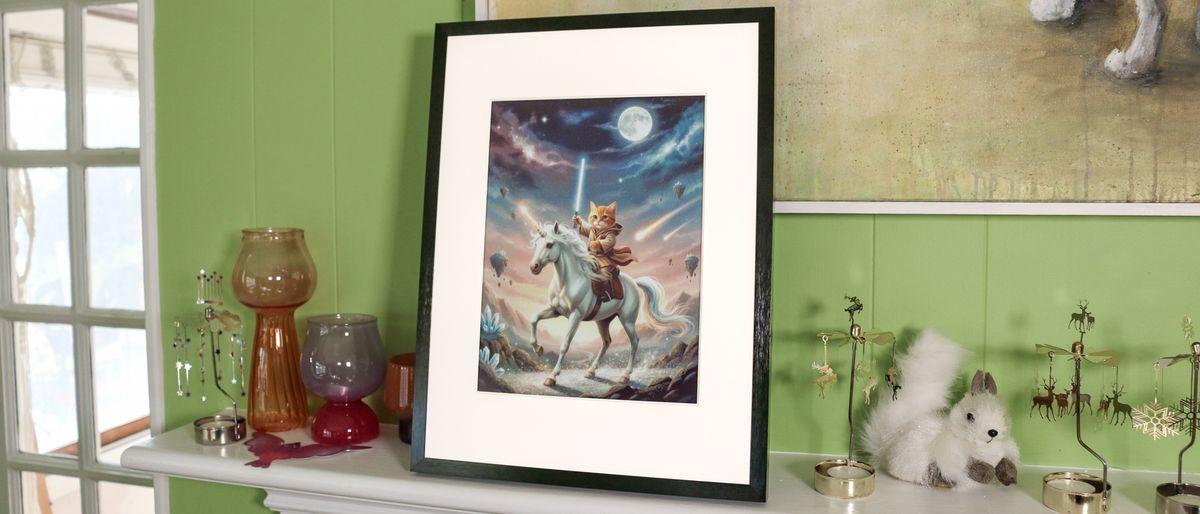
The Switchbot AI Art Frame is one of the first of a new type of digital photo frames, one that uses E Paper rather than an LED display to show off all your images. While this means that your pictures won't look as vibrant, these E Paper frames have much longer battery life -- up to two years -- so you can hang them on a wall as you would any traditional photo frame, and not have any dangling cords to contend with. What sets Switchbot's frame apart from others is that the company added an AI image generator to its app, so that if you get bored with your own photos, you can have the frame make some for you based on your prompts. But is that enough to pay far more than what most of the best digital photo frames cost? The AI art frame is available in three sizes: A 7.3-inch 800 × 480 pixel frame costs $149, the 13.3-inch 1600 x 1200 pixel frame is $349, and the massive 31.5-inch 2560 x 1440 frame is a whopping $1,299. For that price, you might as well get a Samsung The Frame TV and enjoy your favorite shows. As of this writing, you could only purchase the art frame from Switchbot's website. I suspect most will opt for the 13.3-inch frame; Switchbot sent me both that one and the 7.3-inch model, and the smaller one has a rather odd aspect ratio that makes it suitable mainly for landscape images, or narrow portraits. I suspect that Switchbot is using the same supplier as Aluratek did for its E Paper 13.3 inch Wi-Fi Digital Photo Frame. Both use an E Ink Spectra 6 display that has the same size and 1600 x 1200 resolution, and both have a two-year battery life. Not surprisingly, images looked about the same on both frames, which is to say close to an actual photograph, but with some caveats. High-contrast images -- like my daughter at the beach, or in front of a bright white wall bathed in sunlight -- didn't look very good. E Paper just doesn't handle this as well as an LED display. Aluratek's frame has a larger matte, so it'll take up more room on your wall -- I don't have a preference for one over the other -- but the Aluratek also has physical buttons on its side, so you can switch photos without having to use the app. The Switchbot frame has no such physical controls. The app used to control the frame is the same app that's used to control all Switchbot smart home products, which run the gamut from robot vacuums to smart locks and automated curtains. As a smart home app, it's well thought out, but Switchbot's inexperience with digital photo frames shows. Adding photos to the Art Frame is not as easy as with most of the other digital photo frames I've tested. You can only add one photo at a time, and there's no way to sync it with either a Google Photos nor an Apple Photo library. Moreover, there's no way to invite collaborators, so you couldn't give this to your parents or grandparents and then have other family members add photos from their own phones. As I was testing this frame out, I discovered another unfortunate parallel to the Aluratek frame: You can only have 10 photos synced to the Switchbot frame at any one time. You can either display a single image or have it rotate through the ones you've uploaded; if you select the latter, you can change the interval from once every 15 minutes all the way to once every 24 hours. The novel feature with this frame is the integrated AI studio, which lets you use AI to modify images you've already uploaded to the frame, or generate new ones out of whole cloth using prompts. However, to use this feature you need to subscribe to Switchbot's AI Studio, which costs $3.99 per month, and lets you generate up to 400 images each month. It's fun -- I had it create an image of a lightsaber-wielding cat on a unicorn -- but considering there are multitudes of AI image generators you can use for free, like Nano Banana, I'm not sure that Switchbot's is worth the price for the convenience of having it right in the app. In addition to adding AI art, Switchbot also has a Gallery feature where you can add art from famous painters and artists, akin to what you'd find on something like Samsung's The Frame TV (albeit without the subscription costs). It seems somewhat limited: When I searched for "Michelangelo," it only returned a handful of his sketches, rather than more famous works. A search for "Monet" did get me some water lilies and some haystacks, but only 20 pieces in total. Looking back at my Aluratek review (as well as my Aura Ink review), I feel like I was a bit generous with my rating, which I'll chalk up to the fact that it was the first such digital photo frame of its kind. I still like that, while these E Paper displays might not be as vivid as their LED counterparts, you can mount them on a wall for years at a time, and not have to see a cord dangling to an outlet. However, like the Aluratek frame, the Switchbot Art Frame is very limited in the images you can upload. Its AI feature, though a little gimmicky, does add some uniqueness, as does its limited Gallery. The Aura Ink is even pricier at $500, but at least it's more capable when it comes to adding photos from friends and family. Ultimately, all three are far more expensive than traditional digital photo frames, which makes them a harder sell, especially if you don't get the basics right.
Share
Share
Copy Link
SwitchBot launched its AI Art Frame with E Ink display technology and AI image generation powered by Google's Nano Banana model. Available in three sizes from $149 to $1,299, the cord-free display promises two-year battery life but requires a $4 monthly subscription for AI features. Early reviews reveal the frame struggles with spelling errors and copyrighted content while offering limited photo management compared to traditional digital frames.
SwitchBot Introduces AI-Powered Photo Frame With E Ink Technology
The SwitchBot AI Art Frame marks a notable entry into the digital photo frame market by combining e-paper digital photo frame technology with AI image generation capabilities. Available in 7.3-inch ($149), 13.3-inch ($349), and 31.5-inch ($1,299) sizes, the device features an E Ink Spectra 6 display similar to the Kindle Paperwhite, delivering a glare-free display that mimics actual printed material without reflective glare
1
. The cord-free display design allows wall mounting without visible cables, supported by rechargeable batteries that SwitchBot claims can last up to two years per charge2
.
Source: Tom's Guide
Google's Nano Banana Powers AI Image Generation Features
The AI image generator functionality relies on Nano Banana, Google's AI model for image generation also known as Gemini 2.5 Flash Image, which powers the AI Studio function within the SwitchBot app
1
. Users can generate images from text prompts through their smartphones, with the frame receiving images wirelessly via Bluetooth. The process takes several minutes as the E Ink display cycles through colors to materialize each image. After a 30-day trial period, the subscription-based service costs $4 per month, allowing users to generate up to 400 images monthly, excluding personal photos or free content from the SwitchBot Gallery1
.AI Slop and Spelling Errors Plague Image Quality
Testing revealed significant limitations in the AI Art Frame's generation capabilities. When attempting to create disaster movie posters, the system produced typo-riddled titles including "Apocalyopse Now" and "Global Colcapse," demonstrating AI's notorious spelling weaknesses
1
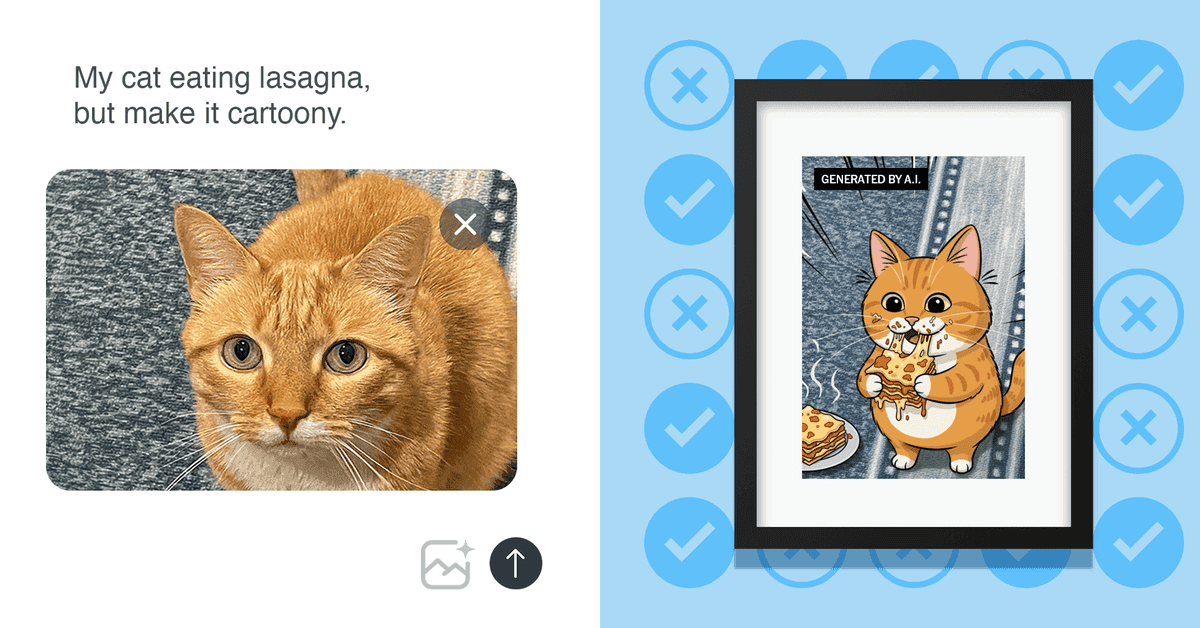
. A Led Zeppelin poster request resulted in the band name spelled three different incorrect ways across multiple attempts, despite correct spelling in the original text prompts. The system struggled with lesser-known public figures and produced what reviewers described as AI slop, though it successfully generated recognizable images of celebrities like Tom Cruise, Beyoncé, and Harrison Ford1
.
Source: NYT
Limited Photo Management Compared to Traditional Frames
The SwitchBot app, designed primarily for the company's smart home products ranging from robot vacuums to smart locks, shows the company's inexperience with digital photo frames
2
. Users can only upload one photo at a time with a maximum of 10 images synced to the frame simultaneously. The app lacks integration with Google Photos or Apple Photo libraries and offers no collaboration features for family members to add photos remotely—a significant drawback for those considering it as a gift for parents or grandparents2
. The frame also lacks physical buttons, requiring app access for all photo changes.Related Stories


E Ink Display Quality Shows Mixed Results
The E Ink display technology delivers images that closely resemble actual photographs but with notable limitations. High-contrast images, such as subjects against bright white backgrounds or beach scenes with intense sunlight, don't render well compared to LED displays
2
. Reviewers found most images appeared darker than expected, which SwitchBot representatives confirmed was intentional, though no brightness adjustment options exist1
. The 1600 x 1200 resolution on the 13.3-inch model provides adequate detail, while the 7.3-inch version's 800 x 480 resolution creates an odd aspect ratio suitable mainly for landscape images.Subscription Costs and Value Proposition Under Scrutiny
At $3.99-$4 per month for AI Studio access, the value proposition faces questions given the availability of free AI image generators like Nano Banana elsewhere
2
. The included Gallery feature offers artwork from famous painters, though searches return limited results—Michelangelo queries produced only sketches rather than famous works, while Monet searches yielded just 20 pieces total2
. This contrasts sharply with Samsung's The Frame TV, which partners with over 80 galleries and museums featuring 800-plus artists, offering unlimited art for $5 monthly or $50 annually1
. For those watching this space, the question remains whether AI-powered photo frame technology will mature enough to justify premium pricing or if traditional digital frames with better photo management will continue to dominate the market.References
Summarized by

Navi
Related Stories
Recent Highlights


Recent Highlights
Today's Top Stories



Your Daily Dose of Curated AI News
Don’t drown in AI news. We cut through the noise - filtering, ranking and summarizing the most important AI news, breakthroughs and research daily. Spend less time searching for the latest in AI and get straight to action.

