Amazon launches Alexa+ web portal to compete with ChatGPT and Google Gemini


3 Sources
3 Sources
[1]
With new Alexa website, Amazon's consumer AI vision finally comes together -- and it's actually useful
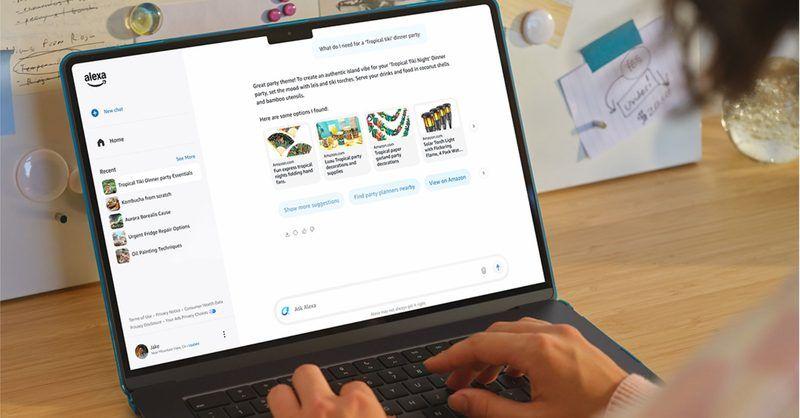
Amazon is quietly rolling out the last big pillar of its AI-powered Alexa+ vision: the Alexa.com website, bridging the gap between its Echo devices, mobile app, and consumer desktops. The web portal means users can now interact with Alexa through a keyboard and mouse: accessing and continuing past Alexa chats, starting new ones, going back and forth between voice conversations in the living room and typed chats in the home office, etc. (Alexa.com is available initially to a subset users in the Alexa+ early access program, with access likely to expand in the coming weeks, so if you're not seeing it yet, stay tuned.) I've been trying it out, and I'm already finding it quite useful as an extension of the Alexa experience. In addition to expanding the chat functionality to the browser, the web interface offers fine-grained control over reminders, calendar appointments, uploaded files, and smart home devices. For example, I was able to edit a family reminder: changing the assigned person, adjusting the date and time, setting it to repeat weekly, and adding a flag for Alexa to follow up until it's complete. All of this happened through simple clicks, much easier than talking Alexa through the details, in my experience. The rollout of Alexa+ earlier this year also introduced the ability to email or upload documents to Alexa for summarization and reference. This made Alexa a lot more useful on its own. Now, with the online portal, it's much easier to upload, access and delete files. There's also some nice smart home integration, with the ability to control lights and plugs, for example. It's similar to the Alexa app, but nice to be able to access on the computer. In short, it's a level of point-and-click precision that voice commands and the mobile app can't offer. Within a few minutes of using Alexa.com, I had this sense of liberation, being able to interact with Alexa in the same way as anything else on the computer. What a concept! That said, I couldn't help but wonder how much I'll actually use it. Three years after the launch of ChatGPT, my AI routines have become relatively entrenched. I'm having a hard time envisioning going to Alexa.com on my computer to start a chat rather than Gemini, NotebookLM, Claude, Perplexity or other AI tools that have become daily habits. Then again, for me, those tools are about work and individual tasks. Alexa is really the digital hub for my family. The introduction of better AI with Alexa+ has improved that experience over the past few months, and the web portal adds a whole new dimension. Family is why I'll use it. The Alexa+ integration goes even further for me since I've been talking to Alexa more and more via my Amazon Echo Buds on my phone when I'm out and about, although this is probably more illustrative of me being an edge case than anything else. Within Amazon, Alexa+ sits at the top of the AI stack that Amazon CEO Andy Jassy talks about. It's the consumer-facing layer for a company that has made a much bigger mark in AI with its cloud infrastructure and platforms. Alexa's web launch fills a gap that's been glaring for a while. One thing I'd like to see is true Ring integration into the web experience -- the ability to see and access smart home cameras from Alexa.com in addition to the existing Ring.com interface. The more Amazon can unify everything inside the web portal, the more useful it will be. No doubt I'll come up with other feature requests as I continue to use it. But for now, the simple act of using an AI-powered Alexa in a web browser is so mind-blowing, in such a basic way, that it's hard not to wonder how much further along Amazon would be in the world of consumer AI if it had been able to make this happen a long time ago.
[2]
You can finally chat with Amazon's AI-enhanced Alexa+ on the web
Alexa+ remains free during early access, with future plans to offer it free to Prime members while charging non-Prime users a monthly fee. It's been nearly a year since Amazon first launched the new, AI-enhanced Alexa+, but until now, a key feature has been missing: the ability to access and chat with Alexa+ on the web. Now it appears Amazon has fulfilled that promise, with an Alexa+ web portal finally going live -- for at least some Alexa+ early access users, anyway -- at Alexa.com. The new Alexa+ web portal will look familiar to anyone who's accessed ChatGPT or Google Gemini on the web. A big chatbox sits front and center, with a friendly "Hello Ben, how can I help?" heading, along with buttons that reveal suggested prompts ("Create a plan for my next getaway," "Teach me a surprising fun fact," "Add an event to my calendar," "Create an image of a dinosaur," "Book a table at a nearby restaurant") on mouse rollover. On the left side of the screen are shortcuts to your Alexa+ chat history (good for revisiting Alexa+ discussions you've had on an Echo speaker), smart home controls (just basic ones, mind you), your calendar, lists, reminders, and uploaded files. That last feature -- the ability to upload files to Alexa+ -- is a big one, as it allows you to do things like upload resumes for Alexa to tinker with, or any other documents you'd like Alexa to analyze. Just for fun, I uploaded a configuration file for the Jellyfin media player installation on my Raspberry Pi, and Alexa+ did a reasonably good job of sifting through the code and offering optimization suggestions. (Alexa+ gets a decent chunk of its AI smarts courtesy of Anthropic's Claude.) I then picked up the conversation on an Echo speaker, allowing Alexa and me to continue batting around Jellyfin ideas. Another nifty thing about the new Alexa+ web portal is that it makes Alexa+'s ability to compose letters and other documents a lot more useful. Before, if you asked Alexa+ to write (for example) a thank-you letter to a friend, there was no easy way to grab the text and put it into a text editor for fine-tuning. (It's possible to access Alexa+ chats in the Alexa app, but it's a tedious process.) With the web portal, you can just click the Copy button beneath any Alexa+ response, just as you can with ChatGPT or Gemini. Granted, the Alexa+ web interface is fairly bare-bones compared to what you get with ChatGPT or Gemini. There are no custom GPTs or Gemini "gems," nor any tools like a canvas, a video generator, or a "guided learning" mode. And while I could upload Word documents, text files, and PDFs via the Alexa+ web interface, Excel files were off-limits, as was the JSON file for my Jellyfin configuration (I had to convert it to a plain text file). But as with ChatGPT and Gemini, I'd expect the Alexa+ website to add more features over time, and being able to chat with Alexa+ at all over the web makes for a big improvement. It's also worth noting that Alexa+ is still in early access mode, meaning its free for everyone. Eventually, Alexa+ will be free for Prime members and $19.99 a month for everyone else. This news story is part of TechHive's in-depth coverage of the best smart speakers.
[3]
Amazon launches Alexa+ on the web to take on ChatGPT and Gemini
Amazon has begun rolling out a web version of its next-generation Alexa+ assistant, giving users a new way to interact with the AI beyond Echo devices and the mobile app. For some users, Alexa.com now opens into a full chatbot-style interface where Alexa+ can be used through a browser. This move puts Alexa+ closer to how people already use tools like ChatGPT and Google Gemini, making the assistant more useful beyond voice interactions and smart speakers. What Alexa+ can do on the web and what it still cannot According to The Verge, Alexa+ web interface will feel familiar if you have used ChatGPT or Gemini. There is a large chat box at the center, suggested prompts to get started, and quick ways to copy responses. Users can type instead of talk, upload files for Alexa+ to analyze, and manage things like shopping lists and calendars from a larger screen. Recommended Videos The left sidebar also pulls in chat history from Echo devices, basic smart home controls, and access to uploaded documents. These options make it easier to continue conversations across devices without starting over. Amazon is positioning the web version as a productivity boost. Tasks that were awkward with voice alone, like editing long documents, reviewing files, or copying generated text, are much easier with a keyboard and mouse. You can ask Alexa+ to plan trips, create study guides, write letters, shop, book restaurants, or analyze uploaded files, then quickly reuse the output elsewhere. That said, the experience is still early. The web interface is more bare-bones than ChatGPT or Gemini, with no advanced tools like custom bots or creative canvas tools, and file support is limited. For now, Alexa+ is free during testing, but Amazon plans to bundle it with Prime later while charging non-Prime users a monthly fee of $20. Alexa's evolution is worth paying close attention to as Amazon continues to expand what the assistant can do. At the same time, questions remain about how much autonomy Alexa should have. Even so, putting Alexa+ on the web is Amazon's strongest move yet to position Alexa alongside leading AI chatbots, not just smart home devices.
Share
Share
Copy Link
Amazon quietly rolls out a web version of its AI-enhanced Alexa+ assistant at Alexa.com, enabling users to interact with Alexa via keyboard and mouse. The new browser interface lets users upload files for analysis, manage reminders and calendars, and continue conversations across Echo devices. Currently free during early access, it will later cost $19.99 monthly for non-Prime users.
Amazon Alexa Gets a New Browser Interface
Amazon has begun rolling out the Alexa web portal at Alexa.com, marking a significant expansion of its AI-enhanced Alexa+ assistant beyond Echo devices and mobile apps
1
. The new browser interface allows users to interact with Alexa via keyboard and mouse, bridging the gap between voice conversations in living rooms and typed chats at desktops1
. Initially available to a subset of users in the Alexa+ early access program, the web portal is expected to expand access in coming weeks1
.
Source: Digital Trends
This move positions Amazon Alexa closer to how people already use tools like ChatGPT and Google Gemini, making the assistant more useful beyond voice interactions and smart speakers
3
. The interface features a large chatbox at the center with suggested prompts including "Create a plan for my next getaway," "Add an event to my calendar," and "Create an image of a dinosaur"2
.What the Alexa Web Portal Offers Users
Alexa on the web provides fine-grained control over reminders, calendar appointments, uploaded files, and smart home controls
1
. Users can edit family reminders by changing assigned persons, adjusting dates and times, setting weekly repeats, and adding flags for follow-up—all through simple clicks rather than voice commands1
. The left sidebar includes shortcuts to chat history from Echo devices, basic smart home controls, calendars, lists, reminders, and uploaded files2
.
Source: GeekWire
The ability to upload files for analysis stands out as a major feature. Users can upload resumes for Alexa+ to revise or any documents for analysis, with the assistant leveraging Anthropic's Claude for its AI capabilities
2
. One user uploaded a Jellyfin media player configuration file, and Alexa+ successfully analyzed the code and offered optimization suggestions, then continued the conversation on an Echo speaker2
. However, file support remains limited—while Word documents, text files, and PDFs work, Excel files are currently off-limits2
.Alexa Versus ChatGPT: How They Compare
The Alexa web portal makes Amazon's consumer AI vision more cohesive, sitting at the top of the AI stack that Amazon CEO Andy Jassy discusses as the consumer-facing layer for a company better known for cloud infrastructure
1
. Tasks that were awkward with voice alone, like editing long documents or copying generated text, become easier with keyboard and mouse access3
.Yet the experience remains more bare-bones compared to ChatGPT or Google Gemini
2
. There are no custom GPTs, Gemini "gems," or advanced tools like canvas, video generators, or guided learning modes2
. Still, putting Alexa+ on the web represents Amazon's strongest move yet to position Alexa alongside leading AI chatbots rather than limiting it to smart home devices3
.Related Stories

Pricing and What to Watch Next
Alexa+ remains free during early access, but Amazon plans to bundle it with Prime memberships while charging non-Prime users $19.99 per month
2
3
. This pricing positions it competitively against other premium AI services.For families using Alexa as a digital hub, the web portal adds a new dimension to managing shared tasks and conversations across devices
1
. Watch for expanded file format support, potential Ring camera integration into the web experience, and additional features as Amazon continues developing the platform1
. The question remains whether users with established AI routines will adopt Alexa.com or stick with their existing tools1
.References
Summarized by

Navi
[1]
[3]
Related Stories
Amazon Alexa+ launches on Alexa.com, bringing AI assistant to web browsers for early access
05 Jan 2026•Technology

Amazon launches Alexa+ nationwide, offering AI assistant free to Prime members
04 Feb 2026•Technology

Amazon Unveils Alexa+: A Generative AI-Powered Assistant with Enhanced Capabilities
27 Feb 2025•Technology

Recent Highlights
1
AI chatbots validate you too much, making you less kind to others, Stanford study reveals
Science and Research

2
Anthropic's Claude Code Source Leak Reveals Hidden AI Agent Plans and Extensive System Access
Technology

3
Judge blocks Pentagon from branding Anthropic a security risk over AI safety guardrails dispute
Policy and Regulation

Recent Highlights
Today's Top Stories




Your Daily Dose of Curated AI News
Don’t drown in AI news. We cut through the noise - filtering, ranking and summarizing the most important AI news, breakthroughs and research daily. Spend less time searching for the latest in AI and get straight to action.

