Blink security cameras now offer AI video descriptions to simplify motion alerts


3 Sources
3 Sources
[1]
Why Blink's New Security Camera Upgrade Matters for the Budget-Minded
Expertise Smart home | Smart security | Home tech | Energy savings | A/V Blink home security cams have been one of my top choices for people looking for well-rounded and affordable security devices with long-lasting batteries. The outdoor model in particular is one of my favorites. That's why I was glad to see that, starting today, Blink is rolling out new video descriptions to users. These AI-powered video descriptions are the latest home security feature to arrive on the subscription-based cameras, including those that use Google's Gemini for Home. They're advanced algorithms that condense video clips into a brief explanation to save you time and hassle when you receive alerts that your camera captured something. Blink's descriptions, while still in early access, come with one huge advantage. They're available completely for free along with a Blink subscription, which starts at $4 per month. That's already one of the lowest subscription rates for home security cams, and unlike other AI video plans, you don't have to upgrade to a high tier to access the latest options. I can't guarantee that Blink's descriptions will always be a free add-on, but for now it's one of the best deals. Everyone is using the "AI" catchphrase right now, but descriptions like these really are AI-powered. They use learning algorithms, LLM-like capabilities that are trained on so many images that they can correctly label specific objects in a picture -- or a video captured by home security cameras. All you have to do is let the algorithm scan the video clips that home security cameras record, which not everyone is comfortable with. I've been testing these video descriptions ever since they first came out, and they've spread to most of the big home security brands in 2025, including not only Nest but Arlo, Ring, Wyze and more. They're one of my favorite ways to use AI in the home and I haven't come across any privacy fiascos so far. One of the most annoying parts of home security cam management is deciding if video clips need viewing based on vague motion alerts. Object identification helped with this: Getting an alert that a package was recognized along with a person can be very useful if you want to save time. Full video descriptions take this usefulness and multiply it, adding details about people, vehicles, colors, specific objects and more. It's easy to tell if a home security video needs further attention or if you already have enough info to act on, which leads to time and sanity saved. Some AI video features go even deeper, like the ability to search video footage for specific objects, or ask the AI questions about what happened. For now, Blink is sticking with the simpler version of the software, which expands notifications with a broader explanation of what's going on. Blink is currently rolling out descriptions to its subscribers as an early access plan at no additional charge (free trial users won't get it). If you want to know if you have it, make sure your Blink app is updated to the latest version and check to see if it's an option. You should get a notification about the feature, but if not you can double-check in the Notifications section of Blink app Settings. If you do have the new feature, you'll see it comes in two flavors, with "Quick Notifications" turned on or off. Quick notifications prioritize pushing basic motion alerts first and add the AI description later. With the feature off, you only get the completed alert with AI description when it's ready. That takes longer, but you get all the info at once. Personally I like waiting for the full description as motion alerts are very rarely time sensitive unless you're trying to catch a porch pirate or trespasser. Note that the descriptions have several limitations. They don't work with early 1st-gen models of Blink devices, they won't affect how Alexa interacts with Blink, and there are some locations where AI video descriptions are disabled due to privacy laws -- notably, the state of Illinois. But for those who can use these features, it's a great way to try some of the most advanced technology in the smart home, without high fees.
[2]
AI video descriptions are coming to Blink security cameras
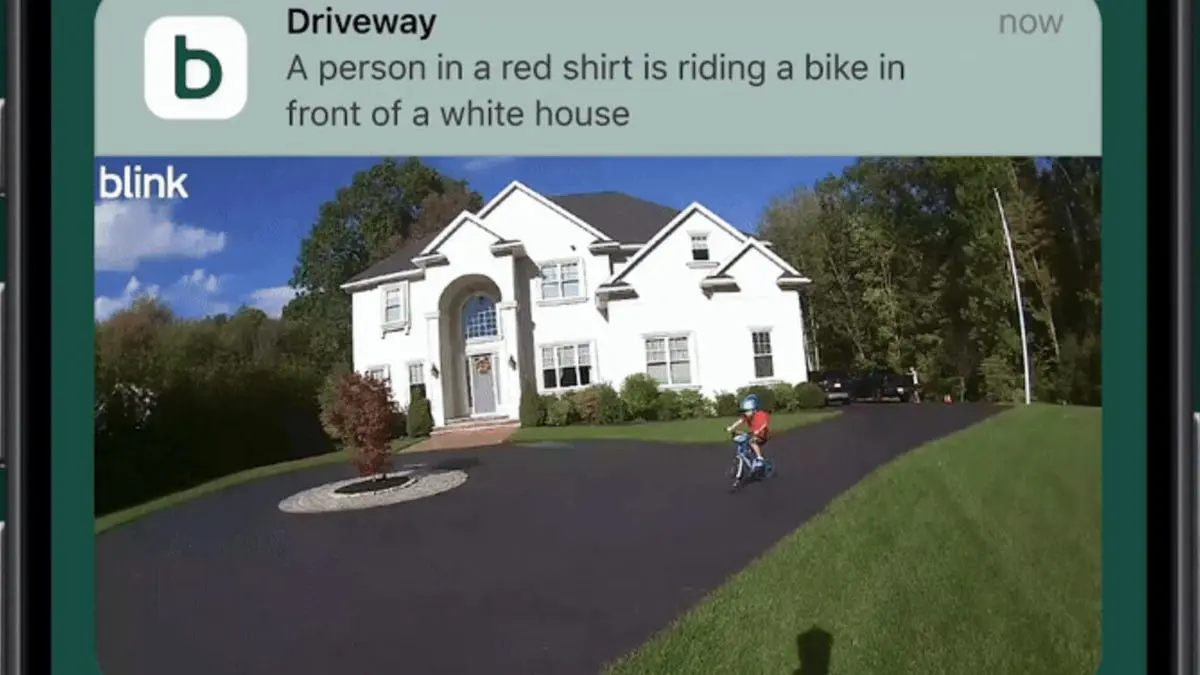
Following in the footsteps of Ring and Google's Nest cameras, Blink subscribers will soon see AI-generated summaries of individual video events. AI is already crafting natural-language summaries of what Amazon's Ring and Google's Nest cameras are seeing, and now the AI-generated descriptions are coming to Blink cameras, too. Slated to begin rolling out today in beta to U.S. users, Blink Video Descriptions will employ AI to analyze the video events captured by Blink security cameras and then generate descriptions of what's happening. The feature, which will work with all existing Blink cameras and doorbells, will start off as a free preview for "select" Blink Plus subscribers, according to a Blink spokesperson. In a Blink promotional clip, an AI-generated description for an event video reads, "A person in a red shirt is riding a bike in front of a white house," which pretty much summarizes what's happening in the video. The videos descriptions are "designed to only deliver the most relevant information" and will "focus on describing the main subject that caused a motion alert and what action they are taking," Blink said. Blink Video Descriptions are similar to the AI summaries generated by Ring's Smart Video Search, which rolled out to Ring subscribers more than a year ago. Both Blink and Ring are owned by Amazon. Google has also rolled out its own generative-AI video descriptions powered by Gemini, while other security cam manufacturers (such as Eufy) have their own versions of the technology. For now, Blink Video Descriptions apply only to individual video events. In contrast, Google's Gemini for Home can also generate "Daily Briefs" that summarize your daily smart home activity, including motion events captured by Nest cameras. In addition, Blink Video Descriptions are not searchable, as are the AI descriptions rendered by Ring's Smart Video Search feature. One issue with Blink Video Descriptions that remains up in the air is whether it will require a subscription once it's out of beta, with a Blink spokesperson telling me that "we don't have any details to share on subscription requirements for Blink Video Descriptions at this time." Blink offers two paid subscription tiers: a $3.99-a-month Basic plan that offers 60 days of video history, AI-powered person and vehicle detection, and other features for a single Blink camera, and a $11.99/month plan covers all your Blink cameras while adding an extended warranty. This news story is part of TechHive's in-depth coverage of the best security cameras.
[3]
Blink cameras get AI-powered alerts that actually tell you what's happening
Say goodbye to generic notifications and hello to AI Video Descriptions. Amazon-owned smart home device maker Blink is taking cues from Google and Ring to introduce a new AI-powered feature that gives users smarter, more descriptive alerts for events captured by its security cameras. Like Ring's AI Video Descriptions and Google's Gemini-powered AI descriptions, Blink's new feature uses AI to analyze security camera footage and generate natural-language summaries of the events. Currently available as an early beta preview in the US for Blink users with a basic or plus subscription, the feature is designed to offer more helpful alerts. Instead of a generic notification like "motion detected in the backyard," the feature will offer a more detailed description that, according to Blink, will "focus on describing the main subject that caused a motion alert and what action they are taking." These glanceable summaries will make it easier for users to decide if an alert requires their immediate attention or can be safely ignored without opening the app. While more useful than generic alerts, Blink's Video Descriptions lag behind what Ring and Google have on offer. PCWorld notes that Blink's summaries aren't searchable like Ring's, so users can't quickly look up specific events with natural language queries. Additionally, unlike Google's Gemini, which can generate daily briefs of all activity, Blink's descriptions are limited to individual events. Recommended Videos Nonetheless, for anyone invested in Blink's ecosystem of video doorbells and security cameras, the feature will be a welcome change. It will eliminate the need to open every single security alert and make monitoring security cameras less of a hassle. While Blink's Video Descriptions may not yet match the capabilities offered by competitors, the company could enhance its offering by the time the feature comes out of beta. If you own a Blink security camera, you can try out the Video Descriptions feature by updating to the latest version of the Blink app and navigating to Settings > Notifications > Blink Video Descriptions. Blink's support page for the feature states that it's only available if the language is set to English and is not compatible with Blink XT, XT2, and Indoor (1st Gen) cameras.
Share
Share
Copy Link
Amazon-owned Blink is rolling out AI-powered video descriptions that transform generic motion alerts into detailed, natural-language summaries. Available now in early access for subscribers starting at $4 per month, the feature analyzes camera footage to describe what's happening—like "a person in a red shirt is riding a bike in front of a white house." Unlike competitors Ring and Google Nest, Blink includes this upgrade at no additional cost.
Blink Security Cameras Introduce AI Video Descriptions at Budget-Friendly Price
Amazon-owned Blink is rolling out AI video descriptions to users starting today, bringing smart home security features that rival offerings from Ring and Google
1
2
. The feature, currently available as an early access beta preview in the U.S., uses learning algorithms to transform vague motion alerts into natural-language summaries that tell users exactly what their Blink security cameras captured.
Source: Digital Trends
Instead of receiving generic notifications like "motion detected," users now get detailed descriptions such as "A person in a red shirt is riding a bike in front of a white house"
2
. The AI-powered alerts are designed to focus on describing the main subject that triggered the alert and what action they are taking, making it easier to decide if immediate attention is required without opening the app3
.
Source: CNET
Budget-Friendly AI Upgrade Sets Blink Apart from Competitors
What makes this rollout significant for the budget-minded is that Blink offers these AI video descriptions at no additional charge for Blink Plus subscribers, who pay just $4 per month
1
. This represents one of the lowest subscription rates for smart home security cameras with advanced AI capabilities. While Ring and Google Nest have already introduced similar features—Ring's Smart Video Search and Google's Gemini for Home—Blink's approach stands out by not requiring users to upgrade to a higher tier to access the latest options1
.Blink offers two paid subscription tiers: a $3.99-per-month Basic plan covering a single camera with 60 days of video history and AI-powered person and vehicle detection, and an $11.99-per-month Plus plan that covers all cameras while adding an extended warranty
2
. The feature will work with all existing Blink cameras and doorbells, though it's not compatible with Blink XT, XT2, and Indoor (1st Gen) cameras3
.
Source: PCWorld
How AI Analyzes Camera Footage to Generate Detailed Descriptions
The technology behind these descriptions uses advanced algorithms with LLM-like capabilities trained on vast image datasets, enabling object identification and the generation of detailed descriptions from video clips
1
. The AI analyzes camera footage to identify people, vehicles, colors, and specific objects, then condenses this information into brief explanations that save time when managing motion alerts [1](https://www.cnet.com/home/security/why-blinks-new-security-camera-upgrade-manage-for-the-budget-minded/).
Users can choose between two notification modes through the Blink app. With "Quick Notifications" enabled, the system sends basic alerts first and adds the AI description later. With the feature disabled, users receive only the completed alert with the full description, though this takes longer
1
. The feature is accessible by updating to the latest Blink app version and navigating to Settings > Notifications > Blink Video Descriptions3
.Related Stories

Limitations and Privacy Considerations for Early Adopters
While the feature marks a significant step forward in smart home security, it comes with several limitations. The descriptions are not searchable like Ring's Smart Video Search feature, meaning users cannot quickly look up specific events with natural language queries
2
3
. Additionally, unlike Google's Gemini, which can generate daily briefs summarizing all smart home activity, Blink's descriptions are limited to individual video events2
.The feature also doesn't work with early 1st-gen models, won't affect how Amazon's Alexa interacts with Blink, and is disabled in certain locations due to privacy laws—notably Illinois
1
. The feature is only available when the language is set to English and is currently rolling out to select Blink Plus subscribers as part of the beta2
3
.Whether Blink will continue offering this budget-friendly AI upgrade for free after the beta period remains unclear, as a company spokesperson indicated no details are available on subscription requirements once the feature exits early access
2
. For now, users invested in Blink's ecosystem of video doorbells and security cameras can access one of the most advanced technologies in the smart home without high fees, making it easier to monitor their properties and eliminate the hassle of reviewing every single alert1
3
.References
Summarized by

Navi
Related Stories
Ring Introduces AI-Powered Video Descriptions for Enhanced Home Security
25 Jun 2025•Technology
Wyze Introduces AI-Powered Video Search and Descriptive Alerts for Security Cameras
15 Jan 2025•Technology

Ring Introduces AI-Powered Single Event Alerts to Combat Security Camera Notification Fatigue
06 Nov 2025•Technology

Recent Highlights


Recent Highlights
Today's Top Stories




Your Daily Dose of Curated AI News
Don’t drown in AI news. We cut through the noise - filtering, ranking and summarizing the most important AI news, breakthroughs and research daily. Spend less time searching for the latest in AI and get straight to action.

