ChatGPT integrates Shazam to identify songs without switching apps across all platforms


5 Sources
5 Sources
[1]
ChatGPT Now Identifies and Remembers Songs With New Shazam App
With over a decade of experience reporting on consumer technology, James covers mobile phones, apps, operating systems, wearables, AI, and more. Much like voice assistants on smartphones, AI chatbots are beginning to offer song identification tools to help you learn about new artists or jog your memory about an older song you've listened to. ChatGPT now has a new way to identify song titles, artists, and other key details by partnering with Apple's Shazam tech. The ChatGPT integration lets you tag Shazam in a chatbot message if the app is activated. The app's description says, "Use @Shazam in your prompt to discover music with the same powerful recognition technology trusted by hundreds of millions worldwide. Preview songs inline, and save discoveries directly to your Shazam library." To use this version, head to the listing on OpenAI's website, sign in, and select Connect, followed by pressing Connect again on the following menu. There's a toggle that lets ChatGPT reference previous conversations about your music taste or what it has learned about you. Neither Apple nor OpenAI specifies whether your use of Shazam may influence future conversations, but turning this toggle on may mean that it adds details you discuss to ChatGPT's memory of what you like to listen to. The brand previously introduced its own Apple Music app for ChatGPT, allowing you to make playlists and listen to tracks. This new tool lets you save songs directly to your Shazam account, or you can ask ChatGPT to make playlists with the identified songs through Apple Music or rival services with OpenAI integrations, such as Spotify. That may help you better keep track of the songs you discover, rather than having them get lost in your chat logs, which are likely to flit between topics. Shazam adds to a growing list of ChatGPT apps you can download for your chatbot, including Adobe Express, Asana, Canva, OpenTable, PayPal, Slack, and hundreds of others.
[2]
ChatGPT can now identify songs for you
The Shazam integration is available across web, Android, and iOS platforms, offering convenient song identification without switching apps. Remember Shazam? The app that helps you identify songs from tunes hummed or played out loud? The satisfying solution to when you're going crazy with a song that's stuck in your head and you want to play it but the name is right there on the tip of your tongue? If you ever hear a song you don't recognize, or if you want to identify that song that's stuck in your head, ChatGPT can now help you identify it. Neowin reports that AI giant OpenAI has now integrated the music recognition service Shazam into its chatbot. To use Shazam in ChatGPT, you first need to activate the Shazam service via the ChatGPT app store. Then, simply type in a ChatGPT conversation to ask what song is playing. (You'll need to give ChatGPT access to the microphone on your device.) Shazam is available in ChatGPT on the web, Android, and iOS.
[3]
I tried the Shazam app for ChatGPT - and it's a surprisingly natural fit for the chatbot
The AI chatbot can now identify songs and instantly turn them into playlists OpenAI has invited Apple Music to join its library of third-party apps for ChatGPT, with a feature that could shape how you find and organize music, even if you can't stream full songs through the AI chatbot. Apple's Shazam app has spent more than two decades identifying songs playing around you. Now that familiar trick has become a third-party app inside ChatGPT, allowing the AI chatbot to tell you the name of any track that's playing without needing to open a separate app. Shazam joins the existing Apple Music and Spotify ChatGPT apps, linking the AI to your listening choices. The combination means Shazam can recognize the song you're hearing and immediately turn it into a conversation about music.. You'll need to connect Shazam before you can use it in ChatGPT. To do this, open Apps in the left-hand menu, search for Shazam, and click Connect to give it permission to link to the chatbot. Once connected, you can either type the plus (+) icon in the ChatGPT prompt bar and select Shazam, or start a prompt with @Shazam and ask what song is playing. Shazam ChatGPT The most obvious test for Shazam is the situation that made the app famous. A song is playing somewhere nearby, and you want to know what it is. So I clicked on the app in ChatGPT and asked, "What song is this?" Then I hit shuffle on my phone. A few seconds later, the result appeared. It's similar to what you'd see in the standalone Shazam app: album artwork, the track title, the artist name, and a preview button that plays a short clip of the song. All Star by Smash Mouth was correct -- a song that, at this point, the internet could probably identify in its sleep. In terms of accuracy and speed, the experience felt identical to traditional Shazam. I could even save the song to my Shazam library if I wished. Instead of closing the app after learning the song's name, I stayed inside the conversation and asked ChatGPT to recommend similar music. The chatbot quickly produced a handful of tracks with a similar sound and mood. Identifying the song becomes the beginning of a conversation rather than the end of the interaction. Shazam inside ChatGPT does not reinvent music recognition. The core technology remains exactly the same, and longtime Shazam users will find the experience instantly familiar. What it changes is the context. Identifying a song is no longer an isolated action that ends once you know the title. Inside ChatGPT, that moment becomes part of a broader conversation about music. The identified track can immediately lead to recommendations, playlists, or additions to a streaming library. Combined with the existing Apple Music and Spotify integrations, the Shazam app turns ChatGPT into a kind of conversational control center for music discovery. It's notable that while Spotify's ChatGPT app offers to build playlists and help explore genres, Shazam operates at the opposite end of the discovery process. It begins with a real-world moment of music and a concrete discovery. In that sense, Shazam is reactive, while Spotify and Apple Music are exploratory. ChatGPT is the conversational musical bridge linking them. Follow TechRadar on Google News and add us as a preferred source to get our expert news, reviews, and opinion in your feeds. Make sure to click the Follow button! And of course you can also follow TechRadar on TikTok for news, reviews, unboxings in video form, and get regular updates from us on WhatsApp too.
[4]
ChatGPT now lets you identify songs on your phone without launching Shazam app
ChatGPT is getting a new music discovery trick that saves you a trip to another app. You can now use Shazam directly inside ChatGPT to identify songs playing around you without launching the Shazam app on your phone. The AI assistant listens to the audio, runs it through Shazam's recognition system, and displays the results inside the conversation. How Shazam works directly inside ChatGPT The feature works through ChatGPT's Apps integration, where you can connect services like Shazam to the AI chatbot. Once connected, you can trigger the feature by typing commands such as "Shazam" or "Shazam this song." Recommended Videos After the audio is analyzed, ChatGPT returns several pieces of information about the track. These include the song title, the artist name, and album artwork from Shazam. You can also preview the track directly from the results inside the chat interface. The integration works even if the standalone Shazam app is not installed on the device. However, if you do have the app installed, any songs identified through ChatGPT can be saved to your Shazam library for future listening. Another advantage is that the discovery process stays inside the conversation. Once ChatGPT identifies the song, you can further ask the AI to find similar tracks, artist information, or even help build a playlist based on the result. Shazam is not enabled in ChatGPT by default, but you can set it up through the ChatGPT Apps section. Type Shazam in the search bar and connect it to your account. The integration can also be enabled from Shazam's dedicated page. Once connected, the music recognition feature works across all supported devices on iOS and Android. There are now several ways to discover music and get recommendations inside ChatGPT. For example, the chatbot can help you find songs and create playlists in Apple Music. It can also suggest music through your Spotify account and help you discover podcasts through conversation.
[5]

A surprising collaboration: Shazam comes into the chat of ChatGPT
The world's most popular music recognition app integrates directly into the bot of OpenAI. Users will be able to identify songs in real time without leaving the conversation. The world of artificial intelligence continues to expand beyond text and code, and this time it goes deep into your playlist. A new feature that is rolling out these days to ChatGPT users around the world brings the familiar capabilities of Shazam directly into the chat interface. The new integration is available to users on iOS, Android and also in the Web version (Web), and allows quick music recognition without the need to switch between different apps on the phone. The process begins with a simple connection: Users are required to link Shazam with the chatbot through the Apps page of ChatGPT. Once the connection is made, it is possible to "summon" Shazam within the conversation using simple voice or text commands, such as "Shazam, what's playing?" or "Shazam, what is this song?". When the command is activated, a dedicated window will appear that can be tapped to begin the process of listening to the music playing in the environment. After the system identifies the sounds, ChatGPT will display the name of the song, the name of the performer and the relevant album cover. Beyond the basic information, the interface allows users to save the identified song directly to their Shazam account for later listening. An interesting point for those who suffer from a constant shortage of storage space: The new integration works within ChatGPT even if the Shazam app itself is not installed on the device. This capability makes the tool a particularly efficient solution for users who prefer to reduce the number of installed apps without giving up the ability to identify a song that got stuck in their head or is playing in the background at the coffee shop. The new service has already begun a global rollout, and it represents another step in the transformation of AI-based chatbots into a multifunctional control center that saves the need for manual use of a wide range of separate tools.
Share
Share
Copy Link
OpenAI has integrated Apple's Shazam into ChatGPT, allowing users to identify songs directly within the AI chatbot without launching separate apps. The music recognition service works across iOS, Android, and web platforms, transforming ChatGPT into a conversational control center for music discovery that connects to Apple Music and Spotify.
ChatGPT Shazam Integration Transforms Music Discovery
OpenAI has rolled out a new integration that brings Apple's Shazam app directly into ChatGPT, enabling users to identify songs without switching between applications
1
. The ChatGPT Shazam integration works across web, iOS, and Android platforms, offering a streamlined approach to music recognition that keeps users within their ongoing conversations2
. This development positions the AI chatbot for music discovery as a multifunctional hub that eliminates the need to juggle multiple apps when encountering unfamiliar tracks.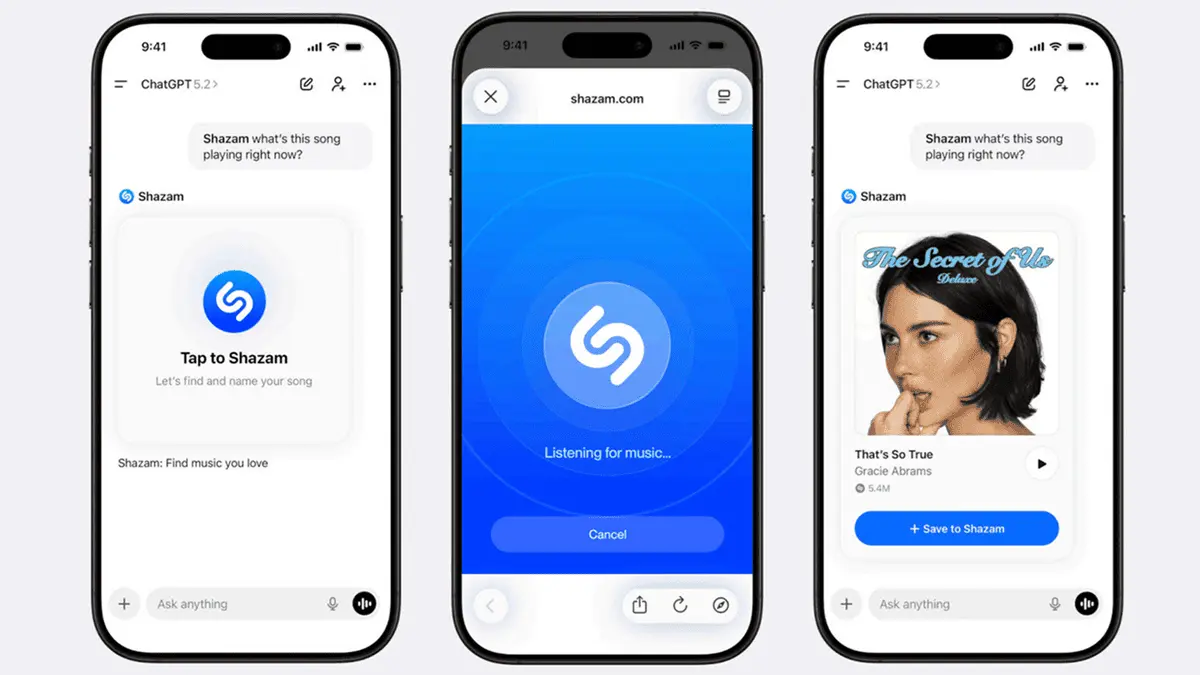
Source: TechRadar
The music recognition service leverages the same technology that Shazam has refined over two decades, delivering results with familiar accuracy and speed
3
. Users can activate the feature by typing commands such as "@Shazam" or "Shazam this song" within the chat interface4
. After analyzing the audio through microphone access, ChatGPT displays the song title, artist name, and album art directly in the conversation, along with a preview button for listening to short clips.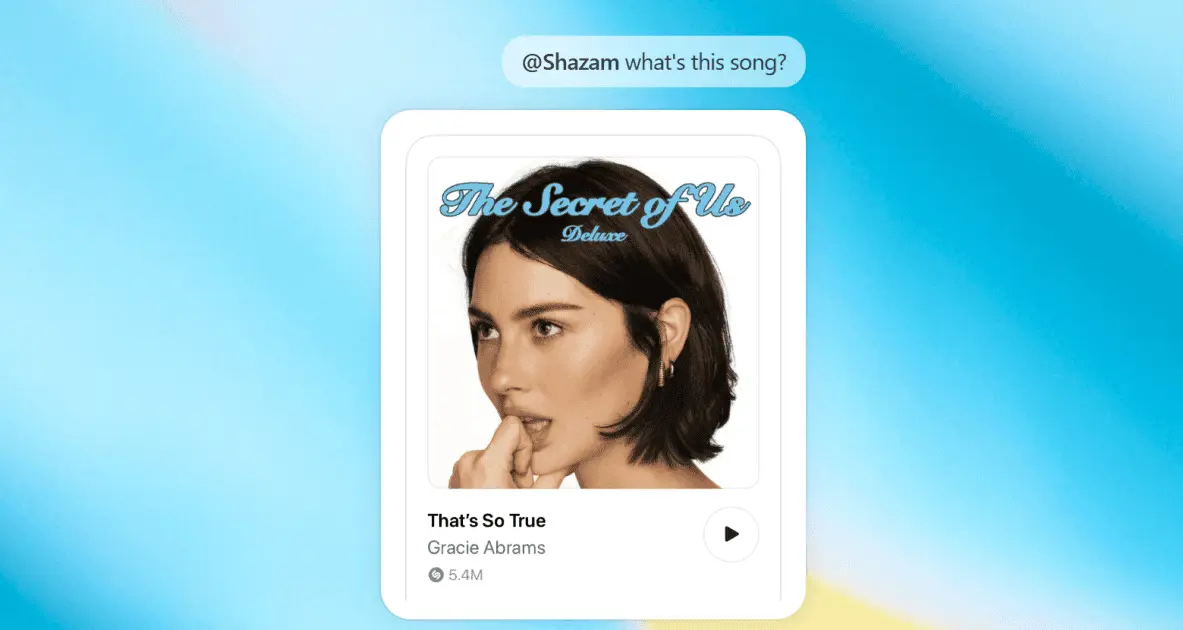
Source: PC Magazine
How to Identify Songs with ChatGPT
Setting up the integration requires connecting Shazam through the ChatGPT Apps section, accessible via OpenAI's website or within the chatbot interface
1
. Users navigate to the Apps menu, search for Shazam, and click Connect to grant permission. A toggle option allows ChatGPT to reference previous conversations about music preferences, potentially influencing future recommendations based on discovered tracks1
.The integration functions even without the standalone Shazam app installed on devices, addressing storage concerns for users who prefer minimizing app clutter
5
. However, those with the Shazam app can save identified songs directly to their Shazam library for later access4
. This flexibility makes song identification accessible regardless of device configuration.OpenAI's ChatGPT Becomes Conversational Control Center
What distinguishes this implementation from traditional music discovery apps is the conversational continuity it enables. Once Shazam identifies a track, users can immediately ask the chatbot to recommend similar music, provide artist information, or create music playlists without ending the interaction
3
. This transforms song identification from an isolated action into the starting point of broader music exploration.The Shazam integration joins existing connections with Apple Music and Spotify, creating a comprehensive ecosystem for music discovery within OpenAI's platform
3
. Users can identify songs through Shazam and immediately build playlists through these streaming services using voice commands or text prompts1
. This integration positions Shazam as reactive—capturing real-world musical moments—while Apple Music and Spotify integrations handle exploratory discovery, with the AI serving as the bridge between these experiences3
.Related Stories

Expanding ChatGPT's Third-Party Ecosystem
Shazam adds to a growing library of third-party apps available through ChatGPT, which includes Adobe Express, Asana, Canva, OpenTable, PayPal, and Slack among hundreds of others
1
. This expansion reflects OpenAI's strategy to transform the chatbot into a centralized platform that reduces the need for manual switching between specialized tools5
. For music enthusiasts, this means ChatGPT can now handle everything from identifying unfamiliar tracks at coffee shops to curating personalized playlists based on discovered songs, all within a single conversational interface that remembers context and preferences across interactions.References
Summarized by

Navi
[2]
[3]
[5]
Related Stories
Spotify and ChatGPT Join Forces: AI-Powered Music Recommendations and Playlist Creation
07 Oct 2025•Technology

Apple Music integration with ChatGPT announced by OpenAI, then mysteriously removed from post
17 Dec 2025•Technology
OpenAI's Vision: Transforming ChatGPT into an AI-Powered Operating System
07 Oct 2025•Technology
Recent Highlights
1
AI chatbots validate you too much, making you less kind to others, Stanford study reveals
Science and Research

2
Anthropic's Claude Code Source Leak Reveals Hidden AI Agent Plans and Extensive System Access
Technology

3
Judge blocks Pentagon from branding Anthropic a security risk over AI safety guardrails dispute
Policy and Regulation

Recent Highlights
Today's Top Stories










Your Daily Dose of Curated AI News
Don’t drown in AI news. We cut through the noise - filtering, ranking and summarizing the most important AI news, breakthroughs and research daily. Spend less time searching for the latest in AI and get straight to action.

