Gemini task automation goes live on Galaxy S26, handling food orders and ride bookings for users


5 Sources
5 Sources
[1]
Gemini's task automation is here and it's wild
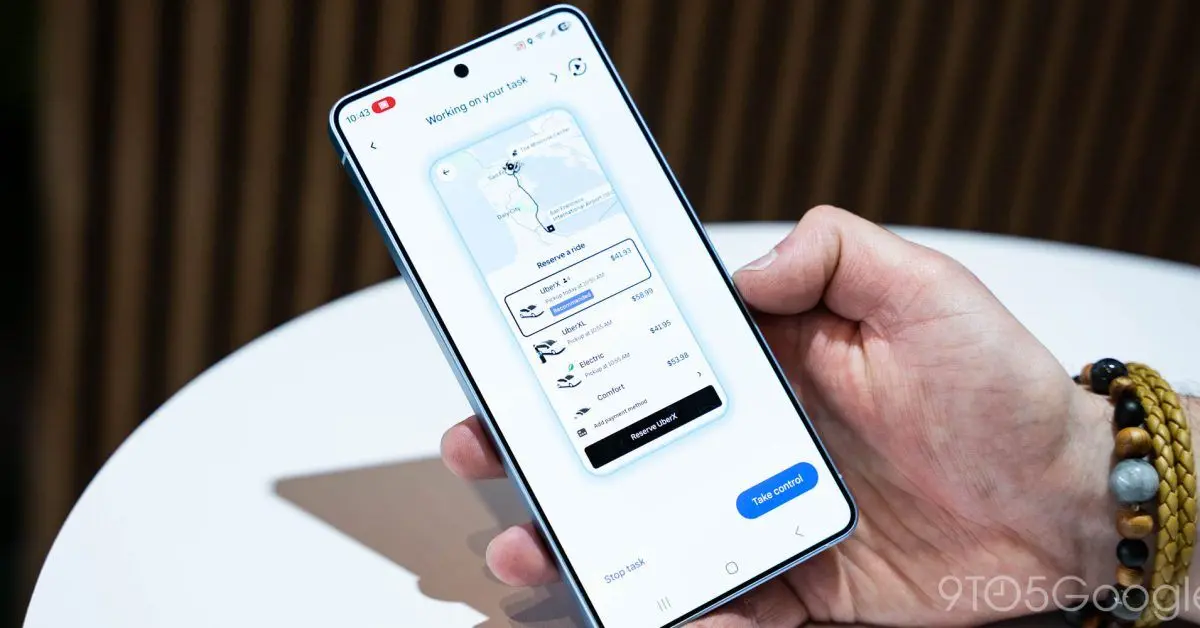
A couple of weeks ago, Google and Samsung announced a big Gemini development coming to their newest devices: task automation. Starting with food delivery and rideshare apps, Gemini would be able to use certain apps on your behalf in a virtual window to take care of things like ordering dinner or getting a car to the airport -- all based on simple prompts. You know, all the stuff that we've been promised for years AI assistants will be able to do. That feature wasn't live when I first started testing the S26 Ultra, but it just arrived in beta as part of an update. And boy is it weird watching your phone use itself! The first prompt I gave it was pretty simple: order an Uber to the airport. Gemini asked for clarification to determine which airport (a good question to ask!), then it went through a couple of steps on its own: adding the destination and opting to skip the step where you specify your airline, which doesn't really matter at my local airport since it's all in one terminal. As promised, the system stopped before the final step and prompted me to review the details before putting in the request for a car. A vague and slightly more complicated request to order a coffee and a croissant required a little more input from me -- and a lot of time on Gemini's part scrolling through Starbucks' hot drink options -- but sure enough, it found the flat white on the menu. It also confronted a crucial decision: order the chocolate croissant warmed, or straight out of the pastry case? Without my input, it specified (correctly) that the pastry should be warmed. Pretty impressive for an assistant that just a year ago would argue with me over the details of a flight on my calendar. I've got much more testing to do with this automation feature and I plan to spend the next few days throwing it some curveballs. Still, it's impressive to see this feature out in the wild working as intended -- so far, at least.
[2]
Google Gemini's task automation is finally live on the Galaxy S26
Instead of opening apps manually, you can say something like "Get me a ride to the airport," and Gemini handles the workflow. Android phones have had smart assistants for years. But now Google is pushing things a step further: instead of just answering questions, Gemini is starting to do things on your phone, and the Samsung Galaxy S26 series is first in line. The new feature, Gemini task automation, is easy to use. You just tell your phone what you want, and Gemini takes care of the steps. For example, you can ask Gemini to order a coffee and a croissant or book a ride somewhere. Instead of you opening the apps, the AI goes into the right apps and finishes the process (via 9to5Google). It can even skip extra steps and pick the right options when you order. This feature also handles multi-step requests. Instead of saying "open Uber" and then typing in an address, you can just say, "Get me a ride to the airport." Gemini will do the rest. You'll get a notification when Gemini is working on something. You can watch it happen live or just keep using your phone as usual. Be ready to finish things up at the end, though. For safety, Google does not let Gemini press the final "place order" or "pay" button. After Gemini builds your cart and skips the extra screens, your phone will prompt you to complete the purchase. Google first showed off this feature during the Galaxy Unpacked event. Android Authority also found mentions of it back in February. This automation system is not available everywhere yet. For now, it is launching on the Galaxy S26 and Pixel 10 phones, starting in places like the United States and South Korea. Support is also limited to a small number of app categories at launch, including ride-hailing and food delivery. More apps are expected to join later as Google expands the system.
[3]
The Galaxy S26 can now order food for you using your favorite apps
Timi is a news and deals writer who's been reporting on technology for over a decade. He loves breaking down complex subjects into easy-to-read pieces that keep you informed. But his recent passion comes from finding the best discounts on the internet on some of the best tech products out right now. Google's put in a lot of work over the years in order to get Gemini in a good place. And while AI can do a lot of things, it's now just getting to the point where it feels like we have a reliable digital assistant in our pockets. Towards the end of last month, Google updated Gemini on Pixel with the ability to handle food orders and hail ride-sharing services. Now, that same feature is arriving on Samsung's Galaxy S26, just in time for its retail release. Just an added touch of convenience Now, this isn't anything unexpected, as it was showcased when the Galaxy S26 was announced. However, it was apparently not available until now, according to 9to5Google. Those who own a new Galaxy S26 series phone will be able to use Gemini to order food or even hail a ride from popular ride-sharing services. The process is straightforward. You ask Gemini to order food using a supported service, and it will handle all the details. It won't actually place the order, but it will get you to the last screen in the order process so that you can confirm all the details. Once it all looks good, you just place the order, and you're good to go. The same applies to hailing ride-sharing services. You just say where you want to go and which service you want to use, and it will make it all happen. As of now, the feature only supports a handful of services, like Uber, Lyft, Grubhub, DoorDash, Uber Eats, and Starbucks. And while the list isn't long, we think plenty of people will be able to get a ton of use from this feature. Subscribe to the newsletter for Gemini phone insights Get straight-to-the-point coverage of features like Gemini on the Galaxy S26 by subscribing to the newsletter. Expect clear explanations, supported-service lists, and practical tips that help you use phone-based AI features with confidence. Get Updates By subscribing, you agree to receive newsletter and marketing emails, and accept our Terms of Use and Privacy Policy. You can unsubscribe anytime. So, if you want to give this a try, be sure to have the apps above installed before you ask Gemini. You can now purchase the Galaxy S26 series phones at your local retail or wireless carrier. Although there aren't huge changes this time around, the refinements made to each phone make them just a touch better than before. Samsung Galaxy S26 Ultra 8/10 SoC Qualcomm Snapdragon 8 Elite Gen 5 RAM 12GB / 16GB Storage 256GB / 512GB / 1TB Battery 5,000mAh The Samsung Galaxy S26 Ultra has a world-first new feature called the Privacy Display, which hides the phone screen from prying eyes. The phone is lighter, thinner, and more powerful than its predecessor. $1300 at Samsung $1300 at Best Buy $1300 at Amazon Expand Collapse
[4]
Gemini can now order your lunch as Android app control rolls out on Galaxy S26 [Gallery]
Gemini has a new trick up its sleeve with agentic task automation, with the AI able to use an app on your behalf to perform certain tasks, and it's now live on the Galaxy S26 series. Rolling out now to the Galaxy S26 series, Gemini task automation - also referred to as "screen automation" - hands control over certain Android apps to your AI assistant. We got a preview of this when the feature was announced alongside Samsung's new phones, but now it's actually live and working. In testing Gemini task automation out on Galaxy S26 Ultra, we were able to ask for Gemini to "order a spicy chicken sandwich from Popeye's on Uber Eats" and, as expected, automation took over and started the process in the background. Gemini will add items to your cart, but it won't finalize checkout. When it reaches that point, it'll send a notification (including a strong vibration) and hand the controls back over to you to finalize the process. It even skips the add-on pages in Uber Eats, skipping straight to the end of the process where you select a driver tip and actually place the order. It seems to work well enough, though in one test the preview "broke" the phone by locking us into a fullscreen preview of the automation that we couldn't leave without forcibly rebooting the phone. Is this faster than just adding items to the cart yourself? Not really, but I would personally say that the bigger use case here is just having Gemini do the grunt work of adding things to the cart - or setting locations in the case of rideshare - using a simple voice command, doing that part in the background while you're doing other things. Right now, Gemini supports task automation with the following Android apps: There are other obvious apps that should be added eventually, like Instacart, but they're not available just yet. A list of compatible apps will appear in Gemini's settings, but it's specific to what apps are currently installed on your phone. Google has opened the door to more apps to be added, too. As far as device support goes, Google is also set to launch this feature on Pixel 10, Pixel 10 Pro, and Pixel 10 Pro XL, but it doesn't appear to be live just yet. You'll want to look for "screen automation" in the Gemini app's settings, as that's what first clued us in to the rollout last night.
[5]

Samsung Galaxy S26 will now let you order food and book rides just by talking to Gemini
At the moment, the feature only supports a limited number of apps. Samsung's latest Galaxy S26 series is getting a helpful AI feature that could make everyday tasks a lot easier. With the latest update, users can now ask Google Gemini to order food or book a ride directly from their phone using simple voice commands. The feature was showcased when the Galaxy S26 lineup was announced, but it wasn't available at the time. According to 9to5Google, the feature is now rolling out. The idea is simple: instead of manually opening the app and going through several steps, users can simply ask Gemini and let the AI handle most of the process. Also read: From garage to the world: Tim Cook pens emotional note before Apple turns 50 For example, if you feel like ordering food, you can ask Gemini to place an order through supported services. It won't place the order for you, but it will take you to the last screen of the ordering process where you can review all the details. Once everything looks right, you can simply confirm and place the order yourself. The same works for booking rides. You can simply tell Gemini where you want to go and which ride service you want to use. The assistant can then open and prepare the ride booking for you. Also read: iPhone 6s to iPhone X, these Apple devices get new iOS update: How to download At the moment, the feature only works with a limited number of apps like Uber, Lyft, Grubhub, DoorDash, Uber Eats, and Starbuck. To try the feature, make sure that the supported apps are installed on your phone. Once that's done, Gemini can connect with those apps and help complete tasks. Also read: How to set up parent-managed account on WhatsApp: Step-by-step guide
Share
Share
Copy Link
Google's Gemini AI assistant can now automate tasks within apps on Samsung's Galaxy S26 series. Users can order food or book rides using simple voice commands while Gemini handles the workflow in the background. The feature supports apps like Uber Eats, DoorDash, and Starbucks, though users must confirm final purchases for security.
Gemini Task Automation Arrives on Galaxy S26
Google and Samsung have officially launched task automation for Gemini on the Galaxy S26 series, marking a significant step forward in AI integration on Android devices
1
. The feature, which was showcased during Samsung's Galaxy Unpacked event but wasn't immediately available, is now rolling out in beta form to users of the new flagship phones2
. This capability transforms how users interact with apps on the user's behalf, allowing the AI assistant to handle complex workflows through simple voice commands.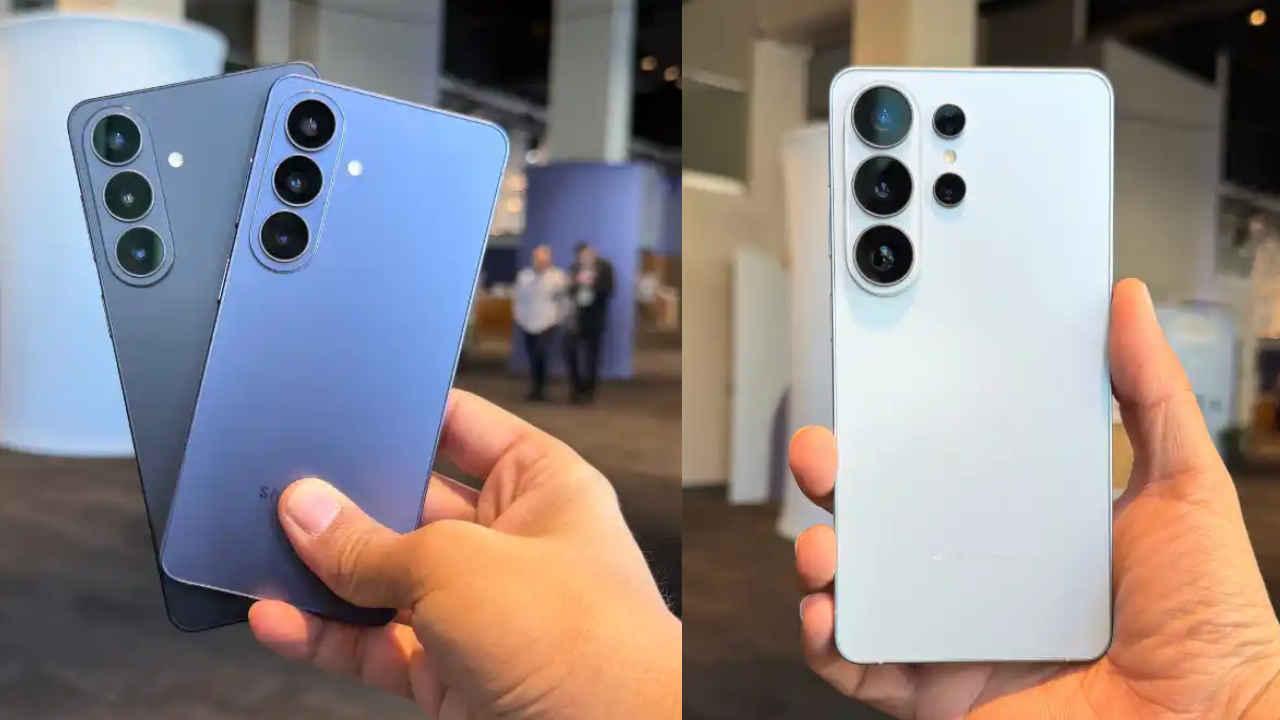
Source: Digit
The screen automation feature enables Gemini AI on Samsung devices to take control of specific Android apps and complete multi-step tasks without manual intervention. Instead of opening apps and navigating through multiple screens, users can issue straightforward requests like "Get me a ride to the airport" or "Order a coffee and a croissant," and Gemini handles the entire process in a virtual window
1
2
.How the AI Assistant Automates Tasks Within Apps
When users activate Gemini to order food and book rides, the system works through several intelligent steps. In testing, the AI assistant successfully navigated Uber's interface, asking clarifying questions like which airport to select before adding destinations and skipping unnecessary steps such as airline specifications
1
.
Source: 9to5Google
For food delivery orders, Gemini can scroll through extensive menus, locate specific items, and even make contextual decisions—such as requesting that a chocolate croissant be warmed rather than served cold from the pastry case
1
.
Source: The Verge
Users receive notifications when Gemini is actively working on a task, with the option to watch the automation happen in real-time or continue using their phone for other activities
2
. The system operates in the background, adding items to carts and preparing orders while handling the workflow efficiently4
.Security Measures and Checkout Limitations
For security purposes, Google has implemented safeguards that prevent Gemini from completing final transactions autonomously. The AI assistant will build your cart, skip promotional add-on pages, and navigate to the final checkout screen, but it stops short of pressing the "place order" or "pay" button
2
4
. When the process reaches this stage, the phone sends a notification with a strong vibration, prompting users to review details and confirm the purchase themselves4
.This approach balances convenience with user control, ensuring that no unauthorized purchases occur while still eliminating the tedious steps of manual app navigation. In practical terms, Gemini handles the grunt work while users maintain final authority over financial transactions
4
.Supported Apps and Current Limitations
At launch, the beta feature supports a limited but practical selection of apps focused on food delivery and rideshare services. The current list includes Uber, Lyft, Grubhub, DoorDash, Uber Eats, and Starbucks
3
4
. Users must have these apps installed on their phones for Gemini to access and automate tasks within them3
.A list of compatible apps appears in Gemini's settings, customized to show only the apps currently installed on each device
4
. While other obvious candidates like Instacart aren't yet available, Google has opened the door for additional apps to join the system as the feature expands4
.Related Stories

Device Availability and Geographic Rollout
The task automation feature is initially launching on the Galaxy S26 series and is also set to arrive on Pixel 10, Pixel 10 Pro, and Pixel 10 Pro XL devices, though the Pixel rollout doesn't appear to be live yet
2
4
. Geographic availability is currently limited, with the United States and South Korea among the first markets to receive access2
.Users can check for the feature by looking for "screen automation" in the Gemini app's settings—this indicator signals that the rollout has reached their device
4
. The feature represents a marked improvement from just a year ago, when AI assistants would struggle with basic calendar details1
.What This Means for AI Assistant Evolution
This development signals a shift from AI assistants that merely answer questions to ones that actively complete tasks on behalf of users. The ability to handle app control through natural language represents the kind of functionality that has been promised for years but is only now becoming practical reality
1
. While the feature isn't necessarily faster than manual app use for single tasks, its true value lies in enabling users to initiate processes through voice commands while multitasking4
.As Google continues testing and refinement, users should watch for expanded app support and improved reliability. Early testing has revealed occasional issues, including one instance where the automation preview locked a device into fullscreen mode, requiring a forced reboot. These growing pains are typical for beta features, and the system's core functionality appears to work as intended in most scenarios
1
.References
Summarized by

Navi
[1]
[2]
[3]
[4]
Related Stories
Google's Gemini AI now automates multi-step tasks on Android while Apple's Siri features stall
25 Feb 2026•Technology

Google Unveils Advanced Gemini AI Features for Samsung Galaxy S25 and Beyond
23 Jan 2025•Technology

Google's Gemini gains screen automation to control Android apps and perform tasks for you
04 Feb 2026•Technology
Recent Highlights
1
OpenAI Releases GPT-5.4, New AI Model Built for Agents and Professional Work
Technology
2
AI chatbots helped teens plan violent attacks in 8 of 10 cases, new investigation reveals
Technology
3
Pentagon shuts door on Anthropic talks as Microsoft and Big Tech rally behind AI firm's lawsuit
Policy and Regulation
Recent Highlights
Today's Top Stories





Your Daily Dose of Curated AI News
Don’t drown in AI news. We cut through the noise - filtering, ranking and summarizing the most important AI news, breakthroughs and research daily. Spend less time searching for the latest in AI and get straight to action.

