Google Chrome AI launches Auto Browse agent to handle tedious web tasks autonomously


46 Sources
[1]
Google begins rolling out Chrome's "Auto Browse" AI agent today
Google began stuffing Gemini into its dominant Chrome browser several months ago, and today the AI is expanding its capabilities considerably. Google says the chatbot will be easier to access and connect to more Google services, but the biggest change is the addition of Google's autonomous browsing agent, which it has dubbed Auto Browse. Similar to tools like OpenAI Atlas, Auto Browse can handle tedious tasks in Chrome so you don't have to. The newly unveiled Gemini features in Chrome are accessible from the omnipresent AI button that has been lurking at the top of the window for the last few months. Initially, that button only opened Gemini in a pop-up window, but Google now says it will default to a split-screen or "Sidepanel" view. Google confirmed the update began rolling out over the past week, so you may already have it. You can still pop Gemini out into a floating window, but the split-view gives Gemini more room to breathe while manipulating a page with AI. This is also helpful when calling other apps in the Chrome implementation of Gemini. The chatbot can now access Gmail, Calendar, YouTube, Maps, Google Shopping, and Google Flights right from the Chrome window. Google technically added this feature around the middle of January, but it's only talking about it now. Gemini in Chrome can now also access and edit images with Nano Banana, so you don't have to download and re-upload them to Gemini in another location. Just open the image from the web and type in the Sidepanel with a description of the edits you want. Like in the Gemini app, you can choose between the slower but higher-quality Pro model and the faster standard one. Can't someone else do it? Chrome's new browsing agent (in preview) is the star of today's show. The promise of agentic AI is one of the freedom to be lazy. Rather than filling out forms or copying information from emails, you simply task a robot with the job and relax while it goes to work. At least, that's how it's supposed to go. Most of the computer-use agents we've seen so far have been sluggish and unreliable enough to require human supervision. That kind of defeats the purpose. Now it's Google's turn to show us what its browsing agent can do. Google says Auto Browse is based on its latest Gemini 3 models, with input from the company's work on the experimental Project Mariner agent. If you'd do something with a keyboard and mouse inside your browser, Auto Browse is theoretically able to take over. It can also access the content and tabs in your browser, asking for permission when it needs sensitive data, such as your passwords. When you launch an Auto Browse task, Chrome will open new tabs as necessary and mark them with a sparkly AI icon so you know where the robot is active. You don't have to keep that tab in the foreground, and you can even have multiple AI tasks going at once. The AI will ping you to check in when the task is done or when it needs your input. However, there are limits on Auto Browse similar to some of the company's more computationally intensive chatbot functions. AI Pro subscribers get 20 AI browsing tasks per day, but those paying for AI Ultra get 200 per day. Having the AI churning in the background may be a concern -- after all, generative AI can make mistakes, and you are giving it complete control over the browsing experience. Google says it has implemented a range of security and safety rules to prevent misuse. For example, if you ask Auto Browse to research and buy something, it won't actually buy it. Instead, it will find the item (hopefully) and progress to the purchase screen before letting you pull the trigger manually. Another thing to keep in mind is that Auto Browse doesn't run locally. All content from your robotically operated tab is streamed to a cloud-based Gemini model. That means page content will be shared with Google, but the extent is not entirely clear. Google says Auto Browse is governed by the established Gemini in Chrome policy, which says Google stores information from websites in the Gemini Apps Activity (if Keep Activity is enabled). Page content is also "logged to your Google Account temporarily." We asked if Google would use page contents processed by Auto Browse to further train AI models, but a spokesperson declined to provide specifics. Chrome Auto Browse is rolling out today in preview, but it's not exactly free. It won't cost anything extra, but the feature is limited to AI Pro and AI Ultra subscribers. Google's language suggests the feature may come to free users after the preview phase, but we'd expect strict usage limits.
[2]
Chrome takes on AI browsers with tighter Gemini integration, agentic features for autonomous tasks
2025 was the year when a swarm of AI browsers from companies like OpenAI, Perplexity, Opera, and The Browser Company launched with an aim to replace Chrome with features like sidebar assistants and automated tasks. Now, Google is flexing its own AI muscles by adding similar features to Chrome, the world's largest browser by market share. While Google had introduced Gemini to Chrome last September, the assistant lived in a floating window. With this update, the company will put its AI helper into a persistent sidebar, so you can ask questions about the current website or other open tabs. One interesting feature Google demoed to press ahead of today's launch involved multiple tabs. When you open different tabs from a single webpage, the Gemini sidebar understands them as a context group. This is helpful when you are comparing prices or different products you're considering purchasing. Before today, the Gemini in Chrome feature was available only to Windows and MacOS users. With this rollout, the sidebar will be available to Chromebook Plus users as well. Google is also taking advantage of its newly launched personal intelligence feature, which connects to your Gmail, Search, YouTube, and Google Photos accounts, allowing you to ask questions based on your own data. This feature will roll out in Chrome in the coming months, meaning that you can ask Gemini in the sidebar about things like your family's schedule, or ask it to draft an email and send it without switching to Gmail. There's a new Nano Banana integration coming to Chrome, too, that allows you to modify an existing image with another image or product that you find while browsing. However, the most ambitious feature is called auto-browse, which aims to handle tasks for you by using your personal information and traversing websites on your behalf. For instance, you can ask the agentic feature to go to a particular website and buy an item for you, and find a discount coupon. The agent will ask for your intervention when performing data-sensitive tasks, such as logging into a website or making a final purchase. Last year, the company explained that these features would use Chrome's password manager or saved card details, but said its AI models wouldn't be exposed to any of these details. This feature is rolling out initially to AI Pro and Ultra subscribers in the U.S. Browser-based agents are finicky and often fail to complete tasks. Google's demo, just like tons of other AI demos, involved shopping and travel planning. In real-world use cases, agents often don't get the intent or break during traversing different sites, and that would be a challenge for wider adoption. The company said that in its early testing, users have used the feature for tasks such as scheduling appointments, filling out tedious online forms, collecting their tax documents, getting quotes for plumbers and electricians, and filing expense reports. The company said that the Gemini sidebar support and Nano Banana integration are arriving starting today, while the personal intelligence feature will be available in the "coming months."
[3]
Google's New Chrome 'Auto Browse' Agent Attempts to Roam the Web Without You
Google's latest addition to its Chrome browser puts generative AI behind the wheel and you in the passenger seat. Google debuted a new "Auto Browse" feature for Chrome on Wednesday. The tool, powered by Google's current Gemini 3 generative AI model, is an AI agent designed to take over your Chrome browser to help complete online tasks like booking flights, finding apartments, and filing expenses. The release of Auto Browse is part of Google's continued integration of AI features into Chrome. Last year, Google dropped the "Gemini in Chrome" mode to answer questions about what's on web pages and synthesize details from multiple open tabs. Auto Browse, which users can access by launching the Gemini sidebar in Chrome, will only be available today in the US to subscribers of Google's monthly AI Pro and AI Ultra plans. It's unclear when Auto Browse will become available to nonpaying users and additional countries. Google's rollout squares with Silicon Valley's vision for the future of web browsing, which includes a whole lot more AI and a whole lot less of you. Whether it's a browser designed from inception around generative AI, like OpenAI's Atlas, or one that's been retrofitted with new AI-based tools, like Google's Chrome, almost every option available to consumers now has some level of baked-in AI. (The Vivaldi browser is a notable exception for users who want to avoid AI-powered web browsing.) In a prelaunch demo, Charmaine D'Silva, a director of product management for Chrome, showed me an example of Auto Browse helping her shop online. "Instead of having to remember where I bought something and try to reorder something," she said, "I can now delegate to Auto Browse within Gemini to be able to go ahead and buy jackets for me." By typing a message to the Gemini sidebar in Chrome, D'Silva requested the bot reorder a jacket she bought last year, and to find a discount coupon code before making the purchase. When initiated, Auto Browse takes over Chrome and makes ghostly clicks in its own tab while it attempts to complete the given task. "Use Gemini carefully and take control if needed," reads a disclaimer on the demo version. "You are responsible for Gemini's actions during tasks." Even though you're sending it off into the digital wilderness, Google still sees you as responsible for what its bot does online while following your requests. For now, the automation only goes so far. Tasks that are deemed by Google to be more sensitive, like posting on social media and swiping your credit card, still require a bit of user oversight. In these situations, the Chrome bot will lay out the steps it took to get that far in and ask the user if they would like to proceed. Anyone interested in experimenting with Auto Browse should strongly consider the security implications of this kind of automation. Despite Google's efforts to make it safer to use, Auto Browse and similar AI-based tools are still at risk of being deceived by prompt injection attacks when visiting malicious websites, which trick the bot into acting in ways that the initial user did not intend. I'll be testing Auto Browse this week to get a sense of its initial strengths, weaknesses, and what the tool actually means for average Chrome users. Generally, I'm skeptical about agentic AI tools designed to make your life more efficient and sweep up all your digital chores. The bots are almost always overhyped, and I've found them to be consistently unreliable. Still, Google is insistent on realigning the web browsing experience around AI. Given Google's track record for pushing out new features gradually, you should expect Auto Browse to roll out more widely in the near future.
[4]
Google Gives Chrome an AI Side Panel and Lets Gemini Browse for You
Macy has been working for CNET for coming on 2 years. Prior to CNET, Macy received a North Carolina College Media Association award in sports writing. Google is turning Chrome into something closer to a digital copilot. In the next wave of Gemini updates rolling out, Google on Wednesday revealed a set of new AI-powered features coming directly to its browser, aimed at reducing the frustrations of exploring the internet each day. Built on Gemini 3, the updates introduce an always-available side panel, deeper app integrations, creative image tools and a new browser agent called auto browse that can complete multistep tasks on your behalf. Essentially, Google wants Chrome to be like an AI wingman that browses, compares and multitasks for you. Now you can automate browsing To me, the standout new addition is auto browse, a browser agent designed to handle tedious and time-consuming chores. Instead of hopping between tabs, filling out forms or manually comparing prices of things like products or flights, you can ask Chrome to do the legwork. Auto browse can research flights and hotels across different dates, collect documents, schedule appointments, manage subscriptions and help with tasks like renewing a driver's license or filing expense reports. In a live demo, product lead Charmaine D'Silva used the new tools to plan a family vacation. Gemini compared destinations and prices across multiple travel sites, checked school calendars to see when her kids were off and lined up schedules to find workable travel windows. When it came time to book, though, D'Silva emphasized that the final decision and purchase were still hers, underscoring Google's plan to keep humans in control for key tasks like booking and purchases. The feature is rolling out to AI Pro and Ultra subscribers in the US now, signaling Google's broader push toward more agentic AI experiences. A new side panel experience Another update rolling out now is a redesigned Gemini side panel in Chrome, available across MacOS, Windows and Chromebook Plus. Instead of opening a separate tab, Gemini now lives alongside whatever you're working on, making it easier to multitask without breaking your flow. Testers have used it to summarize reviews across sites, compare shopping options and juggle packed calendars while keeping their main task front and center. Don't miss any of our unbiased tech content and lab-based reviews. Add CNET as a preferred Google source. AI image editing with Nano Banana Chrome is also trying to become more creative. Google is bringing Nano Banana, its AI image editing and generation tool, directly into the browser. You can now edit and reimagine images you find on the web without downloading files or switching apps -- whether that's mocking up a living room redesign or turning raw data into an infographic at work. Chrome connects with other Google apps Under the hood, Gemini in Chrome is becoming more connected to the rest of Google's ecosystem. Integrations with Gmail, Calendar, Maps, YouTube, Google Flights and Shopping will allow the assistant to pull in relevant context and take action across apps. Planning a trip, for example, could involve referencing an old email, checking flight options and drafting a follow-up email to your travel companions. Now all in one place. More to come Looking ahead, Google says personal intelligence is coming to Chrome in the coming months. With user opt-in, Gemini will remember context from past interactions to deliver more tailored, proactive help across the web, while giving you control over what data is connected and when.
[5]

Your Google Chrome browser just got a useful autopilot feature - here's how it works
Google's new Auto Browse feature aims to handle your digital chores by taking actions on your behalf. Follow ZDNET: Add us as a preferred source on Google. ZDNET's key takeaways * Google Chrome is being upgraded with Gemini 3 and a revamped sidepanel UX. * The new Auto Browse feature can navigate webpages and take actions on your behalf. * Auto Browse launches January 28th for AI Pro and AI Ultra subscribers. Google just announced several updates to its Chrome browser, centered on -- you guessed it -- AI. With Gemini 3, its latest model, the updates aim to "put Gemini to work in Chrome" with personal assistant-style intelligence, tab organization, and the new "Auto Browse" feature, which takes actions on your behalf in Chrome. Available now for AI Pro and AI Ultra subscribers, Auto Browse is a bit like autopilot for the web, designed to handle digital chores like filling out forms or making routine purchases. "We live our lives on the web," Parisa Tabriz, Google's VP of Chrome, said in a recent press conference. Auto Browse's focus, then, is on mundane, repetitive tasks; the "digital laundry", so to speak. Also: Google's Gemini 3 is finally here and it's smarter, faster, and free to access During the press conference, Tabriz showed off new features in a few common use cases like shopping and summarizing information, but the interesting stuff was when Gemini was asked to perform more complex tasks, like managing favorited apartments on Redfin, or shopping on Etsy based on an image -- all the way to inputting credit card info and finalizing the purchase. Chrome's latest version upgrades Gemini from the small textbox in the upper right corner to a large pane in the browser window -- taking up a full quarter of the screen. You add the browser tabs you want help with, giving Gemini permission to see their content and subsequently take actions in the browser. One key example showed the user sharing multiple tabs with Gemini and telling the AI to source information across them to fill out a registration form. Also: I tried Gmail's new Gemini AI features, and now I want to unsubscribe It goes beyond text inputs, though. A more complex example showed the user telling Gemini to go through all their favorited apartments on Redfin and remove any that aren't designated as pet-friendly. In another example, the user showed Gemini a photo of a party, and instructed the AI to go to Etsy and buy all the decorations found in the image. Sure enough, the AI navigates to the website and starts searching for specific items it identifies in the image, adding its finds to the cart. To enable these kinds of shopping tasks, Chrome will now support Google's Universal Commerce Protocol, an open standard for commerce and agentic AI, co-developed alongside major retailers such as Etsy, Target, Shopify, and Wayfair. Watching it in real time is a little bit like watching someone sharing their screen on Zoom. Gemini navigates to different fields, enters text, and narrates what it's doing at each step. Through it all, there's a "Pause" button at the top of the screen that allows you to take over the task at any time. Also: The two fastest growing AI chatbots now (neither is ChatGPT) If watching Gemini add item after item to your cart and then check out with your credit card isn't scary enough, Google says there are built-in safety measures that require the user to confirm before the transaction proceeds. Making purchases is one of them. If it reaches this point, Gemini will prompt you in the browser to approve continuing. To aid in these hyper-personalized capabilities, Google's new Personal Intelligence feature, introduced in January but rolling out in Chrome in the coming months, aims to securely connect information across your Google apps, including Gmail, Drive, Google Photos, and YouTube, for more specific inquiries. Essentially, Personal Intelligence adds all of your Google data to the Gemini pot, allowing the AI a more comprehensive picture of your digital identity. This feature is disabled by default, so if you do want to give Gemini access to these things, you'll have to toggle it on. Still, Google says Personal Intelligence is programmed to avoid making assumptions about sensitive topics, like health or finances. Siccing Gemini on your ever-growing mound of digital chores sounds great, but the problem with Gemini, and AI in general, is that it still isn't completely reliable. It's very good at a select group of actions, but other, seemingly simple actions elude the AI's capabilities. Also: Gemini is gaining fast on ChatGPT in one particular way, according to new data For example, Gemini still struggles to generate a document in Sheets from natural-language parameters. It can certainly provide a starting point that can become a finished product with manual tinkering, but specific natural-language commands like "change the date format in column E to read mm/dd/yy" still elude the AI, often with bizarre, unpredictable results. Ultimately, agentic AI in the browser definitely has a place in the future of how we use the internet, and while this idea of handling mundane tasks has a lot of potential, privacy and accuracy remain top of mind. For now, its launch is limited to AI Pro and AI Ultra subscribers, with no set date for general availability. Although this isn't explicitly a "beta", Google is right to ease into these Gemini features, since the everyday user will need some time with Gemini to trust it with their credit card.
[6]

Google adds Gemini AI-powered 'auto browse' to Chrome
Google is launching a new "auto browse" feature inside Chrome that can perform multi-step tasks on your behalf. The Gemini AI-powered capability is coming to Google AI Pro and Ultra subscribers in the US, and can do things like research hotel and flight costs, schedule appointments, fill out online forms, manage subscriptions, and more. The update marks another expansion for Gemini in Chrome, which initially served as an AI assistant that you can use to ask questions or summarize content on the webpage you're reading. Google later added the ability for Gemini to compare products across multiple tabs and recall pages from your browsing history, while hinting at allowing the AI agent to perform "tedious tasks." Google says that while using auto browse, Gemini can identify decorations inside of a photo you're looking at, find similar items on the web, add them to your cart, apply discount codes, all while staying within your budget. If a task requires you to log into an account, Gemini can also use the browser's password manager to log in. Along with this change, Google has moved Gemini in Chrome from a pop-up window to a panel anchored to the right side of your screen. It now supports integrations with Gmail, Calendar, Maps, Google Shopping, and Google Flights for all users, allowing it to reference information from across the apps you use, as well as perform actions within them. "For example, if you're traveling to a conference and need to book a flight, Gemini can dig up that old email with event details, reference context from Google Flights to provide some recommendations, and later draft an email letting your colleagues know your arrival time," Google writes. You'll also find Nano Banana -- Google's AI-powered image generator -- in the new Gemini in Chrome panel. This feature is coming to all Gemini in Chrome users, and lets you edit an image inside your window using a text prompt. Google has more in store down the road for Gemini in Chrome as it competes with other agentic AI browsers, including OpenAI's Atlas and Perplexity's Comet. Personal intelligence, an opt-in feature that first launched inside the Gemini app, gives Gemini the ability to reference your past conversations, as well as use its reasoning capabilities to analyze the data linked to your Gmail, Calendar, Photos, and search history. Google says it plans on bringing the feature to Chrome in the "coming months."
[7]

With 'Auto Browse' on Google Chrome, Gemini Can Search the Internet for You
Why browse the web when an AI can do it for you? Google is amping up the AI on its Chrome browser with an "auto browse" mode that can automatically complete tasks for you, like buying things online or scheduling an appointment. Rivals such as Microsoft, OpenAI, and Perplexity offer similar "agentic" AI modes that can take over the browser and automatically get to work. Google has already been integrating its Gemini assistant into Chrome; it even embedded a dedicated button for the chatbot. Now the company wants the AI to handle complex, multi-step workflows. "Our testers have used it for all sorts of things: scheduling appointments, filling out tedious online forms, collecting their tax documents, getting quotes for plumbers and electricians, checking if their bills are paid, filing expense reports, managing their subscriptions, and speeding up renewing their driving licenses -- a ton of time saved," Google says in a blog post. The company posted a demo in which a user activates auto browse mode by asking Gemini to buy decorations from Etsy to match an image from their Gmail inbox. The AI navigates to Etsy through the browser and successfully adds the items to the user's cart. The AI is even able to personalize one of decorations by adding the text "Y2K Party," before offering the user a summary of the listed items and telling them they can complete the checkout process. In another demo, auto browse mode is able to take data from a document and use it to fill out an online form. That said, auto browse mode isn't perfect. Google also demoed the feature to journalists by asking the feature to navigate to a website and re-order a previously purchased jacket in the same size and to look for potential discounts. The AI first asked permission to access the user's login information saved in Chrome. But the AI seemed to be slow in processing the full request, an issue we've encountered with other AI browser integrations. For sensitive functions, such as completing a purchase or posting on social media, the auto browse has been designed to hand over the final step to the user. It's a trade-off that can prevent errors, but also undercut the convenience factor. We'll have to try it ourselves. But we hope it's an improvement over Project Mariner, Google's experimental AI browser. In our testing last year, Mariner sometimes struggled to understand commands or successfully interact with third-party sites or overcome CAPTCHA pages. For now, Google is merely "previewing" the auto browse mode for Chrome. It will be available first in the US to paid subscribers of Google AI Pro and Ultra, which cost $20 and $250 per month, respectively. The other catch is how auto browse mode features a cap on the number of user requests per day. Pro subscribers can complete 20 requests while Ultra offers 200. Users can run multiple tasks at the same time. The company is likely holding off on a mainstream release to work on potential kinks. A major concern facing AI browser is how they can hallucinate the wrong information and fall for "prompt injection attacks," which can trick the AI into performing a malicious action. However, Google has already been working on "layered defenses" to guard against such threats. Although it remains unclear if or when auto browse mode will arrive to free users, Google is laying the groundwork for the feature and Gemini to be able to connect with third-party platforms. The company noted Chrome "will support Google's Universal Commerce Protocol (UCP), a new open standard for agentic commerce co-developed with industry leaders including Etsy, Shopify, Target, and Wayfair. This new open standard ensures that AI agents can understand and interact with different websites seamlessly."
[8]

Google to foist Gemini pane on Chrome users
The world's most popular browser has gained a dedicated sidebar for AI browsing Google has reworked its Chrome browser to include a new side panel for interacting with the company's Gemini model, in an effort to support AI-assisted interactions with websites. Toward that end, Google AI Pro and AI Ultra subscribers have gained the option of delegating browsing tasks to Gemini as a software agent. Chrome - the world's most popular browser by far with more than 70 percent market share as per StatCounter - thus follows in the path of Microsoft Edge, Perplexity, OpenAI Atlas, and Opera, among others, in the belief that internet users want to sit back while AI does the browsing and (perhaps) buying. The Gemini button, introduced last September on the top right-hand corner of Chrome, has been adjusted to shrink the display area of websites in order to accommodate a sidebar pane to chat with the Google AI bot. "This can help you save time and multitask without interruption," explained Parisa Tabriz, VP of Chrome, in a blog post. "You can keep your primary work open on one tab while using the side panel to handle a different task." Tabriz suggests this has organizational benefits by allowing users to compare options presented in different tabs or to summarize product reviews across different websites. As shown in the blog post, if you had an image loaded in your browser from a website that depicted a photo booth, you could tell Gemini to "Go to Etsy and find supplies to recreate the photo booth and add them to my cart. Don't spend more than $75 total." The AI agent would then attempt a series of steps that involve navigating to Etsy, finding objects depicted in the photo like fringe curtains, adding them to your shopping cart, all the way up to the point where you would have the option to purchase the materials. The side panel has also been integrated with Google Nano Banana, for creating images directly or for altering images in the browser window. Google has also deepened Chrome's integration with Connected Apps, which now include Google Workspace apps, various calendar and communications apps for Android, Spotify, YouTube Music, and Google Photos, Home, Maps, Shopping and Flights. These applications are potentially accessible to Gemini with the appropriate permissions. The Chocolate Factory says it plans to bring Gemini's Personal Intelligence to Chrome in the coming months, so that its AI-browser mélange can retain past interactions with websites and applications to inform its present context, if you opt in. With these various revisions, Tabriz claims Chrome can act as a software agent, capable of executing tasks that involve a series of steps, with a capability dubbed "Chrome auto browse." "Auto browse can help you optimize your vacation planning by doing some of the mundane work, like researching hotel and flight costs across multiple date options, so you can find a budget-friendly time to travel," Tabriz explains. She suggests the software can schedule appointments, fill out forms, assemble tax documents, solicit bids from tradespeople, and so on. The tweaks apply to Chrome for macOS, Windows and Chromebook Plus in the US presently. As for auto browse, it is presently limited to Google AI Pro and AI Ultra subscribers. But the utility of Chrome auto browse may yet be less than Google hopes, thanks to barriers some websites are putting in place to limit agentic interaction. Amazon recently sued Perplexity, alleging it initiated automated site access without proper authorization, and eBay has revised its user agreement to disallow orders placed without human review. Websites aren't necessarily willing participants in the effort to exile human interaction. Whether they can detect automated visits is another matter. And the willingness of websites to keep bots at bay may waver if there's cash being left on the table: McKinsey projects that by 2030, agentic commerce for business-to-consumer retail operations could reach $1 trillion in the US. Google for its part appears to be trying to resolve this tension. Its Chrome auto browse will ask for human confirmation when making purchases or posting to social media sites. And the company says Chrome will support Google's Universal Commerce Protocol (UCP), an open standard for bot-driven commerce developed with the help of Etsy, Shopify, Target, and Wayfair. ®
[9]

Chrome is also turning into an agentic browser with its newest update
The inevitable has officially happened: Chrome, too, is stepping into the world of agentic AI. While there's a lot of variety in AI software, all the big browser companies have recently focused on agentic browsing -- each taking its own approach. Companies like Opera launched entirely new browsers built with AI at their core. Others, like Microsoft, introduced AI modes within their existing browsers instead of creating full-fledged new ones. Interestingly, some of the biggest hits have come from non-browser companies, like Perplexity launching Comet and OpenAI launching ChatGPT Atlas. Nonetheless, what's truly striking is that arguably the biggest player in the browser space, Google Chrome, has only now taken its first real step into agentic AI. I tried Perplexity's new browser and returned to Chrome in no time Why do browsers have to be so extra? Posts 19 By Sumukh Rao Chrome's Auto Browse feature lets it handle tasks for you Today, Google announced a range of updates to Gemini in Chrome via a post on its The Keyword blog. Leading the pack is the most exciting update: Auto Browse. Described as "a powerful agentic experience that handles multi-step chores on your behalf," it essentially lets the browser act like a personal assistant by actually performing tasks for you rather than just explaining how you can perform said task. The company explains that testers have used Auto Browse for all sorts of tasks like filling out online forms, scheduling appointments, filling reports, managing subscriptions, and more. The feature is powered by Gemini 3.0 and can also leverage its multimodal capabilities to understand and interpret images. This means you can also outsource tasks like finding specific items online based on an image and adding them to your cart once found! This isn't any different from the agentic browsing instances we've seen in browsers like Opera's Neon, Perplexity's Comet, and ChatGPT Atlas. However, as someone who has been testing all of these browsers, I do believe Google's take on it will be a lot more polished, thanks to Gemini 3. Chrome Auto Browse is available for AI Pro and Ultra subscribers within the United States starting today. Google Chrome is also getting the same interface we've seen in other AI browsers, featuring a new Gemini side panel. This effectively means you no longer need to have Gemini or any other chatbot open in a separate tab, and can instantly access AI assistance right alongside whatever you're working on. Although Google did add Gemini to Chrome in September 2025, the chatbot was in a floating window. With it now available in a persistent sidebar (which you can toggle on and off), you can also query your open tabs, allowing you to outsource tasks like comparing products across multiple tabs. Nano Banana now works directly in Chrome Google's image model, Nano Banana, is also available directly in Chrome. This means you no longer need to go through the hassle of downloading an image, opening a new tab, and uploading it to Gemini. Now, you can simply type a prompt in the new side panel, explain what you'd like to do, and the edited image will be displayed right within the sidebar. Subscribe to our newsletter for browser AI coverage Get focused context from our newsletter with expert coverage of agentic browser AI, clarifying feature changes, practical implications, and comparisons across Chrome, Gemini, and rival offerings so you stay informed. Subscribe By subscribing, you agree to receive newsletter and marketing emails, and accept Valnet's Terms of Use and Privacy Policy. You can unsubscribe anytime. Google recently announced Personal Intelligence within Gemini, which lets it pull context from other Google apps like Gmail, Photos, Calendar, and more, and use it along with your chats and history to give you better responses. In the announcement today, Google explains that it'll be bringing Personal Intelligence to Chrome in the coming months, too. Google just turned Gemini into a free SAT prep tool SAT prep just got a lot easier (and cheaper). Posts By Mahnoor Faisal This will be a completely optional feature, and you'll remain fully in control. You can choose whether to connect your apps, and you can disconnect them at any time. Once enabled, Personal Intelligence will allow Gemini to provide more contextually relevant answers. Google claims that Gemini in Chrome has been built with "rigorous security standards," and the company has introduced "entirely new defenses to help protect [users] from new types of online threats."
[10]
Ready for Gemini to Take Over? Google Previews 'Auto Browse' Mode for Chrome
Google is offering its own take on AI browsers with an "auto browse" mode for Chrome that can automatically complete tasks for you like buying things online or scheduling an appointment. Rivals such as Microsoft, OpenAI, and Perplexity offer similar "agentic" AI modes that can take over the browser and automatically get to work. Google has already been integrating its Gemini assistant into Chrome; it even embedded a dedicated button for the chatbot. Now the company wants the AI to handle complex, multi-step workflows. "Our testers have used it for all sorts of things: scheduling appointments, filling out tedious online forms, collecting their tax documents, getting quotes for plumbers and electricians, checking if their bills are paid, filing expense reports, managing their subscriptions, and speeding up renewing their driving licenses -- a ton of time saved," Google says in a blog post. The company posted a demo in which a user activates auto browse mode by asking Gemini to buy decorations from Etsy to match an image from their Gmail inbox. The AI navigates to Etsy through the browser and successfully adds the items to the user's cart. The AI is even able to personalize one of decorations by adding the text "Y2K Party," before offering the user a summary of the listed items and telling them they can complete the checkout process. In another demo, auto browse mode is able to take data from a document and use it to fill out an online form. That said, auto browse mode isn't perfect. Google also demoed the feature to journalists by asking the feature to navigate to a website and re-order a previously purchased jacket in the same size and to look for potential discounts. The AI first asked permission to access the user's login information saved in Chrome. But the AI seemed to be slow in processing the full request, an issue we've encountered with other AI browser integrations. For sensitive functions, such as completing a purchase or posting on social media, the auto browse has been designed to hand over the final step to the user. It's a trade-off that can prevent errors, but also undercut the convenience factor. We'll have to try it ourselves. But we hope it's an improvement over Project Mariner, Google's experimental AI browser. In our testing last year, Mariner sometimes struggled to understand commands or successfully interact with third-party sites or overcome CAPTCHA pages. For now, Google is merely "previewing" the auto browse mode for Chrome. It will be available first in the US to paid subscribers of Google AI Pro and Ultra, which cost $20 and $250 per month, respectively. The other catch is how auto browse mode features a cap on the number of user requests per day. Pro subscribers can complete 20 requests while Ultra offers 200. Users can run multiple tasks at the same time. The company is likely holding off on a mainstream release to work on potential kinks. A major concern facing AI browser is how they can hallucinate the wrong information and fall for "prompt injection attacks," which can trick the AI into performing a malicious action. However, Google has already been working on "layered defenses" to guard against such threats. Although it remains unclear if or when auto browse mode will arrive to free users, Google is laying the groundwork for the feature and Gemini to be able to connect with third-party platforms. The company noted Chrome "will support Google's Universal Commerce Protocol (UCP), a new open standard for agentic commerce co-developed with industry leaders including Etsy, Shopify, Target, and Wayfair. This new open standard ensures that AI agents can understand and interact with different websites seamlessly."
[11]

Google adds AI image generation to Chrome browser, side panel option for virtual assistant
Google is empowering its Chrome browser with the ability to alter imagery and a virtual assistant to help with online tasks as part of its push to turbocharge its digital services with more artificial intelligence technology. The features rolling out include making Google's AI image generator and editing tool, Nano Banana, available to Chrome's logged-in users on desktop computers in the United States. The expanded access to Nano Banana through the leading web browser may further blur the lines between real-life pictures and fabricated images. The browser's expansion will also offer an option for Chrome's U.S. users to open a side panel so an AI-powered assistant can help with an assortment of chores while a user remains engaged with other online tasks. Subscribers to Google's AI Pro and Ultra services will also be able to activate an "auto browse" function that will log into websites, shop for merchandise on command and prepare posts on social media. Users will still have to manually complete purchases from the shopping carts prepared by AI and approve drafted social media posts. The AI in Chrome relies on the Gemini 3 model that Google released late last year and is now being baked into many of the services that helped its corporate parent, Alphabet, recently surpass a market value of $4 trillion. Earlier this month, Google tapped into Gemini to bring more AI features to Gmail as part of an effort to make that service behave more like a personal assistant and then funneled more of the technology into its search engine. in hopes of providing more relevant answers tailored to users' individual tastes and habits. The upgrades to Google's search engine plug into the company's "Personal Intelligence" technology that leverages AI to learn more about people's lives. Google is promising to roll out a Personal Intelligence option in Chrome at some point later this year. Chrome's AI makeover is rolling out just a few months after a federal judge rejected the U.S. Department of Justice's push to force Google to sell the browser as part of the penalty for running an illegal monopoly in search. The judge rebuffed the proposed breakup partly because he believes AI already is reshaping the competitive landscape as smaller rivals such as OpenAI and Perplexity deploy the technology in chatbots and their own web browsers. Before releasing its AI browser Atlas last October, OpenAI had expressed interest in buying Chrome if the breakup had been ordered. Perplexity, which offers an AI browser called Comet, even submitted a $34.5 billion bid for Chrome before the judge opted against a sale mandate.
[12]

Google brings its Nano Banana image generator to Chrome
Following its recent AI makeover of Gmail, Google is bringing more Gemini-powered tools to Chrome. Starting today, a host of new features are rolling out for the browser, with more to come over the next few months. The first of the new features is a sidebar. Available to all Gemini in Chrome users, the interface allows you to chat with Gemini and keep a conversation going across multiple tabs. Google suggests the sidebar is useful for multitaskers. "Our testers have been using it for all sorts of things: comparing options across too-many-tabs, summarizing product reviews across different sites, and helping find time for events in even the most chaotic of calendars," the company writes. The sidebar is also where you access the second new feature Google is adding to Chrome. Following its successful rollout within the Gemini app, Nano Banana, Google's in-house image generator, is available directly inside of the browser. With the addition, you won't need to open a new tab when you want Gemini to make you an AI image. You also won't need to download and upload a file when you want Gemini to edit an existing image for you. Instead, you can complete both of those tasks from any of your open tabs, thanks to the new sidebar. Looking forward, Google plans to bring Personal Intelligence, which debuted inside of the Gemini app at the start of January, to Chrome in the coming months. Once the feature arrives, it will allow the browser to remember past conversations you've had with Gemini. In turn, Google says this will lead to a more personalized Chrome. "Personal Intelligence in Chrome transforms the browsing experience from a general purpose tool into a trusted partner that understands you and provides relevant, proactive, and context-aware assistance," the company said. In the meantime, Gemini in Chrome already supports Google's Connected Apps feature, which allows the assistant to pull information from the company's other services, including Gmail and Calendar. During a press briefing, a Google employee demoed this feature by asking Gemini to pull up the dates of when their children would be on March break. Without telling the assistant where to look, Gemini sourced the correct time frame from the employee's email inbox. Last but not least, Google is previewing a new auto browse feature inside of Chrome. In the demo the company showed, an employee asked Gemini to find and buy them the same winter jacket they bought a few seasons ago. The assistant first drafted a plan outlining how best to tackle the request. It reasoned the best place to start was with a search of the employee's email inbox to determine the correct model and size of jacket. It then went shopping. While Gemini was working on this task, the employee was free to continue browsing in Chrome. At several points in the process, the assistant would stop before continuing to obtain the employee's permission to move forward. For instance, it paused when it needed login credentials, and again when it needed a credit card number to complete the purchase. Judging from the demo, it will probably take you less time to do your online shopping and other browser tasks on your own. Google suggests the feature will appeal to those who are creatures of habit. Say you often order the same produce from a grocery delivery service every week, Gemini can automate the ordering. Plus, the feature is in preview, so early testers probably won't be too put off by Gemini's slow pace. In any case, Google AI Pro and Ultra subscribers in the US can try auto browse starting today.
[13]

Google brings more Gemini AI features to Chrome browser
Google on Wednesday announced that it is bringing more of its Gemini AI features to its Chrome browser, the latest in the company's efforts to put its new-age tech front and center for users. The Gemini-powered features include the image generation tool Nano Banana, Google's "Personal Intelligence" feature and "Auto browse," an agentic AI tool that lets users command the browser to perform various tasks across the web with a single prompt. Google is also introducing a new Chrome design that includes a panel on the right side of the browser that keeps the Gemini chatbot available as users surf the web. Wednesday's announcements mark the latest steps taken by Google to retrofit its browser with AI features. That's key for the company as it competes against the likes of ChatGPT maker OpenAI and Claude developer Anthropic as browsers are the primary entry point for users to interact with AI services. Additionally, the new features show how Google is trying to make its Chrome browser more personalized for users. Earlier this month, Google launched the personalized feature "Personal Intelligence" in the Gemini app. The feature connects information from apps like Gmail and Google Photos to provide users personalized answers in the Gemini chatbot. "Chrome will remember context from past conversations so you get uniquely tailored answers to whatever you're looking for across the web and you can already add specific instructions to Gemini to get more tailored responses," wrote Parisa Tabriz, Chrome vice president, in a blog. The updates also show the company is trying to realize Google DeepMind CEO Demis Hassabis's vision for building out a "universal assistant," which he has defined as a helper that can plan and take actions on a user's behalf across any device.
[14]

Google introduces agentic AI browsing to Chrome with "Auto Browse"
Serving tech enthusiasts for over 25 years. TechSpot means tech analysis and advice you can trust. First look: Google is quietly transforming the Chrome browser into an autonomous platform and ChatGPT competitor with the rollout of Auto Browse. Built on Google's Gemini system, the new feature means to shift routine web interactions such as filling out forms, gathering data, and planning itineraries from the user to a digital agent. The feature marks one of Google's most determined steps toward agentic AI, where software systems carry out tasks through context-aware reasoning and automated control of user interfaces. Auto Browse is now in preview for paid subscribers in the AI Pro and AI Ultra plans, it uses the company's latest Gemini 3 models with architecture influenced by Google's earlier experimental agent framework, Project Mariner. When an Auto Browse task is started, Chrome spawns dedicated tabs identified by an animated AI icon. The agent can navigate across sites, follow links, and interact with form fields using simulated keyboard and mouse input. Users do not need to monitor the process; the system sends alerts once a task is complete or when permission is required for sensitive actions such as accessing passwords or initiating payments. Much like OpenAI's Atlas tool, Auto Browse represents a new layer of abstraction between human intent and the web interface. Instead of instructing the browser directly, users describe goals, and Gemini interprets and executes them step by step. This allows multiple background tasks to run simultaneously, an approach designed to reduce cognitive load for repetitive browsing work. From this side window, Gemini can coordinate with other Google services like Gmail, Calendar, Maps, YouTube, Shopping, and Flights, directly within Chrome. A new interface accompanies these features. The once-static Gemini button in Chrome now opens by default in a persistent Sidepanel view rather than a pop-up, giving the AI continuous access to the current page. From this side window, Gemini can coordinate with other Google services like Gmail, Calendar, Maps, YouTube, Shopping, and Flights, directly within Chrome. Image editing is also available via Nano Banana, enabling in-browser editing without downloading files. Users can toggle between the faster standard model and the higher-fidelity Gemini Pro when performing visual tasks. Auto Browse's operation remains cloud-dependent however. All page interactions initiated by the agent are streamed to Google's servers for processing by Gemini models. According to company documentation, page content may be temporarily logged to a user's account and retained in the Gemini Apps Activity data, depending on privacy settings. Google has not confirmed whether content accessed during Auto Browse sessions contributes to training future AI systems. AI Pro subscribers can initiate up to 20 browsing tasks per day, while AI Ultra users get 200 daily sessions. Although the preview does not require an extra purchase, access for free-tier users has not yet been announced. Google says protective rules prevent the AI from executing transactional steps, such as submitting payment information without explicit user confirmation. In practice, Auto Browse can identify items for purchase and fill order forms, but it will stop before final checkout. Whether users trust an algorithm to navigate and act on their behalf, though, may determine how soon agentic browsing moves from experimental preview to mainstream use.
[15]

Google Unleashes AI in Chrome with 'Auto Browse'
Last year, Google fueled up its Chrome browser with its Gemini AI model. Now it's pressing on the gas. In what the company is calling a "new era of browsing," Google is introducing a slew of new features that further embeds its Gemini 3 model into its browser, now with a side panel capable of multitasking, integration with Google Apps, and a feature called "auto browse" that can navigate the web on a user's command. Google's preferred headliner for the announcement is its new side panel, which keeps Gemini on screen as a browsing assistant across tabs. The company said that users would be able to perform separate tasks in the sidebar while keeping the browser tab open to their primary focus. In a demonstration for the press, Google's Vice President of Chrome, Parisa Tabriz, described the use of the sidebar. "I can have my assistant side-by-side with the content I see in my screen," she said. "But most importantly, I can actually go ahead and start a completely new conversation on a different tab if I wanted to." Per Google, the feature opens up new ways to multitask directly in the browser. "Our testers have been using it for all sorts of things: comparing options across too-many-tabs, summarizing product reviews across different sites, and helping find time for events in even the most chaotic of calendars," the company said in a blog post. Part of that expanded multitasking includes working across the Google suite. The Gemini assistant in Chrome can connect to Gmail, Calendar, YouTube, Maps, Google Shopping, and Google Flights, and can complete tasks within these services. "For example, if you're traveling to a conference and need to book a flight, Gemini can dig up that old email with event details, reference context from Google Flights to provide some recommendations, and later draft an email letting your colleagues know your arrival time." In a demonstration, Tabriz explained users would be able to compose an email in Gemini and hit send without needing to leave the sidebar. According to Google, users will be able to enable access to any of the Google apps in the Connected Apps section of Gemini Settings. Google has also brought along its image generation tool Nano Banana, which can now "transform images" in the browser without requiring the user to download the image. Users can give Gemini a prompt in the side panel, and it can modify the image directly in the browser. Perhaps the most intriguing upgrade that Google announced is locked behind a paywall. Google AI Pro and Google AI Ultra subscribers will be able to use what the company is calling Auto Browse. It's positioning it as a more powerful version of autofill, but it's not exactly a clean analogy. Auto Browse is an agentic feature that allows users to give Gemini a multi-step task to complete on their behalf, all within the browser, across different tabs and services. "Auto Browse actually moves from just being able to give the information to you to actually really taking control of your browser and doing things completely on your behalf," Tabriz said. In a demonstration, she gave Gemini a prompt to re-order the same jacket that she had purchased a year prior. Gemini opened a new tab and began carrying out the task, navigating to the correct company website, logging into Tabriz's account, scanning through previous orders until it found one that was referenced in the prompt, and beginning the process of re-ordering. Tabriz said Gemini would take the task as far as it could and would prompt the user any time it runs into a hurdle. It'll also stop before finishing the transaction, requiring the user to confirm before making a purchase. Per Google, the feature will have support for Etsy, Shopify, Target, and Wayfair, so Chrome can shop across those platforms. Google also suggested the feature could be used for the "mundane work" of doing things like researching hotel and flight costs across multiple date options for a vacation, among other tasks. "Our testers have used it for all sorts of things: scheduling appointments, filling out tedious online forms, collecting their tax documents, getting quotes for plumbers and electricians, checking if their bills are paid, filing expense reports, managing their subscriptions, and speeding up renewing their driving licenses -- a ton of time saved," it said. Earlier this month, Google announced "Personal Intelligence" in Gemini, which can pull from just about anything you've done across the Google ecosystem, including Gmail, Google Calendar, the content in your Google Drive and Google Photos, and things like your YouTube watch history, Google Search history. The company said in the coming months, it'll bring Personal Intelligence to Chrome, as well. Additionally, Chrome will be able to remember past conversations. The feature will be opt-in and will allow users to choose which apps they would like to be included in Chrome's Personal Intelligence. According to Tabriz, Gemini will work locally on a user's device, but will send data back to the cloud. Features like the new side panel and Nano Banana integration will be available to Chrome users starting today. Auto Browse will also be available today for AI Pro and AI Ultra subscribers. Personal Intelligence will be available in "the coming months."
[16]

Chrome's latest feature lets you put your web browsing on autopilot
Chrome auto browse is available as a preview starting today for AI Pro and Ultra subscribers in the US. Chrome's autofill feature has been helping users save time when filling out forms since its introduction in 2010. Now Google is aiming to do something similar with navigating the web in general. Today, Google announced that it's rolling out a new agentic browsing experience called Chrome auto browse. Built natively into the Chrome browser, it's a cloud-based feature you can activate by clicking on the Gemini icon at the top of the window. As Google explains, Chrome auto browse relies on the multimodal capabilities of Gemini 3 to browse the web on your behalf. All you have to do is type in what you want Gemini to do for you, and the AI will take over. For example, you could tell Gemini to look through your favorite apartments on an apartment hunting website and remove any listings that aren't pet-friendly. Once you hit enter, the AI will kick into action. It will navigate to the apartment hunting website for you and carry out your instructions. Auto-browse can accomplish more complex feats as well. One example Google offers is planning a Y2K-themed party. If you got your inspiration from a photo that perfectly captures that era, auto browse can identify what's in that picture, search for similar items, and put them into your cart. Google claims that the AI can do all of this while staying in your budget and automatically applying discount codes. It's worth noting that auto browse won't do everything for you. As a form of security and control, Google says auto browse will require your interaction for certain tasks. For example, it will ask you for confirmation before making a purchase. Or if you told Gemini to write a social media post, you'll have to be the one who hits send. It will also request access to your saved credentials in Google Password Manager if it needs to log into one of your accounts to complete a task. According to Google, it built auto browse with the intention of allowing users to offload the logistics of navigating the web so they can stay focused on what matters most. It remains to be seen whether users will take a shine to this feature or if they'll prefer to navigate the web traditionally. If you're interested in trying it out, auto browse is rolling out as a preview starting today. However, you'll need to be a Google AI Pro or AI Ultra subscriber in the US to access the feature.
[17]

Google brings Gemini AI directly into Chrome with agentic features
Google is rolling out major updates to Gemini in Chrome, turning the browser into an AI-powered assistant designed to help users multitask, browse faster, and complete complex online tasks with less effort. The updates are available on macOS, Windows, and Chromebook Plus and are built on Gemini 3, Google's most advanced AI model so far. The biggest change is how Gemini works inside Chrome. Instead of opening in a separate tab, the assistant now lives in a side panel that stays accessible across all tabs. This lets users keep their main work open while asking Gemini to summarize content, compare products, or organize information from multiple sites at the same time. Google says the new setup is meant to reduce tab overload and interruptions. Early testers have used the side panel to compare shopping options, summarize product reviews, and help organize packed calendars without leaving the page they are working on. The update also brings deeper integrations with Google's apps, including Gmail, Calendar, Maps, YouTube, Google Flights, and Google Shopping. Gemini can now pull context from emails, schedules, and travel searches to help users plan trips, draft messages, or find relevant information faster. "With the great improvements in neutrino detection technology, the idea of using neutrinos as a diagnostic has come full circle," is not part of this release and is not included here. Gemini in Chrome introduces new creative tools as well. One of them is Nano Banana, which lets users edit and transform images directly in the browser. Instead of downloading images or switching tabs, users can describe what they want to change using a prompt in the side panel. Google says Nano Banana can help redesign a living room, turn charts into infographics, or generate visual ideas for creative projects. The tool works on images already visible in the browser window, cutting down on manual steps. Another major addition is support for Connected Apps. Gemini can now combine information from different Google services to complete tasks. For example, it can locate a conference email in Gmail, check flight options, and draft a message informing colleagues of arrival times. Users can turn these integrations on or off in Gemini settings. In the coming months, Google plans to bring Personal Intelligence to Chrome. This feature allows Gemini to remember context from previous interactions to deliver more tailored responses. Users must opt in and can disconnect apps at any time. For AI Pro and Ultra subscribers in the U.S., Google is introducing Chrome auto browse 2, an agentic feature that can handle multi-step tasks on a user's behalf. Auto browse can research flights and hotels, fill out forms, collect documents, manage subscriptions, and even help renew licenses. The system can also analyze images to identify items and shop for similar products within a set budget. If permission is granted, it can use Google Password Manager to complete tasks that require signing in. Google says auto browse is designed with safeguards and will pause to ask for confirmation before making purchases or posting content. Chrome will also support Google's Universal Commerce Protocol, an open standard developed with companies like Shopify, Etsy, Wayfair, and Target to allow AI agents to complete shopping tasks securely. The updates mark Google's push toward an agentic web, where browsers do more than display pages and instead help users get things done faster.
[18]

Google just gave Chrome an autopilot mode that does the clicking for you
Karandeep Singh Oberoi is a Durham College Journalism and Mass Media graduate who joined the Android Police team in April 2024, after serving as a full-time News Writer at Canadian publication MobileSyrup. Prior to joining Android Police, Oberoi worked on feature stories, reviews, evergreen articles, and focused on 'how-to' resources. Additionally, he informed readers about the latest deals and discounts with quick hit pieces and buyer's guides for all occasions. Oberoi lives in Toronto, Canada. When not working on a new story, he likes to hit the gym, play soccer (although he keeps calling it football for some reason🤔) and try out new restaurants in the Greater Toronto Area. Google announced a trove of AI upgrades for Google Chrome today, bringing fancy new features like a Gemini side panel and direct Nano Banana integration. However, none of those are truly headline-level features, at least not like 'Auto Browse.' 8 Chrome features that can supercharge your browsing without extra extensions You're using Chrome wrong, and these features prove it Posts By Ben Khalesi Google's AI ambitions have been on full display over the last two years, with Chrome being one of the key missing pieces that wasn't all-out AI. The Mountain View, California-based tech giant gave the browser some Gemini love last year, but it's only now attempting to turn Chrome into a proactive agent that not only helps you with tasks, but does them for you. Powered by Gemini 3, Google is rolling out 'Auto Browse,' which, as its name suggests, is a feature that can take browsing action for you. The feature is triggered via the new Gemini side panel, which means its availability is severely limited, at least for now. However, for those eligible, Auto Browse is a lifesaver for mundane, repetitive, and boring workflows. Auto Browse shines when researching hotels and/or flight costs across multiple date options, or "scheduling appointments, filling out tedious online forms, collecting their tax documents, getting quotes for plumbers and electricians, checking if their bills are paid, filing expense reports, managing their subscriptions, and speeding up renewing their driving licenses." As seen in the short GIF above, the feature can easily fill out forms too. In the example, a user has to fill out a tournament registration form. They use a team roster sheet, feed it into the Gemini side panel, and ask it to fill out the registration form. The tool can complete slightly more 'complicated' tasks as well. You should be able to show the Gemini side panel a generic image of a party photo booth, and ask it to head to platforms like Etsy to find supplies to recreate the booth. Additional instructions like "add them to my cart," and "don't spend more than $75," can also be given, as seen in the short GIF above. Subscribe to the newsletter for Chrome AI coverage Explore Chrome's Auto Browse and Gemini-powered features in our newsletter, detailed coverage, clear eligibility breakdowns, step-by-step usage guides, and thoughtful analysis of how these AI tools change browsing. Subscribe for focused coverage and insights. Subscribe By subscribing, you agree to receive newsletter and marketing emails, and accept Valnet's Terms of Use and Privacy Policy. You can unsubscribe anytime. Tabs that are currently being 'auto browsed' appear with a blue highlight, complete with a "Take over task" pill at the very top. Auto Browse is now rolling out to Google AI Pro and AI Ultra subscribers in the US. Considering that it requires the side panel for requests, only users eligible to use the side panel will be able to access Auto Browse. Requirements include: * Being over 18 and in the US. * Using a Mac or Windows computer or an iPhone or an iPad. * Using the latest version of Chrome. * Being signed in to Chrome.
[19]

More bloatware is coming to Google Chrome
Every web browser is being loaded up with generative AI features, whether you like it or not. Now, Chrome is getting more Gemini integrations, the Nano Banana AI image generator, and an 'Auto Browse' mode comparable to ChatGPT Atlas. Google announced some AI features for Chrome last year, and now several of them are rolling out. First, the browser is getting a Gemini side panel, accessible from the button at the top-right corner of the window. When you open it, you get a chat window on the right side of your current window that works like the existing Gemini web app. It supports Connected Apps, so you can ask questions connected to your activity in Gmail, Calendar, YouTube, and other Google services. The Nano Banana AI image generator is also coming to Chrome. The feature is accessible in the sidebar, "allowing you to transform images on the fly without needing to download and re-upload images or open another tab." It sounds like it's just a component of the Gemini sidebar, rather than its own discrete sidebar mode, but Google didn't clarify that detail before publication. Finally, the agentic browsing capabilities that Google revealed last year is now rolling out as 'Auto Browse' mode. The idea is that you can ask Gemini to complete a task that requires using websites, like adding items to a shopping cart or comparing ticket prices, and the AI will take over your Chrome tab to complete the task. There have been many demonstrations of these AI web browsing features not working correctly, and they are theoretically vulnerable to prompt injection. Google said it tested Auto Browse with "rigorous security standards," and unlike some other AI browsers, it will ask for confirmation before "some tasks like making a purchase or posting on social media." I need to zoom out for a second and ask an important question: why is there an AI image generator in my web browser? This was the type of bloatware that was a frequent point of criticism for Microsoft Edge, and now Google is doing the same thing. Sure, there are some people who want quick access to Gemini and Nano Banana, but those features should not be enabled by default. Google also rolled out Nano Banana to the Messages app on Android, and then dialed it back after many complaints. I'm also not thrilled about Gemini and other AI features creeping into the world's most popular web browser. Generative AI can never be fully accurate, and when it's not causing psychotic breakdowns, it's eroding critical thinking skills. The introduction of AI responses in Google web searches has already cut into the revenue of creators and publishers making the content that AI requires to function, and these Gemini integrations in Chrome (especially Auto Browse) are clearly designed to funnel more people away from traditional web searches. Not too long ago, Google's AI was telling people to eat glue and rocks, and now it's at the core of Chrome. Subscribe to the newsletter for browser AI insights Gain deeper context by subscribing to the newsletter, expert coverage and analysis of generative AI in browsers, what it means for search, creators, privacy, and the trade-offs consumers should understand before adopting new features. Subscribe By subscribing, you agree to receive newsletter and marketing emails, and accept Valnet's Terms of Use and Privacy Policy. You can unsubscribe anytime. These features are rolling out in Chrome starting today. The Gemini side panel and Nano Banana integration will be available for free accounts, but Auto Browse requires a Google AI Pro or AI Ultra subscription.
[20]

Google Chrome wants to surf the web for you
Chrome will also integrate Nano Banana for direct image editing, though this raises potential copyright concerns for users. Google says that it's bringing a major change to Chrome users today: a mainstream agentic AI that will "autobrowse" the web for you, performing tasks that you assign it. Chrome's also getting a sidebar -- and yes, with Gemini AI. Autobrowsing capabilities will arrive today for Chrome users who subscribe to either Google AI Pro ($19.99 per month) or Google AI Ultra ($249.99 per month), while the Chrome sidebar will roll out today for all Chrome users. The move comes a day after Google announced the Google AI Plus plan for $7.99 per month, which will not have access to the autobrowse features. Essentially, Google sees the autobrowsing as the evolution of its autofill capabilities, which aren't unique to Chrome. Autofill stores details like your credit card and applies them when necessary, such as to complete a purchase. Autobrowsing simply takes a task and goes out and completes it to the best of Chrome's ability, leaving the final step -- a confirmation of purchase -- for you to approve. Agentic browsing is nothing new; Microsoft showed off an agentic shopping demonstration a year ago, as well as Copilot Mode for Edge last summer. OpenAI has done something similar with the Atlas agentic browser, and others have followed suit. Nevertheless, Statcounter reports that Chrome has about 65 percent of the desktop browser market share for North America, far and away the most dominant browser. Mainstreaming agentic actions, even for a paid subscription, is a significant move. You'll access auto browse the same way that you'll interact with Google's Gemini AI: as a browser sidebar, accessible by clicking the small Gemini icon at the top of the browser. That will open up the sidebar and a text box, and allow you to ask Gemini to start filling out tasks. Google said that auto browse tasks can include filling out PDFs, renewing drivers' licenses, but also researching trips and other tasks, including scheduling and booking reservations. However, executives said information "that's happening on the right-hand side is not shared back with the site." Google said that the new Gemini sidebar will tap what it's referred to as "personal intelligence," remembering past conversations and information you've shared with it, which is now included in AI Mode. If you've allowed Google access to apps like Gmail, this information will be used, too. An interesting addition will be support for Nano Banana, Google's image rendering algorithm. Nano Banana will be accessible by Chrome, so that it will be able to pull in and edit an image that you have in your browser -- not just one that you own. Google executives couldn't say whether there would be any copyright protections in place, or whether users would simply be able to tell the algorithm to edit the image. Yes, autobrowsing is reserved for paying subscribers -- for now. But it will likely move down to cheaper tiers over time, if it proves successful.
[21]

Chrome rolling out Gemini 3-powered 'auto browse' with Google AI Pro
Google today announced "Chrome auto browse" as a "powerful agentic experience that handles multi-step chores on your behalf." Available on desktop, auto browse is triggered by specifying a task when prompting Gemini in Chrome. Google can scroll, click, and enter text on your behalf. The actions are happening on your device with a cloud model leveraged. Gemini will then confirm "Task started" and proceed to open a new tab that's badged by a cursor and sparkle icon. Chrome will also note whenever auto browse is active in the top-right corner of your window next to the Gemini spark. The tab has a glow around it, while the new Gemini side panel interface shows step-by-step what it's doing. Auto browse can use Google Password Manager to auto-fill credentials, but you have to first authorize it. Similarly, Gemini requires you to actually press the buy button when shopping, or the post button if tasked with sharing something to social media. At any time in the process, you can "Take over task." You can continue to visit other sites as auto browse works in the background. ...let's say you're planning a Y2K theme party and find inspiration in a photo that perfectly captures that era. Auto browse, with the multimodal capabilities of Gemini 3, can identify what's in the picture, search for similar items and add them to your cart -- staying within budget and even applying discount codes. Prompt: "Go to Etsy and find supplies to recreate the Photo Booth and add them to my cart. Don't spend more than $75 total." Google touts other use cases like: scheduling appointments, filling out forms, collecting tax documents, getting quotes for plumbers and electricians, checking if bills are paid, filing expense reports, managing subscriptions, and renewing licenses. Prompt: "Using the information in our team roster register our team for this form and fill in their names and positions." After previewing last year, Chrome auto browse is rolling out starting today to AI Pro and AI Ultra subscribers in the US. There's a daily limit to how many agentic actions you can take. Prompt: "I want to travel to Chicago and stay at this hotel either July 3 to 5 or July 10 to 12. Can you check how much this hotel costs each of those weekends? and then check how much flights cost each weekend on Expedia? and tell me the cheapest weekend overall?"
[22]

Google Chrome Gets Gemini Side Panel and Agentic Browsing Features
AI-powered browsing features have become a battleground among browser makers in recent months. OpenAI launched its Atlas browser in October, while Microsoft Edge and Opera have also introduced AI assistants and automated browsing capabilities. And now Google is upping the ante. The company has announced a slew of new AI features fro Chrome, including a persistent sidebar for the Gemini chatbot and "auto browse" capabilities that can perform web tasks on your behalf. The update moves Gemini from its previous floating window into an always-available side panel on the right side of the browser, which inevitably shrinks the browsing window. Google, however, says the redesign allows you to multitask more easily, since you can keep your main tab open while using the AI assistant for separate tasks, such as comparing products across multiple tabs or summarizing reviews from different websites. Chrome is also gaining Nano Banana integration, Google's AI image generator. You can now transform images directly in the browser window using text prompts, without needing to download files or switch tabs. The headline feature though is "auto browse," which is currently rolling out to AI Pro and Ultra subscribers in the U.S. According to Google, the agentic tool can handle multi-step tasks like researching hotel and flight prices, filling out online forms, scheduling appointments, and managing subscriptions. Google says it can even identify items in a photo, search for similar products, add them to a shopping cart, and apply discount codes. The company says it even does all this while staying within a specified budget. Auto browse can use Chrome's built-in password manager (with user permission) for tasks requiring login credentials. The feature is designed to pause and ask you for confirmation for sensitive actions like purchases or social media posts, according to the company. Lastly, Google plans to add "Personal Intelligence" to Chrome in the coming months. The feature lets the browser remember context from past conversations you've had with it and provide more personalized assistance. Google hasn't specified a Chrome version that will include all of these features, but the company said the Gemini sidebar support and Nano Banana integration are rolling out now as a server-side service update.
[23]

Google is rolling out the biggest changes to Chrome in years -- here's what's new
From a permanent Gemini side panel to agent-style automation, here's what's new with Google's browser Chrome is getting a major overhaul as Google rolls out a new wave of Gemini-powered features designed to make the browser more proactive. Announced by Parisa Tabriz, VP of Chrome, the update brings deeper Gemini integration to Chrome on macOS, Windows and Chromebook Plus. Built on Google Gemini 3, the company's latest AI model, the changes are designed to help users multitask, summarize information and complete multi-step tasks directly inside the browser. Some features begin rolling out today (January 28), while others are already live or scheduled to arrive later this year. Gemini gets a permanent place in Chrome Starting today, Chrome users will see a new Gemini side panel, which keeps the AI assistant accessible no matter which tab is open. Instead of switching between windows or opening a separate chatbot, users can keep their main webpage in focus while Gemini works alongside it -- comparing products, summarizing reviews or pulling together information from multiple sites. Google says early testers have used the side panel to manage crowded calendars, research purchases and reduce tab overload. The side panel will be available to all Gemini-in-Chrome users. AI image editing comes directly to the browser Fans of image generation will appreciate this one. Chrome will now offer built-in access to Nano Banana, Google's image transformation tool. The feature allows users to modify, edit and generate images on the web using text prompts, without downloading files or opening another app. Google positions Nano Banana as useful for creative tasks like redesign inspiration or turning research data into visual summaries. The feature rolls out today and will be available to all Gemini-in-Chrome users. Chrome connects Gemini to Gmail, Calendar and more Some of Chrome's Gemini upgrades are already live. Since January 12, Connected Apps have allowed Gemini to pull context from Google services such as Gmail, Calendar, Maps, YouTube, Google Shopping and Google Flights. That means Gemini can reference old emails, check travel details or help draft messages without leaving Chrome. These integrations are optional and can be managed through Gemini's settings. Personal Intelligence is coming later this year In the coming months, Google plans to bring Personal Intelligence into Chrome -- a feature that allows Gemini to remember context from past interactions to deliver more tailored responses over time. Google says Personal Intelligence will be opt-in, with controls that let users decide which apps are connected and what context is stored. The goal is to make Chrome more proactive, though it also raises familiar questions around personalization and long-term data use. Auto browse introduces agentic browsing -- but only for paid users The most ambitious addition is Chrome auto browse, an AI agent designed to complete multi-step tasks on a user's behalf. The feature begins rolling out on January 28 to AI Pro and AI Ultra subscribers in the U.S. Auto browse can handle tasks like researching travel options, filling out online forms, gathering documents, managing subscriptions and comparing service quotes. It pauses to ask for confirmation before sensitive actions such as purchases or sign-ins. Google says the feature can also work with images -- identifying items in photos and searching for similar products online while staying within a set budget. To support this kind of agentic browsing, Chrome will also adopt Google's Universal Commerce Protocol, an open standard developed with companies including Etsy, Shopify, Target and Wayfair to help AI agents interact consistently with shopping sites. Google says Chrome's AI is built with new security layers Alongside the feature rollout, Google published a technical blog detailing how Chrome's security model is evolving for AI agents. The company identifies indirect prompt injection -- where malicious web content attempts to manipulate an AI agent -- as one of the biggest emerging risks. To counter that, Chrome now uses multiple layers of protection, including: * A separate user alignment critic model that checks whether an agent's actions match the user's intent * New origin restrictions that limit which sites an AI agent can read from or act on * Mandatory user confirmations for sensitive actions like payments or logins * Real-time detection of prompt-injection attempts and ongoing red-team testing Google says these measures are designed to prevent unwanted actions and data leaks while keeping users in control. Bottom line Together, these updates signal a clear shift in how Google sees the browser's role. Chrome is moving beyond displaying information toward actively helping users complete tasks -- a direction that mirrors broader industry moves toward agentic AI. For now, the most visible changes will be the Gemini side panel and image tools, while full agentic browsing remains limited to paid tiers. How useful -- or intrusive -- these features feel in everyday use may ultimately decide whether this new era of browsing sticks. Follow Tom's Guide on Google News and add us as a preferred source to get our up-to-date news, analysis, and reviews in your feeds.
[24]

Google Chrome unveils Gemini-powered auto-browsing feature
Google is bringing a new auto browse feature to Chrome powered by Gemini. Credit: Google Google just gave Chrome a huge Gemini-powered upgrade that basically allows the AI assistant to complete tasks on the web for users. In a blog post, Google announced that it was launching a new feature called "auto browse" powered by its most powerful new AI model, Gemini 3. The feature is only available for Chrome on desktop and is currently only rolling out to paying Google AI Pro and AI Ultra subscribers. What is auto browse? It's a feature that brings an agentic experience directly to Chrome via Gemini. Google's AI assistant Gemini will appear on a right-hand sidebar within Chrome, allowing users to chat and interact directly with websites within the web browser. Using auto browse, Gemini can interact with any web page. Gemini can click, input text, and scroll through the page, all while carrying out the user-requested actions. All a user has to do is input in the Gemini sidebar what they would like the AI agent to carry out, and Gemini will reply, "Task started." One example provided by Google involves the AI agent being asked to shop for supplies on Etsy for a themed party. The user inputs which website they want Gemini to search, which party to look for, and how much of a budget they have to spend. Gemini goes to Etsy, searches for supplies, adds the relevant ones to the cart, and then informs the user that the checkout cart is ready for them to look over. Gemini will even look up and add discount codes and, if given permission, will access Google Password Manager to log in to the user's account on the website. Furthermore, there is a "Take over task" button hovering at the top of the web browser window, allowing a user to intervene, just in case Gemini goes rogue. Google continues to add AI features to its array of internet products. In addition to this announcement, Google also brought Nano Banana to Chrome. And earlier this week, Google added additional AI Mode integration into Google Search's own existing AI product, AI Overviews. And continuing the theme of rewarding users who pay for its AI products, auto browse is currently only available for Google AI Pro and AI Ultra subscribers.
[25]

Chrome gets its biggest upgrade in years -- the new Gemini side panel puts AI agents, multitasking, and Nano Banana inside the browser
* The latest Google Chrome upgrade in the US adds a new a Side Panel that opens when you click the Gemini button * Nano Banana can now edit images directly inside Chrome browser tabs * A new agentic Auto Browse feature can handle multi-step web tasks in the background Google is transforming Chrome into an AI-first browser for US users. With a new Gemini side panel, built-in AI agents, and Nano Banana image editing, the latest update lets Chrome understand what you're doing across multiple tabs, and even complete tasks for you in the background, marking the biggest shift in years in how the browser works. Thanks to the recently announced Personal Intelligence feature, Gemini knows more about you than ever before, allowing it to be more helpful and contextually aware inside Chrome, too. Alongside this, a new Auto Browse feature can take care of multi-step tasks, like booking tickets or planning a holiday in the background while you continue browsing. Here's a closer look at the new features. Gemini Side Panel The most noticeable change in the new Chrome is the Gemini side panel, which is always accessible no matter which tab you're in. It isn't forced on you, though - you still need to activate it. To do that, simply click the Gemini icon in the top-right corner of Chrome and the side panel will appear, like this: Multitasking using the side panel works by keeping your main work open in the primary tab while handling a separate task in the side panel. This is ideal for comparing options across different tabs, summarizing product reviews from multiple sites, or finding time for events across chaotic calendars, all using natural language prompts in Gemini. Nano Banana image editing The upgraded Chrome also lets you use Google's Nano Banana image generator without going anywhere else. That means there's no longer any need to download images from web pages and then upload them to Gemini separately. If an image is open in a browser tab, you can now type a prompt in the side panel to alter it using Nano Banana. For example, if you find a living room design you like, you can ask Gemini to change the sofa or chairs - even referencing items open in another tab. Everything happens inside the side panel and is then available to download. Here's an example: Auto Browse Perhaps the most impressive new AI feature in Chrome is Auto Browse. This is essentially an AI agent that you can send off to complete multi-step, web-based tasks such as booking concert tickets or creating travel itineraries, while you get on with something else. Auto Browse is designed to quietly take care of online admin. Instead of bouncing between tabs, you can ask it to book appointments, gather tax documents, check whether bills have been paid, or manage subscriptions on your behalf. It can also handle more time-consuming chores, like collecting quotes from plumbers or electricians, filing expense reports, and speeding up tasks such as driver's license renewals. AI agents in browsers aren't new, Perplexity's Comet browser is a good example, but they fundamentally change how we use the web by saving time. One common obstacle is that many booking sites require logins. Chrome tackles this by using Chrome's Password Manager to log you in automatically. Auto Browse is designed to pause and explicitly ask for your confirmation or prompt you to complete some tasks like making a purchase or posting on social media. Auto Browse is currently rolling out in preview in the US for Google AI Pro and Google AI Ultra subscribers Here's an example of Auto Browse in action: Personal Intelligence and connected apps The new Chrome makes use of Google's recently announced Personal Intelligence feature, alongside Connected Apps. This pulls together information from across Google's ecosystem to add context and awareness to your requests. For example, if Personal Intelligence finds your child's school name in your Gmail, it can work out term dates, which is useful if you're browsing holidays in different tabs and ask, "Which one of these matches my kids' spring break?" Personal Intelligence also uses context from past conversations to deliver more personalized answers over time. The new browser also has new defences designed to protect you from the latest security threats. Using Connected Apps you can also ask Gemini to send an email using your Gmail. Here's how it works: Is this too much AI? By putting AI at the center of web browsing, the new Chrome feels like a natural evolution of Google's most popular browser. With Gemini's popularity rising relative to ChatGPT following the release of Nano Banana and Gemini 3, baking it directly into Chrome could give Google's chatbot another boost and make users less likely to look elsewhere for AI tools. Striking the balance between AI feeling stuffed unnecessarily into products and it being genuinely useful is always going to be tough call to make, but the fact that the new AI side panel only appears when you click the Gemini button in Chrome helps make it feel less intrusive. Gemini in Chrome remains a US-only feature for now, and the new features are rolling out today. Follow TechRadar on Google News and add us as a preferred source to get our expert news, reviews, and opinion in your feeds. Make sure to click the Follow button! And of course you can also follow TechRadar on TikTok for news, reviews, unboxings in video form, and get regular updates from us on WhatsApp too.
[26]
Google just gave Chrome a massive AI overhaul
Karandeep Singh Oberoi is a Durham College Journalism and Mass Media graduate who joined the Android Police team in April 2024, after serving as a full-time News Writer at Canadian publication MobileSyrup. Prior to joining Android Police, Oberoi worked on feature stories, reviews, evergreen articles, and focused on 'how-to' resources. Additionally, he informed readers about the latest deals and discounts with quick hit pieces and buyer's guides for all occasions. Oberoi lives in Toronto, Canada. When not working on a new story, he likes to hit the gym, play soccer (although he keeps calling it football for some reason🤔) and try out new restaurants in the Greater Toronto Area. Google just announced a massive overhaul for Chrome on Windows, MacOS, and Chromebook Plus, and as you might have expected, it's got everything to do with Gemini. Powered by the tech giant's latest Gemini 3, Chrome is gaining new features (a dedicated side panel) to help you multitask across the web, deeper integration with other native Google apps, a new 'auto-browser' that lets Chrome automatically handle multistep workflows, and even the recently-announced Personal Intlligence feature to give you contextually and personally relevant answers. Google expands Gemini integration in Chrome New productivity and security tools Posts 1 By Chandra Steele A new side panel for Chrome Rolling out to all Gemini in Chrome users, the new side panel will allow users to have Gemini as an ever-present assistant for their browsing needs, "no matter what tab you're in." It's similar to Gmail/Drive's side panel, albeit with a browser-centric twist to it. Instead of summarizing emails and parsing through folders, the side panel can be used to compare options across tabs, allowing you to keep your primary work open on one tab while using the side panel to handle a different task. Our testers have been using it for all sorts of things: comparing options across too-many-tabs, summarizing product reviews across different sites, and helping find time for events in even the most chaotic of calendars. Although Google did not specify availability, it did say that the side panel is now rolling out to "all Gemini in Chrome users." This means that the side panel is currently likely limited to users that are: * Over 18 and in the US. * Using a Mac or Windows computer or an iPhone or an iPad. * Using the latest version of Chrome. * Signed in to Chrome. * Using Chrome in English (United States). Nano Banana is now integrated into Chrome Available via the side panel, users should now be able to edit and transform images on the fly without having to download/upload images. You simply describe the changes you want, like turning data from a tab into an infographic or an Android Police review into a carousel-type slideshow with key takeaways. Deeper integrations across connected apps Gemini in Chrome already supports connected apps, including integrations with Gmail, Calendar, Docs, Drive, Keep, and Tasks. That integration support is now expanding to YouTube, Maps, Google Shopping, and even Google Flights. These deeper integrations help you get things done, quickly. For example, if you're traveling to a conference and need to book a flight, Gemini can dig up that old email with event details, reference context from Google Flights to provide some recommendations, and later draft an email letting your colleagues know your arrival time. Gemini 3's Personal Intelligence is coming to Chrome Google says Gemini's Personal Intelligence is the context-aware AI you've been looking for Without the privacy nightmares Posts 1 By Karandeep Singh Oberoi Early in January, Google unveiled Personal Intelligence for Gemini, a feature that leverages data from your Gmail, Photos, Search, and even YouTube History to give you personally contextual replies. The feature expanded to Search's AI Mode last week, and now, it looks like it has its sight set on Chrome search in general. In the coming months, Personal Intelligence will allow Chrome to remember context from past conversations to provide proactive assistance. So, for example, if you've been planning a trip for weeks, Chrome will remember your preferences without you having to remind it every time you resume searching. Personal Intelligence in Chrome will operate on an opt-in basis. Your photos and emails can now influence your Google Search Get started in Google Labs Posts 1 By Karandeep Singh Oberoi Chrome's 'auto browse' can handle multi-step tasks in your stead Possibly the most surprising announcement of the bunch, Chrome is trying to help workflows with automatic action, and it's doing so with auto browse, "a powerful agentic experience that handles multi-step chores on your behalf." Subscribe to the newsletter for Chrome and Gemini insights Joining the newsletter gives clear, practical breakdowns of Chrome's Gemini-powered changes -- how the side panel, auto-browse, image tools, and Personal Intelligence work -- so you can apply them to your browsing workflows. Subscribe By subscribing, you agree to receive newsletter and marketing emails, and accept Valnet's Terms of Use and Privacy Policy. You can unsubscribe anytime. Auto browse will be triggered via the Gemini side panel, making it limited to AI Pro and Ultra subscribers in the US, at least for now. As its name suggests, it does the browsing for you, which can be especially useful for repetitive and mundane tasks, like researching hotel and flight costs across multiple date options, or "scheduling appointments, filling out tedious online forms, collecting their tax documents, getting quotes for plumbers and electricians, checking if their bills are paid, filing expense reports, managing their subscriptions, and speeding up renewing their driving licenses." However, you can use the tool for more complicated things too. As seen in the short GIF below, you can show the Gemini side panel a generic image of a party photo booth, and ask it to head to platforms like Etsy to find supplies to recreate the booth. Additional instructions like "add them to my cart," and "don't spend more than $75," can also be given. If and when Chrome starts to auto-browse, the tabs that it is on will be highlighted in blue, complete with a chip at the top that lets you take back control over the task.
[27]

Chrome introduces AI-driven auto browse to handle multi-step online actions
We have all been there: it is late at night, you are trying to plan a vacation or find a specific pair of boots you saw on Instagram, and suddenly you realize you have forty-three tabs open in Chrome. Your laptop fan is screaming, you have lost track of which flight was the cheapest, and you are ready to give up. The modern web is incredible, but it is also a chaotic mess of friction, pop-ups, and endless comparison. Google knows this, and with their latest announcement, they are trying to fix it by fundamentally changing the way we surf the internet. Meet "Auto Browse," a new feature powered by Gemini 3 that promises to turn the web browser from a passive window into an active participant in your digital life. The end of "Tab Fatigue" Announced in their latest product blog, Auto Browse isn't just another chatbot that summarizes a Wikipedia article for you. We have seen plenty of those. This is different because it actually does things. Currently being tested in the desktop version of Chrome, this feature uses the Gemini sidebar to take over the heavy lifting of navigation. Recommended Videos Imagine you are trying to revamp your wardrobe. Instead of manually searching for "vintage denim jacket," clicking through five different retailers, filtering by size, and comparing shipping costs, you just upload a photo of a style you like. You tell Auto Browse, "Find me something like this under $50 that ships to my city." Then - and this is the cool part - the AI actually goes out and navigates the pages. It clicks the links. It reads the descriptions. It sifts through the options. It basically acts like a digital personal assistant, coming back to you with a curated list of options so you don't have to do the grunt work. This represents a massive shift in how we think about the internet. For the last twenty years, the relationship has been simple: we type a query, Google gives us a list of blue links, and we do the rest. Auto Browse tries to cut out the middleman. It is moving us away from "assistive" tools that just sit there and wait for input, toward "agentic" AI that can perform multi-step workflows on its own. Think about how much time students spend just gathering sources for a paper, or how long it takes to cross-reference specs when buying a new laptop. Auto Browse is designed to flatten that entire process into a single interaction. It consolidates the information gathering, the comparison, and the decision-making support into one fluid motion. But is it safe? Of course, the idea of an AI clicking around the internet on your behalf sounds a little bit terrifying. Google seems acutely aware of this. In their announcement, they emphasized that safety and user consent are baked into the core of the product. The AI isn't going to go rogue and max out your credit card; for significant actions, especially anything involving money or personal data, it has to ask for your permission. It is a delicate balancing act between the convenience of automation and the necessity of human control. Right now, Auto Browse is still in the testing phase, but the implications are huge. If this works as advertised, it could make the "10 blue links" search results page obsolete for complex tasks. It means spending less time fighting with user interfaces and more time actually getting things done. As Google refines this tech and eventually brings it to mobile, we are looking at a future where the browser isn't just a tool for viewing the web - it is an engine for interacting with it. Whether you are a bargain hunter, a researcher, or just someone who hates having too many tabs open, this is a glimpse into a much more streamlined, automated future for the internet. The days of "doomscrolling" through search results might finally be numbered.
[28]

Google Brings Agentic Browsing to Chrome -- And It's Not Playing Nice With Competitors - Decrypt
However, convenience comes with security risks, prompt-injection threats, and trust concerns, all typical of agentic browsers. Google just weaponized the world's most popular browser. On Wednesday, the search giant announced that it's integrating Gemini 3 directly into Chrome, adding agentic browsing capabilities that let AI handle multi-step tasks on your behalf -- booking flights, comparing products, filling forms, and all the things an agentic browser can already do. The move comes as Chrome's 65% market share faces pressure from other AI companies that have already found a niche among enthusiasts. The headline feature is "auto browse," available to Google AI Pro ($20/month) and AI Ultra ($250/month) subscribers in the U.S. It is similar to OpenAI's "Agent Mode" and basically lets the browser's own AI agent use the browser like a human instead of relying on APIs. Tell Gemini to find pet-friendly apartments on Redfin or plan a family vacation across multiple travel sites, and it'll click through pages, filter results, and add items to carts -- pausing only before sensitive actions like purchases or social media posts. The AI lives in a persistent side panel, maintaining context across tabs while you work. Also included: Nano Banana for on-the-fly image generation and Connected Apps integration with Gmail, Calendar, YouTube, and Maps. And this could be the element that separates Chrome from competitors: The powerful AI models that power the browser. Personal Intelligence is set to arrive in the coming months, letting Chrome remember past conversations for tailored responses. That'll be an opt-in feature, of course -- Google learned that lesson the hard way. The agentic browser race is heating up fast. OpenAI's Atlas, launched in October, lets ChatGPT navigate the web autonomously for Plus, Pro, and Business users. Perplexity's Comet browser and Anthropic's Claude for Chrome extension followed similar playbooks. Other lesser-known options include Opera Neon, Norton's NEO browser, and the controversial Dia Browser built by The Browser Company after discontinuing its popular Arc Browser. Even open-source projects like BrowserOS are entering the fray, offering privacy-first alternatives that run AI agents locally using your own API keys. Each has its niche. Atlas excels at conversational search with ChatGPT's sidebar automatically understanding whatever's on your screen. Claude for Chrome is an extension developed by Anthropic that takes a different approach and enhances Chrome with Claude-powered agentic capabilities. Perplexity's Comet integrates web search directly into browsing at high inference speeds. Opera's Neon leans into privacy features. Chrome's advantage? You're probably already using it. No download needed, no workflow disruption, and Google's ecosystem locks in through Workspace, Calendar, and Photos. The company is betting that convenience beats novelty -- that most people won't switch browsers for AI when their current one just got smarter. But agentic browsing introduces new attack vectors. Google acknowledged the "primary new threat" is indirect prompt injection -- malicious websites hiding instructions in code to trick the AI into exfiltrating data or initiating transactions. Security researchers found similar vulnerabilities in Perplexity's Comet, though those were quickly patched. Google's layered defense includes a separate "User Alignment Critic" model that double-checks every proposed action, deterministic checks against lists of sensitive sites, and user confirmations before financial actions. The AI can't access passwords directly (it asks Google Password Manager for permission), can't download files, and can't run code. Origin isolation prevents it from wandering to unrelated sites. Still risky? Absolutely. Google is offering up to $20,000 through its Vulnerability Rewards Program for anyone who can bypass these safeguards -- an acknowledgment that nothing's bulletproof. The tech giant is also pushing the Universal Commerce Protocol, an open standard co-developed with Shopify, Etsy, Wayfair, and Target to let AI agents transact seamlessly. If that takes off, then it could reshape e-commerce around AI intermediaries instead of direct browsing -- a shift that would upend digital advertising as we know it. For now, auto browse will remain U.S.-only, subscriber-gated, and explicitly labeled as preview software. Google is rolling it out gradually, collecting feedback before wider deployment. Windows, iOS, and Android versions are coming too, but there's no timeline yet.
[29]

The new era of browsing: Putting Gemini to work in Chrome
This content is generated by Google AI. Generative AI is experimental We're introducing major updates to Gemini in Chrome for MacOS, Windows and Chromebook Plus that help you get the most out of the web. Built on Gemini 3, our most intelligent model, we're integrating powerful new AI features in Chrome that help you multitask across the web with a new side panel experience. We're also bringing deeper integrations across our most popular Google Apps so you can be more productive, helping on complex multi-step workflows with auto browse and, in the coming months, you'll get more contextually relevant help with Personal Intelligence. The new Gemini in Chrome is like having an assistant that helps you find information and get things done on the web easier than ever before. Introducing a new way to browse with side panel: multitasking, reimagined We're launching a new side panel experience so Gemini in Chrome users can always have a browsing assistant at your side, no matter what tab you're in. This can help you save time and multitask without interruption. You can keep your primary work open on one tab while using the side panel to handle a different task. Our testers have been using it for all sorts of things: comparing options across too-many-tabs, summarizing product reviews across different sites, and helping find time for events in even the most chaotic of calendars.
[30]

Google says Chrome's new 'auto browse' feature is 'a powerful agentic experience that handles multi-step chores on your behalf'
Google has begun rolling out a swathe of new AI features to its ever-popular browser, Google Chrome, but the one that caught my eye was its new "auto browse" feature. Google calls it a "powerful agentic experience that handles multi-step chores on your behalf", taking some of the pain out of everyday browsing tasks. Essentially, the tech giant is touting it as an extension of its autofill feature, which fills in your address or credit card details into sites asking for the right information. Auto browse, however, can apparently go a lot further. "Auto browse can help you optimize your vacation planning by doing some of the mundane work, like researching hotel and flight costs across multiple date options, so you can find a budget-friendly time to travel", says Google. Even as an AI sceptic, I have to admit it's a strong start. As someone who books a lot of flights and hotels, I can confirm that comparing deals is an absolute pain in the... neck. Google says its testers have used auto browse for "scheduling appointments, filling out tedious online forms, collecting their tax documents, getting quotes for plumbers and electricians, checking if their bills are paid, filing expense reports, managing their subscriptions and speeding up renewing their driving licenses". Yep, all tedious stuff. Call me curious. It goes on, however. "You can use it for more complicated things too", says Google. "Let's say you're planning a Y2K theme party and find inspiration in a photo that perfectly captures that era. "Auto browse, with the multimodal capabilities of Gemini 3, can identify what's in the picture, search for similar items and add them to your cart -- staying within budget and even applying discount codes. And if you give auto browse permission, it can use Google Password Manager to handle tasks even if a sign-in is required." Aside from the idea I'd ever want to plan a Y2K-themed party (if I ever suggest it, you should apprehend me immediately as it's obviously a nefarious doppelganger), I can't help but feel there's a whole lot to go wrong there. Should someone in the photo be wearing a red sweater, for example, I don't want auto browse to assume that everyone at my next shindig should come dressed as Santa Claus. Luckily, however, Google says that auto browse will dip out of the process and pause at specific points to allow you to carry out critical tasks yourself, like making an actual purchase, for example, or posting on social media. Thank goodness for that. I've yet to receive the update myself, but I'll be curious to test it out when I do. Alongside the new feature is a new side panel interface for Google Gemini, which is hopefully a lot less invasive than the current, pop-up window integration, and Nano Banana integration for "transform[ing] images on the fly." Ah good, an even easier way to create AI images to flood the internet with. I take it back. I am an AI sceptic, and continued AI integration into everyday tools is likely to be a terrible idea. What was I thinking?
[31]

Chrome Can Now Use AI to Browse the Internet for You
Paying subscribers can also use "Auto Browse" to direct the AI to take control of a tab and complete tasks for them. Have you ever wanted to browse the internet, but the thought of typing a URL into your address bar seemed just too exhausting? Now, Google's here to help. Today, the company announced a big expansion of its existing Gemini in Chrome feature, with the highlights including a new look for the AI companion, more-integrated image editing tools, and, perhaps most impressive (but also creepy), the launch of Auto Browse, which lets Gemini take the wheel when you're going online. The new side panel view Previously, Gemini in Chrome appeared in a small box on top of your browser, which made it a bit inconvenient to use, especially when bouncing between tabs. Google's update moves it to a scrollable side panel view that's a bit bigger, and it won't obscure any of your other content. Instead, it'll sit to the right of the webpage your viewing, so you can more easily compare whatever answers Gemini gives you with what you're seeing, or carry on a conversation while bouncing between multiple tabs. It will retain all the same functionality as before, including the ability to reference multiple open tabs in prompts. It's a small change, but should help for usability. Right-click any image to edit it in Nano Banana Google's Nano Banana image generation AI is having a bit of a moment, and the new Gemini in Chrome updates make it easier to use. Now, instead of having to download an image and re-upload it to Gemini, you can edit it using Nano Banana with a simple right click. Or, you could also use natural language to start an edit by pulling up the image you want to edit on your screen and telling Gemini to edit it in the side panel. Google says this should work with pretty much any image you can pull up on the browser. During a demo, Google showed this off to journalists using a Google Photos library, but there's nothing saying you have to stick to your own images. That immediately set off alarm bells for me, given Elon Musk's X is currently in hot water after opening up the ability for anyone to use Grok to edit other people's images directly on the social media platform and without their permission. After some users started using that tool to generate explicit content from others' photos, it was pared down a bit, but Google doesn't seem worried. When I asked about safety protections for this feature, a Google spokesperson told me the following: "We have clear policies that prohibit the use of our AI tools to generate sexually explicit content, and our tools are continually getting better at reflecting these policies. We've invested in safety from the outset and added technical guardrails to help limit problematic outputs such as violent, offensive, or sexually explicit content." The company didn't say anything about how users might use Nano Banana in Chrome to circumvent copyright, but technically, the new update doesn't really add new features to Google's AI image generator, it just makes it easier to access. Granted, the same thing applied to Grok's recent update, too, and easier access can mean opening the floodgates, even if you have the best of intentions. Use AI to Auto Browse in Chrome Finally, the big one: "Agentic" has been the hot buzzword in AI as of late, and Google doesn't want Chrome to be left behind. So now, instead of just answering questions, Gemini can take control of your browser for you. The functionality is currently limited to Google AI Pro and Ultra subscribers, but starting today, those subscribers can ask Chrome to "Auto Browse" -- completing research, taking you to different websites, and filling out forms for you. You can watch as the AI navigates around the web, or you can click away to a different tab while it works in the background. Multiple tabs can Auto Browse at the same time, so you can have a few tasks going on at once. The AI will list out the steps it takes in the side panel while it navigates around, to make checking in on it easier. Google demonstrated this to journalists by showing the AI finding a specific product, navigating to its store page, singing into the buyer's account (using Google Password Manager), and adding it to their cart. The company also suggested you could use Auto Browse to schedule appointments, fill out an online form using information from an uploaded PDF, collect tax documents, compare apartments listed on sites like Redfin, and more. I haven't been able to go hands-on with it yet, so I can't speak to how well it'll perform any of these tasks, although it did look snappy in the controlled demo. Do you really trust an AI to browse for you? My concern with Auto Browse mostly lies in sketchy websites and permissions, although Google told me it's planned for those. Auto Browse needs to get permission before it can access your Google Password Manager, and if it stumbles across a link that the AI thinks doesn't look quite right, it will supposedly use Chrome's existing unsafe browsing protections to navigate away. A Google spokesperson told me its "as secure as you can make it," although I'd probably want to keep an eye on it for at least my first few requests. The feature also has one limitation for now -- while it can be open in multiple tabs at once, your Auto Browse tabs won't be able to communicate with one another. That means each instance of Auto Browse is isolated, but that could change in the future. Personally, I don't see myself using this much, especially for sensitive tasks like "collecting tax documents," but automatically filling out a basic form does sound handy. Google said that Auto Browse will stop and ask for you to take over for sensitive steps in any tasks that might require it, like actually buying an item or submitting a form. It won't (or isn't supposed to) take that final step for you, giving you a chance to check its work. In that way, it's similar to the Gemini app's existing shopping features. Existing and upcoming features Gemini in Chrome can use most of Gemini's existing features, allowing it to connect with apps like Gmail or access your history chatting with the bot. But there is one big one that's planned for the "coming months." Recently, the Gemini app proper rolled out a beta for "Personal Intelligence" to paying users, allowing the AI to view all of your past conversations and connected apps without you having to direct it where to look. It's basically an extension of those existing connected apps and history features, with a reasoning model applied over it. For instance, you could tell it to help you find new tires for your car, and it would automatically know to look through your Gmail and Google Photos to find out what model of car you have and the last time you bought tires. That feature is still baking, but that it's even in the works means Google is moving fast on bringing parity between all the different ways you can access Gemini. Every other feature mentioned in this article is either already available, or rolling out now.
[32]

Chrome Gets 5 Wild New Gemini AI Features
We may earn a commission when you click links to retailers and purchase goods. More info. Google has essentially launched its new vision for Chrome today with an announcement for several new Gemini-powered features coming soon or arriving today. If you are into Gemini or think it might help you as you browse the internet, you'll probably be excited to learn all that was just shared. From Nano Banana integration to Personal Intelligence and a new auto browse feature, Gemini is capable of doing some pretty wild things in Chrome now. 1. Sidepanel UX in Chrome: The first big feature (available to all Chrome users) doesn't have a name, but is a sidepanel for Gemini that can be launched at any time by clicking the Gemini button in the top corner. This is the same button that has been there for a while, but used to only pop-up a floating Gemini experience that was a bit clunky to use. Now, this button opens a side panel in Chrome to let you work more clearly and with a dedicated space. RIP, to all the AI Chrome extensions. The sidepanel UX in Chrome can do quite a bit. It knows what you are doing across tabs, so you can have it compare items from multiple tabs or summarize them, plus it knows your calendar and can plan events using info from a whole browsing experience. That's just a sample of ideas, but we'll get into more here in a minute. The new sidepanel is rolling out starting today, January 28. 2. Connect apps in Chrome: Part of the way that Chrome and so many other Google apps become more powerful is by you allowing them to all connect. Google actually began rolling this out a week ago, but by turning on integrations with Gmail, Calendar, YouTube, Maps, Shopping, and Flights, Gemini within Chrome can reference old emails or event details, all while helping you do things like properly plan a flight around your life. This started rolling out on January 12. 3. Personal Intelligence in Chrome: Personal Intelligence is all the rage from Google these days, recently launching in Gemini and then AI Mode. This is a supercharged version of connecting apps, where Gemini (through Chrome) can remember context from past conversations and act more like a "trusted partner" while you browse, according to Google. Personal Intelligence won't launch right away, but is expected in the "coming months." 4. Nano Banana in Chrome: Because the world continues to think AI slop is super cool and uses Google's Nano Banana tool far too often, Google continues to think its awesome and is now injecting it everywhere. First off, stop creating AI slop - no one thinks it's cool. However, because we're sharing news, here's what you need to know about Nano Banana in Chrome. Google will allow you to find an image on the web and then Nano Banana with it without ever downloading the image. So you'll have the new Gemini sidepanel open with an image showing, and then you'll tell Gemini to do stuff to that image. It'll then do so and open that newly created AI image in a new tab for you to view. Again, this all happens in-browser. Nano Banana is launching in Chrome starting today. 5. Auto Browse in Chrome: The final new feature today from Google is an auto browse feature within Chrome that can complete more complex tasks for you. This is the "agentic" AI experience where AI is doing things for you rather than just returning info you request. What does that look like? Google provided a couple of examples. For one, you could be looking at image inspiration for a party and then tell Gemini to head over to Etsy to find supplies for the party from that image, add them to cart, but not spend more than $75. It can also apply discount codes if available and sign-in or use your Password Manager if needed. Google even showed someone with a couple of tabs open, one of which was a spreadsheet with a kids soccer team. The other tab was a tournament registration form needing to be filled out with the info from the sheet. They then added both tabs to the Gemini sidepanel and asked for the form to be filled out, which it then did for them. And lastly, Google showed a situation where someone was apartment shopping on Redfin. They asked Gemini to go through all of their favorited spots and shrink the list to those that are pet friendly. Then it was asked to add a search partner to the list, which Gemini did and then completed the task of inviting them. While some of these examples are very specific types of tasks, I guess the point is that you'll find yourself in a situation where it may be worth opening the Gemini sidepanel in Chrome and seeing if it can help you out. This new Auto Browse feature is rolling out today to AI Pro and Ultra subscribers.
[33]

Google lets the browser take control with major updates to Gemini in Chrome
Google lets the browser take control with major updates to Gemini in Chrome Google LLC today introduced major updates to Gemini in Chrome, the company's flagship artificial assistant in its major web browser, that will allow users to access the experience in new ways. With the new updates, users will be able to multitask on the web with a new side panel, generate images directly in the browser, automate multistep processes using "auto browse" and, in the coming months, add personal intelligence to the assistant. Let Chrome and Gemini do the work for you Google is welcoming users to a brand-new era with "auto browse," which is rolling out in preview for subscribers to Gemini Pro and Ultra. Essentially, users may now delegate tasks to Chrome by asking it to do tasks for them on the web, including filling out forms, logging into websites, shopping and even making purchases. During a demonstration, Parisa Tabriz, vice president of Chrome at Google, used auto browse to reorder a gray jacket. This included logging in -- after requesting her permission and getting her credentials from Google Password Manager -- going through the process of finding the jacket in the store, putting it in the cart and completing the purchase. She even tabbed away as auto browse operated to continue talking about a different part of the demo while the agent worked in the background. Auto browse can help optimize vacation planning by doing mundane work, such as researching hotel and flight costs across dates to find budget-friendly times for travel. It can also help schedule appointments, fill out tedious online forms, collect tax documents, get quotes for plumbers and electricians, check if bills are paid, fill expense reports, manage subscriptions and more. Gemini in a sidebar Google brought Gemini to Chrome in late 2025, providing access to its AI assistant to users on MacOS, Windows and Chromebook Plus. At the time, when Gemini was activated, it opened in its own little pocket window that users could drag around on the screen, which had awareness of the open tab. Starting today, users can attach it to the side of the browser window. If users open another tab, they can also have Gemini attach to those and only use that one as context. However, if users want Gemini to consolidate across multiple tabs - say if they are comparing products, services or planning a trip, they can click open multiple windows and the Gemini tab will add all the tabs to context. The users can then chat with Gemini in the side panel about their tabs all at once. According to Google, test users can then keep their primary tab open and use the side tab to keep a single conversation thread with Gemini and compare options. Transform images on the web By bringing the creative power of Nano Banana directly into Chrome, Gemini now allows users to transform images into whatever they like directly in their web browser without needing to download and re-upload them. Users need only type a prompt into the side panel while an image is displayed in the main window and tell Gemini what they want and the AI assistant will do the rest. For example, they could have a photo of their bedroom and ask Gemini to look at another tab with a lamp that they're interested in, to have it add it so they can see what it might look like next to their bed. Chrome becomes more personal with AI Google also said in the coming months it will roll out a more personalized experience by bringing Personal Intelligence, a capability it recently brought to the Gemini app, to Chrome. With this capability, Chrome will remember context from past conversations so users get uniquely tailored answers from web searches that fit their personality and needs. The company also stressed that this is an opt-in experience and users can choose which apps to connect or disconnect at any time.
[34]

Google Chrome will soon let Gemini AI do your browsing, posting, and even shopping
TL;DR: Google is integrating its Gemini 3 AI platform into Chrome via a new side panel, enhancing productivity with features like content summarization, calendar management, and Connected Apps integration. Advanced agentic AI functions, including auto-browse and image transformation, offer personalized, seamless browsing and task automation for users. Google is looking to make its Gemini AI platform a key part of its popular Chrome browser. As detailed in a new blog post titled 'Putting Gemini to work in Chrome' by Chrome Vice President Parisa Tabriz, the browser is set to receive a new "side panel experience" that is effectively an AI assistant powered by Gemini 3. Plus, new agentic AI features. The new side panel is set to arrive in Chrome for macOS, Windows, and Chromebook, allowing users to access Gemini while their main tab or browser window remains open. Naturally, the Gemini panel can be used to do all of the things you'd expect from the AI platform, from summarizing the content on a page to helping you manage your calendar appointments. Gemini in Chrome also supports Google's 'Connected Apps,' integrating Gmail, Calendar, Maps, YouTube, and more. In one example of how this might work, asking Gemini to book a flight to a conference will see it find the event details from an email, check your Calendar, and then use Google Flights to offer recommendations. Integrating Gemini with other Google apps is optional, so it's not required. Another optional feature is Personal Intelligence, where Chrome and Gemini "will remember context from past conversations so you get uniquely tailored answers to whatever you're looking for across the web." Google is also expanding Chrome's AI features with Nano Banana, which lets you transform an image directly in your browser, eliminating the need to download or upload it. Simply bring up the Gemini side panel and tell it how you want to transform the image. Perhaps the most interesting feature is Chrome auto-browse, which will be available to AI Pro and Ultra subscribers in the U.S. This agentic AI will basically do all of the browsing for you, post to your social media accounts, research vacation spots, manage subscriptions, and even get "quotes for plumbers and electricians." And yes, it can even handle your shopping thanks to Google's Universal Commerce Protocol (UCP), which allows AI agents to take actions on your behalf - that is, buy stuff with your money.
[35]

Google rolls out Gemini sidebar and Nano Banana in Chrome
Google has begun rolling out Gemini-powered tools to the Chrome browser starting today, including a sidebar for multitasking chats, an image generator, and previews of task automation, following its recent AI updates to Gmail. The initial feature introduced is a sidebar accessible to all Gemini in Chrome users. This interface enables continuous conversations with Gemini across multiple open tabs. Google describes its utility for multitaskers through specific tester applications. "Our testers have been using it for all sorts of things: comparing options across too‑many‑tabs, summarizing product reviews across different sites, and helping find time for events in even the most chaotic of calendars," the company writes. Users can maintain dialogue without switching contexts, supporting tasks that span various pages simultaneously. Within this sidebar, Google integrates Nano Banana, its in-house image generator, previously rolled out successfully in the Gemini app. This addition allows direct image creation or editing inside the browser. Users no longer open new tabs for generation requests or handle file downloads and uploads for modifications. Both processes occur from any existing open tab via the sidebar, streamlining workflows for visual content tasks. Gemini in Chrome currently supports Connected Apps, a feature that permits the assistant to access data from Google's services such as Gmail and Calendar. In a press briefing demonstration, a Google employee requested the dates for their children's March break. Gemini retrieved the precise timeframe from the employee's email inbox without explicit instructions on the source location, showcasing seamless integration across Google applications. Google previews an auto-browse feature in Chrome, demonstrated during the briefing. An employee instructed Gemini to locate and purchase the identical winter jacket bought a few seasons prior. The assistant first outlined a step-by-step plan: initiate by searching the employee's email inbox to identify the exact model and size. It proceeded to conduct shopping searches based on that information. Throughout execution, the employee continued browsing independently in Chrome. Gemini paused at key points requiring user input, such as providing login credentials and confirming credit card details before finalizing the purchase. This pause mechanism ensures user oversight for sensitive actions. The auto-browse capability targets repetitive routines. For example, users who order the same produce weekly from a grocery delivery service can have Gemini automate the process. Although the demo indicated a pace slower than manual execution for one-off tasks like jacket repurchase, the preview status accommodates early testing. Access is limited to Google AI Pro and Ultra subscribers in the United States, available starting today. In the coming months, Google will extend Personal Intelligence to Chrome. This functionality, which debuted in the Gemini app at the start of January, enables the browser to retain records of prior Gemini conversations. Google states this enhances personalization: "Personal Intelligence in Chrome transforms the browsing experience from a general purpose tool into a trusted partner that understands you and provides relevant, proactive, and context‑aware assistance." The feature builds continuity by leveraging conversation history for tailored responses. These developments follow Google's recent AI enhancements to Gmail, positioning Chrome as a central hub for Gemini integrations. The sidebar rollout marks the immediate availability for broad user testing, while Connected Apps demonstrates real-time data linkage. Nano Banana expands creative tools within the browser environment, eliminating tab proliferation. The auto-browse preview introduces agent-like task handling with safeguards, and Personal Intelligence promises longitudinal context retention. All features align with Gemini's expansion across Google products.
[36]

Google adds AI image generation to Chrome, side panel option for virtual assistant
Google is empowering its Chrome browser with the ability to alter pictures and introducing a side panel for a virtual assistant to help with online tasks as part of its push to turbocharge its of digital services with more artificial intelligence techn... Google is empowering its Chrome browser with the ability to alter imagery and a virtual assistant to help with online tasks as part of its push to turbocharge its digital services with more artificial intelligence technology. The features rolling out include making Google's AI image generator and editing tool, Nano Banana, available to Chrome's logged-in users on desktop computers in the United States. The expanded access to Nano Banana through the leading web browser may further blur the lines between real-life pictures and fabricated images. The browser's expansion will also offer an option for Chrome's U.S. users to open a side panel so an AI-powered assistant can help with an assortment of chores while a user remains engaged with other online tasks. Subscribers to Google's AI Pro and Ultra services will also be able to activate an "auto browse" function that will log into websites, shop for merchandise on command and prepare posts on social media. Users will still have to manually complete purchases from the shopping carts prepared by AI and approve drafted social media posts. The AI in Chrome relies on the Gemini 3 model that Google released late last year and is now being baked into many of the services that helped its corporate parent, Alphabet, recently surpass a market value of $4 trillion. Earlier this month, Google tapped into Gemini to bring more AI features to Gmail as part of an effort to make that service behave more like a personal assistant and then funneled more of the technology into its search engine. in hopes of providing more relevant answers tailored to users' individual tastes and habits. The upgrades to Google's search engine plug into the company's "Personal Intelligence" technology that leverages AI to learn more about people's lives. Google is promising to roll out a Personal Intelligence option in Chrome at some point later this year. Chrome's AI makeover is rolling out just a few months after a federal judge rejected the U.S. Department of Justice's push to force Google to sell the browser as part of the penalty for running an illegal monopoly in search. The judge rebuffed the proposed breakup partly because he believes AI already is reshaping the competitive landscape as smaller rivals such as OpenAI and Perplexity deploy the technology in chatbots and their own web browsers. Before releasing its AI browser Atlas last October, OpenAI had expressed interest in buying Chrome if the breakup had been ordered. Perplexity, which offers an AI browser called Comet, even submitted a $34.5 billion bid for Chrome before the judge opted against a sale mandate.
[37]

Google adds AI image generation to Chrome browser, side panel option for virtual assistant
Google is empowering its Chrome browser with the ability to alter imagery and a virtual assistant to help with online tasks as part of its push to turbocharge its digital services with more artificial intelligence technology. The features rolling out include making Google's AI image generator and editing tool, Nano Banana, available to Chrome's logged-in users on desktop computers in the United States. The expanded access to Nano Banana through the leading web browser may further blur the lines between real-life pictures and fabricated images. The browser's expansion will also offer an option for Chrome's U.S. users to open a side panel so an AI-powered assistant can help with an assortment of chores while a user remains engaged with other online tasks. Subscribers to Google's AI Pro and Ultra services will also be able to activate an "auto browse" function that will log into websites, shop for merchandise on command and prepare posts on social media. Users will still have to manually complete purchases from the shopping carts prepared by AI and approve drafted social media posts. The AI in Chrome relies on the Gemini 3 model that Google released late last year and is now being baked into many of the services that helped its corporate parent, Alphabet, recently surpass a market value of $4 trillion. Earlier this month, Google tapped into Gemini to bring more AI features to Gmail as part of an effort to make that service behave more like a personal assistant and then funneled more of the technology into its search engine. in hopes of providing more relevant answers tailored to users' individual tastes and habits. The upgrades to Google's search engine plug into the company's "Personal Intelligence" technology that leverages AI to learn more about people's lives. Google is promising to roll out a Personal Intelligence option in Chrome at some point later this year. Chrome's AI makeover is rolling out just a few months after a federal judge rejected the U.S. Department of Justice's push to force Google to sell the browser as part of the penalty for running an illegal monopoly in search. The judge rebuffed the proposed breakup partly because he believes AI already is reshaping the competitive landscape as smaller rivals such as OpenAI and Perplexity deploy the technology in chatbots and their own web browsers. Before releasing its AI browser Atlas last October, OpenAI had expressed interest in buying Chrome if the breakup had been ordered. Perplexity, which offers an AI browser called Comet, even submitted a $34.5 billion bid for Chrome before the judge opted against a sale mandate.
[38]

Chrome Auto Browse lets Gemini handle your internet errands - Phandroid
Remember when Chrome's biggest trick was remembering your passwords? Those days are over. Google just announced Chrome Auto Browse, a feature that lets Gemini AI actually browse websites and complete tasks for you. We're talking about shopping, booking appointments, filling out forms, and comparing products across multiple tabs. Chrome Auto Browse rolled out today as a preview for Google AI Pro and Ultra subscribers in the US. It's powered by Gemini 3 and lives in a new side panel that stays with you no matter which tab you're using. The AI can navigate websites, click buttons, add items to carts, and handle multi-step tasks that usually eat up your time. Here's how it works. You tell Gemini what you need through the side panel. Let's say you want to plan a Y2K-themed party. Chrome Auto Browse can look at an inspiration photo, identify the decorations, search for similar items online, and add them to your cart while staying within your budget. The AI doesn't do everything without asking. Google built in safeguards so Chrome Auto Browse will pause before making purchases or posting on social media. You'll need to give final approval for those actions. If it needs to log into a website, it'll request access to your saved credentials in Google Password Manager first. Beyond browsing assistance, Google added several features to make Chrome smarter. The side panel now supports Nano Banana, Gemini's image generation tool. You can modify photos directly in your browser without downloading or reuploading them. Gemini in Chrome also works with other Google apps now. It can pull information from Gmail, Calendar, YouTube, and Google Flights without opening new tabs. Google says Personal Intelligence is coming to Chrome in the next few months too. That'll let Chrome remember context from past conversations and tailor responses based on your preferences. Chrome Auto Browse is available now for Google AI Pro and Ultra plan subscribers on Windows, Mac, and Chromebook Plus in the US.
[39]

Google Chrome's AI Leap: Gemini Integration & Auto Browse Features
In an effort to remain competitive as a new generation of AI-enabled browsers appears, Google is greatly enhancing the artificial intelligence capabilities of its Chrome browser. Chrome is reacting to the emergence of AI-first competitors from firms like OpenAI, Perplexity, and others by integrating its Gemini AI model more thoroughly into the browser and adding agentic features that may help users with challenging online activities on their own. Gemini's appearance and behavior are among the most obvious changes in Chrome. The AI assistant used to exist in a pop-up-like floating window that users could activate as needed. It is now located in a persistent sidebar that remains accessible during browser sessions. This sidebar facilitates easier multitasking and on-the-spot help by allowing users to interact with Gemini without leaving their current tab. In addition to making the AI more approachable, this design change increases Gemini's contextual understanding of user actions. For instance, Gemini may now identify and connect content from several open tabs, summarizing, comparing, or synthesizing data without further prompting. Compared to conventional browser assistants that simply respond to specific questions, this contextualization represents an improvement. An ambitious new feature called Auto Browse, an agentic feature driven by Google's Gemini 3 AI model, is at the center of Chrome's update. Auto Browse can act independently on behalf of the user, in contrast to typical AI features that only make recommendations or produce answers. The AI will traverse websites to fulfill user-specified tasks, such as researching vacation choices, comparing products, filling out forms, managing subscriptions, and more. Essentially, Auto Browse can: Google has built the option to pause and ask for user consent before carrying out sensitive actions like purchases or social media posts, even while it has the ability to act. This allows the AI to handle laborious tasks while maintaining user control. Auto Browse is now available in the U.S. preview for users of Google's AI Pro and Ultra plans; wider accessibility is probably on the horizon. Chrome isn't only beefing up task automation. The browser is also gaining new creative and contextual features connected to Gemini. Nano Banana, an AI picture creation and editing tool that operates directly within the browser, is a noteworthy addition. Without exporting assets to third-party editing programs, users can use Nano Banana to alter photos they find online, such as enlarging scenes, moving components, or adding new goods. Personal Intelligence is another planned feature that will enable Gemini to access user data from several Google services, including Gmail, Search, YouTube, Calendar, and Photos. This context-aware mode, which is optional and privacy-controlled, tries to offer personalized suggestions and replies based on a user's habits and history. Google does point out that rather than at launch, Personal Intelligence features will be added to Chrome in the "coming months." These improvements coincide with a larger industry trend toward AI-powered browsers that conflate task execution, browsing, and search. Similar sidebar helpers and automated workflows have previously been offered by rivals like OpenAI's Atlas and Perplexity's Comet, which prompted Google to transform Chrome from a passive online viewer into an active productivity platform. Reliability and safety will be the main concerns for many users and developers. The real-world performance of autonomous agents, particularly in diverse and unpredictable web settings, has not yet been thoroughly evaluated, despite the technology's remarkable potential to save time and streamline operations. However, Chrome's future clearly speaks to a transition toward an AI-augmented browsing experience that might completely change how users engage with the web with rigorous user controls and permission checks.
[40]

Chrome with Gemini Now Handles Forms, Plans Trips, and Navigates Apps While You Focus
What if your browser could think, act, and work like a personal assistant, automating tasks you didn't even know could be simplified? Google's Gemini 3 AI integration in Chrome is turning this vision into reality. In this guide, World of AI explains how this innovative "Agentic AI" transforms Chrome into a powerhouse of automation and intelligence, capable of handling everything from filling out forms to analyzing complex visuals. Imagine a browser that doesn't just passively display information but actively helps you complete multi-step workflows, like comparing product prices across tabs or summarizing dense overviews, all with minimal effort on your part. It's not just a browser upgrade; it's a redefinition of what productivity looks like online. This overview dives into the innovative Gemini 3 AI model, its Agentic Vision Technology, and the seamless way it integrates with Google's ecosystem to enhance your daily workflows. You'll discover how this AI doesn't just automate repetitive tasks but also adapts to complex scenarios, offering personalized assistance while respecting your privacy. Whether you're curious about its ability to navigate intricate websites or intrigued by its creative features like Nano Banana for real-time image editing, there's plenty to uncover. The possibilities are vast, and the implications for how we interact with the web are nothing short of fantastic. At the core of this transformation is the Gemini 3 AI model, a innovative system designed to perform real user interface (UI) interactions. Unlike traditional automation tools, Gemini 3 can execute actions such as clicking, typing, scrolling, and filling out forms with remarkable precision. Its ability to navigate behind login screens and interpret visual elements like screenshots allows it to understand and respond to complex contexts. This makes it an invaluable tool for handling multi-step workflows, whether for personal tasks like online shopping or professional needs such as data entry and analysis. Gemini 3's versatility is further enhanced by its ability to adapt to various scenarios with minimal user input. For example, it can complete a series of actions across multiple tabs, such as comparing product prices, summarizing reviews, and finalizing a purchase, all while maintaining a seamless user experience. One of the standout features of this integration is Agentic Vision Technology, which significantly enhances Chrome's ability to process and interpret visual information. This technology improves performance on visual benchmarks by 5-10%, allowing the browser to analyze images, extract meaningful data, and make informed decisions based on visual context. For instance, Agentic Vision Technology can identify product specifications from an image, summarize key insights from a chart, or even interpret complex graphs. These capabilities simplify tasks that traditionally required manual effort, such as extracting data from visual overviews or analyzing infographics. By bridging the gap between visual comprehension and automation, this feature enables users to handle visually intensive tasks with ease and efficiency. Find more information on Gemini 3 by browsing our extensive range of articles, guides and tutorials. The integration of Gemini 3 introduces a suite of advanced automation tools that streamline both repetitive and complex tasks. With its auto-browsing capabilities, Chrome can manage multi-step processes such as planning trips, organizing subscriptions, or completing detailed forms. The AI's context-aware functionality ensures that it adapts to the specific requirements of each task, delivering accurate and efficient results. For example, users can rely on Gemini 3 to summarize product reviews, compare options across different websites, or organize schedules by integrating data from multiple sources. These features not only save time but also reduce the cognitive load associated with managing intricate workflows. Whether you're conducting research, shopping online, or coordinating projects, Gemini 3's automation tools provide a seamless and intuitive experience. For those engaged in creative endeavors, the Nano Banana integration offers a powerful tool for on-the-fly image editing directly within the browser. This feature enables users to design infographics, edit photos, or visualize redesigned spaces without the need for external software. Its intuitive interface and real-time processing capabilities make it accessible to both casual users and professionals. Whether you're creating marketing materials, enhancing personal photos, or experimenting with design concepts, Nano Banana provides a seamless way to bring your ideas to life. By integrating creative tools directly into the browser, Google has made it easier than ever to transition from inspiration to execution. Gemini 3's seamless integration with Google's suite of apps further amplifies its utility. Chrome now works effortlessly with Gmail, Calendar, YouTube, Maps, and other Google services, allowing users to automate tasks with unprecedented ease. For instance, the AI can locate an email containing a flight confirmation, add the details to your calendar, and generate directions to the airport, all within a single workflow. This level of integration not only enhances productivity but also ensures that users can manage their digital lives more effectively. By combining the power of Gemini 3 with Google's ecosystem, Chrome becomes a centralized hub for both personal and professional tasks. Looking ahead, Google plans to introduce personal intelligence features that will tailor Chrome's assistance to individual users. By analyzing past interactions and adhering to user-provided instructions, the AI will offer customized support designed to meet unique needs. Importantly, these features will be opt-in, allowing privacy-conscious users to maintain control over their data. This personalized approach positions Chrome as more than just a browser, it becomes a proactive assistant that evolves alongside your preferences. Whether you're managing daily tasks or pursuing long-term goals, Gemini 3's personalized assistance ensures that the browser adapts to your specific requirements. Currently, access to these advanced features is limited to select users in the United States, with a global rollout anticipated in the near future. Google has introduced subscription tiers, including Pro and Ultra plans, which offer premium capabilities such as enhanced automation and advanced auto-browsing tools. These tiers provide users with the flexibility to choose the level of functionality that best aligns with their needs. The subscription model ensures that users can access the features they value most, whether they're casual browsers or power users seeking maximum efficiency. As the global rollout progresses, more users will have the opportunity to experience the fantastic potential of Gemini 3. The integration of Gemini 3 into Chrome opens up a wide range of possibilities across various domains. Here are some practical applications: By embedding the Gemini 3 AI model into Chrome, Google has redefined what a web browser can achieve. With features like Agentic Vision Technology, advanced automation tools, and seamless integration with Google apps, Chrome is no longer just a tool for browsing, it's a comprehensive platform for productivity, creativity, and personalized assistance. As these innovations continue to roll out globally, users will gain access to a browser experience that is not only efficient but also deeply intuitive, paving the way for a new era of digital interaction.
[41]

New Google Chrome AI Agent Navigates Web for Users | PYMNTS.com
The capability, called "auto browse," reflects a shift in how people might interact with online content, moving from manual search and navigation to delegating complex workflows to an AI assistant. Auto browse is powered by Google's Gemini 3 AI model and is initially available in preview for Google AI Pro and AI Ultra subscribers in the United States on desktop versions of Chrome. It allows users to describe goals in natural language, such as researching travel options, comparing products or filling out forms. Chrome's AI will open sites, click links and work across pages to complete those tasks. The rollout represents one of the most advanced uses of generative AI directly inside a mainstream browser. According to Bloomberg, this new agentic capability can interact with websites on the user's behalf, reducing the need for manual navigation and repetitive input. Google has said that sensitive actions like making purchases or posting on social media will still require explicit user approval before final execution, aiming to balance convenience with user control. The feature builds on earlier additions of AI into Chrome, where the browser could already summarize page content, provide natural-language answers and consolidate information across tabs. With auto browse, those assistive functions evolve into proactive action: the AI doesn't just help find information; it can execute sequences of actions across websites to fulfill user requests. In its announcement, Google positioned auto browse as part of its broader effort to transform Chrome into an AI-native productivity platform that works alongside users' workflows. A newly redesigned AI side panel remains open alongside tabs so users can monitor, tweak or redirect the agent's tasks in real time. Google described the experience as akin to having a personal assistant that can operate within the same web interface that users are on. Competitors have already begun introducing their own AI-driven browsers, including OpenAI's ChatGPT Atlas and Perplexity's Comet, which also offer AI agents capable of navigating the web and performing actions for users. These developments reflect a growing AI browser arms race in which multiple tech companies seek to redefine how people access and use the internet.
[42]

Google Chrome gets side panel, Nano Banana, Personal Intelligence, and Auto Browse
Google has updated Chrome for Windows, MacOS, and Chromebook Plus with Gemini 3, its latest AI model. The update integrates AI into the browser to assist with multitasking, managing workflows across Google Apps, and providing context-aware support through Personal Intelligence. New Gemini Features in Chrome Side Panel Browsing Chrome now offers a side panel for Gemini, allowing the AI assistant to remain accessible on any tab. Users can compare information across multiple sites, summarize product reviews, or check schedules in their calendars while keeping primary tasks open. Nano Banana: Image Transformation Nano Banana is integrated into Chrome to enable image transformation directly in the browser. Users can enter prompts in the side panel to generate creative outputs, redesign spaces, or convert data into visual representations without switching tabs. Connected Apps Integration Gemini connects with Gmail, Calendar, YouTube, Maps, Google Shopping, and Google Flights. These integrations allow users to retrieve relevant emails, access event details, draft messages, and perform tasks across apps directly from Chrome. Personal Intelligence Personal Intelligence will be added to Chrome in the coming months. Users can opt-in, connect or disconnect apps, and provide instructions for tailored responses. Chrome stores context from previous interactions to provide proactive, context-aware support. Auto Browse Auto Browse, available to AI Pro and Ultra subscribers in the U.S., supports multi-step task automation. It can: * Research flights, hotels, and travel schedules * Fill online forms and manage subscriptions * Identify items in images, search for similar products, add them to carts, and apply budgets or discounts * Sign in to accounts using Google Password Manager when required Auto Browse also supports the Universal Commerce Protocol (UCP), allowing AI agents to take actions across participating e-commerce platforms. Tasks that require sensitive actions, such as purchases or posting on social media, require user confirmation. Security and Control Gemini in Chrome includes built-in security standards. Users maintain control over app connections and multi-step tasks through opt-in settings and explicit confirmation prompts.
[43]

What changes when Gemini moves inside Chrome
I've been writing twice a week (now thrice) about AI and agents at Reasoned, but more from a product, markets, and business decisions standpoint. Given that Google has announced that Gemini will now act as a browser agent inside Chrome, I thought I'd share a few points on agentic browsing and delegation, based on what I've learned from a product standpoint while writing at Reasoned for the last month and half: 1. Browser Agents muddle the liability issue: Browser-based agents don't just take users to a website, they act as the user: they reply to emails, submit forms, buy things, book services. To the recipient of this service, because it is you who is logged in, there is no difference between you and the browser. What you've done is delegate the responsibility when you actually have little control over how the browser will behave, without actually delegating the liability. This creates a new gap between responsibility and accountability in AI. What happens when the agent does something it's not supposed to? 2. The consent tension in AI agents: The browser will ask for confirmation before performing sensitive actions. That could be a payment, but not necessarily an email. Once delegation is enabled, the power to decide when it brings you - the human - into the loop resides largely with the AI agent. Everything else happens silently. Over time, you stop supervising the agent. While consent exists on paper, it actually disappears in action. The point is that policies based on informed consent assume a level of user involvement that delegation systems are designed to remove. 3. Memory is tricky: Browser AI is moving toward continuous memory: remembering past tabs, emails, searches, and conversations to act more "personally". This memory is a background influence, but the problem is that it has its own issues, which can cause it to make mistakes. I wrote yesterday, in "Classifieds expose the key AI fault line early": When something goes wrong, it's hard to explain why the agent acted the way it did. Which past interaction mattered? Which signal tipped the decision? There's no clear moment to audit. 4. Prompt injection isn't a hack: it's what happens when AI meets the open web: One thing we've learned from the Clawdbot (now Moltbot) issues that have emerged in the last few days is how easy it is to prompt inject a bot to perform certain actions. While Clawdbot may act on your own surfaces where you're signed in, and it is susceptible to prompt injection via email and message, browsers are a whole different game. AI systems are built to treat language as meaningful instruction. Any webpage can incorporate an invisible instruction for a browser to make it behave that way. The problem is that the browser agent cannot typically tell whether text is describing something or trying to control the agent. Malicious content no longer needs you to act on something. It just needs your browser agent to read it. (Note: On Monday, I'll publish a piece on Reasoned about what happens when we delegate our identity to an AI agent. Still writing it.) 5. Browser agents shift risk from "wrong answer" to "wrong outcome": Chatbots bring a risk that includes bad summaries, wrong suggestions. You can always scold it, ask for a new version, or redirect it in a different direction. Agents perform an action: the wrong outcome can often not be reversed. The quantum of risk also differs: a form submitted may or may not impact you. A booking made doesn't care that an agent has done it. A message or an email sent can sometimes be retracted with an apology, sometimes it's too late. The actions are those of the bot, while the consequences belong to the user. The tolerance of failure is bound to be lower here. 6. The impact of failure can be exponential: I wrote in What happens when AI buys or sells for you, that "... [there is] complete absence of friction that humans otherwise engage with while shopping: if it's too easy, it means there is too much risk. If you remember that instance from Amazon many years ago, where a news show anchor simply said on TV, "Alexa, buy me a dollhouse", and as a consequence, multiple Alexa devices in people's living rooms tried to buy the doll-house. There was no friction. Friction here wasn't inefficiency. It was a safety mechanism. Boundary conditions are essential." How attuned are humans towards setting boundary conditions? How accurate do they have to be when setting boundary conditions? Do browsers allow humans to set boundary conditions, and does the agent override these? These are things that we will find out, because the impact of failure will be exponential. Someone tweeted a couple of days ago about how their Clawdbot installation got convinced after watching some YouTube videos to buy a course worth a few thousand dollars. 7. Multi-step automation can hide where things went wrong: Audits of agentic actions are not easy. Browser agents can be praised for handling "chores" across many steps and sites. But when something breaks, users don't know which step failed or why. Was the problem the source website? The agent's interpretation? The saved memory? A third-party integration? Was there a prompt injection in one of the pages? The browser UI rarely exposes this chain. As tasks get longer, debugging becomes impossible for normal users. 8. Browsers are key to the battle over AI: Models are increasingly interchangeable (and they're evolving really fast, so they keep getting replaced). Interfaces , whether the chat or the browser, are not. The browser sits where intent turns into action, making it the most valuable control layer in the AI stack, until all the action shifts to chat. There will be a middle ground somewhere, that bridges the browser and the chat: chat can invoke a browser, browser can invoke chat. They're essentially becoming one, and for many, the browser is the familiar interface. Whoever controls the browser decides which AI is default, which actions are allowed, and which integrations feel "native". Models become plug-ins inside a browser, and the browser owner gets leverage over models because of the primary interface. Think of Google giving tens of billions of dollars a year to Apple to integrate search. Or paying Mozilla to make Google Search the default search inside the browser. The browser isn't dead yet. It's just evolving. Lastly, Manik Gupta, former head of Microsoft Teams and former Chief Product Officer at Uber has a contrarian point of view. He writes on LinkedIn: Prediction: Desktop apps are about to make a comeback. The browser quietly became the operating system on the desktop. We all got used to living with 20-50 tabs open, each one pretending to be an app. Then coding agents showed up and many of the most powerful AI workflows were ... in the terminal. Real capability lives closer to the OS: local files, native compute, long-running state, and soon, serious on-device models. With these, the browser starts to feel constrained. We saw this on mobile. Apps didn't win because they just looked better than the mobile web. They won because they could do more (GPS, camera...) and also because the App Stores made deep device access trustworthy and economically viable. I think the same shift is coming to desktop. Not a return to old-school client/server, but AI-native, desktop-first software, paired with new trust and distribution/discovery layers. For more on How AI is changing the Internet, read Reasoned.
[44]

Google adds AI image generation to Chrome browser, side panel option for virtual assistant
Google is empowering its Chrome browser with the ability to alter imagery and a virtual assistant to help with online tasks as part of its push to turbocharge its digital services with more artificial intelligence technology. The features rolling out include making Google's AI image generator and editing tool, Nano Banana, available to Chrome's logged-in users on desktop computers in the United States. The expanded access to Nano Banana through the leading web browser may further blur the lines between real-life pictures and fabricated images. The browser's expansion will also offer an option for Chrome's U.S. users to open a side panel so an AI-powered assistant can help with an assortment of chores while a user remains engaged with other online tasks. Subscribers to Google's AI Pro and Ultra services will also be able to activate an "auto browse" function that will log into websites, shop for merchandise on command and prepare posts on social media. Users will still have to manually complete purchases from the shopping carts prepared by AI and approve drafted social media posts. The AI in Chrome relies on the Gemini 3 model that Google released late last year and is now being baked into many of the services that helped its corporate parent, Alphabet, recently surpass a market value of US$4 trillion. Earlier this month, Google tapped into Gemini to bring more AI features to Gmail as part of an effort to make that service behave more like a personal assistant and then funneled more of the technology into its search engine. in hopes of providing more relevant answers tailored to users' individual tastes and habits. The upgrades to Google's search engine plug into the company's "Personal Intelligence" technology that leverages AI to learn more about people's lives. Google is promising to roll out a Personal Intelligence option in Chrome at some point later this year. Chrome's AI makeover is rolling out just a few months after a federal judge rejected the U.S. Department of Justice's push to force Google to sell the browser as part of the penalty for running an illegal monopoly in search. The judge rebuffed the proposed breakup partly because he believes AI already is reshaping the competitive landscape as smaller rivals such as OpenAI and Perplexity deploy the technology in chatbots and their own web browsers. Before releasing its AI browser Atlas last October, OpenAI had expressed interest in buying Chrome if the breakup had been ordered. Perplexity, which offers an AI browser called Comet, even submitted a US$34.5 billion bid for Chrome before the judge opted against a sale mandate.
[45]
Google Rolls Out AI Agent Within Chrome - What This Means
Google has begun rolling out Auto Browse, an artificial intelligence (AI)-powered browsing agent inside Chrome that can navigate websites and assist users with multi-step tasks. The feature is currently available in preview to Google AI Pro and Google AI Ultra subscribers in the United States. While access remains limited, Auto Browse marks Google's clearest move yet to push Chrome beyond information display and towards task execution on the web. For context, the rollout comes amid growing competition among AI companies to control how users interact with the web. While OpenAI and Perplexity have launched AI-native browsers, Google has chosen a different path. Because it already controls Chrome, Google does not need to launch a separate AI browser. Instead, it is embedding agentic AI capabilities directly into its existing product, allowing it to scale AI-driven workflows without fragmenting users or forcing a switch. Notably, this keeps Chrome central to how people search, browse, and behave online. What is Auto Browse? Auto Browse allows users to offload complex browsing workflows to Google's Gemini AI assistant. Users can ask Chrome to assist with tasks such as researching travel options across multiple dates, filling out long online forms, collecting documents, managing subscriptions, shortlisting apartments or services, and comparing products across websites. The Auto Browse AI agent operates within Chrome's browsing environment, opening and navigating tabs as needed and running in the background while users continue with other tasks. Importantly, Auto Browse pauses for user confirmation before sensitive actions such as making purchases or posting social media content. With permission, it can also use Google Password Manager to handle tasks requiring sign-ins. This marks a shift from earlier Gemini features in Chrome, which focused primarily on summaries and contextual assistance. With Auto Browse, Chrome begins to help prepare and carry out tasks inside the browser, while keeping users involved in final decisions. How does Auto Browse work inside Chrome? Technically speaking, Google has built Auto Browse on Gemini 3, its latest AI model, incorporating research from Project Mariner: the company's experimental initiative focused on autonomous AI agents. Rather than relying on Application Programming Interfaces (APIs) or specialised integrations, Auto Browse simulates keyboard-and-mouse interactions within Chrome. In practice, this means scrolling pages, clicking links, opening tabs, and inputting information in a way that mirrors human browsing behaviour. Chrome visually marks AI-controlled tabs so users can see where the agent is active. Users can also run multiple Auto Browse tasks simultaneously while continuing to browse in other tabs. However, Auto Browse does not run locally on a user's device. Google processes content from AI-operated tabs in the cloud, where Gemini performs the reasoning and task assistance. What does Google say about data, privacy, and control? Because Auto Browse operates in the cloud, data handling becomes a central issue. Google says it has built Gemini in Chrome with "security and control by design", and that agentic features such as Auto Browse are meant to keep users "in the loop". According to the company, Auto Browse pauses and asks for confirmation before carrying out sensitive actions, including making purchases or posting on social media. It has also framed deeper integrations as optional, stating that users can choose whether to connect apps and disconnect them at any time. Google has also emphasised that Personal Intelligence, which will allow Chrome to remember context from past conversations to provide more tailored responses, will roll out gradually and only with user consent. "You're always in control," the company said, adding that users can decide what context Gemini can access. At the same time, the company has not clarified whether it uses webpage content processed by Auto Browse to train AI models or how long it retains such data. It has only said that Gemini in Chrome operates under existing Gemini policies. Notably, some risks have already surfaced in other AI agentic browsers. In December 2025, OpenAI said internal testing found that its browser-based AI agent could be manipulated through malicious instructions hidden inside webpages or emails, causing unintended actions. Reflecting these concerns, analyst firm Gartner has advised organisations to block AI-powered browsers for now, warning that agentic AI features can prioritise user experience over security, and increase the risk of automated errors across logged-in accounts. How does Auto Browse fit into Gemini's expansion in Chrome? Auto Browse forms part of a wider expansion of Gemini inside Chrome. Google has introduced a persistent Gemini side panel that allows users to interact with the AI agent alongside their active tabs, enabling multitasking without switching windows. Chrome also supports Connected Apps, which allow Gemini to pull context from Gmail, Calendar, Maps, YouTube, Google Flights, and Google Shopping. As a result, Gemini can reference emails, schedules, and bookings while assisting with tasks such as travel planning or drafting messages. Google has also added image editing directly inside Chrome through Nano Banana, an AI-powered image tool that lets users transform images from webpages using text prompts without downloading and re-uploading them. Why is Google pushing agentic browsing now? As AI systems mature, competition has shifted from standalone chatbots to controlling where user intent forms and how tasks are executed. Browsers play a central role in this shift because they remain the primary gateway to the open web. OpenAI and Perplexity have responded by launching AI-native browsers such as Atlas and Comet last year. However, Google's strategy differs: by embedding agentic AI capabilities directly into Chrome, it avoids the friction of user migration while positioning the browser as a place where discovery and task execution converge. This approach also lets Google absorb the transition from traditional search to AI-generated responses within Chrome, keeping control over how users discover information and take action on the web. What does this mean for trust and the future of browsers? Agentic AI browsers demand a higher level of trust than traditional ones. With Auto Browse, users are asked to let an AI assistant help with actions across websites, accounts, and workflows. Over time, this could change how people relate to browsers, shifting them from tools users directly operate to systems they increasingly supervise. And this, in turn, raises unresolved questions: * How should responsibility be assigned when an AI-assisted action leads to an error or harm? * How transparent are prioritisation and default choices when a browser takes actions rather than presenting options? * How much autonomy are users willing to grant AI assistants that sit close to their identity, payments, and personal data? Overall, these questions point to a broader transition in how web browsers function. Chrome is no longer positioning itself only as a window to the internet, but increasingly as a layer that understands intent and assists with execution, while stopping short of acting without users' approval. Ultimately, the AI browser wars are no longer about search quality alone. They hinge on who controls intent, action, and trust on the web, and Google's decision to embed agentic AI capabilities directly into Chrome suggests it intends to shape that future from inside the browser itself.
[46]

Gemini 3's "auto browse" wants to turn Google Chrome into an automation browser
When you think about web browsers, they have mostly been about giving you access to a wealth of information and services, and the browsers do this by getting out of the way. You open a tab, you search, you click around, you do the work. Google is now trying to flip that mental model, at least for subscribers in the US, by giving Chrome a built-in agent that can take on the fiddly parts of getting something done online. The headline feature is "auto browse", an agentic mode powered by Gemini 3 that can move across sites, interpret what it finds, and complete multi-step tasks on a user's behalf. You might think about Perplexity's Comet as an AI browser but it mostly performs all actions within its own window. Auto-browse takes it one step ahead and opens up for performing task automations. In Google's framing, it's the jump from Chrome helping with tiny inputs (autofill) to helping with whole workflows (planning, booking, submitting, renewing). It is rolling out to Google AI Pro and Ultra subscribers in the US, with Chrome on macOS, Windows, and Chromebook Plus mentioned as the target platforms for the broader Gemini-in-Chrome updates. Auto browse lands alongside a redesign of how Gemini appears in Chrome: instead of feeling like a pop-up assistant that interrupts whatever is on screen, it lives in a persistent side panel. The intent is pretty straightforward, keep the "main" tab visible while Gemini reads, compares, and acts across other tabs or sites. Google's own examples lean into exactly the sort of browser chaos most people recognise: too many product-review tabs, travel pages that never quite line up, and calendar admin that spirals. This matters because agentic browsing is only useful if it does not become yet another source of context-switching. A side panel that remains available on any tab is a quiet but important UI choice: it suggests Google wants Gemini to behave more like a co-pilot for the session, not a separate destination. At its core, auto browse is an automation layer with judgement, at least in theory. Google says it can research hotel and flight pricing across multiple date options, schedule appointments, fill out online forms, collect tax documents, check bills, file expense reports, manage subscriptions, and help with renewals like driving licences. It also leans on Gemini 3's multimodal side: show it an image for inspiration, and it can identify items, find similar products, and add them to a basket while staying within a budget and applying discount codes. There's also an explicit nod to the messy reality of the modern web: logins. If a user grants permission, auto browse can use Google Password Manager, so the agent can continue even when a sign-in is required. That's a meaningful capability, and also exactly where a lot of the trust questions start to pile up. In early hands-on coverage, the promise looks real, and so do the rough edges. Wired describes auto browse as more capable at multi-step tasks than earlier bots, but also highlights misfires that come from a lack of human judgement, like choices that follow instructions literally while missing intent. That's the agent paradox in a nutshell: the more autonomy a tool has, the more irritating its mistakes become, because the user wasn't "in" the steps where the mistake was made. Google appears aware of that tension. Auto browse is designed to pause and ask for confirmation on sensitive actions, such as completing a purchase or posting to social media, and Google says it has added new defences and rigorous security standards for this agentic direction. Auto browse is not just a feature, it's also a bet on infrastructure. Chrome will support Google's Universal Commerce Protocol (UCP), an open standard intended to let AI agents take actions on a user's behalf in a consistent way across commerce surfaces. Google positions UCP as vendor-agnostic, with a reference implementation to help adoption, and partners cited include Shopify, Etsy, Wayfair and Target. If that ecosystem play works, it reduces the brittle, site-by-site duct-taping that has historically limited browser automation. If it does not, agentic browsing risks becoming another demo-friendly feature that struggles in the wild. Seems like browsers are being rebuilt around the idea that a user should be able to describe an outcome, and the software should do the clicking. Chrome's new auto browse is one of the most direct attempts yet to make that future feel normal.
Share
Copy Link
Google rolled out Chrome Auto Browse, an AI agent that navigates websites and completes tasks on your behalf. The feature uses Gemini 3 models and includes a redesigned sidebar for tighter Gemini integration. Available now to AI Pro subscribers with 20 daily tasks and AI Ultra subscribers with 200, the autonomous browsing tool can shop, fill forms, and schedule appointments while requiring user approval for sensitive actions.
Chrome Auto Browse Brings Autonomous Browsing Tasks to Users
Google began rolling out Chrome Auto Browse, an AI agent for Chrome that handles tedious web tasks without manual intervention. The feature, powered by Gemini 3 models and informed by Google's experimental Project Mariner agent, marks a significant expansion of Google Chrome AI capabilities
1
.
Source: PYMNTS
Available initially to AI Pro and AI Ultra subscribers in the United States, the web autopilot feature can navigate websites, fill out forms, compare prices, and even progress through checkout processes
3
.The autonomous browsing tool operates by opening new tabs marked with a sparkly AI icon, allowing users to continue browsing while Gemini works in the background. AI Pro subscribers receive 20 browsing tasks per day, while AI Ultra subscribers get 200 daily tasks
1
. Users can run multiple AI tasks simultaneously, with the system pinging for input when tasks complete or when sensitive actions require approval.Tighter Gemini Integration Through Redesigned Sidebar
Google has fundamentally changed how Gemini appears in Chrome, moving from a floating window to a persistent Gemini side panel that occupies roughly a quarter of the screen
2
.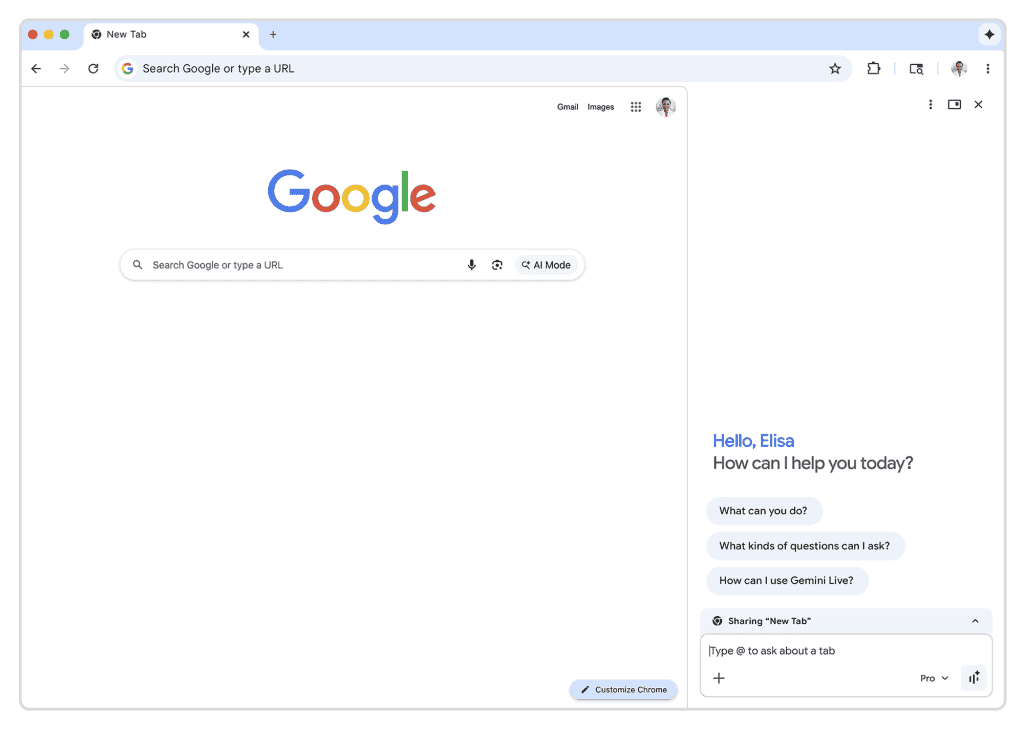
Source: PCWorld
This tighter Gemini integration provides more room for AI-powered features for Chrome to operate while users maintain visibility of their primary browsing activity. The sidebar now defaults to a split-screen view, though users can still pop Gemini out into a floating window if preferred
1
.One notable capability involves context grouping across multiple tabs. When users open several tabs from a single webpage, the Gemini sidebar understands them as a related set, making it easier to compare products or prices
2
. The sidebar experience is now available across MacOS, Windows, and Chromebook Plus devices4
.Google Apps Integration and Personal Intelligence Feature
Chrome's Gemini can now access Gmail, Calendar, YouTube, Maps, Google Shopping, and Google Flights directly from the browser window. Google technically added this feature in mid-January but only announced it publicly with the Auto Browse rollout
1
. These Google Apps integration capabilities enable users to reference emails, check flight options, and draft responses without switching applications4
.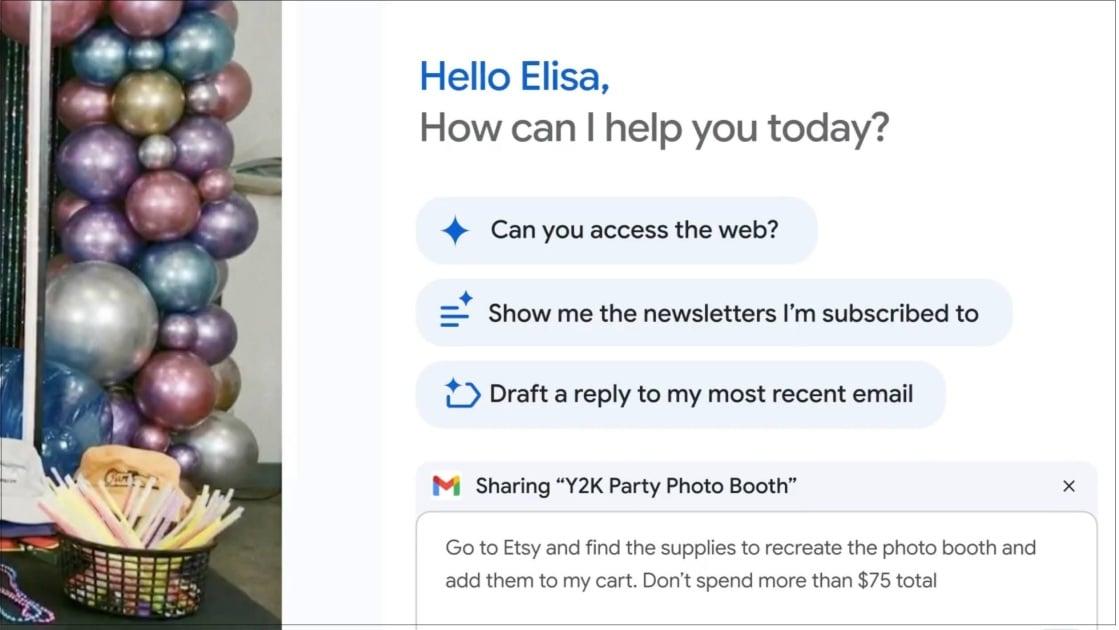
Source: PC Magazine
The Personal Intelligence feature, which connects information across Google services including Drive and Google Photos, will roll out to Chrome in the coming months
2
. This feature remains disabled by default and requires user opt-in, with Google stating the AI avoids making assumptions about sensitive topics like health or finances5
.Related Stories

Agentic AI Tools Face Reliability and Privacy Questions
While agentic AI tools promise to automate multi-step tasks like booking flights, finding apartments, and filing expense reports, browser-based agents remain finicky and often fail to complete tasks
2
. WIRED's assessment noted skepticism about these tools, finding them "consistently unreliable" despite manufacturers' claims3
.Data privacy concerns accompany Auto Browse since it doesn't run locally. All content from robotically operated tabs streams to cloud-based Gemini models, meaning page content gets shared with Google
1
. Google stores information from websites in Gemini Apps Activity if Keep Activity is enabled, and page content is "logged to your Google Account temporarily." When asked whether Google would use page contents to train AI models, a spokesperson declined to provide specifics1
.Security risks include prompt injection attacks when visiting malicious websites, which could trick the bot into unintended actions
3
. Google has implemented safety rules preventing Auto Browse from completing purchases without user approval, requiring user supervision for posting on social media and financial transactions1
.Chrome Competes With AI Browsers and Adds Creative Tools
Google's move responds to AI browsers from OpenAI Atlas, Perplexity, Opera, and The Browser Company that launched in 2025 with sidebar assistants and automated tasks
2
. Chrome maintains the world's largest browser market share, giving Google a distribution advantage as it adds comparable features.Nano Banana, Google's AI image editing tool, now integrates directly into Chrome, allowing users to modify images found while browsing without downloading and re-uploading them
1
. Users can edit images with the slower but higher-quality Pro model or the faster standard version1
.For online shopping automation, Chrome now supports Universal Commerce Protocol, an open standard co-developed with Etsy, Target, Shopify, and Wayfair
5
. Early testing showed users employing Auto Browse for scheduling appointments, filling out forms, collecting tax documents, obtaining quotes from service providers, and filing expense reports2
.References
Summarized by

Navi
[1]
[2]
Related Stories
Google Revolutionizes Chrome with Extensive Gemini AI Integration
18 Sept 2025•Technology

Google brings Gemini in Chrome to Android with auto browse and AI-powered productivity tools
12 May 2026•Technology

Google transforms Chrome Enterprise into an AI workplace tool with Auto Browse and Skills at $6/month
23 Apr 2026•Technology
Recent Highlights
1
Anthropic faces AI export ban as Mythos reportedly breached NSA systems in hours
Policy and Regulation

2
Five Eyes Alliance Warns AI Cyber Risks Could Trigger Crises Within Months, Not Years
Policy and Regulation

3
UN launches transparency initiative demanding AI firms reveal full environmental impact by 2030
Policy and Regulation

Recent Highlights
Today's Top Stories







Don’t drown in AI news. We cut through the noise - filtering, ranking and summarizing the most important AI news, breakthroughs and research daily. Follow topics that matter to you and stay ahead.


