Google Maps gets major AI upgrade through Gemini with rich visual results and conversational search


4 Sources
4 Sources
[1]
Google Maps just got its biggest upgrade in years, and it changes how you navigate (for the better)
If you use Gemini to help find restaurants, coffee shops, or other local sites, Google just made a big change to help you decide. In a post on X, the Gemini team this team announced that its app now gives local search results in a "rich, visual format," showing photos, tips for visiting, review summaries, ratings, and other important information from Google Maps. Also: Gemini vs. Copilot: I compared the AI tools on 7 everyday tasks, and there's a clear winner Previously, if you used Gemini to find this sort of information, you got mostly text results. To give the feature a quick test, I asked Gemini for good coffee shops near me. The results started with a map with pins for all the locations listed so I could see at a glance where they are. Scrolling down, I saw four different options, each one with a photo, a brief description, a rating summary, hours, distance away, a "People talk most about" section that shows which phrases reviews often mention, and a link to learn more. Tapping that link opened a full card for the location, including review highlights and the option to navigate there with Google Maps. Also: Inside the making of Gemini 3 - how Google's slow and steady approach won the AI race (for now) When I tried searching for "fun things to do nearby with my kids," Gemini returned playgrounds, museums, and mini golf courses, along with a few bullet points for each on what makes them a good spot. I did several more searches for restaurants and businesses, and the photos were mostly of the exterior or interior of a building (it seems to be the first photo that comes up on the company's Google business page). I tried asking for recommendations for a specific dish, curious if Gemini would present photos of that specific food at the places it recommended, but the photos were still mostly of buildings. The visual search results are definitely an improvement over the old way, and it's definitely an improvement over a traditional Google search. If Gemini can eventually show relevant photos too, it would go a long way toward making the app a go-to for planning. The new visuals are available on desktop, Android, and iOS versions of Gemini.
[2]
Google Maps now works better than ever inside the Gemini app
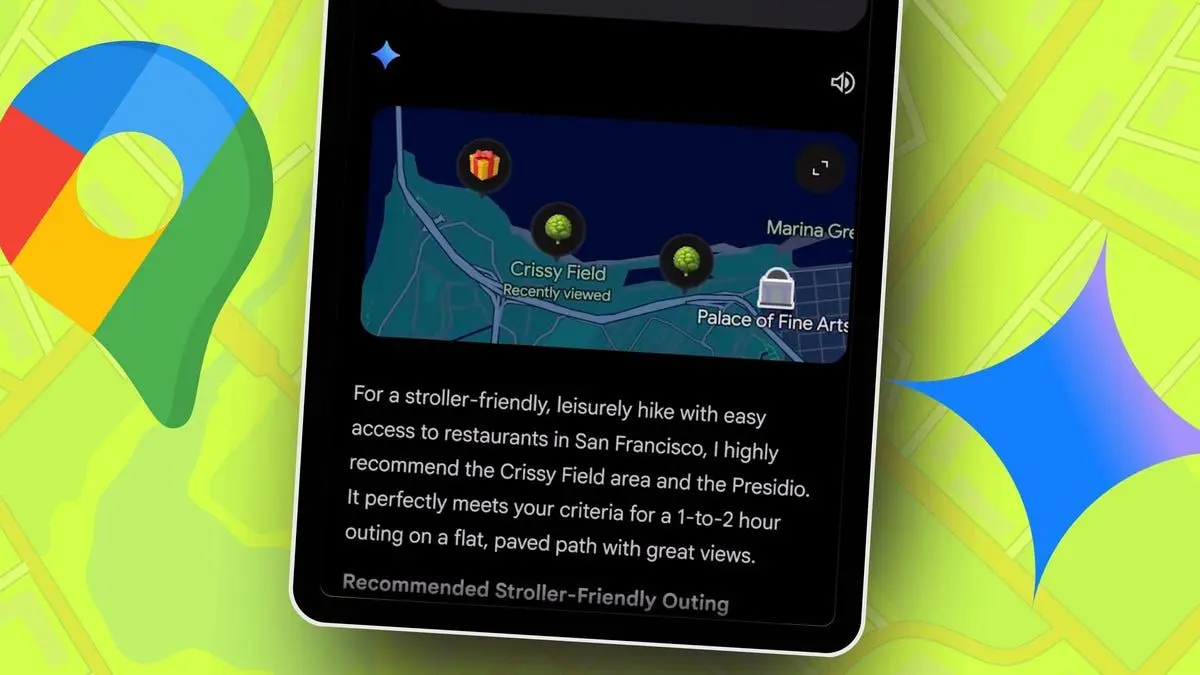
Google has long started incorporating Gemini AI into its apps and services to make things easier for users. Alternatively, you can also use the Gemini app to access many of its services without leaving the app. And with Google removing the requirement to type a command in the month of October this year, accessing those services has become even easier inside the Gemini app. That change impacted all the services that were accessible inside the Gemini app. But now, Google has taken extra care of Google Maps inside the Gemini app, and that means you get better navigation results. An update has been rolled out to the Gemini app to introduce the Google Maps improvements in the Gemini app. What's new in Google Maps inside Gemini app As reported by 9to5Google, Google Maps inside the Gemini app now shows more comprehensive results when you type a prompt. Previously, the search results displayed lines of text, followed by a map view with the locations Gemini has found. As is the case in the Google Maps app, the map view showed pins to pinpoint the locations it has found. Those visuals are now a thing of the past, because the updated Gemini app now shows information in a richer visual format. For example, instead of pins, the map view now shows emoji-style pins that match the place. For example, it'll display a deciduous tree to indicate a park. This is way better than those red pins for recognizing what each place is. Locations will also display a card showing an image of the place, a star rating, followed by the information about that place. You'll also get a review summary, a summary of what people talk most about, and tips from reviewers. Overall, you'll now get pretty much all the information that you need to decide which place is more suitable for you. Another small change is that, when you enter the prompt in the Gemini app, the map view appears first, and then the text. This change makes total sense, because the primary purpose is to see the map. Text is helpful only as supporting information. This new Google Maps experience in Gemini is rolling out for both desktop and phones. If you don't see the change, wait a few more days before it becomes everyone to everyone.
[3]
I tried talking to Google Maps with Gemini, and it actually understood what I wanted
From finding hidden gems to rerouting with bathroom stops, this update listens -- and delivers Google has officially debuted Gemini 3, marking a major upgrade for its AI models and the platforms that use them. New reasoning modes, fresh app features, and an overhaul of the Google ecosystem that could change how people engage with Google products in day-to-day life. Google Maps has always been good at getting me from point A to point B without drama, but with the latest update integrating Google's Gemini AI, navigation is much more conversational and flexible. The update adds context-aware discovery and real-time suggestions that respond to what you are doing instead of just where you are going. The AI's reasoning draws on real‑world location data, using information from business listings, reviews, images, and traffic conditions to answer questions After some tests, on foot and behind the wheel, I can see why Google is so keen to show off how Gemini fits with Maps. The features pair well with how Google is bringing AI to its travel tools. Here are some of the ways I found to best exploit Gemini in Maps. I started with a walk to the nearby park. Along the way, I tapped the Gemini button where the Assistant button once dwelt, and asked the AI to "find the best coffee shops along the way, and tell me which one has the highest review score." Almost instantly, Google Maps showed a handful of options with their scores on the map, telling me about the top ones and highlighting the ones closest to me at the moment. When I got closer to the park, I tried again, and the map updated accordingly, all without ever actually leaving navigation. When I chose one, it updated my directions and asked if I wanted to include directions from the coffee shop to the park, arranging a very easy trip indeed. So much for nearby things, but what about longer-term planning while on the road? I set up a drive from my place to an art gallery about an hour away, then started driving. As I drove, I asked Gemini in Maps to "suggest the top three scenic lunch spots along the way to my destination that aren't too expensive and are easy to park at." Normally, this would mean either opening Gemini or doing more traditional keyword searches in Maps. Instead, Gemini started describing three places along the route, with a short explanation of why it qualified as scenic, the kind of food there, and threw in their star rating as well. None required meaningful detours. Gemini seemed to understand that scenic only mattered after considering the route and even what scenic meant, with mentions of river views and popular terraces. It even offered suggestions like "parking is easiest on weekdays." Traffic updates are something Maps has always handled reasonably well, but I wanted to see how well Gemini's real‑time awareness could handle complex conditions and adjust plans. While on the road, I deliberately took a slower route to observe the response when I asked Gemini, "Tell me if there are any traffic slowdowns ahead, and suggest alternative faster routes that also pass by a gas station or rest stop." Gemini described an upcoming slowdown on the highway due to roadwork, which has been standard, but then it went well beyond that tradition by proposing two alternative routes. The options were not only faster under current conditions but also met the additional needs I mentioned. One went past a conveniently located gas station right off an exit, and the other routed through a small town with a rest area that had a snack stand. What stood out was how Maps layered multiple criteria into a coherent set of choices. It balanced convenience and speed by outlining estimated times and clearly marking amenities on the map. Gemini has been thoroughly embedded in Maps well beyond just updating the Assistant. It's more like using Gemini with a map add-on than Maps with an AI addition. The casual language made using it feel easier than the more traditionally stilted way of engaging with Maps, and the AI could remember what I had been saying earlier during the drive, so that I didn't even have to repeat myself about what I was looking for from requests for nearby lookouts or rest stops. It's more conversational, but also more decisive. It narrows options instead of overwhelming you. There were moments when results took around 15 extra seconds to load, but nothing that derailed the travel. I didn't mind it when the results were as useful as they were. Gemini is advanced enough that, when combined with Maps' data, it seems to understand the spirit of what you want and fills in the rest with context. It also showed some restraint in surfacing suggestions when they are relevant and staying quiet otherwise. The upgrade changed how I talk to Maps, giving it greater confidence when handling multiple requests. That's a real change, and one that people will likely be keen to adopt. And, of course, encouraging people to travel toward Gemini in other contexts as well is a destination Google will be happy to provide navigation for.
[4]
Google Makes Gemini Smarter with Rich Maps Previews and Photos - Phandroid
Planning your weekend just got easier. Google updated the Gemini app on December 11, 2025, with richer Google Maps results that show photos, star ratings, and review summaries instead of boring text and basic pins. Now when you ask Gemini about restaurants or activities, you get visual previews that actually help you decide where to go. The update works on desktop, Android, and iOS, but only in English for now. Instead of plain location pins, you'll see emoji-themed markers that make different spots easy to spot at a glance. Parks get tree icons, restaurants get food symbols, and so on. Tap on any place and you get cards showing photos, ratings, and quick review highlights. These cards include a "People talk most about" section that pulls common themes from reviews. You'll also see reviewer tips and overall impressions without reading through dozens of individual comments. It's basically Google Maps' AI features built right into Gemini conversations. This builds on Gemini's existing Maps integration that already helped with navigation and landmark directions. Now the visual upgrade makes local discovery even faster. Ask about nearby coffee shops and you immediately see what they look like, how people rate them, and what makes them special. For casual users, this means less jumping between apps. You can plan a dinner date, scope out new neighborhoods, or find weekend activities all through Gemini conversations. The photo-rich cards give you enough information to make quick decisions without opening Google Maps separately. The visual approach also helps people who prefer seeing options rather than reading descriptions. If you're comparing three brunch spots, glancing at photos and star ratings beats parsing through text explanations. It's the kind of practical improvement that makes AI assistants actually useful for everyday tasks instead of just impressive tech demos. Google says the update is rolling out now across all Gemini platforms. The company continues pushing Gemini integration across its services, making the AI assistant more practical for real-world planning and navigation.
Share
Share
Copy Link
Google rolled out a significant update to Gemini on December 11, 2025, transforming how users search for local businesses and plan trips. The AI integration now displays rich visual results from Google Maps, including photos, star ratings, review summaries, and emoji-themed location pins. Available on desktop, Android, and iOS, the update makes local discovery more intuitive by replacing text-heavy responses with visual cards that help users make faster decisions.
Gemini Transforms Google Maps Experience with Visual Overhaul
Google announced a major update to Gemini on December 11, 2025, fundamentally changing how the AI assistant presents local search results from Google Maps
4
. The AI integration now delivers information in a rich visual format, replacing the previous text-heavy interface with photo-rich cards, star ratings, and review summaries that mirror the native Google Maps experience1
. This upgrade affects how millions of mobile users and desktop searchers discover restaurants, coffee shops, and local attractions through conversational queries.
Source: Phandroid
The Gemini team shared the news on X, highlighting that the update brings Google Maps data to life within AI conversations
1
. Previously, asking Gemini about nearby businesses returned mostly plain text responses with basic location pins. Now, users receive comprehensive location cards featuring business photos, ratings, hours, distance information, and a "People talk most about" section that extracts common themes from reviews2
.Rich Maps Previews Replace Basic Pins
The visual transformation extends to the map view itself, where traditional red location pins have been replaced with emoji-themed markers that instantly convey what each place represents
2
. Parks display deciduous tree icons, while restaurants show food symbols, making it easier to distinguish between different types of venues at a glance. The map view now appears first when users enter a prompt, followed by supporting text—a change that prioritizes visual information over written descriptions2
.
Source: ZDNet
Each location card provides reviewer tips and highlights without requiring users to read through dozens of individual comments
4
. Tapping a card opens a full view with detailed review summaries and ratings, plus the option to navigate directly using Google Maps1
. This streamlined approach helps users make quicker decisions when comparing multiple options, whether they're searching for brunch spots or planning weekend activities.Conversational Navigation Adds Context-Aware Suggestions
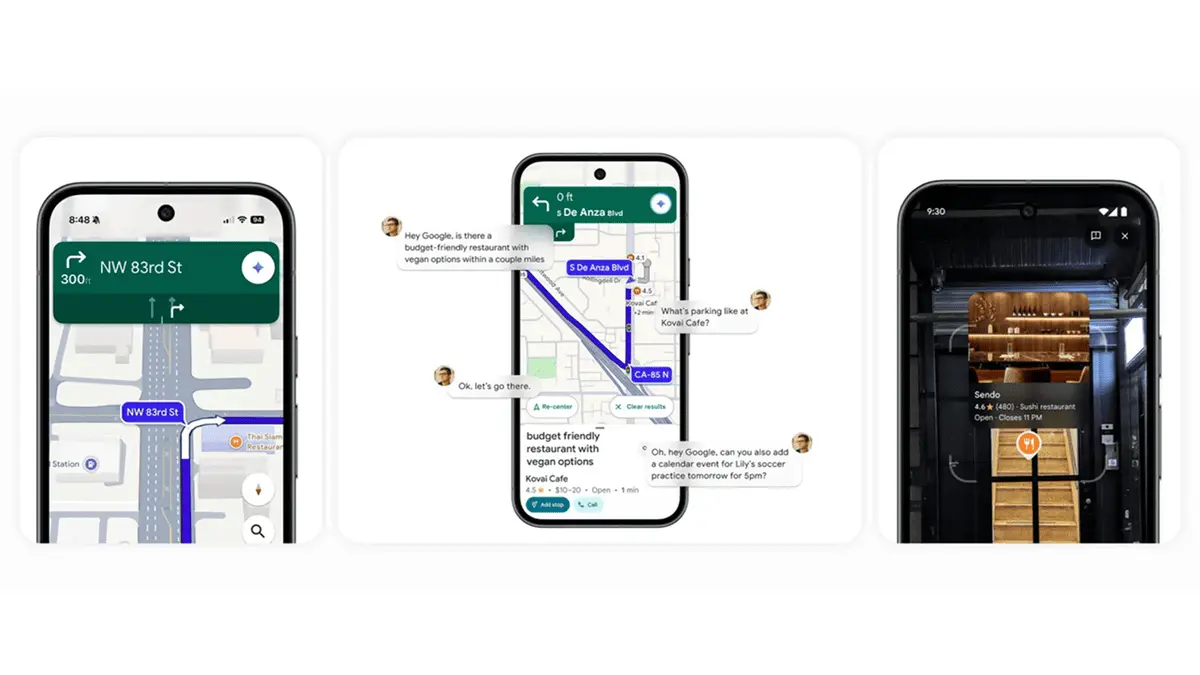
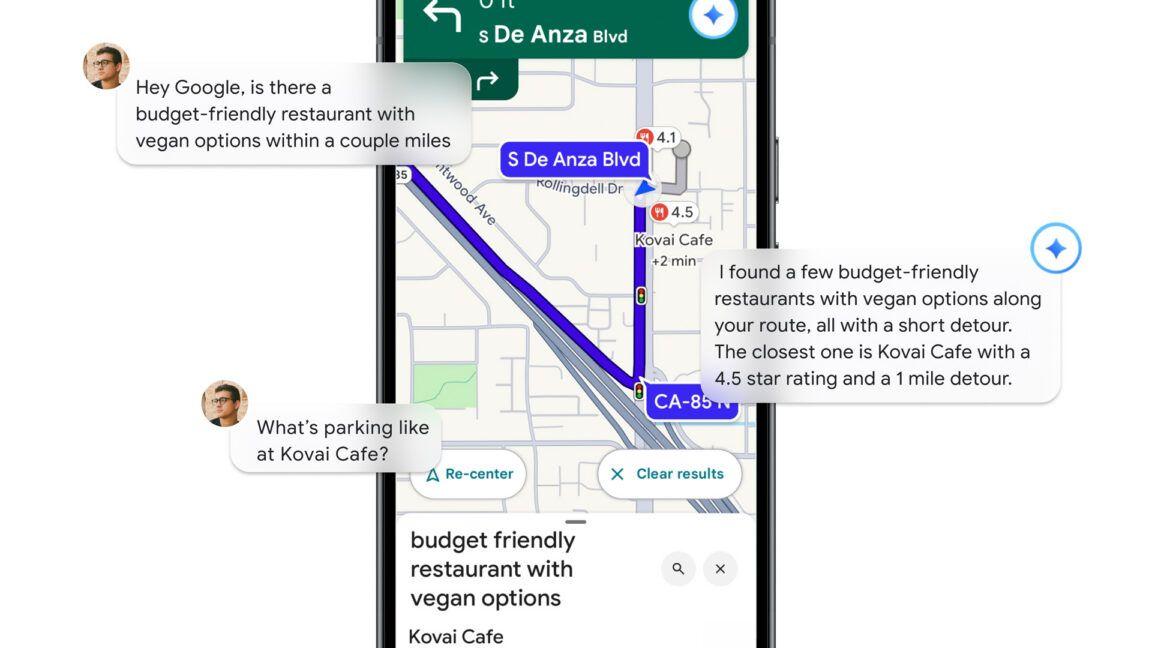
Beyond static search improvements, the update enhances conversational navigation by understanding complex, multi-layered requests
3
. Users can now ask Gemini to "find the best coffee shops along the way and tell me which one has the highest review score," and the AI will surface options with context-aware suggestions that update in real-time based on current location3
.
Source: TechRadar
During active navigation, Gemini can handle requests like "suggest the top three scenic lunch spots along the way to my destination that aren't too expensive and are easy to park at"
3
. The AI analyzes routes, considers traffic conditions, and factors in amenities like parking availability—all while maintaining conversational context throughout the trip. This natural language processing eliminates the need to switch between apps or repeat previous requests.Related Stories
AI Travel Planning Becomes More Practical
The enhanced Google Maps experience positions Gemini as a comprehensive tool for AI travel planning rather than just a navigation assistant
3
. The AI draws on real-world location data from business listings, reviews, photos, and traffic conditions to answer questions with greater precision. When users ask about "fun things to do nearby with my kids," Gemini returns playgrounds, museums, and entertainment venues with bullet points explaining what makes each spot suitable1
.For casual users, this means less jumping between applications during trip planning
4
. Dinner dates, neighborhood exploration, and weekend activities can all be coordinated through Gemini conversations without opening Google Maps separately. The visual approach particularly benefits people who prefer seeing options rather than reading lengthy descriptions—glancing at photos and star ratings proves faster than parsing text explanations when comparing three potential destinations.What Users Should Watch For
The update is rolling out now across desktop, Android, and iOS platforms, though currently only supports English
4
. Some users reported results taking around 15 extra seconds to load during testing, though the added wait time was offset by the quality and relevance of suggestions3
.One area for improvement involves photo selection—current results primarily show building exteriors or interiors from business pages rather than specific menu items or experiences
1
. If Gemini evolves to display contextually relevant photos based on specific queries (like showing actual dishes when users ask for restaurant recommendations), it could further cement the app as a go-to for local discovery.This update builds on Google's broader push to embed Gemini across its services, making the AI assistant more practical for everyday tasks beyond impressive tech demonstrations
4
. As the company continues refining how AI interprets user intent and surfaces directions with minimal friction, the line between traditional search and conversational assistance continues to blur—potentially reshaping how people interact with location-based services in the months ahead.References
Summarized by

Navi
[1]
[2]
Related Stories
Google Maps Integrates Gemini AI for Enhanced Navigation and Hands-Free Driving Experience
05 Nov 2025•Technology
Google Brings Gemini AI to Android Auto, Transforming In-Car Voice Assistance
20 Nov 2025•Technology

Google Maps to Integrate Gemini AI for Enhanced Location-Based Queries
04 Feb 2025•Technology

Recent Highlights
1
AI Models Lie and Deceive to Protect Other AI Models From Deletion, Study Reveals
Science and Research

2
AI chatbots validate you too much, making you less kind to others, Stanford study reveals
Science and Research

3
Judge blocks Pentagon from blacklisting Anthropic over AI safety guardrails dispute
Policy and Regulation

Recent Highlights
Today's Top Stories




Your Daily Dose of Curated AI News
Don’t drown in AI news. We cut through the noise - filtering, ranking and summarizing the most important AI news, breakthroughs and research daily. Spend less time searching for the latest in AI and get straight to action.

