Google's Circle to Search now identifies multiple objects at once, powered by Gemini 3


4 Sources
4 Sources
[1]
Google's Circle to Search can now identify multiple objects in an image
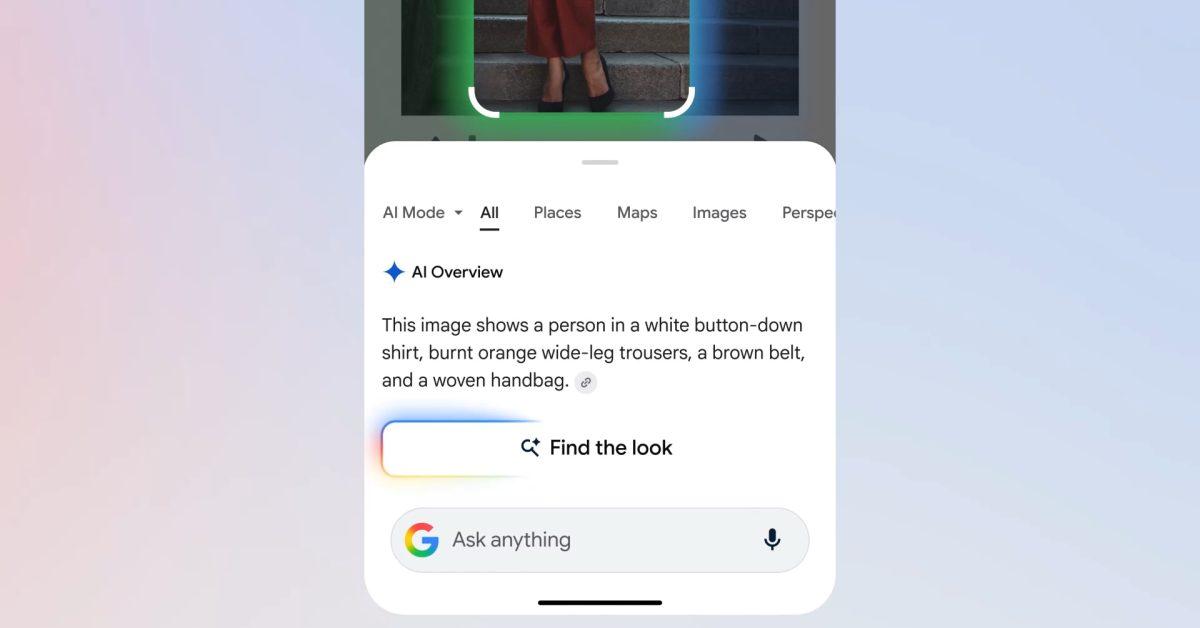
To coincide with the release of Samsung's new Galaxy S26 family of phones, Google is pushing out a small but meaningful update to Circle to Search. As a reminder, Circle to Search allows you to carry out a Google Search from almost anywhere on your phone. Just tap and hold your device's home button, and then circle the passage or image you want to know more about. With previous iterations of Circle to Search, the tool's underlying AI system was limited to searching against a single object in an image. Now, thanks to Gemini 3, it can scan and identify multiple objects at the same time. Naturally, Google is quick to point out the boon this represents for shopaholics. If you see a fit you like on Instagram, you can circle an entire person and the tool will attempt to find a match for each item they're wearing, including any shoes and accessories. At the same time, Google has made it easier to see how those clothes might look on you by bringing its virtual try on feature directly inside of Circle to Search. The benefits of the new model aren't only limited to shopping queries. Building on a search technique Google debuted with AI Mode, Circle to Search can now also reason through the relationship between different objects in an image. So say you see a photo of a coral reef and want to know how all the different pictured fish live together, Circle to Search will not only be able to identify the different species shown but also explain how they coexist with one another. Google is bringing the new and improved Circle to Search to Galaxy S26 and Pixel 10 phones first before rolling it out to more Android devices soon.
[2]
Circle to Search just made impulse buys so much more dangerous
A new "Try it on" button is integrated directly into the search overlay, allowing you to instantly enter a virtual dressing room to test how clothes fit your body type. Circle to Search has always been great for finding that one specific pair of shoes or a random hiking trail on your screen. Now, imagine being able to identify all the decor in a room or create a full mood board in one go. Starting today, Google is upgrading this Android feature so you can explore several objects in an image at the same time. If you spot a creator's incredible fit on your social feed today, you don't have to highlight the sneakers and then go back to search for the jacket. On flagship devices like the newly launched Samsung Galaxy S26 or Pixel 10, you just tap or circle the entire outfit to completely deconstruct the look, according to a blog post by Harsh Kharbanda, Director of Product Management for Google Search. Circle to Search quickly identifies each clothing item and accessory. You get a comprehensive breakdown of similar items to immediately jumpstart your shopping experience. This update combines visual discovery with quick action, and its best feature is the new virtual dressing room. It is one thing to find a great shirt; it is another to know if it actually works for your body type. Now, when inspiration strikes, you just circle the outfit, tap "Find the look," and select "Try it on" to enter a virtual dressing room right from the search overlay. How does Google make this work? The key is Gemini 3's agentic planning, reasoning, and tool features. Instead of just matching a single image, the AI follows a multi-step process. It picks out and crops the important parts of the image, runs several searches at once, and brings everything together for a complete answer. This multi-object recognition is not limited strictly to fashion, either. If you are redesigning a living room and want to capture the entire mid-century modern aesthetic, you can highlight the entire scene rather than selecting a single lamp. Whether you are curating a mood board or satisfying a multi-layered curiosity about everything in a photo, the tool handles it all simultaneously. These new features are available starting today, February 25, for the Samsung Galaxy S26 series and the latest Pixel 10 devices. Google also plans to add them to more Android phones soon.
[3]
Google upgrades Circle to Search with Gemini 3 for multi-search, bottom chat UI
Besides Gemini automation, Google today announced the latest Circle to Search features for the Galaxy S26 and Pixel 10. Circle to Search is now available on over 580 million Android devices. Today's update lets the visual search feature "explore multiple objects in an image, all at once." Let's say you're reading a travel blog on your phone, and you see a breathtaking photo of a variety of vibrant, colorful fish. You want to explore more. Instead of wondering what's what, just circle all the fish on your screen and ask "what are all these fish, and how do they coexist?" Circle to Search will identify each unique species you've selected, from the Honeycomb Filefish to the Moon Jellyfish. Beyond just naming them and surfacing related images, it will explain the science behind their underwater community, and give you links out to the web to dive deeper. This also results in a better shopping experience when you want to replicate a room's decor or someone's outfit. In the latter case, you can tap a "Find the look" button above the new "Ask anything" bar. Circle to Search has moved that text field from the top of your screen to the bottom. Just like AI Mode, this experience is more like a chat. Say you see an outfit you love on social media and you want to replicate the vibe. Now, you can search for every piece -- accessories, clothing and shoes -- all at once. Similarly, Google is integrating virtual try-on with Circle to Search. Google notes how seeing "more visual results from a single search" will create "new opportunities for merchants and businesses to be discovered." Behind the scenes, Circle to Search leverages Gemini 3's agentic planning, reasoning, and tool calling. CtS is no longer "simply looking for a single match." Instead, this model "thinks through a multi-step plan to get you the best results for everything you search on your screen." Google automatically identifies the "most important parts of an image to crop, runs several searches at once, and cross-references what it finds to compile a final response -- including images from across the web -- for each item you've searched." These features are rolling out now to the Pixel 10 and Galaxy S26 series.
[4]
Gemini 3-powered Circle to Search debuts on Galaxy S26 and Pixel 10
Google released an update to its Circle to Search feature, coinciding with the launch of Samsung's Galaxy S26 family of phones. The update utilizes Gemini 3 to enable the scanning and identification of multiple objects simultaneously within a single image. Previously, the tool was limited to searching against a single object. The feature allows users to perform a Google Search by tapping and holding the home button and circling text or images. The enhancement introduces new capabilities for shopping queries. If a user sees a specific fashion fit on social media, they can circle an entire person in a photo. The tool will then attempt to find a match for each item the person is wearing. This includes clothing items, shoes, and any accessories present in the image. Google integrated its virtual try-on feature directly into Circle to Search to facilitate viewing how these clothes might look on the user. Circle to Search now extends beyond shopping to reason about relationships between objects in an image. This capability builds on a search technique Google debuted with AI Mode. For example, if a user circles a photo of a coral reef, the tool can identify different fish species shown. It can also explain how those different species coexist with one another within that environment. The updated Circle to Search is launching first on the Galaxy S26 and Pixel 10 devices. Google plans to roll out the update to more Android devices soon. The update is powered by Gemini 3, which allows the system to scan and identify multiple objects at the same time.
Share
Share
Copy Link
Google upgraded Circle to Search with Gemini 3, enabling multi-object search capabilities on Samsung Galaxy S26 and Pixel 10 devices. The update allows users to identify and search for multiple items in a single image simultaneously, whether shopping for entire outfits or exploring complex scenes like coral reefs. A new virtual try-on feature integrates directly into the search overlay.
Circle to Search Gets Major Upgrade with Multi-Object Recognition
Google launched a significant update to Circle to Search, timed with Samsung's Galaxy S26 release, that fundamentally changes how users interact with visual content on their phones. The feature, now available on over 580 million Android devices
3
, can identify multiple objects in an image simultaneously thanks to Gemini 3's advanced capabilities. Previously limited to searching a single object, Circle to Search now scans entire scenes at once, whether that's a complete outfit on social media or a complex coral reef photograph1
.
Source: 9to5Google
The tool works by tapping and holding your device's home button, then circling the passage or image you want to explore. What sets this Google Search update apart is its ability to handle multi-step reasoning through relationships between objects
4
. If you circle a photo of a coral reef and ask how the fish coexist, the AI identifies each species—from Honeycomb Filefish to Moon Jellyfish—and explains the science behind their underwater community3
.Advanced Shopping Queries Transform the Fashion Experience
The update delivers substantial improvements for shopping experience scenarios. When you spot a creator's outfit on Instagram or any social feed, you can now circle the entire person to deconstruct the look completely
2
. Circle to Search identifies each piece—clothing items, shoes, and accessories—providing a comprehensive breakdown of similar products. A new "Find the look" button appears above the redesigned "Ask anything" bar, which has moved from the top to the bottom of the screen, creating a more chat-like user interface3
.Google integrated its virtual try-on dressing room directly into the search overlay
1
. After circling an outfit and tapping "Find the look," users can select a new "Try it on" button to enter a virtual dressing room and test how clothes fit their body type2
. This integration makes impulse buys more tempting by removing friction between discovery and visualization.Gemini 3 Powers Multi-Step AI Processing
Behind the scenes, Gemini 3's agentic planning, reasoning, and tool calling capabilities drive this multi-object search functionality
3
. The system no longer simply looks for a single match. Instead, the AI thinks through a multi-step plan, automatically identifying the most important parts of an image to crop, running several searches at once, and cross-referencing findings to compile a final response3
. This approach enables the tool to handle complex queries across fashion, home decor, and educational contexts.Google notes this creates new opportunities for merchants and businesses to be discovered through visual search
3
. Whether users are curating mood boards for room redesigns or satisfying curiosity about everything in a photograph, the image recognition system processes it all simultaneously.Related Stories


Galaxy S26 and Pixel 10 Get First Access
These features rolled out on February 25 for Samsung Galaxy S26 series and Pixel 10 devices
2
. Google plans Android device integration across more phones soon, though no specific timeline was provided1
. The staggered rollout prioritizes flagship devices first, likely to showcase the processing power required for Gemini 3's complex operations. Watch for expansion announcements as Google extends these capabilities to mid-range Android phones in coming months.References
Summarized by

Navi
[2]
Related Stories
Recent Highlights
1
Google Maps unveils Ask Maps with Gemini AI and 3D Immersive Navigation in biggest update
Technology

2
Three Tennessee teens sue xAI over Grok AI creating child sexual abuse material from real photos
Policy and Regulation

3
Meta plans to cut 20% of workforce as AI spending reaches $600 billion, mirroring broader tech trend
Business and Economy

Recent Highlights
Today's Top Stories




Your Daily Dose of Curated AI News
Don’t drown in AI news. We cut through the noise - filtering, ranking and summarizing the most important AI news, breakthroughs and research daily. Spend less time searching for the latest in AI and get straight to action.

