Meta Ray-Ban Display impresses with features but restrictive software ecosystem holds it back


2 Sources
2 Sources
[1]
Meta's Ray-Ban Display Is the Best Pair of Smart Glasses I've Used, But I Still Can't Recommend It
Your subscription has been confirmed. Keep an eye on your inbox! The Meta Ray-Ban Display is built around using Meta's services and, if possible, only Meta's services. The AI is Meta AI, the messaging apps outside of phone text messages are Messenger and WhatsApp, the photo-sharing app is Instagram, and those are the only choices you get (and they are all owned by Meta). You can't talk to Gemini, message over Discord or Slack, or post photos on Bluesky. You can connect your Amazon Music, Shazam, and Spotify accounts, but that's probably because Meta doesn't have its own music streaming service. Even without them, you can at least control any audio playing on your phone through the glasses' Music app, as if it were a widget on your lock screen. Notifications are the biggest issue. Text messages and voice calls through your phone are supported, and you'll get notifications for them. But those, and messages from Meta apps, are the only notifications the glasses will show. Unlike every other pair of waveguide smart glasses I've tested, these won't read your phone's push notifications. In addition, all of the Meta apps, including Instagram, are primarily for communication, not for browsing your social feeds. The Instagram app only brings you to your messages, so you can't browse stories, and Facebook isn't on the glasses at all. Calendar support is also limited. There's no dedicated calendar app, so you have to ask Meta AI to tell you what your appointments are. You can link your Google or Outlook calendars to your phone, but not if they're work accounts with any kind of managed IT security. And you have to speak every time you want to check your next meeting. I had initially planned to take the glasses to CES and write an account of covering the show with them. I didn't, because the inability to see incoming Slack messages meant I couldn't use the glasses to keep up with coverage discussions. Moreover, since my Google-based work calendar is protected by IT policies, I couldn't ask Meta when or where I needed to go next for my many appointments. Simply supporting push notifications from third-party apps on my phone would have solved both of those problems on the Meta glasses. That feature is available on the Even Realities G2, which I ended up taking to CES instead. If you're a regular Meta user and the software limitations don't bother you, the Meta Ray-Ban Display generally works quite well in executing its main functions. Closed captions are quick and accurate most of the time, and the text is easy to read. All AI-powered voice transcription depends on good sound quality, so it can make mistakes if the speech isn't completely clear or if there's significant background noise, but even then, it's still very usable. Translation is also effective, within its very limited scope. I watched some Spanish-language soccer programming on my TV, and the glasses translated it into English with surprising accuracy. They can likely do the same with French or Italian. Those are the only options, though, and that's paltry compared with the Even G2 (31 languages) and the Rokid Glasses (89 languages). There's no Chinese, German, Japanese, Korean, Portuguese, or Vietnamese. Visual translation of other languages is supported using the camera, but not voice. You'll have to commit to one language at a time for the glasses to translate. The translation function on the glasses interface doesn't offer any language choices and relies on the app to load a single language pack, a process that can take half a minute. These are the first smart glasses I've used where the navigation feature is genuinely useful and provides a readable map. Opening the Maps app on the glasses pops up a large, easily understandable map of your location. Only a few major streets are labeled, but notable locations nearby, like movie theaters, are displayed as pins, and you can use the knob-turn gesture to zoom in closer for additional landmarks. From this view, you can use voice dictation to search for a location, or tap buttons for nearby cafes, restaurants, parks, or attractions. Selecting a destination will display the route as a blue line. From that view, you can start navigation, send the location to your phone, or, if it's a business with a phone number, call it. I found the navigation to be direct and accurate, with the map view tracking my location and orientation as it gave me turn-by-turn directions. The Music app is simple, with only track forward, track back, and play/pause buttons, plus a tile showing the time on the track. You'll also see album art if it's available and the app is compatible. No art came through my Android phone using Pocket Casts or YouTube Music, whereas both show album art and podcast icons on the phone itself. As mentioned, its phone widget-like universality also means it can control any audio playing from your phone. However, it doesn't offer the same benefits as a phone widget because it only shows those controls when the app is open and on the display. An icon in the quick settings menu shows you the track playing, but to do anything with it, you have to tap it to open the app first. An in-glasses widget for the app to help populate the central tab would have been really helpful here, rather than requiring you to open its full view. You can play/pause and skip tracks with single and double taps on the touch strip on the glasses, but that's all you get for audio gesture support. The Neural Band doesn't give you any audio controls or even provide a shortcut to bring up the Music app quickly. This is baffling because the Meta AI app lets you assign the double-tap gesture to "your favorite feature," but the only options are the default Meta AI activation or disabling it completely.
[2]
I've been wearing the Meta Ray-Ban Display smart glasses for 24 hours -- here's what I like (and hate)
The Meta Ray-Ban Display smart glasses first went on sale in late September, but owing to their popularity and production, have only recently become available in large numbers. I had a chance to go hands-on with them at Meta's launch event, but only for a few brief minutes. I was finally able to schedule a fitting for the glasses -- a required first step for anyone looking to purchase a pair -- and, after waiting over a month, I finally got my hands on a pair and have been testing them out for the past day. I'm still working on my full review, but having worn the Ray-Ban Display for a fair chunk of time, I have a few initial impressions of these $800 specs, and how they might stack up against the best smart glasses. They're chunky Compared to Meta's other wearables, which don't scream "smart glasses," the Displays have a much thicker frame (think Buddy Holly), which makes them stand out a lot more. My wife commented that they didn't look as nice on me as the Ray-Bans or Oakleys, so be prepared to get a few more stares if you pick these up. I do like that the Meta Displays come with transition lenses by default, as it would be a shame to have to stop wearing them each time I went indoors or outside. Gestures took a while to master Both at the store and on the glasses themselves, Meta offers some pretty good instructions on how to use the gestures, but it still takes some practice. By the second day, I had gotten them down fairly well, but there have been more than a few occasions where I had to rub my thumb over my forefinger more than once to get things to move on the display. My favorite gesture is the pinch to adjust volume or zoom. If you're listening to music, you can touch your index finger and thumb and then rotate your wrist to increase or decrease volume. Similarly, if you're using the camera app, the same gesture lets you zoom in and out. One pleasant surprise (especially if you're in the middle of a freezing winter) is that the control gestures work just as well even if you're wearing gloves. That's because all hand gestures are interpreted by a Neural Band, which you wear on your wrist, that detects muscle movement. Handwriting is cool, but a work in progress With some apps (such as WhatsApp), you can use your finger to write, and the glasses will interpret your gestures as letters and numbers. It's pretty neat, and when it works, it responds quickly. I scrawled out a few words, and while the glasses were a second or two behind, it got things mostly right. However, there was more than one occasion where I had to keep tapping for it to recognize my inputs. You can use your finger to write out some punctuation -- I could do periods, exclamation points, and question marks -- but you need to access a special menu for other symbols. What's cool, though, is that you don't even need a hard surface for your finger; you can literally write in mid-air. It's definitely a feature I'm going to dig deeper into. Maps are made for walking One of the key differentiators between the Meta Display and the company's other smart glasses is that it can provide turn-by-turn directions, which can be especially helpful if you're in an unfamiliar place. However, it's very limited at the moment. For starters, while you can look up directions wherever you are, you can only navigate using the glasses in a few select locations, such as New York City. I was able to quickly get directions from the Tom's Guide office to Penn Station, and the glasses gave me guidance along the route. But when I got to suburban New Jersey and tried to use it to get home, the glasses would only show me the route overview, saying that turn-by-turn directions were not available for my location. In those instances, you can have the glasses open up the route on your phone's navigation app (in my case, Apple Maps). Also, you can only get walking directions on the Meta Display, and even then, doesn't take into account things such as mass transportation. So, if you can't get somewhere on your own two feet (and you don't live in a major metropolitan area), the Meta Display won't do you much good. The display is bright but not intrusive Having used other heads-up displays in smart glasses and goggles, I have to say that Meta seems to have gotten things right with the Display. The screen is crisp and colorful, and I don't have to strain my eyes to see things (and there's even a setting for those who have color blindness). It's easy to see the screen, even when I'm in direct sunlight -- and it even auto-adjusts its brightness to compensate for ambient conditions. Meta AI can only do so much The key to any smart glasses is the power of its underlying AI. I've used the Ray-Ban Metas in the past, and it's been pretty good at identifying things I look at, but it does have its limitations. While passing a parking lot, I looked at a Toyota SUV, and asked Meta to identify the vehicle, which it confidently told me was a Range Rover. At another point, I noticed we were running out of carrots, so I asked Meta to add carrots to my shopping list. Unfortunately, it said it couldn't do that, but said it would create a reminder for me. I'm going to dive deeper to see how it compares to Gemini and Alexa+, at least as a wearable AI. Battery life goes fast I put the glasses on a little before 9 am, and by 1 pm, they were down to 56%. That's actually better than Meta's claims of about 6 hours with mixed use, like if you're playing music. I do like the Display's charging case, though, which folds down into a very compact shape when the glasses aren't inside. Initial thoughts Meta has jumped ahead of the likes of Google, Amazon, and Apple with several pairs of smart glasses that are not just innovative but practical. The Meta Display glasses make it easier to do things that would normally require you to take your phone out of your pocket, be it listening to music, taking photos, or getting somewhere new. However, even in my early testing, I see some limitations with Meta's AI that it needs to work out before competitors like Google release their own smart glasses. For starters, navigation needs to be nailed down so you can use it for more than walking -- and in more places. And, Meta AI needs to be able to work with more apps, so that if you do want to create something as simple as a shopping list, you can do so. I'm still checking out all of the other features of the Meta Display, so stay tuned for my full review. Let me know in the comments if there's anything in particular you'd like me to check out. Follow Tom's Guide on Google News and add us as a preferred source to get our up-to-date news, analysis, and reviews in your feeds.
Share
Share
Copy Link
Meta's $800 Ray-Ban Display smart glasses showcase advanced Neural Band gesture controls and heads-up navigation, but reviewers highlight significant software limitations. The wearables lock users into Meta's ecosystem, blocking third-party push notifications and calendar integration while offering limited translation options compared to competitors.
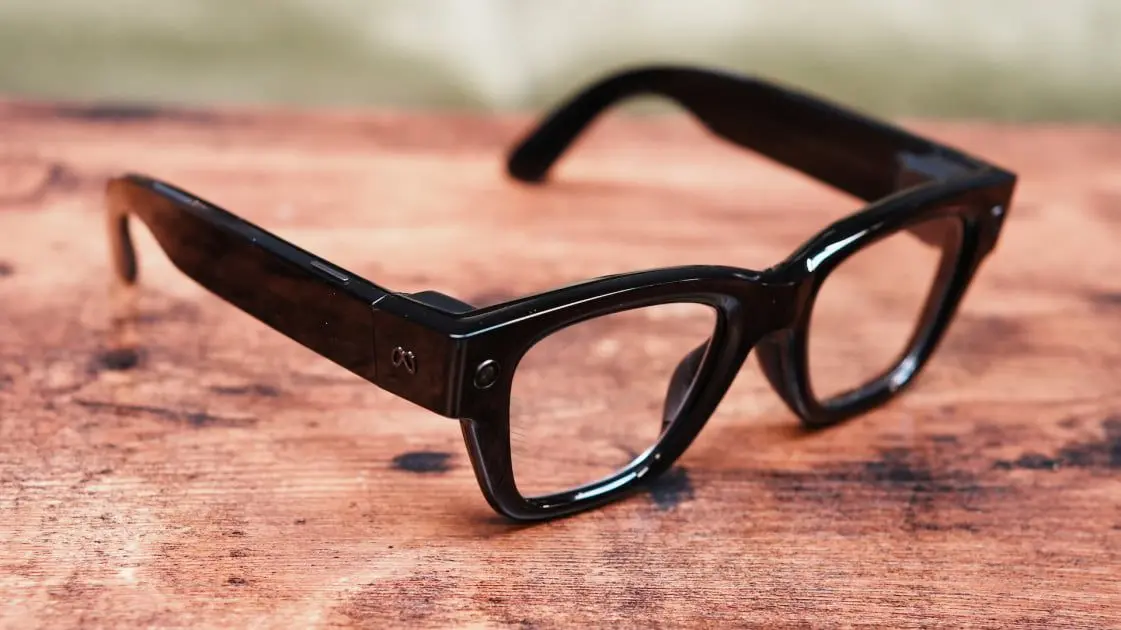
Meta Ray-Ban Display Arrives With Advanced Hardware But Ecosystem Constraints
The Meta Ray-Ban Display represents Meta's latest push into wearables, priced at $800 and featuring a heads-up display that distinguishes it from the company's earlier smart glasses
1
. These smart glasses come equipped with transition lenses by default and require a mandatory fitting appointment before purchase2
. While the hardware delivers on several fronts, the restrictive software ecosystem raises questions about whether these glasses can compete effectively in the growing smart glasses market.Neural Band Gesture Controls Offer Intuitive Interaction
The standout smart glasses features include gesture controls powered by a Neural Band worn on the wrist that detects muscle movement
2
. Users can pinch their thumb and index finger, then rotate their wrist to adjust volume or zoom the camera. The system works even while wearing gloves, making it practical for cold weather use. However, mastering these gesture controls takes practice, with reviewers noting they sometimes needed multiple attempts to register inputs properly during hands-on review of smart glasses testing2
.The glasses also support handwriting recognition, allowing users to write messages in mid-air with their finger for apps like WhatsApp. While the feature responds quickly when it works, recognition accuracy remains inconsistent
2
.Display Quality Excels But Design Stands Out
The waveguide display delivers crisp, colorful visuals that remain readable even in direct sunlight, with automatic brightness adjustment for ambient conditions
2
. Settings accommodate users with color blindness. However, the Meta Ray-Ban Display features a much thicker frame compared to Meta's other wearables, making them more noticeable and less aesthetically appealing according to early testers2
.Walking Navigation Capabilities Show Promise But Geographic Limits
Navigation represents a key differentiator for these smart glasses. The Maps app displays a large, easily readable map with major streets and notable locations marked as pins
1
. Users can zoom using gesture controls, search via voice dictation, and access turn-by-turn directions shown as a blue line tracking location and orientation.Yet walking navigation capabilities face significant restrictions. Turn-by-turn directions only work in select major metropolitan areas like New York City
2
. Outside these zones, the glasses only show route overviews and must hand off to phone navigation apps like Apple Maps or Google Maps. The system provides no mass transportation options, limiting utility for many urban users2
.Related Stories


Software Limitations Create Major Friction Points
The most significant issue in this Meta Ray-Ban Display review centers on software limitations that lock users into Meta's ecosystem
1
. Meta AI serves as the only AI assistant—users cannot access Gemini or other alternatives. Messaging works exclusively through Messenger, WhatsApp, and phone text messages, excluding Discord and Slack. Instagram integration only provides access to messages, not stories or feeds, while Facebook has no presence on the glasses at all1
.Push notifications represent a critical gap. Unlike other waveguide smart glasses, the Meta Ray-Ban Display only shows notifications for phone calls, text messages, and Meta app messages
1
. This prevented one reviewer from using the glasses at CES due to inability to receive Slack messages essential for work coordination.Calendar support proves equally restrictive. With no dedicated calendar app, users must ask Meta AI for appointment information. Google and Outlook calendars can link only if they're personal accounts—work accounts with managed IT security cannot connect
1
. This limitation forced the same reviewer to choose Even Realities G2 glasses for CES coverage instead.Meta AI Performance Shows Mixed Results
Meta AI performance delivers accurate voice transcription and closed captions most of the time, though quality depends on clear speech and minimal background noise
1
. Translation works effectively but supports only Spanish, French, and Italian for voice translation—far behind competitors like Even G2 with 31 languages and Rokid Glasses with 89 languages1
. Users must commit to one language at a time, with language pack loading taking up to 30 seconds.Object recognition accuracy remains inconsistent. During testing, Meta AI confidently misidentified a Toyota SUV as a Range Rover, highlighting limitations in visual understanding
2
.The glasses connect to Amazon Music, Shazam, and Spotify, likely because Meta lacks its own music streaming service
1
. The Music app functions like a phone widget, controlling any audio playing from the phone, though album art doesn't always display properly on Android devices.For professionals requiring integration with workplace tools, third-party notification support, or comprehensive calendar access, these software limitations may prove dealbreaking. Watch whether Meta expands third-party app support and geographic availability for navigation features in future updates.
References
Summarized by

Navi
[1]
Related Stories
Recent Highlights
1
Apple Plans Major Siri AI Overhaul in iOS 27 With Third-Party Chatbot Integration
Technology

2
OpenAI shuts down Sora after six months, ending Disney's $1 billion licensing partnership
Technology

3
AI chatbots validate you too much, making you less kind to others, Stanford study reveals
Science and Research

Recent Highlights
Today's Top Stories









Your Daily Dose of Curated AI News
Don’t drown in AI news. We cut through the noise - filtering, ranking and summarizing the most important AI news, breakthroughs and research daily. Spend less time searching for the latest in AI and get straight to action.

