Microsoft Edge gets Copilot-inspired redesign that users can't disable, sparking backlash


2 Sources
2 Sources
[1]
Microsoft is reportedly turning Edge into a Copilot-styled app, and no, you can't turn it off
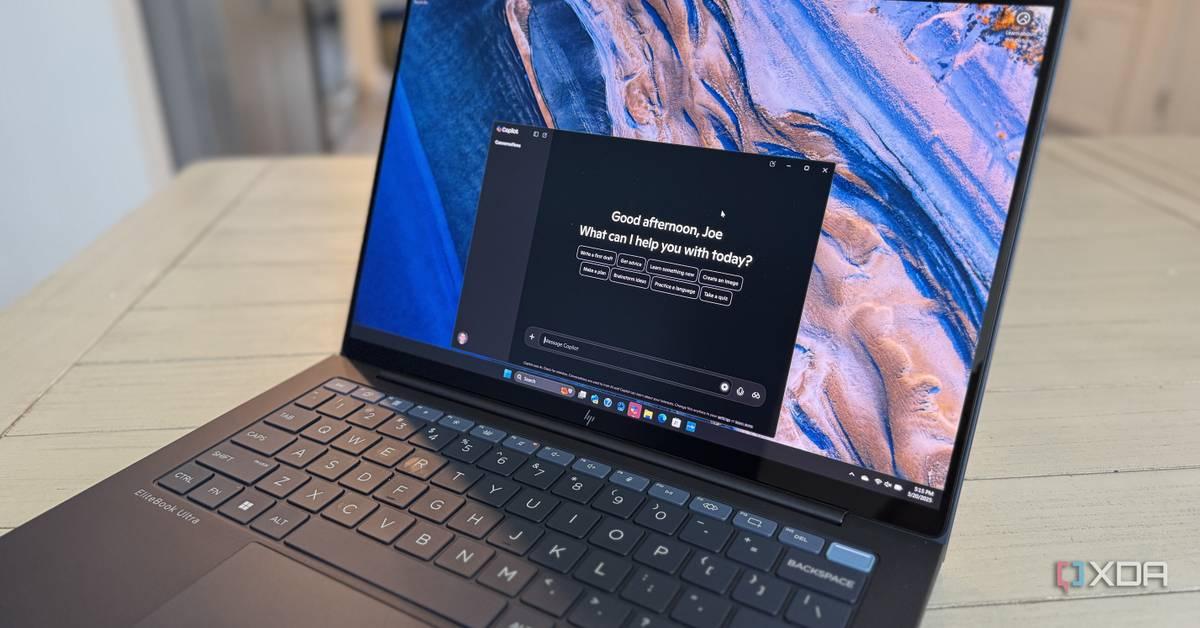
* Edge now greets you with a Copilot-style splash and prompt on launch. * Search box still opens links or Bing; not a full Copilot takeover yet. * You can't disable the new Copilot-like UI; Microsoft seems to be standardizing apps for agentic Windows. It's no surprise to Windows users that Microsoft is adding Copilot features across its ecosystem. Even apps like Paint and Notepad eventually received AI-powered features, as Microsoft touts that it wants to make Windows an agentic system where Copilot is at its core. However, until now, the company hasn't really changed any of its biggest apps to look more like Copilot. I say "until now" because if the latest Microsoft Edge Dev and Canary builds are anything to go off, the company is working toward making its browser more Copilot-like, down to the UI. And, unfortunately, there doesn't seem to be a way to turn it off. 3 reasons I'm ditching Microsoft 365 after the latest changes One step too far for me. Posts 32 By Simon Batt Microsoft Edge is reportedly becoming more like a Copilot app And there's no "no thanks" button As reported by Windows Central, the new Microsoft Edge Dev and Canary builds have introduced a huge revamp to the browser's AI. Now, when you open Microsoft Edge, you're greeted with a screen that's a near-splitted image of the Copilot splash screen. It even includes the text mentioning you by name, asking you how it can help, alongside a box for you to enter what you want. Right now, it doesn't seem like the search box will automatically direct you to Copilot; it seems like it may let you open links or search Bing for things. As such, it doesn't seem like this is Microsoft's big push to make Edge a Copilot app; instead, it's to bring the browser more in line with Copilot's UI design. However, it does give me the feeling that the company is getting people adjusted to the changes before it begins adding Copilot as the primary driver behind Edge. So, can you turn it off? Unfortunately, it seems like you can't. Windows Central tried disabling Copilot Mode, and the new UI stuck around. We may be witnessing the start of a big visual shake-up where Microsoft will gradually redesign its apps to use the same look and feel of Copilot, presumably to lay the foundation for its dreams of an agentic Windows. Subscribe to the newsletter for Copilot UI insights By subscribing to the newsletter, you unlock clear, jargon-free analysis of Copilot's push into Windows - focused context on UI shifts, app redesign implications, and what the move means for how apps will look and behave. Subscribe By subscribing, you agree to receive newsletter and marketing emails, and accept Valnet's Terms of Use and Privacy Policy. You can unsubscribe anytime. If you're not sure what an agentic operating system is and how it'd affect Windows, be sure to check out our reasons why agentic operating systems are extremely problematic. While Microsoft is very excited to bring AI into every corner of the Windows ecosystem, others aren't as excited to see Copilot added to everything they use.
[2]
'Microslop' is heading for Edge - major browser redesign is inspired by Copilot, and it's already seriously unpopular
This is symptomatic of a broader push towards all things AI, and has provoked more bad feeling and accusations of 'Microslop' Microsoft's Edge browser looks like it'll be getting an AI makeover of sorts, with a redesigned interface that adopts a very similar appearance to the Copilot app - and it's a move that isn't going down at all well with those fed up of Microsoft pushing AI harder with Windows 11. Windows Central reports that new builds of Edge in the Canary and Dev channels (the earlier testing avenues) have this revamped interface, which takes some weighty cues from the Copilot app. That includes context menus and settings panels for the web browser that borrow colors and fonts from the Copilot app, and there's evidence of another hallmark of said app - more pronounced rounded corners - in the design, too. As Windows Central notes, the redesigned interface elements are being applied to the browser universally, whether or not you have Copilot Mode turned on in Edge. However, the Copilot-based New Tab Page (which rolled out to Edge last year) is still only presented to those who've enabled Copilot Mode, so others will still get the basic MSN news and Bing feed when they open a new (blank) tab in Edge. Okay, so we need to caveat this, as per usual with anything that's still in testing. Preview stuff doesn't necessarily make the cut for release, but that said, it's hardly surprising to see Microsoft trying to revamp Edge along these lines, as the browser already has Copilot Mode on the alternative New Tab Page (and has long been infiltrated by Copilot). In short, it looks like Microsoft is committed to making Edge more Copilot-like as a way to try to sell its browser to more people. But of course, if you read some of the feedback about this latest attempt to expand the scope of Copilot - including from many of the people posting on this Reddit thread - it's already a seriously unpopular idea that they most definitely aren't buying into. Not everyone hates AI with a passion (or wants to strip it all out of Windows 11), though, and perhaps Microsoft feels it needs to do something more radical to try and fire up Edge adoption. The browser has been faring badly in recent times, after all, so you might argue that it can hardly do any worse. I'd argue back that it can indeed get worse, though, and that this is all part of a larger worrying picture. Namely that Microsoft is pushing AI ever more forcefully in Windows 11, and this Copilot-ification (ahem) of Edge may yet extend further into other apps, or even the interface of the desktop OS itself. As I've said for some time now, I don't think the next version of Microsoft's operating system will be called Windows 12; it's likely to be Windows Copilot, or maybe Windows AI, but Microsoft seems very much all-in with the Copilot brand, and this latest redesign move is another piece of evidence as to how heavily the company intends to push with it. The AI rebellion has been strong, though, and as the new year began we witnessed comments from Microsoft's CEO, Satya Nadella, about how "we need to get beyond the arguments of slop vs sophistication" with AI. Just look how quickly that's led to the coining of a new term on social media: 'Microslop' (as well as folks urging everyone to Google it a few times a day, to make sure the nickname sticks). For those unfamiliar, AI slop is a derogatory term for anything AI-related that's shoveled into a product for the sake of it, bloating things and making them slower (well, more or less - and some might argue that this pretty much encompasses every AI feature). 'Microslop', then, is a slogan that (again, arguably) fits the cap that Microsoft has chosen to don not just in relation to Windows 11, but across much of its product suite (notably with the renaming of Microsoft Office to Microsoft 365 Copilot in the past). Where does all this end for Microsoft? Nowhere good, I'd suggest, if the approach is simply to bury its head in the sand regarding the criticisms leveled at AI, which are reaching fresh heights as 2026 begins. There's a hell of a lot of eggs going into the Copilot basket, and should these AI features (specifically agents) fail to deliver - or worse still, make a name for themselves as unreliable, or even hazardous - then that could leave the reputation of 'Windows Copilot' in tatters. Besides this, there's very much a feeling that Microsoft is losing more of the trust of Windows users - a commodity which has already been eroded significantly since Windows 11 launched - and that the least the company can do is address the concerns of those people who are rebelling against the AI trend and rebalance its approach here, instead of berating them for standing in the way of progress. I remember how when Windows 11 came out Microsoft was busy banging the drum around it listening to feedback from users - but that sentiment seems to have fallen by the wayside for the company when it comes to the AI gold rush.
Share
Share
Copy Link
Microsoft is testing a major overhaul of Edge that adopts Copilot's visual design across the browser interface. The changes, spotted in Dev and Canary builds, include a new splash screen and UI elements that mirror the Copilot app. Users cannot opt out of the redesign, fueling criticism that Microsoft is forcing AI features into its ecosystem without regard for user feedback.
Microsoft Edge Adopts Copilot-Style User Interface in Latest Builds
Microsoft is testing a significant browser redesign for Microsoft Edge that borrows heavily from its Copilot app, according to reports from Windows Central
1
. The changes, currently visible in Dev and Canary builds, transform the Edge browser interface to closely resemble the Copilot experience. When users launch the updated browser, they're greeted with a splash screen nearly identical to Copilot's, complete with personalized text asking how it can help and a prominent search box1
. The redesigned interface elements adopt colors, fonts, and more pronounced rounded corners from the Copilot app, creating a unified visual language across Microsoft's ecosystem2
.
Source: XDA-Developers
No Option to Disable the AI Makeover
The most contentious aspect of this unpopular browser redesign is that users cannot turn it off. Windows Central attempted to disable Copilot Mode, but the new UI design persisted
1
. The Copilot-inspired visual changes are being applied universally to the browser, regardless of whether users have enabled Copilot Mode. However, the Copilot-based New Tab Page remains optional and only appears for those who've activated Copilot Mode; others still see the standard MSN news and Bing feed2
. Currently, the search box doesn't automatically direct users to Copilot but still allows opening links or searching Bing, suggesting this may be a gradual transition rather than an immediate takeover1
.Microsoft's AI Push and the Agentic Operating System Vision
This Copilot-ification represents Microsoft's broader strategy to integrate AI across its entire product lineup and transform Windows into an agentic operating system where Copilot serves as the core
1
. The company has already added AI-powered features to applications like Paint, Notepad, and rebranded Microsoft Office to Microsoft 365 Copilot2
. The Edge redesign appears to be laying groundwork for a visual shake-up where Microsoft will gradually redesign its apps to use the same look and feel as Copilot1
. This move may extend further into other apps or even the Windows 11 desktop operating system itself2
.Related Stories


Growing User Backlash and the 'Microslop' Phenomenon
User feedback has been overwhelmingly negative, with many expressing frustration on social media platforms including Reddit
2
. Microsoft's AI strategy has sparked the coining of a new derogatory term: "Microslop," a play on "AI slop" that refers to AI features shoveled into products unnecessarily. The term gained traction after Microsoft CEO Satya Nadella commented that "we need to get beyond the arguments of slop vs sophistication" with AI2
. Critics argue that Microsoft is losing user trust and ignoring concerns from those rebelling against forced AI adoption. The company's approach stands in stark contrast to its earlier promises about listening to user feedback when Windows 11 launched2
. With Edge already faring badly in recent times, this aggressive push to integrate AI could further alienate users who feel Microsoft is prioritizing its AI ambitions over user preferences and experience.References
Summarized by

Navi
[1]
Related Stories
Recent Highlights
1
AI Models Lie and Deceive to Protect Other AI Models From Deletion, Study Reveals
Science and Research

2
AI chatbots validate you too much, making you less kind to others, Stanford study reveals
Science and Research

3
Judge blocks Pentagon from blacklisting Anthropic over AI safety guardrails dispute
Policy and Regulation

Recent Highlights
Today's Top Stories












Your Daily Dose of Curated AI News
Don’t drown in AI news. We cut through the noise - filtering, ranking and summarizing the most important AI news, breakthroughs and research daily. Spend less time searching for the latest in AI and get straight to action.

