Microsoft Edge Introduces AI-Powered 'Copilot Mode' in Latest Update


3 Sources
[1]
Microsoft Edge Is Getting a Cursed 'Copilot Mode'
Summary Microsoft Edge is introducing an AI mode called "Copilot Mode" that replaces the usual new tab page with AI features. The Copilot icon replaces the Bing or Search icon, redirecting search queries to the Copilot website. An optional feature called "Context Clues" provides AI-generated
[2]
Here's what the new 'Copilot Mode' within Edge looks like
Copilot is migrating to Microsoft Edge's new tab page, with your permission. Microsoft has begun adding Copilot to the "new tab" page of Microsoft Edge, as expected -- possibly making you yearn for the current crazy-quilt layout instead. Generally, browser makers allow you to either open a
[3]
Microsoft Edge is now getting more AI, and I'd be surprised if an even bigger push for more Copilot isn't just around the corner
Moves in testing to have Copilot take over the New Tab Page still appear to be in the pipeline Microsoft Edge is getting more Copilot, with the AI assistant coming to the New Tab Page (or NTP) in a more prominent way. The NTP is what you see in the web browser when you open up a new tab, serving
Share
Copy Link
Microsoft is integrating its AI assistant, Copilot, more deeply into the Edge browser with a new 'Copilot Mode' that transforms the new tab page and search experience.
Microsoft Edge Embraces AI with 'Copilot Mode'
Microsoft is taking a significant step towards integrating artificial intelligence into its Edge browser with the introduction of 'Copilot Mode'. This new feature, currently rolling out as part of Edge version 136, represents a major shift in how users interact with their browser and conduct web searches
1
2
.Transforming the New Tab Experience
The most noticeable change in Copilot Mode is the redesign of the new tab page. Instead of the traditional layout featuring a search bar and frequently visited sites, users will be greeted with a prominent Copilot prompt asking, "How can I help you today?"
2
. This AI-powered interface aims to replace conventional web searches with more interactive, AI-driven experiences.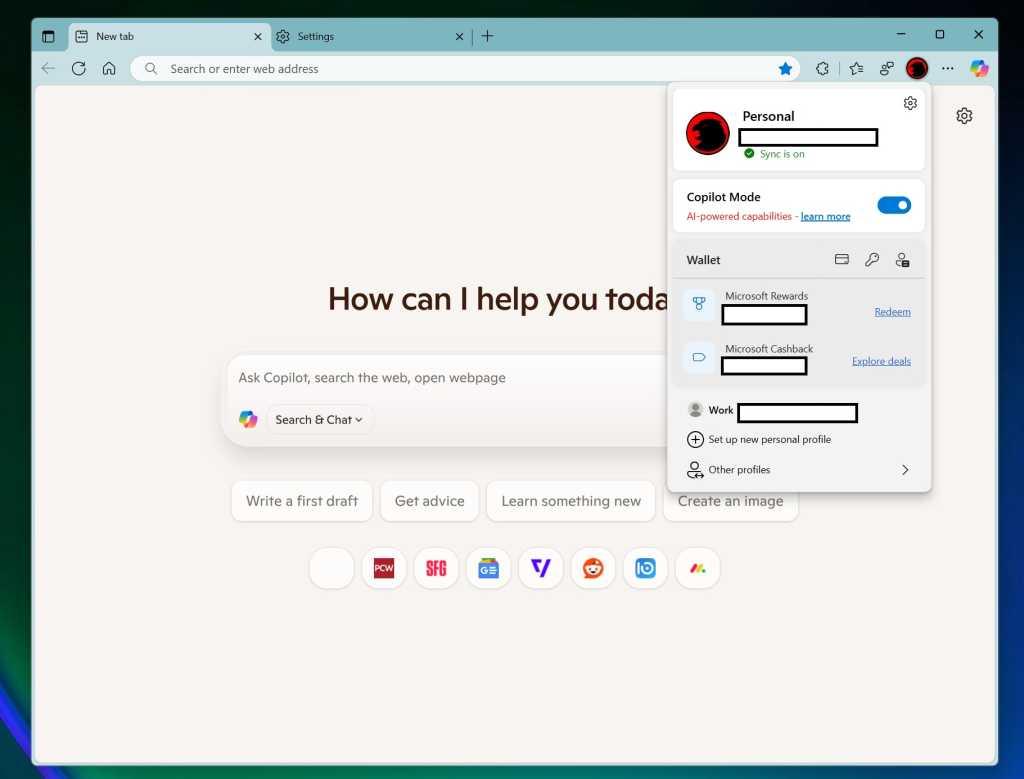
Source: PCWorld
Microsoft is also replacing the standard Bing or Search icon with a Copilot icon. Clicking this icon or entering a query in the search box will now route users to the Copilot website, where their input is automatically formatted as a prompt for the AI assistant
1
.AI-Powered Search and Suggestions
As part of this update, Microsoft is introducing AI-generated suggestions and assistance. Users may see suggested work and productivity-related Copilot prompts near their search box on the new tab page
3
. These prompts, such as "get advice" or "write a first draft," are designed to showcase Copilot's capabilities and encourage users to engage with the AI for various tasks.The Controversial 'Context Clues' Feature
Perhaps the most contentious aspect of Copilot Mode is the optional "Context Clues" feature. If enabled, this function allows Copilot to provide AI-generated answers and assistance based on the user's current webpage, browser history, and preferences in Microsoft Edge
1
3
. While this could potentially offer more personalized and relevant responses, it has raised significant privacy concerns among users and tech experts.Gradual Rollout and User Control
Microsoft appears to be taking a cautious approach with the rollout of Copilot Mode. The company describes it as a "controlled feature rollout," suggesting a gradual implementation
3
. Currently, users need to manually enable the feature through Edge's experimental flags section, indicating that Microsoft is likely gathering feedback before a wider release2
.Related Stories

Implications for Web Search and Content Creation

Source: TechRadar
The integration of Copilot into Edge's core functionality represents a significant shift in how users might interact with web content. Instead of traditional search results that link to various websites, Copilot may provide direct answers without clear attribution to sources
2
. This change could have far-reaching implications for content creators, publishers, and the broader digital ecosystem.Privacy and Data Usage Concerns
The potential access to browsing history and current webpage content for AI assistance has sparked privacy debates. While Microsoft emphasizes that features like Context Clues are optional, the extent of data collection and usage for AI purposes remains a topic of concern for many users
1
3
.
Source: How-To Geek
As Microsoft continues to push AI integration across its products, the evolution of Edge with Copilot Mode serves as a clear indicator of the company's vision for the future of web browsing and information retrieval. The success of this initiative will likely depend on striking the right balance between innovative AI features and user privacy concerns.
References
Summarized by

Navi
[1]
Related Stories
Microsoft Edge Tests Copilot-Powered New Tab Page, Replacing MSN Feed
25 Apr 2025•Technology
Microsoft Edge Introduces AI-Powered 'Copilot Mode': A New Era of Web Browsing
29 Jul 2025•Technology
Microsoft Edge lets Copilot AI read your browser tabs to deliver personalized experiences
14 May 2026•Technology

Recent Highlights



Recent Highlights
Today's Top Stories







Don’t drown in AI news. We cut through the noise - filtering, ranking and summarizing the most important AI news, breakthroughs and research daily. Follow topics that matter to you and stay ahead.


