Microsoft Paint and Notepad gain AI coloring books and faster text generation for Windows 11


6 Sources
6 Sources
[1]
Microsoft Paint can now make AI coloring books
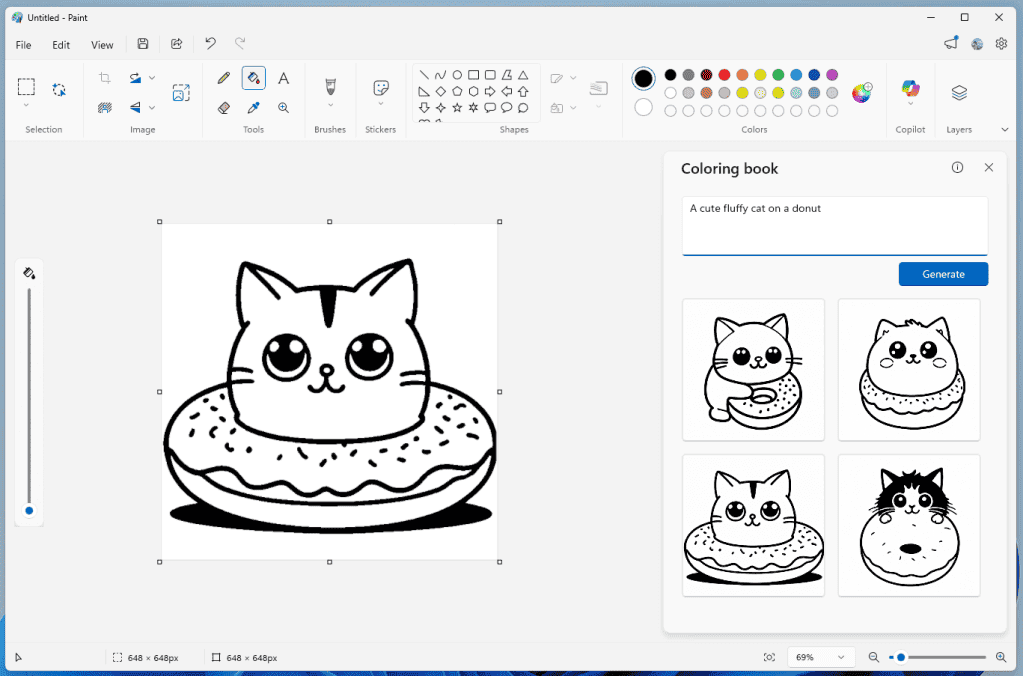
Microsoft is giving its Paint and Notepad apps on Windows new AI capabilities for editing text and making digital illustrations. The updates are currently rolling out to Windows Insiders in the Windows 11 Canary and Dev channels, and include features that feel oddly niche or advanced for such simplified apps, such as AI text improvements in Notepad and the ability to instantly generate coloring book pages in Paint. The latter feature is aptly called "Coloring book," and lets you make blank coloring templates in version 11.2512.191.0 of Paint based on a text prompt. Users can access this feature by selecting the Coloring book option from the Copilot menu in Paint, and then describing what the design should be, such as "a cute fluffy cat on a donut." Paint will then generate four results that Paint users can click to add to their canvas. From there, you can presumably use Paint itself to color the image, or print it out to use traditional art materials. It's such an oddly specific tool that I have to wonder if this is something that coloring book consumers (parents and stressed-out millennials) actually use Paint for. The Coloring book feature is notably only available on Copilot Plus PCs, so it's more likely that Microsoft is exploring novel ways to make its AI-infused Windows 11 devices more marketable. Paint is also getting a fill tolerance slider (which isn't just restricted to Copilot hardware) that provides more control over how the Fill tool applies color. The Notepad 11.2512.10.0 update includes the ability to stream AI-generated results for Write, Rewrite, and Summarize features, allowing a preview of the text results to quickly appear without waiting for the full response. Notepad also has a new welcome experience that provides a quick overview of what's available in the app, and now supports additional Markdown syntax features, including strikethrough formatting and nested lists.
[2]
Microsoft adds AI features and What's New screen to Notepap
Veteran text editor gets more AI enhancements while Paint will be able to generate coloring books Microsoft is meddling with Notepad again, this time adding a "What's New" screen so users know the latest indignities heaped on the once-humble text editor. The "What's New" first-run experience will appear during startup to guide users through the app's latest features. According to Microsoft, "this dialog provides a quick overview of what's possible in Notepad and serves as a helpful starting point for both new and returning users." It can be closed and reopened by clicking a megaphone icon in the top-right of the toolbar. As for "What's New" in version 11.2512.10.0, there are some more formatting options and the inevitable AI updates. Markdown support in the editor arrived last June, and Microsoft added tables in November 2025. This time around, the company has shoehorned in more markdown features, including strikethrough formatting and nested lists. Support for AI streaming features is also expanded in the latest Notepad release. Microsoft wrote: "Whether generated locally or in the cloud, results for Write, Rewrite, and Summarize will start to appear quicker without the need to wait for the full response, providing a preview sooner that you can interact with." Assuming, of course, you've signed in with a Microsoft account. The Register asked Microsoft if it could share the user feedback that had demanded these enhancements to its text editor. A spokesperson told us that they would reply if there was anything to share. They did not. The company has also continued to add tweaks to its former simple bitmap editor, Paint. One, "Coloring book," is an AI feature that turns the user's text into a coloring book page (we can't imagine it being used to produce a picture of "a user faced with relentless AI slop" for a crayon-wielding toddler to improve). The other is a tolerance slider for the fill tool. The Coloring book option applies only to Copilot+ PCs and requires a user to sign in with a Microsoft account. Both Notepad and Paint have evolved far beyond their simple origins, but in doing so, have become intermediate tools that leave behind users who just want to edit text or flip a few pixels without add-ons getting in the way. Still, as users reflect glumly on the latest set of bugs afflicting Windows following an update, it's good to know that Microsoft has found time to add more AI features to Notepad. ®
[3]
Microsoft updates Notepad and Paint with more AI features
Microsoft is rolling out new artificial intelligence features with the latest updates to the Notepad and Paint apps for Windows 11 Insiders. These changes are rolling out to Windows Insiders in the Canary and Dev Channels, who have upgraded to the latest versions. Notepad version 11.2512.10.0 now streams AI-generated results for Write, Rewrite, and Summarize features, displaying previews faster rather than waiting for complete responses. However, users must sign in with their Microsoft accounts to access these AI tools. "Whether generated locally or in the cloud, results for Write, Rewrite, and Summarize will start to appear quicker without the need to wait for the full response, providing a preview sooner that you can interact with," said Dave Grochocki, Principal Group Product Manager for Windows Inbox Apps. The text editor also expands its lightweight formatting support with additional Markdown syntax features, including nested lists and strikethrough text. Notepad users can use these new formatting options via keyboard shortcuts, the formatting toolbar, or Markdown syntax in their documents. Notepad now also comes with a welcome screen designed to help users discover the appțs newest features, a dialog that will appear on first launch and can be accessed later through a megaphone icon in the toolbar. Paint version 11.2512.191.0 has also added a Coloring Book feature that uses AI to generate coloring pages from custom text prompts, offering multiple options users can add to the canvas, copy, or save. However, the Coloring Book option is available only on Copilot+ PCs and requires Microsoft account authentication. Paint now also comes with a fill tolerance slider, allowing users to control how the Fill tool adds color to the canvas. The adjustment slider appears on the left side of the canvas when the Fill tool is selected, allowing users to experiment with different tolerance levels for various effects. Microsoft encouraged users to submit feedback through the Windows Feedback Hub, under the Apps category, to help weed out bugs. In September, Microsoft announced that AI-powered text summarization, text rewriting, and text generation features would be available free to customers with Copilot+ PCs running Windows 11. Users who don't want the new AI features can disable them in settings or uninstall the Windows Notepad app and use the built-in notepad.exe program. The same month, the Paint app added support for Photoshop-like project files and an opacity slider for the Pencil and Brush tools for users who upgraded to version 11.2508.361.0.
[4]
You can now create AI-generated coloring books in Microsoft Paint
Microsoft CEO Satya Nadella recently went on saying that AI still needs to prove its worth if society is to adopt it long-term, but he presumably thinks his company has cracked it with its latest innovation: AI coloring books. A new Microsoft Paint feature currently rolling out to Windows Insiders allows you to generate coloring book pages based on the text prompt you enter. The example Microsoft uses is "a cute fluffy cat on a donut," to which the AI tool will spit out a set of slightly different options based on your prompt. You can then choose which image you want, add it to your current workspace, copy or save it. Presumably you can also print it out for the purpose of entertaining your kids. No doubt the kind of real-world impact the Microsoft chief was alluding to. The coloring book feature is exclusive to Copilot+ PCs, and Microsoft is also adding a fill tolerance slider that lets you adjust the precision with which the Fill tool adds color to your canvas. As well as Paint's new Coloring book feature, Microsoft has also improved its Write, Rewrite and Summarize AI functionality in , which integrates with GPT to fine-tune your writing and summarize complex notes. You'll need to sign into your Microsoft account to use cloud features, but results will now appear more quickly and let you interact with the preview without having to wait for its full response. Again, you'll need to be Windows Insider in the Canary and Dev channels on Windows 11 to take advantage of the updates initially.
[5]

You'll soon be able to AI-generate coloring book pages in Windows Paint
Notepad is also receiving updates with lightweight formatting, Markdown support, and faster AI text generation capabilities for enhanced productivity. Adult coloring books have long been a great gift idea for Christmas and birthdays, and now it seems like Microsoft is catching onto their popularity. According to a recent blog post, Windows Insiders are now starting to get access to a new update that adds two features to Windows Paint, one of which is AI-generated coloring books. With the new Coloring Book feature, you can ask Copilot AI to generate a series of coloring book pages according to your descriptions. Microsoft shows an example of cute cats on donuts (see above). The generated pages can then be saved or pasted directly onto the workspace, where you can then color them in yourself. The Coloring Book feature in Paint will only be available on Copilot+ PCs. The Paint update also introduces a new slider for the Fill tool. This slider allows you to adjust how densely filled you want the area that you're filling in. "Experiment with different tolerance settings to achieve clean fills or creative effects," Microsoft writes in the blog post. The update is currently rolling out to Windows 11 Insiders on the Dev and Canary channels. This update also includes some improvements to Notepad, like expanded lightweight formatting, additional Markdown syntax features, and faster generation of AI text features.
[6]

Microsoft's latest AI feature for Paint lets users create custom Coloring Book pages
TL;DR: Microsoft Paint is receiving an AI-powered Coloring Book feature for Windows Insiders, enabling users to generate unique black ink drawings from text prompts. The update also adds enhanced Fill controls, while Notepad gains strikethrough formatting and nested list support, improving creative and productivity tools on Windows 11. Microsoft's simple digital drawing and image creation app, Paint, is continuing to get an AI makeover, with the company announcing a new feature for Windows Insiders that will leverage image-generation tools to let users create a Coloring Book. And that's precisely what the new tool is called, with Coloring Book letting users "create unique coloring book pages from a text prompt." Paint's new AI-powered Coloring Book tool, image credit: Microsoft. Basically, it's an AI image generation that creates black ink drawings in the style of a children's coloring book, with Microsoft explaining that once you enter text like "a cute fluffy cat on a donut" or "a house with a garden and fence" and then hit the Generate button, you'll be presented with your creation. To complement this new feature, Paint is also getting expanded Fill controls with a new 'tolerance slider' that gives users direct control over how much color (in percentage) is applied. Although not exactly essential, the new Coloring Book feature does sound like it could be fun for families to use, as it opens the door to a seemingly limitless ability to generate different Coloring Book pages. Once it goes live, this feature will only be available on Copilot+ PCs, and you will need to sign in to a Microsoft account to use it. With most GeForce RTX desktop and laptop rigs having exponentially more AI power than the NPUs found in Copilot+ PCs, it still feels weird that after all this time, most of Windows 11's AI features are limited to Copilot+ PCs. In addition to adding another AI tool to Paint, Microsoft is also updating Notepad to add strikethrough formatting and support for nested lists. The updated Paint (version 11.2512.191.0) and Notepad (version 11.2512.10.0) apps are available now for Windows Insiders in the Canary and Dev Channels on Windows 11.
Share
Share
Copy Link
Microsoft introduces AI-powered coloring book generation in Paint and streaming text features in Notepad for Windows Insiders. The updates, exclusive to Copilot+ PCs, let users create custom coloring pages from text prompts while Notepad streams AI results faster. But critics question whether these additions serve users who prefer simple, straightforward tools.
Microsoft Paint Introduces AI Coloring Book Feature for Digital Illustrations
Microsoft is rolling out new AI features to its Paint and Notepad applications on Windows 11, targeting Windows Insiders in the Canary and Dev Channels with capabilities that push these traditionally simple tools into more advanced territory
1
. The most notable addition is an AI coloring book feature in Paint version 11.2512.191.0, which generates blank coloring templates based on text prompts3
. Users can access this through the Coloring book option in Paint's Copilot menu, entering descriptions like "a cute fluffy cat on a donut" to receive four different design options1
. These generated pages can be added to the canvas, copied, saved, or printed for traditional coloring with physical art materials5
.
Source: PCWorld
The AI coloring book feature is exclusively available on Copilot+ PCs and requires Microsoft account login, suggesting Microsoft's strategy to make its AI-infused devices more marketable rather than responding to specific user demand
1
3
. According to Dave Grochocki, Principal Group Product Manager for Windows Inbox Apps, these application updates aim to expand creativity and productivity options3
. Microsoft Paint also receives a fill tool tolerance slider that works across all hardware, not just Copilot+ PCs, allowing users to adjust how precisely the Fill tool applies color to the canvas1
5
.
Source: TweakTown
Notepad Gains Faster AI Text Generation and Enhanced Markdown Support
Notepad version 11.2512.10.0 now streams artificial intelligence-generated results for its Write, Rewrite, and Summarize features, displaying previews faster without requiring users to wait for complete responses
3
. "Whether generated locally or in the cloud, results for Write, Rewrite, and Summarize will start to appear quicker without the need to wait for the full response, providing a preview sooner that you can interact with," Grochocki explained2
. These AI features, which integrate with GPT technology, require users to sign in with their Microsoft account to access cloud-based functionality4
.The text editor expands its lightweight formatting capabilities with additional Markdown syntax features, including strikethrough formatting and nested lists
1
2
. Users can apply these formatting options through keyboard shortcuts, the formatting toolbar, or direct Markdown syntax in their documents3
. Markdown support first arrived in Notepad last June, with table support added in November 2025, marking a continued evolution of the once-humble text editor2
.Related Stories

Welcome Screen and User Feedback Concerns
Notepad now includes a welcome screen that appears during first launch, designed to guide users through the app's latest features
2
. According to Microsoft, "this dialog provides a quick overview of what's possible in Notepad and serves as a helpful starting point for both new and returning users"2
. The welcome experience can be closed and reopened later by clicking a megaphone icon in the top-right toolbar1
.
Source: BleepingComputer
However, questions remain about whether these updates address actual user needs. When The Register asked Microsoft to share user feedback that demanded these enhancements, a spokesperson said they would reply if there was anything to share but did not follow up
2
. Both Notepad and Microsoft Paint have evolved far beyond their simple origins as basic Windows tools, but critics argue they've become intermediate applications that leave behind users who just want to edit text or manipulate pixels without generative AI and add-ons getting in the way2
. Users who don't want the new AI features can disable them in settings or uninstall the Windows Notepad app and use the built-in notepad.exe program3
.These updates come as Microsoft CEO Satya Nadella recently stated that AI still needs to prove its worth for long-term societal adoption, making the timing of these Copilot AI-powered features particularly noteworthy
4
. Microsoft encourages users to submit feedback through the Windows Feedback Hub under the Apps category to help identify bugs and improve functionality3
.References
Summarized by

Navi
[1]
[2]
[3]
Related Stories
Microsoft Paint Gets AI Upgrade with New Copilot Button
04 Feb 2025•Technology

Microsoft Paint Embraces AI: New 'Restyle' Feature Transforms Images with a Click
23 Oct 2025•Technology
Microsoft Infuses AI into Windows Staples: Notepad, Paint, and Snipping Tool Get Generative Upgrades
23 May 2025•Technology

Recent Highlights
1
AI Models Lie and Deceive to Protect Other AI Models From Deletion, Study Reveals
Science and Research

2
AI chatbots validate you too much, making you less kind to others, Stanford study reveals
Science and Research

3
Judge blocks Pentagon from blacklisting Anthropic over AI safety guardrails dispute
Policy and Regulation

Recent Highlights
Today's Top Stories









Your Daily Dose of Curated AI News
Don’t drown in AI news. We cut through the noise - filtering, ranking and summarizing the most important AI news, breakthroughs and research daily. Spend less time searching for the latest in AI and get straight to action.

