NotebookLM's Data Tables feature converts scattered notes into structured spreadsheets


2 Sources
2 Sources
[1]
NotebookLM turning your notes into spreadsheets after this Gemini 3 upgrade
Aggy is a veteran writer and editor in the technology and gaming space. Having served as a Managing Editor for high-traffic digital publications, alongside being an editor and consultant for over a dozen sites. Aggy's published work spans a wide and respected array of tech and gaming outlets, including WePC, Screen Rant, How-To Geek, Android Police, PC Invasion, and Try Hard Guides. Beyond editorial work, Aggy's direct experience in the tech sphere extends to app development. Aggy has published two games under Tales and is always eager to learn and do more. He also likes working on computers and researching in his spare time. He knows about Windows, Linux, Audio, Video, and much more. NotebookLM is officially moving up to Gemini 3, bringing significant upgrades to its processing power alongside the introduction of Data Tables. Google said that the ability to synthesize information into structured tables was the most requested feature by far. Valuable information is rarely easy to work with, especially when you have key facts scattered across meeting transcripts, clinical papers, or lengthy study guides. Manual compilation is always tedious, and that is where the new Data Tables feature steps in. The tool takes the information from your sources and converts it into organized spreadsheets that you can send straight to Google Sheets. This organizes the raw data into a structure that you would need for serious research or planning. I would say the biggest problem with working from raw notes is the sheer time sink involved in standardization. This new tool completely eliminates that issue for certain tasks. Business owners can instantly turn disorganized meeting audio into a structured checklist that assigns tasks to specific employees based on urgency. If you are a student or a researcher, the tool is just as useful. Researchers can compare data points from various medical studies, like participant counts or dates, without manually combing through every document. If you are preparing for exams, then you can do something like create study guides for history class that sort events by when they happened, the major people involved, and the eventual outcomes. The platform has also shifted to Gemini 3. Google said the upgrade results in significant improvements to NotebookLM's reasoning and multimodal understanding. Google hasn't confirmed exactly which version of Gemini 3 is running under the hood, but previous iterations of the software relied on the Flash version. These AI tools are ultimately only as good as the data you feed them, but the improved reasoning capabilities certainly suggest that the tool will be much better at understanding the context of messy, disorganized notes. Regardless of whether you are generating a table or a briefing document, you can now tap the overflow menu next to your Study Guides, Briefing Docs, or saved Notes to export the resulting text to Google Docs or Sheets. Data Tables is the newest addition to NotebookLM's growing collection of Studio outputs. It joins existing features like Audio Overview, Video Overview, Mind Map, Reports, Flashcards, Quiz, Infographic, and Slide Deck. On top of the new table output, Google has also made official how you can integrate your Notebooks directly into the main Gemini app interface. This is available on the web today, though it is coming to mobile sometime next year. This integration lets you combine multiple Notebooks together, which is incredibly helpful if you have segmented your research by topic. Google claims that this will help you generate images or even apps inspired by the material in your Notebooks, which may be true since it can help you keep so much information together in an easy-to-access way. You can also build on existing notes using online research performed by the larger Gemini platform. As for availability, if you happen to be a Google AI Pro or Ultra subscriber, you can start using Data Tables today. For everyone else using the free version of NotebookLM, the feature is coming in the upcoming weeks. Source: Google (1), Google (2)
[2]
NotebookLM can turn your messy data into structured tables for Google Sheets
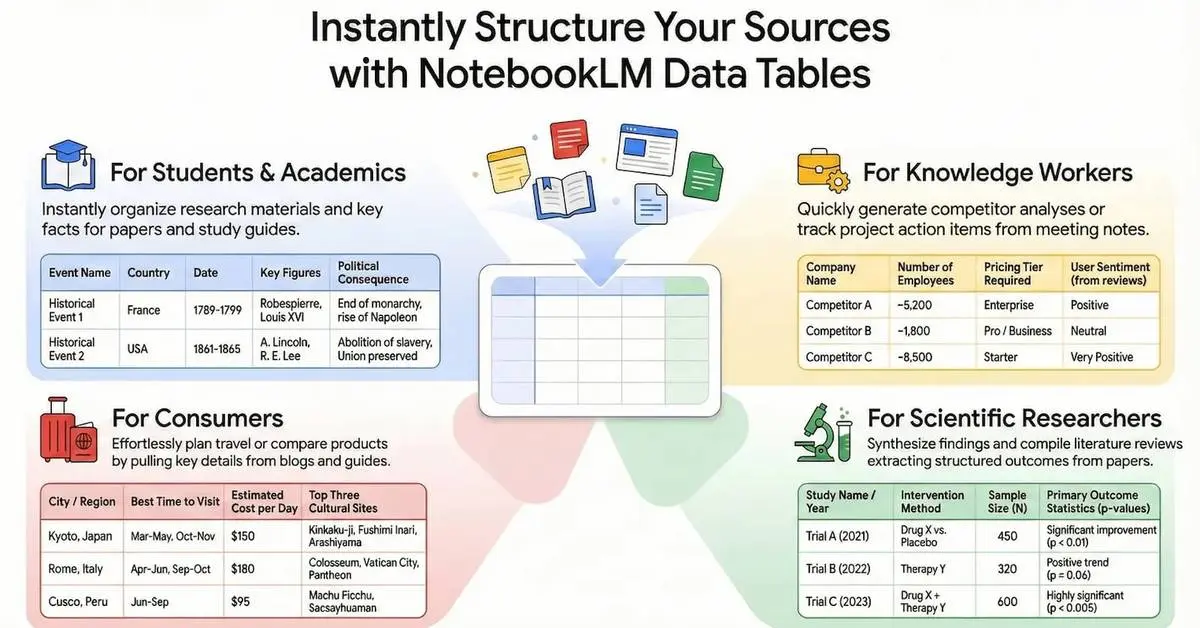
You can turn scattered notes into clean tables and export them to Google Sheets or Docs Google has added a new feature to NotebookLM that turns messy research into something you can actually use. The company has introduced Data Tables, a tool that pulls information from multiple sources and automatically organizes it into clean, structured tables that can be exported directly to Google Sheets for further editing, sharing, or use in Google Docs. NotebookLM has always been about helping users make sense of scattered notes, PDFs, and documents using AI. Data Tables builds on this idea by handling one of the most time-consuming parts of research, which is manual organization. Recommended Videos Instead of copying and pasting information into spreadsheets, users can now ask NotebookLM, in plain language, to generate a table with specific rows and columns based on their sources. The result is a structured overview that can be exported and edited further in Sheets. Using NotebookLM to organize scattered information The feature lives in the Studio panel on the right side of NotebookLM. Like other tools in the app, users can choose a preferred language and describe what they want in natural language before generating a table. Once created, users can view the prompt, export the table to Google Sheets, or delete it. However, the tables themselves are not interactive inside NotebookLM, meaning edits have to be made after exporting or by generating a new table. Google says Data Tables can be used in a wide range of real-world scenarios. You could turn meeting transcripts into a table of action items sorted by owner and priority, build competitor comparison charts that break down pricing and strategy, or aggregate results from multiple research papers into a single view. Students can create study tables of historical events organized by date, key figures, and outcomes, while travelers can compare destinations, best times to visit, and estimated costs in one place. Data Tables are available now for Google AI Pro and Ultra subscribers, with a broader rollout planned for all users over the coming weeks. The update follows Google's recent addition of Deep Research mode and other memory and research upgrades to NotebookLM. Together, these changes highlight Google's effort to turn the tool into a more powerful research and synthesis workspace, rather than just an AI note-taking assistant.
Share
Share
Copy Link
Google has upgraded NotebookLM with Data Tables, its most requested feature that transforms messy notes into organized spreadsheets exportable to Google Sheets. Powered by Gemini 3, the AI-powered feature lets users synthesize information from various sources using natural language commands, eliminating manual data compilation for students, researchers, and business owners.
NotebookLM Introduces Data Tables to Convert Unstructured Data
Google has launched Data Tables for NotebookLM, addressing what the company identifies as the most requested feature by users. The update allows NotebookLM to turn messy data into structured tables that can be exported directly to Google Sheets for further editing and sharing
1
. This AI-powered feature tackles one of the most time-consuming aspects of research and data organization: manually compiling scattered information from meeting transcripts, clinical papers, or study guides into usable formats2
.
Source: How-To Geek
The tool operates through plain language commands, allowing users to describe what they need in the Studio panel on the right side of NotebookLM. Instead of copying and pasting information into spreadsheets manually, users can now request specific rows and columns based on their sources, and the system generates organized spreadsheets automatically . Once created, these tables can be exported to Google Sheets or Google Docs, though they cannot be edited within NotebookLM itself.
Gemini 3 Powers Enhanced Processing Capabilities
The platform has officially upgraded to Gemini 3, bringing significant improvements to reasoning and multimodal understanding
1
. While Google hasn't confirmed the exact version running under the hood, previous iterations relied on the Flash version. These enhanced capabilities suggest NotebookLM will better understand the context of disorganized notes, making it more effective at turning your notes into spreadsheets regardless of source quality. The improved reasoning means AI tools can now handle messier, more complex data inputs when generating briefing documents or tables.Practical Applications for Business Owners, Researchers, and Students
The Data Tables feature serves diverse use cases across professional and academic settings. Business owners can instantly transform disorganized meeting audio into structured checklists that assign tasks to specific employees based on urgency
1
. Researchers can compare data points from various medical studies, such as participant counts or dates, without manually combing through every document. Students preparing for exams can create study guides for history class that sort events by when they happened, the major people involved, and eventual outcomes [1](https://www.howto geek.com/notebooklm-turning-your-notes-into-spreadsheets-after-this-gemini-3-upgrade/).Additional applications include building competitor comparison charts that break down pricing and strategy, aggregating results from multiple research papers into a single view, or creating travel comparison tables with destinations, best times to visit, and estimated costs
2
. The ability to synthesize information from various sources eliminates the time sink involved in standardization, a problem that has long plagued anyone working with raw notes.Related Stories
Expanded Integration and Availability Timeline
Google has also formalized how users can integrate Notebooks directly into the main Gemini app interface, available on the web today with mobile access coming next year
1
. This integration enables users to combine multiple Notebooks together, particularly helpful for those who have segmented research by topic. The connection allows users to generate images or apps inspired by Notebook material and build on existing notes using online research performed by the larger Gemini platform.
Source: Digital Trends
Data Tables joins NotebookLM's growing collection of Studio outputs, including Audio Overview, Video Overview, Mind Map, Reports, Flashcards, Quiz, Infographic, and Slide Deck
1
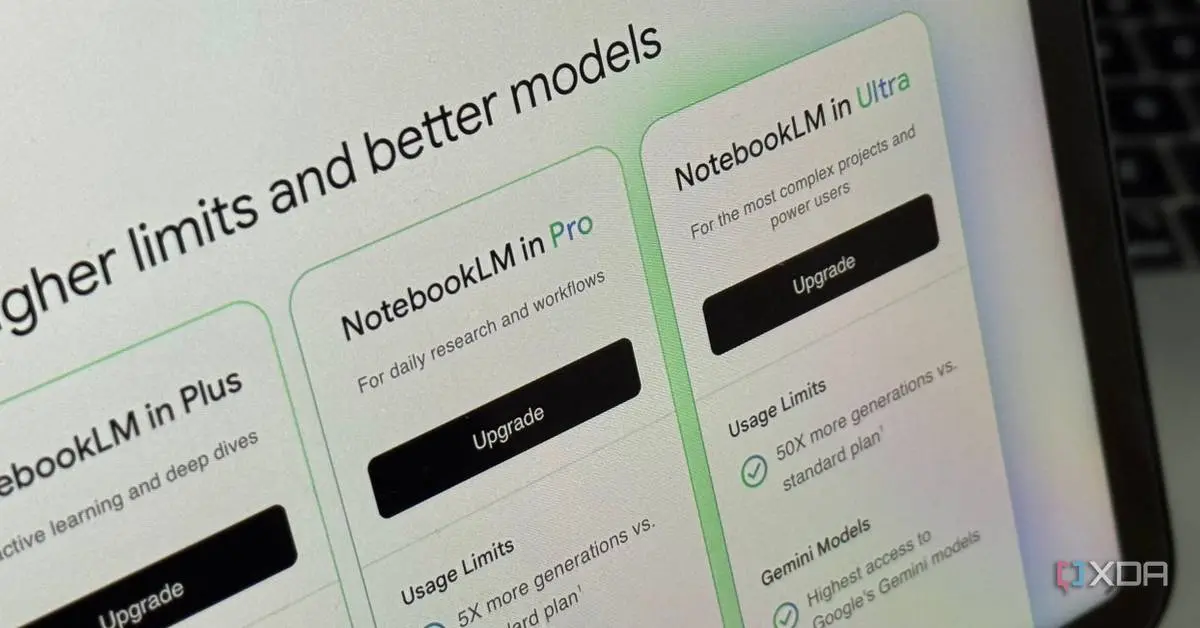
. Users can now tap the overflow menu next to Study Guides, Briefing Docs, or saved Notes to export text to Google Docs or Sheets. The feature is currently available for Google AI Pro and Ultra subscribers, with a broader rollout planned for all free NotebookLM users over the coming weeks1
2
.References
Summarized by

Navi
Related Stories
NotebookLM adds Data Tables and chat history as Google expands AI Ultra tier capabilities
12 Dec 2025•Technology
Google's NotebookLM Unveils Deep Research Tool and Enhanced Mobile Features
07 Nov 2025•Technology

Google NotebookLM Unveils Deep Research Feature and Expanded File Support for Enhanced AI-Powered Research
14 Nov 2025•Technology

Recent Highlights



Recent Highlights
Today's Top Stories







Your Daily Dose of Curated AI News
Don’t drown in AI news. We cut through the noise - filtering, ranking and summarizing the most important AI news, breakthroughs and research daily. Spend less time searching for the latest in AI and get straight to action.

