OpenAI expands ChatGPT personality feature to eight modes in India with GPT-5.1 update


2 Sources
2 Sources
[1]
How to Change Your ChatGPT's Personality
OpenAI shared a pop-up message about the feature to Indian users OpenAI startled ChatGPT users in India on Wednesday after it started sending a pop-up message about the personalities feature. While it is not a new feature, the San Francisco-based artificial intelligence (AI) giant upgraded it significantly with the release of GPT-5.1 AI model. Users in India can now select from eight different personality types, and each of them tweaks the chatbot to make the responses appear visibly different. So, if the default version is too bland for you, you can experiment with the other personalities till you find your fit. Know how to do so in a quick few steps. ChatGPT's Personalities Feature: Details As per OpenAI"s support page, "A personality is the style and tone ChatGPT uses when responding to you. It is a combination of traits, voice, and behavior that shapes how answers feel, whether that is friendly and casual, concise and professional, or something else entirely." However, changing personalities does not affect the chatbot's capabilities or any instruction a user gives it to generate an email, essay, and more. Additionally, all personalities are compatible with the saved memories or custom instructions users have set. In fact, the memories and instructions can override the personality if there is a conflict between the two. Notably, there are eight personalities -- Default, Professional, Friendly, Candid, Quirky, Efficient, Nerdy, and Cynical. How to Activate Personalities in ChatGPT The process is fairly simple, although there are minor differences based on whether you're using the web interface or the desktop and mobile apps. Below, we have shared the steps for each of them separately. On ChatGPT web: On ChatGPT mobile and desktop apps: To go back to the original style of response, just follow the same steps and select default. Once you activate a preset personality, it will be applied across the platform in all conversations, except Projects.
[2]
OpenAI brings 8 new personality modes to ChatGPT in India with GPT-5.1: Here's how to use them
The update makes chats feel more natural and keeps the chosen personality active across sessions, with GPT-5.2 expected to improve personalisation further. OpenAI's new GPT-5.1 update adds three more personality options, increasing the list from five to eight. This wider range is a big step toward making the AI feel less robotic and more like someone you can actually talk to. Since people use ChatGPT for creative projects, work messages, casual conversations, and quick problem-solving all in one place, having built-in tones you can switch between instantly is really useful. The update is exciting because it removes the need to constantly rewrite your prompts just to change the style, making ChatGPT feel much more personal and easy to use. Also read: Apple iPhone 16 Pro price slashed by over Rs 15,900 on this platform ChatGPT currently has eight personalities available, including Default, Professional, Friendly, Candid, Quirky, Efficient, Nerdy, and Cynical. Each one of the presets shifts the tone of responses without changing the knowledge base. What this means for users is that they won't have to repeat style instructions each time; instead, they can simply use whatever personality best fits the moment. Also read: WhatsApp now showing Ads in Status and Channels for more users: How you can manage ad preferences Each tone has its purpose. Here's a breakdown for each tone: Until recently, there were only five personalities. With GPT-5.1, OpenAI added Professional, Candid, and Quirky. It also renamed two of the older modes. The mode previously named Listener is now Friendly, and Robots has been renamed as Efficient. Nerdy and Cynical remain just as they were, continuing to offer their signature tones. The larger update follows OpenAI's trend of making conversations sound even more like humans, including keeping the chosen personality active through extended chatty sessions and even across new conversations. Also read: Google launches Google AI Plus plan for India: Price, benefits and how to subscribe It also comes at a time when public complaints over the demise of GPT-4o still feel fresh. Reports now indicate GPT-5.2 is also ready for launch and will likely introduce smoother tones or, for those who want even deeper personalisation, perhaps more personality options. Using the new personality modes in GPT5.1 is easy. Simply follow the steps below:
Share
Share
Copy Link
OpenAI rolled out an upgraded personality feature for ChatGPT users in India, expanding from five to eight distinct modes with the GPT-5.1 release. Users can now customize chatbot tone across Professional, Friendly, Candid, Quirky, Efficient, Nerdy, Cynical, and Default options. The update aims to make AI conversations feel more natural without requiring constant prompt adjustments.
OpenAI Upgrades ChatGPT Personality Feature for Indian Users
OpenAI surprised ChatGPT users in India on Wednesday by sending pop-up notifications about a significantly enhanced personality feature. While the functionality isn't entirely new, the San Francisco-based artificial intelligence company upgraded it substantially with the release of the GPT-5.1 AI model
1
. The update increases available personality options from five to eight, marking a notable step toward making the AI chatbot feel less robotic and more conversational2
.Eight New Personality Modes Transform User Experience
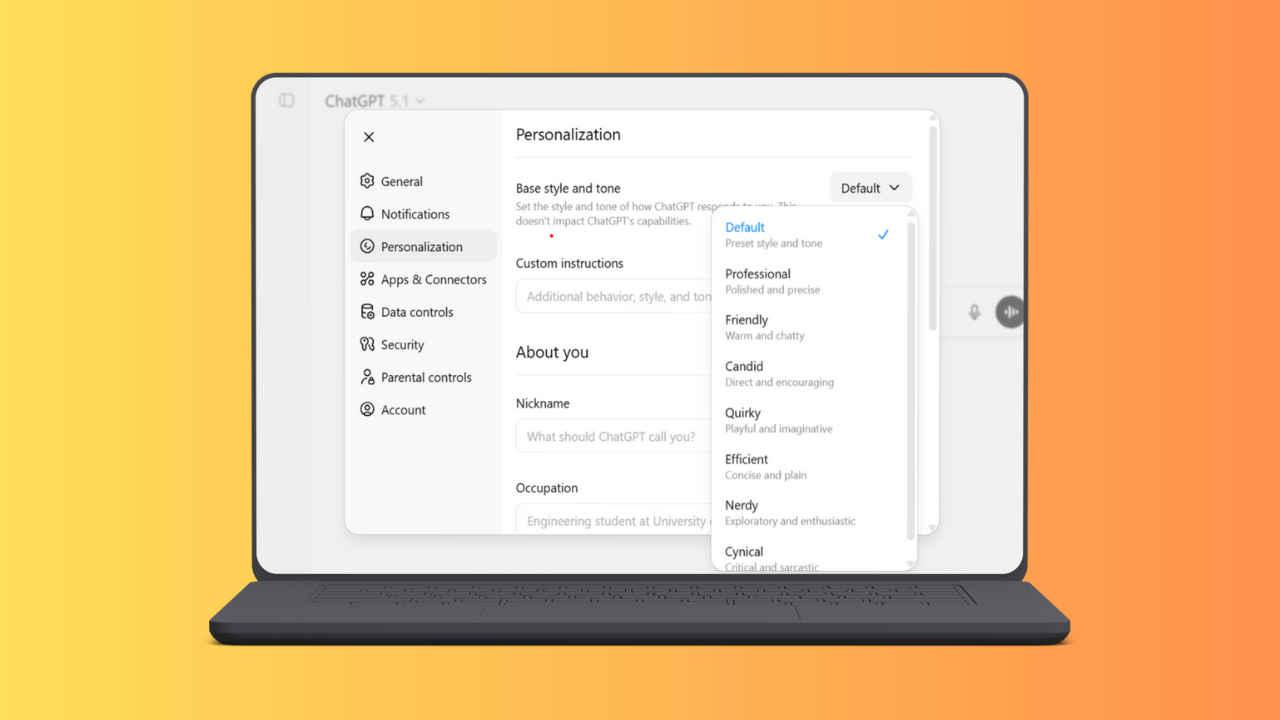
ChatGPT now offers eight distinct personality modes: Default, Professional, Friendly, Candid, Quirky, Efficient, Nerdy, and Cynical
1
. Each preset shifts the tone of responses without altering the underlying knowledge base, allowing users to customize chatbot tone instantly based on their needs2
. The Professional mode delivers formal, structured responses suitable for workplace communication. Friendly adopts a warm, conversational approach that makes interactions feel approachable. Candid provides direct, honest answers without excessive politeness, while Quirky adds playful, creative flair with unexpected word choices. The Efficient mode strips responses down to essentials, Nerdy dives deep into technical details with enthusiasm, and Cynical offers dry, skeptical commentary with sharp wit2
.
Source: Digit
How to Change Personality Settings Across Platforms
Activating different personalities requires just a few simple steps, though the process varies slightly between web and mobile interfaces. Users can access the feature through ChatGPT settings and select their preferred mode, which then applies across all conversations except Projects
1
. The chosen personality remains active through extended sessions and even across new conversations, eliminating the need to constantly rewrite prompts just to change the style2
. According to OpenAI's support page, "A personality is the style and tone ChatGPT uses when responding to you. It is a combination of traits, voice, and behavior that shapes how answers feel"1
.Compatibility With Custom Instructions and User Memories
The personality feature works seamlessly with saved user memories and custom instructions that users have previously configured. Importantly, changing personalities doesn't affect the chatbot's core capabilities or any specific instructions given for tasks like generating emails or essays
1
. However, if conflicts arise between personality settings and custom instructions, the memories and instructions take precedence, ensuring user preferences remain respected1
.Related Stories

Evolution From Five to Eight Modes Signals Deeper Personalization
With GPT-5.1, OpenAI added three new options: Professional, Candid, and Quirky. The update also renamed two existing modes—Listener became Friendly, and Robots was renamed Efficient—while Nerdy and Cynical retained their original names and signature tones
2
. This expansion follows OpenAI's broader trend of making AI conversations feel more natural and human-like, addressing user needs across creative projects, work messages, casual conversations, and quick problem-solving2
.What's Next: GPT-5.2 on the Horizon
Reports indicate that GPT-5.2 is ready for launch and will likely introduce even smoother tones or additional personality options for those seeking deeper personalization
2
. The timing of this update is notable, arriving as public complaints over GPT-4o's performance still linger. For users in India, the expanded personality feature represents a practical tool that adapts the AI chatbot to different contexts without technical complexity, making ChatGPT more versatile for everyday use.References
Summarized by

Navi
[1]
Related Stories
OpenAI lets users adjust ChatGPT's warmth and enthusiasm in new personalization update
20 Dec 2025•Technology

OpenAI Launches GPT-5: A New Era of AI with Enhanced Reasoning and Accessibility
08 Aug 2025•Technology

ChatGPT Unveils Personalization Features: Custom Traits, Project Organization, and Task Reminders
18 Jan 2025•Technology

Recent Highlights
1
Tennessee Teens Sue Elon Musk's xAI Over Grok AI-Generated Child Abuse Images
Policy and Regulation

2
Pentagon designates Palantir Maven AI as core US military system in major defense shift
Technology

3
Supermicro Co-Founder Indicted in $2.5 Billion Nvidia AI Chip Smuggling Scheme to China
Policy and Regulation

Recent Highlights
Today's Top Stories













Your Daily Dose of Curated AI News
Don’t drown in AI news. We cut through the noise - filtering, ranking and summarizing the most important AI news, breakthroughs and research daily. Spend less time searching for the latest in AI and get straight to action.

