Raspberry Pi AI HAT+ 2 brings 40 TOPS and 8GB RAM to run gen AI models locally on Pi 5


8 Sources
8 Sources
[1]
Raspberry Pi's new add-on board has 8GB of RAM for running gen AI models
Raspberry Pi is launching a new add-on board capable of running generative AI models locally on the Raspberry Pi 5. Announced on Thursday, the $130 AI HAT+ 2 is an upgraded -- and more expensive -- version of the module launched last year, now offering 8GB of RAM and a Hailo 10H chip with 40 TOPS of AI performance. Once connected, the Raspberry Pi 5 will use the AI HAT+ 2 to handle AI-related workloads while leaving the main board's Arm CPU available to complete other tasks. Unlike the previous AI HAT+, which is focused on image-based AI processing, the AI HAT+ 2 comes with onboard RAM and can run small gen AI models like Llama 3.2 and DeepSeek-R1-Distill, along with a series of Qwen models. You can train and fine-tune AI models using the device as well. A demo shared by Raspberry Pi shows how you can use the add-on board to power an AI model capable of generating a text-based description of a camera stream, as well as answer a question about whether there are any people in the scene. Another shows how you can translate text from French to English with Qwen2. However, tech YouTuber Jeff Geerling found that a standalone Raspberry Pi 5 with 8GB of RAM generally outperformed the AI HAT+ 2 across the supported models. Geerling links the lower performance to power draw, as the Pi 5 can operate at up to 10 watts, while the AI HAT+ 2 is limited to 3W. Though the AI HAT+ 2 may be ideal for specific use cases, Geerling notes that the add-on board's extra 8GB of RAM is "not quite enough to give this HAT an advantage over just paying for the bigger 16GB Pi with more RAM, which will be more flexible and run models faster." The AI HAT+ released last year, can also handle AI image processing for a cheaper $70 starting price. Raspberry Pi says more and "larger" AI models "are being readied for updates, and should be available to install soon after launch."
[2]
Raspberry Pi AI HAT+ 2 Review: The brains and the brawn
Why you can trust Tom's Hardware Our expert reviewers spend hours testing and comparing products and services so you can choose the best for you. Find out more about how we test. Raspberry Pi's first product of 2026 is an update of the 2024 AI HAT+, but this newer version, another collaboration with Hailo, now sees the Hailo 10H AI chip running the show, along with 8GB of onboard RAM. The new AI HAT+ 2 takes the strain of AI workloads away from the Raspberry Pi 5's Arm CPU, but this all comes at a price of $130. With your Raspberry Pi already costing much more than the original $35 -- of course, the spec has vastly improved over the years -- you could already be hitting the $200 mark for just a Pi and AI HAT+ 2. Does the performance warrant the price? There's only one way to find out! The retail box follows the same design language as the many other Raspberry Pi product boxes that I have opened. At a glance, you'd be forgiven for thinking that this was the same Raspberry Pi AI HAT+ as released previously, and opening the box doesn't help as the boards are very similar. The new AI HAT+ 2 requires the included heatsink. Yes, this heatsink is for the HAT, not the Raspberry Pi 5. Your Pi 5 will also need cooling, and the official Raspberry Pi and Argon low-profile coolers will fit under the HAT. The included plastic standoffs and GPIO header extension work, but the GPIO connection is a little too loose for my liking. The resulting GPIO connections, using DuPoint style connectors, also feel a little too loose. Connecting the board to the Raspberry Pi 5 is simple. Just unlock the PCIe connection on the Pi 5, push in the ribbon cable, lock it down, and then secure the board to the standoffs and GPIO. There is a cut-out for connecting the official Raspberry Pi Camera and an official display. Connect up your keyboard, mouse, HDMI, Ethernet, and finally power, then boot to the Raspberry Pi desktop, remembering of course to enable PCIe Gen 3 via "raspi-config." We're using the latest Debian "Trixie" based image and have a custom installation process as our review unit predates the official software repositories. The end-user software experience will be streamlined for release. Using the provided installation instructions, we ran hailo-ollama and then queried the available and compatible models for the Hailo 10H powering the kit. In our pre-release software, the models are loaded using hailo-ollama via a carefully crafted curl command. Just change the "model" to one of the five available. The 8GB of onboard DDR4X RAM means that larger models will generally work better as the Raspberry Pi's own RAM is untouched. So models up to 8GB should load without incident, even on Raspberry Pi 5s with less than 8GB. This opens up cheaper AI projects, technically. You still need to pay $130 for the AI HAT+ 2, but a $50 1GB, $55 2GB, or $77 4GB Raspberry Pi 5 is now a viable AI platform, negating the need to buy a $105 8GB or the frankly frightening $160 for a 16GB Raspberry Pi 5. So why the new board? That is down to Large Language Models (LLM), an AI that is trained on huge amounts of text data and is used to understand, process, and respond to human language. The AI HAT+ 2 is mainly aimed at LLMs, whereas the older AI HAT+ is for image-based AI projects. The AI HAT+ 2 demo code supplied by Raspberry Pi leans heavily on creating our own local LLM using qwen2:1.5b but you can also use DeepSeek or Qwen models that are distilled via DeepSeek. The onboard 8GB of RAM and powerful AI processing chip take the strain off the Raspberry Pi 5's CPU and RAM. We can also use that power for image processing. If you've not got the original AI HAT+, then having good image processing and a viable LLM platform makes the $130 price tag easier to swallow. The two boards may look similar, but they don't work in the same way. The AI HAT+ was all about image-based AI processing, and the 26 TOPS of the onboard Hailo 8L (13 Tops for the cheaper Hailo8 model) is very similar in performance to the AI HAT+ 2. Using the rpicam-hello suite of examples, we tested compatibility with the AI HAT+ 2, and we are pleased to say that object identification and pose detection worked as expected. While we have no metrics to show the difference, the performance of the AI HAT+ 2 was smooth, and there were no camera issues. Where there were issues, they were largely software-based. "HailoRT not ready!" shows that Hailo's software is playing catch-up to the hardware, which has happened before. Hailo, Raspberry Pi and the community will ultimately fix this gap, but early adopters need to be aware. Because we cannot directly test the AI HAT+ 2 and the AI HAT+, we need to fallback to testing the AI HAT+ 2 versus the Arm CPU of the Raspberry Pi 5. For this test, we will use the qwen2:1.5b language model and pose some questions relating to general knowledge, then specific programming tasks using Python. Installation of qwen2:1.5b was made via ollama. The first question is "What is Tom's Hardware?" "Tom's Hardware is a hardware retailer with stores in the United States and Canada. The company sells various types of tools, equipment, and supplies for home repairs or construction projects." "Tom's Guide is a popular technology website founded in 2004. It was originally focused on computer hardware and reviews, but has since expanded its coverage to include consumer electronics, software, and other topics related to technology. The site is known for publishing detailed product reviews that are valuable resources for consumers looking to make informed purchasing decisions." The next request, "Write a Python script to display an image on the screen. The image file is supplied by asking the user for input and they will specify the absolute path to the image." The AI HAT+ 2 did a decent job of writing quick and concise code, but it was doomed to failure as it never called an application to open the image, rather it read the image and then closed the open image file. AI HAT+ 2 Response The Arm CPU response looked decent, but on closer inspection, it was full of errors around using the imported tkinter module and calling "Image.open" when there is no imported Image module. This vibe coding experience produced a long-winded response, but ultimately it was way off the mark and not something that we would rely on as a coding co-pilot or a sounding board for a project. In our tests, the AI HAT+ 2 was faster than the Raspberry Pi 5's Arm CPU, but more importantly, it ran the code without hogging the CPU. This is great for those who want to integrate AI into a GPIO-based project, like robotics. That said, the model produced inaccurate results. In the case of the coding exercise, the code would appear valid to a layman, but it was completely incorrect. If you are looking to run an LLM on a Pi, then try the Hailo-compatible models and see which one meets your needs. But be warned, the knowledge on which these models have been trained is now outdated, and from our limited testing time, we only saw incorrect responses. Obviously, someone who wants to use AI on a Raspberry Pi, but what type of AI? Offloading the workload from the Arm CPU to the Hailo 10H frees up the CPU for other tasks, such as running a chat server, controlling a robot, reacting to sensors, etc. So those of us who like to build smart GPIO projects will have a field day with the AI HAT+ 2. If you are just interested in image or vision-based AI projects, the older AI HAT+, Raspberry Pi AI Camera, or the original M.2 AI Kit are all cheaper viable options. If you already have any of these products, stick with them, as right now the AI HAT+ 2 is more money for little to no performance boost. If you haven't got any AI HATs or want to dabble with LLMs, then the AI HAT+ 2 is a viable, if currently flawed, option. Personally, we would run LLMs on the Raspberry Pi 5s Arm CPU until we have the knowledge and use case to warrant purchasing the AI HAT+ 2. AI is the buzzword that isn't going away, and Raspberry Pi's adoption of AI into its product range is an interesting, if polarizing, decision. The AI HAT+ 2 continues the progression of more powerful AI platforms, and for the right type of make,r it will be a considered choice. One day. Right now, this is a solution looking for a problem, and we're sure that the bugs will be worked out, but early adopters will be left wanting more. For many who just want to dabble with AI on their Raspberry Pi 5, then they can either use smaller models that your RAM can accommodate, or use an online service. For computer vision and image inference projects, you will get similar performance and a cheaper product with the older AI HAT+ or the Raspberry Pi AI Camera. The AI camera is a cheap entry point for learners. For those who want a local LLM in a compact and power-efficient package, the Raspberry Pi AI HAT+ 2 is something that you should research, after learning the skills and developing the project that it can support. It will also give the software time to mature and to make sure that your wallet is ready.
[3]
Raspberry Pi 5 gets LLM smarts with AI HAT+ 2
40 TOPS of inference grunt, 8 GB onboard memory, and the nagging question: who exactly needs this? Raspberry Pi has launched the AI HAT+ 2 with 8 GB of onboard RAM and the Hailo-10H neural network accelerator aimed at local AI computing. On paper, the specifications look great. The AI HAT+ 2 delivers 40 TOPS (INT4) of inference performance. The Hailo-10H silicon is designed to accelerate large language models (LLMs), vision language models (VLMs), and "other generative AI applications." Computer vision performance is roughly on a par with the 26 TOPS (INT4) of the previous AI HAT+ model. These components and 8 GB of onboard RAM should take a load off the hosting Pi, so if you need an AI coprocessor, you don't need to blow through the Pi's memory (although more on that later). The hardware plugs into the Pi's GPIO connector (we used an 8 GB Pi 5 to try it out) and communicates via the computer's PCIe interface, just like its predecessor. It comes with an "optional" passive heatsink - you'll certainly need some cooling solution since the chips run hot. There are also spacers and screws to fit the board to a Raspberry Pi 5 with the company's active cooler installed. Running it is a simple case of grabbing a fresh copy of the Raspberry Pi OS and installing the necessary software components. The AI hardware is natively supported by applications. In use, it worked well. We used a combination of Docker and the hailo-ollama server, running the Qwen2 model, and encountered no issues running locally on the Pi. However, while 8 GB of onboard RAM makes for a nice headline feature, it seems a little weedy considering the voracious appetite AI applications have for memory. In addition, it is possible to specify a Pi 5 with 16 GB RAM for a price. And then there's the computer vision, which is broadly the same 26 TOPS (INT4) as the earlier AI HAT+. For users with vision processing use cases, it's hard to recommend the $130 AI HAT+ 2 over the existing AI HAT+ or even the $70 AI camera. Where LLM workloads are needed, the RAM on the AI HAT+ 2 board will ease the load (although simply buying a Pi with more memory is an option worth exploring). According to Raspberry Pi, DeepSeek-R10-Distill, Llama3.2, Qwen2.5-Coder, Qwen2.5-Instruct, and Qwen2 will be available at launch. All (except Llama3.2) are 1.5-billion-parameter models, and the company said there will be larger models in future updates. The size compares poorly with what the cloud giants are running (Raspberry Pi admits "cloud-based LLMs from OpenAI, Meta, and Anthropic range from 500 billion to 2 trillion parameters"). Still, given the device's edge-based ambitions, the models work well within the hardware constraints. This brings us to the question of who this hardware is for. Industry use cases that require only computer vision can get by with the previous 26 TOPS AI HAT+. However, for tasks that require an LLM or other generative AI functionality but need to keep processing local, the AI HAT+ 2 may be worth considering. ®
[4]
This official Raspberry Pi addon helps your SBC churn through more demanding tasks
* Raspberry Pi AI HAT+ 2 adds a 40 TOPS NPU to Pi, boosting local AI processing power. * Enables offline LLM use on Pi; run many AI models without internet. * Available now for $120 with docs and examples (e.g., Qwen2 demo) on the Raspberry Pi site. While Raspberry Pi's base hardware isn't anything to sniff at, the foundation does occasionally release optional add-ons to boost your SBC's power. These are usually something you can plug into the Pi itself to unlock additional features and hardware, which makes them nice little extras to pick up if you're interested in what the addon is doing. This time, the Raspberry Pi Foundation has revealed the Raspberry Pi AI HAT+ 2. As you might expect with a name like that, it's designed for running intensive AI tasks on the board, allowing people to use LLMs without an internet connection. And while the hat won't turn the SBC into a Copilot+ compatible device overnight, it's still a fantastic showing from a board as small as a credit card. This local AI agent running on a Raspberry Pi 5 is the perfect smart home addition Plus, it has a cute face! Posts 2 By Simon Batt The Raspberry Pi AI HAT+ 2 adds 40 TOPS of NPU power to your SBC Pretty beefy for a Pi Over on the Raspberry Pi website, the Foundation has revealed the Raspberry Pi AI HAT+ 2. It's an addon that adds a 40 TOPS NPU to your SBC, which is a great deal more than the original Raspberry Pi AI kit from a year and a half ago that hit 13 TOPS. For context, Microsoft's definition of an "AI PC" requires 50 TOPS of AI processing power, so while the official Raspberry Pi addons haven't quite got it to that level, we're dang close. The main benefit of this hat is that it allows the Raspberry Pi to process AI tasks locally. We've seen a few projects in the past where people wanted to add an AI feature to their Raspberry Pi, but they also wanted to have it offline. Beforehand, they'd have to squish an LLM onto the board or give up and use an internet connection, but this hat should let people tap into a decently powerful model locally. You can see an example of using Qwen2 on the hat in the video above. Subscribe for newsletter deep dives on Raspberry Pi AI HAT+ 2 Explore hands-on guides and benchmarked coverage by subscribing to our newsletter. Get detailed setup walkthroughs, model compatibility notes, performance benchmarks, and buying advice for the Raspberry Pi AI HAT+ 2 and similar SBC AI add-ons. Subscribe By subscribing, you agree to receive newsletter and marketing emails, and accept Valnet's Terms of Use and Privacy Policy. You can unsubscribe anytime. You can purchase the Raspberry Pi AI HAT+ 2 starting today for $120, and you can check out the official documentation for the hat before you buy. Raspberry Pi AI HAT+ 2 $130 at The Pi Shop US Expand Collapse
[5]

Raspberry Pi AI HAT+ 2 adds 40 TOPS accelerator to the single-board computer
Serving tech enthusiasts for over 25 years. TechSpot means tech analysis and advice you can trust. TL;DR: Raspberry Pi products have been used in a wide range of custom computing applications, from industrial automation to IoT and everything in between. Thanks to a recently introduced add-on, the boards can now also handle and manage complex generative AI workloads. Raspberry Pi has started selling the AI HAT+ 2, an add-on board that represents a significant upgrade over the AI HAT+ model launched in 2024. While the original board could only accelerate certain types of neural network models, the Raspberry Pi AI HAT+ 2 is powerful enough to manage and run a popular subset of generative AI models. When paired with a Raspberry Pi 5 base board, the AI HAT+ 2 can help close the GenAI performance gap that the single-board computer platform has faced so far. Chatbot interactions and local LLM workloads are now easier than ever, although the Raspberry Pi Foundation notes that this is not on the same scale as ChatGPT in terms of parameter size and model complexity. The AI HAT+ 2 includes a Hailo-10H neural network accelerator, a chip capable of delivering 40 TOPS of inferencing performance. By comparison, the first AI HAT was available with either a Hailo-8 (26 TOPS) or Hailo-8L (13 TOPS) accelerator and was primarily designed to enhance the performance of vision-based neural network models. Raspberry Pi said that a Pi 5 board equipped with an AI HAT+ 2 module can provide developers with a low-latency, cost-effective device for locally performed GenAI tasks. The AI HAT+ 2 is well-suited for managing smaller inference workloads, thanks in large part to its 8GB of dedicated on-board RAM and an improved hardware architecture. Vision-based models should perform similarly to the original AI HAT+, with the added benefit of Raspberry Pi's integrated camera software stack. The foundation encourages developers already using the original board to upgrade, noting that existing software tools are easy to adapt to the new model. Alongside the AI HAT+ 2, the foundation is providing several LLMs that can be readily installed and run on the device. Model complexity ranges from 1 billion parameters (Llama 3.2) to 1.5 billion parameters, supporting popular GenAI tasks such as chatbot queries (Qwen2), code generation (Qwen2.5-Coder), language translation, and more. Raspberry Pi cautions that cloud-based LLMs like ChatGPT or Gemini have been trained on 500 billion to 2 trillion parameters, allowing for far more complex interactions. However, by fine-tuning or retraining the smaller models with custom datasets, developers can overcome these limitations to power specific GenAI applications. The Raspberry Pi AI HAT+ 2 add-on is available for $130. The UK-based organization is also providing a comprehensive AI HAT guide, with step-by-step instructions on how to install and use the product.
[6]

The Raspberry Pi 5 has a new add-on board to boost performance
Corbin Davenport is the News Editor at How-To Geek and an independent software developer. He also runs Tech Tales, a technology history podcast. Send him an email at [email protected]! Corbin previously worked at Android Police, PC Gamer, and XDA before joining How-To Geek. He has over a decade of experience writing about tech, and has worked on several web apps and browser extensions. Raspberry Pi has sold the AI HAT+ board for over a year now, giving Pi boards the ability to run lightweight machine learning models for object detection, file tagging, and other tasks. Now, there's a Raspberry Pi AI HAT+ 2, and it's powerful enough to run large language models (LLMs). The new Raspberry Pi AI HAT+ 2 is an add-on board for the Raspberry Pi 5, powered by a Halio-10H chip and 8GB of dedicated RAM. It can deliver 40 TOPS (IN4) of inferencing performance, which is close to the 40-60 TOPS in the Neural Processing Units (NPU) found in newer PC chips from Intel, AMD, and Qualcomm. You'll be able to run large language models like Llama 3.2 1B, DeepSeek-R1-Distill 1.5B, Qwen2.5-Coder 1.5B, Qwen2.5-Instruct 1.5B, and Qwen2 1.5B, and Raspberry Pi says additional models with larger parameter sizes are being developed. The 8GB RAM isn't enough for models like GPT-OSS or regular DeepSeek, but it wouldn't be a stretch for Gemma 3 1B or other smaller models to be eventually supported. The board isn't just for LLMs, though. It works with the same camera software stack as the original AI HAT+, so you can set up vision-based models for object detection, pose estimation, or other machine learning workflows. Raspberry Pi says performance for vision models like Yolo is "broadly equivalent to that of its 26-TOPS predecessor, thanks to the on-board RAM." Raspberry Pi said in a blog post, "cloud-based LLMs from OpenAI, Meta, and Anthropic range from 500 billion to 2 trillion parameters; the edge-based LLMs running on the Raspberry Pi AI HAT+ 2, which are sized to fit into the available on-board RAM, typically run at 1-7 billion parameters. Smaller LLMs like these are not designed to match the knowledge set available to the larger models, but rather to operate within a constrained dataset." If you're working on a project that could benefit from machine learning or generative AI models, like a camera that detects which birds are flying past your window or a text-to-speech engine, a Raspberry Pi 5 with the AI HAT+ 2 could be one way to do it. Hopefully, the list of available models grows over time, so the list of capabilities continues to expand. Subscribe to our newsletter for Raspberry Pi AI HAT+ 2 coverage Join the newsletter for curated coverage of Raspberry Pi AI HAT+ 2: clear breakdowns of model compatibility, camera/vision workflows, and practical setup tips that help makers and developers evaluate, configure, and experiment with edge LLMs and AI HAT hardware. Subscribe By subscribing, you agree to receive newsletter and marketing emails, and accept Valnet's Terms of Use and Privacy Policy. You can unsubscribe anytime. You can buy the Raspberry Pi AI HAT+ 2 starting today for $130 from authorized stores. That's slightly more expensive than the 8GB RAM Raspberry Pi on its own, which now costs $95. Source: Raspberry Pi
[7]

Raspberry Pi expands into AI with AI HAT+ 2, bringing serious LLM and more
8GB of onboard memory supports larger models without using system RAM * Raspberry Pi AI HAT+ 2 allows Raspberry Pi 5 to run LLMs locally * Hailo-10H accelerator delivers 40 TOPS of INT4 inference power * PCIe interface enables high-bandwidth communication between the board and Raspberry Pi 5 Raspberry Pi has expanded its edge computing ambitions with the release of the AI HAT+ 2, an add-on board designed to bring generative AI workloads onto the Raspberry Pi 5. Earlier AI HAT hardware focused almost entirely on computer vision acceleration, handling tasks such as object detection and scene segmentation. The new board broadens that scope by supporting large language models and vision language models which run locally, without relying on cloud infrastructure or persistent network access. Hardware changes that enable local language models At the center of the upgrade is the Hailo-10H neural network accelerator, which delivers 40TOPS of INT4 inference performance. Unlike its predecessor, the AI HAT+ 2 features 8GB of dedicated onboard memory, enabling larger models to run without consuming system RAM on the host Raspberry Pi. This change allows direct execution of LLMs and VLMs on the device and maintains low latency and local data, which is a key requirement for many edge deployments. Using a standard Raspberry Pi distro, users can install supported models and access them through familiar interfaces such as browser-based chat tools. The AI HAT+ 2 connects to the Raspberry Pi 5 through the GPIO header and relies on the system's PCIe interface for data transfer, which rules out compatibility with the Raspberry Pi 4. This connection supports high-bandwidth data transfer between the accelerator and the host, which is essential for moving model inputs, outputs, and camera data efficiently. Demonstrations include text-based question answering with Qwen2, code generation using Qwen2.5-Coder, basic translation tasks, and visual scene descriptions from live camera feeds. These workloads rely on AI tools packaged to work within the Pi software stack, including containerized backends and local inference servers. All processing occurs on the device, without external compute resources. The supported models range from one to one and a half billion parameters, which is modest compared to cloud-based systems that operate at far larger scales. These smaller LLMs target limited memory and power envelopes rather than broad, general-purpose knowledge. To address this constraint, the AI HAT+ 2 supports fine-tuning methods such as Low-Rank Adaptation, which allows developers to customize models for narrow tasks while keeping most parameters unchanged. Vision models can also be retrained using application-specific datasets through Hailo's toolchain. The AI HAT+ 2 is available for $130, placing it above earlier vision-focused accessories while offering similar computer vision throughput. For workloads centered solely on image processing, the upgrade offers limited gains, as its appeal rests largely on local LLM execution and privacy-sensitive applications. In practical terms, the hardware shows that generative AI on Raspberry Pi hardware is now feasible, although limited memory headroom and small model sizes remain an issue. Follow TechRadar on Google News and add us as a preferred source to get our expert news, reviews, and opinion in your feeds. Make sure to click the Follow button! And of course you can also follow TechRadar on TikTok for news, reviews, unboxings in video form, and get regular updates from us on WhatsApp too.
[8]

Raspberry Pi AI HAT+ 2 Review : Perfect for Vision Tasks & Small AI Models
What if you could bring the power of AI to your Raspberry Pi without relying on the cloud? That's exactly what the new Raspberry Pi AI HAT+ 2 promises to deliver. Jeff Geerling takes a closer look at how this $130 add-on transforms Raspberry Pi devices into localized AI workhorses, capable of handling tasks like real-time object detection and small language model processing. Equipped with 8GB of LPDDR4X RAM and the innovative Halo 10H chip, this device is designed to push the boundaries of what's possible in constrained environments. But with its limited memory and power, does it live up to the hype, or is it too niche for most users? In this overview, we'll explore the AI Hat Plus 2's standout features, such as its ability to enable machine vision in battery-powered robotics and its seamless integration into existing Raspberry Pi setups. You'll also discover where it shines, and where it falls short, when it comes to balancing performance and cost. Whether you're a developer working on specialized AI applications or just curious about the latest in Raspberry Pi innovation, this guide will help you decide if the AI Hat Plus 2 is the right fit for your next project. The Raspberry Pi AI HAT+ 2 introduces several hardware enhancements specifically designed to handle AI workloads. These features include: These hardware features make the AI Hat Plus 2 a practical choice for low-power, localized AI applications, particularly in scenarios where cloud dependency is impractical or undesirable. The AI Hat Plus 2 demonstrates strong performance in specific, small-scale AI tasks. It is particularly effective in scenarios such as: However, the device's 8GB RAM and processing power are insufficient for running larger AI models or handling general-purpose workloads. While the Halo 10H chip provides specialized processing capabilities, it lacks the versatility of the Raspberry Pi 5's CPU, which is better suited for broader applications. For machine vision tasks, such as allowing real-time object detection in battery-powered robotics, the AI Hat Plus 2 excels. Yet, its limited computational power and memory capacity make it less competitive for running more demanding AI workloads, such as advanced LLMs or complex neural networks. This positions the device as a niche solution rather than a universal AI tool. Enhance your knowledge on Raspberry Pi 5 by exploring a selection of articles and guides on the subject. The AI Hat Plus 2 is best suited for developers and enthusiasts working on projects that require localized AI processing. Some of the most relevant use cases include: While the device is valuable for these specialized scenarios, its narrow focus limits its appeal for general-purpose users. Developers seeking a more versatile AI solution may find alternative setups more suitable for their needs. Despite its hardware advancements, the AI Hat Plus 2 faces several challenges that may affect its usability and adoption: These challenges highlight the importance of carefully evaluating the device's compatibility with your specific project requirements before committing to its purchase. At $130, the AI Hat Plus 2 is priced higher than its predecessor ($110) and the AI camera module ($70). While its hardware upgrades, such as the Halo 10H chip and increased RAM, justify part of the price increase, its narrow use cases and limited performance may deter general users. For developers focused on running larger AI models or seeking more versatile solutions, alternative setups may offer better value at a similar or lower price point. For those working on specialized AI projects, the AI Hat Plus 2 provides a capable and efficient tool. However, its cost may be difficult to justify for users who require broader functionality or higher performance levels. This makes it a device best suited for those with specific needs that align closely with its capabilities. The Raspberry Pi AI Hat Plus 2 is a well-designed device for specialized tasks such as machine vision and localized AI processing. Its hardware features, including 8GB LPDDR4X RAM and the Halo 10H chip, enable it to handle small-scale AI workloads effectively. However, its limited performance, evolving software support, and relatively high price point restrict its appeal to niche applications. For developers focused on battery-powered robotics or targeted AI projects, the AI Hat Plus 2 offers a valuable tool that can meet specific needs. However, for broader AI applications or general-purpose use, its cost and performance constraints make it less competitive compared to alternative solutions. Ultimately, this device is best suited for those with clearly defined project requirements that align with its specialized capabilities.
Share
Share
Copy Link
Raspberry Pi launched the AI HAT+ 2, a $130 add-on board that equips the Raspberry Pi 5 with a 40 TOPS Hailo 10H chip and 8GB of dedicated RAM. The module enables local processing of generative AI models like Llama 3.2 and Qwen2, though early tests show mixed performance results compared to simply upgrading the base Pi's memory.
Raspberry Pi AI HAT+ 2 Targets Local Generative AI Processing
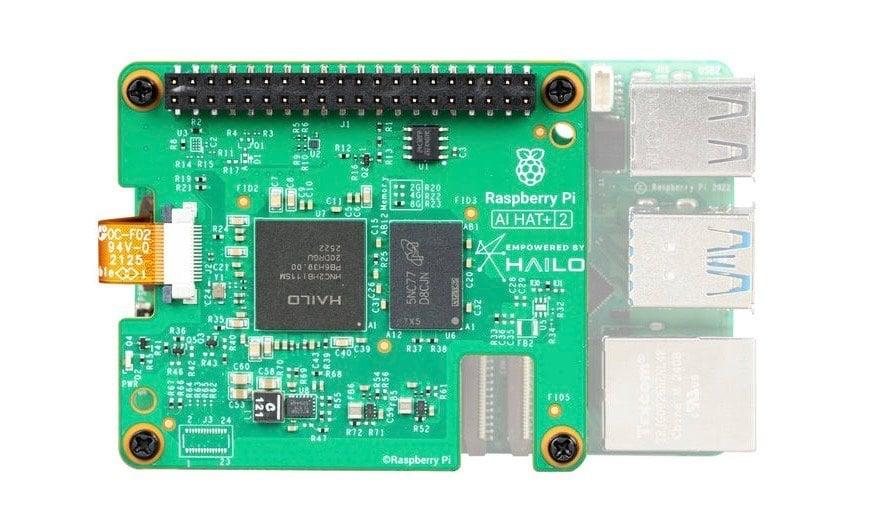
Raspberry Pi has introduced the AI HAT+ 2, an add-on board for Raspberry Pi 5 designed to run generative AI models locally without cloud connectivity. Announced this week, the $130 module represents a shift from its predecessor's focus on image-based tasks to handling Large Language Models and other generative AI applications
1
. The Hardware Attached on Top (HAT) connects via the single-board computer's PCIe interface and GPIO connector, offloading AI-related workloads from the Raspberry Pi 5's Arm CPU2
.
Source: Geeky Gadgets
Hailo 10H AI Chip Delivers 40 TOPS Accelerator Performance
At the heart of the Raspberry Pi AI HAT+ 2 sits the Hailo 10H AI chip, a neural network accelerator capable of delivering 40 TOPS of inference performance
3
. This represents a substantial upgrade from the original AI HAT+, which featured either a Hailo-8 with 26 TOPS or Hailo-8L with 13 TOPS5
. The new module also includes 8GB of RAM dedicated to AI processing, allowing the board to handle models up to 8GB in size without tapping into the host Pi's memory2
. This architecture means even lower-spec Raspberry Pi 5 models with 1GB, 2GB, or 4GB of RAM can now serve as viable platforms to accelerate AI workloads, potentially reducing overall project costs2
.
Source: The Register
Compatible Models Include Llama 3.2, Qwen2, and DeepSeek-R1-Distill
The AI HAT+ 2 supports several generative AI models at launch, including Llama 3.2, DeepSeek-R1-Distill, Qwen2, Qwen2.5-Coder, and Qwen2.5-Instruct
1
. Most of these are 1.5-billion-parameter models, with Llama 3.2 featuring 1 billion parameters5
. Raspberry Pi demonstrated the board's capabilities through demos showing text-based descriptions of camera streams and language translation from French to English using Qwen21
. Users can install models via hailo-ollama and ollama interfaces, with the foundation promising larger models will become available soon after launch1
.Performance Questions and Power Limitations Surface
Early testing reveals performance concerns that potential buyers should consider. Tech YouTuber Jeff Geerling found that a standalone Raspberry Pi 5 with 8GB of RAM generally outperformed the AI HAT+ 2 across supported models
1
. The performance gap appears linked to power draw constraints—while the Pi 5 can operate at up to 10 watts, the AI HAT+ 2 is limited to 3W1
. Geerling noted that the add-on board's 8GB of RAM "is not quite enough to give this HAT an advantage over just paying for the bigger 16GB Pi with more RAM, which will be more flexible and run models faster"1
. For edge AI applications requiring local LLM workloads and offline operation, however, the NPU's dedicated processing capabilities may justify the investment3
.Related Stories


Computer Vision Capabilities Retained from Previous Generation
While the AI HAT+ 2 focuses primarily on generative AI, it maintains computer vision performance roughly equivalent to the 26 TOPS delivered by the original AI HAT+
3
. Testing confirmed that object identification and pose detection worked as expected using the rpicam-hello suite, with smooth image processing performance2
. For users exclusively focused on vision-based tasks, The Register questions whether the $130 AI HAT+ 2 makes sense compared to the existing AI HAT+ or the $70 AI camera3
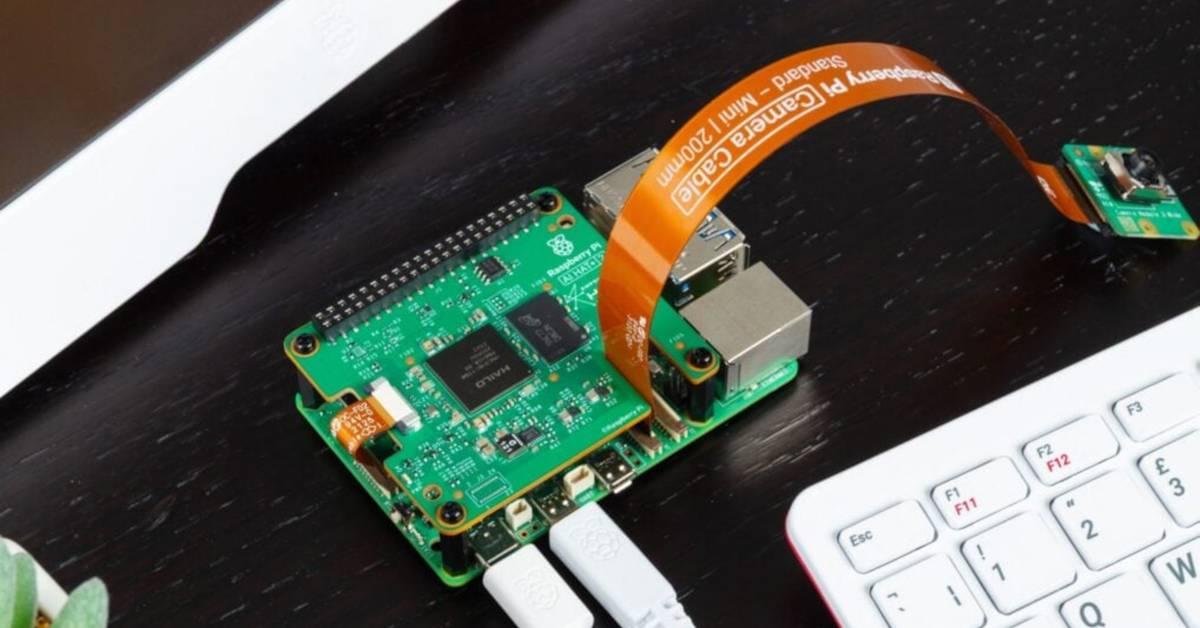
. The module requires a passive heatsink for the HAT itself, which comes included, while the Raspberry Pi 5 needs separate cooling that fits beneath the board2
.
Source: XDA-Developers
Target Use Cases and Future Model Support
The Raspberry Pi Foundation positions the AI HAT+ 2 for developers building cost-effective, low-latency devices that need to run generative AI models locally
5
. While cloud-based LLMs from OpenAI, Meta, and Anthropic range from 500 billion to 2 trillion parameters, the smaller models supported by the HAT can be fine-tuned or retrained with custom datasets for specific applications5
. Industry use cases requiring both computer vision and local LLM workloads may find the most value in the new board3
. The module is available now for $120-$130 depending on retailer, with comprehensive documentation and installation guides provided by the foundation4
.References
Summarized by

Navi
[2]
[3]
[4]
Related Stories
Recent Highlights



Recent Highlights
Today's Top Stories









Your Daily Dose of Curated AI News
Don’t drown in AI news. We cut through the noise - filtering, ranking and summarizing the most important AI news, breakthroughs and research daily. Spend less time searching for the latest in AI and get straight to action.

