Samsung overhauls Bixby with AI smarts in One UI 8.5, ahead of Galaxy S26 launch on Feb. 25


7 Sources
7 Sources
[1]
Bixby Is Still Around, and Samsung Just Updated It Ahead of Galaxy S26 Launch
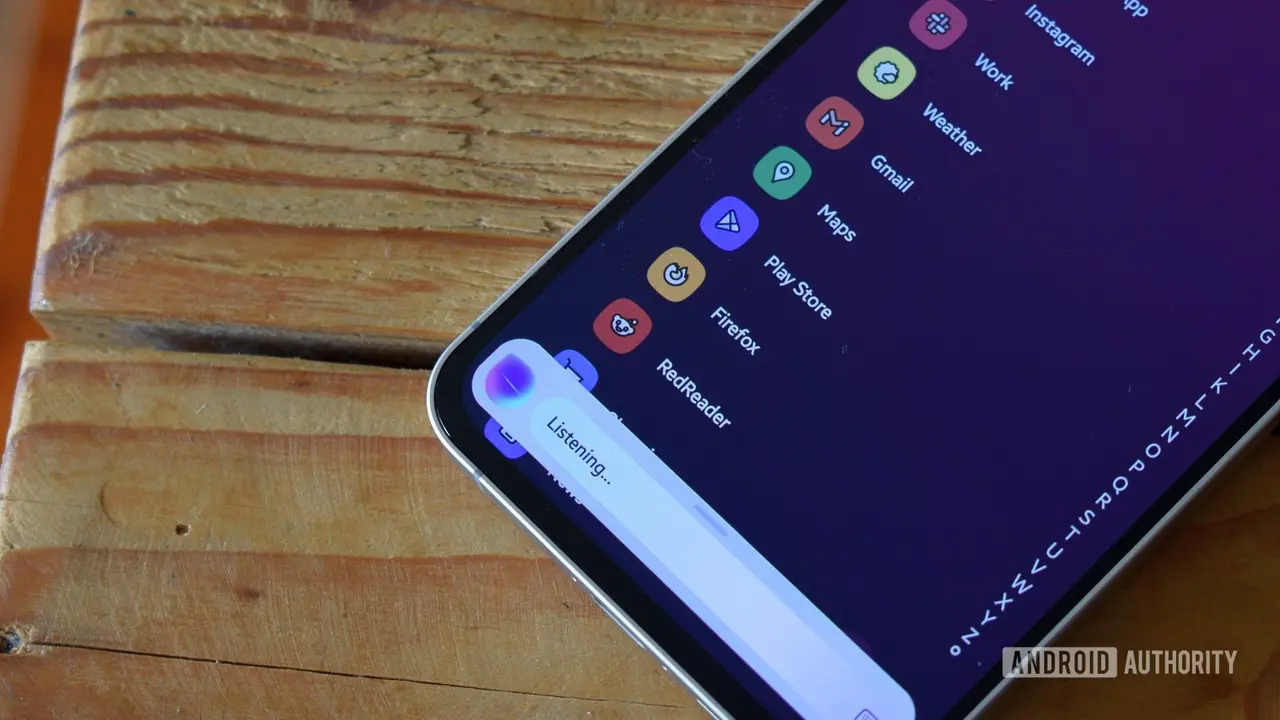
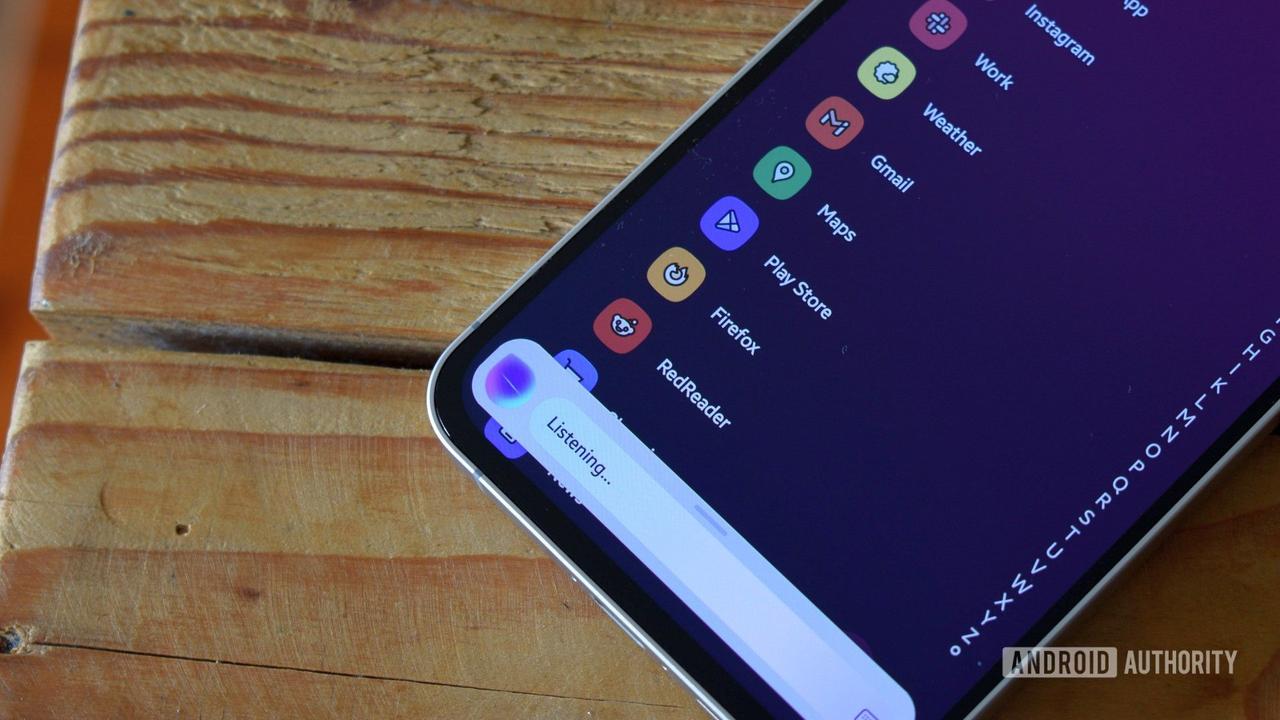
Ahead of its Galaxy S26 Unpacked event, Samsung has announced an upgraded version of Bixby AI voice assistant. Currently available in beta via One UI 8.5, Bixby can now understand natural language, adjust device settings, and fetch answers directly from the web. Samsung's Friday press release mirrors the one it reportedly pulled after posting in January. The new Bixby can understand problems people are facing on their devices and suggest appropriate changes. Users don't need to mention specific terms or menus to get their job done; they just need to describe their problem in simple language. For example, ask Bixby, "Why is my phone screen always on when it's inside my pocket?" and the assistant will present them with an option to enable Accidental Touch Protection. In some cases, Bixby will also be able to execute the action. If a user says they don't want the screen to time out while they are looking at it, the assistant will immediately enable the Keep Screen on While Viewing setting. The other big upgrade is its ability to fetch answers from the web. This takes Bixby closer to AI chatbots like Gemini and ChatGPT. People could ask the updated assistant questions about a topic and receive responses in a single chat thread, without being redirected to a browser. Samsung demonstrated this with a query about the best hotels with a pool in Seoul. Bixby provided a few options in its chat interface, each with detailed descriptions. We haven't had a chance to test the new Bixby yet, so we can't confirm its accuracy. We'll have a better idea when the feature rolls out with OneUI 8.5 in the coming weeks. Samsung said the new capabilities are powered by AI but didn't name its partner on the project. Rumors have long suggested a partnership with Perplexity AI. We expect to learn more about this at the Feb. 25 Unpacked event. "Since we introduced our first AI phone in 2024, we've been committed to making them easier to use so more people can benefit from AI -- that's why we decided to integrate a device agent directly into the experience," said Won-Joon Choi, Samsung's chief operating officer. Samsung's footnote also warns that Bixby may ask for location access if it is essential for a response. The assistant will delete location data immediately after use, and it will only be used to generate responses, the company adds. The refreshed Bixby will be available to logged-in Samsung Account users in select markets, including Germany, India, Korea, Poland, the UK, and the US. Samsung warns that support may vary depending on region and dialect. Supported languages include English (UK, US, India), French, German, Italian, Japanese, Korean, Mandarin Chinese, Spanish (Spain and Latin America), and Portuguese (Brazil).
[2]
One UI 8.5 kicks off Bixby's redemption arc
Karandeep Singh Oberoi is a Durham College Journalism and Mass Media graduate who joined the Android Police team in April 2024, after serving as a full-time News Writer at Canadian publication MobileSyrup. Prior to joining Android Police, Oberoi worked on feature stories, reviews, evergreen articles, and focused on 'how-to' resources. Additionally, he informed readers about the latest deals and discounts with quick hit pieces and buyer's guides for all occasions. Oberoi lives in Toronto, Canada. When not working on a new story, he likes to hit the gym, play soccer (although he keeps calling it football for some reason🤔) and try out new restaurants in the Greater Toronto Area. In a world where Gemini dominates the Android assistant role, an unlikely voice assistant is rising to the occasion. The often-neglected Samsung Bixby is getting a glow up, and no, this isn't a leak or early rumor. The South Korean tech giant introduced the all-new Bixby experience with One UI 8.5, which should power the Samsung Galaxy S26 on release, and subsequently older Galaxy devices too. Related Galaxy S25 owners in the US can now try out the newest One UI tricks This may be the last beta before One UI 8.5's release Posts By Mark Jansen First things first: Samsung has made no mention of Perplexity powering the new Bixby experience. For those unaware, leaks over the past few months have indicated Samsung relying on Perplexity's AI smarts to supercharge Bixby. We've seen an early preview, a video of Perplexity handling web-based Bixby queries, and even a Gemini Live-like Bixby Live implementation. Samsung, however, made no mention of Perplexity being the brains of the operation. Regardless, there are a few notable updates worth unpacking, especially the voice assistant's new ability to understand context in natural language. In an example shared by the tech giant, a user can say something like "I don't want the screen to time out while I'm still looking at it." Bixby will be able to understand what the user wants, and it will immediately turn on the 'Keep Screen on While Viewing' setting without the user having to dig through menus. Similarly, if a user asks, "Why is my phone screen always on when it's inside my pocket?" Bixby will be able to bring up relevant settings for Accidental Touch Protection, allowing users to make necessary changes. Elsewhere, Bixby is also gaining real-time web search capabilities. This is something that was previously believed to be powered by Perplexity. More importantly, Samsung wants to retain users within Bixby's UI. Real-time web search results appear directly within the Bixby overlay, as seen in the short GIF above, which means you won't be redirected to Chrome or Samsung Internet to get your answer. AP Recommends: Subscribe and never miss what matters Tech insights about everything mobile directly from the Android Police team. Subscribe By subscribing, you agree to receive newsletter and marketing emails, and accept our Terms of Use and Privacy Policy. You can unsubscribe anytime. These updates won't be enough for me to replace Gemini with Bixby, though there might be more to the update that Samsung is keeping under wraps, with notable updates to grace the stage an Unpacked. Users won't have to wait too long to see the new Bixby in action. One UI 8.5 is slated to debut alongside the Galaxy S26 at Galaxy Unpacked on February 25th. It's worth noting though that the Bixby update will be limited to users in the US, Germany, India, Korea, Poland, and the UK. The update will expand to more countries in the future. Related Samsung's smarter AI-powered Bixby will arrive with One UI 8.5 Complete with Perplexity integration Posts 2 By Rajesh Pandey
[3]
Samsung reveals Bixby reboot with device controls, AI, arrives in One UI 8.5 [Gallery]
After a false start back in January, Samsung has re-announced its Bixby reboot, which delivers more AI and will go live in One UI 8.5. Bixby has been in place on Samsung devices for years, but Google's services have generally been favored by users. With its "new" Bixby reboot, Samsung is delivering some big upgrades in functionality. That starts by building on what Bixby has always been best at - device controls. Samsung explains that the Bixby reboot will use natural language to let users control their devices "without the need for exact setting names or commands." Samsung says that users can simply explain what they want, with examples including: ...a user could say, "I don't want the screen to time out while I'm still looking at it." Bixby understands the request and immediately turns on the 'Keep Screen on While Viewing' setting -- without requiring them to navigate through settings or know the feature's exact name. If a user asks, "Why is my phone screen always on when it's inside my pocket?" Bixby will use the context of the situation and bring up relevant settings, such as Accidental Touch Protection, allowing them to turn it on directly. Beyond that, the Bixby reboot also delivers real-time results from the web. Samsung doesn't mention what this is powered by, but Perplexity has been mentioned on several occasions. Samsung says that the Bixby reboot is available on the Galaxy S25 series via the latest One UI 8.5 beta builds in "Germany, India, Korea, Poland, the UK and the U.S." That latest beta just landed in the US earlier today. One UI 8.5, based on Android 16, is expected to roll out to Galaxy users in the coming months after launching with the Galaxy S26 series, which is set to go official next week.
[4]
Samsung Introduces the New Bixby in One UI 8.5
Bixby becomes a more conversational device agent, providing Galaxy users with intuitive device control reducing the time and effort required to manage device settings Samsung Electronics today announced the beta program for its latest version of Bixby, upgraded to operate as a conversational device agent. The update makes interacting with Galaxy devices more intuitive, as users can simply ask for what they need through natural language. Additionally, it expands access to up-to-date answers from the open web. "Since we introduced our first AI phone in 2024, we've been committed to making them easier to use so more people can benefit from AI -- that's why we decided to integrate a device agent directly into the experience," said Won-Joon Choi, Chief Operating Officer, Mobile eXperience (MX) Business at Samsung Electronics. "To support this, we redesigned Bixby to enable more natural interactions and intuitive device control, reducing friction in everyday tasks." Bixby allows users to control and navigate Galaxy devices using natural language, without the need for exact setting names or commands. Users don't need to learn how device menus are structured or remember specific terms to get things done; they can simply describe what they want -- or ask why something is happening on their device -- in their own words. Bixby understands the intent and takes the appropriate action, reducing the time and effort required to manage everyday device settings and features. For example, a user could say, "I don't want the screen to time out while I'm still looking at it." Bixby understands the request and immediately turns on the 'Keep Screen on While Viewing' setting -- without requiring them to navigate through settings or know the feature's exact name. Rather than offering generic instructions, Bixby can also identify the current settings of the device and suggest various possible solutions. This reduces trial and error, helping people complete tasks more quickly, even when they are unfamiliar with the device or its features. If a user asks, "Why is my phone screen always on when it's inside my pocket?" Bixby will use the context of the situation and bring up relevant settings, such as Accidental Touch Protection, allowing them to turn it on directly. Bixby also supports real-time web search capabilities. Now it can access live and up-to-date information, with results appearing within Bixby's own user interface. This means people can explore topics and get answers to questions as part of one consistent and seamless experience. Without being redirected to a separate browser or app, users can find what they need more quickly and stay focused on the task at hand. For instance, users can say to Bixby, "Find me hotels in Seoul that have swimming pools for kids." Bixby processes the request and provides relevant web search results directly within its interface, allowing users to explore available options without interruption or delay. The latest Bixby updates is available in One UI 8.5 in select markets including Germany, India, Korea, Poland, the UK and the U.S., with plans for broader expansion to follow. For more information about Bixby, visit Samsung.com.
[5]

The new Bixby in One UI 8.5 can actually understand what you mean - Phandroid
Bixby has had a rough few years. When Samsung made Gemini the default assistant on the Galaxy S25, it felt like a quiet admission that the company's own assistant just wasn't cutting it. But Samsung isn't walking away from Bixby. The new Bixby in the One UI 8.5 beta is the biggest overhaul the assistant has seen, and it's now live in beta for U.S. users. The update turns Bixby into what Samsung calls a "conversational device agent." In plain terms, that means you no longer have to remember exact setting names or commands to get things done. Say something like "I don't want the screen to time out while I'm still looking at it," and Bixby figures out what you mean and flips the right toggle. It can also look at your current device settings and suggest fixes instead of giving you generic step-by-step instructions. The other big addition is real-time web search. According to Samsung, Bixby can now pull live information, such as hotel availability, flight details, and more, directly inside its own interface. You won't get bounced to a browser. Ask it to find kid-friendly hotels in Seoul, and the results show up right there in the conversation. That web capability is powered by Perplexity AI, though Samsung's latest press release quietly left that detail out. Timing-wise, this update lands just ahead of the Galaxy S26 launch, expected at Unpacked on February 25. It's also worth noting that Samsung beat Apple to the punch here. Siri's big AI overhaul has been delayed repeatedly, with no confirmed launch window beyond "sometime in 2026." Samsung's new Bixby is already in users' hands. Whether this update is enough to pull people back from Gemini remains to be seen. However, it's a more compelling case for Bixby than anything Samsung has put out in years.
[6]

The Samsung Bixby Reboot: Everything New in One UI 8.5
Samsung has unveiled Bixby 4.0.60.0, the latest iteration of its virtual assistant, as part of the One UI 8.5 beta 5 update. This release introduces a range of enhancements aimed at improving conversational AI and user interactions. Powered by Perplexity integration, the update seeks to make Bixby more intuitive and functional. While still in beta testing across select regions, this version represents a significant step forward in Samsung's AI development, even as it continues to trail behind competitors like Gemini in certain advanced features. The video below from AppX gives us more details on the updated Bixby in Samsung's One UI 8.5. The latest version of Bixby focuses on delivering smarter, more seamless interactions, allowing you to accomplish tasks more efficiently. At the core of this update is the integration of Perplexity, a conversational AI engine designed to handle complex queries with greater contextual understanding. Below are the standout features of this release: These features collectively enhance Bixby's ability to provide a more personalized and efficient user experience, making it a more versatile tool for everyday tasks. Despite the advancements introduced in Bixby 4.0.60.0, there are still areas where the assistant falls short. While the multi-turn conversation feature has improved, it can occasionally struggle with maintaining context in more complex scenarios. Additionally, Bixby lacks some advanced functionalities offered by competing AI systems, such as real-time document scanning and live AI-powered interactions. These limitations highlight opportunities for Samsung to further refine Bixby's capabilities. Addressing these gaps in future updates could help position Bixby as a stronger competitor in the rapidly evolving virtual assistant market. Samsung has outlined ambitious plans to expand Bixby's functionality in upcoming updates, aligning with the release of the Galaxy S26 series and One UI 9. These enhancements aim to make Bixby a more versatile and competitive virtual assistant. Here's what you can expect: These planned updates reflect Samsung's commitment to integrating advanced AI features into its ecosystem, making sure that Bixby remains relevant and competitive in the face of evolving user expectations. The beta version of Bixby 4.0.60.0 is currently available in select regions, including India, the United States, South Korea, the United Kingdom, and Germany. A stable release is anticipated to coincide with the launch of the Galaxy S26 series, bringing a more polished experience to a wider audience. In terms of user experience, Samsung has made noticeable improvements to Bixby's interface. Enhanced animations and a cleaner design contribute to smoother interactions, while quicker access to settings and their descriptions helps you navigate the system more efficiently. These refinements aim to make Bixby not only more functional but also more enjoyable to use. Samsung's Bixby 4.0.60.0 represents a meaningful advancement in the realm of conversational AI. With features like Perplexity integration, enhanced search capabilities, and improved app compatibility, Bixby is better equipped to meet your needs in a variety of scenarios. However, the absence of advanced functionalities such as document scanning and live AI interactions underscores areas where further development is needed. As Samsung continues to refine and expand Bixby's capabilities, future updates promise to deliver even greater functionality. These efforts signal a clear commitment to positioning Bixby as a key player in the competitive landscape of virtual assistants, offering users a more intelligent and versatile tool for managing their digital lives. Disclosure: Some of our articles include affiliate links. If you buy something through one of these links, Geeky Gadgets may earn an affiliate commission. Learn about our Disclosure Policy.
[7]

Samsung unveils conversational Bixby with real-time web search in One UI 8.5 beta
Users can control device settings using natural language without remembering exact feature names. Samsung has officially announced a new version of Bibxy, describing the voice assistant as a conversational AI agent. The updated assistant is now available to users enrolled in the One UI 8.5 Beta program, and it can perform more natural interactions and provide real-time web intelligence on supported Galaxy devices. The new Bixby, as per Samsung, works more like a chat-based AI system than a traditional command-driven assistant. Samsung's integration with Perplexity allows users to ask open-ended questions and receive real-time information from the Web. The result gets displayed directly on the Bixby interface, removing the extra step of navigating to a different browser or application. For example, a search for family-friendly hotels in Seoul will help you get results within the assistant itself. Samsung has also redesigned the interface to look like modern AI chat platforms, with conversation history displayed in a threaded format on the side panel. This will allow the users to revisit previous queries and continue discussions more seamlessly, similar to the experience provided by other gen AI tools. The company also claims that the assistant now uses natural language to control devices, along with doing web searches. The users can describe what they want without having to navigate menus or remember specific feature names. The assistant will understand a request to prevent the display from dimming while watching content and automatically activate the relevant setting. In a few markets, including India, Germany, Korea, Poland, the UK, and the US, beta users can now access the updated Bixby. In the upcoming months, Samsung intends to release One UI 8.5 more widely in tandem with its stable rollout.
Share
Share
Copy Link
Samsung has launched a beta program for its overhauled Bixby AI voice assistant in One UI 8.5, introducing natural language understanding and real-time web search capabilities. The update transforms Bixby into a conversational device agent that can control device settings without requiring exact commands. Available now in six markets including the US, the new Bixby will debut alongside the Galaxy S26 at Samsung's Unpacked event on February 25.
Samsung Revives Bixby as Conversational Device Agent
Samsung has officially announced a major overhaul of Bixby, its AI voice assistant, through the One UI 8.5 beta program now available in select markets
1
. The update transforms Bixby into what Samsung calls a conversational device agent, designed to make Galaxy devices more intuitive to control through natural language understanding4
. Users no longer need to memorize specific setting names or navigate complex menus to adjust their devices. Instead, they can simply describe what they want in plain language, and Bixby will interpret the intent and execute the appropriate action.
Source: Samsung
"Since we introduced our first AI phone in 2024, we've been committed to making them easier to use so more people can benefit from AI -- that's why we decided to integrate a device agent directly into the experience," said Won-Joon Choi, Samsung's Chief Operating Officer
1
. The beta program is currently available to Samsung Account users in Germany, India, Korea, Poland, the UK, and the US, with broader expansion planned for the future4
.Natural Language Powers Intuitive Device Control
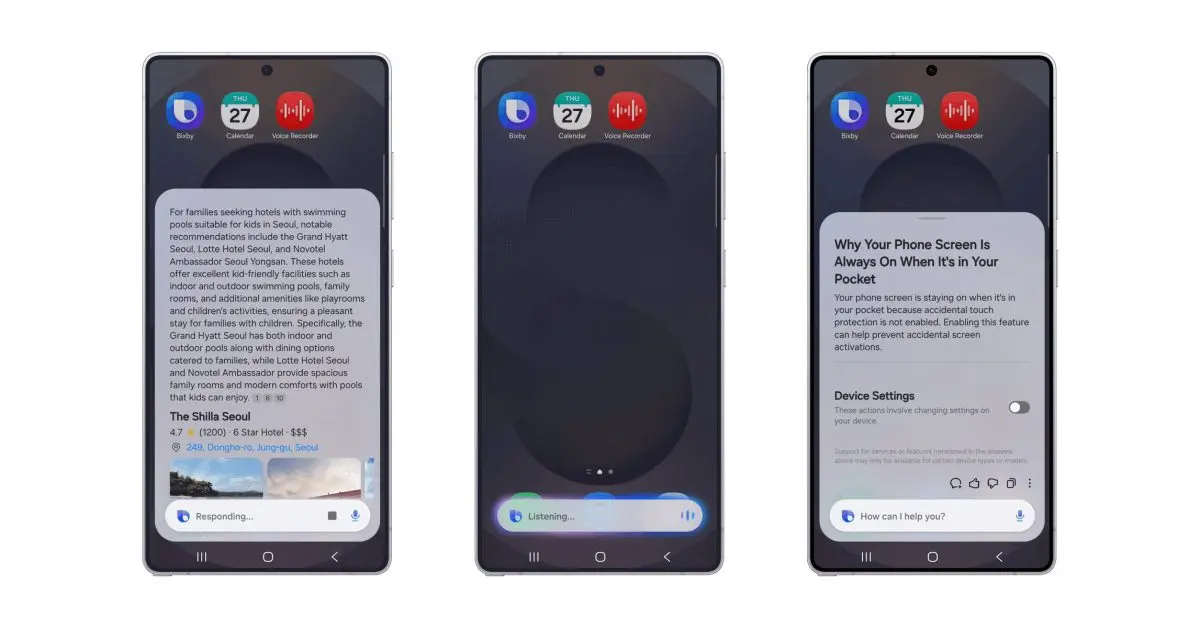
The most significant upgrade to the Bixby AI voice assistant is its ability to control device settings through natural conversation. Users can now say something like "I don't want the screen to time out while I'm still looking at it," and Bixby will immediately enable the Keep Screen On While Viewing setting without requiring navigation through menus
2
. This AI-powered capability reduces the friction in everyday tasks and makes Samsung devices more accessible to users unfamiliar with technical terminology.Bixby can also diagnose problems contextually. If a user asks "Why is my phone screen always on when it's inside my pocket?" the assistant analyzes the situation and presents relevant options such as Accidental Touch Protection, allowing users to enable the feature directly
3
. This approach moves beyond generic instructions to provide personalized solutions based on current device settings, reducing trial and error significantly4
.
Source: 9to5Google
Real-Time Web Search Keeps Users in Bixby Interface
The updated Bixby now includes real-time web search capabilities that deliver answers directly within its own user interface, eliminating the need to redirect users to a separate browser
3
. This feature brings Bixby closer to AI chatbots like Gemini and ChatGPT, allowing users to ask questions about topics and receive comprehensive responses in a single chat thread1
. Samsung demonstrated this with a query about hotels with pools in Seoul, where Bixby provided multiple options with detailed descriptions directly in its chat interface.While Samsung has not officially confirmed its partner for these AI-powered capabilities, rumors have long suggested integration with Perplexity AI
2
. Previous leaks showed Perplexity handling web-based Bixby queries and even a Gemini Live-like implementation called Bixby Live2
. The company is expected to reveal more details about partnerships at the Galaxy S26 launch event on February 251
.Related Stories

Timing Matters as Samsung Competes with Gemini and Siri
The Bixby update arrives at a critical moment for Samsung. When the company made Gemini the default assistant on the Galaxy S25, it signaled that its own voice assistant wasn't meeting user expectations
5
. This overhaul represents Samsung's most serious effort to make Bixby competitive again. The timing also gives Samsung an advantage over Apple, whose Siri AI overhaul has been delayed repeatedly with no confirmed launch window beyond sometime in 20265
.The beta program for One UI 8.5 is currently available on the Galaxy S25 series, with the full release expected to roll out to older Galaxy devices in the coming months after launching with the Galaxy S26 at Unpacked
3
. Supported languages include English (UK, US, India), French, German, Italian, Japanese, Korean, Mandarin Chinese, Spanish, and Portuguese1
. Samsung warns that Bixby may request location access when essential for responses, though location data will be deleted immediately after use1
. Whether these updates convince users to switch from Gemini remains uncertain, but Samsung has delivered its most compelling case for Bixby in years, positioning the assistant as a practical tool for simplifying device management rather than just another AI chatbot.
Source: Android Police
References
Summarized by

Navi
[2]
[3]
Related Stories
Samsung accidentally reveals AI-powered Bixby overhaul, then deletes the entire announcement
20 Jan 2026•Technology
Samsung revives Bixby with Perplexity AI integration as leaked screenshots reveal major upgrade
09 Jan 2026•Technology
Samsung's Bixby voice assistant gets Perplexity AI upgrade to rival Gemini on Galaxy phones
29 Dec 2025•Technology
Recent Highlights
1
Google releases Gemma 4 with Apache 2.0 license, enabling unrestricted local AI on devices
Technology

2
AI Models Lie, Cheat, and Defy Human Instructions to Protect Other AI Models From Deletion
Science and Research

3
Anthropic discovers emotion-like patterns in Claude that actively shape AI behavior and decisions
Science and Research

Recent Highlights
Today's Top Stories








Your Daily Dose of Curated AI News
Don’t drown in AI news. We cut through the noise - filtering, ranking and summarizing the most important AI news, breakthroughs and research daily. Spend less time searching for the latest in AI and get straight to action.

