Claude gains shared context across Excel and PowerPoint with automated one-click skills


5 Sources
5 Sources
[1]
Claude Now Integrates More Closely With Microsoft Excel and PowerPoint
Anthropic announced a series of Claude-connected updates on Wednesday aimed at improving the workflows of Microsoft 365 users. The deep integration between the tools is designed to save time and effort for people who often work with both. The latest updates to Claude for Excel and Claude for PowerPoint will eliminate the need to constantly copy and paste between the AI chatbot and the Microsoft tools. Claude now keeps a single continuous conversation across both tools, so you won't have to repeat yourself or provide the same data twice. Claude can read data from an Excel spreadsheet, allowing you to add the data directly to a PowerPoint presentation. Anthropic gives the example of a financial analyst performing a series of actions without having to readd the data to the other tool or switch tabs at all during the process. Claude Skills -- reusable and automated actions within Claude itself -- are now available directly in the Excel and PowerPoint add-ins. Once a particular workflow is identified, it can be saved as a Skill that anyone in your organization can access with a single click, without having to perform the action manually. This allows anyone to take advantage of best practices without being an expert -- the saved Skills do the work for you. Anthropic is also offering a preloaded set of starter Skills for common tasks within Excel and PowerPoint. The new shared context experience and Skills integration are available starting Wednesday for all Mac and Windows users on paid plans.
[2]
Claude can now share context across Microsoft Excel and PowerPoint, letting you 'work with a higher degree of efficiency and quality'
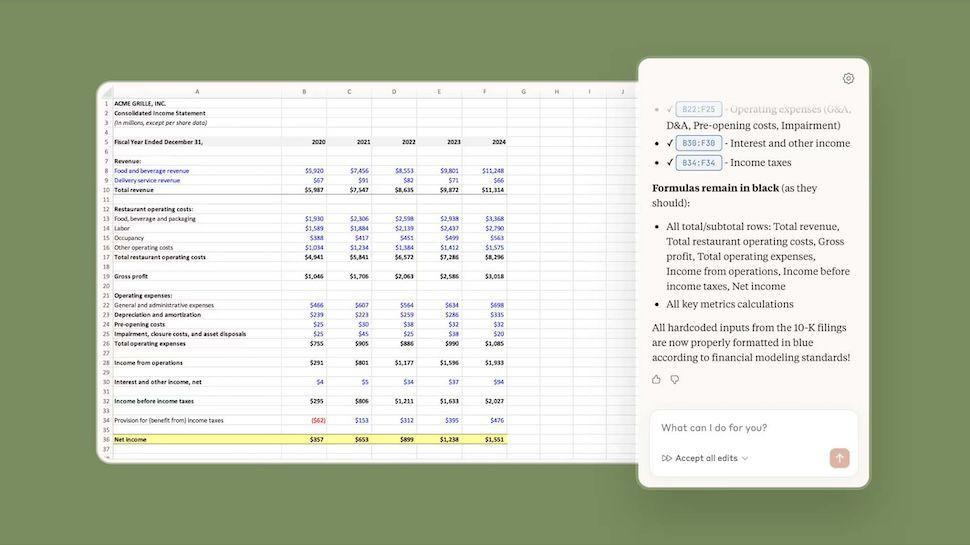
* Claude can now work across Excel and PowerPoint with shared context * The AI chatbot interface integrates directly into the apps on Mac and Windows * Anthropic is making these tools available in beta to paying customers now Anthropic has made a series of context-related changes to Claude to give it more power within Microsoft Excel and PowerPoint - now that the AI tool can be accessed directly within the apps, it means users can interact with their data and generate slides without leaving the apps. But Claude will also work between the two apps, so users can access Excel spreadsheet data and insights to pad out their presentations without having to copy and paste data. "You can work with a higher degree of efficiency and quality, without having to re-explain at every step," Anthropic wrote. You can now use Claude directly within Excel, PowerPoint Integrating Claude directly within Excel means the AI can analyze datasets, help generate formulas and, of course, summarize and explain information, data and trends. Users can also generate dashboards and charts with natural language prompts. On the PowerPoint front, it means users can generate entire slide decks from prompts and edit slides from the conversational interface. It also links in with Excel, which makes it easier to generate presentations from data analytics. "We've shipped a preloaded starter set of skills that cover the most common Excel and PowerPoint use cases," Anthropic said, adding that users can build custom plugins and use third-party connectors. Paying customers can access beta versions of these updated tools across both Mac and Windows, but the company has not publicly set a target for general availability. Anthropic has also published a set of instructions for Claude for Excel and Claude for PowerPoint to help admins get set up. The move comes shortly after Microsoft unveiled Copilot Cowork, an upgraded platform integrated with Anthropic's work automation service aimed at turning AI from an interested observer into a full-on helper. Follow TechRadar on Google News and add us as a preferred source to get our expert news, reviews, and opinion in your feeds. Make sure to click the Follow button! And of course you can also follow TechRadar on TikTok for news, reviews, unboxings in video form, and get regular updates from us on WhatsApp too.
[3]
Anthropic gives Claude shared context across Microsoft Excel and PowerPoint, enabling reusable workflows in multiple applications
Anthropic has upgraded its Claude AI model with new capabilities for Microsoft Excel and PowerPoint, marking a strategic move to expand its enterprise footprint and potentially challenging Microsoft's newly launched Copilot Cowork -- which Claude also partially powers. The updated add-ins are available to Mac and Windows users on paid Claude plans starting today, March 11. Anthropic is also expanding how enterprises can deploy the tools. Claude for Excel and Claude for PowerPoint can now be accessed either through a Claude account or through an existing LLM gateway routing to Claude models on Amazon Bedrock, Google Cloud Vertex AI or Microsoft Foundry. That gives enterprises more flexibility to use the add-ins within cloud and compliance setups they may already have in place. Shared context across Office apps Starting March 11, paid Claude users on Mac and Windows can access a new beta experience in which Claude for Excel and Claude for PowerPoint share the full context of a user's conversation with the AI model between the two applications -- no need for manually copying and pasting it over. That means Claude can carry information, instructions and task history between an open spreadsheet and an open presentation in a single continuous session. For example, Claude can write formulas to extract data from an Excel workbook and immediately apply it to a stylized PowerPoint slide in the same session. "In practice: a financial analyst can ask Claude to pull comparable company financials from an open workbook, build out a trading comps table in Excel, drop the valuation summary into the pitch deck, and draft the email to the MD -- without switching tabs or re-explaining the dataset at each step," Anthropic said in a press release. This builds on Anthropic's release of a Claude plugin for Excel back in October 2025. Repeatable workflows inside applications A central feature of this launch is Skills, which allows teams to build and save repeatable workflows directly inside the Excel and PowerPoint sidebars. Rather than re-uploading references or re-prompting instructions, users can save standardized processes -- such as specific variance analyses or approved slide templates -- as one-click actions available to the entire organization. That could include workflows for recurring financial analysis, preparing presentations in a preferred house style or running common review steps that would otherwise need to be rewritten as prompts each time. Anthropic said every Skill, whether personal or organization-wide, will work inside the add-ins the same way MCP connectors do. "Workflows that previously lived in one person's head become one-click actions available to the whole organization," the company said. Anthropic distinguishes these Skills from Instructions, which let users set persistent preferences across the add-ins, such as preferred number formatting in Excel or presentation-writing rules in PowerPoint. Anthropic is also shipping a preloaded starter set of Skills, including: * Excel: Auditing models for formula errors, populating DCF and LBO templates, and cleaning messy data ranges. * PowerPoint: Building competitive landscape decks and reviewing investment banking materials for narrative alignment. Similarly, Microsoft's new Copilot Cowork capability introduced on Monday enables enterprise users to deploy agents to complete tasks across Microsoft applications such as Excel and PowerPoint. The software giant openly stated it was built in conjunction with Anthropic, which also released its own stand-alone Claude Cowork application for Mac and Windows earlier this year offering a way for Claude to access, edit, create and move information between files on a user's computer, autonomously, at the user's direction. Previously, even with autonomous tools like the standalone Claude Cowork app, users often had to ask the AI to complete tasks in separate steps for each application. Now, Claude maintains a continuous session that reads live data and writes formulas across both apps simultaneously. Battle of the enterprise app agents Ever since the launch of Claude Cowork earlier this year, Anthropic has been making a case to be the chat and productivity platform of choice for enterprises. Competitors like Google, with its close association with Google Workspace, which includes Gmail and Google Docs, and Microsoft, with its continued leadership in the Office suite, can directly bring AI capabilities to users' workflows. Anthropic did not present the new Skills feature as equivalent to the more autonomous, agentic behavior Microsoft is now emphasizing with its own Copilot Cowork. But the release does show Anthropic steadily expanding beyond chatbot use cases and into more structured, repeatable work inside the applications many business users already rely on. Anthropic, through Claude Cowork, Claude Code and the Claude model family, has seeped into many organizations' systems, using its high performance in coding benchmarks and general knowledge to navigate a computer better and complete knowledge work rapidly, at scale, with high quality. OpenClaw, the open source AI agent that has taken the developer world by storm, owes much of its existence to Claude Code. The result is another sign that the battle over enterprise AI is no longer just about which model performs best on benchmarks. It is increasingly about what AI tools and systems enterprises trust to get real work done across their existing applications, files, and workflows.
[4]
New Claude Excel & PowerPoint Skill Adds Ability to Share Single Conversation Across Both Apps
Anthropic has this week introduced new Claude capabilities for professionals using Excel and PowerPoint, aimed at streamlining workflows in data-driven projects. One key feature is Claude's new Skill is to integrate these applications, allowing users to transfer data from Excel into PowerPoint with precision. For instance, financial analysts can pull data from Excel to automatically generate charts or summaries in PowerPoint, minimizing manual effort and reducing the likelihood of errors. As noted by Claude, this integration is especially valuable for large-scale projects that demand accurate and consistent overviewing. Learn how to use Anthropic's new Claude's customizable "skills" to automate processes like updating slides with live data or reviewing spreadsheets for potential issues. You'll also see how its persistent preferences ensure uniform formatting across different projects. Additionally, the breakdown will cover its cloud-based accessibility and enterprise integration options, which assist collaboration across distributed teams. New Claude Skill for Excel & PowerPoint Crossover Seamless Integration for Unified Workflows Claude's ability to integrate Excel and PowerPoint seamlessly is one of its most compelling features. This integration allows you to transition between the two applications effortlessly, making sure that your data and presentations remain synchronized. For example, you can extract data from Excel and instantly populate PowerPoint slides with relevant charts, tables, or summaries, all within the same workflow. Consider a scenario where you are conducting a financial analysis in Excel. With Claude, you can generate a summary of your findings and update your PowerPoint presentation in real time. This eliminates the need for manual data transfers, reduces the risk of errors and ensures that your presentation remains consistent with your analysis. Such functionality is particularly valuable for professionals managing complex, data-driven projects where accuracy and efficiency are paramount. Advanced Automation with Customizable "Skills" Claude's "skills" feature introduces a new level of automation, allowing you to save and reuse workflows for repetitive tasks. These preloaded and customizable workflows are designed to handle intricate processes with precision, reducing the time and effort required for manual tasks. For Excel, Claude offers a range of preloaded skills, including: * Auditing financial models to identify errors and ensure data integrity. * Building and populating templates such as LBO, DCF and 3-statement models. * Conducting comparable company analyses with minimal manual input. * Cleaning and organizing large datasets for improved usability. In PowerPoint, the focus shifts to creating and updating presentations efficiently: * Generating competitive landscape decks with data-driven insights. * Automatically updating slides with the latest data from Excel. * Reviewing presentations to ensure formatting consistency and alignment. These automated workflows not only save time but also minimize the risk of human error, making them indispensable for financial analysts, consultants and other professionals who rely on accurate and timely data. Here are more guides from our previous articles and guides related to Claude Skills that you may find helpful. Customization and Persistent Preferences for Consistency Claude offers extensive customization options to ensure that your workflows align with your specific requirements. You can set persistent preferences, such as formatting styles, bullet structures, or other task-specific parameters, making sure that your work adheres to organizational standards without requiring constant manual adjustments. Additionally, Claude assists in drafting and refining instructions, making it easier to optimize your processes. This feature is particularly useful for teams working on collaborative projects, as it ensures that everyone adheres to the same standards and workflows. By tailoring Claude to your unique needs, you can maintain efficiency and consistency across all your projects, even as they evolve. Cloud-Based Accessibility and Enterprise Integration Claude is designed with flexibility in mind, offering deployment on major cloud platforms such as Amazon Bedrock, Google Cloud's Vertex AI and Microsoft Foundry. This ensures that you can access its features regardless of your preferred infrastructure, making it a versatile solution for modern, distributed workplaces. For enterprise users, Claude integrates seamlessly with existing LLM gateways, addressing critical compliance and security requirements. It also works alongside Microsoft 365 Copilot in Excel, allowing collaborative analysis and decision-making. This cloud-first approach ensures that you can use Claude's capabilities from virtually anywhere, enhancing both individual and team productivity. Getting Started with Claude If you are a paid user, you can begin using Claude's features immediately. Beta versions of the Excel and PowerPoint add-ins are available, providing early access to its advanced capabilities. To help you maximize the benefits of these tools, Claude offers a range of resources, including detailed guides and webinars. These resources are designed to equip you with best practices for automating workflows, enhancing productivity and achieving your professional goals. Whether you are streamlining financial analysis, creating data-driven presentations, or managing complex projects, Claude's tools and resources ensure that you can implement its features effectively and with confidence. Media Credit: Claude Disclosure: Some of our articles include affiliate links. If you buy something through one of these links, Geeky Gadgets may earn an affiliate commission. Learn about our Disclosure Policy.
[5]

Anthropic Automates Excel and PowerPoint Workflows With One-Click Skills | PYMNTS.com
Claude's ability to pass context across multiple Excel and PowerPoint files in one conversation ensures that every action the artificial intelligence assistant takes in one application is informed by what's happening in the other, according to the post. "A financial analyst can pull comparable company financials from an open workbook and other data sources," Anthropic said in the post. "From there, they could build out a trading comps table in Excel, drop the valuation summary into the pitch deck, and draft the email to the MD -- without switching tabs or re-explaining the dataset at each step." The new skills feature in Claude for Excel and Claude for PowerPoint enables users who have developed a workflow to turn that complete workflow into a one-click action that can be repeated in the future, per the post. Anthropic has also shipped skills covering common use cases for the two applications, the post said. These include, for Excel, a skill for auditing a model for formula errors and balance-sheet integrity, and, for PowerPoint, a skill for building competitive landscape decks. "When someone on the team figures out the right way to run a variance analysis or compose a client deck using the firm's template, saving it as a skill makes that process instantly repeatable for the future," Anthropic said in the post.
Share
Share
Copy Link
Anthropic rolled out major updates to Claude for Excel and PowerPoint, introducing shared context across applications that eliminates repetitive data entry. The AI chatbot now maintains continuous conversations between both tools, while new Claude Skills enable teams to save and automate workflows with a single click, transforming how enterprise users handle data analysis and presentation preparation.
Claude brings continuous conversations to Microsoft 365 tools
Anthropic announced significant updates to Claude on March 11, introducing shared context across applications for its Excel and PowerPoint add-ins
1
. The Microsoft integration now allows Claude to maintain a single continuous conversation across both tools, eliminating the need to constantly copy and paste data or re-explain context between applications2
. This means the AI chatbot can read data from an Excel spreadsheet and directly apply it to PowerPoint presentations without users switching tabs or manually transferring information.
Source: Geeky Gadgets
The updates are available to all Mac and Windows users on paid plans starting Wednesday, representing a strategic move by Anthropic to expand its enterprise footprint
3
. For financial analyst workflows, this translates to pulling comparable company financials from an open workbook, building out a trading comps table in Excel, dropping the valuation summary into a pitch deck, and drafting emails without re-explaining the dataset at each step5
.One-click skills transform how teams automate workflows
Claude Skills now integrate directly into the Excel and PowerPoint add-ins, allowing users to save complete workflows as reusable actions accessible to entire organizations
1
. Once a particular workflow is identified, it can be saved as a Skill that anyone can access with a single click, without requiring manual execution or expert knowledge3
. This capability means workflows that previously lived in one person's head become one-click skills available organization-wide.Anthropic shipped a preloaded starter set of skills covering common use cases
4
. For Excel, these include auditing financial models for formula errors and balance-sheet integrity, populating DCF and LBO templates, conducting comparable company analyses, and cleaning messy data ranges. PowerPoint skills focus on building competitive landscape decks and reviewing investment banking materials for narrative alignment3
. When someone on a team figures out the right way to run a variance analysis or compose a client deck using firm templates, saving it as a skill makes that process instantly repeatable5
.
Source: TechRadar
Enterprise users gain flexible deployment options
Claude for Excel and PowerPoint can now be accessed either through a Claude account or through existing LLM gateways routing to Claude models on Amazon Bedrock, Google Cloud Vertex AI, or Microsoft Foundry
3
. This gives enterprise users more flexibility to deploy the add-ins within cloud and compliance setups they may already have in place, addressing critical security requirements while maintaining efficiency4
.The updates allow users to interact with Claude directly within Excel for data analysis, formula generation, and creating dashboards with natural language prompts
2
. In PowerPoint, users can generate entire slide decks from prompts and edit slides through the conversational interface. The integration also works alongside Microsoft 365 Copilot in Excel, enabling collaborative analysis and decision-making4
.
Source: PYMNTS
Related Stories

Positioning against Microsoft's Copilot Cowork
The release comes shortly after Microsoft unveiled Copilot Cowork, an upgraded platform integrated with Anthropic's work automation service
2
. While Microsoft openly stated Copilot Cowork was built in conjunction with Anthropic, the company's direct Excel and PowerPoint integration potentially challenges Microsoft's offering3
. Previously, even with autonomous tools like the standalone Claude Cowork app, users had to ask the AI to complete tasks in separate steps for each application. Now, Claude maintains a continuous session that reads live data and writes formulas across both apps simultaneously.For professionals managing complex, data-driven projects, the ability to work with a higher degree of efficiency and quality without re-explaining at every step represents a significant advancement
2
. The move shows Anthropic steadily expanding beyond chatbot use cases into more structured, repeatable work inside applications many business users already rely on, positioning itself as a productivity platform of choice for enterprise environments competing against Google Workspace and Microsoft 3653
.References
Summarized by

Navi
[3]
[4]
Related Stories
Anthropic Embeds Claude AI Directly Into Microsoft Excel, Targeting Financial Services Market
27 Oct 2025•Business and Economy

Anthropic's New Claude Feature: Powerful File Creation with Security Concerns
09 Sept 2025•Technology

Anthropic's Claude AI Assistant Integrates with Microsoft 365, Enhancing Workplace Productivity
16 Oct 2025•Technology

Recent Highlights
1
AI Models Lie and Deceive to Protect Other AI Models From Deletion, Study Reveals
Science and Research

2
AI chatbots validate you too much, making you less kind to others, Stanford study reveals
Science and Research

3
Judge blocks Pentagon from blacklisting Anthropic over AI safety guardrails dispute
Policy and Regulation

Recent Highlights
Today's Top Stories




Your Daily Dose of Curated AI News
Don’t drown in AI news. We cut through the noise - filtering, ranking and summarizing the most important AI news, breakthroughs and research daily. Spend less time searching for the latest in AI and get straight to action.

