Gemini in Google Sheets now handles complex tasks with a single AI prompt, saving 20 minutes


2 Sources
2 Sources
[1]
I've never been good with spreadsheets, but Gemini is changing that
Joe Fedewa has been writing about technology for over a decade. Android and the rest of the Google ecosystem have been a focus for years, as well as reviewing devices, hosting podcasts, filming videos, and writing tutorials. Joe loves all things technology and is also an avid DIYer and food blogger. He has written thousands of articles, hundreds of tutorials, and dozens of reviews. Before joining How-To Geek, Joe worked at XDA-Developers as Managing Editor and covered news from the Google ecosystem. He got his start in the industry covering Windows Phone on a small blog, and later moved to Phandroid where he covered Android news, reviewed devices, wrote tutorials, created YouTube videos, and hosted a podcast. From smartphones to Bluetooth earbuds to Z-Wave switches, Joe is interested in all kinds of technology. After several years of jailbreaking and heavily modifying an iPod Touch, he moved on to his first smartphone, the HTC DROID Eris. He's been hooked ever since. People have created all sorts of amazing things with spreadsheets, but I've never been one of them. It's just one of those things I didn't think was worth spending time learning. However, I have found myself using Google Sheets more often, and Gemini is to thank. Confessions of a spreadsheet skeptic I do not like them, Sam-I-Am I grew up during the explosion of the home PC. My family got our first computer when I was in grade school, and by college, we had upgraded from dial-up to Wi-Fi. Throughout my school years, we had classes for learning things like typing with the "home row" and using WordArt. Unsurprisingly -- you're reading this on a technology website, after all -- I was a fast learner when it came to computers. There's always been one blind spot in my personal knowledge graph, though: Microsoft Office. Sure, I can write a paper in Word and create a presentation in PowerPoint, but my real weakness is Excel. The problem is, I never really saw the value of spreadsheets. It seemed like a very boring, adult thing to learn how to do. I didn't retain any of the information I was taught about formulas and all the cool things they can do. Thankfully, my career hasn't required much spreadsheet knowledge, but I have started to see how they can be useful. Related How-To Geek's A to Z of Key Microsoft Excel Jargon Familiarize yourself with some essential Excel lingo! Posts By Tony Phillips Unlocking the potential of spreadsheets Finally, something useful AI can do for me In my experience, AI is good at things I don't need it to do, and bad at things that would actually improve my life. However, I was recently proven wrong. I was playing around with one of the few spreadsheets I've made and decided to ask Gemini for help with something. The results impressed me so much, I feel like it's given me a skill I never learned. It started with a relatively simple idea. Like many people, I shop at various stores for groceries and other general day-to-day necessities. Costco for the monthly load up, a local market for weekly produce, Target for the random one-off purchase, etc. I thought it would be cool to see how many times I shop at each place and how much I spend. Related 4 Google apps that are actually better with Gemini Sometimes it's bloat, but when implemented correctly, it can be a game changer. Posts 4 By Arol Wright As much as I hated to admit it, this was a perfect situation for a spreadsheet. I knew I could set up the simple things like the sum of multiple cells, but I wanted more than that. If you pay for Google AI Plus, you can use the Gemini tab directly inside Google Sheets. But Gemini can help you in Sheets without a subscription, too. Using Gemini's "Canvas" tool, I entered this prompt: I would like you to build a Google Sheet for me. I want it to be for tracking a grocery budget. Column A should be for shopping date, column B is for store name, and column C is for receipt total. I also want Column E to list each store name that gets added, column F keeps track of the number of visits for each of those stores, and column G has the total price of the visits. Gemini proceeded to build a fully functional "Grocery Budget Tracker" spreadsheet in the canvas -- which was pretty cool on its own. I didn't want to keep track of this in the Gemini app, though. I needed to know how to do it in my own Google Sheet. First, I asked Gemini to add an "Export to Google Sheets" button. After it did that for me, I was able to download the CSV and import it into Google Sheets as my starting point. Then I gave my next prompt: Please list all the formulas used to create this spreadsheet, and how I should add them in my Google Sheet. Gemini gave me all the formulas I needed to replicate the sheet it had made, and told me exactly which cell to put them in. It also told me when I should drag the cell down so it could populate more cells. After I pasted the formulas into their correct cells and followed the rest of the instructions, I started entering data into the spreadsheet. Sure enough, it worked perfectly -- but I wanted more. I have one more idea. How can I keep a tally of how many times I went shopping in a given month? This time, Gemini gave me a couple of different options to try. I found one that worked, and my spreadsheet was off and running. In under 10 minutes, I had a very handy spreadsheet that would have taken me much longer to create on my own. AI delivering on its promise Bringing spreadsheets to the masses! Now, I fully understand that many people can set up this sort of thing without the need for AI. If I had tried this on my own in the past, I would have been Googling every step until I either figured it out or gave up. But in all honesty, I probably wouldn't have even tried. Subscribe to the newsletter for AI-powered Sheets tips Make AI do the heavy lifting in Google Sheets -- subscribe to our newsletter for clear prompts, replicable formulas, and ready-to-use templates that turn spreadsheet ideas into working trackers. Perfect if you want hands-on guidance for Sheets and AI tools. Get Updates By subscribing, you agree to receive newsletter and marketing emails, and accept our Terms of Use and Privacy Policy. You can unsubscribe anytime. That's what's so impressive about this to me. It feels like a situation where the promise of AI has actually been realized. I most likely would have given up on this idea the second I realized Google Sheets was the best place for it. Gemini made the power of spreadsheets accessible to me, and that's pretty cool. I'm excited to see what else I can get into with my newfound ability.
[2]
I save 20 minutes in Google Sheets with one Gemini prompt
In 2021, after catching the tech bug as a kid and earning a degree in communications, Ada got into tech writing by editing crypto guides. Ada's expertise now spans Windows, Android (especially Samsung devices), mobile apps, and productivity tools through several years of hands-on exploration. She's published over 100 articles on MakeUseOf since 2023. Her knack for breaking down complex stuff into engaging articles has earned nods from tech enthusiasts. You'll likely find Ada curled up with a riveting book when she's not testing the latest shiny tech toy or uncovering its how-tos through her articles. It's her way to unplug and fuel her passion for lifelong learning. I've always been a proponent of using Gemini in Google Sheets to help me generate new sheets, clean and organize data, analyze and visualize information, pull in context from Gmail and Drive, and explain trends for my report. It's been awesome having that assistance readily available, but I still had to spend a few minutes prompting Gemini and running each of these tasks individually. Well, that extra time isn't as necessary because Gemini can now handle multistep jobs in Google Sheets. With a single prompt, I can generate a sheet, organize my data, analyze it, visualize key insights, and pull in relevant context all at once. If you haven't tried Gemini in Google Sheets recently, now's a good time to take another look. Google Sheets See at Google Sheets Expand Collapse Gemini can now handle your entire to-do list in one go Just tell it once For a while, AI assistants in productivity apps were essentially single-task helpers. You'd ask them to do one thing, check the result, and then prompt them again for the next thing. However, Gemini in Google Sheets now understands compound, multistep instructions and can execute an entire sequence of actions from a single prompt. You just describe what you want in plain language and Gemini will work through each step on its own. To see what this looks like in practice, I tested it on a 100-row sales dataset with columns covering categorical data (Region, Item Type, Sales Channel), temporal data (Order Date, Ship Date), and numerical data (Units Sold, Total Profit) in one sheet. This was the prompt I used: Convert range A1:N100 to a table, format the 'Total Revenue' and 'Total Profit' columns as currency, and add a conditional formatting rule to highlight 'High' priority orders in light red. Then, add a new column at the end called 'Unit Profit' that subtracts 'Unit Cost' from 'Unit Price'. Then, create a pivot table on a new sheet summarizing the 'Total Profit' by 'Region'. After that, delete all rows where the 'Item Type' is 'Office Supplies' and then sort the remaining data by 'Units Sold' from highest to lowest. With a single prompt, Gemini handled the full sequence of operations for me -- from converting the range into a formatted table and applying currency and conditional formatting, to adding a calculated column, building a pivot table on a new sheet, removing unneeded rows, and sorting what was left. In a normal session, I'd expect to spend many minutes clicking through menus for that kind of cleanup, but here it all ran as one chained command that I just reviewed and applied. I ran this prompt on data in one sheet, but Gemini can also pull in context from other sources in your Google ecosystem. For example, I can ask it to reference meeting notes stored in Google Drive or summarize an email thread from Gmail and incorporate that information directly into the sheet. After clicking the Ask Gemini button in Sheets (the spark icon), select the dropdown in the bottom-left corner of the prompt box and choose which sheet in the workbook Gemini should focus on. From the same menu, you can also connect to Google Drive, Gmail, or the Google web to provide additional context. These advanced editing capabilities are currently available to you if you subscribe to Business Standard or Plus, Enterprise Standard or Plus, Google AI Pro for Education, and certain Gemini add-on plans. If you're part of Google's Workspace Labs, as I am, you'll also have access. Related Gemini isn't as useless as it was when you tried it two years ago AI that I first despised is now my Google Assistant replacement. Posts 3 By Keval Shukla All the things Gemini can do in your sheets It's more than you'd expect The reason a prompt like the one above works is that Gemini's supported action library in Google Sheets has expanded significantly. Knowing what tools Gemini has available makes a difference in how you write your prompts, because the more you know, the easier it becomes to ask for several steps at once. On the formatting side, Gemini can apply conditional formatting rules based on values or text, such as highlighting high-priority orders in light red. It can also set number formats for things like currency or dates, convert a range into a structured table, and freeze rows or columns, so headers remain visible while you scroll through large datasets. For data entry and manipulation, Gemini can add checkboxes, convert cells into dropdown lists, run find-and-replace operations across an entire sheet, and write formulas using the correct cell references. That last one is particularly useful when you're building a lot of formulas in a large dataset. Also, instead of clicking through tabs for something like replacing every instance of "Office Supplies" with "Stationery" across your sheet, you can just write a simple instruction. Gemini also helps with structure and organization. It can insert or delete rows and columns, sort data by any column in ascending or descending order, and generate pivot tables that summarize large datasets by the category you choose. Subscribe for practical Gemini-in-Sheets tips and prompts Get more by subscribing to the newsletter: deeper Gemini-in-Google-Sheets coverage with ready multistep prompt templates, formatting and pivot-table recipes, and practical workflows you can copy into your own sheets. Get Updates By subscribing, you agree to receive newsletter and marketing emails, and accept our Terms of Use and Privacy Policy. You can unsubscribe anytime. When it comes to analysis, Gemini can summarize what's in a spreadsheet, identify trends in the data, and create charts to visualize those insights. Depending on the dataset, that might mean a line chart showing performance over time, an expense breakdown, or another chart that best represents the patterns in your data. Think bigger with your prompts The biggest barrier to getting value out of Gemini in Sheets is the instinct to keep your prompts cautious and bite-sized. That habit made sense before, when the tool struggled with complex instructions. Now, it's worth unlearning that approach. Instead of asking Gemini to complete one small task at a time, describe what you want the final result to look like and outline the steps in order. As long as you're clear about the range or table and the sequence of operations, Gemini usually produces a clean result. And if something doesn't come out quite right, the Undo button is always there.
Share
Share
Copy Link
Google's Gemini AI assistant now executes multistep operations in Google Sheets from one prompt, handling everything from data formatting to pivot table creation. Users report saving significant time as Gemini streamlines spreadsheet tasks that previously required multiple manual steps, making advanced spreadsheet work accessible even to those without extensive formula knowledge.
Gemini transforms Google Sheets with multistep AI prompt capabilities
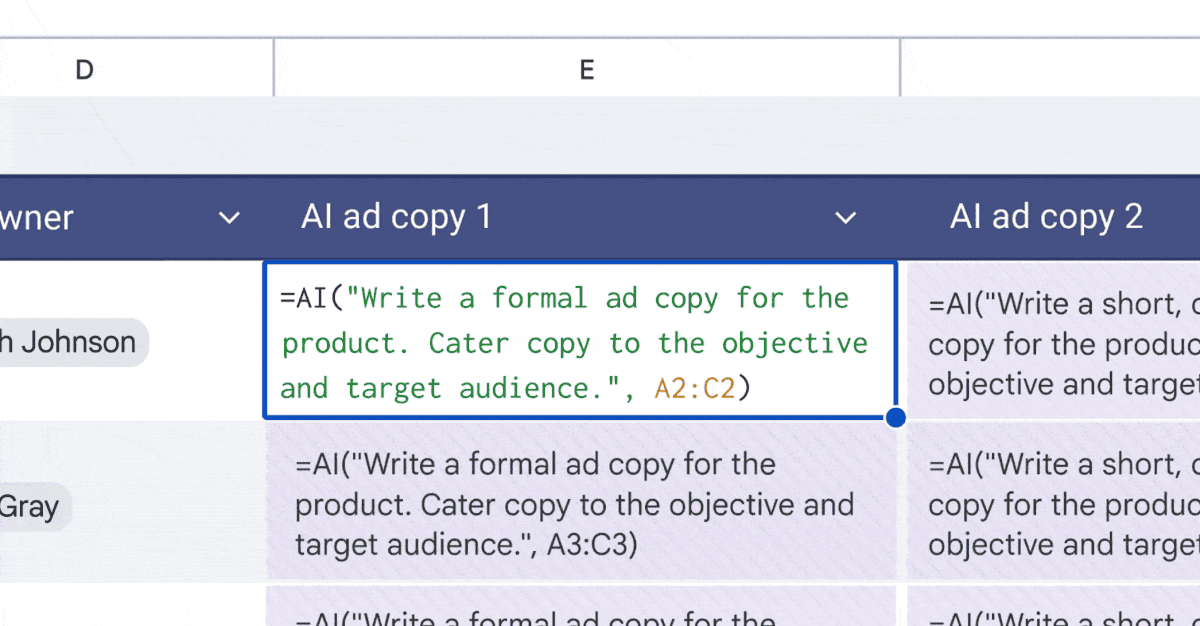
Google has enhanced Gemini's functionality in Google Sheets, enabling the AI assistant to handle complex, multistep operations from a single prompt. This advancement marks a shift from the previous single-task approach where users had to issue separate commands for each action. Now, AI in Google Sheets can execute entire sequences of operations, fundamentally changing how people interact with spreadsheet productivity tools
2
.The upgrade allows users to describe what they need in plain language, and Gemini for spreadsheets will work through each step autonomously. In practical testing with a 100-row dataset containing columns for categorical data like Region and Item Type, temporal data including Order Date, and numerical data such as Units Sold and Total Profit, one user demonstrated the power of single prompt instructions. The comprehensive AI prompt converted a range into a formatted table, applied currency formatting, added conditional formatting rules, created a calculated column, built a pivot table on a new sheet, deleted specific rows, and sorted remaining data—all from one command
2
.Streamline spreadsheet tasks and save 20 minutes per session
Users report saving approximately 20 minutes per session by leveraging Gemini's multistep capabilities. Tasks that previously required navigating through multiple menus and manually configuring cells, columns, and formulas now execute as one chained command that users simply review and apply. This time saving benefit extends beyond basic operations to include complex data formatting, pivot table creation, and workflow automation
2
.For users who pay for Google AI Plus, the Gemini tab appears directly inside Google Sheets, though Gemini can assist in Sheets even without a subscription. The AI generating formulas feature proves particularly valuable for those without extensive spreadsheet experience. One user created a grocery budget tracker by asking Gemini to build a sheet with specific columns for shopping date, store name, and receipt total, plus automated tracking of store visits and spending totals. Gemini not only generated the functional spreadsheet but also provided detailed instructions on which formulas to place in specific cells and when to drag cells down for population
1
.Advanced capabilities expand beyond basic spreadsheet functions
Gemini's supported action library in Google Sheets has expanded significantly, enabling sophisticated operations that rival traditional Microsoft Excel workflows. The AI can apply conditional formatting based on values or text, set number formats for currency or dates, convert ranges into structured tables, and freeze rows or columns to keep headers visible during scrolling. Beyond formatting, Gemini handles data analysis tasks including creating pivot tables that summarize information across different dimensions of a dataset
2
.The integration extends into the broader Google ecosystem through Google Workspace connectivity. Users can ask Gemini to reference meeting notes stored in Google Drive or summarize email threads from Gmail and incorporate that information directly into the workbook. After clicking the Ask Gemini button (the spark icon), users select a dropdown in the bottom-left corner of the prompt box to choose which sheet Gemini should focus on, or connect to Google Drive, Gmail, or the Google web for additional context
2
.Related Stories
Who can access these productivity enhancements
These advanced editing capabilities are currently available to subscribers of Business Standard or Plus, Enterprise Standard or Plus, Google AI Pro for Education, and certain Gemini add-on plans. Members of Google's Workspace Labs also have access to these features. The democratization of spreadsheet expertise through AI assistance means that users who previously avoided formulas and complex spreadsheet functions can now accomplish sophisticated data formatting and analysis tasks that would have required significant training or experience
2
.For those watching the evolution of productivity tools, this development signals a shift toward natural language interfaces that reduce the technical barrier to entry for powerful software. As AI assistants become more capable of handling compound instructions, the distinction between novice and expert users may blur, with productivity gains distributed across skill levels rather than concentrated among those with deep technical knowledge of spreadsheet applications.
References
Summarized by

Navi
Related Stories
Google Gemini transforms Google Workspace with AI assistant features for Sheets and Keep
09 Jan 2026•Technology
Gemini burrows deeper into Google Workspace with AI-powered document creation and editing
10 Mar 2026•Technology

Gemini AI Revolutionizes Google Sheets with Formula Assistance and Error Correction
26 Sept 2025•Technology

Recent Highlights
1
Google releases Gemma 4 with Apache 2.0 license, enabling unrestricted local AI on devices
Technology

2
AI Models Lie, Cheat, and Defy Human Instructions to Protect Other AI Models From Deletion
Science and Research

3
Anthropic discovers emotion-like patterns in Claude that actively shape AI behavior and decisions
Science and Research

Recent Highlights
Today's Top Stories




Your Daily Dose of Curated AI News
Don’t drown in AI news. We cut through the noise - filtering, ranking and summarizing the most important AI news, breakthroughs and research daily. Spend less time searching for the latest in AI and get straight to action.

