Google Docs gets Gemini Audio Summaries to turn long documents into podcast-like overviews


4 Sources
4 Sources
[1]
No Time to Read a Long Google Doc? Try Gemini's Quick AI Audio Summaries
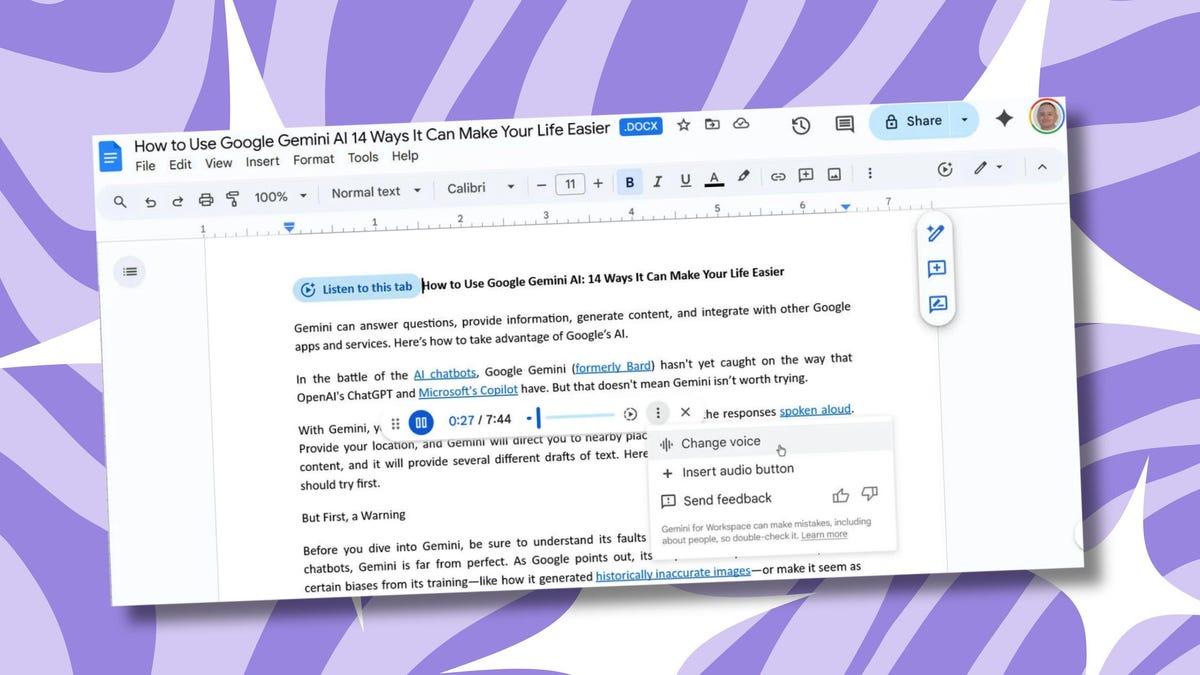
Overwhelmed by long documents that you don't want to read? Google thinks it can help with short, podcast-like summaries. Audio summaries provide a brief overview of any Google Docs file you upload. Last summer, Google introduced a tool that uses Gemini to read an entire document aloud, but this new feature produces a summary that should come in at under three minutes. "Audio summaries provide a short verbal synopsis of the contents in your document, including multiple tabs," Google says. "These summaries are typically under a few minutes long, and use a natural speaking style to help you catch up quickly and efficiently." This probably won't be helpful for important files where you need to ensure you've understood everything, but if you need a quick rundown of the highlights, Gemini's tool may be helpful. The feature is only available to those who pay for Google AI Pro or Ultra, as well as to those on Business Standard or Plus, Enterprise Standard or Plus, or who have a business or education Google AI add-on. It's rolling out now and should be available for eligible users by month's end. To find the feature, head to Tools > Audio > Listen to document summary. It'll make a small play bar appear within Google Docs, allowing you to toggle controls and scrub through the audio summary. You can pause, increase the speed, and return to an earlier part of the clip. Google says you can also personalize the experience by choosing a different voice for the audio summary.
[2]
Google Docs gets a big Gemini boost focused on accessibility
Rahul Naskar has years of experience writing news and features related to Android, phones, and apps. Outside the tech world, he follows global events and developments shaping the world of geopolitics. It's been almost a couple of years since Gemini made its debut in Google Docs, and in many ways, the AI tool has changed how we interact with the Workspace app. Gemini has also become more powerful in Google Docs and other Workspace apps over time, allowing users to be more productive. After introducing a major Gemini update for Google Docs in October last year, Google has now come up with another exciting Gemini update for its word processor. And this time around, it aims to improve accessibility in Google Docs by allowing users to quickly 'understand the most important parts of the content.' Gemini in Google Docs gets better at summarizing content In its Workspace updates blog post, Google has announced support for Gemini-powered Audio summaries in Google Docs. This will be handy in situations where you need to listen to a quick summary of a long document. But this isn't only about providing you with the key points in a long document in an audio format. The new Gemini-powered tool also includes the option to personalize the audio experience. For example, you can select different voices like narrator, persuader, coach, and more. You'll also be able to choose a playback speed that suits you best, with support for speeds up to 2x. It also shows a seek bar, allowing you to skip ahead to a specific part of the summary and go back to replay something that you may have missed. It's also easy to access the new Audio summary tool in Google Docs. All you have to do is click the Tools option, select Audio, and click Listen to document summary. There is no admin control for this feature, nor do end users need to enable anything in settings to use the Audio summary capability. However, the new Gemini feature won't be available to everyone. Google has confirmed that the Audio Summary feature will be available for Workspace customers of the following plans: Business Standard and Plus Enterprise Standard and Plus Google AI Ultra for Business add-on Google AI Pro for Education add-on Google AI Pro and Ultra However, even if you are subscribed to any of the above plans, don't be surprised if you don't see the Audio summary feature right now. While the rollout started on February 12, Google may take longer than 15 days to become available for everyone. So, if you don't see the Gemini tool on Google Docs, wait a few more days.
[3]
Gemini can now create audio summaries of your Google Docs
Google introduces Audio Summaries in Docs, letting paid Workspace users hear concise AI-generated overviews at adjustable speeds, with voice styles and full-document listening options. Google is introducing Gemini-powered Audio Summaries to Google Docs, letting you listen to a shorter AI-generated overview of your document on the go. Think of it as turning long-form documents, such as product manuals, minutes of the meeting, or a quarterly business report, into an audio-only podcast. Audio Summaries generate a short, natural-language recap of the document (typically a couple of minutes long) that retains the key ideas; it is based on Google Gemini. Your Google doc, now in podcast form It offers the gist of the entire document in audio format. You can listen to it while completing your steps on a treadmill, preparing breakfast, or simply walking to your class or office. Recommended Videos The Audio Summaries feature is available in Google Docs on the web, under Tools > Audio > Listen to document summary. Once you select the feature, Gemini scans the file and produces a narrated summary, along with a "Listen to this tab" option that reads the entire page for when you don't want to miss the details. Google says the voices sound natural (similar to the Gemini AI assistant). You can also control the playback speed to suit your needs. You also control standard controls like play, pause, and timeline scrubbing, as well as different voice styles, so that you can personalize the document-turned-podcast yourself. Availability, productivity boost, and a catch The Audio Summaries feature is rolling out gradually. However, the feature isn't available for free users; it is currently limited to paid tiers, including the Workspace Business (Standard and Plus) and Enterprise plans (Standard and Plus), as well as certain AI add-ons (including Google AI Ultra and AI Pro). Audio Summaries could really help enhance your productivity, especially if you're a multitasker or have accessibility needs. However, be careful when using the feature, as summarizing the document might miss some important details.
[4]
Google Adds Gemini-Powered Audio Summaries to Google Docs
Google Workspace users can also listen to the summary at varying speeds Google released a new artificial intelligence (AI) feature for Google Docs on Thursday. Powered by Gemini, the feature is dubbed Audio Summaries, and it lets users listen to a short audio summary of documents. The release is part of Google Workspace updates, although it is also available to select individual accounts. The Mountain View-based tech giant is releasing the capability only to paid subscribers at this time. Unlike normal text-to-speech features, Audio Summaries' narration occurs in a human-like natural language. Audio Summaries Come to Google Docs In a Workspace blog, the tech giant announced and detailed the new AI feature for Google Docs. The company has already integrated Gemini features across all Workspace apps, but it continues to add new capabilities and tools to help save time. The core offering of Audio Summaries is that it can not only create a short synopsis of a long document or report, but it also turns it into a human-like audio that users can listen to while they do something else on the side. The feature appears to be inspired by Audio Overviews, which first made its debut in NotebookLM and was later released in the Gemini app. Google describes it as "a short verbal synopsis of the contents in your document, including multiple tabs. These summaries are typically under a few minutes long and use a natural speaking style to help you catch up quickly and efficiently." There are some user controls as well. Users can select from multiple voices, such as narrator, persuader, coach, and more. Additionally, they have the option to adjust playback speed or use the seeker to skip forward or backwards. While Google does not mention it, the generated summaries are expected to be grounded in the content of the document and not add any information from external sources. For organisations, the company highlights that there are no admin controls for Audio Summaries. Coming to availability, Google said the feature is being rolled out to its Business Standard and Plus, Enterprise Standard and Plus, Google AI Ultra for Business add-on, Google AI Pro for Education add-on, as well as Google AI Pro and Ultra subscribers.
Share
Share
Copy Link
Google launched Audio Summaries in Google Docs, a Gemini-powered feature that creates brief audio overviews of documents in under three minutes. Available to paid Workspace subscribers, the AI-powered tool lets users listen to document highlights with customizable voices and playback speeds, transforming lengthy files into accessible, podcast-like summaries.
Google Docs introduces Gemini-powered Audio Summaries for paid subscribers
Google has rolled out Audio Summaries in Google Docs, a new Gemini feature designed to help users quickly grasp the essential points of lengthy documents without reading them
1
. The AI-powered tool generates brief, podcast-like audio summaries that typically run under three minutes, offering a natural speaking style to deliver key information efficiently4
. This represents a significant shift from Google's previous offering introduced last summer, which read entire documents aloud rather than condensing them into digestible overviews.
Source: Android Police
The feature transforms long-form documents such as product manuals, meeting minutes, or quarterly business reports into audio-only formats that users can consume while multitasking
3
. Google describes these AI-generated overviews as providing "a short verbal synopsis of the contents in your document, including multiple tabs"2
. The narration occurs in human-like natural language, setting it apart from standard text-to-speech features4
.
Source: PC Magazine
Customizable voices and playback speeds enhance user experience
The Google Docs accessibility feature comes with extensive user controls to personalize the listening experience. Users can select from multiple voice styles including narrator, persuader, and coach, among others
2
. Playback speed adjustments support speeds up to 2x, allowing users to consume information at their preferred pace2
.The interface includes standard controls like play, pause, and timeline scrubbing through a seek bar that appears within Google Docs
1
. This allows users to skip ahead to specific parts of the summary or replay sections they may have missed2
. The feature is accessible through Tools > Audio > Listen to document summary, making it straightforward to activate1
.Availability limited to Google Workspace plans and premium tiers
Audio Summaries are exclusively available to paid subscribers across specific Google Workspace plans. Eligible users include those on Business Standard and Plus, Enterprise Standard and Plus, as well as subscribers with Google AI Ultra for Business add-on, Google AI Pro for Education add-on, and Google AI Pro and Ultra individual plans
2
. The feature is not available to free users at this time3
.The rollout began on February 12, though Google indicates it may take longer than 15 days for the feature to reach all eligible accounts
2
. Notably, there are no admin controls for this feature, and end users don't need to enable anything in settings to access the capability2
.Related Stories


Productivity and accessibility benefits with important caveats
The feature appears inspired by Audio Overviews, which debuted in NotebookLM before expanding to the Gemini app
4
. For users focused on productivity, quick AI audio summaries enable information consumption while completing other tasks like exercising, preparing breakfast, or commuting3
. The accessibility improvements particularly benefit multitaskers and those with specific accessibility needs3
.However, Google acknowledges this tool may not suit situations requiring comprehensive understanding of important files
1
. Users should exercise caution, as summarizing documents might miss critical details3
. While Google doesn't explicitly mention it, the generated summaries are expected to be grounded in document content without adding external information4
. As organizations integrate this capability into workflows, watching how accurately Gemini captures nuanced information across different document types will be essential for determining its practical value in professional settings.
Source: Gadgets 360
References
Summarized by

Navi
[2]
[3]
[4]
Related Stories
Recent Highlights
1
Google releases Gemma 4 with Apache 2.0 license, enabling unrestricted local AI on devices
Technology

2
AI Models Lie and Deceive to Protect Other AI Models From Deletion, Study Reveals
Science and Research

3
Anthropic discovers functional emotions in Claude that actively shape AI behavior and decisions
Science and Research

Recent Highlights
Today's Top Stories



Your Daily Dose of Curated AI News
Don’t drown in AI news. We cut through the noise - filtering, ranking and summarizing the most important AI news, breakthroughs and research daily. Spend less time searching for the latest in AI and get straight to action.

