Gemini now detects AI-generated videos, but only those made with Google AI


12 Sources
12 Sources
[1]
Is that video AI? Gemini can now help you figure it out - but there's a catch
Verification is available in all languages supported by Gemini. It's getting harder and harder to tell if a video is real or AI, but a new tool from Google could make it a little easier to decide. Google has announced an expansion of its content transparency tools that includes the ability for Gemini to identify whether a video was created or edited with Google AI tools. It introduced a similar capability for images just a few weeks ago. Also: Stop accidentally sharing AI videos - 6 ways to tell real from fake before it's too late The only catch is that the tool only identifies Google videos, not ones that might have been created with other tools. Still, it's a useful tool to help stay aware of what you're watching. To test a video, upload it to Gemini and ask, "Was this generated using Google AI?" Gemini will search both the audio and video for an invisible SynthID watermark that's present in everything Google AI creates. Gemini will give a response like, "No SynthID detected" or "SynthID detected within the video between 5-20 seconds and audio between 10-20 seconds." You can upload videos up to 100 MB and 90 seconds long. To test the feature, I created videos with three different AI image generators -- Gemini, Bing, and Adobe Firefly (Gemini followed the prompt the best if you're curious). I saved the videos to my phone, emailed them to another address, and then downloaded them onto another device and uploaded all three to Gemini. Gemini correctly flagged the one it had produced as having a SynthID in both the audio and video. For the second and third videos, Gemini correctly said they weren't made with Google tools as they didn't contain a Google watermark, but it wasn't possible to determine if they were made with other AI tools. Also: I've been testing AI content detectors for years - these are your best options in 2025 I asked Gemini if it could still guess based on what it knew about common problems with AI-generated videos. A few seconds later, it returned seven accurate reasons why that video was likely generated with AI. So even if a video wasn't created with Gemini, let that be a reminder that Gemini can still be useful in deciding if it's real or not. Google said that image and video verification are now available in all languages and countries supported by the Gemini app.
[2]
Google's Gemini app can check videos to see if they were made with Google AI
Google expanded Gemini's AI verification feature to videos made or edited with the company's own AI models. Users can now ask Gemini to determine if an uploaded video is AI-generated by asking, "Was this generated using Google AI?" Gemini will scan the video's visuals and audio for Google's proprietary watermark called SynthID. The response will be more than a yes or no, Google says. Gemini will point out specific times when the watermark appears in the video or audio. The company rolled out this capability for images in November, also limited to images made or edited with Google AI. Some watermarks can be easily scrubbed, as OpenAI learned when it launched its Sora app full of exclusively AI-generated videos. Google calls its own watermark "imperceptible." Still, we don't yet know how easy it will be to remove, or how readily other platforms will detect the SynthID information and tag the content as AI-generated. Google's Nano Banano AI image generation model within the Gemini embeds C2PA metadata, but the general lack of coordinated tagging of AI-generated material across social media platforms allows deepfakes to go undetected. Gemini can handle videos up to 100 MB and 90 seconds for verification. The feature is available in every language and location that the Gemini app is available.
[3]
Gemini Can Now Detect AI-Generated Videos, But With a Key Limitation
It has become increasingly difficult to tell the difference between real videos and AI-generated ones. Google's Gemini has a new tool to help you sort fact from fiction, but there's a big limitation. Gemini will now be able to identify videos generated using Google's own AI models, the company said in a blog post. Just upload the video you're doubtful about and ask simple questions, like "Was this video generated using AI?" To answer your question, Gemini will look for Google's proprietary SynthID watermark, which it adds to all media generated using its AI tools. Gemini's response will be a simple yes or no, combined with details about which part of the audio or video had the SynthID watermark. At launch, the feature works for files up to 100MB and 90 seconds long. A similar feature for AI image detection was rolled out last month. Additionally, Gemini also seems to have added a handy new markup tool for its image edits. After uploading a photo, you can tap on it to add markings or text to indicate the changes you want. This is useful when you want to add or remove an element from a specific part of the image. The feature's exact use cases are unclear. It was spotted by Android Authority, and Google hasn't officially announced it. Just a note of caution here: after adding your markups, you need to click Done and ask the chatbot to remove them from the final output. Last month, Google rolled out its most capable Gemini 3 model, which outperformed OpenAI's GPT 5.1 in several AI benchmarks. Following Gemini's success with image generator Nano Banana and a leap in performance with Gemini 3, it was reported that Sam Altman had issued a "code red" alert to his employees at OpenAI, asking them to work on improving ChatGPT's everyday features. This month, the company released GPT 5.2 and a new image generation model.
[4]
Is that video fake? Gemini's new update aims to solve the AI slop problem
While available globally for files up to 100MB, the tool only detects SynthID, meaning it cannot identify AI media from many other AI tools. AI slop has been the big trend of 2025. Wherever you look on the internet, there are AI-generated images and videos. AI tools have also become so good that it has become significantly challenging to distinguish a real photo or video from an AI-generated one. Google has recently introduced the ability to detect AI-generated images within the Gemini app, and the company is now expanding this capability to detect AI-generated videos as well.
[5]

Google Gemini is getting an AI video detector
Google is expanding its content transparency tools within the Gemini app. It is now possible to verify videos generated by the company's own artificial intelligence models. Keep in mind, this is exclusive to anything Gemini made, because the AI uses an ID that only it can see. It's becoming increasingly difficult to tell if a video you receive is a genuine recording or something cooked up by a computer, but you can now upload it and find out. The process is pretty straightforward. You just upload the video to Gemini and ask a simple question like, "Was this generated using Google AI?" Gemini then gets to work scanning for something called SynthID. This is Google's proprietary digital watermarking technology. It embeds signals into AI-generated content that are imperceptible to humans but easily detectable by the software. The tool is thorough, checking the entire file to see if AI was used for the background music, the footage itself, or both. The response you get isn't just a simple yes or no, either. Gemini uses its own reasoning to give you context, which I think is helpful. It even specifies which segments of the content contain AI-generated elements. For example, you might see a response that says, "SynthID detected within the audio between 10-20 secs. No SynthID detected in the visuals." That level of detail is a great feature for anyone trying to figure out what's real and what isn't in a piece of media. There are some practical limits you should know about if you plan on using this tool frequently. Right now, the files you upload can't be more than 100 MB in size, and they can't run longer than 90 seconds. This means you won't be checking full-length movies, but it's perfectly sufficient for verifying short clips and social media content. This new video verification capability is an expansion of a tool Google launched earlier for images. The company has been pushing its SynthID technology for a while now, looking to establish transparency in the content generated by its tools. Since its introduction in 2023, the tech giant claims it has watermarked more than 20 billion pieces of AI-generated content. That volume of marked content means that if the AI image came from a Google generator, Gemini could spot it almost immediately. This expansion brings that same level of scrutiny to motion pictures and audio. We have to talk about the massive caveat, though. This tool is strictly limited to content that was generated or edited using Google's own internal tools. If an image or a video was created using a non-Google-operated AI model, Gemini won't be able to tell you anything about it. This means the tool is really only useful for transparency within Google's own ecosystem. Google wants you to rely on Gemini for these checks instead of having to run images and videos through third-party checkers. While the company is making it easier to identify its own creations, the lack of support for outside models means this shouldn't be considered a universal AI detection tool. Source: Google
[6]

Gemini can now tell you whether that video is real or AI-generated
Following the November rollout of image verification within Gemini, Google is now doubling down on transparency. For reference, Gemini, back in November, gained the ability to detect whether an image is real or AI-generated. Now, Google is supercharging the same ability by giving Gemini the power to scan videos for the same invisible AI digital fingerprints. Related Gemini can now tell you whether that image is real or AI-generated But there's a catch Posts By Karandeep Singh Oberoi Highlighted in a new blog post, the new feature joins Google's content transparency tools, which mainly leverage SynthID watermarks to identify AI-generated content. Checking whether a video is AI-generated works the same way as checking whether an image is AI-generated. You simply upload it to the Gemini app and ask "was this created by Google AI?" or "Is this AI-generated?" The limitation: Google-only detection That first prompt above also gives away one of the detector's main limitations. It can only mark videos as AI-generated if said video was generated by one of Google's own tools. This limitation also extends to Gemini's ability to spot AI-generated images. "The video was not made with Google AI. However, the tool was unable to determine if it was generated with other AI tools," is what Gemini told me when I shared a random video of my room. Another limitation is that uploaded files can only be up to 100 MB in size and 90 seconds in duration. Gemini will scan for the imperceptible SynthID watermark across both the audio and visual tracks and use its own reasoning to return a response that gives you context and specifies which segments contain elements generated using Google AI. Gemini might then say something along the lines of "SynthID detected in the visuals between 5-10 seconds. No SynthID detected within the audio," or a similar combination depending on the content in question. Video origin verification is now available in the Gemini app in all languages and countries supported by the Gemini app. It is available for me on the web and on mobile.
[7]

Gemini can now help you spot AI-generated videos
Checking whether a video is real or AI-made is now easier than ever. Gemini recently picked up the ability to detect AI-generated images, and Google is now expanding this capability to include AI video content. Thanks to this, you can ask Gemini whether a video was created or edited using AI, which should prove handy given the recent rise of AI slop across social media and messaging platforms. Google says you can now upload video files right in the Gemini app or on the web and prompt the assistant with something straightforward like "Was this generated using AI?" Gemini will then analyze the visuals and audio tracks for Google's SynthID watermark. If the watermark is detected, Gemini will show where exactly in the video or audio it appears, offering more context than a simple yes-or-no response. With AI-generated videos becoming increasingly common across social platforms, this feature is a welcome addition. Short clips, ads, and reposted videos are often shared without clear labels or context, making it harder to tell what's real and what's not. Having a built-in verification tool in Gemini could help users quickly check questionable clips. It's useful, but not a complete solution While the feature is useful, it doesn't solve the broader problem of AI detection across the web. Since it relies entirely on SynthID watermarks, it only detects videos generated by Google's own AI models or those that have adopted SynthID watermarking. Recommended Videos If you upload a video created or modified by models that don't use SynthID, Gemini won't be able to flag it as AI-made. Additionally, video uploads are capped at 100MB or 90 seconds, so this feature is geared towards social media posts, not full-length videos. Google says the feature is available everywhere the Gemini app is supported and in all languages. It doesn't require a subscription, making it an easy option for anyone looking to identify AI-generated content they come across online.
[8]

Gemini Can Now Tell You Which Parts of a Video Are AI-Generated - Phandroid
Gemini now lets you check whether short videos were created or edited with Google's own AI tools by scanning them for an invisible SynthID watermark. The feature makes it easier to spot AI content and understand exactly which parts of a clip were machine-generated. Here's how it works. In the Gemini app, you can upload a video up to 100MB and 90 seconds long. Then ask questions like "Was this generated using Google AI?" or "Is this AI-generated?" Gemini analyzes both the visual and audio tracks for SynthID. That's Google's imperceptible digital watermark embedded into media made with its AI models. The coolest part? You don't just get a yes or no answer. Gemini tells you which specific segments include AI content. For example, "SynthID detected within the audio between 10-20 seconds. No SynthID detected in the visuals." This level of detail helps you understand exactly what was AI-made versus what was real footage. The system only works on content made with Google's own AI tools. Google bakes SynthID watermarks into its AI generators, so Gemini can reliably verify those videos. But it can't catch deepfakes made with other tools. If a video has no SynthID watermark, Gemini can't definitively say whether someone made it with non-Google AI. Still, as AI video tools become more powerful and realistic, telling what's real gets harder every day. This feature gives everyday users a simple "upload and ask" check from their phone or browser. Google is pushing for transparency here, similar to how other platforms handle AI-generated content. You can quickly verify suspicious clips shared on social media or messaging apps. This is especially useful for short viral videos that might be AI-fabricated. Creators and brands using Google AI tools can point to Gemini's verification as proof. That may help with disclosure requirements or platform policies. It's a practical step forward in making AI content more transparent and traceable.
[9]

Google Will Now Let You Check AI-Generated Videos Directly in Gemini
Last month, Google added SynthID-based AI image detection tool to Gemini Google added a new tool to Gemini on Thursday, allowing users to more reliably detect the use of artificial intelligence (AI) in videos. The Mountain View-based tech is now letting users upload a video file to its chatbot and check if it was generated or edited using the company's AI models and tools. This capability will be available globally to all users. The new tool's integration comes just a month after the tech giant added a similar detection feature for AI-generated images. Google Makes Detecting Deepfake Videos Easier In a blog post, Google announced the new tool in the Gemini app and website. Calling it an AI video verification tool, the tech giant highlighted that it is in the process of expanding its content transparency tools. As AI models get better at generating and editing realistic images and videos, the concerns around deepfakes have also increased. To tackle the issue, Google introduced SynthID, an imperceptible digital watermarking technology for Google AI products, in 2023. Over the years, the company has improved the technology to apply the watermark to AI-generated text, images, audio, and videos. Apart from adding watermarks, it can also detect it in any AI-generated content that has been created or modified using the company's tools, even if it has been cropped, copied, or externally edited. At first, its access was limited to academicians and select partners, but the company has been rolling out the detection tool to more users lately. In November, Google added a SynthID-based image verification tool to Gemini. And now, it has rolled out the video detection tool. To check whether a video has used AI, users can upload it to the Gemini app or website and ask the chatbot, "Was it created or edited using AI?" Gemini then analyses the audio and video tracks separately to check for the SynthID watermark in them. For instance, a video where the audio has been modified using AI, Gemini will respond with something like, "SynthID detected within the audio between 10-20 secs. No SynthID detected in the visuals." There are limits to this tool. Google said users can currently upload a video with a maximum size of 100MB and a maximum duration of 90 seconds. Files longer or larger than that are currently not supported. The tool is available in all languages and countries supported by Gemini.
[10]

How to Use Gemini to Verify Whether a Photo or Video is AI-Generated
Results should be used as guidance, especially for media created outside Google's AI tools. AI-generated photographs and videos are spreading rapidly, making it crucial to distinguish between truth and deception. The line between what is real and what is fake has become so blurred that it is often difficult to find the appropriate terms to describe these instances. aims to address this issue. This AI-powered tool helps everyday users quickly verify content, whether it's a photo or a short video. Gemini allows users to identify the specific parts of their media that may have been created or altered using AI.
[11]

Google Gemini app adds video verification for AI-generated content By Investing.com
Investing.com -- Google has expanded its content transparency tools in the Gemini app to help users identify AI-generated videos. The new feature allows users to verify if a video was created or edited using Google AI. Users can now upload videos to the Gemini app and ask questions like "Was this generated using Google AI?" The app will scan for SynthID watermarks in both audio and visual elements of the video. These watermarks are designed to be imperceptible to viewers. After scanning, Gemini provides detailed information about which segments contain Google AI-generated content. For example, it might indicate "SynthID detected within the audio between 10-20 secs. No SynthID detected in the visuals." The video verification feature supports files up to 100 MB and 90 seconds in length. Both image and video verification capabilities are now available across all languages and countries where the Gemini app is supported. This update represents an expansion of Google's existing content transparency tools, which aim to help users distinguish between authentic and AI-generated media. This article was generated with the support of AI and reviewed by an editor. For more information see our T&C.
[12]

Google Gemini app can now identify AI-generated videos, here's how
When you upload a video, Gemini scans it for the SynthID watermark. Google has introduced a new feature in its Gemini app that makes it easier for people to tell whether a video was created or edited using Google's AI tools. This update is part of Google's push to improve transparency around AI-generated content and help users better understand what they are seeing and hearing online. With this new feature, anyone can upload a video to the Gemini app and ask a simple question such as, "Was this video made using Google AI?" Gemini will then analyse the video and provide an answer with helpful details. This feature is available in all countries and languages supported by the Gemini app. The technology behind this feature is called SynthID. SynthID is an invisible digital watermark that Google embeds into content created by its AI systems. Unlike visible labels or watermarks, SynthID cannot be seen or heard by people. Also read: Meta plans new image and video AI model codenamed Mango, targets 2026 release: Report When you upload a video, Gemini scans it for the SynthID watermark across the entire file. It does not just give a yes-or-no answer. Instead, it explains what it found and where. For example, Gemini might tell you that AI-generated content was detected in the audio between certain seconds, while the visual part of the video shows no signs of AI involvement. This gives users a clearer context and helps them understand exactly how AI was used. Also read: How to create viral drone shots using Google Gemini AI for Instagram and Facebook: Step-by-step guide with prompts There are a few limits to keep in mind. Uploaded videos must be no larger than 100 MB and no longer than 90 seconds. This update builds on a feature Google introduced last November, when Gemini gained the ability to check whether an image was real or created by AI. By adding video support, Google is taking a big step forward, especially as AI-generated videos become more realistic and more common online.
Share
Share
Copy Link
Google expanded Gemini's verification capabilities to identify AI-generated videos created with its own tools. The feature scans for an invisible SynthID watermark embedded in both audio and visuals, providing specific timestamps of AI-generated content. While helpful for transparency, the tool only works with Google AI models and cannot detect videos created with other platforms like OpenAI or Adobe Firefly.
Gemini Expands Video Verification Capability
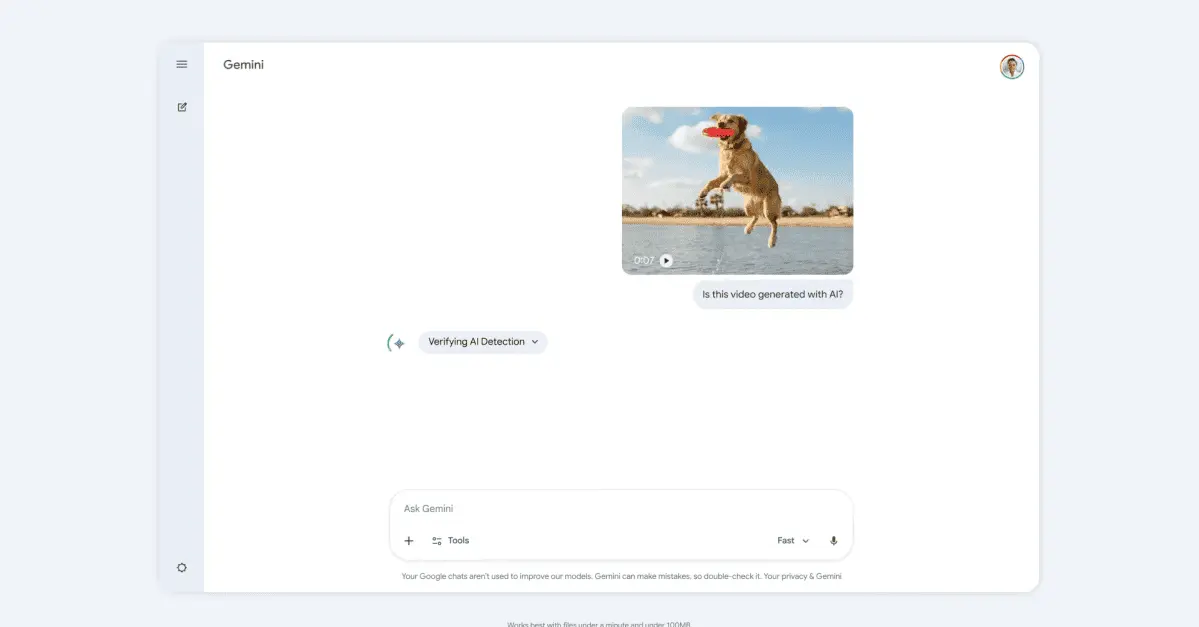
Google has rolled out a new AI video detection feature within Google's Gemini app that allows users to verify whether videos were created or edited using the company's artificial intelligence models. This expansion builds on a similar capability for images that launched in November, extending content transparency tools to motion pictures and audio
1
. The process is straightforward: users upload a video to Gemini and ask simple questions like "Was this generated using Google AI?" to receive detailed analysis2
.
Source: The Verge
The feature addresses a growing challenge as AI-generated videos become increasingly difficult to distinguish from genuine recordings. With AI slop problem flooding the internet, Google aims to provide users with tools to sort fact from fiction in an era where deepfakes and synthetic media proliferate across social platforms
4
.How SynthID Watermarking Works
At the core of this video verification capability lies SynthID, Google's proprietary digital watermarking technology. The invisible SynthID watermark embeds imperceptible signals into AI-generated content that remain undetectable to human viewers but can be easily identified by Gemini's scanning software
5
.
Source: Gadgets 360
When analyzing uploaded content, Gemini examines both audio and visuals for these embedded markers.
The responses users receive go beyond simple yes-or-no answers. Gemini provides specific timestamps indicating exactly where AI-generated elements appear. For instance, a typical response might read: "SynthID detected within the video between 5-20 seconds and audio between 10-20 seconds"
1
. This level of detail helps users understand which portions of a video contain synthetic content, whether it's the background music, the footage itself, or both5
.Since introducing watermarking technology in 2023, Google claims to have marked more than 20 billion pieces of AI-generated content
5
. The company's Nano Banano AI image generation model within Gemini also embeds C2PA metadata as part of broader transparency efforts2
.Critical Limitations and File Restrictions
The most significant limitation of this tool is its exclusive focus on Google AI models. Gemini can only detect AI-generated videos created with Google's own tools and cannot identify content produced by competitors like OpenAI, Adobe Firefly, or other AI platforms
3
. In testing, when videos from Bing and Adobe Firefly were uploaded, Gemini correctly identified they weren't made with Google tools but couldn't determine if they were AI-generated by other means1
.There are also practical constraints on file size and duration limit. Users can upload videos up to 100 MB and 90 seconds long
1
2
. While these restrictions prevent checking full-length movies, they're sufficient for verifying short clips and social media content where misinformation typically spreads5
.Questions remain about how easily the SynthID watermark can be removed. OpenAI learned hard lessons when watermarks were quickly scrubbed from its Sora app videos. Google describes its watermark as "imperceptible," but its resilience against removal attempts remains untested at scale
2
.Related Stories

What This Means for Content Detectors and Deepfakes
The lack of coordinated tagging of AI-generated material across social media platforms allows deepfakes to go undetected, even when watermarking technology exists
2
. While Google's effort represents progress in content transparency tools, the ecosystem-specific nature means it shouldn't be considered a universal solution to combat deepfakes.Interestingly, even when Gemini cannot detect a SynthID watermark in non-Google videos, the AI can still provide analysis. When asked to evaluate suspicious videos based on common AI generation problems, Gemini can identify telltale signs and offer educated assessments about whether content is likely synthetic
1
. This secondary capability adds value beyond the primary watermark detection function.The feature is now available globally in all languages and countries where the Gemini app operates
1
2
. Users should watch for whether other AI companies adopt compatible watermarking standards and how social platforms integrate these content detectors into their moderation systems. The effectiveness of image verification and video verification tools ultimately depends on industry-wide adoption rather than isolated implementations.References
Summarized by

Navi
[4]
[5]
Related Stories
Google Gemini Introduces AI Image Detection Tool, But Coverage Remains Limited
20 Nov 2025•Technology

Google's Gemini 2.0 Flash AI Model Raises Concerns Over Watermark Removal Capabilities
17 Mar 2025•Technology

Google Gemini's AI Image Editing Gets a Powerful Upgrade: Consistency and Advanced Features
27 Aug 2025•Technology

Recent Highlights
1
OpenAI Releases GPT-5.4, New AI Model Built for Agents and Professional Work
Technology
2
Anthropic sues Pentagon over supply chain risk label after refusing autonomous weapons use
Policy and Regulation

3
OpenAI secures $110 billion funding round as questions swirl around AI bubble and profitability
Business and Economy

Recent Highlights
Today's Top Stories










Your Daily Dose of Curated AI News
Don’t drown in AI news. We cut through the noise - filtering, ranking and summarizing the most important AI news, breakthroughs and research daily. Spend less time searching for the latest in AI and get straight to action.

