Google Workspace Studio launches to help businesses create AI agents without coding experience


12 Sources
12 Sources
[1]
Google Workspace now lets you create AI agents to automate your work - how to get started
The tool is available for Business and Enterprise Workspace users. Agentic AI is all the buzz in the business world as people envision creating and using special AI agents to carry out both routine and complex tasks on their behalf. Now, Google is launching a new product for Workspace users who want to see if they can benefit from such agents. Also: Want better Gemini responses? Try these 10 tricks, Google says Soon available for companies with Business or Enterprise Workspace subscriptions, Google Workspace Studio aims to help employees create, manage, and share AI agents. Accessible directly in Workspace, the tool supports the standard Workspace apps, including Gmail, Google Chat, and Google Drive, as well as select third-party apps such as Salesforce, Mailchimp, and Asana. You can use Studio to create AI agents to tackle a variety of tasks, from simple to complex. But the best candidates are ones that are also repetitive. Any task that requires you to repeat the same steps and actions is one that could potentially be handled more efficiently by an agent, freeing you up for other work. Yet these aren't just mindless tasks. They're ones that often require decision-making. That's why Google has enlisted Gemini 3 to power the process. Promising greater reasoning skills and more effective multimodal capabilities, the latest Gemini model is designed to navigate the problems and challenges that often arise, even in simple tasks. Also: Inside the making of Gemini 3 - how Google's slow and steady approach won the AI race (for now) "While traditional automation logic relies on stringent rules, rigid conditionals, and coding skills, Workspace agents are designed to be more powerful and flexible," Google said in a new blog post. "Thanks to Gemini's advanced capabilities, these agents can effectively reason through problems, adapt instantly to new information, and tackle the most complex, end-to-end business processes. This unlocks a new level of AI help, enabling sentiment analysis, content generation, intelligent prioritization, smart notifications, and more." Developing AI agents, especially ones that aim to perform programmatically complex tasks, seems like a daunting challenge. But here, Google promises that no coding or special technical skills are required to build your own agents. By integrating directly with Workspace, Studio is also accessible in the same tools and apps you normally use. If you do need help getting started, you can always check out these YouTube videos, refer to the Studio Help Center page, or join the Workspace Discord channel. Also: Should you trust AI agents with your holiday shopping? Here's what experts want you to know To get started, make sure you have the right kind of Workspace or AI account, and that Studio is set up at your organization. Any of the following plans qualify: If Studio is ready, head to the Google Workspace Studio page. Make sure you're signed in with your Workspace account and then click the Get Started button. You can then try to design your first agent from scratch or use one of the built-in templates. As a few template examples, you could ask for a daily summary of unread emails from Gmail, get notifications about emails from key people, label emails that have action items, highlight certain emails for follow-up, send email summaries and action items after meetings, or get news headlines summarized each day. Also: AI agents are already causing disasters - and this hidden threat could derail your safe rollout Otherwise, you can add your own tasks for an agent to carry out. You might create an agent to automatically add email attachments to Google Drive, to request team updates each week, to write email replies using information from a specific document, or to be notified when you're mentioned in a Google Chat conversation. When will you actually be able to use Studio? That depends on your organization and your release schedule. For companies on the rapid release track, admins will see Studio in the Admin console, and employees will get access starting December 3. For those on the scheduled release track, admin console settings will begin to roll out December 3, but user access won't kick off until Jan. 5, 2026.
[2]
Google just made automating your thankless work tasks even easier
You can also set us as a preferred source in Google Search by clicking the button below. Today, Google announced the debut of Workspace Studio. This feature is designed to allow you to create, manage, and share AI agents to automate work within Workspace. With Studio, you'll be able to build customized agents by simply describing what you want to automate. For example, you could ask to create an agent that notifies you whenever you receive an email with a specific keyword. Gemini will then take over to create the agent you're asking for. That means you can create agents without any prior coding knowledge.
[3]
Google launches Workspace Studio to create automated Gemini-powered agents
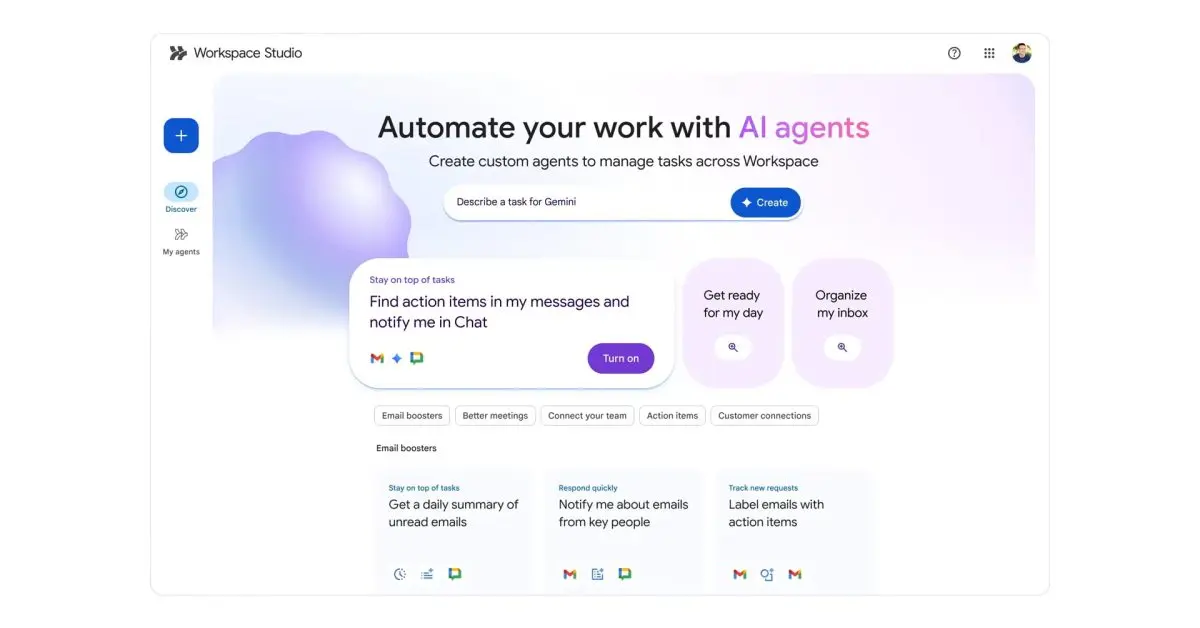
After teasing at I/O 2024 and announcing this April, Google today is launching Workspace Studio as a new automation tool that lets you "design, manage, and share AI agents" powered by Gemini 3's multimodal understanding. Previously known as Workspace Flows, Workspace Studio basically follows the "if this, then that" model of automation with full integration across Gmail, Chat, Drive, and other Google productivity apps. (You can also connect to Asana, Jira, Mailchimp, and Salesforce.) With Workspace Studio, you can build agents in minutes to automate everyday work, from simple tasks to complex workflows -- no coding or specialized syntax required. This includes a shortcut (double arrow icon) in the top-right corner of every web app next to Gemini. There are tabs for Discover, My agents, and Activity. You create Agents backed by Gemini's reasoning, context understanding, and generative capabilities. This allows for sentiment analysis, content generation, intelligent prioritization, smart notifications, and more. Prompts can be given in plan language. Prompt: "If an email contains a question for me, label the email as 'To respond' and ping me in Chat." Studio builds this agent instantly, utilizing Gemini 3 to decide which incoming emails contain questions. It can go even further -- extracting crucial details like action items, invoice numbers from the emails and their attachments. And since collaboration is at the heart of Workspace, you can share your agents with your team as easily as you share files in Google Drive. There are three components to Agents. Starters, or what triggers the automation, can be a time/date or receiving an email, including only those from specific people. You can then specify several Steps that the Agent should perform, like draft a reply, adding to a document, or extracting information. Each Step can have Variables, or "dynamic placeholders for information," that the Agent can use later on. This can be "Gemini's response to your prompt, the sender of the message that started the agent, a form response, and more." Google wants to put "custom agent creation in the hands of every employee" by "removing the friction of coding and making it easy for anyone to design agents that automate their unique business processes in minutes." At Cloud Next 2025, the tool entered alpha testing for enterprise customers. Over the coming weeks, it will be available for:
[4]
Google wants to help businesses build AI agents with no prior experience
You can create agents using natural-language prompts and Gemini 3 Google's Workspace Studio is now generally available for business and enterprise customers, serving as a no-code platform for creating, managing and sharing AI agents. Powered by the company's Gemini 3 model, praised for its advanced reasoning and multimodal understanding, customers can use Workspace Studio to create AI agents for both Google Workspace apps and third-party apps. Product Director Farhaz Karmali explained the reasoning behind the new AI agent creation ecosystem: "Legacy automation tools tried to help, but they were simply too rigid and technical for the everyday user." "You can delegate these repetitive tasks to agents that can reason, understand context, and handle the work that used to slow you down," Karmali added. With Workspace Studio, users can create agents using natural language, so no coding is required. Even so, they can still be packed with complex reasoning and contextual awareness to enhance output quality, and they'll support cross-app workflows including connectors with tools like Asana, Jira, Salesforce and Mailchimp. Prior to today's general availability, Workspace Studio was available as a beta project to Gemini Alpha program members. Google says more than 20 million tasks have been supported by AI agents built in the Studio over the past month alone. Karmali also highlighted Studio's collaborative nature: "You can share your agents with your team as easily as you share files in Google Drive." Kärcher, an early adopter, reduced drafting time by 90% from "hours of manual consolidation" to just two minutes. The company used AI agents to fetch fragmented data, review brainstorming sessions and perform feasibility checks. Workspace Studio is rolling out to business customers over the coming weeks, and users can pick from pre-arranged templates or build their own agents from the ground up.
[5]

Workspace Studio aims to solve the real agent problem: Getting employees to use them
One problem enterprises face is getting employees to actually use the AI agents their dev teams have built. Google, which has already shipped many AI tools through its Workspace apps, has made Google Workspace Studio generally available to give more employees access to design, manage and share AI agents, further democratizing agentic workflows. This puts Google directly in competition with Microsoft's Copilot and undercuts some integrations that brought OpenAI's ChatGPT into enterprise applications. Workspace Studio is powered by Gemini 3, and while it primarily targets business teams rather than developers, it offers builders a way to offload lower-priority agent tasks. "We've all lost countless hours to the daily grind: Sifting through emails, juggling calendar logistics and chasing follow-up tasks," Farhaz Karmali, product director for the Google Workspace Ecosystem, wrote in a blog post. "Legacy automation tools tried to help, but they were simply too rigid and technical for the everyday user. That's why we're bringing custom agents directly into Workspace with Studio -- so you can delegate these repetitive tasks to agents that can reason, understand context and handle the work that used to slow you down." The platform can bring agents to Workspace apps such as Google Docs and Sheets, as well as to third-party tools like Salesforce or Jira. More AI in applications Interest in AI agents continues to grow, and while many enterprises have begun deploying them in their workflows, they're finding it isn't as easy to get users on board as expected. The problem is that using agents can sometimes break employees out of their flow, so organizations have to figure out how to integrate agents where users are already fully engaged. The most common way of interacting with agents so far remains a chat screen. AWS released Quick Sight in hopes of attracting more front- and middle-office workers to use AI agents, although access to agents is still through a chatbot. OpenAI has desktop integrations that bring ChatGPT to specific apps. And, of course, Microsoft Copilot helped was ahead of this trend. Google has an advantage that only Microsoft rivals: It already offers applications that most people use. Enterprise employees use Google Workspace applications, host data and documents on Drive and send emails through Gmail. This means Google can easily get the context enterprises need to power their agents and reach millions of users. If people build agents through Workspace Studio, the platform can prove that agents targeting workplace applications, not just Google Docs, but also Microsoft Word, could be a winning strategy to increase agent adoption from employees. Templatizing agent creation Enterprise employees can choose from a template or write out what they need in a prompt window. A look around the Workspace Studio platform showed templates such as "auto-create tasks when files are added to a folder" or "create Jira issues for emails with action issues." Karmali said Workspace Studio is being "deeply integrated with Workspace apps like Gmail, Drive and Chat," and agents built on the platform can "understand the full context of your work." "This allows them to provide help that matches your company's policies and processes while generating personalized content in your tone and style," he said. "You can even view your agent activity directly from the side panels of your favorite Workspace apps." Teams can extend agents to third-party enterprise platforms, but they can also configure custom steps to integrate with other tools.
[6]

Google launches Workspace Studio to let users build AI agents for everyday work - SiliconANGLE
Google launches Workspace Studio to let users build AI agents for everyday work Google LLC today announced the general availability of Google Workspace Studio, a new platform designed to let everyday users build and deploy artificial intelligence agents to automate routine work across Gmail, Docs, Sheets, Drive, Meet and Chat. The new offering brings agentic AI capabilities directly into Google Workspace and, in doing so, allows employees to create task-specific digital agents using natural language rather than code. Workspace Studio is powered by Google's latest Gemini 3 model to enable users to describe what it is they want an agent to do, such as triaging emails, generating reports, tracking approvals, or coordinating project updates, with the system automatically building and running the workflow. The agents delivered by the offering are designed to reason, adapt and handle multi-step tasks using real workplace context. The agents can also access documents, read emails, analyze spreadsheets and trigger follow-up actions based on changing conditions. "Studio puts the full potential of agentic AI into the hands of everyone, not just specialists, by removing the friction of coding and making it easy for anyone to design agents that automate their unique business processes in minutes," said Farhaz Karmali, product director of the Google Workspace Ecosystem, in a blog post. The new service is being pitched as a response to the growing burden placed on employees by repetitive digital tasks. Google argues that workers often spend hours per week on low-value coordination, manual reporting and routine communications. By making AI agent creation accessible to non-technical users, Google is aiming to bring advanced automation into mainstream office workflows. While the agents can be used on an individual basis, they can also be shared across teams to allow organizations to standardize business processes in the same way they share documents today. Users can start with prebuilt templates or create agents from scratch using conversational prompts, making the tool accessible to business users without engineering support. In pre-full release testing, earlier customers saw strong productivity gains. One early tester, the cleaning solutions company Karcher SE & Co. used Workspace Studio to automate its internal product-planning workflow by deploying multiple agents responsible for brainstorming, feasibility analysis, user-experience validation and documentation. Using the agents saw the company reduce manual planning time by as much as 90% and be able to now produce ready-to-review plans in minutes instead of hours. Coming into the launch, customers participating in the Alpha program have already executed more than 20 million tasks using Workspace Studio agents over the past 30 days. Use cases range from simple reminders and meeting summaries to more complex workflows such as legal document triage, customer service routing and travel request management. Workspace Studio is rolling out to Google business customers over the next few weeks.
[7]

Google Workspace Studio Turns Plain English Into Working AI Agents - Phandroid
Remember when automation meant hiring developers or wrestling with complicated tools? Google just changed that. Workspace Studio launched December 3, 2025, and it lets anyone build AI agents by simply describing what they want in plain English. No coding required. The platform lives right inside Google Workspace and taps into Gemini 3 to automate tasks across Gmail, Docs, Sheets, Drive, Meet, and Chat. You could tell it something like "sort my emails by priority" or "summarize today's meetings and update the project spreadsheet," and Google Workspace Studio actually builds an agent that handles it. Alpha testers already ran over 20 million tasks in a single month, tackling everything from auto-generating reports to routing approval requests. These aren't basic if-then scripts that break the moment something changes. The agents actually reason through problems and adapt on the fly. They can integrate with external tools like Asana or Salesforce too, making them useful for real work instead of just demos. For teams drowning in repetitive admin tasks, this could be a genuine time-saver. Unlike tools like Zapier that require some technical know-how, Google Workspace Studio is designed for people who've never touched automation before. Your marketing coordinator or HR manager can build custom agents in minutes, which frees up your IT team to focus on bigger projects instead of handling every little workflow request. The agents get smarter as they work. Need something that flags urgent customer emails and coordinates responses across your team? It adjusts based on context rather than following rigid rules that fall apart when priorities shift. Legal teams can automate document reviews with fewer errors. Customer service departments can route inquiries intelligently without babysitting the system constantly. Gemini 3's multimodal smarts, handling text, images, and data simultaneously, give Google Workspace Studio an edge over Microsoft Copilot for deeper integration. Early tests suggest automations run about 30% faster, though your mileage will vary depending on how complex your workflows get. Google Workspace Studio is rolling out gradually to Business, Enterprise, and Education plans, plus select AI subscriptions. Full access through the Admin console is coming soon. For small businesses wondering if this is worth the hassle, think about how much time your team currently wastes on repetitive tasks that could run automatically while they focus on work that actually makes a difference.
[8]

You Can Now Create AI Agents for Automation in Google Workspace Apps
Google Workspace Studio is rolling out to paid enterprise subscribers Google Workspace Studio, the company's latest platform to let users design, manage, and share artificial intelligence (AI) agents for Workspace apps, was introduced on Wednesday. The platform was earlier available to select users under the name Workspace Flows, but is now generally available to all paid enterprise subscribers. These AI agents can be used to create automation for various tasks within the "if then, then that" format. As such, the platform does not let users create general-purpose agents, but those that can perform a single task with high efficiency. Google Workspace Studio Launched: Features and Availability The Google Workspace Studio will first be rolling out to the company's enterprise clients over the next few weeks, and then it will be made available to all paid subscribers, including the Business and Enterprise Starter, Standard, and Plus plans; Education Fundamentals, Standard, and Plus plans; Google AI Pro for Education, and AI Ultra for Business subscribers. As mentioned above, the AI agents created using the platform can be used across Gmail, Docs, Sheets, Chat, Meet, and other Workspace apps. The platform's agents are powered by the reasoning and multimodal capabilities of Gemini 3, and let users automate everyday tasks and more complex workflows. Google says the biggest advantage of these AI agents is that they can be created using natural language prompts, instead of relying to code-based traditional automation. Users can just tell Gemini to create an AI agent to "flag incoming emails from finance, extract, invoice data, add to Sheets, and notify me in Chat," and the underlying large language model (LLM) will be able to understand the context and broader goal to create the agentic workflow. Agents created via Studio are integrated into the user's existing Workspace environment. As a result, they can access relevant content, such as emails, documents, spreadsheets and more, while abiding by an organisation's data access controls. The tech giant claims that customer data, is not used to train its AI models, and is protected under existing privacy and security safeguards. Getting started is pretty simple. Once users enter the Workspace Studio, they can go to the Gemini text box at the top and type the task they want to automate. Users need to mention the trigger for the agent's activation, the steps to be taken by the agent, and variables. Once done, they can tap the create button, which will allow Gemini 3 Pro to create the entire workflow. If this is complicated, users can also start with several templates shared by the company. These templates cover common business needs. After the configuration step is done, the AI agents will automatically begin working, and they do not require any manual intervention. Users can also assign complicated tasks, such as responding to emails, and the agent relies on Gemini 3 Pro's context awareness to complete the action. Additionally, AI agents created in Workspace Studio can also connect to third-party enterprise tools, such as Asana, Jira, Mailchimp, and Salesforce. This allows users to integrate third-party data and actions into their automation setup as well.
[9]

Google rolls out Workspace Studio to help users automate everyday work
Google launches Workspace studio agents: Google has launched Workspace Studio, a new platform that lets anyone create AI agents using Gemini 3. Users can automate tasks across Gmail, Docs, Sheets, Drive, Meet and Chat without coding. Agents can handle routine work, extract details from documents, and connect with apps like Asana and Jira. Google rolled out a new platform called Workspace Studio on Thursday, designed to let people create, manage and share AI agents built on Gemini 3's multimodal abilities. "With Workspace Studio, you can build agents in minutes to automate everyday work, from simple tasks to complex workflows -- no coding or specialised syntax required," Google said in a blog post, highlighting that anyone can use it without technical skills. These AI agents can be deployed across Gmail, Docs, Sheets, Drive, Meet and Chat to take over routine activities. Workspace Studio also supports links to other major business tools, including Asana, Jira, Mailchimp and Salesforce, making it easier for companies to connect their existing systems. The system works by allowing users to describe what they want done, and the AI constructs the workflow automatically. Google explains that agents can pull important information from emails and attachments, such as action points and invoice details, with the system automatically building and running the workflow. The blog gives a simple example of how an instruction might look: "For example, you can prompt, 'If an email contains a question for me, label the email as 'To respond' and ping me in Chat.'" This means that users can create task-specific digital agents using natural language rather than code. Farhaz Karmali, product director for the Google Workspace Ecosystem, wrote: "Studio puts the full potential of agentic AI into the hands of everyone, not just specialists, by removing the friction of coding and making it easy for anyone to design agents that automate their unique business processes in minutes." Workspace Studio is already being used by customers in Google's Gemini Alpha programme. According to the company, these AI agents have handled over 20 million tasks within the past month. Users have applied them for a wide range of activities, from sending status updates and organising reminders to more complex tasks such as sorting legal notices and processing travel approvals.
[10]

Google rolls out Workspace Studio to support end-to-end business automation
Google has announced the general availability of Google Workspace Studio, a platform that enables users to design, manage, and share AI agents across Workspace. It uses Gemini 3 for reasoning and multimodal understanding, allowing automation without coding. Farhaz Karmali, Product Director, Google Workspace Ecosystem, said the aim is to reduce time spent on routine digital tasks such as managing email and follow-ups. He stated that previous automation tools were technical and rigid, and Workspace Studio makes it possible for anyone to build agents that understand context and execute tasks within Workspace applications. Workspace agents go beyond rule-based workflows. With Gemini capabilities, they can: They can be used for actions such as sentiment analysis, content generation, prioritizing tasks, and sending relevant notifications. Kärcher, working with Google Cloud partner Zoi, adopted Workspace Studio to improve product feature evaluation. Their virtual team of agents now performs: This process has reduced drafting time by 90%, turning hours of review and consolidation into about two minutes. Workspace Studio is already in use by customers in the Gemini Alpha program, with agents completing over 20 million tasks in the last 30 days. Users can start from templates or describe an automation request in natural language. Label an incoming email containing a question as "To respond" and trigger a Chat alert. Agents can also extract data from email content and attachments. They can be shared across teams similar to files stored in Google Drive. Since agents operate inside Workspace tools such as Gmail, Drive, and Chat, they can act with awareness of organizational context and use content from across applications. Activity tracking is available through Workspace side panels. Workspace Studio also supports connections to platforms including: More technical users can extend automation using Apps Script, internal tools, proprietary models, and Vertex AI integrations. Workspace Studio will roll out to business customers over the coming weeks. Once available, users can create agents through templates or natural language prompts. Additional information is provided through the Google Workspace Help Center, Discord community, and the Gemini alpha program.
[11]

Google Launches Workspace Studio, A No-Code Platform to Build AI Agents
Google has announced the general availability of Workspace Studio, a no-code platform within Google Workspace that employees can use to build and deploy AI-powered agents. It automates repetitive tasks while streamlining complex workflows, delivering advanced AI features to everyday users. According to Google, legacy are not in line with modern workflows. "Legacy automation tools tried to help but were too rigid and technical for the everyday user. That is why we are bringing custom agents directly into Workspace with Studio," the company said in a blog post. The tech giant believes employee-led automation will unlock massive productivity gains. Agents built in Workspace Studio can reason, understand, and execute tasks that previously required human input, creating a more flexible alternative to traditional rule-based systems.
[12]

Workspace Studio explained: AI agents will automate more work, believes Google
New agents aim to boost productivity across Gmail, Docs, and Sheets Google is preparing for a future where office software does far more than respond to prompts. With Workspace Studio, the company is laying the foundation for AI agents that can observe workflows, take actions across apps and complete complex tasks without constant human oversight. It signals a shift from conversational assistants to fully fledged autonomous helpers that operate inside the tools millions already use. Also read: Crucial RAM is dead, blame it on AI: Why Micron is shifting its memory priorities Workspace Studio is Google's new environment for building, testing and deploying agent style workflows across Gmail, Docs, Sheets, Drive and Calendar. Instead of relying on traditional scripting or API integrations, it allows developers and enterprises to create agents that understand context, learn patterns and coordinate tasks across the entire Workspace ecosystem. The idea is simple but ambitious. If today's AI helps you draft an email, tomorrow's AI should be able to read incoming messages, understand priorities, schedule meetings, update spreadsheets and alert teams, all with minimal human intervention. A central part of Google's pitch is that agents are not replacing core applications. They are meant to extend them. Workspace Studio gives teams the ability to map multi step tasks, connect them to company specific data and let agents run these processes repeatedly with oversight controls in place. For example, a customer support team could build an agent that pulls issues from a shared inbox, triages them based on urgency, logs them in Sheets and assigns them to the right person. A finance team could create an agent that reads invoices, extracts details and updates expense trackers on its own. What makes this moment significant is that Google sees agents as the next platform shift inside the enterprise. While chat based AI has become common, businesses are now asking for automation that can work at scale. Workspace Studio is Google's answer to that demand. It borrows ideas from software engineering, workflow automation and large language models, merging them into one environment where AI can act with both precision and flexibility. Google also argues that this approach will help organisations avoid fragmented setups. Many businesses today rely on a mix of Zapier style automations, custom scripts and manual steps that break down when teams grow. By putting agents inside Workspace, Google wants to centralise orchestration, logging, permissions and data security in one place. That is likely to appeal to companies that already trust Google's infrastructure and want automation without creating more complexity. Also read: Claude 4.5 Opus 'soul document' explained: Anthropic's instructions revealed There is also a competitive angle. Microsoft has Copilot Studio, which lets enterprises construct custom agents inside the Office ecosystem. OpenAI is pushing agent style capabilities across its API stack. Google needs a clear entry point into this emerging market, and Workspace Studio gives it one. With Workspace already embedded in so many organisations, Google is betting that enterprises will choose an automation layer that sits natively inside tools they already understand. Still, the promise of agents raises questions. How much autonomy is too much for office software. Will companies trust AI to make decisions that affect customers or finances. And can Google deliver reliability in real world environments where workflows vary widely. These are not trivial challenges, but Google believes the benefits outweigh the risks. In its view, the future of productivity is not just smarter documents and emails, but systems that take work off human hands in a tangible way. Workspace Studio reflects that belief. It shows a company trying to move beyond chat responses toward continuous, structured automation. If Google succeeds, the next wave of workplace AI will not simply answer questions. It will act, coordinate and complete work alongside us. Also read: Trainium 3 explained: Amazon's new AI chip and its NVIDIA-ready roadmap
Share
Share
Copy Link
Google has launched Workspace Studio, a no-code platform that enables Business and Enterprise users to create, manage, and share AI agents powered by Gemini 3. The tool integrates with Gmail, Drive, and third-party apps like Salesforce and Jira, allowing employees to automate repetitive tasks using simple natural language prompts. Over 20 million tasks have already been automated in the past month.
Google Workspace Studio Brings AI Agents to Business Users
Google has officially launched Google Workspace Studio, a no-code platform designed to help Business and Enterprise users create AI agents for task automation across their workflows
1
3
. Previously teased at I/O 2024 and known as Workspace Flows, the tool aims to democratize AI by putting custom agent creation in the hands of every employee, eliminating the need for coding skills or specialized technical knowledge3
4
.
Source: 9to5Google
Accessible directly within Google Workspace applications including Gmail, Google Chat, and Google Drive, Studio also supports third-party integrations with platforms like Salesforce, Mailchimp, Asana, and Jira
1
3
. The platform appears as a shortcut icon in the top-right corner of every web app, making it easy to discover and deploy Gemini-powered agents without disrupting existing workflows3
.Building Agents with Natural Language Prompts
The ability to create AI agents using natural language prompts represents a significant shift from legacy automation tools that required rigid conditionals and coding expertise
1
4
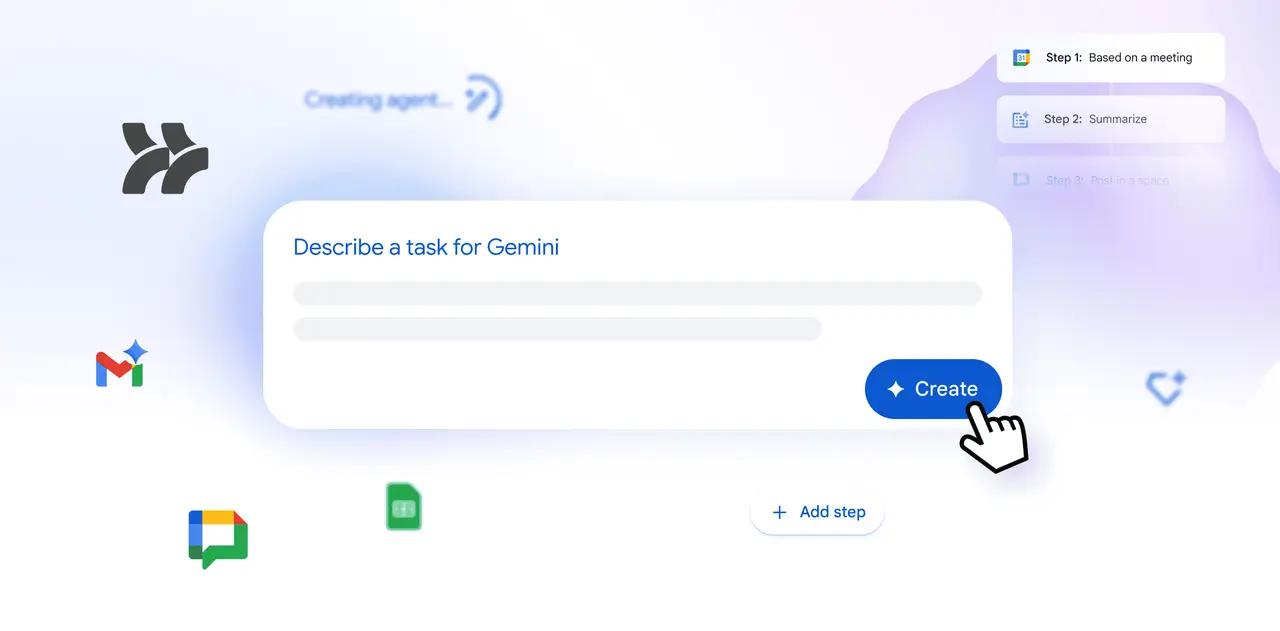
. Users can simply describe what they want to automate, and Gemini 3 takes over to build the agent2
. For example, an employee might prompt: "If an email contains a question for me, label the email as 'To respond' and ping me in Chat," and Studio builds the agent instantly3
.
Source: SiliconANGLE
Product Director Farhaz Karmali explained the platform's purpose: "We've all lost countless hours to the daily grind: Sifting through emails, juggling calendar logistics and chasing follow-up tasks. Legacy automation tools tried to help, but they were simply too rigid and technical for the everyday user"
5
. The platform offers templates for common scenarios, such as auto-creating tasks when files are added to a folder or creating Jira issues for emails with action items5
.Gemini 3 Powers Advanced Reasoning and Multimodal Understanding
Google has enlisted Gemini 3 to power the agentic workflows, promising greater reasoning skills and more effective multimodal understanding
1
4
. Unlike traditional automation logic that relies on stringent rules, these agents can effectively reason through problems, adapt instantly to new information, and tackle complex, end-to-end business processes1
.This enables capabilities like sentiment analysis, content generation, intelligent prioritization, and smart notifications
1
3
. Agents can extract crucial details like action items and invoice numbers from emails and their attachments, demonstrating the contextual awareness that Gemini 3 brings to task automation3
.Early Adoption Shows Significant Time Savings
Prior to general availability, Workspace Studio was available as a beta project to Gemini Alpha program members, with more than 20 million tasks supported by AI agents built in the Studio over the past month alone
4
. Early adopter Kärcher demonstrated the platform's potential by reducing drafting time by 90%, from hours of manual consolidation to just two minutes4
. The company used AI agents to fetch fragmented data, review brainstorming sessions, and perform feasibility checks4
.Related Stories

Solving the Agent Adoption Challenge
Google Workspace Studio addresses a critical challenge enterprises face: getting employees to actually use AI agents
5
. By integrating agents directly into applications that employees already use daily, Google avoids breaking users out of their flow—a common problem with agent platforms that rely solely on chat interfaces5
.
Source: VentureBeat
This strategy puts Google in direct competition with Microsoft Copilot and undercuts some integrations that brought OpenAI's ChatGPT into enterprise applications
5
. Google has an advantage that only Microsoft rivals: it already offers applications that most people use, making it easy to gather the context enterprises need to power their agents and reach millions of users5
.Rollout Timeline and Availability
The platform is rolling out to Business and Enterprise Workspace users over the coming weeks
4
. For companies on the rapid release track, admins will see Studio in the Admin console, and employees will get access starting December 31
. For those on the scheduled release track, admin console settings will begin to roll out December 3, but user access won't kick off until January 5, 20261
.Karmali highlighted Studio's collaborative nature: "You can share your agents with your team as easily as you share files in Google Drive"
3
4
. This collaborative approach to agentic AI could accelerate agent adoption across organizations and establish new patterns for how teams automate work tasks in the coming months.References
Summarized by

Navi
[2]
Related Stories
Google's Gemini AI Set to Revolutionize Workplace Productivity in Workspace
27 Sept 2024

Google Workspace Unveils AI-Powered Features to Enhance Productivity and Automation
10 Apr 2025•Technology

Google Unveils Agentspace: An AI-Powered Enterprise Platform for Unified Search and Task Automation
14 Dec 2024•Technology

Recent Highlights


Recent Highlights
Today's Top Stories










Your Daily Dose of Curated AI News
Don’t drown in AI news. We cut through the noise - filtering, ranking and summarizing the most important AI news, breakthroughs and research daily. Spend less time searching for the latest in AI and get straight to action.

