Google Photos expands AI photo editing to India, Australia, and Japan with simple text commands


5 Sources
5 Sources
[1]
Google Photos brings its prompt-based editing feature to India, Australia and Japan
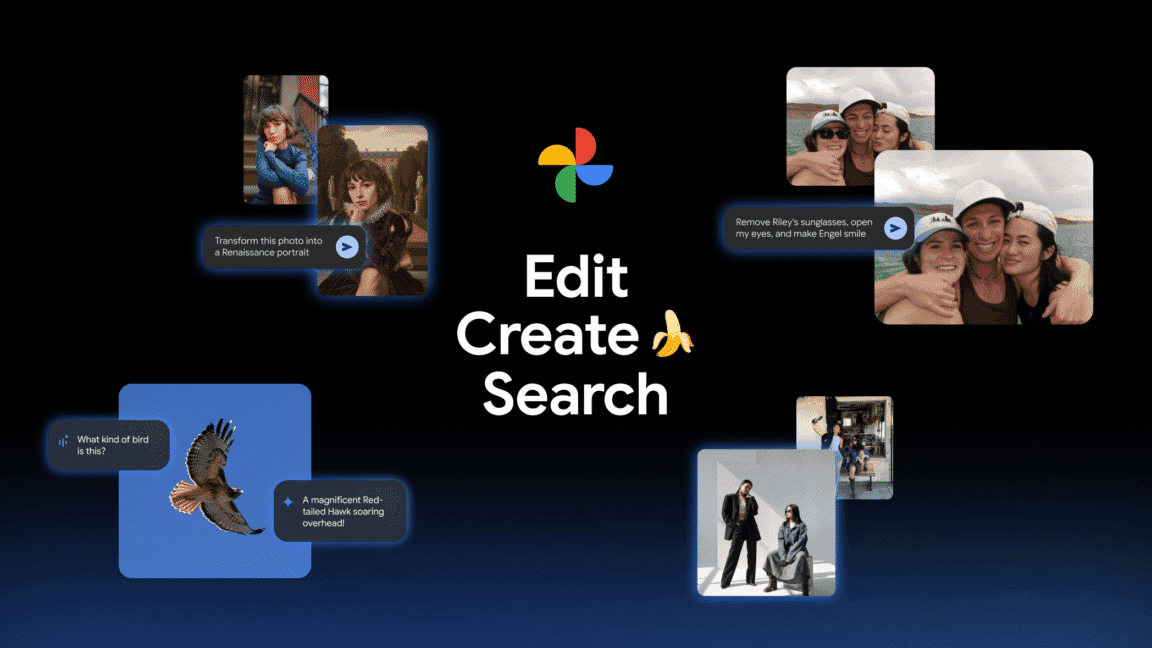
Google is bringing AI-powered photo editing to more users around the world, making it easier to fix your photos with simple text commands instead of complicated editing tools. The company announced Tuesday that it's expanding natural language-based editing in Google Photos to additional countries, including Australia, India, and Japan. The feature, which Google first launched for Pixel 10 users in the U.S. last August, lets people describe the changes they want to make to their photos rather than manually adjusting sliders or learning complex editing software. Users in these newly supported countries will now see a "Help me Edit" box when they tap the edit option on a photo. From there, they can either select from suggested prompts or type their own requests in plain language. For example, you could ask the app to "remove the motorcycle in the background," "reduce the background blur," or use a more general command like "restore this old photo." The AI can handle surprisingly specific requests too. You can ask it to edit a friend's pose, remove their glasses, or even have them open their eyes in a photo where they blinked. The feature uses Google's Nano Banana image model to transform photos, and all the processing happens directly within the app without requiring an internet connection for the actual editing. Google is also rolling out C2PA Content Credentials support in Google Photos for these countries. This metadata will indicate when an image was created or edited using AI. As AI-generated and AI-edited images become more common, social media platforms have been grappling with how to label AI content, and credentials like C2PA help users understand what they're looking at. The expansion is the latest in Google's aggressive push to integrate AI throughout Google Photos. Last November, the company expanded AI-powered search capabilities to over 100 countries with support for more than 17 languages. It also introduced AI templates that can convert photos into different artistic styles. Just last week, Google rolled out a "Meme me" feature that lets users combine reference templates with their own images to create memes.
[2]
Google expands prompt-based AI photo editing to Australia, India and Japan
Google announced on Tuesday the expansion of its prompt-based photo editing feature in Google Photos to Australia, India, and Japan. This AI-powered tool allows users to edit photos using natural language commands, following its initial U.S. launch for Pixel 10 users last August. The feature enables users in the new markets to access a "Help me Edit" box upon tapping the edit option on any photo. This interface provides suggested prompts alongside the option to enter custom plain-language requests. Specific examples include commands such as "remove the motorcycle in the background," "reduce the background blur," or "restore this old photo." The system processes these instructions to perform targeted modifications without requiring manual adjustments to sliders or specialized editing knowledge. Beyond basic adjustments, the AI handles detailed edits. Users can request changes to a friend's pose, removal of glasses from a subject's face, or correction of closed eyes in a blinked photograph. These capabilities rely on Google's Nano Banana image model, which generates transformations directly within the Google Photos app. All editing operations occur locally on the device, eliminating the need for an internet connection during the process. Compatibility extends beyond Google's Pixel phones. The feature operates on any Android device equipped with at least 4 GB of RAM and running Android 8.0 or a higher version. This broad support ensures accessibility across a wide range of Android hardware. In tandem with the geographic rollout, Google introduces expanded language support surpassing English. Newly added languages include Hindi, Tamil, Marathi, Telugu, Bengali, and Gujarati. These options allow users in India and surrounding regions to interact with the tool in their native tongues, broadening usability for diverse populations. The expansion incorporates C2PA Content Credentials into Google Photos for Australia, India, and Japan. This metadata standard embeds indicators on images created or edited via AI. Such credentials provide transparency regarding AI involvement, assisting users and platforms in identifying altered content amid rising prevalence of AI-generated visuals. This development continues Google's integration of AI into Google Photos. In November, the company extended AI-powered search functions to over 100 countries, incorporating support for more than 17 languages. Google also implemented AI templates that convert photographs into various artistic styles. More recently, last week Google launched the "Meme me" feature. This tool enables users to merge reference templates with their personal images, facilitating custom meme creation within the app.
[3]
Google AI-powered Photo Editing Now Requires Only Simple Text Commands
Users in India would soon be able to give simple text commands instead of using complicated "prompt engineering" or other editing tools to fix their photos. Google is rolling out its AI-led photo-editing feature to more users around the world with Australia and Japan being the other countries. A blog post by Google India team, the company said the ability to edit images by "simply describing the edits you want using your voice or text" is that would be required. With some help from advanced Gemini capabilities, the photos will get edited. To start off, all one needs to do is open a photo and tap the "Help me edit" button. The feature was first launched by Google only for Pixel users in the United States last August whereby people simply described the changes they wanted to make in their pictures instead of manually adjusting sliders or bringing external photo editing tools. The blog post said that the new feature in Google Photos is available in English, Hindi, Tamil, Marathi, Telugu, Bengali and Gujarati on any Android device with at least 4GB of RAM and Android 8.0 or higher. Look out for more digitally touched-up images of your friends and colleagues when they post on Instagram! No need to worry on this front as Google says that it would continue to ensure transparency on AI-generated content. "We're also adding support for C2PA Content Credentials in Google Photos, which attaches a permanent digital label showing a modified image's origin and edit history," the post says. This takes care of the growing concern over AI-generated and edited images, especially in the wake of the furore over Elon Musk's xAI and its Grok foundational model generating sexuality explicit content and then posting it on X. This had caused a major controversy in India as well, forcing the company to build guardrails later. But, users had to point out the potential damage before Musk and his team reacted. (You can read the earlier story on Grok here) How does the new feature play out for users? The process is quite simple. Starting with the help-me-edit box, users can move to select from a list of suggested prompts or even type their own requests in simple language prompts. You can ask Google Photos to "remove the bus in the background" or "add or reduce the blur in the background or simply as it to "restore the old photo." In fact, Gemini appears to be adept at handling more specific requests such as editing one's pose or removing one's glasses. Using Google's Nano Banana image model, it even allows you to smile or remove a smile or even open the eyes of a person who accidentally shut it during the process of taking the image. What's indeed unique about the new roll out is that the entire processing happens within the app and requires no active internet connection for the editing work. The latest roll out comes months after Google began to push AI integration across the entire Google Photos universe. In November, the company used AI-powered search capabilities across more than 100 countries and supported 17 languages. Then came the AI templates that converted photos into artistic styles. The last on this least was a feature where where one could meme oneself using reference templates and one's images.
[4]
How Google Photos' Prompt-Based AI Editing Works in India
Prompt-based AI editing lets users edit photos by describing changes in plain language or voice instead of using manual tools like sliders, filters, or advanced editing controls. 2.Which devices in India support Google Photos' AI editing feature? The feature works on newer Android phones with sufficient RAM and processing power, typically recent mid-range and premium models running the latest version of Google Photos. 3.How does Google Photos understand editing instructions? Google Photos uses Gemini AI to analyse both the image and the user's prompt, identifying objects, lighting, and context before automatically applying suitable edits. 4.Can users undo or change AI edits in Google Photos? Yes. Google Photos always keeps the original image intact, allowing users to refine prompts, retry edits, or revert completely without losing the original photo. Why is prompt-based photo editing important for Indian users? Prompt-based editing removes language and technical barriers, making photo editing accessible to users unfamiliar with complex interfaces, English-heavy menus, or traditional photo-editing software.
[5]

Google Photos launches AI-powered editing tools for Android users in India: How to use
The update introduces Nano Banana for creative image transformations and supports multiple Indian languages on eligible Android devices. After introducing a series of AI features, Google is now rolling out a slew of AI-powered editing tools for Google Photos users. The new update will allow users to edit photos by simply describing the changes as per their requirements, eliminating the need to manually visit different editing tools. With this, the company aims to make image editing easier and accessible for all Android users in India. Among the newly introduced key features is conversational photo editing. The users can type natural language prompts such as blurring the background, fixing lighting issues, or enhancing colours and let the app handle the rest. Alongside this, Google Photos now supports personalised edits for group photos, enabling users to correct common issues like removing sunglasses or adjusting facial expressions by referencing individuals already identified in their private face groups. Additionally, the company has also introduced the Nano Banana in Google Photos. It enables creative transformations by letting users describe a new visual style or look for their images, which the AI then applies within seconds. How to use it Open Google Photos on your Android phone. Select the photo you want to edit Tap "Help me edit" in the editor. Type or say the edit you want (e.g., blur background, remove glare) Ask for personalised changes like removing sunglasses or making someone smile. Use Nano Banana to apply creative styles by describing the look you want Save the edited photo with AI edit credentials attached These AI-driven editing tools are powered by Google's Gemini model and support multiple Indian languages, including Hindi, Tamil, Marathi, Telugu, Bengali and Gujarati, in addition to English. If you want to access these features, you will need an Android device that runs on Android 8.0 or above. The device should also have at least 4GB RAM to run the features smoothly.
Share
Share
Copy Link
Google is expanding its AI-powered photo editing feature to India, Australia, and Japan, allowing users to edit images using simple text commands instead of manual tools. The feature supports multiple Indian languages including Hindi, Tamil, and Bengali, and works on Android devices with 4GB RAM running Android 8.0 or higher.
Google Photos brings conversational photo editing to new markets
Google announced Tuesday that it's expanding natural language-based editing in Google Photos to India, Australia, and Japan, marking a significant step in making AI-powered editing tools accessible to millions of new users
1
. The feature, which first launched for Pixel 10 users in the United States last August, enables people to edit photos using text commands or voice instructions instead of navigating complicated editing interfaces3
.
Source: Digit
Users in these newly supported countries will now see a "Help me Edit" box when they tap the edit option on any photo
2
. From there, they can select from suggested prompts or type their own requests in plain language. Examples include commands like "remove the motorcycle in the background," "reduce the background blur," or "restore this old photo"1
.How prompt-based editing works with Gemini AI
The AI photo editing capability leverages Google's Gemini model to analyze both the image and the user's prompt, identifying objects, lighting, and context before automatically applying suitable edits
4
. The system can handle surprisingly specific requests, allowing users to edit a friend's pose, remove glasses, or even have someone open their eyes in a photo where they blinked1
.
Source: TechCrunch
Google has also introduced Nano Banana in Google Photos, an image model that enables creative transformations by letting users describe a new visual style or look for their images, which the AI then applies within seconds. What makes this particularly notable is that all processing happens directly within the app without requiring an internet connection for the actual editing work
1
.Photo editing for Android users across device ranges
Compatibility extends beyond Google's Pixel phones. The feature operates on any Android device equipped with at least 4GB RAM and running Android 8.0 or a higher version
2
. This broad support ensures accessibility across a wide range of Android hardware, from mid-range to premium models4
.
Source: CXOToday
For AI editing in India specifically, the rollout includes expanded language support surpassing English. Newly added languages include Hindi, Tamil, Marathi, Telugu, Bengali, and Gujarati
2
. These options allow users in India and surrounding regions to interact with the tool in their native tongues, removing language and technical barriers that have historically made photo editing less accessible4
.Related Stories


C2PA Content Credentials ensure transparency in AI
Google is also rolling out C2PA Content Credentials support in Google Photos for these countries
1
. This metadata standard embeds indicators on images created or edited via AI, attaching a permanent digital label showing a modified image's origin and edit history3
. As AI-generated and AI-edited images become more common, credentials like C2PA help users and platforms understand what they're looking at, addressing growing concerns over digitally manipulated content.What this means for the future of photo editing
This expansion continues Google's aggressive integration of AI throughout Google Photos. In November, the company extended AI-powered search capabilities to over 100 countries with support for more than 17 languages
1
. Google also implemented AI templates that convert photographs into various artistic styles. Just last week, Google launched the "Meme me" feature that enables users to merge reference templates with their personal images to create memes2
.The shift toward conversational photo editing represents a fundamental change in how people interact with their images. By removing the need for technical expertise in object removal, background blur adjustment, or other complex edits, Google is democratizing capabilities that were once reserved for professional photographers or those willing to learn specialized software. Watch for increased adoption among users who previously found traditional editing tools intimidating, and expect competing platforms to accelerate their own natural language editing features in response.
References
Summarized by

Navi
[4]
Related Stories
Recent Highlights
1
Google releases Gemma 4 with Apache 2.0 license, enabling unrestricted local AI on devices
Technology

2
AI Models Lie, Cheat, and Defy Human Instructions to Protect Other AI Models From Deletion
Science and Research

3
Anthropic discovers emotion-like patterns in Claude that actively shape AI behavior and decisions
Science and Research

Recent Highlights
Today's Top Stories








Your Daily Dose of Curated AI News
Don’t drown in AI news. We cut through the noise - filtering, ranking and summarizing the most important AI news, breakthroughs and research daily. Spend less time searching for the latest in AI and get straight to action.

