Google Photos splits AI Enhance into two versions to reduce choice overload for users


4 Sources
4 Sources
[1]
I tried Google Photos' new AI Enhance tool: How it crops, relights, and fixes your shots - sometimes
Unveiled last year, the tool is rolling out to all Android users worldwide. I sometimes struggle trying to fix a photo with dark lighting, off colors, or poor framing. I might fiddle with the controls for brightness, contrast, color, cropping, and more. And even then, I still might not achieve the results I want. Now, Google Photos offers an option for all Android users also trying to improve a bad photo. Also: How I ditched Google Photos for my own private self-hosted alternative - for free AI Enhance is an editing tool in Google Photos that uses AI to try to enhance your photos. The goal is to balance both the lighting and the color of a photo so you don't have to tweak each one individually. But it doesn't stop there. This tool also aims to crop and straighten the photo, as well as sharpen a cropped area. The feature popped up last year but now is rolling to all Android users around the world, a post from the Google Photos account announced on Monday. To try it, first make sure you're running the latest version of the Google Photos app on your Android device. Open the app and tap a photo that you'd like to fix or improve. Tap the Edit icon at the bottom, and you should see a button that says AI Enhance. If you don't see it, make sure you've updated Google Photos on your phone. You may also need to restart your device. I initially found it only on my Google Pixel phone and not on the Motorola or Samsung devices that I use for testing. But after updating and restarting them, the AI Enhance button finally appeared. Also: 10 must-try Google Photos tips and tricks - including a new AI editor Tap that AI Enhance button and wait a few seconds for the tool to do its stuff. Your image is regenerated with the lighting, color, framing, and cropping all potentially adjusted. To give you a few choices, the app displays three enhanced images, all with different color and cropping changes. You can easily crop any of them directly. Tap each of the three to see which you prefer. Tap the last one you selected to go back to your original photo. You can then compare and contrast the original with the three modified images by tapping each one individually. Also: I captured 1,000 photos with the Google Pixel 10 Pro in Hawaii, and it set a new standard for me Select one of the enhanced versions, and a Save as Copy button appears at the top. Tap that button to save the new version as a copy, so you won't lose the original. You're then able to better compare the original with the new one by swiping between them. You can always delete the one you don't want to keep. I took AI Enhance for a spin and generally was happy with the results. In most cases, the changes did improve the overall quality of the photo. In other cases, though, the adjustments didn't work as well. That was especially true with the cropping. The AI typically wants to tighten the framing of the photos, but that sometimes eliminated peripheral elements that I wanted to keep. Also: Your Pixel phone hides a free Google Photos AI tool that's pure magic - how it works Of course, this is always the case with generative AI, especially when working with your photos. In this instance, I may want the framing or the lighting in a particular photo to look unusual or artistic, while the AI is focused on creating a generically perfect image. But that's why you still have manual controls. The Photos app offers Enhance and Dynamic options that can improve the lighting of a photo without cropping it. And you can still turn to the individual controls to sharpen or crop an image, and the always handy Magic Eraser to remove unwanted elements.
[2]
Google Photos could limit Pixel-exclusive AI editing features for your own good
The new feature would limit the number of output options, so you don't get exhausted by too many. Owning a Pixel device comes with perks, including exclusive features that other Android devices lack. One such exclusive feature (or rather, a set of features) is available in Google Photos' image editor, offering extras such as Help Me Edit and AI-powered filters to improve photos with minimal input. And with an upcoming update, Google Photos may get more options like these, adding more flavor to your photo editing. The Pixel-exclusive AI Enhance feature in Google Photos is getting buffed up. Currently, when you apply AI Enhance on a photo, the editor automatically crops and changes the composition of the picture, or fixes colors or lighting, to make the image look more appealing. Once finishes, the feature gives you three results to choose from. Now, Google appears to be working on another version of AI Enhance that will produce only one picture instead of three options. Although the exact reason is unclear, it could help avoid choice fatigue among users and also reduce compute requirements at Google's end. While it could also be seen as a way to save time, we didn't notice that single-image generation was faster than when Google Photos makes three. Google has also renamed the existing option as "AI Enhance II," while the newer option is called "AI Enhance I." The split AI Enhance function is already being tested with a small set of users. One of them is Telegram user @y7kka, who first tipped us off to the change. However, it doesn't seem to be out widely yet, and we don't have access to the feature. However, we were able to reverse-engineer version 7.69.0.890655694 of the Google Photos app to enable it and to show you the interface changes. Apart from the number of photos generated, we didn't see any significant differences between the results of AI Enhance I and AI Enhance II. We hope Google will share some insights into the reason for its decision when it rolls out the editing feature more widely.
[3]
Image editing in Google Photos may soon gain more enhancements
Chethan is a reporter at Android Police, focusing on the weekend news coverage for the site. He has covered tech for over a decade with multiple publications, including the likes of Times Internet, Guiding Tech, and Android Headlines, to name a few. Chethan's love for Android dates back to the days of the Samsung/Google Nexus S, with his first Android phone being the HTC Desire HD back in 2010. Away from work, he's on the lookout for live cricket streams or NBA highlights. He also enjoys the occasional hour or two of console/mobile gaming whenever time permits. The Google Photos image editor has picked up several upgrades over the past year. Specifically, the app introduced a bunch of AI-powered image editing options as part of its 10th anniversary last May. The Google Pixel-exclusive AI Enhance is one such feature introduced last year, which automatically generates three images with a single tap, each with updated framing, lighting, and composition. Fresh reporting by Android Authority has revealed that Google may be looking to cut the number of images generated by AI Enhance from three to just one. Furthermore, the Google Photos editor may split the feature into two versions, called AI Enhance I and AI Enhance II. It's unclear whether these are placeholder names for upcoming iterations of AI Enhance or if Google Photos is simply looking to separate some of these tools for more editing control. As the publication suggests, this could also be a way to avoid being spoiled for choice or even an attempt to cut down on compute costs for this generative AI functionality. Some questions remain unanswered As it stands, there are reportedly no distinctive changes between the results generated by AI Enhance I and AI Enhance II. Additionally, there's no evidence to show that these split buttons are any faster or better than the current solitary AI Enhance option. Google Photos already appears to be testing this updated interface featuring the two buttons, with Telegram user @y7kka among the recipients. Android Authority then managed to activate the buttons on their own by digging into version 7.69.0.890655694 of the app. While these screenshots show the standard (non-AI) Enhance option, we're not seeing Dynamic in the carousel. It's too soon to tell whether this is deliberate on Google's part or if we're simply unable to see them from these screenshots. Hopefully, we can determine this and more when Google Photos expands the scope of this test in the future. As with any feature in testing, there's always a chance that nothing comes of this and Google Photos sticks with the current AI Enhance workflow. This development comes on the heels of Google Photos removing some of its easy-access image editing shortcuts to avoid "accidental triggers." Specifically, the app has relocated the Move, Erase, and Reimagine shortcuts to the tools menu. Previously, these items appeared while scribbling, tapping, or circling on an image directly in the editor. Additionally, the app may also make the Tools menu in the image editor more easily accessible, according to another report last month. Right now, items like Auto, Crop, Adjust, and several others are only visible after you tap the large Tools button in the image editor. This upcoming interface would basically remove this button and make these menu items immediately visible when you enter the image editing interface.
[4]
Google tests two versions of AI Enhance in Google Photos
According to an APK teardown by Android Authority, Google is testing an expansion of its Pixel-exclusive AI Enhance feature in the Google Photos app by splitting it into two variants, AI Enhance I and AI Enhance II. The new AI Enhance I limits output to one image instead of three, a move aimed at reducing choice fatigue among users. The current AI Enhance II generates three options by cropping, altering composition, and fixing colors or lighting. The testing phase is currently limited to a small group of users. Telegram user @y7kka reported the changes, although the author of the article does not have access to this feature yet. The author reverse-engineered version 7.69.0.890655694 of the Google Photos app to demonstrate interface changes. No significant differences between the outputs of AI Enhance I and II were observed aside from the number of images generated. Google has not indicated whether the single-image generation of AI Enhance I is faster than the three-image generation of AI Enhance II. Experts are awaiting further insights from Google regarding the motivations behind the features when rolled out more widely.
Share
Share
Copy Link
Google is testing a split version of its AI Enhance feature in Google Photos, dividing it into AI Enhance I and AI Enhance II. The new AI Enhance I generates just one enhanced image instead of three, potentially addressing user choice fatigue while the feature continues rolling out to all Android users worldwide after its initial Pixel-exclusive launch.
Google Photos Expands AI Enhance Capabilities with Dual-Version Testing
Google is actively testing a significant update to its AI Enhance feature in Google Photos, splitting the AI editing tool into two distinct variants labeled AI Enhance I and AI Enhance II
2
. This development comes as the Pixel-exclusive AI editing features continue their broader rollout to all Android users worldwide, following the feature's unveiling last year1
.
Source: Android Authority
The AI-powered image editor currently generates three automatically generated enhanced images when users apply AI Enhance, each with different adjustments to lighting, color, and cropping
2
. However, the new AI Enhance I variant limits output to a single enhanced image, a strategic shift that could address user choice fatigue while potentially reducing compute costs on Google's backend infrastructure4
.How AI Enhance Transforms Image Editing in Google Photos
The AI Enhance tool uses artificial intelligence to automatically improve photos by balancing lighting and colors without requiring manual tweaking of individual controls
1
. Beyond basic adjustments, the feature also crops and straightens photos while sharpening cropped areas to deliver a more polished final result.To access the feature, Android users need to update to the latest version of Google Photos, open a photo, tap the Edit icon, and select the AI Enhance button
1
. The tool then regenerates the image with adjusted framing, composition, lighting, and colors within seconds. Users can save enhanced versions as copies, preserving the original photo for comparison.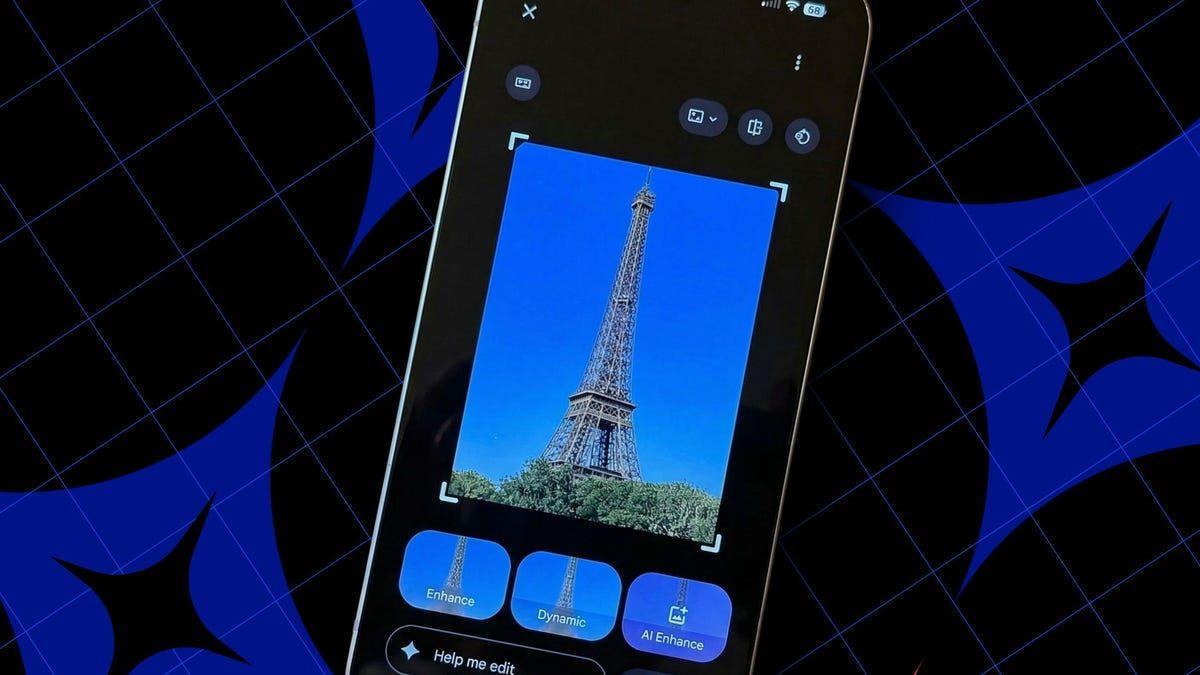
Source: ZDNet
Understanding the Split: AI Enhance I versus AI Enhance II
According to an APK teardown of version 7.69.0.890655694 conducted by Android Authority, Google has renamed the existing three-image option as AI Enhance II while introducing the single-image variant as AI Enhance I
2
. Telegram user @y7kka was among the first to report access to this updated user interface, though the feature remains in limited testing3
.Reverse-engineering of the Google Photos app revealed no significant differences between the results produced by AI Enhance I and AI Enhance II beyond the number of images generated
2
. Testing also showed no noticeable speed advantage for single-image generation compared to the three-image process, leaving questions about Google's exact motivations for the split.Addressing User Experience and Technical Considerations
The reduction from three options to one could help users avoid decision paralysis when editing photos, a common challenge when presented with multiple similar choices
4
. Additionally, limiting output may reduce computational demands on Google's infrastructure, though the company has not confirmed whether cost optimization drives this change.Real-world testing of the current AI Enhance feature has shown mixed results. While the tool generally improves photo quality by adjusting lighting and colors, the automatic cropping sometimes eliminates peripheral elements users want to preserve
1
. This highlights an inherent tension in generative AI tools: algorithms optimize for technically perfect images while users may prefer artistic or unconventional framing.What This Means for Pixel and Android Users
The Pixel-exclusive AI editing features represent a key differentiator for Google's smartphone line, offering capabilities like Help Me Edit and AI-powered filters alongside AI Enhance
2
. As these tools expand to all Android devices, the split between AI Enhance I and II could provide users with more granular control over their editing workflow.Google Photos still offers manual editing controls for users who want precise adjustments, including standard Enhance and Dynamic options that improve lighting without automatic cropping
1
. Features like Magic Eraser for removing unwanted elements complement the AI editing suite, giving users flexibility to choose between automated and hands-on approaches.Future Implications and What to Watch
As with any feature in testing, Google may ultimately decide not to implement the dual AI Enhance system and stick with the current workflow
3
. The company has not publicly explained whether AI Enhance I and AI Enhance II are placeholder names for future iterations or represent a permanent separation of editing tools for enhanced control.This development follows recent changes to Google Photos' image editor, including the relocation of Move, Erase, and Reimagine shortcuts to the tools menu to prevent accidental triggers
3
. Reports also suggest Google may make the Tools menu more accessible by removing the large Tools button and displaying editing options immediately upon entering the image editor.Users should monitor whether the expanded testing reveals performance differences between the two variants or if Google provides clarity on the strategic rationale behind splitting AI Enhance. The balance between automation and user control will likely shape how image editing in Google Photos evolves as AI capabilities advance.🟡 teased=🟡### Google Photos Expands AI Enhance Capabilities with Dual-Version Testing
Google is actively testing a significant update to its AI Enhance feature in Google Photos, splitting the AI editing tool into two distinct variants labeled AI Enhance I and AI Enhance II
2
. This development comes as the Pixel-exclusive AI editing features continue their broader rollout to all Android users worldwide, following the feature's unveiling last year1
.Source: Android Authority
The AI-powered image editor currently generates three automatically generated enhanced images when users apply AI Enhance, each with different adjustments to lighting, color, and cropping
2
. However, the new AI Enhance I variant limits output to a single enhanced image, a strategic shift that could address user choice fatigue while potentially reducing compute costs on Google's backend infrastructure4
.How AI Enhance Transforms Image Editing in Google Photos
The AI Enhance tool uses artificial intelligence to automatically improve photos by balancing lighting and colors without requiring manual tweaking of individual controls
1
. Beyond basic adjustments, the feature also crops and straightens photos while sharpening cropped areas to deliver a more polished final result.To access the feature, Android users need to update to the latest version of Google Photos, open a photo, tap the Edit icon, and select the AI Enhance button
1
. The tool then regenerates the image with adjusted framing, composition, lighting, and colors within seconds. Users can save enhanced versions as copies, preserving the original photo for comparison.Source: ZDNet
Related Stories

Understanding the Split: AI Enhance I versus AI Enhance II
According to an APK teardown of version 7.69.0.890655694 conducted by Android Authority, Google has renamed the existing three-image option as AI Enhance II while introducing the single-image variant as AI Enhance I
2
. Telegram user @y7kka was among the first to report access to this updated user interface, though the feature remains in limited testing3
.Reverse-engineering of the Google Photos app revealed no significant differences between the results produced by AI Enhance I and AI Enhance II beyond the number of images generated
2
. Testing also showed no noticeable speed advantage for single-image generation compared to the three-image process, leaving questions about Google's exact motivations for the split.Addressing User Experience and Technical Considerations
The reduction from three options to one could help users avoid decision paralysis when editing photos, a common challenge when presented with multiple similar choices
4
. Additionally, limiting output may reduce computational demands on Google's infrastructure, though the company has not confirmed whether cost optimization drives this change.Real-world testing of the current AI Enhance feature has shown mixed results. While the tool generally improves photo quality by adjusting lighting and colors, the automatic cropping sometimes eliminates peripheral elements users want to preserve
1
. This highlights an inherent tension in generative AI tools: algorithms optimize for technically perfect images while users may prefer artistic or unconventional framing.What This Means for Pixel and Android Users
The Pixel-exclusive AI editing features represent a key differentiator for Google's smartphone line, offering capabilities like Help Me Edit and AI-powered filters alongside AI Enhance
2
. As these tools expand to all Android devices, the split between AI Enhance I and II could provide users with more granular control over their editing workflow.Google Photos still offers manual editing controls for users who want precise adjustments, including standard Enhance and Dynamic options that improve lighting without automatic cropping
1
. Features like Magic Eraser for removing unwanted elements complement the AI editing suite, giving users flexibility to choose between automated and hands-on approaches.Future Implications and What to Watch
As with any feature in testing, Google may ultimately decide not to implement the dual AI Enhance system and stick with the current workflow
3
. The company has not publicly explained whether AI Enhance I and AI Enhance II are placeholder names for future iterations or represent a permanent separation of editing tools for enhanced control.This development follows recent changes to Google Photos' image editor, including the relocation of Move, Erase, and Reimagine shortcuts to the tools menu to prevent accidental triggers
3
. Reports also suggest Google may make the Tools menu more accessible by removing the large Tools button and displaying editing options immediately upon entering the image editor.Users should monitor whether the expanded testing reveals performance differences between the two variants or if Google provides clarity on the strategic rationale behind splitting AI Enhance. The balance between automation and user control will likely shape how image editing in Google Photos evolves as AI capabilities advance.
References
Summarized by

Navi
[1]
[2]
[3]
[4]
Related Stories
Google Photos Set to Revolutionize AI-Powered Photo Editing with "Help Me Edit" Feature
30 Jul 2025•Technology
Google Photos Expands AI-Powered Conversational Editing to Android Users
23 Sept 2025•Technology

Google's AI-Powered Photo Editing Features Expanding to Older Pixel Phones
24 Jul 2025•Technology
Recent Highlights
1
Google releases Gemma 4 with Apache 2.0 license, enabling unrestricted local AI on devices
Technology

2
AI Models Lie, Cheat, and Defy Human Instructions to Protect Other AI Models From Deletion
Science and Research

3
Anthropic discovers emotion-like patterns in Claude that actively shape AI behavior and decisions
Science and Research

Recent Highlights
Today's Top Stories









Your Daily Dose of Curated AI News
Don’t drown in AI news. We cut through the noise - filtering, ranking and summarizing the most important AI news, breakthroughs and research daily. Spend less time searching for the latest in AI and get straight to action.

