Google unveils AI Inbox for Gmail with smart summaries and natural language search capabilities


55 Sources
55 Sources
[1]
Google announces AI Overviews in Gmail search, experimental AI-organized inbox
Gmail made us all rethink how email could work when it debuted more than 20 years ago. Google thinks we're in the process of another email transformation courtesy of AI. The company has unveiled a new round of AI features that will make Gemini an even more integral part of Gmail. The new Gemini experiences are coming to paying subscribers starting today, and a collection of previously premium-only AI features are rolling out widely. AI Overviews first appeared in Gmail last year to summarize email chains, and now it's expanding to Gmail search. This is closer to the AI Overview experience to which you are accustomed in Google's web search. You can enter a natural language search, and the robot churns through your messages to generate a response. In the example above, the user looks up a past plumbing quote. Traditionally, Gmail would show emails that are likely matches for your search. With AI Overview, you instead get a nicely formatted AI answer that includes all the relevant information and cites the email. That sounds all well and good, assuming it works. AI Overviews in search is notoriously inaccurate when summarizing search results, but grounding it in your email could make it less likely to screw up. Maybe. AI Pro and Ultra subscribers will also begin seeing a new proofreading tool in Gmail. Proofreading suggestions will appear as dotted underlines in your email text, offering suggestions to streamline and clarify your writing. Google says AI Proofreading can make more nuanced changes than standard spellchecking features thanks to the company's largest and most powerful Gemini 3 models. Lastly, Google is previewing a new version of its iconic inbox -- no, not that Inbox. The AI Inbox will roll out to a group of "trusted testers" before making its way to more users. The AI Inbox looks at your unread mail and creates an interactive list with "Priorities" at the top. If Gemini thinks an email is important, it will become a line item in that section. Below that is "Catch me up," which summarizes less important messages. Again, this is based on Gemini's ability to delineate important from unimportant. The company stresses that AI Inbox will be optional when it arrives. However, we could imagine a future in which it becomes the default view. Google doesn't have a timeline for when this one will move beyond testing. The AI future of Gmail We are also beginning to see how Google's AI changes filter down through the subscription tiers. Email summaries, Help me write, and Suggested replies launched last year and were initially limited to those paying for AI Pro or Ultra. Google notes most Gmail users aren't paying for either one. Now, all those people will have access to those features as they move to the free tier. We suspect it will be a similar story for the features announced today. At launch, you'll need a premium AI plan to access Proofread and Search AI Overviews (and presumably AI Inbox when it's ready). Down the line, they will likely expand to all Gmail users. So if you were happy to see AI features limited to paid users, that reprieve is looking rather short-lived. Google is used to being asked if the latest raft of AI inbox features can be disabled. The answer has always been "yes," and that's still the case for the new expansion of AI in Gmail. However, Gemini doesn't have its own toggle. By lumping AI into "Smart Features," you can only ditch Gemini if you're also willing to give up features like package tracking cards, calendar integration, and loyalty cards in Wallet. If you don't mind losing all that, you can keep Gemini out of your inbox.
[2]
Gmail debuts a personalized AI Inbox, AI Overviews in search, and more | TechCrunch
Google has unveiled a new AI Inbox for Gmail that's designed to provide a personalized overview of your tasks and keep you informed about important updates. Gmail is also launching AI Overviews in search and a Grammarly-like "Proofread" feature. Additionally, Gmail is bringing several AI features that were previously available only to paid users to all users. The new AI Inbox tab features two sections: "Suggested to-dos" and "Topics to catch up on." The first section displays summaries of top priority emails that require an action, such as a reminder that you have a bill due tomorrow or that you need to call your dermatologist to confirm your mailing address so they can ship your prescription refill. Under the "Topics to catch up on" section, you'll see updates such "Your Lululemon return is being processed, and your order of Metal Vent Tech shirts has been delivered" and "Your end-of-year statement is now available from Wealthfront." These different updates are grouped into different categories, such as "Finances" and "Purchases." "This is us delivering on Gmail proactively having your back, showing you what you need to do and when you need to do it," said Blake Barnes, VP, Product at Google, in a briefing with reporters. "Don't worry, the traditional inbox will remain available. This is simply a new view you can toggle in and out of as you please to cut through the noise of your incoming mail." Google is rolling out the AI Inbox feature to trusted testers before making it more broadly available in the coming months. With the new AI Overviews in Gmail search, users can now search their inbox using natural language questions to get a quick answer instead of having to rely on traditional keyword search and open multiple emails to find specific information. For example, you can ask "Who was the plumber that gave me a quote for the bathroom renovation last year?" You will then get an AI Overview that pulls answers from your emails and highlights the key details you need. "We scour every email in your inbox, and we give you the answer to your questions right at the top," Blake said. "So just like AI Overviews in Google Search, you can ask natural language questions to get an AI powered response. However, in Gmail, the model relies solely on your email, your personal memory brain, to generate the response." This new functionality is rolling out to Google AI Pro and Ultra subscribers. Google says all of Gmail's AI features are optional, that it doesn't use personal content to train its foundational models, and that it processes personal data in a strictly isolated environment. As for the new Proofread feature, Google says it's designed to help you polish and refine your writing by analyzing your draft to improve clarity and structure. It offers one-click suggestions for word choice, conciseness, active voice, and splitting complex sentences. For instance, if you write something like "might inflict disturbance," Gmail will suggest changing it to "might disturb." It'll also flag instances where you use the wrong word, like "weather" instead of "whether." It's essentially similar to popular proofreading services like Grammarly. By rolling out its own proofreading tool, Google likely hopes people will stop turning to third-party tools or plugging their emails into ChatGPT to fix them. Proofread is rolling out to subscribers of its paid subscription tiers Google AI Pro and Ultra. While these new features are only launching to select users, Google announced that Gmail's "Help Me Write," AI Overviews for threaded emails, and "Suggested Replies" are rolling out to all users. These features were previously only available to paying subscribers. Help Me Write can help you compose an email from a single prompt, while AI Overviews for threaded emails provide summaries of longer email threads with multiple replies. Suggested Replies use the context of conversations to offer relevant responses that match your tone and style.
[3]
Google Is Adding an 'AI Inbox' to Gmail That Summarizes Emails
Google is putting even more generative AI tools into Gmail as part of its goal to further personalize user inboxes and streamline searches. On Thursday, the company announced a new "AI Inbox" tab, currently in a beta testing phase, that reads every message in a user's Gmail and suggests a list of to-dos and key topics, based on what it summarizes. In Google's example of what this AI Inbox could look like in Gmail, the new tab takes context from a user's messages and suggests they reschedule their dentist appointment, reply to a request from their child's sports coach, and pay an upcoming fee before the deadline. Also under the AI Inbox tab is a list of important topics worth browsing, nestled beneath the action items at the top. Each suggested to-do and topic links back to the original email for more context and for verification. Despite the continued spread of generative AI features, the underlying reliability of these tools remains iffy. Back in 2023, when Google's chatbot was still called "Bard," I tested the company's nascent Gmail extension that tried to summarize my messages and search through the inbox for insights. At the time, this extension was a complete bust, with a bevy of incorrect responses. Since then, Google has worked to better its base AI model, called Gemini, and integrate those improvements into its suite of existing software services, including Gmail as well as Search. Despite the company's advances in AI, current Gmail users are still shown a disclaimer stating that Gemini "can make mistakes" when attempting to search an inbox and answer questions. For users who are concerned about their privacy, the information Google gleans by skimming through inboxes will not be used to improve the company's foundational AI models. "We didn't just bolt AI onto Gmail," says Blake Barnes, who leads the project for Google. "We built a secure privacy architecture, specifically for this moment." He emphasizes that users can turn off Gmail's new AI tools if they don't want them. At the same time Google announced its AI Inbox, the company made free for all Gmail users multiple Gemini features that were previously available only to paying subscribers. This includes the Help Me Write tool, which generates emails from a user prompt, as well as AI Overviews for email threads, which essentially posts a TL;DR summary at the top of long message threads. Subscribers to Google's Ultra and Pro plans, which start at $20 a month, get two additional new features in their Gmail inbox. First, an AI proofreading tool that suggests more polished grammar and sentence structures. And second, an AI Overviews tool that can search your whole inbox and create relevant summaries on a topic, rather than just summarizing a single email thread.
[4]
Google Has a New AI Inbox for Gmail Users, and That's Not All
Blake has over a decade of experience writing for the web, with a focus on mobile phones, where he covered the smartphone boom of the 2010s and the broader tech scene. When he's not in front of a keyboard, you'll most likely find him playing video games, watching horror flicks, or hunting down a good churro. Gmail users, Google has an AI Inbox coming your way. It's just one part of a sweeping infusion of Gemini-powered AI features for the widely used email service. The new AI Inbox view will provide a snapshot of what Gemini judges to be your most important emails without your having to sift through them all. Google has been force-feeding Gemini into products across its lineup, from Google Docs and Sheets to the AI Overviews and AI Mode on search pages. Its hardly alone in its vigorous rollout of generative AI capabilities -- Microsoft has been taking a similar approach in spreading Copilot into Windows and its Microsoft Office services. Meanwhile, top rival OpenAI has been cramming more and more services into ChatGPT, as well as launching its own browser. In its Thursday announcement of the Gmail updates, Google said it is making some AI features freely available to everyone, and introducing other new features for its paid Google One subscribers. Read on for everything that's coming to your Gmail inbox Don't miss any of our unbiased tech content and lab-based reviews. Add CNET as a preferred Google source. Let's start with the free features that will come to all consumers who have a Gmail account, whether they access through the web, or via iOS or Android. Suggested replies with personalization: Gmail users are likely familiar with Smart Replies, which appear as suggestions when they're replying to an email. These suggestions have been serviceable but rarely perfect, requiring significant edits. The updated version uses AI smarts to better understand the context of the conversation and to offer suggested replies using your personal style and tone. AI Overviews (thread summaries): These aren't the AI Overviews that took over the top of your Google search, but summarizations of email threads meant to show you what's most important from the conversation without you having to read every single reply. Help Me Write: Help Me Write lets you draft an entire email using a single prompt to Gemini, which could come in handy when there's a lot of specificity that needs to be relayed and you need help finding the words. Google also announced a few new features specifically for paid subscribers. Here's what you can expect when they arrive in your inbox. This is a feature with serious power behind it, especially when you're trying to find a specific piece of information and aren't sure how to surface it. Google will let you use natural language to kick off a search through conversations you've had with others, look at past online purchase orders and everything in between to provide a summary. Proofread is a straightforward feature that will stay on the lookout for grammar, conciseness, word choice and sentence structure to provide a one-click fix when you're crafting emails. Both AI Overviews and Proofread will be available for Google One Ultra and Pro subscribers, starting in the US and for the English language, with wider availability to follow. Easily the biggest new feature for Gmail is the AI Inbox view that will provide a streamlined experience, putting what's most important front and center. AI Inbox will initially roll out to people enrolled in Google's Trusted Tester program, with wider availability to follow. AI Inbox is broken into two key sections: Priorities: Your most important emails will be surfaced here, along with time-sensitive action items, due dates and more. Catch me up: A recap of emails and events you should be aware of that don't require immediate attention. Reservations, online orders and deliveries will be found here. Given that it's in a testing period, AI Inbox will likely evolve based on feedback from testers.
[5]

I tried Gmail's new Gemini AI features, and now I want to unsubscribe
AI Overviews often omit context that power users actually need. Everyone uses email differently. Our experiences relate directly to our relationships, the kind of work we do, the mail flow we have, and what we want to accomplish. I'm saying this so you know that while Gemini in Gmail isn't right for me, at least not yet, it might be just fine for you. I also want to talk about Gmail and security. For years, I ran my own email servers. In fact, way back in the day, when cc:Mail was a thing, an email "server" was really a cluster of machines. I had a full cluster on a rack in my office. Eventually, I moved off physical hardware to the cloud. I've been happily letting Google worry about server management for quite some time. I long ago accepted the fact that Google would, technically, have access to all my email. It's certainly possible the company might mine that data for some nefarious purpose. It's also clear that Google's security practices are far better than anything I'd ever be able to set up on my own servers. While there's always some concern over the possibility of a breach, I have no problem using Google's infrastructure to manage my email. I protect my account with multifactor authentication and passkeys. I am fairly sure Google itself won't abuse its privileged access. The fact is this: I don't use Gemini in Gmail not because I don't trust Gemini. I don't use Gemini in Gmail because it's just not yet particularly useful. In fact, as far back as 2023, I outlined ways AI could help Gmail manage my inbox. AI has come a long way since 2023. I now want even more. But, at least from my perspective, Google's AI features for Gmail are just too weak and not ready for prime time. As of this writing, there are five(ish) AI-specific features baked into Gmail: Suggested responses and Help me write are the core generative AI features for writing emails. Suggested responses are generated automatically as you compose an email. Help me write is a mode that can be initiated when you type the / key. For this feature, you prompt Gmail about what you want to say. Gmail will then write out your message. Also: I let Gemini Deep Research dig through my Gmail and Drive - here's what it uncovered For those folks for whom writing is difficult, these are enormously helpful features. Because I write so much and it's such a natural act, I find that reading and revising the words Gmail writes for me takes more time than it would for me to dash off an email on my own. So I just don't use them. One feature I had high hopes for is AI Overviews for email threads. You know how threads go. There can be tens or even hundreds of back-and-forth email messages, all in one thread. It's sometimes quite difficult to figure out the status of the issue being discussed in the thread. The AI overview feature displays its idea of a quick overview of the entire thread discussion. Also: Can Google save Apple AI? Gemini to power a new, personalized Siri Here's an example. I often work with vendors as project partners for my YouTube channel. In this case, I've been talking to a vendor across 15 messages about getting spools of 3D printing filament for a planned project. What's frustrating about this overview is that it's inaccurate. The vendor and I actually agreed to five spools, not the four that Gemini reported in its overview. I'd love to know what the three other colors we agreed on are, but they aren't included in the overview. One piece of information the overview did provide, two green spools, is something I could have easily found on my own, since it's in the second line of the very top email. Also: I tried Gemini's 'scheduled actions' to automate my AI - the potential is enormous (but Google has work to do) There is one trick to this. You can click the caret icon repeatedly, and Gmail will regenerate the AI overview, often with new information. So if you need the feature, try regenerating and see what it will produce for you. You can, however, query the thread to find out more. This isn't done in the overview, but by using the sidebar. You get to the sidebar by clicking the star icon next to the settings icon at the top of the screen. You can see that I toggled the AI overview and got a slightly different summary at the top of the screenshot. You can also see that I was able to query the thread and get a good response to which spools are being sent. Also: Gemini vs. Copilot: I compared the AI tools on 7 everyday tasks, and there's a clear winner This can be genuinely useful. For example, when I asked it, "who are the Google PR people I usually talk to," Gemini responded with a fairly good list of contacts. It also provided clickable links that took me to messages from those people. I don't yet have access to these two new features, either in my free Gmail account or my corporate Google Workspace account, even though I have a $20 per month Pro AI subscription. Perhaps it's not fully rolled out yet. Proofread is Gmail's answer to Grammarly. It highlights sections of text that could benefit from a rewrite and provides alternative ways of phrasing. While my editors certainly think I could benefit from a rephrase here and there, it's not really a feature I see myself using all that often. Also: Inside the making of Gemini 3 - how Google's slow and steady approach won the AI race (for now) Then there's the AI inbox, announced just recently. Google says this feature is rolling out to "trusted testers." It's apparently a new way for you to look at your inbox, providing a view that's summary and overview based, rather than a list of messages. Google tried a version of this idea back in 2014, calling it Inbox by Gmail. The feature was killed off in 2019. I'm just not sure that folks like the idea of an algorithmic overview of messages, with the actual messages still living in the inbox, just to lay about. I think people really want to gain control over the actual message stream. But we'll see. I haven't tried this new feature out, so I can't really judge it yet. What I really want is an intelligent agent that processes my message flow. I want to be able to work with an agent that's always watching my emails, can distinguish between the various types of messages I manage, can sort and process those messages, and more. For example, I get hundreds to thousands of press releases dropped in my email inbox each week. If there's a big event going on, the traffic goes up. While my filters do a fair job of processing all those messages, and I've tried to train my categories, i.e., Primary, Promotions, Social, Updates, and Forums, I really want more. Also: Want better Gemini responses? Try these 10 tricks, Google says Filters based on text strings can only go so far. What I'd like to be able to do is tell Gmail to filter all press releases into a folder, but if I get a pitch from Google, OpenAI, or Microsoft about new programming tools, to let me know. That level of sophistication would be enormously useful, but isn't possible now. I'd also like Gmail to be able to work with my email history overall. Right now, it's useless. For example, I asked Gemini, "What is the date of the very first email message I ever sent?" Its response? December 23, 2025. As if. I've had a Gmail account since 2005 or so. What's strange is it couldn't even infer dates based on the email thread we've been discussing. That thread began on November 10, well before the date it seems to think was the date of my first-ever email message. You can turn off Gmail's "smart features" in settings. I tried that, but found the price too high. It also turned off all my inbox categories, which I rely on to have any control over my inbox flow. Unfortunately, this means I have to leave the AI features on in my Gmail, whether I want them or not. That said, I don't have to enable Gemini overall to have access to my email. In fact, I tried. As I discussed in my article about Gemini's scheduled actions features, I tried to get Gemini to send me news overview emails. But even though I connected my Gmail to Gemini, the AI told me it didn't have the capability to send email. Also: How to turn off Gemini in your Gmail, Photos, Chrome, and more - it's easy to opt out of AI So, here at least, I'm able to turn off Gemini's access to my email. You do this in the settings section of Gemini's interface at gemini.google.com. If you think about how AI works, how it's trained on enormous collections of unformatted data, it would seem like email is an almost perfect data source. A Gmail AI should be able to train on all my email. All of it, going back to 2005 or so, should be fodder for Gmail's AI knowledge base. Think about it this way. ChatGPT and Gemini have been trained by hoovering up content from all over the web, including articles and even books I wrote. We know these companies have been using that content and all our work product to help them create these powerful AIs that are also boosting the value of their companies without compensation to the content creators. Also: This one Gmail trick gave me another 15GB of space for free (and saved my inbox) That same content ingesting capability could be leveraged to learn our email. Of course, the content would have to be kept as private as current Gmail archives already are. But with that understanding, and with the ability to train agents, we should be able to turn our raw email inboxes into email processing powerhouses. Also: How to get rid of AI Overviews in Google Search: 4 easy ways Unfortunately, we're very much not there yet, despite Google's recent updates to Gmail and AI. As such, while I can't completely keep AI out of my email, I won't be using it very much. But if it ever becomes useful to me, you know I'll jump right onboard. What about you? Have you tried Gemini's AI features in Gmail? If so, have they actually helped you manage your inbox? Do AI-generated Overviews make it easier to follow long threads, or do you still prefer reading the messages yourself? How comfortable are you with giving an AI deeper access to your email history? What would it need to do before you'd trust it with more control?
[6]

Google Adding an AI Inbox, AI Overviews to Gmail. Does Anybody Want This?
(Credit: SOPA Images / Contributor / LightRocket via Getty Images) Google is adding several Gemini 3-powered features to the free version of Gmail, including a new AI Inbox that promises to filter out clutter and AI Overviews of your messages. "Email has changed considerably since Gmail launched in 2004," Google says. "With email volume at an all-time high, managing your inbox and the flow of information has become as important as the emails themselves." AI Overviews for Gmail The first is AI Overviews for email, which most people should already be familiar with from Google Search (whether you like it or not). They will summarize a long email thread into "key points," Google says. Apple does the same in the Mail app, and it can be dicey if it misinterprets or skips over major themes, so it remains to be seen how effective Google's version is. Perhaps more promising is the ability to ask Gemini questions about your inbox instead of rooting around for an elusive email. "Instead of hunting for keywords or digging through a year of emails, just use natural language, like 'Who was the plumber that gave me a quote for the bathroom renovation last year?'" Google says. "Gemini's advanced reasoning pulls the answer, instantly summarizing the exact details you need." AI Overview conversation summaries are rolling out today for everyone for free. If you want to ask questions with AI Overviews, however, you'll need a Google AI Pro or Ultra subscription. AI Inbox Google already offers AI summaries of individual emails for Workspace users, but its new AI Inbox taps Gemini to crawl your entire inbox and create a list of recommended to-dos. The option for AI Inbox will appear on the left-hand menu. According to Google, AI Inbox is like "having a personalized briefing" that will filter out "the clutter so you can focus on what's important." It identifies emails from "your VIPs based on signals like people you email frequently, those in your contacts list and relationships it can infer from message content." Better hope it's a good judge of that, but to be fair it's on the human to make sure not to trust the AI too much. You probably want to manually review your inbox every so often to make sure you didn't miss something important. Google claims all this AI analysis "happens securely with the privacy protections you expect from Google, keeping your data under your control." The company is treading lightly, though, and will only make AI Inbox available broadly "in the coming months" after giving it to "trusted testers." 'Help Me Write' for Everyone Google's AI writing tool, Help Me Write, has been available for Workspace Gmail users since last year following a Workspace Labs test-run, but it's now rolling out to everyone for free. Similar to Apple's Writing Tools, Help Me Write can polish and proofread emails you've already written, or draft them from scratch with the click of a button. Starting next month, Google will update Help Me Write to bring context "from your other Google apps." (Help Me Write is also available for Google Docs, Chrome, and on Chromebooks.) One of the company's biggest advantages in the AI space is its wide ecosystem of products, so there's no surprise that the company is trying to bring in all the data it has on you already. A new Proofread feature, meanwhile, will offer "advanced grammar, tone and style checks so everything is polished before you send." Google is also rebranding Smart Replies as Suggested Replies, which offer suggestions on what to write as you type. Google says both options will "match how you write"; hopefully it's more convincing than a ChatGPT-written message. Suggested Replies are rolling out to everyone at no cost, but Proofread requires a Google AI Pro or Ultra subscription.
[7]

Google decides to bring Gmail into 'the Gemini era'
We hope you like more AI in your Gmail inbox, because Google is "bringing Gmail into the Gemini era." It'll be on by default, but the good news is that you can disable it. The threat, issued on Thursday by Google's VP of product Blake Barnes, sees the company expanding the reach of a trio of inbox AI features that were previously only available to Google AI Pro and Ultra subscribers. You know - the folks who actually wanted the stuff. Now, Barnes explained, everyone will be getting a dose of Google's much-derided AI Overviews in their Gmail inbox, along with Help Me Write features and new Suggested Reply features that are supposed to be more contextual, based on a user's writing style, and helpful. "Just like they do in Google Search, AI Overviews turn information into answers without the digging," Barnes said. "When you open an email with dozens of replies, Gmail synthesizes the entire conversation into a concise summary of key points." Google is also rolling out natural language inbox search, which could be the most helpful of the new features. Unfortunately for the many non-paying plebeians using Gmail for free, that feature is only available for Google AI Pro and Ultra subscribers - hey, gotta give them something if those previously paid AI features are being rolled out to everyone. As for composition help, "everyone can use Help Me Write to polish emails or draft them from scratch," Barnes said. Smart Replies - the prior trio of AI-generated responses to emails - are also being updated with Suggested Replies, "which use the context of your conversation to offer relevant, one-click responses that match how you write." AI proofreading, which we assume will be more helpful than the current squiggly underlining of incorrectly spelled words and poor grammar, is also being rolled out on Thursday, but just to Pro and Ultra subscribers, Google explained. Barnes also threatened Gmail users with a full-on "AI Inbox" view that is only being rolled out to select testers for now, but will be more broadly available in the coming months. That view, as demonstrated in a video published by Google on Thursday, turns the standard Gmail inbox into a list of daily to-dos designed to help users prioritize their inbox workload "based on signals like people you email frequently, those in your contacts list and relationships it can infer from message content." Gmail users in the US with English set as their primary language are the first ones to be subjected to these new features, which a Google spokesperson told us should be gradually rolling out to users in the next few days. For those worried about the privacy of their Gmail content, Google claimed in an email that it's not going to use personal message text to train its foundational models and does all AI processing in an isolated environment. "When Gmail connects the dots between your emails to answer a question, it does that work in a private space dedicated solely to your task," the spokesperson explained. "The data is processed to give you an answer, and it never leaves that secure boundary." Of course, this assumes the answers you get from Gemini in Gmail will be accurate, and that's far from a guarantee. Take, for example, a recent Google job posting for an AI answers quality engineer. While the job posting will see a new Google employee "help the AI Answers Quality team deliver AI Overviews to users' hard and complicated queries on the [search results page] and in AI Mode," where there's AI smoke, there may be AI fire, and it's entirely possible the version of Gemini that's stuffed into people's email inboxes could make mistakes, too. For those who'd prefer to skip the Gemini-ification of their email, Google also told us that the features can all be disabled, though that comes with a slight catch: Disabling AI in Gmail requires disabling Gmail smart features entirely, which means no more inbox tabs or messages sorted by type. To disable Smart Features, just navigate to Settings -> General and scroll down until you see the "Smart features" header. Uncheck the "Turn on smart features" box and you should be good to go. To avoid dealing with future forced AI insertion into your email business, it's also not a bad idea to check out a standalone email application like Thunderbird, or the built-in email client in your operating system, all of which support Gmail and don't require dealing with an ever-changing web interface to access your messages. ®
[8]

Google wants to reinvent Gmail's inbox with AI -- and some features actually sound useful
* Gmail's new AI features aim to make it easier to manage your inbox efficiently. * New Gemini-powered Gmail features include Help Me Write, Suggested Replies, Proofreading, AI Inbox, and more. * AI Inbox gives prioritized briefings, while Smart Overviews aims to help find buried emails. Look, I know there are solid third-party email apps out there like Spark, Thunderbird, and Proton Mail -- believe me, I've tried them all over the years. I always come back to Google's Gmail because it's the platform I'm most comfortable with and that I've used for the longest. Still, I've never found a way to manage my very busy inbox efficiently, especially as I pipe more email addresses through it. At various points, I've tried an urgency-related triage system, and sorting email into specific folders, but nothing has really stuck. That's why the idea of Google's Gemini managing the flow of my Gmail inbox with AI Inbox and Smart Overviews appeals to me. In a recent blog post, Blake Barnes,Google's Vice President of Product for Gmail, outlined how the tech giant plans to integrate AI into its popular email app. "With email volume at an all-time high, managing your inbox and the flow of information has become as important as the emails themselves. To help, we're bringing Gmail into the Gemini era and making it your personal, proactive inbox assistant," writesBarnes in the post. So what does this mean? A lot of the expected AI slop features are here, like Help Me Write, which as you likely already guessed, allows AI to generate emails from scratch, and Smart Replies, which have evolved into a new feature called Suggested Replies that better matches a user's tone. These features don't appeal to me and are excellent examples of questionably useful AI features being shoved into a popular app. If you're a Google AI Pro ($20 per month) or Ultra subscriber ($249 per month), you can also get access to Proofreading, which, if you don't subscribe to a platform like Grammarly and already have a pricey Google AI premium subscription, could be useful. Microsoft is scrapping a useful Edge feature for seemingly no reason Get ready for the change. Posts 2 By Simon Batt AI Inbox and Smart Overviews some of the first in-app AI features that actually seem useful It's unclear when AI Inbox will get a wider release Where things get interesting is when it comes to the AI Inbox and Smart Overviews. Instead of a list of messages like you're used to, AI Inbox creates a personalized briefing with a list of to-dos, short briefings that summarize emails, and shifts emails you need to pay attention to the most to the top of your inbox. The feature is rolling out first to "trusted testers" in the US that are using consumer Gmail accounts (workspace accounts can't access AI Inbox yet). Subscribe to the newsletter for deeper Gmail AI insights Want clearer guidance? Subscribing to the newsletter delivers in-depth breakdowns of Gmail's Gemini features, privacy implications, and practical walkthroughs to help you understand and control new AI tools in your inbox. Subscribe By subscribing, you agree to receive newsletter and marketing emails, and accept Valnet's Terms of Use and Privacy Policy. You can unsubscribe anytime. On the other hand, with Smart Overviews, you're able to get a straightforward AI answer to any question you've typed into your Gmail inbox search bar. For example, if you're trying to hunt down that specific email from 2014 that you know is buried deep in a massive thread, in theory, AI Overview should be able to find that nugget of information quickly, as long as you offer up enough context. Google says that, like its Search AI Overview feature, the Gmail version is designed to work with natural language. Intel's Panther Lake handheld chip might approach PS6-level performance The next generation of PC-based handheld game consoles could be a surprisingly big leap forward. Posts By Patrick O'Rourke AI inbox will be "more broadly available in the coming months" and isn't tied to a subscription, while Smart Overviews is unfortunately exclusive to Google AI Pro and Ultra subscribers. From a privacy perspective, Google says that its new AI Gmail features offer the "privacy protections you expect from Google," but it doesn't elaborate further. In the past, Google has stated that it doesn't use Gmail content to train its Gemini AI models. If you don't want Gemini scanning through your inbox, you can turn these new AI features off.
[9]

Gmail's new AI Inbox uses Gemini, but Google says it won't train AI on user emails
Google says it's rolling out a new feature called 'AI Inbox,' which summarizes all your emails, but the company promises it won't train its models on your emails. On Thursday, Google announced a new era of Gmail where Gemini will be taking over your default inbox screen. Google argues that email has changed since 2004, as users are now bombarded with hundreds of emails every week, and volume keeps rising. With AI Overviews in Gmail, Google says it can address the high-volume problem and allow you to ask anything about your inbox. For example, when you find the right emails, you might be staring at a list of messages, as emails can be long conversations, especially in corporate environments, and you are forced to dig through the long list. Similar to Google Search, AI Overviews summarizes your email and provides a short overview, so you don't have to read all previous emails in the thread AI Overview conversation summaries are rolling out today for everyone at no cost. AI Inbox is a new section that appears above the traditional Inbox on the left sidebar, and it's like your personalized briefing. "AI Inbox is like having a personalized briefing, highlighting to-dos and catching you up on what matters," Google explained in a blog post. "It helps you prioritize, identifying your VIPs based on signals like people you email frequently, those in your contacts list, and relationships it can infer from message content," the company added. AI Inbox in Gmail is powered by Gemini, and it's rolling out to users with Google AI Pro and Ultra subscribers in the United States. Google confirmed that you'll be able to turn off the AI features in Gmail, and it's promising that it won't train its AI models on your emails.
[10]
Your Gmail is getting an AI makeover - here's what to expect and when
Google introduced new AI upgrades for Gmail on Thursday.They include AI Overviews, Proofread, and a new AI inbox.The biggest upgrade is going to trusted testers first. Kicking off 2026, Google is advancing its mission to bring Gemini to as many people as possible, accompanied by some fresh AI upgrades for Gmail. The upgrades -- which include AI Overviews, a new proofread feature, and an "AI inbox" interface -- have been engineered with an eye toward boosting personalization within Gmail. Like other tech giants, Google has been pushing to deliver customizable AI tools -- that can analyze the context of specific users -- in order to gain an edge in the ongoing AI race. Also: Use Google AI Overview for health advice? It's 'really dangerous,' investigation finds "We want [users] to feel like this is the Gmail they've always known and loved, just more effective," Gmail VP of Product Blake Barnes told ZDNET. Here's what you can expect from each of the new AI features, how they work, and who can access them. In May 2024, Google launched AI Overviews for search (originally Search Generative Experience, or SGE), a feature that leverages AI to provide summaries to user queries in natural language at the top of search results pages. The feature has now been embedded into Gmail. Previously, users could enter keywords or phrases into the search bar at the top of their Gmail inbox and be directed to relevant messages. AI Overviews takes a significant step further by allowing users to ask questions or search for subjects in natural language, and the algorithm responds with a summary based solely on data gleaned from that user's inbox. (Unlike AI Overviews for search, it doesn't search the entire web when formulating its response.) Also: This one Gmail trick gave me another 15GB of space for free (and saved my inbox) Say you're planning a ski trip with a large group of friends. Rather than searching for keywords to surface specific logistical details from your group thread, you can enter a prompt like, "What should I pack for my upcoming trip to Breckenridge?" The system will generate a personalized response based on your message history. You might also ask questions like: "How much did I pay in utilities last month?" or "When do I owe my team a draft of the new presentation?" "These are uniquely personal questions that only your inbox can answer for you, and that is the difference between core Google search and what we're doing here with Gmail," said Barnes. Google is also debuting a new AI-powered Proofread feature. Think of this as a smarter auto-correct tool: When you're drafting messages in Gmail, the feature will automatically underline words or phrases that could be edited for brevity and/or clarity, and also suggest some changes. Proofread and AI Overviews within Gmail will initially be available only to G1 Ultra and Pro subscribers. The third and final update now being rolled out in Gmail is also the largest, as it offers an entirely new take on the basic user interface of a digital inbox. It's also probably the riskiest, since it's by no means clear yet if the majority of users will prefer it over the traditional Gmail layout. It's therefore not a surprise that Google is initially rolling it out to its "trusted testers" program. The AI Inbox essentially turns Google's flagship large language model, Gemini, into an intermediary between email senders and recipients. Rather than logging onto Gmail and seeing the usual inbox, with messages organized chronologically and displaying sender name, subject, and so on, the AI Inbox analyzes all messages and condenses them into actionable items at the top of the homepage: a "Suggested to-dos" section, followed by a list of "Topics to catch up on." That layout could change down the road depending on early user feedback, however. Also: Want to change your embarrassing Gmail address? Google may be working on a fix "It's an entirely different view of how to look at [Gmail]," said Barnes. "It's going across your inbox and synthesizing it down -- it's not the same experience at all." Don't worry, Google isn't replacing the traditional Gmail UI wholesale (not yet, anyway). For early testers with access, the AI Inbox will be accessible via a separate view that can be selected at the top of the left-hand menu on the Gmail homepage. Each of the three new features is now being rolled out in English and to users in the US, but they'll be expanded to other regions and languages in the coming months, according to Google. Google will not collect data from user emails to train its AI models, Barnes told reporters in a virtual press conference on Wednesday. The company also announced today that other AI-powered features within Gmail, which were previously only available to paying subscribers, including Help Me Write and Suggested Replies with personalization (an update to Smart Reply), are also now available for free to all users.
[11]

Google adds Gemini features like message thread summaries to Gmail
Google is adding more Gemini features to Gmail, providing upgrades like artificial intelligence-generated summaries of email threads, the company said Thursday. "When you open an email with dozens of replies, Gmail synthesizes the entire conversation into a concise summary of key points," Google wrote in a blog post. The company said it's bringing AI Overviews, which shows up at the top of search results, to Gmail inboxes. The updates come as Google embeds its Gemini AI technology across its wide portfolio of consumer products. Google is counting on its massive customer base to provide an advantage as the company takes on the likes of OpenAI, Anthropic and others in the booming generative AI market. Google says Gmail now has more than 3 billion users. Driven by its rapid advancements in AI, Google parent Alphabet topped Apple by market cap on Wednesday for the first time since 2019, continuing a rally that made the stock the best performer among tech megacaps last year. Meanwhile, OpenAI soared to a private market valuation of $500 billion late last year, and Anthropic said Wednesday that it's valued at $350 billion in a new funding round. Google said its latest updates will be rolled out in phases, and some features will be turned on by default in inboxes, meaning users who don't want them will have to opt out. One of the new features is "Suggested Replies," which Google says uses the context of a user's emails to create one-click responses. It's an update to a prior tool called "Smart Replies." The company is also upgrading a proofreading option for checking grammar and making messages more concise. Last year, Google's Gemini integration in Gmail allowed users to do things like search messages, draft emails from prompts, improve grammar and generate custom responses.
[12]

Gmail's new AI features, turning it into a personal assistant
More artificial intelligence is being implanted into Gmail as Google tries to turn the world's most popular email service into a personal assistant that can improve writing, summarize far-flung information buried in inboxes and deliver daily to-do lists. The new AI features announced Thursday could herald a pivotal moment for Gmail, a service that transformed email when it was introduced nearly 22 years ago. Since then, Gmail has amassed more than 3 billion users to become nearly as ubiquitous as Google's search engine. Gmail's new AI options will only be available in English within the United States for starters, but the company is promising to expand the technology to other countries and other languages as the year unfolds. The most broadly available tool will be a "Help Me Write" option designed to learn a user's writing style so it can personalize emails and make real-time suggestions on how to burnish the message. Google is also offering subscribers who pay for its Pro and Ultra services access to technology that mirrors the AI Overviews that's been built into its search engine since 2023. The expansion will enable subscribers pose conversational questions in Gmail's search bar to get instant answers about information they are trying to retrieve from their inboxes. In what could turn into another revolutionary step, "AI Inbox" is also being rolled out to a subset of "trusted testers" in the U.S. When it's turned on, the function will sift through inboxes and suggest to-do lists and topics that users might want to explore. "This is us delivering on Gmail proactively having your back," said Blake Barnes, a Google vice president of product. All of the new technology is tied to the Google's latest AI model, Gemini 3, which was unleashed into its search engine late last year. The upgrade, designed to turn Google search into a "thought partner" has been so well received that it prompted OpenAI CEO Sam Altman, whose company makes the popular ChatGPT chatbot, to issue a "code red" following its release. But thrusting more AI into Gmail poses potential risks for Google, especially if the technology malfunctions and presents misleading information or crafts emails that get users into trouble -- even though people are able to proofread the messages or turn off the features at any time. Allowing Google's AI to dig deeper into inboxes to learn more about their habits and interest also could raise privacy issues -- a challenge that Gmail confronted from the get-go. To help subsidize the free service, Google included targeted ads in Gmail that were based on information contained within the electronic conversations. That twist initially triggered a privacy backlash among lawmakers and consumer groups, but the uproar eventually died down and never deterred Gmail's rapid growth as an email provider. Rivals eventually adopted similar features. As it brings more AI into Gmail, Google promises none of the content that the technology analyzes will be used to train the models that help Gemini improve. The Mountain View, California, company says it also has built an "engineering privacy" barrier to corral all the information within inboxes to protect it from prying eyes.
[13]

Gmail is getting a Gemini AI overhaul
In a move that should surprise nobody, Google is stuffing more Gemini AI into Gmail. A host of new features, some of which are already familiar to Workspace users, are rolling out today for Gmail users in the US. Some are free, while others require a Google AI Pro or Ultra subscription. The first premium feature is AI Overviews, the same name as a similar feature in Google Search. Gmail's version lets you ask questions about your messages in the search bar, using natural language. Google uses the example of, "Who was the plumber that gave me a quote for the bathroom renovation last year?" It's hard to imagine that saving much time over a basic search for "plumber quote" or "plumbing estimate," but maybe it could help in some situations. There's also a free portion of AI Overviews that summarizes mail threads for easy catch-ups. However, the ability to ask your inbox questions requires a subscription. Meanwhile, Proofread is a subscription-only feature that's essentially Grammarly for Gmail. As you'd guess, it suggests improvements in grammar, word choice, conciseness, voice and sentence structure. Finally, there's the AI Inbox, a feature that "filters out the clutter so you can focus on what's most important." Google says it's like a personal briefing that flags to-dos and catches you up on what it thinks is most important. (It identifies VIPs based on frequent contacts, your contact list, and inferred relationships.) The company claims, without adding further detail, that this all "happens securely with the privacy protections you expect from Google." AI Inbox is another subscription-only feature. Now onto the free stuff. Help Me Write is a tool for all Gmail users that generates email copy from a prompt. This kind of thing should be well-familiar by now, as Big Tech increasingly encourages users to avoid drafting anything from scratch. And Suggested Replies can draft replies for you that mimic your tone and style. (Google describes it as a next-gen version of Smart Replies.) Help Me Write and Suggested Replies are rolling out to everyone (no subscription required) today. The new Gemini-powered features begin rolling out to Gmail today. Although they're starting with English speakers in the US, Google says they'll arrive in more languages and regions "in the coming months."
[14]

A.I. Has Arrived in Gmail. Here's What to Know.
Brian X. Chen has been the lead consumer technology writer for The New York Times since 2015. About two years ago, Google practically force-fed artificial intelligence to the masses when it began showing A.I.-generated responses to people's questions at the top of search results. Now the company is taking a similar tack by adding A.I. into another ubiquitously used service, Google Mail. Google this month began rolling out a suite of new tools relying on generative A.I., the technology driving chatbots, to help users manage their bloated inboxes and speed up the process of writing email. Some of the features are free, while others require paying a subscription. Gmail users can now look up emails by typing a question, such as "What's the name of the job recruiter I met last month?" Google is also testing a new type of inbox, set for release later this year, that automatically pulls together a to-do list based on tasks discussed inside emails. In addition, Google unveiled tools to streamline writing, including an automatic proofreader and response generator. If the new A.I. technology becomes widely adopted by Gmail users, this could be the biggest change to email, our most steadfast web service, in decades. It may transform the way people manually check their inboxes all day long into a more streamlined experience, an overview that people look at periodically. All of this, of course, has implications for privacy. To make the new features work, Gemini, Google's A.I. assistant, needs access to a user's entire inbox. The company insists that while Gemini systems analyze our emails, there are protections in place so that its employees do not read them. To understand what this means for us, I interviewed a Google executive overseeing Gmail as well as privacy experts. And to assess whether the tools are worth the potential trade-off in privacy, I tested Google's A.I.-ified Gmail for the last week. I found a few of these features, especially the automatic to-do list generated from my inbox, very useful, but I didn't care for the tools that sped up writing. Ultimately, I'm on the fence about whether I will opt to share even more data with Google to use these features once they are all fully released. Here's a rundown of first impressions of the new tools and answers to important questions about privacy going forward. Gmail enters the A.I. era Let's start with the most important new feature, AI Inbox, which will be broadly released in the coming months, followed by the smaller updates available today. A New A.I.-Powered Inbox Managing an email inbox has become a tedious chore. When someone sends you an email, you can read and reply to it, delete it or ignore it. The option of ignoring an email takes the least effort, but unread notes pile up over time and add to stress. (Case in point: My Gmail app icon currently shows a red bubble for 131,000 unread emails.) Google's new AI Inbox fundamentally changes the way people check email. It gives a high-level overview of what you need to know and do today based on recent emails by looking at conversations and creating action items and summaries of topics. The AI Inbox offered me respite from my chaotic inbox this week. I had recently exchanged emails with a local preschool discussing enrollment for my daughter. Around the same time, her pediatrician had sent an email asking me to fill out a questionnaire. But throughout the day, my inbox became cluttered with marketing messages from retailers and other unsolicited emails. When I clicked on the AI Inbox tab, Google's A.I. reminded me of my recent conversations and presented a to-do list: Respond to the preschool about enrollment and fill out the questionnaire for the pediatrician. None of the other noise in my inbox was there. Google is testing the AI Inbox with a small set of users, but when the feature arrives publicly in the coming months, I think lots of people, especially busy parents and office workers, will find it useful. Free Tools Google is now making free the following Gmail tools that were previously available only to users who paid subscriptions to use its A.I.: * Suggested replies with personalization. Gemini will now analyze a message and generate a bespoke response based on your writing style in past emails. * AI Overviews with email summaries. Similar to the AI Overviews featured on Google search, Gmail will show an automatic summary of a conversation at the top of each email thread. * A "Help Me Write" button. Users can click "Help Me Write" to compose an email by typing a prompt, such as "Draft a letter to my power company asking why my bill is so high." As a professional writer, I mostly did not find these tools helpful, but people who struggle with words might appreciate having them. Paid Tools Google has also released new tools that will be available initially to people paying for a subscription to one of Google's A.I. plans, which start at $20 a month: * AI Overviews for searching for emails. In the past, people could look for emails by typing keywords like "plumber" into a search bar. Now, users can type a question into the search bar, such as "What is the name of the plumber who fixed my toilet last year?" I liked this feature -- it will come in handy especially for people with bloated inboxes, since the old-school way of searching for the keyword "plumber" could load lots of irrelevant emails. * A proofread tool. Google's A.I. can highlight an entire sentence that needs improvement and suggest a full revision. For example, it could trim a rambling sentence down to a few concise words. Does Gemini in my inbox mean Google is reading my emails? The integration of A.I. inside Gmail raises an important question about whether the technology opens doors to human reviewers reading our emails. That's because in general, humans are involved in improving A.I. technology -- for example, people occasionally need to manually review conversations with A.I. chatbots to ensure that their responses are accurate and appropriate. In the case of Google and Gmail, the answer is, it's complicated. The company says that while its Gemini A.I. system can scan your emails to offer help, people do not look at your content, including the questions you ask Gemini to search for an email. In addition, the company said, it will not be using Gmail data to train, or improve, Gemini. "We know it takes a lot of trust for people to invite A.I. to connect these dots," said Blake Barnes, Google's vice president of product overseeing Gmail, in an interview. "We can use A.I. to process and do these things like the AI Inbox in these isolated environments without humans in the loop at all." Mr. Barnes offered this analogy: Each Gmail user is living inside his or her own private room. Inside that room, Gemini is presented a question along with a set of emails that could have the answer to that question. All of this data processing happens within the private room, and the data does not leave this room to train Gemini, he added. However, just because a company says it won't look at your data doesn't mean it technically can't. A Google spokeswoman said some user interactions with A.I. in Gmail -- for example, questions posed to Gemini to search for emails -- could be accessed and shared with law enforcement to comply with a legal search warrant. She noted that Google pushed back on government requests for excessive information. This is nothing new. Google and all tech companies have been required to comply with legal requests for relevant user data, including emails and text messages, in response to search warrants and subpoenas. The only difference now is that chatting with Gemini inside Gmail is yet another source of data that can be sought through your inbox. "It's a reminder to people that email should be treated almost not quite public," said Thorin Klosowski, a privacy and security activist at the Electronic Frontier Foundation, a digital rights nonprofit. "It should be treated like the company who runs it and law enforcement can access it. The more you put it in it, the more they'll have access to." The upshot: If you use these tools, don't say anything naughty to Gemini. Should I opt out? All of the above features, with the exception of AI Inbox, which has yet to be released, are turned on for Gmail users by default, meaning you will have to opt out if you are uninterested in using them. To opt out, go into the account settings and uncheck the box labeled "Smart features."
[15]

Google is putting even more AI into Gmail, and some of it is on by default
Serving tech enthusiasts for over 25 years. TechSpot means tech analysis and advice you can trust. The takeaway: Here's a piece of news that not everyone will welcome: Google thinks there simply isn't enough generative AI in Gmail, so it's adding even more Gemini features. Some are free, others are subscription-only, and a few will be enabled by default - meaning you'll have to opt out if you don't want them. The biggest new feature Google has announced is its AI Overviews. The feature is already in Gmail for summarizing email chains. Now, it's being expanded to Gmail search, where users can ask conversational questions about their inbox. The feature is similar to the AI Overviews Google uses on its web search. Users can enter a search query using natural language, such as "Who was the plumber that gave me a quote for the bathroom renovation last year?" The AI will then search through your emails and generate a response with the answers, rather than just listing a load of emails that mention the word "plumber." AI Overviews in Gmail search will only be available to Google AI Pro and Ultra subscribers. Paying users also get a new Proofread feature for advanced grammar, tone, and style checks. Also new is the AI Inbox. This view will automatically surface what Gemini believes are your most important emails, pushing them to the top while demoting everything else. Google says the system looks at factors like recency, frequent contacts, and how you typically interact with messages. In other words, it's another algorithm deciding what you should and shouldn't see, except this time it's powered by a large language model rather than a relatively simple ranking system. Google is also expanding its existing AI tools. "Help me write" is getting more capable, allowing users to adjust tone (formal, concise, or more enthusiastic) and refine drafted emails. Google says it will upgrade Help Me Write with better personalization next month by bringing context from your other Google apps. Smart Reply is being upgraded to Suggested Replies, with Gemini generating longer, more detailed responses instead of the short canned phrases Gmail has used for years. Another addition is automatic follow-up suggestions powered by Gemini, which will proactively surface stalled conversations and suggest next steps. There's also improved email summarization for long newsletters and multi-part threads, and deeper integration with Google Calendar and Tasks, letting Gemini suggest events or to-dos directly from email content. Several of these features had been available on subscription tiers, including Help Me Write and email summaries, but Google is now opening some of them up to users on the free tier. Unsurprisingly, privacy concerns are already being raised. Google says Gemini processes emails securely and that personal data isn't used to train its public AI models. Still, the idea of an AI continuously scanning your inbox to rank messages, generate replies, and answer conversational queries isn't going to sit well with everyone - especially since some features will be switched on by default. The new Gemini-powered Gmail features will begin rolling out today on the web, Android, and iOS, starting in the US and in English.
[16]

Gmail now answers your email questions like Google Search -- but you'll have to pay for it
Both features are powered by Gemini and are available exclusively to paid Google AI Pro and Ultra subscribers in English, with a web-first rollout in the US. Most of us use Gmail practically every day, and any improvements Google can make to make emails a little easier to handle would be appreciated by billions of people worldwide (three billion, to be precise). The company announced that some of Gmail's most helpful new AI features are now being made available to all users for free. There's still a reason to pay for Gmail, though, as Google is now introducing new features for Google AI Pro and Ultra subscribers.
[17]

Google Just Stuffed a Bunch of New AI Into Your Gmail
Heard you like inboxes. Well, you're getting an "AI Inbox" in your inbox. Google wants users to integrate AI into their day-to-day lives. As part of that effort, the tech giant just announced a slate of new Gemini-powered features meant to help users navigate Gmail more efficiently. The new tools include AI summaries of email conversations, a new AI inbox mode, and the ability to get help drafting emails. While many of these features sound useful, they also seem like another example of AI slowly creeping, or being pushed, into every aspect of life. “With email volume at an all-time high, managing your inbox and the flow of information has become as important as the emails themselves. To help, we're bringing Gmail into the Gemini era and making it your personal, proactive inbox assistant,†said Vice President of Product for Gmail Blake Barnes in a blog post. Google isn’t alone in trying to nudge users toward AI. Tech companies are steadily integrating AI into the apps and platforms people already use. Microsoft has been sneaking Copilot into its Office suite and PCs. Amazon wants users to shop with its Rufus assistant and recently gave Alexa an AI upgrade. OpenAI, meanwhile, has integrations with apps ranging from Photoshop and Spotify to Target and Instacart. Now Google wants to reinvent how we do email. First up is a new AI overview feature, which will feel familiar to anyone who’s used Google Search lately. Gmail will now summarize long email threads. When a user opens a message chain with dozens of replies, Gmail will generate “a concise summary of key points.†Google says this feature is rolling out today and will be free for all users. For Google AI Pro and Ultra subscribers, there’s a more advanced version. Those users can ask questions like, “Who was the plumber that gave me a quote for the bathroom renovation last year?†and Gmail will scan their entire inbox to find the answer. This will ideally eliminate the need for users to dig through hundreds of old emails to track down a single detail. Additionally, Gmail will now help draft emails. With “Help Me Write,†users can prompt the AI to review email drafts or generate messages from scratch. Gmail’s Smart Replies, the short suggested responses that appear at the bottom of many emails, are also getting an upgrade. The new Suggested Replies are designed to better match a user’s writing style while still offering one-click responses. Both of these features are rolling out to all users. Meanwhile, paid subscribers will also get access to a new proofreading feature. The biggest potential shift, though, is something Google calls the AI Inbox. Instead of a simple list of messages, it turns your inbox into a personalized briefing with a list of recommended to-dos like scheduling a dentist appointment, paying a bill, or sending a thank-you note, all based on your emails. Google says it prioritizes what matters most using factors like who you email most often, your contacts, and relationships it infers from the content in emails The AI Inbox will also generate short briefings on things users need to stay on top of, like an upcoming soccer season or an upcoming vacation. This feature is being tested now and will become more widely available in the coming months.Â
[18]

Gmail's new features are absolute game-changers -- if you can afford them
Mark has almost a decade of experience reporting on mobile technology, working previously with Digital Trends. Taking a less-than-direct route to technology writing, Mark began his Android journey while studying for a BA in Ancient & Medieval History at university. But since then, he's cast his eyes firmly on the future, with a deep love for anything that bleeps or bloops. Outside of Android tech of all types, Mark loves to hike, play video games, build small plastic men that cost far too much, and spend time with his two daughters. Google is continuing to shovel AI tools at you in the hope you actually start using them, adding various AI functions to its most popular products in the hope that this time, they'll stick. This time, it's Gmail's turn to get some new "helpful" AI functions, as Google is rolling out AI summaries for your Gmail emails (via 9to5 Google). There are some useful features here -- if you pay for them Credit where it's due to Google, there are some very useful features included in this update. Searching through your Gmail inbox has become an art in itself, and there's real skill involved in pulling small details from your memory to narrow down the search to one particular email. Say you remember an email with a friend where they recommended a certain color of crayon. But, of course, you're big on your Crayola newsletters, so searching for just "crayons" won't help. You could just narrow it down to your friend's email, but you're constantly nattering about crayons, so that won't help. Aha, you can vaguely remember when it was, so you can add a date range too. Now you're getting there. It is tiresome, and sifting through data like this is one thing AI is good at. So it makes sense you can ask Gemini to do the hard work for you. You can speak to Gemini in normal conversational language, like the image above, and the AI overview will pull up a bunch of potential matches, saving you time. That is very helpful. The catch is it's only available for those paying for the Google AI Pro and Ultra subscriptions. The former costs $20 a month, and the latter an eye-watering $250 a month. Of course, if you bought a Pixel 10 Pro then you have a year's access to AI Pro for free, so that's a minor bonus to an otherwise rather meager bonus. Subscribe to our newsletter for clear Gmail AI insights Our newsletter breaks down Gmail's AI additions and similar AI product changes in plain language. Subscribe for clear coverage and context that helps you understand what's included in free vs. paid features without sifting through tech jargon. Subscribe By subscribing, you agree to receive newsletter and marketing emails, and accept Valnet's Terms of Use and Privacy Policy. You can unsubscribe anytime. What do free users get? They get access to AI summaries of long email chains. Which is, admittedly, another good feature, but one that's likely to be useful less often than the first. Also included in this update were the Help Me Write, Suggested Replies, and Proofread features. Previously only selectively available, these three features will now be more widely available. Help Me Write and Suggested Replies are available for free, whereas Proofread is only available for subscribers to the above two plans, again.
[19]

Gmail is getting an AI Inbox and much more Gemini
Joe Fedewa has been writing about technology for over a decade. Android and the rest of the Google ecosystem have been a focus for years, as well as reviewing devices, hosting podcasts, filming videos, and writing tutorials. Joe loves all things technology and is also an avid DIYer and food blogger. He has written thousands of articles, hundreds of tutorials, and dozens of reviews. Before joining How-To Geek, Joe worked at XDA-Developers as Managing Editor and covered news from the Google ecosystem. He got his start in the industry covering Windows Phone on a small blog, and later moved to Phandroid where he covered Android news, reviewed devices, wrote tutorials, created YouTube videos, and hosted a podcast. From smartphones to Bluetooth earbuds to Z-Wave switches, Joe is interested in all kinds of technology. After several years of jailbreaking and heavily modifying an iPod Touch, he moved on to his first smartphone, the HTC DROID Eris. He's been hooked ever since. Your inbox is about to look a lot different. Google has slowly trickled out some Gemini tools to Gmail, but the floodgates are being opened. AI Overviews, proofreading, and a fully AI Inbox are coming to Gmail starting today. Admittedly, email inboxes can be a huge pain to navigate. Digging through months -- if not years -- of email chains just to find when you purchased your coffee maker or a specific date for a flight. The new AI Overviews feature aims to make this easier. It's essentially the same idea as AI Overviews in Google Search. Instead of using keywords, you can ask Gemini a question in plain English, and it will scan your inbox to pull out the details you're looking for. It can also summarize long email chains into shorter summaries, so you don't have to expand fifty replies. The act of writing emails is getting even more AI juice, too. While you may already use the helpful Smart Replies feature, the new "Suggested Replies" are supposed to be even better. They use the context of your current conversation to offer one-click drafts that Google says will actually sound like you. Additionally, Gmail's "Help Me Write" feature is now available to everyone for free, while a new "Proofread" tool is available for Google AI Pro and Ultra subscribers. Far and away the biggest change, however, is the new AI Inbox option in the sidebar. Think of this like Google Search's "AI Mode," but for your inbox. Gone is the traditional email interface we've all come to know. Instead, it brings suggested and time-sensitive to-dos to the top and attempts to organize everything else into topic groups. Gemini generates a summary of the various emails regarding a topic and includes shortcuts to the associated emails. Your frequent contacts are identified as "VIPs," and it keeps those important messages at the top of the pile as well. The AI Inbox will roll out first to "trusted testers" first, but the rest of the Gemini-powered tools are beginning to roll out to users in the U.S. today. All of these features can be disabled if you don't want to use them, or you simply don't like the idea of Gemini having access to your inbox. Get the newsletter for clear Gmail AI coverage Subscribe to the newsletter for concise explainers, practical how-tos, and privacy-focused analysis of Gmail's Gemini features and the AI Inbox, providing focused coverage that breaks down what matters and how these tools work. Subscribe By subscribing, you agree to receive newsletter and marketing emails, and accept Valnet's Terms of Use and Privacy Policy. You can unsubscribe anytime. Source: Google Related 4 Google apps that are actually better with Gemini For most apps, the addition of AI tends to be considered unwanted bloat rather than a useful feature. But when properly implemented, it can be a lifesaver in some of the apps we use daily. Google is adding Gemini everywhere, and I don't love it -- except in these four apps. Posts By Arol Wright
[20]

New Gmail AI features replacing Gemini side panel for some
With the launch of "in-line AI experiences" in Gmail yesterday, Google has shared that the Gemini side panel is going away for AI Pro and Ultra subscribers in the US. On the web, this side panel was accessed by tapping the Gemini spark next to your profile photo in the top-right corner. This traditional chatbot interface let you: As part of making it "easier to use AI directly in Gmail," Google says AI Pro and AI Ultra "subscribers in the US may no longer see Ask Gemini in Gmail or be able to open the Gemini in Gmail side panel." Most of that functionality is now handled via the "in-line AI experiences," with Help Me Write unchanged and Proofread serving as a more powerful spelling, grammar, and style check. There's also the upgrade to Suggested Replies that takes into account the context of the thread. Meanwhile, AI Overviews can summarize longer email threads and the new AI Overviews in search provide a more integrated experience where you'd naturally expect it. As of today, the side panel is gone on our personal Gmail account that has the new features, but it remains on mobile (Android). There are no changes to the availability of the Gemini side panel in Gmail for Google Workspace plans.
[21]

Google's Gmail just got a big AI upgrade and it's (mostly) free
This shouldn't come as a surprise-AI is omnipresent these days-but Gmail is getting a big old AI upgrade, and this time Google's taking a hammer to its paywall. During a press briefing led by Ross Reichardi from Gmail PR and Blake Barnes, head of Gmail product, Google announced a wide rollout of AI-powered Gmail features to all U.S. users for free. That includes tools like Help Me Write, AI-generated summaries in email threads, and more advanced Smart Replies, which were previously limited to paying customers. There's a brand-new Proofread feature that helps you spiffy up your email drafts in real time. It helps with things like fixing incorrect word usage and grammatical errors, and breaking up sentences that go on and on into infinity. You don't have to use these suggestions if you don't want to-they're one-click optional. There's also an undo button if you're not feeling it. Paying subscribers get some exclusive perks, though. Google One Pro and Ultra users now see AI overviews in Gmail's search bar. This lets you ask questions like, "How much was my last electric bill?" and get summarized answers based on your email history. You don't have to endlessly scroll to find whatever it is you're looking for. They also introduced a new feature called AI Inbox, which transforms your inbox into a kind of personal assistant. It uses Google's Gemini to read entire threads and pull out emails that require immediate attention. Don't worry, the traditional inbox you know and love is still there, and now you can toggle between the views. AI Inbox is rolling out to testers starting today, January 8. Privacy was a big talking point throughout the briefing (as it should be!). Google stressed that personal Gmail content used for these AI features is processed in a private, isolated environment and is not used to train Gemini models. You can also turn these features off entirely. So, what did I take away from this meeting? I see it as a clear push to make Gmail feel less overwhelming and more approachable. I'm not entirely closed off to it, as my own inbox contains years of email exchanges. That said, I'm still leery of the idea of AI further worming its way into my personal digital space. The rollout is live today for consumer accounts and Pro/Ultra subscribers, though the AI Inbox is limited to a select group of testers, with wider availability coming later.
[22]

Gmail's biggest update in 20 years: 5 AI features that could change email forever
Gmail's Gemini-powered AI adds instant answers, inbox summaries, smarter replies and a redesigned AI Inbox The "Gemini era" of Gmail has officially arrived. In its biggest update since 2004, Google is rolling out a sweeping suite of AI tools designed to transform Gmail from a static list of messages into an active personal assistant. Whether you're a power user or just trying to clear out a cluttered inbox, these 2026 updates -- powered by the new Gemini 3 model -- are designed to do the heavy lifting for you. Here's what's new, what's free and when it's all coming to you. The days of digging through 2023 archives for a single PDF are over. With AI Overviews in Gmail Search, you can now ask questions like: Gemini scans your history and provides a concise answer immediately, so you never have to open a dozen threads to find one detail. Availability: AI Overview thread summaries are rolling out to all users at no cost. AI Overview search answers are available to Google AI Pro and Ultra subscribers. The most visual change coming to Gmail is AI Inbox, a new and completely separate inbox view that looks to prioritize what matters most. Instead of showing emails chronologically, the AI inbox delivers a personalized briefing that highlights: The AI view is designed to reduce inbox clutter and help important emails -- like bills or reminders -- rise to the top. Availability: AI Inbox will roll out first to trusted testers first, with a wider global launch later this year. We've all played catch up with work and personal emails, scrolling through dozens of "reply all" messages, but those days are gone. Gmail now automatically generates AI Overview Conversation Summaries at the top of long threads. These summaries highlight key decisions, next steps and who said what -- giving you time back instead of reading through every thread. Google has evolved "Smart Replies" into Suggested Replies with Personalization. Rather than generic "Thanks!" or "Received," the AI now understands your specific writing tone; context of the relationship with the sender; and even the actual content of the question (e.g., suggesting "Cake" or "Pie" based on your actual preference). This feature is pretty exciting, especially for users who occassionally stumble over grammar or spelling. So much more than spell check, AI Proofread will make necessary changes if you use the wrong word (e.g., suggesting "weather" instead of "whether" or "affect" instead of "effect"). The new AI Proofread tool helps refine your tone and clarity. It's a game-changer for mobile users who need to send polished, professional emails on the go without the risk of "fat-finger" typos or awkward phrasing. While many features are coming to all 3 billion Gmail users, some of the more "power features" remain behind the subscription curtain. As of today (January 8), AI Thread Summaries and Personalized Suggested Replies are free to everyone, while AI Search Answers and AI Proofread Tool and are only available with Google AI Pro / Ultra. AI Inbox View is currently for certain testers only. These new capabilities are only available to Gmail users in the U.S. at the moment. By weaving Gemini 3 directly into the interface, this update is Google's clearest attempt yet to make your inbox work for you -- not the other way around.
[23]

Gmail launches AI inbox and overviews with Gemini
Credit: Avishek Das/SOPA Images/LightRocket via Getty Images Google has been sneaking in its AI assistant, Gemini, into Gmail for some time. Now Gmail is apparently "entering the Gemini era" officially with an inbox assistant, according to a blog post by Gmail's VP of product, Blake Barnes, published yesterday. One feature Gmail's launching is AI Overviews, which summarize information in your inbox, apparently building on the already-launched autogenerated email summaries. AI Overview can also be able to answer questions about what's in your inbox, but this feature will only be available to Google AI Pro and Ultra subscribers. AI Inbox, another addition, is designed to "filter out the clutter" so you can focus on the most important emails. Features include personalized briefings, highlighting to-dos, and identifying emails from contacts. AI Inbox analysis "happens securely with the privacy protections you expect from Google, keeping your data under your control," the blog post states. Starting yesterday, all Gmail users can use Help Me Write for email drafts. An update to Smart Replies, called Suggested Replies, also launched for everyone. Gmail also now features a Proofread tool for grammar, tone, and style -- but this is only available to Google AI Pro and Ultra subscribers. In addition to the blog post, Google published a YouTube video about the new AI tools: The top (unpinned) comment reads, "Nobody is going to sound human anymore." Last year, some Gmail users began noticing the "Help Me Write" prompt, complete with the sparkle icon that has become synonymous with AI. Mashable published a guide on how to turn that off.
[24]

Google announces AI summaries, proofreading and more to Gmail
Why it matters: The new features are part of an effort to make finding information in e-mail more like talking with a chatbot. The big picture: Google announced a slew of new features on Thursday. * Some are not yet broadly available. * Others are only available to paid subscribers. 1. AI Summaries Much as it already does for web searches, Google is adding an automatic summary for e-mail threads and the ability to ask questions within Gmail search. * The thread summaries will be available for all U.S. users, while the search summaries require a Google One Ultra or Google One Pro subscription. 2. Proofreader Between the lines: The tool offers suggestions as a user writes. * Google says the proofreader can improve clarity, conciseness, grammar and sentence structure. * Available for paid subscribers in the U.S. 3. AI Inbox AI will surface items that may require more immediate action or attention and it will give a recap of other potentially important messages. * Limited to a small group of trusted testers for now, What they're saying: All of the new features are limited to personal accounts, for now, though Google says it is working to bring them to people who use Google Workspace for their work e-mail.
[25]

Gmail is getting a whole host of AI updates to try and solve your most irritating workplace tasks
Google has revealed it is adding a host of new AI tools and features to Gmail as it looks to offer users a smarter and more efficient way to stay in touch. The company has unveiled a number of updates for its email service which it says will help Gmail "enter the Gemini era". Among the new updates are AI Overviews for your inbox, improved writing and proofing assistance, and a new AI Inbox to flag the most important messages for your attention. In a blog post announcing the new additions, Google noted that the nature of email itself has changed significantly since Gmail was launched in 2004. Managing inboxes has become something of a full-time job for many of us, and Google hopes AI will help provide the solution. In particular, the new AI Inbox for Gmail looks to help cut out the clutter of crowded inboxes, effectively acting like a daily briefing for users. Currently in testing before a wider roll out later this year, the tool can identify what messages or tasks need to be prioritized, based on data such as those people you email the most, meaning the important emails get flagged and addressed first. Previously seen (not always positively) in Google Search, AI Overviews are now coming to Gmail. Working in an almost-identical fashion, the feature will be able to quick find and condense information from a range of sources (in this case, your emails) into a brief and (hopefully useful) summary. Users can also ask Gmail a question in natural language, (such as "Who was the plumber that gave me a quote for the bathroom renovation last year?") with Gemini trawling through your messages and pulling out an answer. AI Overview conversation summaries will be available now, however the ability to ask your inbox questions with AI Overviews is only open to Google AI Pro and Ultra subscribers for now. Finally, Gmail's "Help Me Write" tool is being expanded and upgraded to help users create better and smarter emails. The service now includes new Suggested Replies, an update to the previous Smart Replies feature, which scans the context of your conversations to provide quick and relevant options. These will be written in your own style and tone of voice, with users provided with a draft to refine before approving. In addition, a new Proofread feature offers improved grammar and syntax checking, as well as the ability to spot errors in tone and style, making sure your message is as polished as it can be. Help Me Write and Suggested Replies are rolling out now for free to all users, with the Proofread feature currently only available for Google AI Pro and Ultra subscribers.
[26]

You can now use three of Gmail's best AI features for free
Google is expanding free access to several AI-powered Gmail features that were previously limited to paid Google One plans. Starting today, three Google Gmail AI features, including Help Me Write, Suggested Replies, and AI-generated summaries, will be available for free Google account holders in the United States. This is a significant shift from their previous availability, restricted to Google AI Pro or Ultra users (paid Google One tiers). To give you a quick idea of the features, Help Me Write can help you draft emails with shorter, text-based commands or proofread and refine the ones you've already written. Turning Gmail into a proactive mailing assistant This might not be an entirely new feature for smartphone users, though, as on-device AI, such as Apple Intelligence or Galaxy AI, can already process and improve text-based content. For web users, however, it could be a helpful addition. Recommended Videos Then there's the AI-generated summaries, which provide concise overviews of long or messy email threads at the top of conversations, in ai AI-overview card. So, instead of scrolling through a couple of emails, you can instantly get an idea about the subject of the trail. Finally, there's the Personalized Suggested Replies feature, which drafts responses to emails based on your writing style. If you're okay with the fact that the feature skims through your emails to analyze and recognize your writing style and then generates a response as if it were you, it could be a brilliant addition to your daily mailing chores. Together, these features strive to reduce the time you spend writing and reading new emails and catching up on the old ones. Instead of you doing all the heavy lifting in your brain, Google wants Gmail to take some of the load, transforming it from a passive inbox to a proactive mailing assistant. Whether you're a student, a working professional, or an executive who deals with hundreds of important emails daily, the trio of Gmail AI features can make your life easier. For now, the features are only available for personal account holders in the United States, but they should also expand globally in the near future.
[27]

Google takes first steps toward an AI product that can actually tackle your email inbox | Fortune
New Year, new Gmail. Google announced on Thursday that it is further integrating Gemini 3 into its email service and its more than 3 billion users. The expanded features, which include AI summarization and writing tools, come as Google responds to users wanting more personalized AI experiences. "We recently surveyed our users and found that 85% of them think that AI in Gmail is most helpful when it leverages their content to generate tailored responses," Gmail's Head of Product, VP Blake Barnes, told reporters in a conference call on Wednesday. "They don't want a generic assistant." A December poll by Google Workspace and The Harris Poll found that 92% of knowledge workers ages 22-39 want AI with personalization. As part of the rollout, an AI Overview tool similar to the one found on Google Search will summarize email threads. Paid users will be able to ask their inboxes and receive an AI Overview. The biggest update is to how Gemini will assist users with writing and replying to messages. The "Help Me Write" tool, previously available as a paid service on Gmail, can draft emails from a signal prompt. According to internal company data, 70% of enterprise users who use "Help Me Write" in Google Docs or Gmail took Gemini's suggestion. "AI securely analyzes your past emails. It understands your writing style, the typical greetings you have, the sign-offs, and also what's going on in your life to generate the suggested response that's really personalized to you," Barnes said. Next month, the Help Me Write tool will be updated to include information from users' other Google apps. The existing "Smart Replies" feature, now called "Suggested Replies," can write responses that better match a user's tone and style. While both of these features are free to all, the AI-powered proofreading tool that addresses word choice, concision and active voice is only available to Google AI Pro and Ultra subscribers. The update will also pilot an AI inbox tab with "trusted testers" that briefs users on their emails and creates to-do lists reminding users about tasks like paying bills or a dentist appointment. The features will only be available in English and in the US. Google plans to expand to other languages and countries in the coming months.
[28]
Google announces the future of Gmail with AI Inbox & new AI Overview search
Google today previewed the future of Gmail, with new features like AI Overviews for search that are rolling out starting today and the upcoming "AI Inbox." This comes as Gmail has over 3 billion monthly active users. Similar to google.com, AI Overviews in Gmail search will let you ask questions and get back AI-generated responses immediately to save you from having to open an email or check through multiple threads. It starts with the search bar prompting you to "Get answers from Gmail." Instead of hunting for keywords or digging through a year of emails, just use natural language, like "Who was the plumber that gave me a quote for the bathroom renovation last year?" Gemini's advanced reasoning pulls the answer, instantly summarizing the exact details you need. You can ask your question naturally, with the existing search experience loading normally as Gmail reviews your request, scans your inbox, analyzes your message, and creates your overview. Gmail will reference past threads and provide citations to them. AI Overviews in Search are rolling out to Google AI Pro and Ultra subscribers, while the summaries that appear when you open an email thread are going free for all users. The new Proofread performs advanced grammar, tone, and style checks. It goes beyond typos to analyze drafts for clarity and structure. Found issues are underlined and Google might suggest you: Improve word choice, Simplify the sentence (like splitting to avoid run-ons), Correct spelling, or Make concise. This feature is also available for AI Pro and Ultra subscribers, starting on the web. The new AI Inbox will be a new view alongside your existing list of emails. "AI Inbox" with a sparkle icon appears above "Inbox" in the Gmail side panel on the web. Google's goal is to provide a personalized briefing or snapshot of your inbox that instantly surfaces the information you need instead of the message. This includes a greeting that offers a count, with the last refresh time noted in the corner. The first section shows "Suggested to-dos" that you need to take on, like bills, reminders, and other short-term tasks. Gmail notes in bold what you have to do and that's followed by more details, including the ability to see the originating email(s). "Topics to catch up on" are still important, but not immediately actionable. The topic is followed by bullet points that provide useful context. AI Inbox, along with the other features announced today, is powered by Gemini 3. On the privacy front, Google reiterates that your personal Workspace content is not used to train its AI models. Google has a new "engineered privacy" processing environment. This private space dedicated to your information means data doesn't leave the secure boundary. You can turn off AI features by disabling smart features at any time. AI Inbox is coming first to Trusted Testers, with broader availability in the coming months.
[29]

Google Just Overhauled Gmail With Gemini 3, Turning It Into an AI Assistant - Decrypt
Google stresses privacy safeguards as deeper AI integration raises concerns over how personal inbox data is used. Google unveiled a sweeping overhaul of its flagship email service today, integrating its most advanced artificial intelligence model, Gemini 3, directly into Gmail. The move marks the company's most aggressive attempt yet to transform the inbox from a passive repository of messages into an active personal assistant, escalating its rivalry with OpenAI and Microsoft. The updates, announced alongside new features for the Gemini app, leverage the company's latest large language model to automate daily tasks, sort communications by priority, and generate creative visual content. At the center of the update is a redesigned Gmail interface powered by Gemini 3, the next-generation model Google introduced late last year. The new "AI Inbox" view, available starting today, departs from the traditional chronological list. Instead, it uses on-device processing to organize emails into priority clusters and offers a "Catch me up" summary of recent activity, such as shipping notifications, appointment reminders, and purchase receipts. "This is us delivering on Gmail proactively having your back," said Blake Barnes, a Google VP of product, in a statement Thursday. The company positioned the update as a shift toward a "thought partner" capable of answering complex queries about a user's digital life, such as "When does my flight land?" -- all without requiring manual searches. The update also expands the "Help Me Write" tool. Previously a premium feature, the AI drafting capability is now rolling out to all users with enhanced tone-matching abilities, allowing the software to mimic a user's personal writing style more improved accuracy. The rollout started Thursday for users in the United States. While some features (like email thread summaries and "Help Me Write") are free for everyone, the most powerful "Assistant" features -- specifically the ability to ask questions across your inbox (e.g., "What size shoes did I order?") -- are currently restricted to paid subscribers using Google AI Pro or Ultra. The new "AI Inbox" view (which sorts mail by priority) is still limited to a group of "trusted testers," not the general public. Gmail holds roughly 30% of the global email client market share, typically ranking second behind Apple Mail -- which has a higher share because it is the default app on iPhones, often used to access Gmail accounts. Most major industry reports and data suggest the user base has stabilized around 1.8 billion, though some recent estimates project it crossing the 2 billion mark in 2025-2026.
[30]

Gmail now uses AI to help you write messages and keep track of your inbox
Google on Thursday unveiled new artificial intelligence features in Gmail, an effort by the technology giant to refresh its 22-year-old messaging app amid growing use of AI. The advancements include helping users write messages, finding information buried in email inboxes and delivering daily to-do lists. Gmail's new AI features initially will only be available in English within the U.S. Some features will be accessible to all users free of charge, while others require G1 Ultra and Pro subscriptions. Alphabet-owned Google is rolling out the new email tools as the company weaves functionality from its latest large language model, Gemini 3, into its online search and other applications. Yet the push comes amid mounting privacy concerns around the use of generative AI, including its potential access to personal information. With the new features, all Gmail users will have access to what Google calls a 'Help Me Write' tool, which assists users with their grammar and phrasing. The tech analyzes users' previous emails to better understand their writing style so it can personalize emails and make real-time suggestions on how to respond to a message. Gmail will also offer an AI Overview feature, which summarizes email exchanges and highlights key takeaways from longer threads. Both features will be available on the Web and mobile versions of Gmail. "This is us delivering on Gmail proactively having your back," said Blake Barnes, a Google vice president of product. Google is offering paid Pro and Ultra subscribers access to technology that lets users ask natural-language questions directly in the Gmail search bar. Subscribers will also have access to a dedicated chatbot for follow-up questions. For example, instead of manually searching for last month's electric bill, a user could ask, "How much was my electric bill last month?" Gemini would scan the user's email history, highlight the information and provide direct access to any relevant messages. Another feature, "AI Inbox," is also being rolled out to a handful of customers for testing. When it's turned on, the function will sift through inboxes and suggest to-do lists and topics that users might want to explore. Meanwhile, the so-called "Catch me up" tool will provide users with reminders of their upcoming events and appointments. This includes but is not limited to upcoming reservations, purchases and deliveries, and cancelled or rescheduled appointments. Incorporating AI directly into Gmail could pose risks for Google, given that large language models can sometimes present erroneous or misleading information. And although users can proofread AI-aided messages before they're sent, the tech could potentially make mistakes. Still, Gmail users can turn off the AI features. To do so, users should open their Gmail account settings and, under the "General" tab, scroll to the "Smart" features and personalization section. Users should then uncheck "Turn on smart features in Gmail, Chat, and Meet," and then save their changes.
[31]

Google adds new AI features to Gmail, making it a personal assistant
Your Gmail inbox is getting an AI-powered update. Google announced new AI features to help users write emails, summarise information, and create to-do lists. More artificial intelligence (AI) is being implanted into Gmail, as Google tries to turn the world's most popular email service into a personal assistant that can improve writing, summarise far-flung information buried in inboxes, and deliver daily to-do lists. The new AI features announced Thursday could herald a pivotal moment for Gmail, a service that transformed email when it was introduced nearly 22 years ago. Since then, Gmail has amassed more than 3 billion users to become nearly as ubiquitous as Google's search engine. Gmail's new AI options will only be available in English within the United States for starters, but the company is promising to expand the technology to other countries and other languages later this year. The most broadly available tool will be a "Help Me Write" option, designed to learn a user's writing style so it can personalise emails and make real-time suggestions on how to polish the message. Google is also offering subscribers who pay for its Pro and Ultra services access to technology that mirrors the AI Overviews that's been built into its search engine since 2023. The expansion will enable subscribers to pose conversational questions in Gmail's search bar to get instant answers about information they are trying to retrieve from their inboxes. In what could turn into another revolutionary step, "AI Inbox" is also being rolled out to a subset of "trusted testers" in the US. When it's turned on, the function will sift through inboxes and suggest to-do lists and topics that users might want to explore. "This is us delivering on Gmail proactively having your back," said Blake Barnes, a Google vice president of product. All of the new technology is tied to the Google's latest AI model, Gemini 3, which was unleashed into its search engine late last year. The upgrade, designed to turn Google search into a "thought partner" has been so well received that it prompted OpenAI CEO Sam Altman, whose company makes the popular ChatGPT chatbot, toissue a "code red"following its release. But thrusting more AI into Gmail poses potential risks for Google, especially if the technology malfunctions and presents misleading information or crafts emails that get users into trouble - even though people are able to proofread the messages or turn off the features at any time. Allowing Google's AI to dig deeper into inboxes to learn more about their habits and interest also could raise privacy issues - a challenge that Gmail confronted from the get-go. To help subsidise the free service, Google included targeted ads in Gmail that were based on information contained within a user's inbox. That twist initially triggered a privacy backlash among lawmakers and consumer groups, but the uproar eventually died down and never led to any significant backlash against Gmail. Rivals eventually adopted similar features. As it brings more AI into Gmail, Google promises none of the content that the technology analyses will be used to train the models that help Gemini improve. The California-based company says it also has built an "engineering privacy" barrier to gather all the information within inboxes and protect it from prying eyes.
[32]

Gmail Is Getting AI-Powered Search and Proofreading Features
Paid subscribers will also get AI-powered proofreading and AI overviews from search. Google is adding a slate of AI features to Gmail that could save some of the hassle of searching for important information buried in messages and threads. Many users will soon see a more personalized inbox with AI-powered suggestions, summaries, and proofreading support. Plus, some AI functionality that was previously available only to paid subscribers will be rolling out to all Gmail users, including Help Me Write, AI Overviews for threaded emails, and Suggested Replies. Gmail users will soon have an AI Inbox view with two sections. "Suggested to-dos" will show immediate action items found in your inbox, such as bills to be paid and appointments to be confirmed. The task will be bolded and followed by a summary and a link to the relevant email or thread. Below that, "Topics to catch up on" includes items that are less urgent (but still important), such as order status and event updates. AI Inbox is an optional toggle in the Gmail side panel. You won't see it immediately, though -- the feature is being made available to those in Google's Trusted Tester program before launching for users more broadly "in the coming months." Google AI Pro and Ultra subscribers will also be able to get AI Overviews from natural language questions typed into the Gmail search bar (just like a Google search). Instead of a running standard keyword search and clicking through multiple message threads, you'll be able to ask things like "Who was the plumber that gave me a quote for the bathroom renovation last year?" and get a detailed summary of information pulled from emails in your inbox. The response will also provide citations to specific threads. Finally, Gmail will have a built-in, AI-powered proofreading feature that will check grammar, tone, and style and analyze your emails for clarity and structure. Similar to third-party tools like Grammarly, you'll see one-click suggestions for fixing typos, simplifying sentence structure, selecting improving word choice, and making writing more concise. Like AI Overviews, Proofread will be limited to paid subscribers. Note that these AI features are optional and can be disabled, and Google says it does not use personal information or content to train its AI models.
[33]

Gmail Enters Gemini Era with AI Overviews, Writing Tools & Inbox Prioritisation | AIM
The new capabilities begin rolling out on January 9 in the US, starting with English. Google on January 8 announced a major update to Gmail, introducing new AI-powered features under what it calls the 'Gemini era' of email, to help users manage growing inbox volumes and extract information faster. The new capabilities are powered by Gemini 3 and begin rolling out on January 9 in the US, starting with English. Google said support for more languages and regions will follow. The update brings AI Overviews to Gmail, allowing users to get summaries of long email threads and answers to questions asked in natural language. The feature uses Gemini to synthesise information across emails instead of requiring keyword searches. "Instead of hunting for keywords or digging through a year of emails, just use natural language," said Blake Barnes, vice president of product for Gmail. "Gemini's advanced reasoning pulls the answer, instantly summarising the exact details you need." AI Overviews conversation summaries are rolling out globally at no cost, while the ability to ask questions directly to the inbox will be available to Google AI Pro and Ultra subscribers. Google also announced wider access to its AI-assisted writing tools. Help Me Write and updated Suggested Replies are now available to all users for drafting and refining emails. A new Proofread feature, which checks grammar, tone and style, will be limited to paid AI subscribers. "Suggested Replies use the context of your conversation to offer relevant, one-click responses that match how you write," Barnes added. He explained that Help Me Write will gain deeper personalisation next month by using context from other Google apps. Another addition is AI Inbox, a new inbox view designed to surface priority emails, deadlines and reminders. The system identifies important messages based on factors such as frequent contacts, saved contacts and inferred relationships from email content. "AI Inbox is like having a personalised briefing, highlighting to-dos and catching you up on what matters," Barnes said, adding that analysis is done "securely with the privacy protections you expect from Google". AI Inbox is currently being tested with a limited group of users and is expected to roll out more broadly in the coming months.
[34]

Google just changed Gmail -- and it could reshape how you use your inbox
Starting today, Google is weaving its massive investment in AI into one product nearly everyone already uses -- and for many people, the change won't feel optional. Google announced Thursday that a suite of new features powered by Gemini 3 will begin appearing in Gmail, introducing automation designed to reduce inbox overload. The most consequential update is a new Gmail view called AI Inbox, which reshapes email around summaries, topics, and to-dos, rather than individual messages. For users, the shift isn't about learning new tools -- it's about no longer having to manage email the same way. Instead of opening Gmail to a chronological list of messages, AI Inbox presents a briefing-style overview that surfaces conversations, tasks, and updates it thinks matter most. "With email volume at an all-time high, managing your inbox and the flow of information has become as important as the emails themselves," Gmail VP of product Blake Barnes wrote in a blog post announcing the changes. Google's goal, he added, is to turn Gmail into a "personal, proactive inbox assistant."
[35]

Google's Gmail is getting a Gemini-inspired overhaul with AI priorities, summaries and more - SiliconANGLE
Google's Gmail is getting a Gemini-inspired overhaul with AI priorities, summaries and more Google LLC is making some sweeping changes to Gmail, integrating Gemini-powered artificial intelligence capabilities throughout its flagship email service in an effort to transform it into a "personal, proactive inbox assistant." The updates introduced today represent one of the company's most aggressive pushes towards normalizing AI automation so far and will likely escalate its growing rivalry with competitors such as Microsoft Corp. and OpenAI Group PBC. Gemini is at the cornerstone of all of the new capabilities, and will now be on hand to help Gmail users sort their communications out by priority, automate tasks such as writing emails and even generate visual content. The most prominent change is the new AI Inbox view, which is rolling out to some users from today. It departs from the traditional, chronological list of emails and instead uses on-device AI smarts to try and organize users' emails into "priority clusters". At the same time, it also tries to help users keep on top of everything that's happened while they've been away with a "Catch me up" summary of their most recent email activity, offering quick updates on things such as shipping activity, purchase receipts and appointment bookings. "This is us delivering on Gmail proactively having your back," said Google Gmail Vice President of Product Blake Barnes in a blog post. According to him, Gemini is transforming Gmail into more of a "thought partner" that has the ability to answer complex questions about user's digital lives. For instance, someone could ask Gemini "When does my flight land?" and it will quickly provide the answer, without requiring the user to click on anything themselves. The update also expands Google's "Help Me Write" tool, which has previously been a premium feature in Gmail but is now being made available to all users. It also gains enhanced tone-matching functionality, Google said, which means it's capable of mimicking the user's writing style to make its suggested emails more realistic. Google said the new features are coming to users in the U.S. first. While some of the new capabilities are free for everyone - such as Help Me Write and the email thread summaries - others are being offered as premium capabilities. To be able to ask Gemini questions across their entire email inbox, users must have a paid Google AI Pro or Ultra subscription. As for the new AI Inbox view, that's currently limited to a few "trusted testers", and not yet publicly available. The update is one of the most comprehensive rollouts of AI automation Google has ever undertaken. Gmail holds around a 30% share of the global email client market, second behind only Apple Mail, which ranks higher as it's the default for iPhone users, though it's often used to access Gmail accounts. All told, Gmail has around 1.8 billion global users. Whether or not Google will face any kind of privacy pushback remains to be seen. Google seems to anticipate this, for it stressed that while Gemini will be processing user's inbox data to provide summaries and answer questions, all of that data will remain behind a secure "engineering privacy" barrier. The company also explicitly states that nobody's Gmail content is going to be used to train its public AI models. To further reassure users, Google also announced the launch of a new "Temporary Chat" feature within the Gemini application. This is similar to the "incognito mode" in Google Chrome, and allows users to engage in one-off conversations with Gemini safe in the knowledge that whatever they say will not be retained or used for training purposes.
[36]

Google Gave Your Gmail 3 Actually Useful Gemini Features for Free
We may earn a commission when you click links to retailers and purchase goods. More info. Not that any of us expected Google to dial back on the Gemini push as we enter 2026, but I'm also not sure I anticipated them giving away several features for free to Gmail. And not just any features either, we're talking about a handful of Gemini tools that you'll probably use at some point. Google announced today that it is giving all Gmail users a more powerful search with AI Overviews, Help Me Write, and Suggested Replies. The AI Overviews feature in search will be truly useful at times, since so many of us have had our Gmail accounts for a decade+ and those archives run deep. Google will now let you search within Gmail using more natural language about a subject or idea or whatever it is you need to find without having to be so short and precise in your search terms. Using Gemini, Gmail will then try to return an AI Overview of the information with a summary of "the exact details you need." In the image above, you can see an example where Google asked Gmail to find a plumber it had received a bathroom renovation quote from the previous year. Gmail then returned a summary or AI Overview with the companies who provided quotes, prices from the quotes, and then marked one as a recommendation. The summary also provides shortcuts to the emails as little footnote markers. For the other two free features, Google is giving everyone access to Help Me Write and Suggested Replies. These are pretty self explanatory by name, but the Help Me Write feature is there for those who need to quickly draft an email from scratch or polish up one you've already written. Next month, this should start to return more personalized responses thanks to context from other Google apps. As for Suggested Replies, this is AI trying to speak for you in a way. At the bottom of an email thread, in the reply box, you'll see these pop-up and should be "in your tone and style," according to Google. Below, you can see what these look like. Obviously, you can not take the suggestion, delete it, and then write your own reply. Finally, Google also announced that an upgraded Proofread feature is on the way for Google AI Pro and Ultra subscribers. This new version of Proofread includes advanced grammar, tone, and style checks. All of these features will begin rolling out as early as today.
[37]

Google transforms Gmail with AI Inbox and natural language search
Google has launched an AI Inbox for Gmail, AI Overviews in search, and a Proofread feature, alongside expanding access to other AI tools for all users. These updates aim to deliver personalized task overviews and streamline email management through optional AI functionalities. The AI Inbox introduces a dedicated tab with two primary sections tailored to user needs. The "Suggested to-dos" section presents summaries of high-priority emails that demand immediate action. For instance, it highlights a reminder about a bill due the following day or a prompt to contact a dermatologist to verify a mailing address for shipping a prescription refill. This setup surfaces critical items that might otherwise require manual scanning of numerous messages. The "Topics to catch up on" section aggregates updates from various emails and organizes them into specific categories such as Finances and Purchases. Examples include notifications like "Your Lululemon return is being processed, and your order of Metal Vent Tech shirts has been delivered" or "Your end-of-year statement is now available from Wealthfront." This categorization enables quick scanning of grouped information without navigating individual threads. Blake Barnes, Vice President of Product at Google, described the feature during a briefing with reporters: "This is us delivering on Gmail proactively having your back, showing you what you need to do and when you need to do it." He emphasized that the traditional inbox layout persists unchanged. Users retain full control, as the AI Inbox operates as an optional view that can be toggled on or off to filter incoming mail noise as desired. Google: Video Google plans to deploy the AI Inbox initially to trusted testers. Broader availability will follow in the coming months, allowing gradual integration based on feedback from early participants. AI Overviews in Gmail search enable users to query their inbox with natural language questions, yielding immediate responses rather than requiring keyword searches across multiple emails. This shifts the process from sifting through results to direct extraction of relevant details. A practical example involves asking, "Who was the plumber that gave me a quote for the bathroom renovation last year?" The system generates an AI Overview that draws from inbox content, highlighting the plumber's name and quote specifics at the top. Blake Barnes explained: "We scour every email in your inbox, and we give you the answer to your questions right at the top." He added, "So just like AI Overviews in Google Search, you can ask natural language questions to get an AI-powered response. However, in Gmail, the model relies solely on your email, your personal memory brain, to generate the response." This search capability processes data exclusively from the user's emails. Google confirms that personal content does not contribute to training foundational models. All Gmail AI features remain optional, with personal data handled in a strictly isolated environment. The functionality rolls out first to Google AI Pro and Ultra subscribers. The Proofread feature analyzes email drafts to enhance clarity and structure through one-click suggestions. It addresses word choice, promotes conciseness, encourages active voice usage, recommends splitting complex sentences, and corrects misused words. This tool functions analogously to services like Grammarly, providing inline refinements directly within Gmail. Video: Google Specific corrections include changing "might inflict disturbance" to "might disturb" for precision and simplicity. It also identifies homophone errors, such as substituting "weather" with "whether" in appropriate contexts. These adjustments refine phrasing without altering the original intent, supporting professional communication standards. Proofread deploys to Google AI Pro and Ultra subscribers, aligning with other premium AI enhancements. Google positions this as an integrated alternative to external proofreading tools or generative AI platforms like ChatGPT for email polishing. Google simultaneously extends three previously subscriber-exclusive features to all Gmail users: "Help Me Write," AI Overviews for threaded emails, and "Suggested Replies." This expansion broadens access to core AI assistance. "Help Me Write" generates complete emails from a single user prompt, streamlining composition for replies or new messages by incorporating specified content and style. AI Overviews for threaded emails condense long chains with multiple replies into concise summaries, extracting key points and decisions for efficient review. "Suggested Replies" analyzes conversation context to propose responses that align with the user's established tone and voice, facilitating quick, relevant interactions.
[38]

Google Announces New Gemini-infused Features for Gmail - Phandroid
Google recently announced that it's been working on bringing new AI-based features to Gmail, which the company says is aimed at bringing a new experience for users. The new features are powered by Gemini 3, and are launching today in English for users in the United States. First up is AI Overviews, which allows users to query their inboxes using natural language to find specific details without manual searching. This feature also shortens long email threads into more concise summaries. While conversation summaries are now free for all users, the more advanced "ask your inbox" functionality is reserved for Google AI Pro and Ultra subscribers. The update also comes with Help Me Write, Suggested Replies, and Proofread which use the context of your conversations to generate personalized, tone-accurate drafts as well as grammatical checks. Help Me Write and Suggested Replies are rolling out at no cost, while Proofread remains a premium subscriber feature. Google says that it plans to integrate context from other Google apps next month for further personalized email drafts. Finally, the update also comes with AI Inbox, a filtering system that prioritizes "VIP" contacts and time-sensitive tasks like bills or appointments, although it's currently available to select testers. Google says that it's planning a broader global rollout within the coming months.
[39]

Gmail's New Inbox Is the Ultimate Gateway Drug to AI
Gmail was always a gateway drug for the greater Google ecosystem. When it launched in 2004, Gmail stood out by offering then-wild amounts of storage for free. Despite few updates to its design in two decades, it now boasts 3 billion users and is the largest email service in the world. And -- like so much of the tech industry -- Google is betting that email will sell you on its next big bet: AI. Starting today, Gmail will begin rolling out three new AI services that will significantly impact the way you use your inbox. Two of the services require a $20/mo subscription to its Gemini AI service, while the third will come to all users, free. (And yes, you will be able to opt out if you don't want them.) The biggest, and most exciting update is AI Overviews. In essence, this is the Gmail search bar you know -- that perplexing window that stares you in the face as you wonder, "what combination of keywords do I need to recall from a random message thread from 6 years ago?"[Image: Google] But now, the search bar is infused with AI. So you can ask anything -- like, "who was the recruiter I talked to last week" -- and it'll pop up their name alongside other recruiters you may have been talking to a bullet point summary that includes names, dates, and other details from your conversations. What's interesting about those summaries is that they might include things that your friends said about these recruiters and companies in other emails on the topic -- which Gmail cites with its now-familiar notation we see in Google's main AI search. Then below this new AI summary, you'll find all your related emails, much like in classic Gmail search. The next feature is a bit more disquieting, and a direct extension of Google's autocomplete "Smart Replies." Now called Suggested Replies, it's essentially an auto-email writer. At the bottom of someone's email to you, Suggested Replies floats a gray preview of an already-written response. If you tap on it -- much like you can tap on Google's autocomplete suggestions today -- it transforms from a gray preview into a fully editable email box. Suggested Replies is actually coming to all users, free, as is a related "Help Me Write" feature, which generates an email from a prompt. (Pro users also get a set of features that also includes a more generalized "proofread" grammar check, for those who respect the people they're emailing enough to actually write a note themselves.) [Image: Google] Finally, Google's "trusted testers" will be the first to get access to a new Gmail AI inbox as the company hones its approach before a wider release (for which Google is promising no timeline). This is at least the third attempt Gmail is making to cut through the clutter of your emails -- which is necessary for most people, as the average, overwhelmed person gets dozens of emails a day but takes action on fewer than five, according to Yahoo. [Image: Google] AI Inbox has two big features. The first turns your emails into a to-do list. Instead of showing you an email you haven't responded to, it actually gives you a job like "send Ernie's vaccination records to Doggy Daycare." What's clever in the UI is that these to-dos are actually presented a lot like emails. They're familiar -- which is key to a platform used by billions of people. You see someone's avatar alongside a two-line summary of what you have to do. And by clicking a reply button, and you're ushered into the proper email thread to do it. Just below the to-do list, there's a second, "catch me up" list. This goes into various topics, ranging from your children's school updates to your bills. It summarizes the state of play, reminds you of upcoming chats, and lists pertinent dates coming up. It's also heavily cited, with direct links to emails on each topic. For Google, AI is not just a means to improve your inbox clutter in the immediate. In the longer term, Blake Barnes, head of Gmail product, shared that Google is building a future where the lines between the rich data inside our inboxes and our search queries combine into a far more satisfying, and effective manifestation of Google AI. Assuming you're willing to open up your email to Google's wider service stack. "What if Gemini could help you plan a vacation with all of the context Gmail has? Imagine that experience. We know what kind of places you like to go to. We know the budget you usually spend. We know how many people you're traveling with," Barnes told us for an essay in Fast Company's Winter issue, imagining that it could eventually help with about any task you wanted to do. "It's like having your own personal chief of staff," he said. However, in the immediate, a Google spokesperson confirmed that Gmail's AI is being operated as a separate silo from Gemini AI, and using Gmail AI does "not involve ads or commingling with core Search." That seemingly trial separation is enough to make Gmail AI seem like an inevitable, and irresistible toe dip for a large swath of the global population into having a personal AI assistant. Just please, please write me that next email yourself. BY Mark Wilson This article originally appeared in Inc.'s sister publication, Fast Company. Fast Company is the world's leading business media brand, with an editorial focus on innovation in technology, leadership, world changing ideas, creativity, and design. Written for and about the most progressive business leaders, Fast Company inspires readers to think expansively, lead with purpose, embrace change, and shape the future of business. Go inside one interesting founder-led company each day to find out how its strategy works, and what risk factors it faces. Sign up for 1 Smart Business Story from Inc. on Beehiiv.
[40]

Gmail is making these three useful features free for everyone
When not writing, Dave enjoys spending time with his family, running, playing the guitar, camping, and serving in his community. His favorite place is the Blue Ridge Mountains, and one day he hopes to retire there (hopefully his fear of heights will have retired by then, too!). * Gmail is making Help Me Write, Suggested Replies, and AI Overview free for personal accounts in the US. * These tools use AI to help streamline your email workflow, and they're surprisingly useful. * AI Inbox is another optional feature coming soon that prioritizes your email for you -- it's entering limited testing soon. Today, Google announced that several features that were part of Gmail's premium AI plans would be made free for all personal accounts in the US. These features aim to help streamline and speed up interactions in your inbox so you can get back to doing something more productive. Help Me Write Let Gmail write your emails for you Help Me Write enables you to create email drafts using a simple prompt. Just click the icon (it's a pencil with a star next to it) and type your prompt in the text box. The tool will draft the email and then provide options for you to refine the tone and length draft. Suggested Replies Respond with style As the name implies, this tool offers suggested replies to emails. It attempts to write the reply using your tone and writing style, based on the content of the email thread you're replying to. You can then refine the output before sending. It's essentially a more advanced version of Smart Reply, which has been around for a while now. AI Overviews Never dig through an old email thread again AI Overview is a combination of a couple tools. The tool that's now free provides a conversation summary at the top of email threads. If you open a long thread, it will go through and pick out the key points and provide them in bullet-point form right at the top. This is actually very handy, especially for emails you've been saving in your inbox for a while but can't quite remember why. Combine it with Gmail's keyboard shortcuts to get your inbox cleaned up even faster. There's a second function of AI Overview that's coming to Google AI Pro and Ultra subscribers. it enables you to use the search bar at the top of your inbox to ask questions, just like a Google search. Gmail will then comb through your emails and provide a summary of the answer. Google's example is a query asking for the name of a plumber who provided a quote. This also sounds very useful, but unfortunately you'll have to pay for one of the premium AI plans to use it. AI Inbox is coming Fortunately, it should be optional Finally, Google discussed an upcoming Gmail feature called AI Inbox that's supposed to "help filter out the clutter so you can focus on what's most important." The feature will prioritize your mail for you, identifying VIPs and urgent messages. The company claims this all happens securely. Get clear Gmail AI guides -- subscribe to our newsletter Subscribe to the newsletter for clear, practical coverage of Gmail's free AI features - Help Me Write, Suggested Replies, AI Overview - and plain-language explanations of what they do, their limits, and related email-AI and privacy developments. Subscribe By subscribing, you agree to receive newsletter and marketing emails, and accept Valnet's Terms of Use and Privacy Policy. You can unsubscribe anytime. AI Inbox sounds pretty similar to the old (and beloved) Google Inbox app from about a decade ago, although it'll be baked right into the Gmail client this time. The company says this feature will be entirely optional, so you can turn it off if it creeps you out (although your inbox might still be leaking data). This feature will enter limited testing first before a more general release "in the coming months." Help Me Write, Suggested Replies, and AI Overview should be available in US Gmail accounts starting today. They join other useful new features like the ability to manage subscriptions right in Gmail.
[41]

Gmail adds new AI features, turning it into a personal assistant
More artificial intelligence is being implanted into Gmail as Google tries to turn the world's most popular email service into a personal assistant that can improve writing, summarize far-flung information buried in inboxes and deliver daily to-do lists. The new AI features announced Thursday could herald a pivotal moment for Gmail, a service that transformed email when it was introduced nearly 22 years ago. Since then, Gmail has amassed more than 3 billion users to become nearly as ubiquitous as Google's search engine. Gmail's new AI options will only be available in English within the United States for starters, but the company is promising to expand the technology to other countries and other languages as the year unfolds. The most broadly available tool will be a "Help Me Write" option designed to learn a user's writing style so it can personalize emails and make real-time suggestions on how to burnish the message. Google is also offering subscribers who pay for its Pro and Ultra services access to technology that mirrors the AI Overviews that's been built into its search engine since 2023. The expansion will enable subscribers pose conversational questions in Gmail's search bar to get instant answers about information they are trying to retrieve from their inboxes. In what could turn into another revolutionary step, "AI Inbox" is also being rolled out to a subset of "trusted testers" in the U.S. When it's turned on, the function will sift through inboxes and suggest to-do lists and topics that users might want to explore. "This is us delivering on Gmail proactively having your back," said Blake Barnes, a Google vice president of product. All of the new technology is tied to the Google's latest AI model, Gemini 3, which was unleashed into its search engine late last year. The upgrade, designed to turn Google search into a "thought partner" has been so well received that it prompted OpenAI CEO Sam Altman, whose company makes the popular ChatGPT chatbot, to issue a "code red" following its release. But thrusting more AI into Gmail poses potential risks for Google, especially if the technology malfunctions and presents misleading information or crafts emails that get users into trouble -- even though people are able to proofread the messages or turn off the features at any time. Allowing Google's AI to dig deeper into inboxes to learn more about their habits and interest also could raise privacy issues -- a challenge that Gmail confronted from the get-go. To help subsidize the free service, Google included targeted ads in Gmail that were based on information contained within the electronic conversations. That twist initially triggered a privacy backlash among lawmakers and consumer groups, but the uproar eventually died down and never deterred Gmail's rapid growth as an email provider. Rivals eventually adopted similar features. As it brings more AI into Gmail, Google promises none of the content that the technology analyzes will be used to train the models that help Gemini improve. The Mountain View, California, company says it also has built an "engineering privacy" barrier to corral all the information within inboxes to protect it from prying eyes.
[42]
Gmail's new inbox is the ultimate gateway drug to AI
Subscribe to the Design newsletter.The latest innovations in design brought to you every weekday The biggest, and most exciting update is AI Overviews. In essence, this is the Gmail search bar you know -- that perplexing window that stares you in the face as you wonder, "what combination of keywords do I need to recall from a random message thread from 6 years ago?" But now, the search bar is infused with AI. So you can ask anything -- like, "who was the recruiter I talked to last week" -- and it'll pop up their name alongside other recruiters you may have been talking to a bullet point summary that includes names, dates, and other details from your conversations. What's interesting about those summaries is that they might include things that your friends said about these recruiters and companies in other emails on the topic -- which Gmail cites with its now-familiar notation we see in Google's main AI search. Then below this new AI summary, you'll find all your related emails, much like in classic Gmail search.
[43]

Google Is Adding AI Overviews and a New Inbox to Gmail
AI-powered Proofreading feature has also been added to Gemini in Gmail Google is rolling out a major set of Gemini-powered artificial intelligence (AI) features in Gmail. Announced on Thursday, the Mountain View-based tech giant said these new capabilities bring Gmail to the "Gemini era." The most notable is the integration of AI Overviews, which now powers the search experience and email summaries in threads with large numbers of replies. Google also introduced a new AI-powered inbox where users will automatically see their priority emails and to-do lists. A couple of AI features have also been expanded to non-paying Gmail users. Gmail Gets New AI Features In a blog post, the tech giant introduced several new AI features for its email client. While most of them are only available to Google AI Pro and AI Ultra subscribers, two features have been expanded to everyone. The new features are initially rolling out in the US in the English language and will be expanded to more regions and languages in the coming months. One of the headline additions is AI Overviews, which will now power two key features within Gmail. First, it will answer natural-language questions about the inbox in a small box right underneath the search bar -- similar to how it shows up in Google Search. With this, users no longer have to focus on keyword-based searches or scrolling through their emails to find the information, as a plain-worded query will surface the relevant email. Second is summarising long email threads into key points. Notably, the email summarising capability will be rolling out to all users; however, the natural-language search is only available to Google's AI Pro and AI Ultra subscribers. This is also available in the US, currently. Apart from this, the tech giant is also adding new tools focused on email composition and replies. Help Me Write is a drafting tool that generates or refines email text based on a simple prompt or the context of an ongoing conversation. Alongside this, Gmail will offer Suggested Replies, an evolution of classic Smart Reply functionality, which proposes quick, context-aware responses that users can edit before sending. Both features are being made available to all users at no cost, while a new Proofread feature with advanced grammar and tone suggestions remains behind Google's paid AI plans. Google is also trialling a new AI Inbox view that acts more like a proactive assistant than a traditional list of messages. It appears above the old Inbox tab, and shows high-priority emails and to-dos that require a user's urgent attention, such as an upcoming meeting, important bills, or key conversations. To do this, Gemini analyses the content of the emails, but Google maintains that this processing occurs securely with privacy protections offered by the company. The AI Inbox is being made available first to a group of trusted testers, with wider rollout expected in the coming months.
[44]

Google's AI inbox could change how you use Gmail -- here's what's coming
Gmail new features 2026: Google is integrating Gemini AI into Gmail, introducing features like AI Overviews to summarize long email threads and answer inbox questions. "Help Me Write" and enhanced "Suggested Replies" speed up email composition, while "AI Inbox" prioritizes important messages. These updates aim to transform Gmail into a proactive personal assistant for managing crowded inboxes. Gmail new features 2026: Google is bringing Gmail into what it calls the Gemini era, rolling out a new set of artificial intelligence features aimed at helping users manage increasingly crowded inboxes, as per Google's blog post. AI has already been part of Gmail through tools like Smart Replies and spam filtering, but as email volume reaches record levels, Google is shifting its focus toward helping users manage the flow of information itself, not just individual messages, according to Google's VP Product Blake Barnes. The company says these updates are designed to make Gmail a more personal and proactive inbox assistant. Many of these new features are powered by Gemini 3. The updates rolled out on Thursday in the United States, starting in English, with additional languages and regions expected in the coming months. Also read: Costco stock today rallies after strong December sales - why analysts double down on bullish COST stock price target One of the key additions is AI Overviews. The feature is designed to turn long email threads and buried details into clear answers. Instead of scrolling through dozens of replies, Gmail can now summarize entire conversations, highlighting the most important points. Users can also ask their inbox questions using natural language. Rather than searching through months of emails, a user can ask something like who provided a renovation quote last year, and Gemini will pull the relevant details and generate a concise summary. AI Overview conversation summaries have rolled out on Thursday at no cost to all users. The ability to ask questions directly to the inbox using AI Overviews will be available to Google AI Pro and Ultra subscribers. Also read: Alphabet (GOOG) beats Apple in market cap for first time since 2019 - here's how Google became world's second most valuable company Google is also expanding its writing tools to help users respond faster. Help Me Write is now available to everyone, allowing users to draft emails from scratch or polish existing ones. Suggested Replies, an updated version of Smart Replies, use the context of conversations to generate responses that match a user's writing style and tone. For example, when coordinating a family gathering, Suggested Replies can draft a response to common questions instantly, leaving users free to review or edit before sending. A new Proofread feature adds more advanced checks for grammar, tone, and style. Help Me Write and Suggested Replies are rolling out to all users at no cost, while the Proofread feature will be available to Google AI Pro and Ultra subscribers. Google says Help Me Write will receive better personalization next month by pulling in context from other Google apps. Another major addition is AI Inbox, a feature designed to surface what matters most. AI Inbox filters out lower-priority messages and highlights important items, acting like a personalized briefing of tasks and updates. It prioritizes emails based on signals such as frequent contacts, saved relationships, and message content, allowing time-sensitive items like bills or appointment reminders to rise to the top. Google says this analysis happens securely, with privacy protections that keep users in control of their data. AI Inbox is currently being tested with a group of trusted users, with wider access planned in the coming months. What is Google changing in Gmail? Google is adding new AI tools to help users manage crowded inboxes more efficiently. What are AI Overviews in Gmail? AI Overviews summarize long email threads and turn information into clear answers. (You can now subscribe to our Economic Times WhatsApp channel)
[45]
Google Just Made Three Premium Gmail AI Features Free for Everyone - Phandroid
Google is giving everyone in the US a taste of its premium AI tools without asking for a credit card. Three features that previously required a paid Google AI Pro subscription are now available for free in personal Gmail accounts. If you've ever looked at a long email thread and wished someone would just tell you what it's about, or stared at a blank compose window hoping the words would write themselves, this update is for you. The newly unlocked tools include Help me write, which lets you type a quick prompt and watch Gmail generate a full email draft or rewrite what you've already written to sound more polished, formal, or concise. There's also AI thread summaries that pop up at the top of lengthy conversations, giving you bullet points so you don't have to scroll through dozens of messages just to figure out what's happening. Finally, personalized suggested replies now go beyond the generic "Sounds good!" options and actually try to match your tone and writing style for one-tap responses. Google previously rolled out smarter AI replies powered by Gemini, and this builds on that foundation. These free features are rolling out now in the US for English-language personal Gmail accounts, with more countries and languages coming in the next few months. However, power users who want even more will still need to subscribe. Advanced tools like AI search answers inside Gmail, deeper proofreading, and the experimental AI Inbox view that surfaces bills and to-dos remain exclusive to Google AI Pro subscribers. Google also previously launched Gmail Q&A features on Android, letting users ask Gemini questions about their inbox. In practice, this means you can handle everyday inbox clutter faster without paying a dime, while Google hooks power users on subscription perks. It's a smart move that gets more people comfortable with AI-powered email before deciding whether to upgrade.
[46]
Google Just Announced Major AI Changes to Gmail. Here's What's Coming
Google has announced three new AI-powered features coming to the massively popular email platform. The company has also made a few AI features that were previously exclusive to paid subscribers available for free. The new features provide users with editorial guidance while composing emails, enhance Gmail's search capabilities, and proactively surface insights through a new experience that the company calls an "AI Inbox." In an interview, Gmail product lead Blake Barnes tells Inc. that all of the new AI features are designed to be additive, without fundamentally altering the simplicity that has allowed Gmail to thrive for over 20 years. To avoid any kind of disruption, Barnes says, "we made very intentional and specific decisions to extend from features that already exist in a very natural way, but using modern day technology."
[47]

Gmail Just Got a Massive Al Upgrade : Sum up Threads, Suggest Replies & Clean Your Inbox Faster
Imagine opening your inbox to find dozens of unread emails, threads stretching endlessly, important messages buried, and your to-do list growing by the second. It's a scenario many of us know all too well, but what if your email could take on some of the burden? Kevin Stratvert outlines how Gmail's latest AI-powered features are transforming email management, offering smarter, faster, and more intuitive ways to handle your inbox. From summarizing lengthy threads to crafting polished replies, these updates aim to save time and reduce stress for everyone, from casual users to busy professionals. This overview dives into the standout features driving Gmail's transformation, including free AI Overviews that simplify complex conversations and the advanced "Help Me Write" feature that drafts emails with ease. For those looking to go further, paid upgrades like AI-Powered Search and Proofread deliver unmatched precision and refinement. Whether you're curious about how these innovations work or considering if they're worth the investment, this breakdown will reveal how Gmail's AI advancements can enhance your communication and productivity. Gmail's New AI Features AI Summarization: Simplifying Email Threads One of the standout features is AI Overviews for Email Threads, a free tool designed to condense lengthy conversations into concise summaries. This feature allows you to quickly grasp the key points of a discussion without needing to read through every message. Whether you're catching up on a group email or revisiting an older thread, AI Overviews save time and ensure you stay informed. This tool is particularly useful for busy professionals who need to prioritize their time while staying updated on important conversations. Context-Aware Replies for Smarter Communication Gmail's Enhanced Suggested Replies improves the concept of automated responses by analyzing the tone and content of incoming emails. This free feature generates contextually appropriate replies, making it easier to respond quickly and effectively. For instance, if a colleague requests feedback on a project, Gmail might suggest a polished, professional response tailored to the situation. By reducing the effort required to craft replies, this tool helps you maintain timely and effective communication, making sure that your email exchanges remain productive and professional. New Gmail Tools Write, Summarize, and Sort for You Discover other guides from our vast content that could be of interest on Gmail AI features. Streamlined Drafting with "Help Me Write" The Help Me Write feature simplifies the process of composing emails by generating drafts based on brief prompts. This free tool allows you to customize the tone, length, and level of detail to suit your needs, whether you're drafting a formal business proposal or a casual follow-up message. By adapting to your specific requirements, Help Me Write makes email composition faster and more intuitive, allowing you to focus on the content rather than the mechanics of writing. Polished Emails with Advanced Proofreading For users who prioritize clarity and professionalism, the Proofread tool offers advanced editing capabilities. Available through paid Google AI Pro or Ultra subscriptions, this feature analyzes your drafts for grammar, tone, and clarity, suggesting improvements to enhance readability and impact. By refining word choice and sentence structure, Proofread ensures that your emails leave a strong impression, whether you're communicating with colleagues, clients, or other stakeholders. This tool is particularly valuable for professionals who rely on precise and effective communication in their daily work. AI-Powered Search: Instant Answers at Your Fingertips The AI-Powered Search feature transforms how you locate information in your inbox. Available as part of a paid subscription, this tool allows you to ask questions in plain language, such as "When is my next meeting with Sarah?" or "Where is last month's invoice?" The AI scans your inbox and delivers precise answers, eliminating the need to manually sift through emails. This feature is especially beneficial for users with high email volumes, as it significantly reduces the time and effort required to find specific information. AI Inbox: A Smarter Way to Organize Emails Currently in early access, the AI Inbox feature introduces a new approach to email organization. It categorizes messages into actionable items, groups related topics, and highlights important tasks, providing a clear overview of your priorities. Acting as a dashboard for your inbox, this tool helps you stay on top of your workload by streamlining email management. While still in the testing phase, AI Inbox has the potential to redefine how users interact with their emails, offering a more efficient and organized experience. Availability and Expansion Plans These AI features are initially available in English within the United States, with plans to expand to additional languages and regions in the future. Free tools like AI Overviews and Help Me Write are widely accessible, while advanced features such as Proofread and AI-Powered Search require paid subscriptions. Early access tools like AI Inbox are currently limited to select users during the testing phase, but broader rollouts are anticipated as the features are refined and improved. How These Updates Benefit You Gmail's latest AI updates mark a significant advancement in email management, offering tools that cater to a diverse range of users. Whether you're summarizing lengthy threads, drafting responses, or organizing your inbox, these features are designed to enhance productivity and simplify communication. By providing a mix of free and paid options, Google ensures that both casual users and professionals can benefit from these innovations. As Gmail continues to evolve, these updates demonstrate its commitment to delivering a powerful and user-friendly platform for modern email management.
[48]

Google Bets On AI To Fix Email Overload With Gemini-Enhanced Gmail -- What's New? - Alphabet (NASDAQ:GOOG), Alphabet (NASDAQ:GOOGL)
On Thursday, Alphabet Inc. (NASDAQ:GOOG) (NASDAQ:GOOGL) CEO Sundar Pichai said Google is ushering Gmail into a new "Gemini era," using artificial intelligence to help users manage overflowing inboxes more efficiently. Gmail Gets Its Biggest AI Upgrade Since Launch Google announced that Gemini, its flagship AI model, is being deeply integrated into Gmail, marking the email service's most significant transformation since its launch on April Fool's Day in 2004. Pichai said the update reflects how email has evolved as users now receive hundreds of messages each week. "We launched Gmail on April Fool's Day in 2004," Pichai wrote on X. "20+ years later, we're bringing Gmail into the Gemini era." AI Overviews Summarize Long Email Threads A key feature rolling out globally at no cost is AI Overviews, which summarizes lengthy email conversations. Google said the tool is designed to help users quickly understand discussions without reading every message in a thread, a common pain point in corporate email chains. Similar to AI summaries in Google Search, users can also ask questions about their inbox, helping them find relevant information faster. AI Inbox Acts As A Personalized Briefing Google is also introducing AI Inbox, a new section that appears above the traditional inbox view. The feature highlights priority emails, suggested to-dos and topics users should catch up on. "AI Inbox is like having a personalized briefing," Google said in a blog post, adding that it identifies important messages by analyzing signals such as frequent contacts and inferred relationships. AI Inbox will roll out to Google AI Pro and Ultra subscribers in the U.S. Price Action: Alphabet Class A shares are down 0.040% in after-hours trading, while Class C shares slipped 0.0031%, according to Benzinga Pro. Benzinga Edge Stock Rankings show GOOGL maintains a positive price trend across the short, medium, and long-term horizons. Click here to see how it compares with peers and competitors. Disclaimer: This content was partially produced with the help of AI tools and was reviewed and published by Benzinga editors. Image via Shutterstock GOOGAlphabet Inc$326.00-%OverviewGOOGLAlphabet Inc$325.31-%Market News and Data brought to you by Benzinga APIs
[49]

Google is Loading AI Features Into Gmail with AI Inbox, AI Overviews, and More
You can now ask questions in natural language and Gmail will pull relevant details and show the direct answer instead of the search result. Google is introducing AI Inbox inside Gmail to make the email client more proactive and personal. It will surface important emails and act like a personalized briefing with priority emails and options to review, reply, and schedule emails quickly. It will also summarize other important updates so you can catch up with the conversation so far. The new Gmail AI Inbox feature looks similar to the Inbox by Gmail app Google launched in 2014 and shut down in 2019. It showed priority highlights and made the Inbox more task-focused so you could quickly perform actions. Now, with Gemini 3 AI reasoning, Gmail's AI Inbox shows actions and priorities with context instead of a simple message list. Thanks to AI, the Gmail AI Inbox uses signals like frequent and saved contacts to identify important emails. High-priority emails like bills and medical reminders are automatically surfaced. Google says all this analysis happens securely with strong privacy protections. AI Inbox is currently available to trusted testers and it will be broadly rolled out in the coming months. Apart from that, Gmail is also getting AI Overviews, similar to AI Overviews in Google Search. It automatically summarizes long email threads into concise key points. You can also ask questions in natural language in Gmail's search box and it will pull all the relevant details from emails and offer direct answers instead of search results. AI Overview is rolling out to all users for free. However, the ability to ask natural language questions in Gmail is available to Google AI Pro and Ultra subscribers in the US only. Finally, Help Me Write which allows users to draft and enhance emails is now coming to all Gmail users for free. Smart Replies is also being upgraded with Suggested Replies and it generates contextual and tone-matched writing, similar to your writing style. This feature is also now free and available to everyone. Next, the Proofread feature offers advanced grammar check, tone and style suggestions. It's currently available to Google AI Pro and Ultra subscribers only.
[50]
Gmail's new AI features, turning it into personal assistant - The Economic Times
The new AI features announced Thursday could herald a pivotal moment for Gmail, a service that transformed email when it was introduced nearly 22 years ago. Since then, Gmail has amassed more than 3 billion users to become nearly as ubiquitous as Google's search engine.More artificial intelligence is being implanted into Gmail as Google tries to turn the world's most popular email service into a personal assistant that can improve writing, summarize far-flung information buried in inboxes and deliver daily to-do lists. The new AI features announced Thursday could herald a pivotal moment for Gmail, a service that transformed email when it was introduced nearly 22 years ago. Since then, Gmail has amassed more than 3 billion users to become nearly as ubiquitous as Google's search engine. Gmail's new AI options will only be available in English within the United States for starters, but the company is promising to expand the technology to other countries and other languages as the year unfolds. The most broadly available tool will be a "Help Me Write" option designed to learn a user's writing style so it can personalise emails and make real-time suggestions on how to burnish the message. Google is also offering subscribers who pay for its Pro and Ultra services access to technology that mirrors the AI Overviews that's been built into its search engine since 2023. The expansion will enable subscribers pose conversational questions in Gmail's search bar to get instant answers about information they are trying to retrieve from their inboxes. In what could turn into another revolutionary step, "AI Inbox" is also being rolled out to a subset of "trusted testers" in the US. When it's turned on, the function will sift through inboxes and suggest to-do lists and topics that users might want to explore. "This is us delivering on Gmail proactively having your back," said Blake Barnes, a Google vice president of product. All of the new technology is tied to the Google's latest AI model, Gemini 3, which was unleashed into its search engine late last year. The upgrade, designed to turn Google search into a "thought partner" has been so well received that it prompted OpenAI CEO Sam Altman, whose company makes the popular ChatGPT chatbot, to issue a "code red" following its release. But thrusting more AI into Gmail poses potential risks for Google, especially if the technology malfunctions and presents misleading information or crafts emails that get users into trouble - even though people are able to proofread the messages or turn off the features at any time. Allowing Google's AI to dig deeper into inboxes to learn more about their habits and interest also could raise privacy issues - a challenge that Gmail confronted from the get-go. To help subsidise the free service, Google included targeted ads in Gmail that were based on information contained within the electronic conversations. That twist initially triggered a privacy backlash among lawmakers and consumer groups, but the uproar eventually died down and never deterred Gmail's rapid growth as an email provider. Rivals eventually adopted similar features. As it brings more AI into Gmail, Google promises none of the content that the technology analyses will be used to train the models that help Gemini improve. The Mountain View, California, company says it also has built an "engineering privacy" barrier to corral all the information within inboxes to protect it from prying eyes.
[51]

Gmail gets Gemini-powered AI Overviews and AI Inbox
Google is updating Gmail with AI-powered features as part of the Gemini era, designed to help users manage emails more efficiently. Gmail, used by over 3 billion people, has long incorporated AI for features like Smart Replies and spam filtering, and with increasing email volume, it is now adding tools to summarize messages, assist with composing emails, and prioritize important communications, said Blake Barnes, VP of Product, Gmail. Gmail now provides AI Overviews that summarize lengthy email threads into essential points, and users can ask questions in natural language -- like "Who provided a quote for my bathroom renovation last year?" -- with Gemini retrieving the relevant details from their emails. Help Me Write allows users to draft or refine emails. Suggested Replies (an update to Smart Replies) provide context-aware, one-click response suggestions. The new Proofread feature checks grammar, tone, and style. Next month, Help Me Write will add personalization using context from other Google apps. AI Inbox: Prioritize Important Emails AI Inbox filters messages to highlight critical updates and tasks. It identifies VIP contacts based on email patterns and inferred relationships while keeping user data private. Important items like bills or reminders are prioritized over less relevant emails. These features, powered by Gemini 3, start rolling out today in the U.S. for Gmail users and Google AI Pro and Ultra subscribers.
[52]

Gmail Unveils New AI Features - Are Emails Fair Game for LLM Training Now?
Being a Gmail user since 2004, I would say that the AI overview is useful, but the other two new features aren't as smart as Google will have us believe First things first. The AI features that Google has unveiled further breaks down the inbox and provides quick summaries that helps one decide what to read first and then the rest. There is also a Grammarly-type proof reading features that is helpful. And when it comes to using these Gemini features, users can opt out right up front. And Google claims they aren't using our data to train their foundational models. Now that the tough part is out of the way, let's take a closer look at what this fuss is all about? In a detailed blog post, Google explains the rationale behind the move to bring Gemini into Gmail. For starters, Gmail came in 2004 and in two decades email volumes are at an all-time high and users require help to manage information flow. So, Google tells us up front that the Gmail in the Gemini era will be used to "make it your personal, proactive inbox assistant." And it does this through a personalized overview of tasks that updates users in a timely fashion. An AI overview that can help one prioritise what to read first in a crowded inbox and a proofread feature now available to all users. Gemini in Gmail - what exactly does it mean? Let me explain this a bit further. Gmail now offers users an AI summary in case they are searching for a specific topic within their email. Unlike earlier where the mail client just threw up a series of email trails with the particular keyword and left you to open each one and figure out its contents, the new feature just gives readymade answers. "And when you ask your inbox a question, we use Gemini to generate a simple AI Overview with the answer. Instead of hunting for keywords or digging through a year of emails, just use natural language, like "Who was the plumber that gave me a quote for the bathroom renovation last year?" Gemini's advanced reasoning pulls the answer, instantly summarizing the exact details you need," says the blog post. Aaargh! So, now we officially know what the world has known unofficially for more than a decade. That Gmail does read through your emails! Having said so, the feature is definitely helpful for folks like me who seldom believe in tracking a topic through an email trail, instead often starting new email trails even for the same topic with the same receiver. Of course, the only fear now is how Google will use my information in the future? No, it isn't about privacy. It's about being paid for my data in case it gets used by Gemini for training future language models. The new inbox is optional and we're glad it is so The new AI inbox actually has two sections - "Suggested to-dos" and "Topics to catch up on". The summaries appear on the first one, especially so when it contains actionable insights. The second section throws up updates, which seemed a bit "meh" as even today Gmail throws up messages like "Your Amazon package has been delivered". Duh!, I know that because Amazon sent me an OTP for delivery! Of course, Google wants us to believe that Gemini is going to make Gmail into some sort of sci-fi solution for the hardworking professionals. "This is us delivering on Gmail proactively having your back, showing you what you need to do and when," says Blake Barnes loftily. He's the VP of Product at Google and reminds us that the traditional inbox would remail available in case we think the new UX sucks. Barnes was quoted by multiple media publications whom he spoke with as saying that the new inbox is one where users can toggle in and out of as they please. Good to hear that but it still doesn't tell us whether our emails would be used to training future Gemini models. Not that Google ever admitted to them reading our emails in the past. The AI overviews actually work for scatterbrains like me Coming to the AI Overviews, users can now search their inboxes with natural language questions. Which is nothing new as internet search itself has moved away from keywords to this mode - ChatGPT and its ilk has covered lots of ground here. Just that Google is offering the same to Gmail now. A great feature or another intrusion - it's your call. Personally speaking, I like the feature that allows me randomly search across my gazillion emails from the time I purchased a Gmail account for a dollar off eBay in 2004 (or was it some other platform?) What's more, once I got one, I sent invites to many friends and family to check out Gmail and its easy-on-the-eye look compared to Yahoo and Hotmail. Being less than organized, the feature helps me write random queries like "Who was the friend that sent me details of the veterinary clinic some years ago?" and get a valid result. Not a series of my old email trails that I then need to open and close till I find what I am looking for. Sometimes, not even then. Google scours our emails... can they pay us for it? While Barnes admitted that Gemini looks through all emails in the inbox to provide the right summary, he adds cautiously that in Gmail, "the model relies solely on your email, your personal memory brain, to generate the response." Google goes on to add that it does not use personal content to train its foundational model and that it processes all personal data in a strictly isolated environment. Happy to hear that Google. Whether you stick to your words or do so till someone out there proves otherwise, is for time to tell. I mean we knew you scoured our emails for ages. Now that it is appearing to help us, we are okay. We users are also as duplicitous as you are, dear Google! As for the proofread feature, won't touch it with a bargepole And finally, the proofread feature. This is just a sharper effort to help you write and refine your emails. For someone who can feel smoke coming out of his ears when Gmail or MS Word tries to help write plain English, this feature is a total washout. For the record, it offers word choice, conciseness and sharper auto-editing. Obviously, Google is attempting to showcase its own set of tools to Gmail users so that they refrain from turning to third-party tools or using some plugins. Worse still, they could plugin their emails to ChatGPT - imagine how much of their own Google would be giving away to its arch rival? Remember, this is a Gemini vs ChatGPT race. (About the author: Raj is anything, but a tech writer and his focus is to de-jargonize technology for the simple and uncluttered minds. He studies the business of technology and seeks to cut the clutter. You can reach him at [email protected])
[53]

Sundar Pichai Unveils 'Gemini Era' for Gmail: AI Is About to Rewrite Your Inbox
Google has officially unveiled the Gemini era, with a new suite of AI-powered features. It is designed to make email more intelligent, conversational, and efficient. At the core of the update is Gemini-powered . It will automatically summarize long email threads and surface key points. Users can also ask questions directly within an email conversation. It will provide key details such as deadlines, action items, and decisions, without scrolling through multiple replies. Google mentioned in its blog post: "AI Overviews turn information into answers without the digging. When you open an email with dozens of replies, Gmail synthesizes the entire conversation into a concise summary of key points." "And when you ask your a question, we use Gemini to generate a simple AI Overview with the answer. AI Overview conversation summaries are rolling out today for everyone at no cost. The ability to ask your inbox questions with AI Overviews is available to Google AI Pro and Ultra subscribers," the post added. Google is also expanding its writing and response tools. Suggested personalised replies use Gemini to draft more context-aware responses that reflect the conversation's tone and intent. The Help Me Write feature can generate complete email drafts from simple prompts. Its Proofread feature will offer enhanced grammar, clarity, and tone suggestions to help you communicate more effectively. AI Inbox, which is currently being tested with select users, introduces streamlined inbox views to highlight priority emails. It will suggest relevant topics, upcoming meetings, tasks, and time-sensitive messages.
[54]
Google Introduces Gemini-Powered AI Features in Gmail, Including Smart Summaries and Upgraded Inbox
Google Enhances Gmail With Gemini AI, Delivering Smarter Summaries and Inbox Intelligence The 'Gemini era' of Gmail officially began in January 2026, highlighting the biggest update in the platform's twenty-year history. Google is rolling out these Gemini-powered features to its three billion users to address record-high email volumes. The firm intends to transform Gmail into a dynamic digital assistant by integrating the advanced Gemini 3 model into its primary interface, making Gmail no longer a static repository. This update adds smart summaries for long threads and an Intelligent Inbox that automatically prioritizes important tasks.
[55]

Google unveils Gemini AI tools for Gmail, bringing smart summaries, AI inbox and more features
A new AI Inbox prioritises important emails like bills and appointments, with a wider rollout planned in the coming months. Google has officially announced a massive AI-backed update for Gmail. With this, the email sharing platform gets new Gemini-powered features that aim to help users manage rising email volumes more efficiently. Taking to X, Sundar Pichai confirmed the update and confirmed the arrival of new AI features like AI Overviews, Suggested personalized replies, Proofread, AI Inbox with new streamlined views and suggested topics and more. Among the most notable are the AI Overviews, which automatically summarise lengthy email threads and conversations. Instead of scrolling through dozens of responses, users will now see brief highlights that highlight key decisions and context. Gmail can use Gemini's reasoning capabilities to answer natural language questions about previous emails, such as identifying contacts or retrieving old quotes. Conversation summaries are free to everyone, but question-based AI Overviews are only available to Google AI Pro and Ultra subscribers. Google is also expanding its writing assistance features. Help Me Write is now available to all users, allowing them to draft or refine emails with AI. Traditional Smart Replies are replaced by an upgraded Suggested Replies feature, which generates responses that are more appropriate for a user's writing style and conversation tone. A new Proofread option provides more detailed grammar, tone, and style checks, but this feature is only available to paid AI subscribers. More personalisation based on data from other Google apps is expected to arrive next month. Another notable addition is AI Inbox, a new system that prioritises important emails while filtering out noise. The feature prioritises urgent items like bills, appointments, and messages from frequent or high-priority contacts. Google claims that this analysis is secure and will be tested with a small group of people before becoming more widely available in the coming months. The new Gmail features are powered by Gemini 3 and are currently being rolled out in the United States in English, with plans to expand to other regions and languages in the future.
Share
Share
Copy Link
Google is transforming Gmail with a suite of AI features powered by Gemini, including an experimental AI Inbox that organizes priorities and suggests to-dos. The company is also introducing AI Overviews in search and an AI proofreading tool for paid subscribers, while making previously premium features like Help Me Write and email thread summaries available to all users for free.
Google Expands Gmail AI Features with Gemini-Powered Tools
Google is integrating Gemini more deeply into Gmail with a collection of AI features designed to reshape how users manage email. The company announced that several capabilities previously limited to paying subscribers are now rolling out to all users, while introducing new premium tools for Google One AI Pro and Ultra subscribers starting at $20 per month
1
. The expansion marks Google's latest effort to compete with rivals like Microsoft Copilot and OpenAI in the generative AI space4
.
Source: Analytics Insight
AI Inbox Delivers Personalized Email Organization
The most significant addition is the AI Inbox, currently rolling out to trusted testers in beta testing before wider availability. This experimental view features two main sections: "Suggested to-dos" and "Topics to catch up on"
2
. The AI Inbox analyzes unread mail to create an interactive list with priorities at the top, where Gemini identifies emails requiring action such as bill payment reminders or appointment confirmations3
. Below that, the "Catch me up" section groups less urgent updates into categories like "Finances" and "Purchases," helping users summarize unread messages without manually sorting through their inbox2
.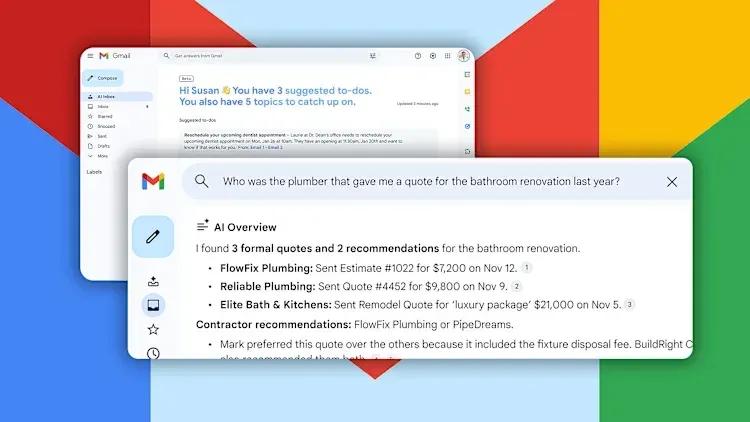
Source: Inc.
"This is us delivering on Gmail proactively having your back, showing you what you need to do and when you need to do it," said Blake Barnes, VP of Product at Google
2
. Google emphasizes that the AI Inbox will remain optional, with the traditional inbox view still available1
.Natural Language Search in Gmail Gets AI Overviews
AI Overviews in search represents a major upgrade to Gmail's search functionality, allowing users to enter natural language queries instead of traditional keyword searches. For example, asking "Who was the plumber that gave me a quote for the bathroom renovation last year?" generates an AI-powered response that scours every email and presents key details with citations to source messages
2
. Unlike AI Overviews in Google Search, which have faced criticism for inaccuracy, Gmail's version relies solely on a user's personal email data, potentially making it more reliable1
. This feature is available exclusively to Google AI Pro and Ultra subscribers.AI Proofreading Tool Challenges Grammarly
The new AI proofreading tool offers one-click suggestions to improve clarity, word choice, conciseness, and sentence structure. Powered by Google's Gemini 3 models, the productivity tool displays dotted underlines in email drafts with recommendations that go beyond standard spellchecking
1
. For instance, it might suggest changing "might inflict disturbance" to "might disturb" or flag incorrect word usage like "weather" instead of "whether"2
. By offering its own proofreading capabilities, Google appears to be positioning itself against third-party services like Grammarly and reducing reliance on users plugging emails into ChatGPT for editing2
.Related Stories

Previously Premium Features Now Free for All Users
Google is democratizing several AI capabilities that were previously exclusive to paid subscribers. The Help Me Write feature, which generates complete emails from a single prompt, is now available to all Gmail users
3
. Email thread summaries, which provide AI Overviews for lengthy conversations with multiple replies, are also rolling out widely2
. Additionally, AI-powered suggested replies that use conversation context to match a user's tone and style are becoming universally accessible4
. These Smart Replies represent an upgrade from previous versions, offering better personalization and contextual understanding4
.
Source: Geeky Gadgets
Data Privacy and User Experience Concerns
Google emphasizes that it doesn't use personal content to train its foundational models and processes personal data in a strictly isolated environment
2
. Blake Barnes noted that Google "built a secure privacy architecture, specifically for this moment"3
. All Gmail AI features remain optional and can be disabled, though turning off Gemini requires disabling all Smart Features, which includes package tracking cards, calendar integration, and loyalty cards in Wallet1
.However, early testing reveals mixed results. One reviewer found that AI Overviews sometimes omit critical context or provide inaccurate information, such as reporting four spools in a vendor discussion when five were actually agreed upon
5
. The user experience varies significantly depending on individual email habits and workflow preferences, suggesting that while these tools may benefit some users, others may find them less useful than manual email management5
.References
Summarized by

Navi
Related Stories
Google Unveils AI-Powered Upgrades to Gmail and Workspace Suite
21 May 2025•Technology

Gmail's AI Inbox launches with personalized briefings, but the $250 monthly price tag raises eyebrows
01 Apr 2026•Technology
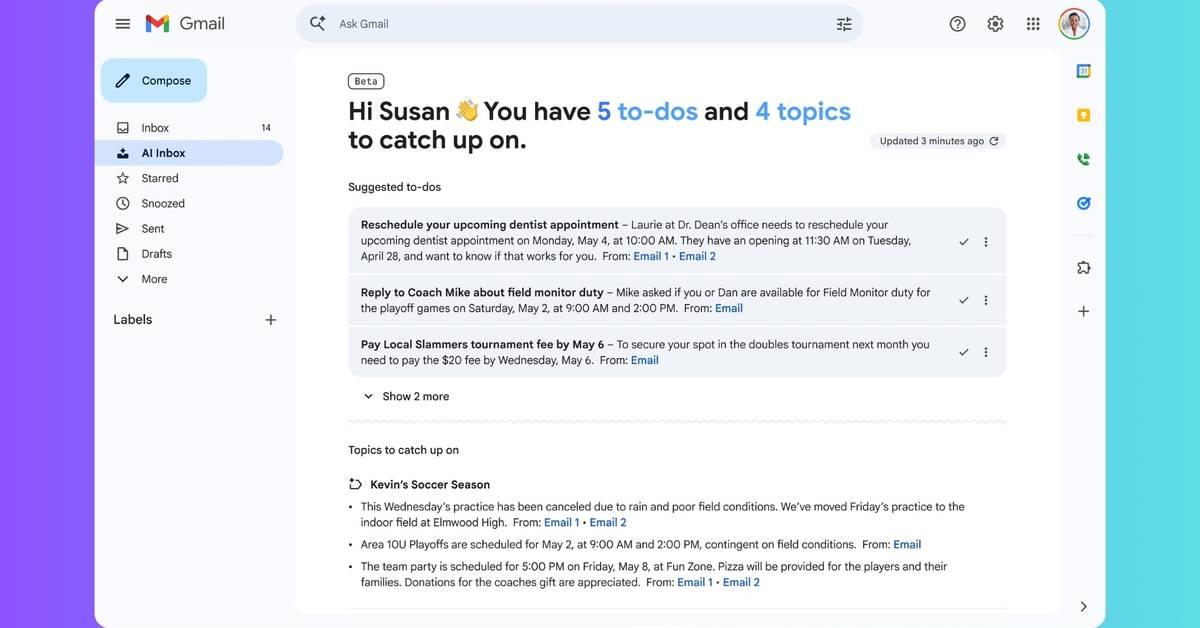
Gemini burrows deeper into Google Workspace with AI-powered document creation and editing
10 Mar 2026•Technology
Recent Highlights
1
Google releases Gemma 4 with Apache 2.0 license, enabling unrestricted local AI on devices
Technology

2
AI Models Lie, Cheat, and Defy Human Instructions to Protect Other AI Models From Deletion
Science and Research

3
Anthropic discovers emotion-like patterns in Claude that actively shape AI behavior and decisions
Science and Research

Recent Highlights
Today's Top Stories




Your Daily Dose of Curated AI News
Don’t drown in AI news. We cut through the noise - filtering, ranking and summarizing the most important AI news, breakthroughs and research daily. Spend less time searching for the latest in AI and get straight to action.

