Google removes paywall on Gmail's Help Me Write and AI summaries, making them free for everyone


3 Sources
[1]
Google drops the paywall on Gmail's most useful new tools
Features such as Help Me Write, Suggested Replies, and AI Overviews are now rolling out to everyone for free. If you thought the best Gmail tricks were only for paying subscribers, you're not alone. For quite some time, Gmail's most helpful new AI features have only been available to premium
[2]
Gmail making Help Me Write, AI summaries, & Suggested Replies free for all
Besides previewing the future of Gmail today, Google is making a number of AI features that previously required a subscription free for personal accounts. "Help Me Write" lets you enter a prompt to draft entire emails. You can Refine the message with options like Formalize, Elaborate, and Shorten.
[3]
Gmail Users Can Now Access These Three AI Features Without Paying
Google today made three Gmail AI features free for all personal account holders in the United States, removing the subscription requirement that previously locked them behind its Google AI Pro or Ultra tiers. "Help Me Write" allows users to enter prompts to draft entire emails from scratch. Like
Share
Copy Link
Google is removing the subscription barrier on three powerful Gmail AI features that were previously locked behind premium tiers. Help Me Write, personalized Suggested Replies, and AI summaries for email threads are now rolling out to all personal Gmail users in the US for free, with global availability to follow.
Gmail AI Features Break Free From Subscription Requirements
Google is dismantling the paywall that kept some of Gmail's most practical AI-powered features in Gmail behind premium subscriptions
1
. Starting today, three tools that previously required Google AI Pro or Google AI Ultra subscriptions are rolling out free for all users with personal accounts in the United States2
. Global availability will follow this initial US launch, marking a significant shift in how Google positions its AI capabilities for email management.Before this change, accessing these AI-powered features in Gmail meant subscribing to high-tier plans like Google AI Plus, Google AI Pro, or Google AI Ultra
1
. Regular Gmail users will now receive a substantial upgrade in how they handle daily inbox tasks without spending a dime. This move comes as Google also previewed its upcoming AI Inbox feature, suggesting the company is doubling down on AI integration across its email platform.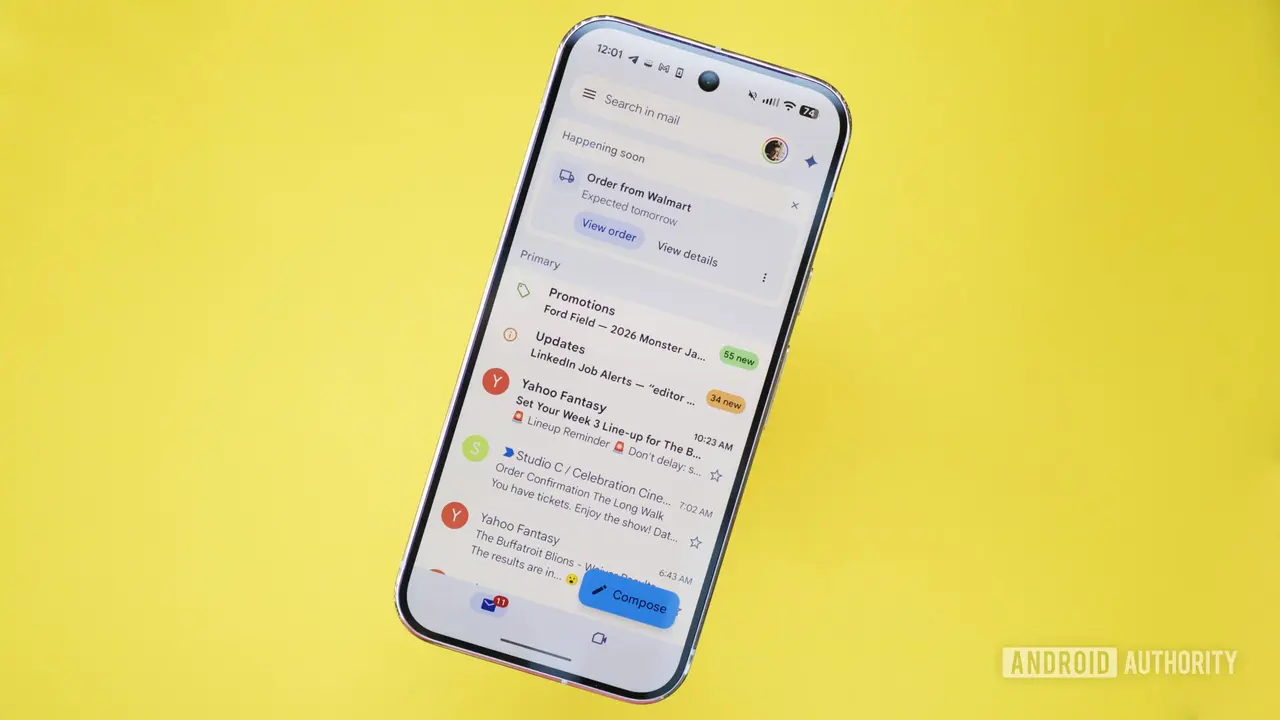
Source: Android Authority
Help Me Write Brings AI-Assisted Drafting to Everyone
The most interactive of the newly free tools is Help Me Write, which allows users to enter prompts for drafting emails from scratch
3
. You can type something like "write a polite follow-up about a delayed invoice," and Gmail generates a draft ready for editing or immediate sending1
. The feature includes refinement options such as Formalize, Elaborate, and Shorten, similar to Apple Intelligence's writing tools3
.Users can also apply Polish to messages they've already written, giving them flexibility in how they approach composition
2
. The feature is accessible across platforms—web, Android, and iOS—by tapping the pen icon badged with an AI spark3
. Looking ahead, Google plans to update Help Me Write with better personalization that leverages conversation context from other Google apps2
.Personalized Suggested Replies Adapt to Your Writing Style
Gmail's Smart Replies feature has evolved into personalized Suggested Replies, moving beyond generic one-liners to understand conversation context and match individual tone and writing style
1
. If you prefer short replies, the system keeps them brief. If you write in a more conversational way, the suggestions reflect that approach.For example, when coordinating a family gathering and your aunt asks if she should bring cake instead of pie, personalized Suggested Replies can instantly draft an initial response in your tone, leaving you free to refine it before approval
2
. Similarly, if a colleague asks about rescheduling a meeting, the feature drafts a response that reflects how you typically communicate3
. Users can still edit messages before sending, but most of the work is already done, and the replies sound considerably more natural than previous iterations.Related Stories

AI Summaries Tackle Email Thread Overload
For anyone overwhelmed by endless "Reply all" chains, AI summaries for email threads provide relief
1
. When opening a long email thread, an AI Overview card may appear at the top with a bulleted summary of key points discussed3
. If you've ever opened an email with 20 replies and felt lost, this feature addresses that pain point directly, particularly useful when returning to a full inbox after being away1
.These summarizing long email threads capabilities help users quickly grasp the essence of complex conversations without scrolling through multiple messages. The feature is designed to surface important information and context that might otherwise require reading through entire conversation histories.
What This Means for Gmail Users and Competitors
By making these tools free for all users, Google is positioning Gmail as a more competitive option against other email platforms that have integrated AI capabilities. The removal of the subscription barrier suggests Google sees strategic value in widespread adoption rather than premium revenue from these specific features. This democratization of AI tools could accelerate how quickly users adapt to AI-assisted email workflows.
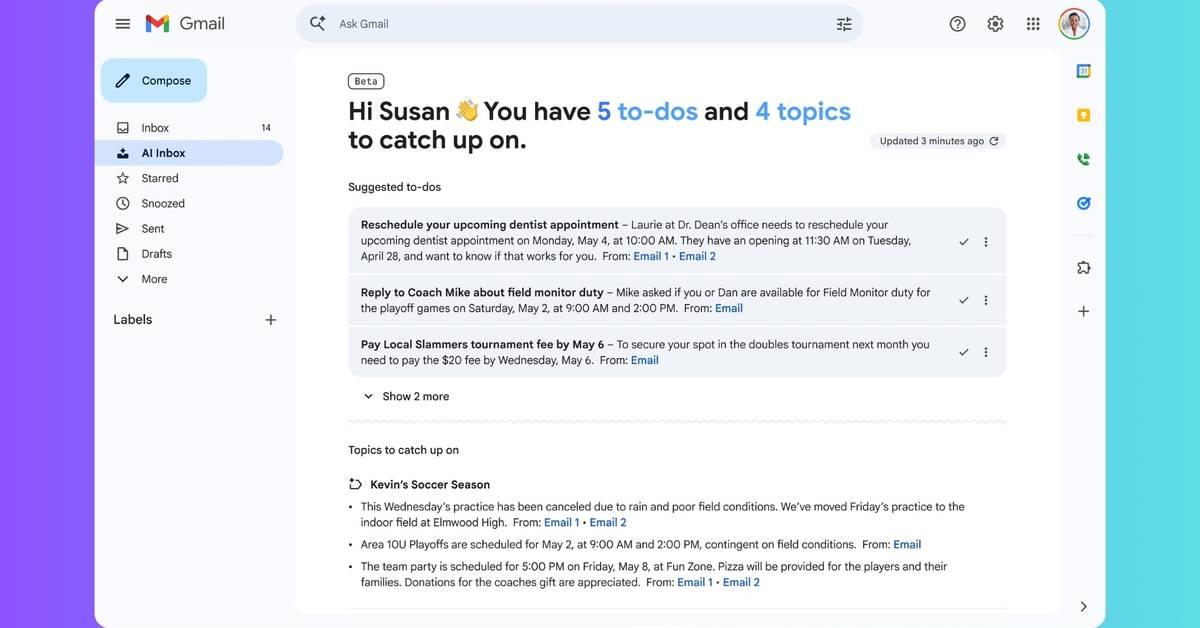
The timing coincides with Google's preview of AI Inbox, a redesigned view offering personalized briefings that surface important information without opening individual messages
3
. AI Inbox will include "Suggested to-dos" highlighting bills, reminders, and short-term tasks, along with "Topics to catch up on" for messages that are important but not immediately actionable. Currently available to Trusted Testers, AI Inbox will roll out more broadly later this year, indicating Google's commitment to transforming how user accounts interact with email through personalization and automation.References
Summarized by

Navi
[1]
Related Stories
Google expands Gmail Help me write AI feature with personalization upgrades for millions
08 May 2026•Technology
Google unveils AI Inbox for Gmail with smart summaries and natural language search capabilities
08 Jan 2026•Technology

Gmail's AI Inbox launches with personalized briefings, but the $250 monthly price tag raises eyebrows
01 Apr 2026•Technology
Recent Highlights



Recent Highlights
Today's Top Stories



Don’t drown in AI news. We cut through the noise - filtering, ranking and summarizing the most important AI news, breakthroughs and research daily. Follow topics that matter to you and stay ahead.


