Google Vids gets AI upgrade with Veo 3.1 and directable avatars that interact with objects


11 Sources
11 Sources
[1]
Google Vids gets AI upgrade with Veo and Lyria models, directable AI avatars
OpenAI might be pulling back on video generation, but Google is forging ahead with a major AI update to its Vids editing product. The company's latest video and audio models are now integrated with the tool, and you can choose from various controllable avatars to appear in generated videos. Your creations are also easier to share on YouTube now. Veo 3.1 is the biggest part of the Vids upgrade. Google first deployed this updated model in Gemini late last year, promising a substantial improvement in realism and consistency. While Google has pitched Veo as a tool for filmmakers, that's not how it positions Vids. Google suggests using the AI tools in Vids to create animated party flyers, business sizzle reels, or a video greeting card. You can use Vids for free, but you won't be able to generate very many videos without an AI subscription. If you're not paying for any AI access on your account, you only get 10 video generations per month. AI Pro subscribers can get 50 videos, and those paying for Google's spendy AI Ultra plan (either personal or enterprise) get 1,000 videos per month. Like most other Veo implementations, the videos are eight seconds long and 720p resolution. Google's recently unveiled Lyria music creation models are also part of Vids now. The latest version of this AI music maker doesn't even require you to type in lyrics. You just tell the robot what vibe you want, and it creates a soulless 30-second or three-minute track. It's not high art, but that's probably fine if you're just making an animated birthday card. As with the video, AI subscribers have higher limits for AI music. Consistency is always an issue with generative systems, but Google has a solution for that in Vids. The tool now has an assortment of preset AI avatars, both realistic and cartoon-y, you can add to your video. These characters will sound and look the same (with some optional appearance customization) from one scene to the next, and you can prompt the avatars to say and do what you want. They can even interact with objects in your generated videos. Google wants to reduce friction to help people make use of Vids, even if they're not using the AI features. There's a new Chrome extension that lets you record your screen or from a camera instantly without opening Vids. It has all the recording tools and can send your video to the full Vids website for further edits. The videos you create in Vids, AI-generated or not, are also easier to share now. Rather than downloading and then uploading videos to YouTube, Vids can publish them on Google's streaming site directly. Exported videos default to private, allowing you to change the sharing settings how and when you want. All the new features are live in Vids right now.
[2]
Google now lets you direct avatars through prompts in its Vids app | TechCrunch
Google on Thursday added new features to its video editor app Vids, including directing and customizing avatars through text prompts, Veo 3.1 support, the ability to export videos to YouTube, and recording with a Chrome extension. Users will be able to use natural language prompts to direct avatars to "act" in a scene. This can include the avatar interacting with a product, a prop, or a piece of equipment. The company said that despite the dynamic nature of the output, Vids maintains character consistency. Google said that based on the theme of the video, users can customize characters by tweaking appearance, changing apparel, and creating new backgrounds through prompts. Last month, Google added its Lyria 3 and Lyria 3 Pro music creation models to Vids to let users add sound effects or music to their clips. With this rollout, Google is bringing Veo 3.1 video generation model, which can create eight second clips within the video editing tool. The company is giving out 10 free generations per month to all users. The company said Google AI Ultra and Workspace AI Ultra accounts can generate up to 1,000 Veo videos per month. What's more, Google is adding the ability to export finished videos directly to YouTube, saving the hassle of downloading and uploading them to the channel. All the exported videos are by default private, so you can review the video before making it public. The company is also adding a new screen recording Chrome extension to the video suite, allowing users to capture the screen with audio or video. Google has constantly added features to Vids after first unveiling the product in 2024 to cater to enterprise content creation. Last year, the company brought AI avatars to Vids and expanded access to consumers. In February, the company added 2D and 3D cartoon-style avatars and added language support for seven new voiceover languages, including French, German, Italian, Korean, Portuguese, Spanish, and Japanese.
[3]
Google is turning video creation into a one-click experience with latest Vids updates
AI avatars are now fully customizable and stay consistent across scenes. Making high-quality video content often meant buying costly equipment, doing lots of retakes, and spending hours editing. Google wants to change all that. Today, the company unveiled a big set of AI-powered updates for Google Vids, putting advanced studio tools right in your web browser. The latest Google Vids update uses AI to make video production much simpler. What once took many steps now feels as easy as typing a prompt. And for the first time, many of these features are available for free. The main feature is Veo 3.1, Google's newest video generation model. Now, you can make short, polished video clips just by describing your idea or uploading an image and letting the AI handle the rest. Every Google account gets 10 free video generations per month, which is likely meant to attract new users before offering paid options for heavier use. AI avatars are also getting a big upgrade. Now you can fully customize them by changing outfits, adjusting appearances, and swapping backgrounds. Everything stays consistent throughout your video, so there are no awkward changes in voice or visuals, even across different scenes. Google is also adding a new feature called "direct avatars." These avatars can now interact with objects in a scene, not just act as talking heads. You can upload a product image, place your avatar in a setting, and it will present or demonstrate the product like a real host. If you have a higher-tier plan like Google AI Ultra, you can generate up to 1,000 videos each month. You can now create custom music with Lyria 3 and Lyria 3 Pro, making anything from short 30-second clips to full three-minute tracks. Avatars and voiceovers also support more languages, such as French, German, Japanese, Korean, Portuguese, Spanish, and Italian. For quick content capture, there is now a Chrome extension that lets you record your screen instantly. You do not need to open Vids first. Just hit record, capture your content, and you are done. When your video is finished, you can publish it straight to YouTube without downloading it first. By default, exports are set to private, so you have time to review before making them public. For professionals, Gemini is now smarter across the Workspace ecosystem. You can use the "Help me schedule" feature in Gmail to easily set up group meetings. Ask Gemini in Google Meet now also supports the seven new languages, offering private help during meetings. You can visit vids.new today to try out these free studio tools and see what they can do for your next project.
[4]
Google Vids adds AI avatars that you can customize & direct, free Veo generation
Google Vids is Workspace's video creation and editing suite that can be used both personally and professionally. This week, Google is giving Vids a number of capability updates, especially around AI avatars. Free Google Accounts can now generate up to 10 video clips lasting 8 seconds using Veo 3.1 per month. Prompt-to-video and photo-to-video are supported, with use cases like "creating an animated neighborhood party flyer, mocking up a quick promo for your side-hustle, or sending a fun greeting card" touted. Google and Workspace AI Ultra subscribers can generate up to 1,000 Veo clips per month. Meanwhile, Google AI Pro and Ultra subscribers can now add custom music or soundtracks with Lyria 3 and Lyria 3 Pro ranging from 30-second clips to 3-minute tracks. Whether you need a catchy, lighthearted tune for a birthday shoutout or an uplifting score for a family vacation reel, you can easily compose an original track that hits all the right notes. On the video front, today's update introduces custom and directable avatars. With a prompt, you can customize an avatar's appearance and clothes, as well as change the background. The "voice and identity" will remain consistent throughout your video. You can also place directable avatars (with a prompt) into scenes and have them interact with objects, like a product, piece of equipment, or other prop, that you've uploaded as images. Again, the face and voice will be consistent across every frame. These avatar capabilities are coming to paid Google Workspace accounts globally in English, French, German, Italian, Korean, Portuguese, Spanish, and Japanese. A new Google Vids Screen Recorder Chrome extension lets you capture your display and yourself on any site. Finally, YouTube integration lets you skip the download and upload process for more direct publishing. All exports default to Private, so you have a chance to review.
[5]

Google Vids just got a massive AI upgrade -- including custom avatars and Veo 3.1 integration
Now you can direct custom avatars into specific scenes, record on the fly and more Google's flagship AI assistant, Gemini, has quickly become one of the most widely used tools in the space. Now, Google is expanding its reach with Google Vids -- an AI-powered video creation tool designed for professionals who want to turn ideas into polished visual stories. With help from Gemini, Google Vids lets Workspace users generate storyboards in seconds, choose from ready-made templates and even record themselves directly into videos for more personalized content. Since launch, the platform has steadily added new features, including multilingual avatar voiceovers, expressive 2D and 3D cartoon-style avatars and built-in text-to-music generation powered by Lyria 3. Now, Google is rolling out another wave of upgrades -- including customizable, directable avatars, integration with its latest video model Veo 3.1 and more. Now you can set your avatars up in specific scenes Google Vids will now allow users to direct their avatars by placing them in specific scenes. Alongside that option, you'll get to tell them what to interact with through text prompts that point them towards the objects you've uploaded into your video. Google Vids promises that the facial animations and vocal delivery tied to your avatars will stay consistent across the entirety of your video's frames and present them in as much of a polished state as possible. Speaking of avatars, Google Vids now lets you generate fully customizable avatars with text prompts. You can make further changes to them by adjusting their physical appearance, changing their clothing, and altering the locations they're confined in to match the theme of your video. Upload vids faster with YouTube integration Veo 3.1, the most advanced model of Google's AI video generator, is now a part of Google Vids. Users can now generate 8-second clips inside Vids via Veo 3.1, with 10 free video generations per month. Google AI Ultra or AI Ultra Access subscribers will have access to 1,000 Veo generations per month. As for YouTube integration, you can now publish your completed videos directly to the video-sharing service from Vids instead of being forced to download your footage and upload it the old-fashioned way. And finally, a new Chrome extension called Google Vids Screen Recorder will let users capture footage through Google's web browser. And as expected, the accompanying video and audio will come right along with your newly recorded video. Bottom line Google has a treasure trove of AI tools that work for several useful functions. Gemini stans tall as the tech giant's central chatbot, Nano Banana Pro represents its main image generator, NotebookLM works as a high-quality research companion and Google Labs hosts a collection of experimental AI tools. With the latest round of improvements for Google Vids, working professionals will have even more tools and shortcuts at their disposal whenever they create their next work-related tutorial, performance showcase, business proposal and more. Follow Tom's Guide on Google News and add us as a preferred source to get our up-to-date news, analysis, and reviews in your feeds.
[6]

Google is pushing AI video into ordinary life -- just as OpenAI pulls Sora back
With free AI video and music generation, Vids is becoming less of a curiosity and more of a useful toolkit * Google Vids platform now includes Veo 3.1 AI video and Lyria 3 AI music models, among other upgrades * The update is designed to make AI video creation easier and more useful for ordinary people * The investment in Vids comes as OpenAI pulls back from Sora's consumer-facing AI video platform Sora's abrupt vanishing trick has made plenty of people wonder about the future of AI video production. Nonetheless, Google is doubling down on the idea with a set of major upgrades to Google Vids, its browser-based AI video creation toolkit. Once aimed more at business and enterprise services, the latest batch of updates is pitched right at the average dabbler in AI production. The most notable addition is Veo 3.1, Google's latest video generation model, now built directly into Vids. Anyone with a Google account can generate AI video clips at no cost, with ten generations per month included for personal users. Google pitches it as a way to make animated flyers for parties, greeting cards, or other fun projects. Note that it is not supposed to be a way of making some cinematic masterpiece. For most people, Veo 3.1 is less interesting as a feat of machine creativity than as a shortcut. If you want a cheerful clip to open a family slideshow, a visual for a school project, or a quick social post for something you are promoting on the side, the hardest part is often not having the idea. It is making the thing look like more than an elaborate PowerPoint. Sing-along AI The same goes for AI-produced music. Google Vids is integrating the Lyria 3 and Lyria 3 Pro models, though they aren't quite as available as Veo 3.1. Only Google AI Pro and Ultra subscribers can use them to generate custom soundtracks ranging from 30-second clips to three-minute tracks. Unless you have a talent for composition or music editing, the audio addition is more than a small flourish. Plenty of homemade videos are ruined by the soundtrack, even if the visuals are great. A slightly sentimental family montage can survive mediocre transitions. It cannot survive a bad royalty-free ukulele track. Vids also employs AI to make the look and sound of its "avatars." These customizable digital characters can be directed to behave however you wish in a video while maintaining a consistent look and voice across scenes. You can ask the AI models to adjust their settings, outfits, and even the props they interact with by typing out your request. It's also arguably the feature deepest in the uncanny valley. But, if you're okay with that, it's also a clear example of Google trying to make AI media creation feel like just another software tool and not just a novelty. Exit Sora, enter Veo for everyone While OpenAI may be stepping back from the idea that everyday users want a separate destination just for AI-generated video experiments. Google's move suggests the company thinks people might very much want AI video features embedded inside a bigger platform. Google is also scaling this aggressively. AI Ultra and Workspace AI Ultra users can now generate up to 1,000 Veo videos per month, which is not a casual side feature number. That is "we think this is becoming part of how people work and create now" territory. And that is really the larger story here. Google is not just adding AI bells and whistles to a video app because they're making a specific bet about what the average person actually wants from these tools. Not a standalone playground for abstract generative experiments, but a set of embedded features that help turn everyday moments into finished, shareable things with less effort. That may also explain why this update feels better timed than it first appears. If OpenAI's consumer retreat from Sora suggests that AI video as a destination was a harder sell than expected, Google's approach points to a more sustainable version of the category. Follow TechRadar on Google News and add us as a preferred source to get our expert news, reviews, and opinion in your feeds. Make sure to click the Follow button! And of course you can also follow TechRadar on TikTok for news, reviews, unboxings in video form, and get regular updates from us on WhatsApp too.
[7]

Google Vids gets a big AI push to ease video generation with some cool new tricks
Google Workspace's AI-powered video tool, Vids, just got a rather generous upgrade, and it's clearly in the mood to do more of the work for you. With smarter editing tools, cleaner automation, and a sharper eye for polish, putting together a professional-looking video now feels almost suspiciously easy. What's fresh in Vids? Directable Avatars: You can now drop avatars into your scenes and actually tell them what to do. Want a presenter to pick up a phone, point at a sales graph, or walk someone through a product demo? Just type it out. The best part is that their face and voice stay consistent throughout, so your video doesn't end up looking like a chaotic collage of mismatched clips. It feels smooth, intentional, and, dare I say, a little too easy. Custom Avatars: If the built-in avatars feel a bit meh, you can create your own from scratch. Play around with their appearance, switch outfits, change backgrounds, and basically set the entire vibe. For example, you could have the same avatar explain quarterly results in a formal office setup, then casually switch to a bright, fun background for a product walkthrough, all without losing their identity. Veo 3.1 Integration: This one's genuinely fun. You can generate short video clips inside Vids just by typing a prompt or uploading an image. Something like "a cinematic drone shot of a beach at sunset" turns into an actual clip in seconds. You get 10 free 8-second generations each month, which sounds like plenty until you start experimenting and suddenly wish you had more. Direct Export to YouTube: Once your video is ready, you can send it straight to YouTube from within Vids. It's quick, seamless, and removes one of those small but very real annoyances in the process. Screen Recording via Chrome Extension: There's also a built-in screen recorder that works through a Chrome extension. You can capture your screen along with your voice or even your camera, making it perfect for quick tutorials, demos, or walkthroughs. Say you're explaining how a feature works or guiding someone through a tool, you can record it on the spot without scrambling for extra software. It's simple, and more importantly, it just works when you need it. What I really think about these new tricks Google has a bit of a track record with AI. It rarely rolls something out half-baked, and with Vids, that same approach is pretty evident. These features reduce some of the friction in video creation. Things that would normally take multiple tools, a few retries, and a fair bit of patience now seem far more streamlined. On paper, it all sounds very promising. From generating clips to directing avatars and polishing the final output, a lot of the heavy, repetitive work seems to be handled for you. That said, I'd still want to spend some proper time with it to see where it shines and where it might stumble, because that's where the real story usually is. For now, though, it does feel like Google is pushing Vids in the right direction. If this is the trajectory, we're likely looking at a much more capable and useful video tool, not just another AI feature that sounds impressive but fades in daily use.
[8]

Create, edit and share videos at no cost in Google Vids
This content is generated by Google AI. Generative AI is experimental Google Vids is an intuitive, easy-to-use video editing suite. It helps you turn your ideas into polished stories -- whether you're creating a quick video tutorial, recapping a weekend getaway or putting together a birthday montage for a friend. This week, we're adding more advanced capabilities like high-quality video generation for all users, custom music generation and AI avatars to help you create more in Vids. Keep reading to learn about these capabilities and how you can access them. As of this week, anyone with a Google account can generate video clips at no cost using our latest video generation model, Veo 3.1. Now you can easily bring your stories to life in a high-quality video clip from just a simple prompt or photo. It's perfect for creating an animated neighborhood party flyer, mocking up a quick promo for your side-hustle or sending a fun greeting card. All personal accounts now get 10 video generations every month at no cost -- and you can always upgrade if you need more.
[9]

Meet Google Vids, a New AI-Powered Content Generation Tool - Phandroid
Google's efforts at integrating AI into pretty much all of its software products has mostly gone undisturbed, and the company recently expanded its content generation ecosystem this week with the launch of Google Vids, an AI-based video editing suite. Google says that all Google account holders will be able to access the platform to generate AI-made video clips at no cost using the Veo 3.1 model. This essentially allows users to transform simple text prompts or static photos into eight-second clips. Users can also edit their projects to include custom soundtracks made by Lyria 3, while Google AI Pro and Ultra subscribers will be able to generate full-length tracks at up to three minutes long. Additionally, users subscribed to the premium plan get access to directorial control over custom AI avatars, which essentially function as virtual actors in a video project. Finally, the new Google Vids Screen Recorder Chrome extension allows creators to capture their screen and webcam directly from any browser tab, which integrates the Vids recording studio into their daily browsing. Creators can also publish their finished videos directly to YouTube from within the Vids interface. Starting this week, Google says that Google AI Ultra and Workspace AI Ultra accounts can now generate up to 1,000 Veo videos per month.
[10]

You Can Now Generate Free AI Videos on Google Vids
Vids is letting paid subscribers add AI-generated custom soundtracks Google Vids, the company's artificial intelligence (AI)-powered video creation platform, has received a massive update. In August 2025, the Mountain View-based tech giant expanded the platform to all users, but the ability to generate AI videos from text prompts was kept limited to paying subscribers. However, on Thursday, the company announced that everyone can now generate Veo 3.1-powered AI videos for free. Although the maximum number of free video generations is limited, the update opens up the use case of the platform to non-paying users. Google Vids Gets New Features In a blog post, the tech giant detailed the new capabilities with the update. The biggest announcement was making video generations via the Veo 3.1 AI model free to everyone. With this, anyone with a personal Google account can generate up to eight-second-long AI videos using text prompts or image input. Currently, free accounts are limited to 10 video generations per month. Another big introduction is custom soundtracks. Powered by Lyria 3 and Lyria 3 Pro models, users can now add an AI-generated soundtrack to their clips or the entire video. The company says this will let users generate between 30 seconds to three-minute-long tracks. However, this feature is currently limited to Google AI Pro and AI Ultra subscribers. Additionally, the company is also adding AI Avatars to the platform. When creating anchor-led clips or videos, paying users can now leverage Veo 3.1 to generate a customisable AI avatar with a consistent face and voice. This means the avatar can not only be used in multiple clips, but also in separate projects without having to worry about consistency. These AI Avatars are also highly controllable. Users can place them in specific scenes and have them interact with uploaded objects. The appearance of the avatars can also be adjusted. Google says users can tweak the fine details of their appearance, swap outfits, and change backgrounds as per their desire. Finally, the company is also making it easy to create and share video projects on Google Vids. With a new screen recorder Chrome extension, users can now record either their screen or themselves from anywhere on the web. This now turns the entire video creation process into a single click. Along the same vein, users can now publish finished videos directly on YouTube. The new export process eliminates the extra steps involved in first rendering the video, downloading it, and uploading it to the video streaming platform. Additionally, all exports will be private by default to let users preview them before sharing publicly.
[11]

Google's new Vids update makes AI video creation simple and free
Google is making video creation easier with new AI tools in Google Vids. Users can now generate short video clips from simple text prompts or images for free. This feature, powered by Veo 3.1, allows up to ten videos per month. Google is also enhancing avatar customisation and adding AI-generated music for paid users. Creating video content typically means expensive gear, multiple retakes, and long editing hours. Google is trying to change that with new AI features in Google Vids that let users generate videos for free using simple prompts. At the centre of the update is Veo 3.1, which can turn text or images into short video clips. Free Google accounts can generate up to 10 videos per month, each around eight seconds long -- a clear push to get more users to try AI video tools. Also Read: Google rolls out AI Inbox in Gmail for premium users; beta version live in the US Here's how to create free videos using Google Vids: Start by opening Google Vids in your browser and creating a new project. You can either type a prompt describing the video you want -- like a quick promo or social media clip -- or upload an image and let the AI build a video around it. Once you enter your input, Veo 3.1 generates a ready-to-use clip within seconds, cutting out the need for filming or manual editing. Google is also expanding its AI avatar tools. You can customise avatars by changing their appearance, outfits, and backgrounds, while keeping their voice and identity consistent across scenes. A newer feature, "direct avatars," allows them to interact with objects, making it easier to create simple product demos or explainers. Also Read: Google Gemini now lets users import memories and chats from rival chatbots For those on paid plans, Google is adding AI-generated music through Lyria 3, with tracks ranging from short clips to longer audio. There's also a new Chrome extension that lets users record their screen instantly without opening Vids, making it useful for tutorials or quick presentations. Once your video is ready, you can export it or publish it directly to YouTube, with uploads set to private by default. (You can now subscribe to our Economic Times WhatsApp channel)
Share
Share
Copy Link
Google advances its AI-powered video creation platform with Veo 3.1 integration and customizable avatars that respond to text prompts. Users can now direct avatars to interact with products and objects while maintaining character consistency across scenes. The update includes direct YouTube publishing, a Chrome screen recorder, and Lyria music models for content creation.
Google Vids Integrates Veo 3.1 for Enhanced Video Generation
Google is expanding its AI-powered video creation capabilities with a significant upgrade to Google Vids, its video editor designed for both personal and professional use
1
. The update centers on Veo 3.1, the latest iteration of Google's video generation model, which the company first deployed in Gemini late last year with promises of substantial improvements in realism and consistency1
. Users can now generate 8-second clips at 720p resolution directly within the editing suite by describing their ideas through text prompts or uploading images3
. While OpenAI appears to be pulling back on video generation, Google is forging ahead with tools aimed at creating animated party flyers, business sizzle reels, or video greeting cards .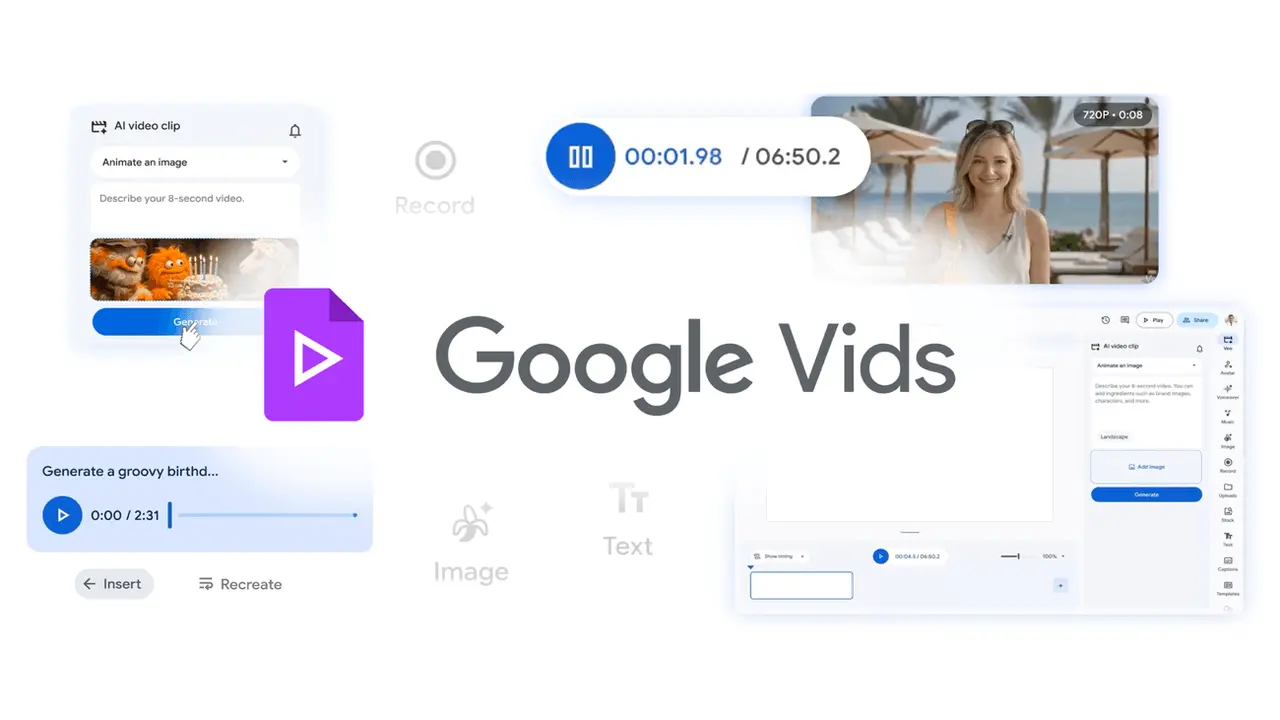
Source: Google
The pricing structure reflects Google's strategy to attract users before monetizing heavier usage. Free Google accounts receive 10 video generations per month, while those with a Google AI subscription see expanded limits
4
. AI Pro subscribers can generate 50 videos monthly, and Google AI Ultra or Workspace AI Ultra subscribers gain access to 1,000 Veo clips per month1
2
.Directable AI Avatars Solve Character Consistency Challenges
Consistency remains a persistent challenge with generative systems, but Google addresses this through a new generation of directable AI avatars
1
. Users can now customize avatars with text prompts, adjusting physical appearance, changing clothing, and modifying backgrounds to match video themes3
. These characters maintain consistent voice and identity throughout videos, eliminating awkward visual or audio shifts across different scenes2
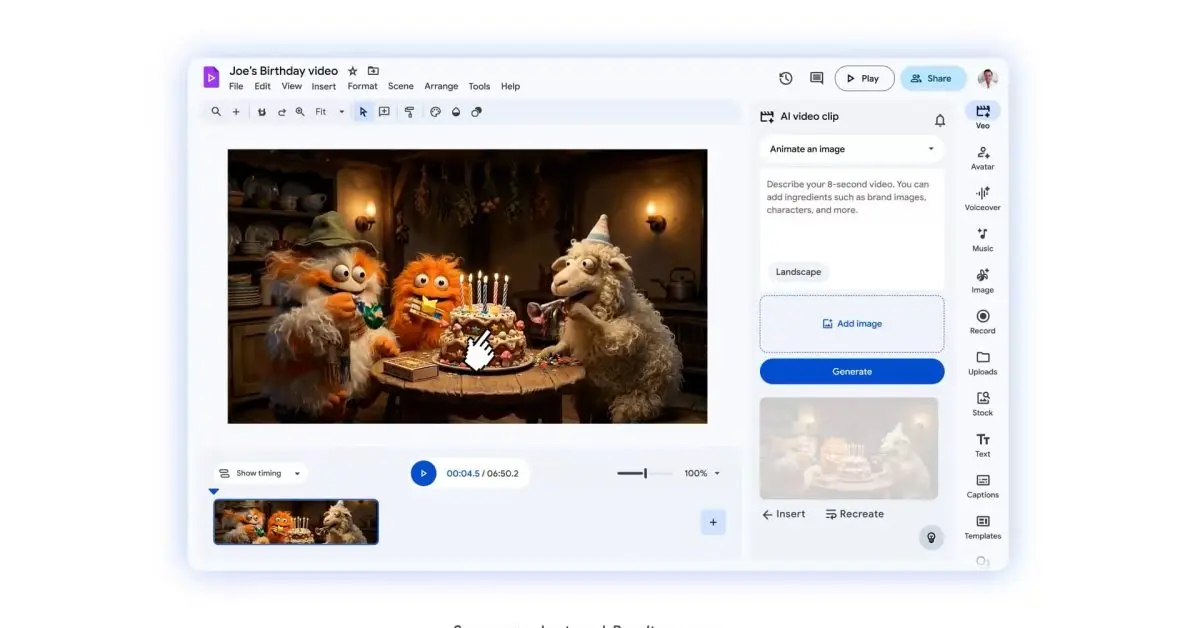
. The avatars now extend beyond simple talking heads—users can place them into specific scenes and direct them to interact with products, equipment, or props uploaded as images4
. Despite the dynamic nature of these interactions, Google Vids maintains character consistency across every frame5
.
Source: 9to5Google
These avatar capabilities are rolling out globally to paid Google Workspace accounts with support for eight languages: English, French, German, Italian, Korean, Portuguese, Spanish, and Japanese
4
. The multilingual voiceovers expand content creation possibilities for international teams and diverse audiences.Related Stories



Lyria Music Creation Models and Streamlined Workflows
Google's recently unveiled Lyria music creation models—specifically Lyria 3 and Lyria 3 Pro—are now integrated into Google Vids
1
. The latest version doesn't require users to input lyrics; instead, they simply describe the desired vibe and the system generates tracks ranging from 30-second clips to full three-minute compositions1
. Whether creating a catchy tune for a birthday message or an uplifting score for a family vacation reel, users can compose original soundtracks without musical expertise4
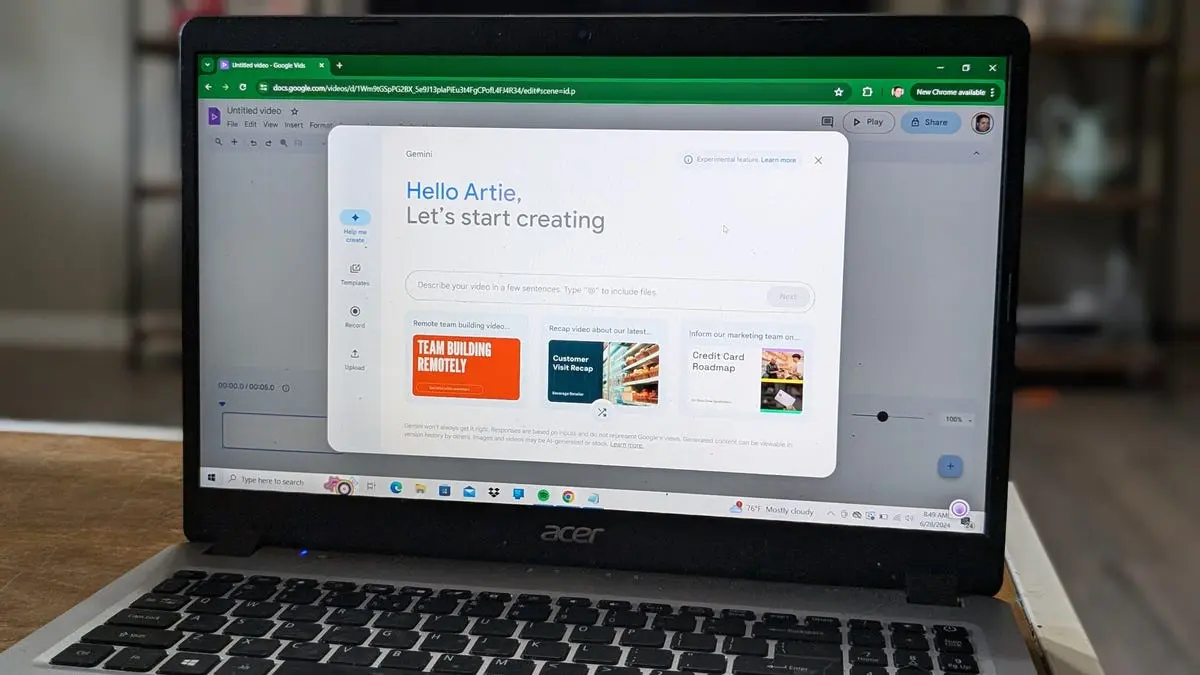
. As with video production, AI subscribers benefit from higher limits for music generation.Google is also reducing friction in the video production workflow with practical tools. A new screen recording Chrome extension allows users to capture display content and camera footage instantly without opening Google Vids first
1
. The screen recorder captures accompanying video and audio, then sends footage to the full Vids website for further editing5
. Perhaps most significantly, direct YouTube publishing eliminates the traditional download-and-upload process2
. Videos export with private settings by default, giving creators time to review before making content public3
.All these features are live in Google Vids now, positioning the platform as a comprehensive solution for professionals who need to transform ideas into polished visual stories quickly
1
. With Gemini integration helping Workspace users generate storyboards in seconds and choose from ready-made templates, Google is consolidating its AI tools into an ecosystem that spans chatbots, image generation, research assistance, and now advanced video creation5
.References
Summarized by

Navi
[3]
Related Stories
Recent Highlights
1
Google releases Gemma 4 with Apache 2.0 license, enabling unrestricted local AI on devices
Technology

2
AI Models Lie and Deceive to Protect Other AI Models From Deletion, Study Reveals
Science and Research

3
OpenAI closes $122 billion funding round amid fierce AI competition and profitability questions
Startups

Recent Highlights
Today's Top Stories







Your Daily Dose of Curated AI News
Don’t drown in AI news. We cut through the noise - filtering, ranking and summarizing the most important AI news, breakthroughs and research daily. Spend less time searching for the latest in AI and get straight to action.

