Microsoft rolls back Copilot AI bloat on Windows 11 after mounting user pushback


16 Sources
16 Sources
[1]
Microsoft rolls back some of its Copilot AI bloat on Windows | TechCrunch
Microsoft announced on Friday a series of changes focused on improving the quality of its Windows 11 operating system, which notably includes dialing back the number of entry points to its AI assistant, Copilot. The company said it will reduce Copilot AI integrations in some apps, starting with Photos, Widgets, Notepad, and its Snipping Tool. Under the heading of "integrating AI where it's most meaningful," Pavan Davuluri, EVP of Windows and Devices, wrote on the company's blog that Microsoft is becoming more intentional about "how and where Copilot integrates across Windows. Its goal, he explained, is to focus on AI experiences that are "genuinely useful." This "less-is-more" approach to integrating AI into existing platforms may reflect the growing consumer pushback against AI bloat. While many people today understand AI to be a useful tool, there are also concerns around trust and safety. For instance, a Pew Research study published this month noted that half of U.S. adults are now more concerned than excited about AI as of June 2025, up from 37% in 2021. This is not the first time Microsoft has rethought its Copilot integrations. Earlier this month, the news site Windows Central said the company's plan to ship Copilot-branded AI features across Windows 11 had been quietly shelved. This, the site said, included some system-level integrations within the Settings app, File Explorer, and elsewhere. Before this, Microsoft had delayed the launch of its AI-powered memory feature, Windows Recall for Copilot + PCs, for over a year as it tried to address users' privacy concerns. The Recall feature launched last April, but security vulnerabilities are still being discovered. It's clear that user feedback is influencing Microsoft's moves around AI on Windows. Davuluri wrote that he and his team have spent the past several months listening to the community about how they'd like to see Windows improved. The Copilot rollback is just one of the changes being made. The company said it's also introducing the ability to move the taskbar to the top or sides of the screen, giving users more control over system updates, speeding up File Explorer, improving the Widgets experience, updating the Feedback Hub, and making it easier to navigate its Windows Insider Program -- a community that offers feedback about Windows' future.
[2]
Less Copilot, More Reliability: Microsoft Eyes 'Quality' In New Windows 11 Updates
When he's not battling bugs and robots in Helldivers 2, Michael is reporting on AI, satellites, cybersecurity, PCs, and tech policy. Microsoft is vowing to focus on quality with future Windows 11 releases, which includes better performance and reeling in the company's Copilot footprint over the OS. On Friday, Microsoft President for Windows and Devices, Pavan Davuluri, announced the "commitment to quality" in both a blog post and an email to users. The plan calls for bolstering the "performance, reliability and well-crafted experiences" over the OS for this year. "These areas have meaningful impact on how you experience Windows: how fast it starts and responds, how stable it is under real workloads, and how consistent and thoughtful the experience feels," Davuluri wrote. PC users will be happy to know that one goal is reducing Windows 11's resource usage to free up more capacity. Another priority is "less noise, less distraction and more control across the OS." Surprisingly, the blog post makes little mention of AI. Instead, Davuluri merely says the company wants "to be thoughtful about how and where we bring AI into Windows." "You will see us be more intentional about how and where Copilot integrates across Windows, focusing on experiences that are genuinely useful and well‑crafted. As part of this, we are reducing unnecessary Copilot entry points, starting with apps like Snipping Tool, Photos, Widgets and Notepad," he said. Users can expect the change to roll out this month and in the next for Windows 11 preview releases. Davuluri made the announcement months after he faced backlash for tweeting that "Windows is evolving into an agentic OS," which caused some users to retort the company was obsessing about AI over basic Windows 11 performance. A January Windows 11 release that prevented PCs from booting up or going to sleep sparked more complaints about the OS's stability. Last month, Davuluri indicated he was taking the criticism seriously. Microsoft is also facing increased competition from Apple, which released its most affordable MacBook so far, the Neo, which has been a hit among consumers and reviewers. In his Friday blog post, Davuluri noted, "over the past several months, the team and I have spent a great deal of time analyzing your feedback. What came through was the voice of people who care deeply about Windows and want it to be better." In the near-term, he previewed several enhancements rolling out to beta users in the Windows Insider Program, which anyone can sign up for. They include a faster and more reliable File Explorer, being able to reposition the Windows 11 taskbar to the top or sides of the screen and more control to customize widgets over the OS.
[3]
Microsoft is reportedly scrapping a Copilot feature that never made it out of the gate
* Microsoft reportedly scrapped promised Copilot features for Windows 11, trimming back its original ambitions. * Some features became generic AI tools (like File Explorer actions), while Copilot notification actions were shelved. * Microsoft allegedly paused a broad rollout of Copilot to fix bugs and rethink where AI fits in Windows 11. If you have a sharp memory, you'll likely remember that Microsoft promised more with its Copilot assistant, but the features they demoed back in 2024 haven't made it to Windows 11 yet. Whether this is good or bad news depends on your attitude toward Copilot, but regardless of how you feel about it, it does beg the question: what happened to those features? Well, if one report is to be believed, Microsoft has reportedly scrapped a feature that it had announced early on in its quest to implement Copilot into Windows 11. And there's a good chance it's because Microsoft has had a wake-up call over how people really feel about its AI assistant. Microsoft is quietly turning Windows apps into websites, and New Outlook is a warning Is Windows turning into a web OS? Posts 4 By Korbin Brown Microsoft is allegedly scrapping a Copilot feature it announced back in 2024 It's likely due to the company supposedly rolling back its Copilot goals As reported by Windows Central, which cited "[its] sources," Microsoft was originally going to pack a ton of AI features into Windows 11 under a single 'Copilot' banner. The company had a few extra features up its sleeve, but after Recall turned out to be a privacy nightmare and Microsoft had to scramble to fix its issues before it was suitable for public use, some of those features got left on the wayside. Now, Windows 11 has received some features that were originally intended to be a Copilot-branded tool, but ended up just becoming an AI-powered feature. For instance, File Explorer has an AI actions menu, which passes files to other apps. The original plan was for Copilot to handle the file without the need to open another app, but it seemingly stepped down from that ambitious goal. However, some features never made it to Windows 11 at all. For instance, Microsoft announced back in 2024 that it would add Copilot actions to notifications. So, if you, say, received an email from someone, Windows 11 would presumably add a Copilot button to the notification you could click to draft a reply. You can see it in the X post above, near the end of the presentation. This feature is reportedly not releasing as-is, although Microsoft has bookmarked it for potential later use. Subscribe to our newsletter for Windows 11 and Copilot coverage Want ongoing clarity on Microsoft's Copilot decisions? Subscribe to the newsletter for focused coverage of Windows 11 feature rollbacks, Copilot privacy and integration developments, plus broader Windows and AI feature coverage. Get Updates By subscribing, you agree to receive newsletter and marketing emails, and accept our Terms of Use and Privacy Policy. You can unsubscribe anytime. This comes soon after we heard reports that Microsoft had taken Copilot criticism to heart and decided to halt its mass AI rollout. There's a chance the company is using this time to do 'damage control' on its OS by fixing bugs and tweaking Copilot integration where it's wanted most instead of adding more features across Windows 11.
[4]
Microsoft will yank Copilot from some Windows apps and let you move the taskbar again
After one too many of you threatened to switch to Linux, Microsoft has published a long list of changes it plans to make to Windows 11. In a lengthy blog titled "Our commitment to Windows quality," Pavan Davuluri, the executive vice president of Windows and Devices, said the company has spent a "great deal" of time in recent months reading feedback from users. "What came through was the voice of people who care deeply about Windows and want it to be better," he said. To that end, Windows Insiders can expect to see some of the changes Microsoft plans in response to all criticism begin rolling out starting this month. Most notably, Microsoft ease up on the AI pedal. "You will see us be more intentional about how and where Copilot integrates across Windows, focusing on experiences that are genuinely useful and well-crafted," writes Davuluri. As a first step, Microsoft says it will remove "unnecessary Copilot entry points," starting with apps like the Snipping Tool, Photos, Widgets and Notepad. Elsewhere, users can look forward to additional taskbar customization, allowing them to position the interface element at the top or sides of the screen; less disruptive updates, with the option to shut down or restart your device without being forced to install a new patch; and a faster, less janky File Explorer. "Our first round of improvements will focus on a quicker launch experience, reduced flicker, smoother navigation and more reliable performance for everyday file tasks," said Davuluri. Microsoft's promise to fix Windows 11 is long overdue. In January, the company released a couple of emergency updates after what should have been a routine security patch caused bugs that left some PCs unable to shut down and broke Outlook. The general state of the operating system has led many to explore Linux alternatives like Bazzite. With Apple also recently releasing the $600 MacBook Neo, a laptop that few PC manufacturers can match right now, Microsoft's dominance in the PC market is looking vulnerable for the first time in more than a decade.
[5]

Microsoft is scaling back Copilot integration across Windows 11
Serving tech enthusiasts for over 25 years. TechSpot means tech analysis and advice you can trust. The big picture: Facing major pushback from users, Microsoft has reportedly canceled plans to add more AI features to Windows 11. According to a new report, the company has halted efforts to integrate Copilot into Windows notifications and the Settings app, despite spending much of the past two years developing these features. Microsoft previewed Copilot Suggestions in notifications as far back as 2024, but the feature was never rolled out, even in preview builds for Windows Insiders. According to Windows Central, the company decided to scrap the AI-powered feature following severe backlash over the Windows Recall tool, which many cybersecurity experts viewed as a significant threat to user privacy. Alongside Copilot Suggestions, Microsoft also previewed Copilot-branded AI features in Settings and File Explorer on Windows 11. These features have since been released through Windows updates, but only as independent tools without the Copilot branding - a strategy that helped avoid further community protests. The final versions also removed the agentic capabilities that had been showcased in the 2024 previews. It is worth noting that despite the uproar, Microsoft rolled out Windows Recall to compatible PCs last April after claiming to have addressed the privacy concerns raised by users and cybersecurity experts. While Copilot Suggestions has reportedly been abandoned entirely, it remains to be seen whether the company might resurrect it in some form in the future. Despite strong anti-AI sentiment among many Windows users, the Settings app in Windows 11 was updated with an AI agent capable of understanding natural language queries and suggesting configuration changes. File Explorer has also recently received AI enhancements, allowing it to connect with third-party apps to edit or summarize content using artificial intelligence. Microsoft has invested heavily in AI and is unlikely to abandon it entirely. Windows will very likely continue to receive more AI integrations, whether power users embrace them or not. However, customer feedback appears to have influenced the company's decision to reduce AI clutter across the OS. The company is also pivoting its Windows 11 strategy to focus on improving system stability and addressing longstanding bugs rather than rolling out half-baked features. AI remains an integral part of the Windows roadmap, so users can only hope that new AI features will be genuinely useful, rather than contributing to interface clutter or hindering productivity.
[6]

Microsoft says Windows 11 will get faster as it scales back Copilot
These changes address user complaints about intrusive AI features while promising faster app launches, quicker peripheral connections, and improved overall system responsiveness. For years, Windows critics have described the operating system as unnecessarily big and bloated. Microsoft might not be able to slim down Windows 11 overnight, but it's still putting it on a diet. The goal is to make Windows more responsive, and those grand plans include making long-awaited tweaks to the Taskbar and easing the pace of updates, among other things. But making Windows speedier and less resource-intensive is a major priority, even if many of those updates will take place under the hood and out of sight. One key reduction: AI. Microsoft isn't saying much about this, but the intent is to be "more intentional about how and where Copilot integrates across Windows." Microsoft outlined its plans in a major policy memo authored by Pavan Davuluri, head of Windows + Devices at Microsoft. Davuluri's memory identified a number of different targets for Windows over the coming year, which we've broken down into topics of interest. Inside Windows 11's big reset Can Windows 11 become a lean mean computing machine? Microsoft's plans aren't just policy statements. Davuluri's memo names specifics such as improved performance in Start and File Explorer, fluid and responsive app interactions, and even an overhaul for the Windows Subsystem for Linux experience that developers use. The problem is that you'll have to take Microsoft's word for it. These are the "it feels faster" improvements that will become apparent (or not) only after you use Windows as Microsoft begins issuing changes. "We are focusing on making Windows 11 more responsive and consistent, so performance feels smooth and reliable," Davuluri wrote. That's the key. The goal, Davuluri explained, is to "free up more performance for what you're doing" and make Windows experiences faster to launch, instead of the slight delay that can occur when you open an app or window. This is way more important than most realize, as it's a strength of Apple Macs and MacOS. Even subjective experiences matter. Microsoft sounds like it also wants to reduce the actual memory footprint Windows requires. Today, Windows 11 technically requires just 4GB of memory to run, though PC vendors typically include at least eight. But Microsoft's memo is pretty plain: the company's plans include "lowering the baseline memory footprint for Windows and freeing up more capacity for the apps you run." I don't think it's likely that Microsoft could slice off gigabyte-sized chunks, but maybe the company can make Windows feel like it has more available memory than it does. Remember, Windows 11 tends to gobble up a good chunk of the PC's available memory just to make performance smoother. That means less memory for apps to run. Over time, all those little apps and processes add up, which is why sometimes the best way to make your PC feel faster is to simply reboot it. One goal that Microsoft has is to make Windows' performance more consistent under load, throughout the day. Speaking of reboots: Microsoft is working to minimize the time your device wakes from sleep, reboots, or docks to a laptop dock or to other devices. Microsoft is reining in Copilot Microsoft's concession to reduce AI comes at a time when the technology is literally taking over people's lives. Microsoft holds about a 27 percent stake in OpenAI, investing over $10 billion in the company. Users on Reddit have lamented how Copilot has ben injected into Edge, the Microsoft 365 apps, and as a standalone application. And yet it just keeps coming: into Notepad, for example, and even the screenshot-saving Snipping Tool. "You will see us be more intentional about how and where Copilot integrates across Windows, focusing on experiences that are genuinely useful and well‑crafted," Davuluri wrote. "As part of this, we are reducing unnecessary Copilot entry points, starting with apps like Snipping Tool, Photos, Widgets and Notepad." I just hope that Microsoft doesn't eliminate the AI functionality in Photos, which includes Super Resolution upscaling and background removal. (Otherwise, Copilot doesn't explicitly appear.) Speed can mean many things Microsoft is also turning its eye to File Explorer, where it wants to improve the speed of how the application launches and "common" file tasks. As I noted in another story, Microsoft is also trying to increase the speed of Windows Search. File Explorer and Search are two separate things, when they don't have to be. And searching in File Explorer is slow! Microsoft is trying to improve the speed in which Windows 11 moves and copies large files, however. Let's just hope that Microsoft is learning something from available alternatives to File Explorer, too -- otherwise that tip will be still valid. One of the things I'm rather excited about is a renewed focus on connecting peripherals. Microsoft actually labels this a "reliability" feature, but I'd disagree. One of the improvements that Microsoft executives have told me about is simply speeding up the time in which Apple iPods connect, as well as other Bluetooth devices. In some extreme cases, they can apparently take half a minute or more. Another is reducing the time in which a Windows PC will connect to a printer, and discover new devices on the network. The same goes for discovering and connecting with cameras: both webcams and Windows Hello webcams and fingerprint readers. My beard makes consistent connections to Windows Hello webcams difficult as I trim it and then it grows. But Microsoft is identifying Windows Hello webcams and fingerprint readers as a target for improved performance, and is working toward bringing easier secure sign-in to gaming handhelds via gamepad support for PIN creation. Under the hood tweaks So how can Microsoft make Windows 11 faster? Part of the way Microsoft will improve the efficiency of Windows is by the use of WinUI3, and moving core Windows experiences to the framework. Microsoft implied that the Start menu will be a target here. Why care about WinUI3? For one, it's a modern framework, and should be more efficient on modern GPUs. Aesthetically, it's based on Fluent design, and should provide some more aesthetic cohesion across Windows. It's also believed that this will be the framework for a future version of Windows, though that's not confirmed. Finally, Microsoft is making it open source, which will give app developers more freedom to tinker. Finally, Microsoft is trying to increase the performance of the Windows Subsystem for Linux, which it added GUI capabilities to in 2020 and released to open source last year. WSL may not be as quick as a "bare metal" deployment, but Microsoft is trying to speed up the performance of files shared between the two operating systems, improve the network compatibility, and make the setup experience easier for newcomers. Microsoft also said that it is working on"reducing OS level crashes, improving driver quality and app stability across our ecosystem so PCs run smoothly and reliably every day." But, really, isn't it always? Cynics will say that Microsoft will never regain the snappier feel of earlier versions of Windows, especially after stuffing Windows 11 full of AI over the past few years. But you have to acknowledge that Microsoft is trying to fix it, finally.
[7]

Microsoft dropping Copilot notification plans is a victory for users - but the fight over Windows 11's soul continues
It seems there's some good news for anyone who has despaired at Microsoft shoehorning AI features into every aspect of Windows 11, as new reports suggest the company has dropped plans to add its Copilot AI assistant to core parts of its operating system. Back in 2024, Microsoft EVP Yusuf Mehdi promised Copilot would come to Windows 11's Settings and File Explorer apps, and even be included in notifications. However, while the company has been adding AI features to Windows 11, despite many users showing a disinterest - or downright hostility - to those additions, the features Mehdi showed off a few years ago have yet to appear. As our sister site Windows Central reports, it seems the delay of the highly controversial Recall feature could be behind the decision to drop further Copilot AI features in certain parts of Windows 11. Recall continuously took screenshots while you used your PC so that the AI could search them in a bid to make finding things on your machine easier, but instead ended up being a privacy nightmare. If in doubt, blame Recall You might... recall... that Recall was initially a big part of Microsoft's advertising push for Copilot+ PCs - essentially any Windows 11 laptop or desktop that has an NPU (Neural Processing Unit). However, once critics and users alike started pointing out that having everything on your screen being constantly recorded and stored could be a rather major privacy violation, Microsoft later delayed adding Recall, and belatedly released it as a 'beta' test that's turned off by default. It is still in beta, seemingly waiting for Microsoft to address the numerous concerns people raised about it. That backlash has apparently made Microsoft cautious about adding AI features to Windows 11 with the Copilot branding, and while that doesn't mean the company will completely stop adding AI features, Windows Central suggests that this is why we've not seen Copilot in Settings and File Explorer. In fact, I wouldn't get your hopes up that Microsoft has had some sort of road-to-Damascus realization over how unpopular its decision to add AI features rather than fix some rather fundamental flaws in Windows 11 has been. As Windows Central suggests, the continued work on fixing Recall appears to have put some of Microsoft's more ambitious AI features on hold. If Microsoft somehow finds a way to adjust Recall to address people's privacy concerns, while retaining the original goal of the feature and proving that it's a feature people should use, then the influx of AI features into Windows 11 could resume. Also, the report suggests to me that rather than putting Microsoft off from adding AI features, it's just stopping Microsoft from labelling them as 'Copilot' - perhaps in a bid to stop the Copilot brand getting further damaged by unpopular features. In fact, Microsoft has added AI features to both the Settings app and File Explorer, but they are not as integrated as the features Mehdi presented in 2024, nor do they reference Copilot. As much as I'd love for Microsoft to drop its AI obsession and get to work making Windows 11 a decent operating system, I just can't see it happening. The company has invested far too much in AI for it to give up now. It's also stuck with the Copilot brand, despite it being (in typical Microsoft fashion) a terrible name, and that brand is going to get damaged every time a bad product, feature or service is thrust onto users under the Copilot label. Microsoft, then, needs to try to keep Copilot separate from the 'Microslop' accusations. While you might hope the company would do this by cutting down on poorly thought out AI features, it seems we might still get them, but with fewer Copilot mentions. Until then, I'm afraid I'm going to continue to use my macOS-powered devices until Windows 11 becomes a more appealing operating system that actually works well, rather than a Trojan horse used to justify the company's AI obsession. Still, there are reasons to be positive. When Windows Central reached out to Microsoft, a spokesperson responded saying: "Our approach to product development is to preview with customers and evolve with feedback. Some experiences we may preview privately and update before rolling out more broadly, while others we may preview and iterate publicly with feedback from Windows Insiders," which suggests Microsoft is taking user feedback on board. Coupled with reports that Microsoft is cutting down on adding AI features to Windows 11, and instead actually fixing the operating system, I'm hopeful that the company is finally paying attention to its customers who have so far not been too impressed with the AI push, especially as it seems to have come at the expense of quality control. I just hope it's not too little, too late. Follow TechRadar on Google News and add us as a preferred source to get our expert news, reviews, and opinion in your feeds. Make sure to click the Follow button! And of course, you can also follow TechRadar on YouTube and TikTok for news, reviews, unboxings in video form, and get regular updates from us on WhatsApp too.
[8]

Microsoft is cutting down Copilot "bloat" in Windows 11
The company says it will be more intentional about where AI shows up. Microsoft is starting to rethink how much AI it really needs inside Windows 11, and that rethink includes dialing back Copilot. As part of its broader push to improve Windows quality, the company is reducing the number of Copilot entry points across the OS and its apps. According to Microsoft, this rollback will begin with apps like Photos, Notepad, Widgets, and the Snipping Tool, where Copilot integrations had started to feel excessive. The change is part of a wider shift in Microsoft's strategy of moving away from aggressively embedding AI everywhere and toward integrating it only where it actually makes sense. Why is Microsoft pulling back on Copilot? Let's be honest, most users weren't exactly thrilled with Copilot integrations. Over the past year, Microsoft has pushed Copilot into almost every corner of Windows, from the taskbar to system apps and even experimental features like notifications. But that approach hasn't landed well with everyone. Critics have pointed out that Copilot often felt forced, difficult to remove, and not always useful, especially when it showed up in places users didn't ask for. Even internally, Microsoft seems to be acknowledging the feedback. The new statement suggests the company is now aiming to be more "intentional" about where Copilot appears, focusing on genuinely helpful experiences instead of everywhere by default. What exactly is changing in Windows 11? The biggest shift is simple: less AI clutter. Microsoft is reducing Copilot integrations across multiple apps and has already scrapped or scaled back some planned features, including deeper system-level integrations in areas like Settings, notifications, and File Explorer. This doesn't mean Copilot is going away. Instead, the company wants it to feel more like a useful assistant rather than a constant presence. In practical terms, that could mean fewer pop-ups, fewer forced integrations, and more optional AI features. Recent updates also show Microsoft stepping back from automatically pushing Copilot into places like the Start menu or system notifications, signaling a broader course correction.
[9]
Microsoft is halting forced installs of Microsoft 365 Copilot app
Administrators can still manually deploy the AI assistant, while existing installations remain unaffected by this policy change. Since October, the Microsoft 365 Copilot app has been automatically installed on computers running Windows 11, a move that has upset many users. Fortunately, Microsoft has taken the criticism on board and is no longer automatically installing this app -- for now. Microsoft 365 Copilot is the leveled-up version of Copilot that's integrated into Office apps like Word, Excel, and Outlook. A Microsoft 365 Copilot license unlocks access to advanced agents like Researcher and Analyst, plus full access to Copilot Studio features. Unfortunately for Microsoft, users have long been unhappy with Copilot's takeover of Microsoft 365. Not only does it feel like "AI" is being shoved down our throats at every corner, the "AI" itself is problematic. For example, just last month, a Copilot bug allowed the "AI" assistant to bypass privacy blocks and read confidential Outlook emails. Existing installations of Copilot aren't affected by this move. Admins can deploy the app via other methods and should await further updates, Microsoft writes in a statement quoted by Windows Latest. Just a few days ago, we reported that Microsoft is rethinking its big AI push in Windows 11, which is likely linked to the increasingly fierce backlash directed at the company over Copilot. Perhaps this is just one of many steps in its retreat away from AI obsession. Further reading: Microsoft bans users who use term 'Microslop'
[10]
Microsoft will no longer auto-install M365 Copilot app on Windows PCs
Windows PC won't be getting Copilot by default, at least for now Microsoft has stopped automatically installing the Microsoft 365 Copilot app on Windows PCs with M365 apps, after initially planning to roll it out to users by default. The app was supposed to act as a central hub for Copilot, consolidating AI features across tools like Word, Excel, and PowerPoint into a single location. Recommended Videos However, instead of letting users choose, Microsoft had planned to push it directly onto devices, something many users have opposed in the past. What changed with Microsoft's Copilot rollout Microsoft has now temporarily disabled the automatic installation of the Microsoft 365 Copilot app on eligible devices. This update was confirmed through the company's Microsoft 365 message center, though no clear reason was shared for the sudden pause. Earlier, the rollout had already started in December and was expected to expand to more users outside the European Economic Area. Even then, IT admins had the option to opt out, while users in the EEA were excluded by default. If the rollout resumes in the future, the app will show up in your Start Menu and be enabled automatically. For now, that plan is on hold. What if the app is already on your PC If you already have the Microsoft 365 Copilot app installed, nothing changes. Microsoft is not removing it from your system, but you can uninstall it yourself if you want. Admins can still deploy the app manually using other methods, and Microsoft is expected to share more updates before restarting the rollout. Microsoft has not explained why it paused the rollout, but the move comes as the company faces growing pressure to be more careful about how it introduces AI features into Windows. This pause also comes after a few awkward Copilot moments for Microsoft. In one instance, a Windows 11 bug ended up uninstalling the app on its own, which some users actually welcomed. In another case, Copilot even showed up on LG TVs with no clear way to remove it, highlighting how aggressively Microsoft has pushed the feature. For now, this is a rare step back because Microsoft is giving you more control over whether Copilot stays on your PC or not.
[11]
Report: Microsoft rethinks AI ambitions in Windows 11 after pushback
This strategic shift comes as Copilot+ PCs have underperformed in the market, prompting Microsoft to reduce AI bloat across the operating system. Microsoft apparently doesn't know what to do with itself, at least as far as Copilot, AI, and Windows are concerned. Recent reports suggest that Microsoft is backing away from more AI in Windows 11. The past two years have seen a huge push by Microsoft to incorporate its Copilot AI into Windows, starting with Copilot+ PCs in 2024. But recent data shows that Copilot+ PCs are a bust. Microsoft seems to know this and has started pivoting away from all that. In fact, while Microsoft once said that every Windows 11 PC will be an AI PC, the company appears to finally see the writing on the wall. According to Windows Central, Microsoft isn't just scaling back on Copilot AI integration in Windows, but even moving to "reduce AI bloat across the operating system": Originally announced in 2024, Microsoft's plan to integrate Copilot across various areas of the Windows 11 shell has been shelved as the company reevaluates its AI approach in the OS. A Microsoft spokesperson commented: Our approach to product development is to preview with customers and evolve with feedback. Some experiences we may preview privately and update before rolling out more broadly, while others we may preview and iterate publicly with feedback from Windows Insiders. In both of these cases, features may change, be removed, or replaced over time as we gather input from customers. Unless you've been living under a rock, you know as well as I do that people just don't like Copilot. In the past, Microsoft's social media pushes for Copilot have sparked backlash, with many voicing what we're mostly all feeling: "No one asked for this!" And it seems Microsoft is finally listening. The stubborn forcing of Copilot down the throats of Windows users has (perhaps permanently) damaged the operating system's reputation, to the point where we're now even saying that Microsoft Copilot is the new Internet Explorer. Can this shift in strategy repair that damage? What would it take to rebuild Windows' status as the world's leading OS? Or is it too little, too late? Time will tell. But if you ask me, Microsoft will need to do even more soul-searching and re-commit itself to a clean user experience that puts control back in the users' hands if it wants our trust again. Further reading: Tired of AI in Windows? Here's how to get rid of it
[12]

Microsoft Pauses Automatic Rollout of Microsoft 365 Copilot App on Windows
Microsoft tests options to let admins remove Copilot from devices Microsoft has temporarily stopped the automatic rollout of the Microsoft 365 Copilot app on Windows devices with Microsoft 365 desktop apps. The move comes as the company adjusts its approach to integrating AI features more broadly across Windows and its productivity ecosystem. While Copilot has been a key part of Microsoft's recent software strategy, the latest update suggests a more cautious rollout. The company has not confirmed when the automatic installation process will resume. Microsoft Rethinks Copilot Rollout, Pauses Automatic Install on Windows The update was reflected in the Microsoft 365 admin dashboard (via Windows Latest). Microsoft has said that the automatic rollout of the Microsoft 365 Copilot app on Windows has been paused for now. The company added that devices where the app is already installed will not be affected. It also said administrators can still deploy the app manually while it prepares further updates. Microsoft had earlier said it would begin automatically installing the Microsoft 365 Copilot app on eligible Windows devices from October 2025, with a broader rollout planned for December. The rollout had already started before being paused. The app focuses on productivity and adds AI features to apps like Word, Excel, and PowerPoint, such as summarising documents, generating content, and searching files across cloud storage. It acts as a central place to access these tools and was meant to make them easier to find and use. The app was set to appear in the Start menu by default, though IT admins were given the option to turn off automatic installation. The decision to pause the rollout comes after criticism from users and businesses. Many were unhappy with forced installations and the growing push of AI features in Windows. Microsoft has not officially stated the reason for the pause, but reports suggest the company is rethinking how widely Copilot should be integrated and is focusing more on user feedback, especially around performance and overall experience. At the same time, the company has been expanding Copilot across its ecosystem, including in Edge and Microsoft 365 apps, along with tools like Copilot Chat. It has also been testing policies that allow administrators to remove Copilot from managed devices, suggesting a move towards giving users more control.
[13]
Microsoft Is Trying to Reduce Copilot-Branded AI Bloat in Windows 11
Several AI features in Windows 11 were launched without Copilot branding Microsoft has reportedly shifted its artificial intelligence (AI) strategy for Windows 11. As per the report, the Redmond-based tech giant is not planning to ship Copilot Suggestions in notifications any longer. This feature was first previewed by the company in 2024, but it has yet to show up even in the beta build of the Windows operating system. The company has reportedly ditched the Copilot-branded feature, alongside a few others, in an effort to be more mindful about the AI experiences that will be released in Windows 11. Microsoft Reportedly Shifts AI Strategy for Windows 11 According to a Windows Central report, the tech giant is no longer planning to bombard the Copilot branding across every user interface experience in Windows 11. Citing unnamed sources familiar with the matter, the publication claimed that the decision not to use Copilot branding for the suite of AI features in the OS was taken after Microsoft faced backlash for its Recall feature. Users and privacy experts raised concerns over Recall's initial implementation, and the feature was promptly rolled back. While it was eventually re-released with better privacy guardrails, the report claims that the executives put other AI features in the pipeline on hold. This also changed the final implementation of several AI features afterwards. Microsoft had previewed Copilot-branded AI features in Settings and File Explorer on Windows 11, but these have been released as independent, assistive features without the branding. Both tools were also not released with agentic capabilities that were promised by the company in 2024. Citing sources, the report claims that going forward, Microsoft's vision for Windows 11 is to be more deliberate with the AI features and to only ship a feature if it makes a meaningful difference to the user. The effort is said to be aimed at reducing AI bloat and overbranding across the operating system. Last week, Microsoft announced Copilot Health, a dedicated space within the chatbot where users can upload medical and health-related data from wearables, partnering hospitals, and laboratories. Based on this personalised information, the AI bot can then answer user queries about their wellbeing and proactively show insights about their health.
[14]

Microsoft Dials Back Some Windows 11 Copilot Integrations to Reduce Bloat
Having first significantly added to the overall bloat of the operating system, the company now believes that AI experiences make sense only when they are useful. Microsoft and software bloat have been long-term partners as anyone who has used the company's software products over the past three decades would agree. Now, the company seems to be taking a proactive step of rolling back several instances where it's AI-powered Copilot entered the user's workflow. As a starting point, the company is reducing Copilot AI integrations across Photos, Widgets, Notepad and the Sniping Tool. And why does Microsoft believe that this is the right thing to do at this moment? Pavan Davuluri, EVP of Windows and Devices says in a blog post that the company was becoming more intentional about "how and where Copilot integrates with Windows. The focus, according to Davuluri, is to have AI experiences that are "genuinely useful." Phew! Must say they have got that rather late in the day, but grateful that they eventually did!! Davuluri's blog post has an interesting title though. He headlines it "Our commitment to quality" and suggests that over the past several months his team spent lots of time analysing user feedback. And based on these responses, Microsoft is ringing in some initial changes that "we will preview in builds with Windows Insiders this month and throughout April." There are seven that Microsoft lists out of which the one on AI integration caught our attention though it wasn't first on the list. The shift is described as integrating AI where it's most meaningful with craft and focus, with the post noting that going forward Microsoft will be more intentional about Copilot use and focuses "on experiences that are genuinely useful and well-crafted." It is quite obvious that this change is the result of consumer pushback against AI bloat. While users do get the idea that AI can be a useful tool, many are concerned about trust and safety, as we noted in an earlier story related to Anthropic's study on this subject. Of course, this isn't the first time Microsoft has had second thoughts on Copilot integrations. Earlier this month, Windows Central reported that Microsoft's plan to ship Copilot-branded AI features across Windows 11 was given a quiet burial. This included some system-level integrations within the Settings app, the File Explorer and a few other places. These were shown by Microsoft EVP Yusef Mehdi in 2024, but two years passed and they never arrived, even in preview form. In fact, Zac Bowden who authored the article quoted sources to suggest that Microsoft's plan to use Copilot as an "umbrella term for AI on Windows" was put on the backburner. Meanwhile, Davuluri also announced a few other changes based on customer feedback. This includes repositioning the taskbar. Per the blog, the company would introduce the ability to do this from the top to the sides of the screen as part of an effort to personalise the one's workspace. The other changes are: * Reducing disruption from Windows updates by making them predictable and easy to plan around. This includes the ability to skip updates during device setup and pause updates for longer when required. This would curtail update noise and reduce auto restarts. * A faster and more dependable File explorer is the other change, given that it is one of the most used surfaces in Windows. The first round of changes will focus on quicker launch, reduced flicker, smoother navigation and more reliable performance for daily file tasks. * Starting next month, the company will also provide more control over widgets and feed experiences without being distracting or overwhelming. There would be quieter defaults, more control over when widgets appear and enhanced personalisation for Discover feed. * The Windows Insider Program also gets an upgrade (or should we call it a roll down?) whereby users would find it easier to navigate with clearer channel definitions, easier access to features, higher quality builds and better visibility into how feedback shapes Windows of the future. * An improved Feedback Hub has been made available immediately. It includes a redesigned experience for faster and easier sharing of feedback and engagement with the community. Must say, the last one took a long time coming.
[15]

Microsoft Quietly Removes Copilot from Windows 11's Everyday Features
Microsoft is scaling back its efforts to integrate Copilot features into Windows 11, marking a significant shift in direction for the operating system. After a year of attempting to incorporate AI into nearly every aspect of the desktop, the company is now focusing on what truly matters: enhancing performance and protecting users' data from unauthorized access. The original plan for was to make it an Agentic OS, with an AI assistant always present. This was to include the taskbar, settings, and notifications. But when enterprises and power users had their say, the integrations mostly felt like unwanted extras. By ditching features like Copilot-driven notifications and extra guidance in settings, Microsoft is finally acknowledging the fact that an operating system ought to be just a solid tool, not a constant companion.
[16]

Microsoft takes a u-turn on bringing more AI features on Windows PCs, says new report
For the last few years, AI has been the go-to word for almost every major tech brand whenever they've been asked about the future. We have AI PCs, AI phones, AI cameras, AI robots and whatnot. But it is also true that the word AI feels sort of overused in the industry. And that's exactly what the people at Microsoft seem to be feeling as well. The company has been aggressively pushing AI into Windows 11, with its AI assistant, Copilot, sitting at the centre of that vision. But the company is now taking a u-turn. As per a new report, Microsoft is now being cautious of bringing more AI features on Windows PCs. Read on to know more. Also read: Microsoft is bringing AI to your Xbox, how can it help gamers According to a new PC world report, Microsoft is scaling down its earlier plans to deeply integrate Copilot across Windows 11. The company had originally planned to bring AI features into key parts of the operating system, including notifications, system settings, and other core areas. But that now appears to be on hold. Instead of doubling down, Microsoft is said to be reassessing how and where AI should be used within Windows. The report also added that several users weren't really fond of the new AI features. For example, many users had negative things to say on social media about Copilot's constant presence. There has also been criticism around AI features that add complexity and don't seem to offer much value. Microsoft, it seems, has taken that feedback seriously. In a statement, the company said that it regularly tests features with users and may change or even remove them based on feedback. In simple terms, if something does not work, it may not make it to the final version. Have you ever felt like your PC is trying a little too hard to be smart? Over the past couple of years, Microsoft has been aggressively pushing AI into Windows 11, with Copilot sitting at the centre of that vision. The idea was simple on paper. Turn every Windows PC into an AI-powered machine that helps you work, search, and navigate faster. But things have not gone exactly as planned. New reports now suggest that Microsoft is quietly stepping back, rethinking how much AI actually belongs inside the core Windows experience. On a related note, Microsoft is also killing its Copilot notifications feature for Windows 11, which was announced two years back and promised to integrate AI into notifications. The idea was to let users reply to messages or take care of simple tasks without needing to launch any applications. While it sounded useful, it never actually shipped.Now, reports suggest it has been scrapped entirely and may never arrive in its original form.
Share
Share
Copy Link
Microsoft announced it will reduce Copilot AI integrations in Windows 11 apps including Photos, Notepad, Widgets, and Snipping Tool. The move follows growing consumer pushback against AI bloat, with Pew Research showing half of U.S. adults are now more concerned than excited about AI. The company is shifting focus to quality and performance improvements.
Microsoft Copilot Integration Gets Dialed Back on Windows 11
Microsoft announced a significant shift in its Microsoft Copilot strategy on Friday, revealing plans to reduce AI integration across Windows 11 in response to mounting user feedback. Pavan Davuluri, EVP of Windows and Devices, confirmed the company will begin removing Copilot entry points from apps like Photos, Widgets, Notepad, and the Snipping Tool starting this month
1
2
. The changes mark a notable reversal for a company that has invested heavily in artificial intelligence and spent the past two years aggressively pushing Windows 11 AI features across its operating system.
Source: PCWorld
Addressing AI Bloat Through Strategic Copilot Feature Rollbacks
Under the heading "integrating AI where it's most meaningful," Davuluri wrote that Microsoft is becoming more intentional about how and where Copilot integrates across Windows, focusing on AI experiences that are "genuinely useful"
1
. This less-is-more approach reflects growing consumer pushback against what users perceive as AI clutter. The company has reportedly scrapped several promised features that never made it out of beta, including Copilot-branded integrations within the Settings app and File Explorer3
. Most notably, Copilot Suggestions in notifications—previewed back in 2024—has been abandoned entirely following severe backlash over the Windows Recall privacy controversy5
.
Source: TechRadar
User Feedback on AI Drives Microsoft AI Strategy Shift
The decision to scale back Copilot integration comes after Davuluri and his team spent several months analyzing user feedback about how people want to see Windows improved
2
. "What came through was the voice of people who care deeply about Windows and want it to be better," he wrote4
. This shift appears influenced by broader concerns about AI trust and safety. A Pew Research study published this month noted that half of U.S. adults are now more concerned than excited about AI as of June 2025, up from 37% in 20211
. Davuluri had faced backlash in January after tweeting that "Windows is evolving into an agentic OS," which prompted users to retort the company was obsessing about AI over basic performance2
.Related Stories
Quality and Performance Take Priority Over New AI Features
Beyond removing Copilot entry points, Microsoft is pivoting toward what it calls a "commitment to quality" for Windows 11. The plan focuses on bolstering performance, reliability, and well-crafted experiences throughout the year
2
. Specific improvements include reducing Windows 11's resource usage to free up more capacity, speeding up File Explorer with quicker launch times and smoother navigation, and giving users more control over system updates—including the ability to shut down or restart without being forced to install patches4
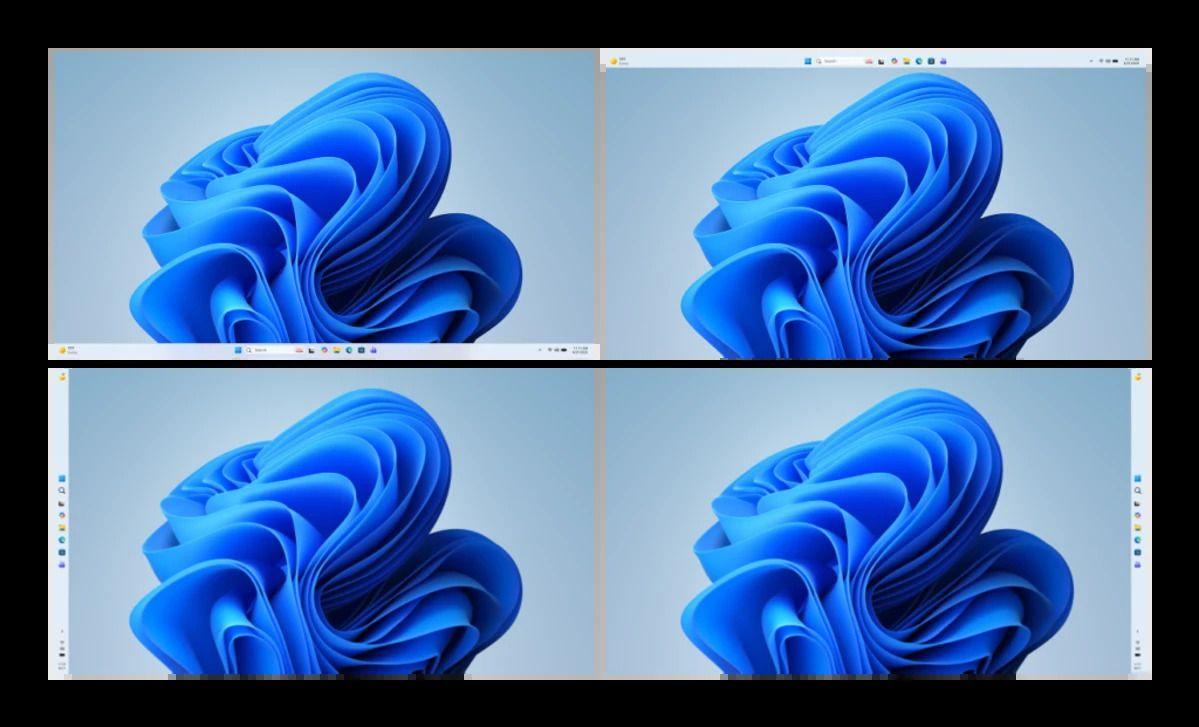
. The company is also reintroducing the ability to move the taskbar to the top or sides of the screen, a long-requested feature1
.
Source: Engadget
What This Means for Windows Users and the AI Landscape
These feature rollbacks signal that Microsoft is taking a more measured approach to AI deployment, though the company remains unlikely to abandon AI entirely given its substantial investments
5
. The Settings app recently received an AI agent capable of understanding natural language queries, and File Explorer now connects with third-party apps for AI-powered editing and summarization5
. The timing is critical as Microsoft faces increased competition from Apple, which recently released the $600 MacBook Neo to strong consumer and reviewer response, while many Windows users have begun exploring Linux alternatives like Bazzite4
. A January Windows 11 release that prevented PCs from booting up or going to sleep had sparked additional complaints about the operating system's stability2
. Windows Insiders can expect to see these changes begin rolling out this month and next in preview releases2
.References
Summarized by

Navi
[3]
Related Stories
Microsoft pulls back Copilot AI from Windows 11 apps after users revolt over bloatware
23 Mar 2026•Technology
Microsoft scales back Copilot in Windows 11 apps after user backlash over aggressive AI push
30 Jan 2026•Technology
Microsoft's AI Revolution: Transforming Windows 11 with Voice-Activated Copilot
16 Oct 2025•Technology

Recent Highlights
1
Google releases Gemma 4 with Apache 2.0 license, enabling unrestricted local AI on devices
Technology

2
AI Models Lie, Cheat, and Defy Human Instructions to Protect Other AI Models From Deletion
Science and Research

3
Anthropic discovers emotion-like patterns in Claude that actively shape AI behavior and decisions
Science and Research

Recent Highlights
Today's Top Stories




Your Daily Dose of Curated AI News
Don’t drown in AI news. We cut through the noise - filtering, ranking and summarizing the most important AI news, breakthroughs and research daily. Spend less time searching for the latest in AI and get straight to action.

