WordPress.com rolls out AI Assistant to edit sites, generate images with natural language prompts


5 Sources
5 Sources
[1]
WordPress.com adds an AI Assistant that can edit, adjust styles, create images, and more | TechCrunch
WordPress.com, the website hosting platform from Automattic, will now include a built-in WordPress AI assistant, the company announced on Tuesday. The feature is designed to work inside the website to understand its content and layout, allowing site owners to make changes with natural language commands. With the new tool, you can adjust the site's layout, its style, or other patterns by issuing commands to the AI assistant, and then see the changes reflected on the site as you work. These instructions don't have to be precisely tailored prompts, either, the company notes. Instead, you can use more general language, like "make this section feel more modern or spacious," "change my site's colors to be brighter and bolder," or "give me more font options that feel clean and professional." You can also direct the AI to add or adjust your layout, instructing it to do things like "add a contact page," or "add a testimonials section below this section." However, the company notes that its adjustments work with block themes, not classic ones. If you're using the latter, the assistant won't appear in the editor. The WordPress AI assistant can update the site's content, as well, like asking it to rewrite your bio to sound more confident, or translating a section into another language. The AI can also function like an editor, offering headline suggestions, fact checks, and other grammar and editing suggestions. This aspect is available through the block notes editor that arrived in WordPress 6.9, where you're able to collaborate with teammates in the editor. Now, you can pull the AI into that workflow by typing @ai followed by your requests. The AI will provide its answers here, including relevant links and other information where it cites external sources. Meanwhile, for help with visuals, the assistant leverages Google Gemini's Nano Banana AI models, which can be used to either make new images or edit existing ones. With the AI helper, available as a new "Generate Image" button in the Media Library, you can specify image requirements like aspect ratios or dictate image styles. The company notes the WordPress AI Assistant is an opt-in feature users can enable if they choose. To do so, they will need to visit their Sites list once logged in, click their site name, and then Settings. Under settings, they'll scroll down to "AI tools" and toggle the "Enable AI assistant" setting on. Customers who purchase a website with the AI website builder will have the assistant enabled automatically.
[2]
WordPress' new AI assistant will let users edit their sites with prompts
Starting on Tuesday, WordPress users can edit their websites using the new AI assistant built into the platform's site editor and media library, TechCrunch reports. The AI has a sidebar in the WordPress site editor where users can ask it to edit and translate text, generate and edit images using Google's Nano Banana, and make adjustments to their sites like creating new pages or changing fonts. Users can also interact with the AI through the new block notes feature WordPress added in its 6.9 update in December, which allows users to leave comments in the site editor. By tagging the AI assistant with "@ai" in block notes, users can give it prompts like asking it to edit a specific block of text or suggest a headline. To try out the AI assistant, users have to manually enable it by going into their site's settings and toggling on "AI tools." Sites that were made with the AI website builder WordPress launched last year will have AI tools enabled by default.
[3]
WordPress adds an AI assistant
Web designers of the world: The Automattic-owned WordPress.com is further embracing AI on its platform. On Tuesday, it expanded its one-off AI site builder into a persistent AI assistant for editing and media creation. In the site editor, the AI assistant can help with site-wide structure and design choices. For example, you can ask the chatbot to "give me more font options that feel clean and professional or "change my site colors to be brighter and bolder." It also includes image generation and writing assistance, such as "rewrite this to sound more confident." (Who needs learning when you have automation!) The assistant can also now be integrated into your site's media library. It can generate new images or make prompted edits to your existing ones. Examples include "update this image to be black and white" or "replace this stack of pancakes with waffles." (Just don't fake that if your business sells breakfast food, okay?) WordPress says the assistant understands your website's look and brand and can tailor the media accordingly. WordPress also added the AI assistant to the platform's team chat, Block Notes. You can summon the chatbot from within your team chat threads. The tool is available for WordPress.com's Business or Commerce plans. (Or, if you made your site using the AI builder, it's enabled by default, no matter which plan you use.) The feature works best with the platform's block themes; it's much more limited with classic ones. You'll find the toggle to activate the AI assistant in your site settings under the "AI tools" section.
[4]
WordPress has a new AI assistant to help you build your dream website
Nano Banana image generation and editing is integrated with the media library Set against a background of other AI-powered website builders, WordPress.com has launched its own AI Assistant, and it covers more than just generating copy. The company explains its new assistant will be able to understand a site's content and layout, therefore users can make more complex changes with simple natural language prompts. "No copy-pasting, no prompt engineering, and no code to figure out what to do with," Head of AI Ronnie Burt wrote in a blog post. WordPress.com highlighted three key areas where its AI Assistant can help: creating and editing content with context, generating and tweaking images, and colleague-style collaboration. Some of the changes handled include adjusting layouts, styles, colors, fonts and page structure, as well as other copy-related tasks like generating and translating text. On the page editor front, WordPress.com shows examples of the AI Assistant making changes based on pretty loose, unspecific commands, such as 'Make this section feel more modern and spacious'. Besides generating text, AI Assistant can also generate and edit images using Google's Nano Banana models directly within the media library without having to use third-party platforms. Burt also pointed to the new block notes editor that launched with WordPress 6.9, which provides colleagues with a space to collaborate and share comments. Unsurprisingly, the AI Assistant also plays a role here, where it can do things like fact-check or make edit suggestions. WordPress AI Assistant is now generally available, but users must opt in via Sites > Settings > AI tools. Sites already built using the AI website builder option will have AI Assistant enabled by default.
[5]

WordPress.com launches built-in AI assistant for site design
WordPress.com, the website hosting platform from Automattic, has introduced a built-in AI assistant. This feature was announced on Tuesday. The AI assistant integrates with the website's content and layout, allowing site owners to implement changes using natural language commands. Users can instruct the AI to adjust site layout, style, or patterns. Changes will appear on the site as commands are given. The AI assistant can process general language commands, such as "make this section feel more modern or spacious," "change my site's colors to be brighter and bolder," or "give me more font options that feel clean and professional." It can manage layout additions and adjustments, including creating a contact page or adding a testimonials section below an existing one. This functionality is compatible with block themes. The assistant does not appear in the editor for classic themes. Content updates are also possible, such as rewriting a bio to sound more confident or translating a section into another language. The AI acts as an editor, providing headline suggestions, fact checks, and grammar and editing recommendations. This feature is accessible through the block notes editor introduced in WordPress 6.9, which supports team collaboration. Users can invoke the AI by typing @ai followed by their requests. The AI delivers its responses within the block notes, including relevant links and information from external sources. For visual assistance, the assistant utilizes Google Gemini's Nano Banana AI models. These models can create new images or modify existing ones. A new "Generate Image" button in the Media Library allows users to specify image requirements like aspect ratios or image styles. The WordPress AI Assistant is an opt-in feature. Users can enable it by logging into their Sites list, clicking their site name, and navigating to Settings. Under "AI tools" in Settings, they can toggle on "Enable AI assistant." Customers who buy a website using the AI website builder will have the assistant automatically enabled.
Share
Share
Copy Link
WordPress.com has launched a built-in AI assistant that allows site owners to modify site layouts, adjust styles, create and edit images, and update content using simple natural language commands. The feature integrates with Google's Nano Banana AI models for image generation and editing, and works within the site editor and media library to understand website content and layout.
WordPress.com Introduces Built-In AI Assistant for Site Management
WordPress.com, the website hosting platform from Automattic, announced Tuesday the launch of a built-in AI assistant designed to transform how site owners manage their websites
1
2
. The WordPress AI Assistant integrates directly into the site editor and media library, allowing users to edit sites with prompts using natural language commands rather than requiring technical expertise or coding knowledge4
. This marks a significant expansion beyond the company's previous one-off AI website builder, evolving it into a persistent assistant for ongoing site design and customization3
.Natural Language Commands Enable Easy Site Design and Customization
The WordPress AI Assistant understands website content and layout, enabling site owners to modify site layouts and styles without precise technical instructions. Users can issue general commands like "make this section feel more modern or spacious," "change my site's colors to be brighter and bolder," or "give me more font options that feel clean and professional"
1
. Head of AI Ronnie Burt emphasized the simplicity: "No copy-pasting, no prompt engineering, and no code to figure out what to do with"4
. The assistant can also add or adjust layouts by creating contact pages or adding testimonials sections, though these features work exclusively with block themes rather than classic themes1
.
Source: TechCrunch
Image Generation and Editing Through Google's Nano Banana AI
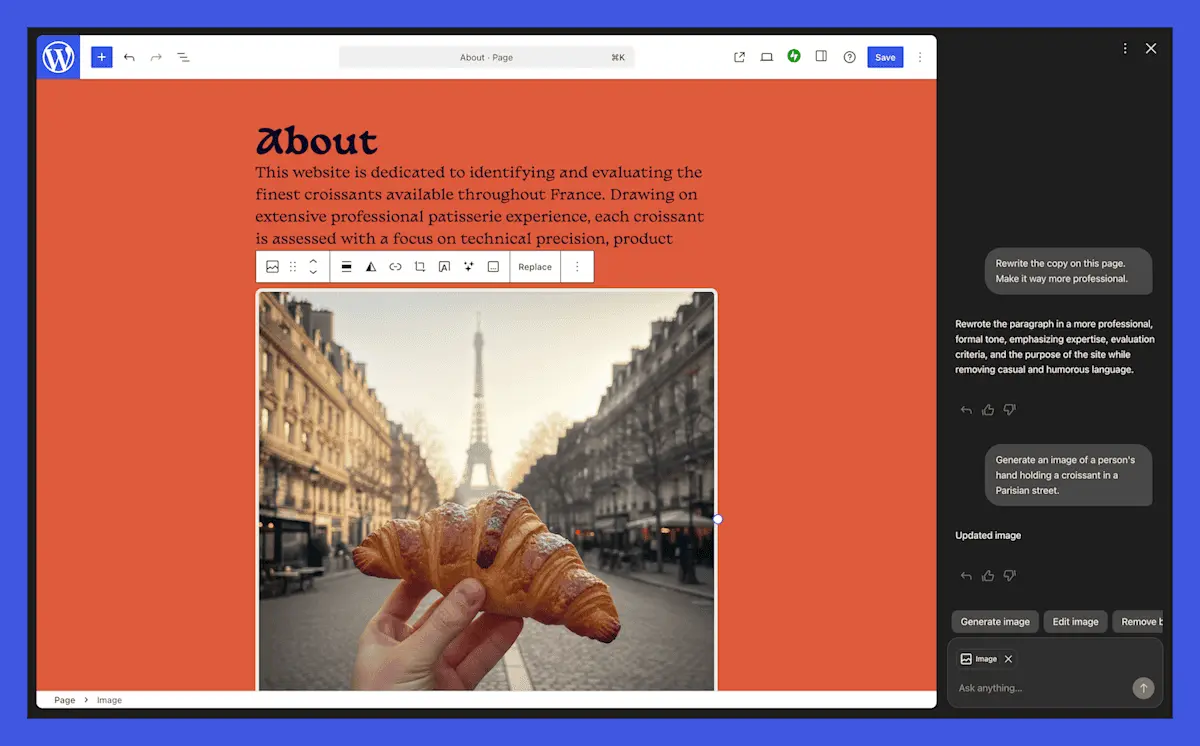
For visual content, the assistant leverages Google Gemini's Nano Banana AI models to handle image generation and editing tasks
2
. A new "Generate Image" button in the media library allows users to specify requirements like aspect ratios or dictate image styles1
. The assistant can generate new images or make prompted edits to existing ones, with examples including "update this image to be black and white" or "replace this stack of pancakes with waffles"3
. WordPress.com states the assistant understands a website's look and brand, tailoring media accordingly3
.
Source: Engadget
Related Stories

Content Updates and Editorial Support Through Block Notes
Beyond design, the AI assistant handles content updates such as rewriting bios to sound more confident or translating sections into other languages
5
. The assistant functions as an editor, offering headline suggestions, fact checks, and grammar recommendations1
. This capability integrates with the block notes editor introduced in WordPress 6.9, which enables team collaboration within the editor1
. Users can invoke the assistant by typing the @ai command followed by their requests, and the AI provides responses with relevant links and citations from external sources5
2
.Opt-In Feature with Automatic Activation for AI-Built Sites
The WordPress AI Assistant is an opt-in feature that users must manually enable through their site settings
4
. To activate it, users need to visit their Sites list, click their site name, navigate to Settings, scroll to "AI tools," and toggle on "Enable AI assistant"1
. However, customers who purchase a website using the AI website builder will have the assistant enabled automatically1
. The tool is available for WordPress.com's Business or Commerce plans, and works best with the platform's block themes while offering limited functionality with classic themes3
. This launch positions WordPress.com to compete more directly with other AI-powered website builders in an increasingly competitive market4
.References
Summarized by

Navi
[1]
[3]
Related Stories
WordPress.com Launches Free AI-Powered Website Builder for Quick and Easy Site Creation
10 Apr 2025•Technology
WordPress.com now lets AI agents write and publish posts with human approval
20 Mar 2026•Technology

WordPress Forms Dedicated AI Team to Guide Development of AI-Powered Tools
28 May 2025•Technology

Recent Highlights
1
AI Models Lie and Deceive to Protect Other AI Models From Deletion, Study Reveals
Science and Research

2
AI chatbots validate you too much, making you less kind to others, Stanford study reveals
Science and Research

3
Judge blocks Pentagon from blacklisting Anthropic over AI safety guardrails dispute
Policy and Regulation

Recent Highlights
Today's Top Stories




Your Daily Dose of Curated AI News
Don’t drown in AI news. We cut through the noise - filtering, ranking and summarizing the most important AI news, breakthroughs and research daily. Spend less time searching for the latest in AI and get straight to action.

