Zoom AI Companion 3.0 launches with browser access and free tier for meeting summaries


4 Sources
4 Sources
[1]
Zoom brings its AI assistant to the web with access to free users | TechCrunch
Zoom released its AI assistant to the web today as part of its AI Companion 3.0 release. The company is also allowing free users to access the assistant's features, such as summarizing the meetings, listing action items, or getting insights from meetings with limits. The company said that basic plan users get to use the AI companion within three meetings every month, which will each include a meeting summary, in-meeting questions, and AI note-taking capabilities. Plus, they can ask 20 questions each through the side panel and the new web surface. They can also purchase a $10 add-on plan to access AI companion features. On the new web surface, the company is also adding conversation starter prompts to inform users about what the assistant can do. Zoom said that with this update, the assistant can also retrieve information from third-party services such as Google Drive and Microsoft OneDrive, along with all data stored within Zoom. The company said it will soon add support for Gmail and Microsoft Outlook as connectors. The AI Companion also generates a daily reflection report that summarizes meetings, tasks, and updates for the day. What's more, the assistant can create follow-up tasks and draft email messages. Zoom is also adding more features related to document creation and management. Through the new companion update, users can draft and edit documents based on meeting details. The company said that users can start drafting documents within the companion surface and shift the project to Zoom Docs and collaborate with teammates. It supports the export documents to MD, PDF, Microsoft Word, and Zoom Docs. Lijuan Qin, head of AI product at Zoom, said that the company is an independent operator and has contextual meeting data puts it at an advantage compared to other competitors in the productivity space. The company said it uses a mix of its own models along with models from OpenAI and Anthropic. Zoom, founded by CEO Eric Yuan (pictured above), became synonymous with video meetings during the pandemic. But it's additional productivity tools also compete with the likes of Google, Microsoft, ClickUp, and Notion, with each of them trying to capture more context about the user's data, including meetings. Earlier this year, Zoom announced a cross-app notetaker that works with different meeting apps as well as in offline meetings, to compete with other productivity apps.
[2]
Zoom opens up a taste of its AI Companion features to free users
Key productivity features include automated follow-up task generation, email drafting, and daily meeting reports, significantly expanding AI accessibility beyond paid subscribers. Yesterday, Zoom launched its AI Companion 3.0 initiative (reports TechCrunch), which now makes the company's AI assistant available via the web and to free users. Users with a Zoom Basic account can use the AI companion for up to 3 meetings per month. The AI companion grants access to features like automatic meeting summaries, AI-generated notes, and the ability to ask questions directly during meetings. AI Companion 3.0 can also retrieve and analyze information from third-party services like Google Drive and Microsoft OneDrive. The AI assistant can also be used to create follow-up tasks, write email drafts, and generate daily reports that summarize the day's meetings and tasks. In addition to these features, the new version can be used to create and edit documents based on meeting data and collaborate in Zoom Docs with exports to PDF, Microsoft Word, Markdown, and more.
[3]
Zoom is also getting an AI assistant, if that's what you need for video calls
Zoom is rolling out its AI Companion 3.0 with a new web interface and expanded features that turn meetings, chats, and documents into actionable insights. Zoom has launched its next-generation AI Companion 3.0, which brings its AI assistant out of the app and into a dedicated web interface. It isn't another meeting transcriber and summarizer anymore; Zoom's latest AI can turn conversations into actionable tasks, create daily reflection reports, draft follow-up emails, and even create documents from meetings or notes. While free Zoom users can use the new AI Companion 3.0 for three meetings every month (including features like AI note-taking, in-meeting questions, summary, and 20 questions via the side panel), the platform is offering the entire suite of AI features for $10 per month (in addition to the fee paid for Zoom Workplace). This update marks a shift for Zoom from a simple video-conferencing platform to an AI-driven workspace. Adding agentic AI capabilities that can handle meetings, chats, documents, and connected apps helps the platform stand out. Recommended Videos Furthermore, the company is following a federal AI model approach, blending its own AI engines with popular models from OpenAI, Anthropic, and other open-source tools. If you're a hardcore Zoom user who spends a workday juggling between meetings, emails, to-do lists, documents, and other connected apps, Zoom's new AI Companion 3.0 could help you offload a decent amount of tasks onto AI. For instance, instead of manually summarizing meetings or writing follow-up messages, you can ask Zoom's AI to do it for you. This will help you free up time for higher-value tasks. In the near future, Zoom plans to expand AI Companion's integrations. For example, the company could add Gmail and Outlook connectors to its platform, thereby refining its personal workflows and document-creation tools. Over time, this could reshape how teams collaborate using Zoom, not just by hosting calls but by helping everyone get mundane tasks faster.
[4]
Zoom rolls out AI Companion 3.0 with browser access and agentic automation - SiliconANGLE
Zoom rolls out AI Companion 3.0 with browser access and agentic automation Zoom Communications Inc. today launched AI Companion 3.0, the latest iteration of its workplace assistant that pushes the platform beyond meeting summaries into agentic workflows, low-code automation and federated AI orchestration across the browser and desktop. Announced in September, the newest AI Companion weaves together multiple generative AI functions that touch every part of employee knowledge and daily work. It provides intelligent assistance, new skill updates, a low-code agent builder and greater opportunities for interaction. "We just try to fit with their existing workflow," Xuedong Huang, chief technology officer of Zoom, told SiliconANGLE in an interview. "This is a bigger surface area to help people from conversation to completion." Bringing the system into the browser, via ai.zoom.us, he explained, allows the AI Companion to meet users where they work. Browser-enabled AI capabilities are becoming the norm across the industry and expanding beyond the desktop client opens access. Behind the scenes, the Companion pulls in multiple AI models, including those from commercial vendors and Zoom's own small language models to understand user intent, orchestrate agentic activities and provide swift answers. "This ability to federate, to bring the best of the best, to delight our customer, has been going on for two years," Huang said. Zoom starts with small language models to apply reflection and break down user personalization and intent. Then the back end escalates to larger models such as GPT-4 when necessary to get heavy lifting done. The company calls this a "federated AI approach" that learns quickly to lower costs while greatly improving quality. Today's release of Zoom AI Companion 3.0 is underpinned by the company's recent results on Humanity's Last Exam, a full-set proving ground designed to stress advanced reasoning systems. Zoom said its federated AI approach achieved a 48.1% score on the benchmark, a 2.3-point improvement over tool-integrated frontier models such as Google LLC's Gemini 3 Pro, highlighting the gains from orchestrating multiple models rather than relying on a single system. "We are really standing on the shoulders of giants," Huang said. "The frontier models are provided by OpenAI, Google and others...we can easily provide this orchestrated solution." At its core, Zoom provides a client that brings people together in virtual meetings, the AI Companion embraces this core strategy and expands on it by giving users a way to interconnect their communication with every part of their knowledge work. "The biggest use case is number one: meeting summary," Huang said. Summaries remain a dominant usage pattern, followed by customer support automation via the Zoom Virtual Agent and sales tooling via Zoom Revenue Accelerator. Huang noted all three of these capabilities are powered by the same AI Companion platform. Framed as a conversational work surface, AI Companion now comes with a new AI portal that provides access to everything: meeting conversations and notes, access to insights, the ability to orchestrate day-to-day tasks with proactive agentic-driven actions. Like other AI chatbots, Companion allows users to ask questions and receive answers. Expanding on that foundation, users can activate "Help Me Write," a mode that transforms the copilot into a document generator capable of reading meeting transcripts, documents and other assets to craft reports and polished replies. Using agentic retrieval capabilities, the assistant can locate information across past meetings, notes in Zoom Workplace, as well as connected third-party apps, including Google Drive and Microsoft OneDrive. Integration with Gmail and Outlook are coming soon. Users can export documents in multiple formats, including Markdown, PDF, Microsoft Word and Zoom Docs. Coming soon, workers will be able to bring documents directly into Zoom Docs to continue editing and collaborating with teammates while retaining full access to AI Companion features. Currently in beta mode, users also have access to a low-code "personal workflows" designer. The drag-and-drop interface allows users to build state diagrams of work that include triggers, actions and outcomes as executed by AI agents. "This is like agentic coding, but for everyone," said Huang. For example, a user might create an agentic workflow that captures the transcript and notes from any meeting they are invited to and transform it into a contextualized report that gives them an at-a-glance update on what happened. This would provide easy to understand recollection of past meetings and a way to catch up with meetings an employee had to miss. AI Companion 3.0 rolls out today and is included with paid Zoom Workplace licenses. It is also available as a standalone product for $10 per user per month, or as a $20 per user per month "Custom Companion" integrated with enterprise knowledge sources. Zoom Basic users receive limited free access -- currently capped at around three meetings per month.
Share
Share
Copy Link
Zoom unveiled AI Companion 3.0, bringing its AI assistant to the web and opening access to free users for the first time. Basic plan users can now use the assistant for three meetings monthly, including meeting summaries, AI note-taking, and 20 questions. The update introduces agentic automation, document creation tools, and integration with third-party services like Google Drive and Microsoft OneDrive.
Zoom AI Companion Expands to Browser and Free Users
Zoom released AI Companion 3.0, marking a shift from a desktop-only tool to a web-accessible AI assistant available at ai.zoom.us
1
4
. For the first time, the company is extending AI features for free users, allowing Basic plan subscribers to access the Zoom AI Companion within three meetings every month1
. Each session includes meeting summaries, in-meeting questions, and AI note-taking capabilities, plus 20 questions through the side panel and web interface2
. Users seeking more can purchase a $10 add-on plan to unlock full AI assistant functionality1
3
.Browser access removes barriers for users who work across multiple platforms. Xuedong Huang, Zoom's chief technology officer, explained that bringing the system into the browser allows the AI Companion to meet users where they work, fitting into existing user workflows rather than forcing adaptation
4
. The web surface includes conversation starter prompts to help users understand what the assistant can do1
.
Source: SiliconANGLE
Agentic Automation and Productivity Tools Transform Daily Work
AI Companion 3.0 pushes beyond simple transcription into agentic automation that handles end-to-end workflows
4
. The assistant generates daily reflection reports that summarize meetings, tasks, and updates for the day, helping users stay organized without manual effort1
2
. Automated task creation enables the assistant to generate follow-up tasks and draft email messages based on meeting content1
3
.Document creation and editing capabilities allow users to draft and refine documents based on meeting details directly within the companion surface
1
. Users can start drafting in the companion interface and shift projects to Zoom Docs for team collaboration, with export options to Markdown, PDF, Microsoft Word, and Zoom Docs formats1
4
. A "Help Me Write" mode transforms the copilot into a document generator capable of reading meeting transcripts and other assets to craft polished reports4
.Currently in beta, a low-code automation designer with a drag-and-drop interface lets users build personal workflows with triggers, actions, and outcomes executed by AI agents
4
. Huang described this as "agentic coding, but for everyone," enabling non-technical users to create sophisticated automation.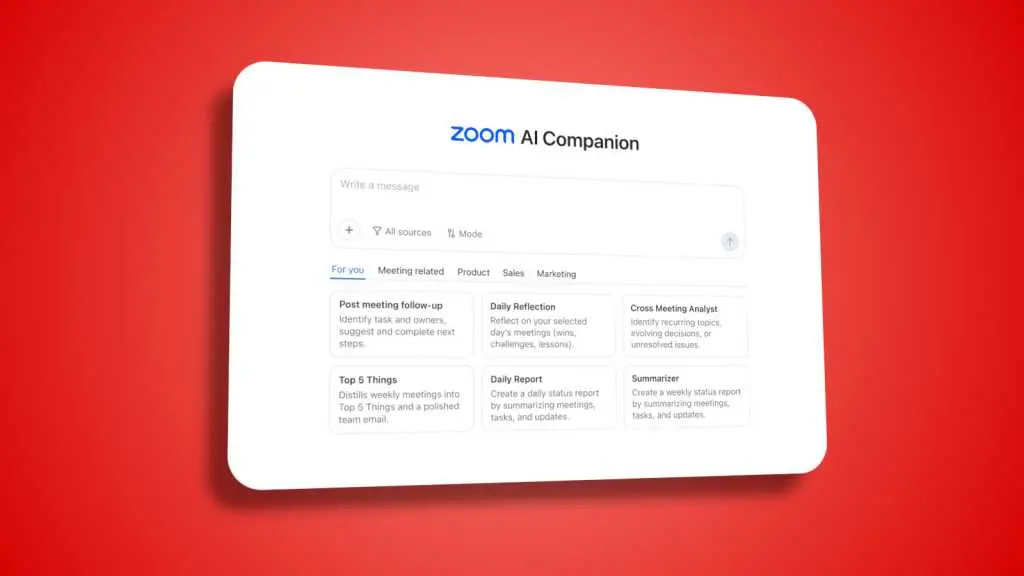
Source: PCWorld
Integration with Third-Party Services Expands Data Access
Integration with third-party services significantly enhances the assistant's utility. AI Companion 3.0 can retrieve and analyze information from Google Drive and Microsoft OneDrive, along with all data stored within Zoom
1
2
. Using agentic retrieval capabilities, the assistant locates information across past meetings, notes in Zoom Workplace, and connected apps4
. Zoom plans to add Gmail and Microsoft Outlook as connectors soon, further refining personal workflows1
3
.This broader data access matters because it positions Zoom to compete directly with productivity tools from Google, Microsoft, ClickUp, and Notion, all racing to capture more context about user data
1
. Lijuan Qin, head of AI product at Zoom, stated that having contextual meeting data gives the company an advantage as an independent operator in the productivity space1
.Related Stories

Federated AI Approach Blends Multiple Language Models
Zoom employs a federated AI approach that orchestrates multiple AI models rather than relying on a single system
3
4
. The company uses a mix of its own language models alongside models from OpenAI and Anthropic1
3
. Zoom starts with small language models to understand user personalization and intent, then escalates to larger models like GPT-4 when necessary for complex tasks4
.This strategy learns quickly to lower costs while improving quality. Zoom's federated AI approach achieved a 48.1% score on Humanity's Last Exam, a 2.3-point improvement over tool-integrated frontier models such as Google's Gemini 3 Pro
4
. "We are really standing on the shoulders of giants," Huang said, noting that frontier models from OpenAI, Google and others enable Zoom to provide an orchestrated solution4
.The update signals Zoom's evolution from a video-conferencing platform synonymous with pandemic-era remote work into an AI-driven workspace that handles meetings, chats, documents, and connected apps
3
. Meeting summaries remain the dominant use case, followed by customer support automation via Zoom Virtual Agent and sales tooling through Zoom Revenue Accelerator, all powered by the same AI Companion platform4
. AI Companion 3.0 is included with paid Zoom Workplace licenses and available as a standalone product for $10 per user per month4
.References
Summarized by

Navi
Related Stories
Zoom Unveils AI-Powered Features: Photorealistic Avatars, Cross-Platform Integration, and Intelligent Meeting Management
17 Sept 2025•Technology

Zoom Unveils AI Companion 2.0: Transforming Meetings with Agentic AI Capabilities
18 Mar 2025•Technology

Zoom Enhances AI Companion with Agentic Capabilities and Third-Party App Integration
09 Jul 2025•Technology

Recent Highlights
1
Google releases Gemma 4 with Apache 2.0 license, enabling unrestricted local AI on devices
Technology

2
AI Models Lie and Deceive to Protect Other AI Models From Deletion, Study Reveals
Science and Research

3
OpenAI closes $122 billion funding round amid fierce AI competition and profitability questions
Startups

Recent Highlights
Today's Top Stories







Your Daily Dose of Curated AI News
Don’t drown in AI news. We cut through the noise - filtering, ranking and summarizing the most important AI news, breakthroughs and research daily. Spend less time searching for the latest in AI and get straight to action.

