OpenAI rolls out ChatGPT Library to store and manage files for paid subscribers


5 Sources
5 Sources
[1]
OpenAI Gives Users a Long-Term Storage Option With ChatGPT Library
ChatGPT users can now store, browse and retrieve the files they upload and create with the AI tool, OpenAI announced this week. All of the documents you upload inside the normal chat window are automatically saved to the library, as long as you're logged into your account. Now you can search for and pull up documents in one central place. The feature is limited to Plus, Pro and Business users, so you have to pay at least $20 per month to store files using ChatGPT Library. You also have to be online to access your files. (Disclosure: Ziff Davis, CNET's parent company, in 2025 filed a lawsuit against OpenAI, alleging it infringed Ziff Davis copyrights in training and operating its AI systems.) If you turn on ChatGPT's Memory feature, the chatbot can also reference the files you've saved to bring up in future chats. OpenAI mentions documents, spreadsheets, presentations and images as supported file types. However, the images you generate using ChatGPT will remain in the Images tab. Read more: OpenAI's Slop Machine Sora Is Dead. We're All Better Off Without It To use the Library feature, sign in to your account and click the plus sign on the left side of the window where you type commands. Select the "Add from Library" option to choose the file you want to bring up. The library is visible in a left-hand sidebar that's searchable. You can filter results by file type and whether you uploaded or created the file. There are some restrictions on file size. The maximum file size is 512MB, and all documents and chat conversations are limited to 2 million tokens (characters). Spreadsheets and CSV files must be 50MB or smaller, and images must be 20MB or smaller. Deleting files is a little tricky. You can select a file in the library window and click "delete" or use the trash icon beside the file name. Then OpenAI will delete the file within 30 days, unless the company needs it for security or legal obligations, or if "the chat has already been de-identified and disassociated from you." Lately, OpenAI has been refining its models and expanding services for coders and developers, with faster models that are suited for debugging code. OpenAI announced these improved models as the company is competing with rivals that offer coding-specific tools, like Anthropic's Claude Code. OpenAI executives have also been talking about building a "superapp" desktop interface that consolidates its AI tools in one place. The three tools included in the app would be ChatGPT, the coding platform Codex and the internet browser Atlas, which uses AI as an assistant. The company also announced this week it would shut down its AI video app Sora as it pivots away from video generation into more coding and productivity tools, like Codex.
[2]
ChatGPT just got a library for all your files - how it works
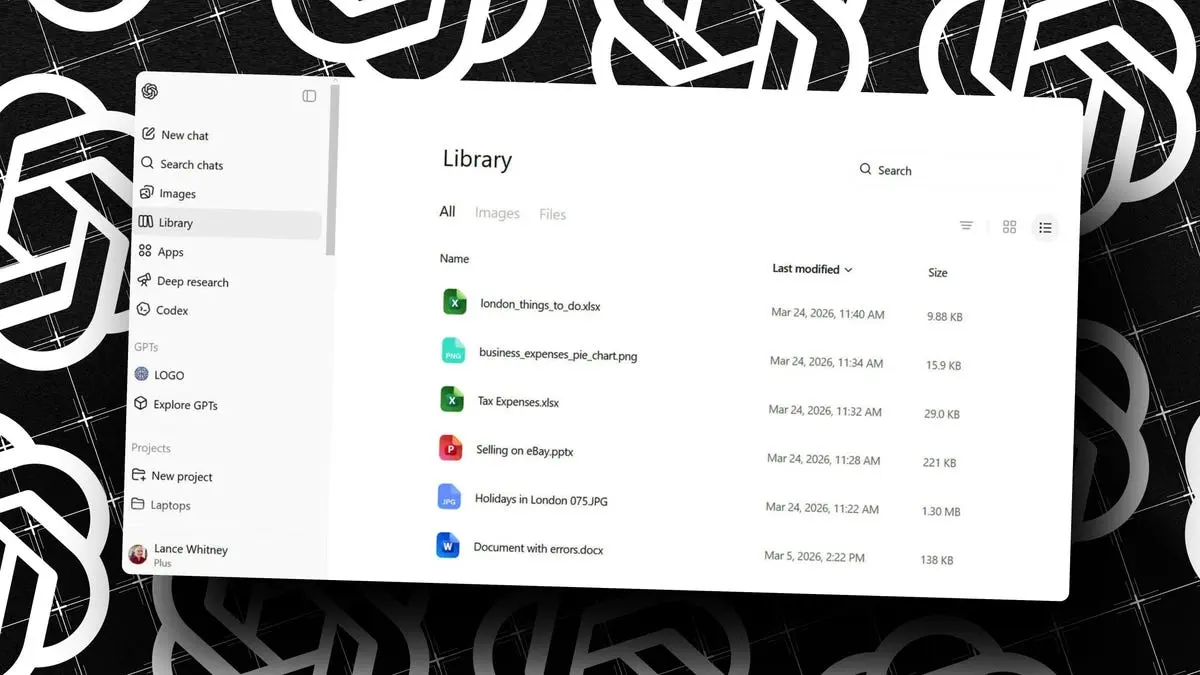
ChatGPT now stores all your files in a dedicated library.The library is home to uploaded and generated files.You can save and access images and documents. I often use ChatGPT to analyze photos, documents, and other files that I upload. I also sometimes ask the AI to create PDFs or other documents with information related to my request. Trying to find all those photos and other files on my PC used to be a hassle. But now I can tap into an online library that stores all of them in a single place. Recently unveiled, the new ChatGPT Library will save files that you've uploaded in a chat, including images, documents, spreadsheets, and presentations. The library will also be home to any files you ask the AI to create. The one exception applies to generated images, which will still be accessible in the Images section. Also: These 7 useful ChatGPT settings are turned off by default (and I can vouch for them) OpenAI touts the library as a dedicated and secure online location where you can quickly and easily access any of your uploaded or generated files at any time. That means you no longer need to hunt around your PC for a file that you want to use in a new conversation. All files are automatically saved to the library, so you don't need to do anything special for this to work. The library itself imposes certain size limitations. Most files must be no larger than 512MB. CSV files and spreadsheets are restricted to 50MB, while images can't be larger than 20MB. Uploaded text files and documents are capped at 2 million tokens, but that's still a hefty amount of text. Sounds handy, right? Yep, but there are a few conditions. Also: OpenAI's rumored 'superapp' could finally solve one of my biggest issues with ChatGPT First up, you need ChatGPT Plus, Pro, or Business to use the library. That means free users and Go subscribers are out of luck. Second, the library is available only in regions outside the European Economic Area, Switzerland, and the UK. Third, it's accessible only through the ChatGPT website. To try this, sign in to the ChatGPT website with a supported account. You should then see a Library entry in the left sidebar. If not, you may need to refresh your screen. Select the library to view any uploaded and generated files from past conversations. The library offers three different views -- one for all files, one for images, and one for general files. Rev up a new chat and upload a file, or ask ChatGPT to generate a file. Check the library again to see the new files that were saved. To reference an existing file in a new chat, click the plus icon at the prompt and move to Recent files in the menu. Select a recent file from the list, or select the option to add from library to access all your files. Also: I stopped using ChatGPT for everything: These AI models beat it at research, coding, and more Finally, you can easily manage all your stored files. To view a file in the library, just click it. To download a file from the library to your computer, click the Download icon. To upload a new file, click the Upload button and select the file. To delete a file, click the trash can icon. You can also select all the files to download or delete them in one shot.
[3]
OpenAI rolls out ChatGPT Library to store your personal files
OpenAI is rolling out a new feature called 'Library' for ChatGPT, which allows you to store your personal files or images on OpenAI's cloud storage. OpenAI says ChatGPT Library requires Plus, Pro, and Business. It's rolling out to customers across the world except the European Economic Area, Switzerland, and the United Kingdom. I refreshed the ChatGPT web, and the Library automatically showed up on the sidebar. To my surprise, it's actually not empty, as ChatGPT has already saved some of the files I uploaded in the last two weeks. Turns out it's an expected behaviour. By default, GPT will save your uploaded files in a dedicated, secure location, and they can be used for reference in a future chat. "ChatGPT automatically saves uploaded and created files, including files uploaded in chats (for example: documents, spreadsheets, presentations, and images) in a dedicated, secure location so they can be easily accessed later," OpenAI noted in a document. On the other hand, if you use ChatGPT to generate AI images, they will continue to appear in the Images tab. The Library section only has files you uploaded, and you can upload files by following these steps: OpenAI says ChatGPT automatically saves uploaded and created files, including files uploaded in chats, in a dedicated, secure location so they can be easily accessed later. This means files are saved to your account until you delete them manually, but deleting a chat containing a file does not delete those files saved to Library. To delete a file: OpenAI will remove files from its servers within 30 days of deletion. It's unclear why it takes nearly a month to purge files, but it is likely due to legal reasons.
[4]
OpenAI's New ChatGPT Feature Makes It Easier to Reference Uploaded Files
The feature automatically shows the recently uploaded documents OpenAI added a new feature to ChatGPT on Tuesday. Dubbed Library, it is a quality-of-life feature that makes it easier for users to reference previously uploaded files. The San Francisco-based artificial intelligence (AI) giant highlighted that the feature will help quickly reshare files during conversations, eliminating the need to upload them over and over. The Library acts as a locker space that shows all the recently uploaded files, and users can simply select and attach them to a conversation. ChatGPT Gets Library In a post on X (formerly known as Twitter), the official handle of OpenAI announced and detailed the new feature, saying, "It's now easier to find, reuse, and build on the files you upload and create in ChatGPT." Essentially, a new Library option is being added to the main menu, tapping which shows all the files the user has uploaded to the chatbot. These files include documents, images, spreadsheets, presentations, and other formats. These files can also be directly reached in a ChatGPT conversation by tapping the attachment icon and navigating to a new "Recent files" option. This shows the three recent files that were uploaded by the user to the platform. This way, users can either re-upload a file in the same conversation to reference it or attach it in a new session to drive a different conversation on the data. The Library can be accessed through the sidebar, where users can browse all stored files in one place or search for specific documents using filters such as file type or upload status. Additionally, the AI giant is also making it easier to search saved files for users who upload a large volume of files or do so frequently. The company says the search bar can be used to find files. For easier location, users can also filter the files by file type and by whether they were uploaded or generated. OpenAI said the feature is currently rolling out to paid subscription tiers, including ChatGPT Plus, Pro, and Business users. It will be available to all regions, except the European Economic Area (EEA), Switzerland, and the UK. Notably, files are saved on an account until a user deletes them manually. Deleting a conversation does not delete a file. To delete a file, users must select it from the Library tab and click the trash icon placed next to it. Once a file has been deleted, it is removed from the account immediately and is scheduled for permanent deletion from the servers within 30 days.
[5]

How to use the latest ChatGPT Library feature: Step-by-step guide
Access is currently limited to ChatGPT Plus, Pro, and Business users. If you've used ChatGPT before and you have uploaded a bunch of files for some projects that you were working on, chances are you didn't realise they were important. In many cases, such files become hard to find, as many get tired of scrolling through older ChatGPT chats in hopes of finding those files back. However, to solve this, OpenAI has introduced a new ChatGPT Library feature that would make your life much simpler. Let's take a detailed look at a step-by-step guide on how exactly you can use this feature. Also Read: How to automate Claude and complete your important tasks: Step-by-step process With the help of the ChatGPT Library, any files that you upload or create in the AI chatbot window will now be saved under a new library section. This allows for finding those saved files much more easily for reusing them later, as there's an option to search those files using either the name or the file type. As of now, the Library is only available on the web version, and while ChatGPT will automatically save uploaded and created files, this does not include all sorts of files. The AI-generated images created using ChatGPT will still continue to appear in the dedicated 'Images' tab in the app. Before we actually dive into how you can use the latest ChatGPT library feature, you need to make sure you meet the general requirements set by OpenAI. That's because the feature isn't currently available for everyone. In their official blog post, OpenAI announced that the latest Library feature is currently only available to ChatGPT Plus, Pro, or Business users. Not only that, but as of now, there are a few region-related restrictions. Currently, the feature works in most regions across the world. However, if you're in the European Economic Area, Switzerland, or the United Kingdom, the feature isn't available as of now. Thankfully, India remains unaffected, since the feature is rolling out here. Follow the steps mentioned below to add or remove a file from the ChatGPT Library: Hope you understood the entire process on how you can use the latest ChatGPT Library option. For many such guides, keep on reading Digit.in
Share
Share
Copy Link
OpenAI has launched ChatGPT Library, a new feature that automatically saves uploaded and created files to a dedicated cloud storage location. Available exclusively to ChatGPT Plus, Pro, and Business subscribers, the library provides a searchable sidebar where users can access documents, spreadsheets, presentations, and images. The feature aims to streamline workflows by eliminating the need to repeatedly upload the same files across different conversations.
OpenAI Introduces ChatGPT Library for File Management
OpenAI has rolled out ChatGPT Library, a new feature designed to help paid subscribers store personal files and manage uploaded files more efficiently
1
. The long-term storage option automatically saves documents, spreadsheets, presentations, and images that users upload or create within the AI chatbot, making them accessible from a centralized location2
. This marks a significant shift in how ChatGPT handles user data, moving from temporary session-based storage to persistent cloud storage that remains available across conversations.
Source: Gadgets 360
The feature addresses a common pain point for frequent ChatGPT users who previously had to hunt through old conversations or re-upload files multiple times
3
. By automatically saving files to a dedicated sidebar, the library transforms ChatGPT into more of a productivity tool rather than just a conversational AI chatbot. Users can now reference uploaded files in future chats without the hassle of searching their local storage or scrolling through chat history4
.How ChatGPT Library Works for Users
Accessing the library is straightforward for eligible subscribers. The feature appears as a new entry in the left sidebar of the ChatGPT web interface, where users can browse all stored files in one searchable location
2
.
Source: ZDNet
To reuse previously uploaded files in a new conversation, users simply click the plus icon at the prompt and navigate to "Recent files" or select "Add from Library" to access their complete collection
1
.The library offers filtering options by file type and upload status, making it easier to locate specific documents among potentially hundreds of saved items
4
. Notably, AI-generated files created during conversations are also automatically saved, though AI-generated images remain in the separate Images tab3
. When ChatGPT's Memory feature is enabled, the AI chatbot can even reference saved files proactively in future conversations1
.File Size Limitations and Storage Restrictions
OpenAI has implemented specific file size limitations to manage cloud storage resources. Most documents can be up to 512MB, while CSV files and spreadsheets are restricted to 50MB or smaller
1
. Images must be 20MB or smaller, and uploaded text files and documents are capped at 2 million tokens, which still represents a substantial amount of text2
.File deletion follows a specific protocol that users should understand. While files can be removed immediately from the library interface by clicking the trash icon, OpenAI retains them on its servers for up to 30 days before permanent deletion
3
. The company may extend this retention period if files are needed for security or legal obligations, or if the chat has been de-identified and disassociated from the user account1
. Importantly, deleting a conversation does not delete files stored in the library—users must manually remove them from the library itself4
.Related Stories



Availability Limited to Paid Subscribers
The ChatGPT Library feature is exclusively available to ChatGPT Plus, Pro, and Business users, requiring a subscription of at least $20 per month for Plus subscribers
1
. Free users and those on the Go tier cannot access this functionality2
. Geographic restrictions also apply—the feature is currently unavailable in the European Economic Area, Switzerland, and the United Kingdom, though it works in most other regions including India5
.Access is currently limited to the ChatGPT website, with no mobile app support announced yet
2
. This web-only availability may limit user experience for those who primarily interact with ChatGPT through mobile devices, though OpenAI may expand platform support as the feature matures.Strategic Shift Toward Productivity Tools
The library launch signals OpenAI's broader strategic pivot toward productivity tools and away from certain experimental features. The company recently announced it would shut down Sora, its AI video generation app, to focus resources on coding and productivity capabilities
1
. OpenAI executives have discussed building a "superapp" desktop interface that consolidates ChatGPT, the Codex coding platform, and the Atlas AI-assisted browser into a unified workspace1
.
Source: BleepingComputer
This focus on developer tools and enterprise features positions OpenAI to compete more directly with rivals like Anthropic's Claude Code and other coding-specific platforms. The library feature, while seemingly simple, represents a fundamental enhancement to ChatGPT's utility as a persistent workspace rather than a stateless conversation tool. For professionals who regularly analyze documents, create reports, or work with data files, the ability to maintain a personal repository of work materials within ChatGPT could significantly improve workflows and reduce friction in daily tasks.
References
Summarized by

Navi
[3]
Related Stories
Recent Highlights
1
OpenAI shuts down Sora video app after six months, ending Disney's $1 billion investment deal
Technology

2
AI-Generated Val Kilmer to Posthumously Appear in As Deep as the Grave After His Death
Entertainment and Society

3
Supermicro Co-Founder Indicted in $2.5 Billion Nvidia AI Chip Smuggling Scheme to China
Policy and Regulation

Recent Highlights
Today's Top Stories




Your Daily Dose of Curated AI News
Don’t drown in AI news. We cut through the noise - filtering, ranking and summarizing the most important AI news, breakthroughs and research daily. Spend less time searching for the latest in AI and get straight to action.

