Gemini burrows deeper into Google Workspace with AI-powered document creation and editing


29 Sources
29 Sources
[1]
Gemini burrows deeper into Google Workspace with revamped document creation and editing
Google didn't waste time integrating Gemini into its popular Workspace apps, but those AI features are now getting an overhaul. The company says its new Gemini features for Drive, Docs, Sheets, and Slides will save you from the tyranny of the blank page by doing the hard work for you. Gemini will be able to create and refine drafts, stylize slides, and gather context from across your Google account. At this rate, you'll soon never have to use that squishy human brain of yours again, and won't that be a relief? If you go to create a new Google Doc right now, you'll see an assortment of AI-powered tools at the top of the page. Google is refining and expanding these options under the new system. The new AI editing features will appear at the bottom of a fresh document with a text box similar to your typical chatbot interface. From there, you can describe the document you want and get a first draft in a snap. When generating a new document, you can rope in content from sources like Gmail, other documents, Google Chat, and the web. This also comes with expanded AI editing capabilities. You can use further prompts to reformat and change the document or simply highlight specific sections and ask for changes. Docs will also support AI-assisted style matching, which might come in handy if you have multiple people editing the text. Google notes that all Gemini suggestions are private until you approve them for use. Gemini is also getting an upgrade in Sheets, and Google claims the robot's spreadsheet capabilities are nearing those of flesh-and-blood humans in recent testing. Similar to text documents, you can tell Gemini in the sidebar what kind of spreadsheet you need and the AI will use the prompt (and whatever data sources you specify) to generate it. Gemini can also allegedly fill in missing data by searching for it on the web. In our past testing, Gemini has had a lot of trouble with spreadsheet layouts, but Google says this revamp will handle everything, from basic tasks to complex data analysis. Sides is getting added Gemini functionality, but not all at once. Google says Gemini can now build an entire slide from a prompt, with the same ability to pull context from your files and emails (if you enable this for the prompt). You can also have the AI edit or rework a slide if it doesn't look the way you want. In the future, Google plans to give Gemini the ability to create entire presentations with multiple slides from a single prompt, but this won't be available during the initial rollout. Just ask Gemini While Google has mostly focused on the changes coming to individual Workspace apps, the way you find and interact with your files is also getting an AI makeover. The search bar will rely more heavily on AI to find your files, and searches will also come with an AI Overview right at the top. This text will summarize the most relevant information for your search with citations for the associated documents. You'll also see "Ask Gemini" buttons around the interface, including in search results. Those let you ask deeper questions about the documents in a particular folder or a batch of search results. You can export the resulting AI outputs to a new document where you can, again, use Gemini to expand and edit the content. Like most of Google's new AI expansions, these Workspace features will come first to Google AI Ultra and Pro subscribers. The Docs, Slides, and Sheets features will roll out gradually over the spring globally, but only in English. The Drive search changes will also arrive in the coming months, but this will be limited to the US at first. If you don't want any part of this, you can disable "Smart Features" in Workspace, which kills Gemini but also turns off things like Gmail package tracking and pulling calendar events from Gmail.
[2]
Google rolls out new Gemini capabilities to Docs, Sheets, Slides, and Drive | TechCrunch
Google announced on Tuesday that it's bringing a slew of new Gemini-powered AI capabilities to Docs, Sheets, Slides, and Drive. The new features let users do things like quickly generate fully formatted first drafts, slides, and sheets based on information from their Gmail, Chat, and Drive. The tools are designed to make the apps more personal and capable of helping users get things done faster, right within the platforms themselves, instead of needing to switch to a separate tool or chatbot. A new "Help me create" tool in Docs lets users describe what they want to create, and Gemini will follow their instructions and gather information from Drive, Gmail, and Chat to generate a first draft. For example, you can ask Gemini to "draft a newsletter for our neighborhood association using the meeting minutes from my January HOA meeting and the list of upcoming events." Once you have a first draft, Gemini can help refine specific sections without regenerating the entire document. You can also use the "Help me write" tool to do things like improve clarity or add details where needed. Additionally, if you have multiple people working on a draft with differing voices and tones, you can now use a new "Match writing style" feature to help unify the documents. Gemini will suggest edits to make the tone and voice consistent throughout the draft. Docs is also getting a new "Match the format" tool that lets you mirror the structure and style of another document. For example, if you find a travel itinerary template you like, Gemini can fill it in with your own trip details by pulling information from your emails, such as flight confirmations, hotel bookings, and rental car reservations. As for Sheets, Gemini is evolving from a tool you work in to a collaborative partner, Google says. With a single prompt, it will pull relevant data from across your Gmail, Chat, and Drive to quickly create a fully formatted spreadsheet. For example, you could ask it to "organize my upcoming move to Chicago. Create a checklist for packing by room, a contact list for utilities, and a spreadsheet to track moving company quotes from my inbox." For more complex tasks, you can now use a "Fill with Gemini" tool to populate tables even faster. The feature can instantly generate custom text, categorize and summarize data, or pull in real-time information from Google Search. For instance, if you're managing your college applications, you might have a tracker for all your application details. Instead of manually looking up each school's deadlines, tuition, and other information, you can set up column headers for the details you need, then let Gemini fill in the table automatically by pulling relevant information from the web. Over on Sheets, you can now have Gemini generate a fully editable slide in your deck that matches your overall theme, drawing on context from your files, emails, and the web. If you don't like a slide, you can ask Gemini to adjust it by asking it to do things like "match the colors to the rest of my deck" or "make this more minimal." In the future, Google says Slides will let you create a complete presentation from a single prompt, using relevant context when needed. For instance, you will be able to ask Gemini to "create a 5-slide deck for my upcoming Tokyo trip." Google also announced that it's making Drive no longer just a place to store your files, but more of an active collaborator. Now, when you search in Drive using natural language, Gemini will surface an "AI Overview" at the top of your results, like the ones you see on Google Search. The overview summarizes the most relevant information from your files, while citing its sources, so you don't need to open a document to find what you're looking for. A new "Ask Gemini in Drive" feature lets you ask complex questions across your documents, emails, calendar, and the web. For example, you could select all of your tax-related files and ask, "What should I ask my tax advisor before filing this year's taxes?" and get a detailed answer based on your actual data. All the new features are rolling out today in beta and will first be available to Google AI Ultra and Pro subscribers. They're available in English worldwide for Docs, Sheets, and Slides, and in the U.S. for Drive.
[3]
I Used Google's New Gemini-Powered 'Help Me Create' Tool in Docs. It's Great at Corporate-Speak
Google rolled out multiple new AI features today for its core Workspace products: Google Docs, Sheets, Slides, and Drive. These apps now include additional tools powered by Gemini, Google's AI assistant. The features range from generating entire rough drafts in your Docs to finding information tucked away in the recesses of your Drive. This Google launch is part of a larger trend in 2026, in which major software developers are continuing to bake generative-AI-based features into core user experiences -- despite the lingering distaste many in the US have for tools like these. The features are coming first to English-speaking subscribers of Google's AI Pro and Ultra plans. For Docs, Google added "Help me create," which attempts to generate full first drafts of your document, from a prompt, by looking at your emails and files, and searching the internet for context. This feature takes the existing "Help me write" feature in the Chrome browser even further and points to a future where humans rely on AI to craft their thoughts and share ideas with others. Sheets and Slides both can now create similar full first drafts by pulling from information on the web and your past data. Another new, notable feature in Docs enables users to mimic the structure of past files when starting a new project. Also, Drive now includes AI Overviews of your files and more natural language searching abilities. My tests primarily focused on the new tools in Google Docs, where I have the most familiarity. To start, I asked Gemini to draft an itinerary for some St. Patrick's Day shenanigans. In just a few seconds, Gemini combed through my Gmail and the web to put together a short plan. I was a little creeped out when the bot correctly looked up my flight reservations to see what city I'd be located in on March 17. It also tacked on a few well-known Irish pubs where I could grab a pint of Guinness. Overall, the results of this test were quick and solid. Now let's raise the stakes. How convincing a first draft could Gemini generate for my job as a software reporter? WIRED's editorial standards block the use of generative AI, rightly so, except in situations where it's disclosed and used as an example. Rest assured, everything you're reading here was scribbled into my notebook before being typed up. Other digital media outlets may not have rigorous standards around AI use, and tools like "Help me create" could be forced onto early-career journalists expected to pump out numerous stories each day. I attached the press materials Google provided about today's launch and requested a 600-word hands-on story from Gemini, with first-person insights that could help readers better understand the launch.
[4]
Google's New AI Features Are Trying to Make Data Entry a Thing of the Past
The latest batch of Google updates to its workspace tools highlights AI's promise to automate mundanity in the workplace. Google Docs, Slides, Sheets and Drive all have new AI-powered features, the company announced Tuesday. The one thing all these updates have in common? Gemini is using your files, emails and chats to give you relevant information, not random answers gleaned from the web. These updates come as AI is playing a bigger role in our work lives, for better or worse. Agentic tools like Claude Cowork and coding assistants like Anthropic's Claude Code and OpenAI's Codex are more capable than chatbots and able to handle tasks announced independently. AI tools are also becoming more customized, with Google's personalized intelligence rolling out across its platforms to help refine AI outputs to things that are relevant and useful for you. Google continues that trend with this new batch of Workspace updates. New Gemini AI features in Google Workspace apps will cite their sources after each query. For example, if you ask Gemini in Google Docs to fill out an itinerary template, it will pull the information from your email, chats and files. The "sources" tab in the Gemini side panel will show you where it found the information it used, like your flight confirmation email and chats discussing dinner plans. Seeing where Gemini pulled its answers from is also how you'll double-check Gemini's work. The most impressive new features are in Sheets, where AI can fill in the holes in your spreadsheets. You can describe what you want the AI to do with a simple prompt and avoid writing an exact formula. You can click on an empty cell, select the pop-up that says "Drag to fill with Gemini," then highlight the cells you want Gemini to fill in. That deploys an AI agent to search the web to fill each cell with the necessary information. For example, if you have a spreadsheet of the contact info for local companies, you can have Gemini search the web to fill in a the location, CEO and other publicly available information of each company. The tool aims to dramatically reduce the time needed for manual data entry. Gemini can also summarize, categorize and create charts with prompts alone. You can also chat with Gemini in Sheets and have it scour your raw data to make custom reports and charts. No need for pivot tables if they confound you as much as they baffle me. One of the biggest uses of AI at work is helping create presentations. In Google Slides, you can now tell Gemini in natural language what you want to appear on a slide, and it will create it, matching the style of your existing slides. You can also ask Gemini to edit your slides if you don't want to waste time painstakingly moving design elements around the slide. The AI should fill the slides with relevant information based on your instructions and the work files it has access to, so you shouldn't need to replace a bunch of filler text. If you use Docs, Sheets and Slides through the Workspace account of your company, then you won't be able to turn off AI features individually. The managing company is in control of AI access for users. Personal users can tweak their settings to limit Gemini. The new features are rolling out in beta now, in English only, to Google AI Ultra and Pro subscribers in the US, as well as some Google Workspace customers who are part of the Gemini Alpha testing program.
[5]

Gemini can now use your Drive and emails to build spreadsheets, slides and more
You can create entire spreadsheets or documents with a prompt. If you've ever struggled with starting a letter or a presentation, Google has a little help coming your way courtesy of Gemini. Google is introducing several new Gemini integrations across Docs, Slides, Sheets, and Drive, the most notable of which is aimed at helping you create projects from the beginning. Gemini already exists in Google's productivity offerings, but now it can access your email, your Drive, and other documents and use those to craft entire spreadsheets in Sheets, presentations in Slides, or documents in Docs, the company said Tuesday. Also: I tested Google Docs' new AI audio summaries, and they're a massive time-saver You can tell Gemini what sources you'd like it to access (it won't access unless you specifically request), and when it creates something, you'll see notations of what it actually used. Here's a look at what's new with Gemini. Perhaps the most useful change is coming to Sheets. Before, you could ask Gemini to create a table or formula, fix formatting, and look for data entry errors. But now, you can ask it to create an entire spreadsheet. Google explained that you can just tell Gemini what you're working on, like "Help me organize my upcoming move by making a checklist for packing each room, a contact list for utilities in my new city, and a spreadsheet to track moving company quotes from my email inbox." Gemini will craft an entire spreadsheet based on your request, pulling relevant information from your Gmail and Drive files. In addition, Gemini can also make changes to an existing spreadsheet, adding tables or dashboards, and enter data on a sheet with "Fill with Gemini." With the latter, you can categorize data or summarize data with information from Google Search. For example, Google said, you might ask Gemini to help track college applications, and it will fill in data like the due date, tuition, and more. Gemini can already refine your writing in Docs, but now you get even more personalized help. You can describe what you want, and Gemini will use contextual information to create a draft, like, "Put together a newsletter for my neighborhood based on the last HOA meeting notes in my email." Also: Stop using Google Docs like a beginner: 10+ useful tricks to boost your productivity You can also ask Gemini's new "Match writing style" option to refine a document so that every part fits your tone and voice or aligns with the style of a reference document. Slides is also getting the ability to create a new project from the ground up with Gemini, but Google said that feature is coming soon. When it does arrive, you can create full layouts, editable diagrams, or entire presentations from a prompt. Also: I tested Google Docs' new AI audio summaries, and they're a massive time-saver Right now, you're getting the ability to ask Gemini to create a new slide in your deck that fits your overall theme and pulls relevant information from your files, emails, and the web, and you can ask Gemini to edit a single slide with queries like "make this match the colors of every other slide" or "make this less flashy." Drive is also getting a little love, adding the ability for you to get instant answers about your files or get a better understanding of your documents. Google said you can now use AI Overview at the top of your Drive to see a summary of relevant information or ask a complex question like,"What specific things should my tax advisor know before I file this year's tax returns?" These features are rolling out slowly, starting with Google AI Ultra and Pro subscribers and Workspace users.
[6]

Google's Gemini AI is getting a bigger role across Docs, Sheets, and Slides
Google is embedding its Gemini AI assistant even more deeply within its Workspace apps. The changes, which are rolling out to Google Workspace and AI plan subscribers, include a new Gemini chat window inside Google Docs, a way to generate entire spreadsheets with AI, and a new Gemini-powered search feature in Drive. While Google Docs already shows you a few AI writing options alongside your blinking cursor, now you'll see a Gemini chat window at the bottom of your screen. There, you'll get the option to describe to Gemini the kind of document you'd like to create, and the AI assistant will use information from the web, Drive, Gmail, and Chat to generate and fully format a draft. You can also ask Gemini to match an existing document's format, which should save you some time editing the new doc's style and structure. Google is making some tweaks to the Gemini-powered editing features in Docs as well. If you're working on a document with other people, you can now highlight their text and select "Match writing style." Gemini will then analyze the tone of your document and rewrite the text accordingly. It can also make changes throughout your document based on a prompt, while showing its suggestions in-line -- similar to if someone else is editing your document. Google notes that these suggestions will be private until you approve them. With this rollout, Yulie Kwon Kim, Google's VP of product for Workspace, says Google aims to put Gemini "in the places where people work," so users don't have to navigate to a separate app or website. "When you are, for example, wanting to write a report, or write a customer brief, people are turning to Docs," Kwon Kim says. "You can get the assistance from Gemini right where you are in your familiar place, where you're doing your everyday work." Gemini is getting a bigger role in Sheets, too, as you can now ask Gemini to generate an entire spreadsheet -- not just tables -- by describing it. Gemini will use data across your files, emails, chats, and the web to create the spreadsheet. You can even have Gemini fill your tables using information from an existing spreadsheet or the web, which goes beyond the AI function that Google rolled out last year. During a briefing, Google showed how Gemini can search for and fill columns with the locations, revenue, and market capitalization of a list of companies inside a spreadsheet. Another feature coming to Sheets will help you solve "analytical tasks" by describing what you need in the app's side panel. "For instance, you can ask Gemini to optimize your weekly employee scheduling to maximize profit while balancing staff availability and required skills," Google says in its announcement. Meanwhile, a Gemini-powered upgrade heading to Slides allows you to ask the AI assistant to generate a slide for you. Gemini can automatically insert copy and format the slide to match the rest of your deck. You can even prompt Gemini to edit your slide, which means you won't have to fiddle with manually formatting text or images if you don't want to. Google plans to roll out the ability to generate an entire presentation based on a text prompt and your Workspace data "soon." And, in case you're having trouble managing all your files across Workspace, Google is trying to roll out a solution for that by transforming the app from a "passive storage container into an active knowledge base." When you search for a file in Drive using natural language, Google now presents you with an AI Overview -- similar to the one you see on Google Search. But instead of summing up results from the web, it will return a list of relevant documents, or answer your question with citations. You can also use a new "Ask Gemini in Drive" feature to ask the AI assistant about your stored files, or the information in Gmail, Calendar, and Chat. Google says you can "control which sources are included in your search," as well as narrow your focus to a certain group of folders. These new features will come with the same "enterprise-grade data protections as the rest of Workspace," according to Google. This update is rolling out now in English to Google AI Pro and Ultra subscribers, as well as for Workspace customers with Gemini Alpha enabled.
[7]

I found this Gemini feature so good that I cancelled ChatGPT, Claude, and Perplexity
Parth, a seasoned tech writer, wields the keyboard (or pen) with finesse to unravel the intricacies of both Windows and Mac operating systems. He has covered evergreen content on mobile devices and computers for multiple publications over the last six years. You can find his work on AndroidPolice, GuidingTech and TechWiser. Whether it's demystifying system updates, deciphering error codes, or exploring hidden features, Parth's prose guides readers through the binary maze. When not immersed in tech jargon, you'll find him sipping chai, pondering the next software review, and occasionally indulging in a friendly debate about mechanical keyboards. Whether it's ChatGPT, Claude, Perplexity, Copilot, or Gemini, I have tried them all. They all have their fair share of strengths and weaknesses. ChatGPT is ideal for brainstorming, Claude for long-form analysis, and Perplexity for my deep-dive research. But despite spending on their paid versions, I was still doing the heavy lifting myself, like downloading PDFs from Gmail, re-uploading them to Claude, and manually feeding ChatGPT context from my own spreadsheets. That all changed when I finally leaned into Gemini's Google Workspace integration. Here is why the Google ecosystem is officially the only AI stack you need. I tried Gemini, ChatGPT, and Copilot for a month and I have a clear winner for you Don't buy the hype. Posts 10 By Parth Shah What's Google Workspace integration in Gemini? Let's cover the basics When I first started using Gemini, I thought it was just another chatbot. I was wrong. The 'Google Workspace integration' is the moment the AI stopped being a separate website I had to visit and started being a part of my actual brain. Imagine if your AI didn't just know 'the internet,' but also knew your life. That's what this integration does. It connects Gemini directly to your YouTube Music, Google Keep, Tasks, Docs, Sheets, Slides, and of course, Drive. Instead of me having to download a PDF, upload it to a chat, and then ask a question, Gemini just sees my Drive. It can read my emails, summarize my spreadsheets, get relevant information from a Google Docs document, and even travel plans from a Keep note. It turns the AI into a librarian who has already read every single document and email I have ever saved and received. First, you need to open Gemini settings on the web or mobile and enable the Google Workspace toggle. Now, Gemini has access to all your files, documents, and spreadsheets stored in Google Drive. I can read and edit your tasks and Keep notes as well. Issues with other AI tools Avoid being a manual data courier Before I went all-in on Gemini, my workday felt like a mess. If I wanted Claude to analyze a contract, I had to find the email, download the PDF, upload it to the chat, and then ask my question. If I wanted ChatGPT to draft a reply, I was constantly bouncing between tabs, highlighting text, and hoping I didn't miss a crucial detail in the transition. I didn't realize how much 'context switching' was affecting my workflow until I turned on the Workspace integration. Instead of manually uploading files and notes, I can now just mention the source using @. I'm not giving the AI context anymore. For example, I can type @Gmail get me the last five emails from the HDFC bank and get them in no time. I'm not just saving clicks, I'm staying in my flow state. This is where the other 'Big Three' started to feel limited for me. Perplexity is a search beast, but it's blind to my internal files. ChatGPT is getting better at this, but it still feels like a plugin experience. With Gemini, it's a native experience. I can point it at a folder in my Drive and say, '@Google Drive, watch the recording of yesterday's meeting and tell me exactly what the CEO said about the Q3 budget.' It doesn't just read the transcript; it understands the context of my question and gets me a relevant answer in no time. My new workflow with Gemini It's much smoother and effective Here is how my new workflow has completely replaced the multi-app mess I used to call a system. In my old workflow, if I needed to know which household items I had noted down for a specific room, I would have to open Google Keep, search for the note, and manually scan the text. Now, I just treat Gemini like a conversation. I ask, '@Google Keep what are the household items for Bedroom 1?' and it instantly pulls the details from my 'Décor Ideas' note. Instead of bouncing between my calendar a separate to-do list app, I just ask Gemini for my next week's tasks and it pulls up the list instantly. I can plan the next week accordingly. Subscribe to the newsletter for Gemini & Workspace insights Get hands-on Gemini + Google Workspace coverage by subscribing to the newsletter -- step-by-step workflows, file and Docs techniques, and real use-case walkthroughs to replicate these integrations in your own workflow. Get Updates By subscribing, you agree to receive newsletter and marketing emails, and accept our Terms of Use and Privacy Policy. You can unsubscribe anytime. My favorite bit is the integration with Google Docs. I have several long client documents with useful information. However, instead of opening them to find a specific detail, I use Gemini to get the job done. For example, I can launch Gemini and type '@Google Docs get me bangles info from the Suraj Copy - Swami Jewels Final Content' and get the codename and description for each product. I don't even need to open and find information from that file. You can explore a similar integration with Slides, Sheets, and YouTube Music, too. I can't wait to see how Google takes the entire experience to the next level. I thought Google Tasks was basic, then I paired it with Gemini Supercharged Google Tasks with AI Posts By Parth Shah Gemini just did the impossible Make no mistake, I'm not saying that other AI tools are inferior or bad. They all excel at basic tasks like writing an email, complex code, or helping with your college assignments. But as someone who is heavily invested in the Google ecosystem, I prefer a tool that understands my notes, tasks, documents, spreadsheets, and even music playlists and here is where Gemini becomes unbeatable. It became the only tool that actually knew what I was talking about without me having to explain it first.
[8]

New Gemini features are coming to Google Workspace
A wave of Workspace updates puts Gemini inside Docs, Sheets, Slides, and Drive, with a benchmark result Google is happy to shout about. The blinking cursor is Google's enemy. Every time a Workspace user stares at an empty document, spreadsheet, or slide deck and reaches for a different tool to get unstuck, that's a moment Microsoft 365 Copilot is happy to fill. Google's answer, rolled out today in beta, is a sweeping set of Gemini updates across Docs, Sheets, Slides, and Drive that are less about adding features and more about changing the fundamental workflow: describe what you need, point Gemini at your files and emails, and let it build the first draft. The updates are rolling out today to Google AI Ultra and Pro subscribers, the consumer-facing paid tiers that replaced the old Google One AI Premium branding, and will be available in English worldwide for Docs, Sheets, and Slides. The Drive features are initially US-only. The headline product is what Google calls "Help me create" in Docs. A new bottom bar alongside the existing side panel lets users describe a document in plain language, a neighbourhood newsletter, a coaching plan based on last season's notes, a travel itinerary lifted from a thread of confirmation emails, and Gemini will pull relevant information from files, Gmail, and Drive to produce a first draft. Two additional editing modes sit alongside it: "Match writing style" unifies the tone across a document, while "Match doc format" lets users apply the structure of one document to the content of another. The practical use case Google offers is pulling flight and hotel details from emails and reformatting them to match a saved itinerary template. In Sheets, the headline claim is a benchmark result. Google says that Gemini in Sheets has achieved a 70.48% success rate on SpreadsheetBench, a public benchmark developed to test AI models on real-world spreadsheet editing tasks, which it describes as exceeding competitors and approaching human expert performance. On top of the benchmark claim, a "Fill with Gemini" feature auto-populates table cells with summarised, categorised, or web-sourced data. Google cites an internal study of 95 participants comparing manual entry against Fill with Gemini on a 100-cell task; it is careful to note that the 9x speed improvement figure cited by 9to5Google is based on that controlled study, not general usage data. Slides gets an updated slide-generation tool that pulls context from files, emails, and the web, and can edit individual slides on instruction, adjusting colours, tone, or layout based on a follow-up prompt. Full deck generation from a single prompt, the more ambitious feature, is marked as "coming soon" rather than live today. The Drive update is arguably the most strategically significant. Google is adding AI Overviews to Drive search, the same format it uses in Google Search, so that a semantic query surfaces a cited summary at the top of results without requiring users to open any document. A second feature, "Ask Gemini in Drive," lets users select files and pose complex questions across them, pulling from Drive, Gmail, Calendar, and the web simultaneously. Google's own framing in the Workspace blog describes it as transforming Drive "from a passive storage container into an active knowledge base." Yulie Kwon Kim, VP of Product for Google Workspace, authored the announcement, which was light on named executives beyond her byline. Google has not provided subscriber numbers for Google AI Ultra and Pro, so the addressable audience for today's beta is not independently verifiable. The business version of the same features is covered in a separate Google Workspace blog post for enterprise customers. The timing is pointed. Microsoft has been embedding Copilot into Microsoft 365 at pace, and the productivity suite market, where Google Workspace and Microsoft 365 are the two dominant platforms, has become a proxy war for enterprise AI adoption. Google's strategy, evident in today's release, is not to build a separate AI assistant that sits alongside its apps but to fold Gemini so deeply into the existing interfaces that the apps themselves become the AI interface. Whether users will trust Gemini to crawl their inboxes for document content without hesitation is a different question, one Google addresses only briefly, noting that information is "safeguarded" without specifying the technical controls.
[9]

Google Workspace apps just got Gemini-powered brain upgrade
Karandeep Singh Oberoi is a Durham College Journalism and Mass Media graduate who joined the Android Police team in April 2024, after serving as a full-time News Writer at Canadian publication MobileSyrup. Prior to joining Android Police, Oberoi worked on feature stories, reviews, evergreen articles, and focused on 'how-to' resources. Additionally, he informed readers about the latest deals and discounts with quick hit pieces and buyer's guides for all occasions. Oberoi lives in Toronto, Canada. When not working on a new story, he likes to hit the gym, play soccer (although he keeps calling it football for some reason🤔) and try out new restaurants in the Greater Toronto Area. Google supercharged its suite of Workspace apps with Gemini-powered AI features all the way back in June 2024. Since then, Workspace apps, including Docs, Sheets, Slides, Drive, and more have received a constant stream of updates, with support being far from one-and-done. Related Gemini side panel comes to Gmail, Drive, and other Workspace apps Sadly, It's only available to paid customers Posts By Hamid Ganji In a new blog post today, the Mountain View, California-based tech giant announced new Gemini-powered features coming to Google Workspace, but only for Google AI Ultra and Pro subscribers, at least for now. Google Docs Gemini in Google Docs can now personalize what it writes for you. You simply describe what you want Gemini to create in the side panel or Docs' new bottom bar, and with its ability to pick up context from other connected Google apps, Gemini will be to personalize what it writes. For example, you can prompt "draft a newsletter for our neighborhood association using the meeting minutes from my January HOA meeting and the list of upcoming events," and Gemini will be able to go through your files to create a first draft. Elsewhere, Docs now has a new Match writing style tool, which, as its name suggests, can edit a piece of text to make it sound like it was written by you. This should be especially useful for those that can easily type out rough thoughts but struggle to create a cohesive narrative out of it. Google Sheets According to Google, Sheets is going from a tool you use to a tool that you'll be able to collaborate with. The most impressive development here is the addition of "Fill with Gemini." The tool uses AI to generate custom text, categorize data and summarize data or access real-time information from Google Search. For example, "if you're applying for college, you may have a tracker for all of your application details. Instead of needing to manually research the due date, tuition and more information for each school, you can populate column headers for the information you want, then drag down to let Gemini fill in the table for you based on relevant information from the web," suggests the tech giant. Google Slides Gemini can already generate Slides for you, but Google's latest update puts more focus on making sure generations align with your intended theme. When you already have a deck created, you'll be able to tell Gemini to create a new slide that aligns to your overall theme. Gemini in Slides will also be able to pull context from your files, emails, and the web to generate relevant content. Elsewhere, if one slide doesn't match the visual aesthetic of the rest of the presentation, a simple prompt along the lines of "make this match the colors of the rest of my deck" can fix the design for you. Although not available just yet, users will soon also be able to generate entire decks based on single prompts, like "create a 5-slide deck for my upcoming Tokyo trip," or akin. Google Drive Google Drive is getting 'Ask Gemini,' making it easier for you to find exactly what you're looking for in your messy drive. Subscribe to the newsletter for Gemini Workspace insights Get focused coverage -- subscribe to the newsletter for clear, expert breakdowns of Gemini-powered Google Workspace features, practical use cases, and step-by-step explanations to help you understand and apply AI changes across Docs, Sheets, Slides and Dri Get Updates By subscribing, you agree to receive newsletter and marketing emails, and accept our Terms of Use and Privacy Policy. You can unsubscribe anytime. You can search for files and folders with natural, everyday language, and Gemini will generate an AI Overview to summarize "the most relevant information from your files -- complete with citations -- so you can get the answer you need without even opening a document." Elsewhere, in addition to finding files, the same Ask Gemini tool can also answer complex questions for you. For example, "you can select all your tax-related files and ask, 'What should I ask my tax advisor before I file this year's tax returns?' to get a detailed response based on your actual data." All new Gemini-powered features are rolling out in beta now to Google AI Ultra and Pro subscribers in English. Google Docs, Sheets and Slides' upgrades are rolling out globally. Google Drive's Ask Gemini upgrade is currently limited to the US. Related I connected Gemini with these 4 apps and it's productivity on steroids The Gemini power-stack Posts 4 By Parth Shah
[10]

Google wants Gemini to read your mind at work
The advanced AI features are exclusive to premium subscribers and will roll out over coming months, initially supporting English-only functionality. Google's Gemini AI isn't a newcomer to its Workplace applications, such as Docs, Sheets, and Slides. But it was originally pretty dumb. Now, "knowledge" is the word that best describes Gemini's new approach to how you work. In 2024, Google began integrating Gemini into its Workplace apps. But in Docs, for example, you had to manually explain all the information that you wanted to include, plus the format and style in which you wanted the copy to be written. But that's not the way that you work: you already have an idea of what you want to convey, and the source of that information. Instead of feeding it specific information, Gemini can now simply adapt what it already knows of your Workspace data let it use that as the foundation of your content. (A day earlier, Microsoft showed off something similar with Copilot and Microsoft 365.) Though Google is adding new features to Slides, Docs, Sheets, and Drive, this autonomous synthesis, rather than directed content, is the underlying basis of what Google will be adding over the coming months. Unfortunately, all of these features are only available to Google AI Pro and Ultra subscribers, or business customers that use Gemini Alpha. AI Pro costs $19.99./mo and Ultra costs $124.99/mo, putting the features out of reach for many users. Google Gemini Alpha is an optional feature which can be turned on for business Workspace customers. I can't help but think of these new features as the textual equivalent of some of the AI features Adobe has been added to Photoshop. AI art certainly allows to generate a visual composition from scratch, but you can generatively expand the copy in Docs, as you can do with images in Photoshop. Docs also allows you to use AI to edit a block of text for style and tone; just highlight it and prompt the changes. Finally, a visual editor allows you to smooth out any imperfections. Docs allows you to take text and ensure that it's tonally consistent with the rest of the document, even with multiple contributors. You can also ensure that it meets any corporate guidelines. The way in which Gemini has been integrated into Slides acts similarly: you can use AI to generate a quick slide, or just funnel Workspace data into a prompt to generate an entire presentation. (Again, this capability was here before; the autonomous synthesis aspect is new.) The latter capability is close, but not quite here, Google said. The finished product will include "beautiful layouts that balance hierarchy, spacing, and visual weight while matching the style of your other slides," Google said. Like Copilot for OneDrive, Google is also turning your collection of cloud documents into a database of sorts that you can search and query. What Google is trying to do isn't to provide a list of documents for you to manually go through, but to extract the information you need. Google is building on features like document summary, which have been in Drive before. Finally, there's Sheets. Here, Google and Gemini are doing three things, including allowing you to build a spreadsheet from data collected elsewhere, such as emails and other documents; as well as the capability to take that information and fill any empty cells that are available. Finally, there's a much more valuable aspect: using that data and asking questions of it, trying to extract knowledge with a prompt versus a complex formula. That's a challenge I've been wrestling with lately -- though Google's pricy subscriptions mean that I likely will be sticking with my existing Microsoft 365 subscription to solve the problem. It's not clear, however, whether these new charts will be dynamic; previous Gemini-generated charts were not. These new features aren't here today; instead, they'll be delivered in the coming months, Google said. For now, they're in English only.
[11]

Google Drive adding AI Overviews as Gemini upgraded in Slides, Sheets
With new Gemini features, Google wants to transform Drive "from a passive storage container into an active knowledge base." These updates are also coming to Google Slides and Sheets, starting today for AI Pro and AI Ultra subscribers, as well as Gemini Alpha business customers for US-English. Google Drive Like Gmail in January, Google Drive search is getting overhauled with AI Overviews. The goal is to replace keyword queries with semantic search that generates a "highly relevant list of documents or a complete answer with citations." For example you can ask "Help me find customer feedback from the winter 2025 campaign." Gemini's advanced reasoning pulls the answer, quickly summarizing the exact details you need. Meanwhile, Ask Gemini in Google Drive lets you go deeper. You can "ask questions and get detailed responses, all based on the content from your files in Drive, as well as Gmail, Calendar, and Chat." Filters let you control what sources are included and narrow to specific folders and files. You can even save this curated list of sources as a project for you to reference later, or share with others. Projects adhere to Drive's built-in security and compliance controls, so only those with access to the underlying content can access it in the project. Google Slides In Slides, Create a slide has been updated so it "aligns to your overall theme and pulls context from your files, emails and the web." You can edit with prompts like "make this match the colors of the rest of my deck" or "make this more minimal," while Google can transform sketches and tables into editable charts and diagrams. More broadly, Generate a presentation in the future will let you just enter a prompt, like "create a 5-slide deck for my upcoming Tokyo trip." Gemini will use your Workspace data to create a "complete presentation that is on-brand in a fraction of the time it typically takes." You can make further edits by prompting. For example, to pitch your new campaign plan you can ask Gemini to build a presentation based on your document and a style in line with your corporate branding. Gemini instantly synthesizes the document, organizes the narrative into a presentation format, and applies visually appealing layouts to create your presentation. Google Sheets Finally, Gemini in Sheets will let you build or edit entire spreadsheets using natural language prompts. Google "orchestrates the complex, multi-step construction from start to finish, synthesizing data across your files, emails, and chat, and the web." Imagine you're a small business and you need a quick view of last year's financial health. You can ask Gemini to create a P&L dashboard leveraging your historic service incidents and rate cards. Gemini constructs a plan for you to approve, then retrieves the relevant details structuring the data in a well formatted spreadsheet with stylized tables and charts. A Fill with Gemini feature can auto-populate tables with "summarized, categorized, or brand-new data from your existing sheet or the web." It can also understand intent. This method of populating data is 9x faster than manual entry for 100-cell tasks*. Gemini can now handle hard analytical tasks like advanced optimization problems that "typically require complex manual formulas or third-party tools to solve" thanks to advancements from Google DeepMind and Google Research. Just describe your goal and other rules to Gemini. For instance, you can ask Gemini to optimize your weekly employee scheduling to maximize profit while balancing staff availability and required skills. Gemini handles the complex logic to identify the best way to deploy your team.
[12]

Gemini just got a major upgrade in Docs, Sheets, Slides and Drive -- here's how I used it to go from blank page to finished project
Boost productivity with new ways to create in Google Workspace If you've ever started a project from scratch, you already know the feeling of starting at a blank page. Google is now trying to solve that problem with a wave of new Gemini features across Docs, Sheets, Slides and Drive. The updates rolling out today aim to turn Workspace from a set of productivity tools into something closer to an AI collaborator that can help draft documents, build spreadsheets and summarize files across your account. Many of these tools are designed to remove the manual setup work that usually happens before the real task even begins. Here's a closer look at what's new and how these features could change the way people work inside Google Workspace. Google Docs: From blank page to first draft One of the biggest additions to Docs is a new feature called Help me create, which automatically generates a structured draft based on information from your Google Workspace account. Instead of starting with a blank page, Gemini can pull context from Drive, Gmail, Chat and the web to create a formatted starting document. For example, just type what you want in the sidebar, such as asking Gemini to create a project proposal, a meeting recap, or a blog post. The tool then assembles a draft using relevant information from your files and messages. Then simply click the arrow to insert everything into the document. Google has also added tools designed to keep documents consistent: * Match writing style analyzes the tone of an existing document and rewrites new sections to match it * Match format mirrors the layout and structure of existing templates * Context-aware drafting allows Gemini to reference other files directly from Drive The idea is to eliminate the "setup phase" of writing by giving Gemini your messy notes or ideas so that it can move directly into editing and refining. Google Sheets: Create and edit spreadsheets with prompts Gemini is also expanding its capabilities inside Google Sheets, where the AI can now build or modify entire spreadsheets using natural language. Instead of manually creating rows, columns and formulas, users can simply describe what they want. For example, typing a prompt like: "Create an editorial calendar for a week of social media content." In this example, I asked Gemini for social media post ideas, and it automatically generated a structured spreadsheet. Another new feature within Sheets is called Gemini Fill. This feature can also populate spreadsheets automatically by recognizing patterns or generating values. Thanks to these new features, Gemini can now handle more complex tasks such as: * Writing formulas from natural language descriptions * Editing spreadsheet structures automatically * Optimizing logistics or planning problems with simple prompts Google says Gemini's spreadsheet editing abilities are now among the strongest in the industry. On the public SpreadsheetBench benchmark, the system achieved a 70.48% success rate, approaching the level of human spreadsheet experts. Google Slides: Generate and redesign presentations Presentations are another area where Google is leaning heavily on AI assistance. I was able to create an entire presentation just by adding my project launch notes and social media calendar into the sidebar. From there, Gemini integrated directly into Slides and generated new slides that automatically match my existing theme by using Nano Banana 2. You can also ask Gemini to create slides based on data from other files in Drive. For example, the AI can turn information from a document or spreadsheet into a formatted slide layout. Gemini can also help with design elements by: * Generating images for slides * Updating layouts to match brand colors or templates * Editing slides to match the context of existing presentations The goal is to remove much of the manual design work involved in creating presentations. Google Drive: Turning files into a searchable knowledge base Another major change is happening in Google Drive, which is becoming more of an AI-powered knowledge hub rather than just a place to store files. Drive now includes AI Overviews, which provide summaries at the top of search results so users can quickly understand what a file contains before opening it. There's also a new Ask Gemini capability that lets you ask multi-step questions across your files. For example, you could ask: "What was the agreed budget for 2027 rebrand?" Gemini can scan documents, spreadsheets and PDFs across your Drive to locate the answer and identify which files contain the relevant information. In practice, this turns Drive into something closer to a personal knowledge base built from your own files. Gemini can scan documents, spreadsheets and PDFs across your Drive to locate the answer and identify which files contain the relevant information. In practice, this turns Drive into something closer to a personal knowledge base built from your own files. The takeaway Google says these new features are rolling out today to Google AI Pro and Ultra subscribers as well as Gemini Alpha business customers. The initial rollout will be available in English, with broader availability expected later. Taken together, these updates highlight new and efficient ways to use AI in the workplace. Instead of requiring users to open a chatbot and ask questions, Google continues to integrate AI tools directly into the apps where work already happens. Follow Tom's Guide on Google News and add us as a preferred source to get our up-to-date news, analysis, and reviews in your feeds.
[13]

'We are reimagining how people create content': Your Google Workspace apps are getting a major Gemini-powered upgrade
Making the most of the information across all your Google Workspace apps should soon be a lot easier thanks to a major upgrade to Gemini. The AI tool will now be able to search across the likes of Google Docs, Sheets, Slide and Drive to hunt out the details you need, saving hours of trawling through your files and conquering what the company calls "the dread of the flashing cursor". This means tasks such as creating a first document draft, building a budget spreadsheet or slide deck, or finding that crucial bit of information in a long-forgotten file, should be a lot simpler thanks to Gemini. Gemini in Workspace "Today, we are reimagining how people create content, transforming Gemini in Docs, Sheets, Slides, and Drive into a collaborative partner that works alongside you throughout the creative process. With insights from across your emails, chats, files, and more, Gemini helps you draft, iterate, and perfect your work" a Google blog post announcing the launch said. Among the new additions are a new Help me create experience in Docs, available in the side panel or a new bottom bar, which will let users describe what they want to create, and Gemini will bring in information from your Drive, Gmail, Chat, and the web to generate a first draft. This initial output can then be edited or tightened up with the existing Help me write tool, adding extra polish or a more focused tone, which can also be helped with Gemini's ability to match the format or tone of your most-used or accessed documents. In Sheets, Gemini can now build and edit entire spreadsheets from a single natural language prompt, such as developing a financial overview sheet using information from existing documents and presentations. The new Fill with Gemini tool can auto-populate using summarized, categorized, or brand-new data from your existing sheet or the web much faster than manual entry. Gemini can also generate, build and edit a full presentation deck from scratch, again using only a simple prompt, before searching through your Workspace data for what is needed. Finally, Gemini will now help create AI Overviews when you're searching in Google Drive, looking through all the necessary files and formats to provide a list of what it thinks will be the most relevant findings for your needs. The new Gemini features are rolling out now in beta, with Google AI Ultra and Pro subscribers the first to get access. It will be available in English globally for Google Docs, Sheets and Slides, and in the US for Google Drive. Follow TechRadar on Google News and add us as a preferred source to get our expert news, reviews, and opinion in your feeds. Make sure to click the Follow button! And of course you can also follow TechRadar on TikTok for news, reviews, unboxings in video form, and get regular updates from us on WhatsApp too.
[14]

Google upgrades Gemini for Workspace allowing it to pull data from multiple apps to create Docs, Sheets, Slides and more
Lest you thought Microsoft would have all the fun introducing new AI features for white collar enterprise work this week with its Copilot Cowork announcement yesterday, Google is here to take back the spotlight. The search giant and, increasingly, AI leader today announced a sweeping series of updates to its Gemini AI models embedded into Google Workspace -- the productivity suite of cloud-based apps including Drive, Docs, Sheets, Slides, and more. They're being made available both to individual consumers and enterprises, though you'll need an AI Pro ($20 per month) or higher subscription plan for the former, and your enterprise will need to be enrolled in the "Gemini Alpha" program and have the features switched on by an administrator. The biggest news: it's now possible to have Gemini automatically create these file types from a single text prompt and fill them out with information gathered from other files and apps throughout you, the user's Google Workspace, including emails, chats, files, and the open web via Google Search. By synthesizing information across these disparate apps and experiences, Gemini acts as an assistant capable of drafting, iterating, and perfecting complex, finished, professional-grade content in seconds, effectively ending the era of the manual "dig" for information. The message is simple: the era of searching across multiple windows, tabs, files and folders for your information is over -- Gemini will do it and put it all together for you in a nearly finished product, simply from a plain English (or language of your choosing) natural language text prompt! And best of all for enterprise technical leaders -- this feature is now provided first-party by Google themselves, short-cutting or eliminating large parts of the need to build their own orchestration system (if they don't wish to pursue this route and have most of their data in these Google applications, albeit). The rollout spans the entire Workspace suite, with specific features tailored to the unique demands of each application: Google Docs: "Help me create": The new "Help me create" experience allows users to generate fully formatted first drafts by simply describing their goal. Because Gemini can access Drive, Gmail, and Chat, a user can prompt: "Draft a newsletter using the meeting minutes from my January HOA meeting and the list of upcoming events". The result is a contextualized document that includes smart chips and structured formatting, rather than a generic template. Google Sheets gets a 9x speed boost: The most striking efficiency claim in this release involves "Fill with Gemini". A 95-participant study conducted by Google found that using Gemini to auto-populate tables with categorized or summarized data was 9x faster than manual entry for 100-cell tasks. Users can now describe a goal -- like optimizing a weekly schedule to maximize profit while balancing staff skills -- and Gemini handles the multi-step construction from start to finish. Google Slides gets narrative-first design: Slides is receiving updates that allow Gemini to act as a design collaborator. It can now turn rough brainstorm sketches into editable diagrams and generate slide layouts that balance visual weight and hierarchy while matching the theme of an existing deck. Google also teased an upcoming feature that will generate an entire presentation from a single prompt based on a reference document. Google Drive: The Knowledge Base: Perhaps the most fundamental shift is in Google Drive, which is moving from "passive storage" to an "active knowledge base" that compiles data from multiple files and file types stored there and allows Gemini to access it and move it around as needed in creating and editing projects. While the user interface of the new Workspace updates is designed for simplicity, the backend architecture relies on a specialized ensemble of Google's most advanced AI models. These features are not powered by a single general-purpose engine but rather a suite of task-specific models developed by Google DeepMind and Google Research. Google is positioning these features as premium additions to its ecosystem. The new Gemini capabilities are rolling out in beta starting today. The Gemini Alpha program is a pre-release initiative that allows Google Workspace administrators to grant users early access to experimental AI features before they are made generally available. To participate, your organization must have a supported subscription -- such as Business Standard, Business Plus, Enterprise, or Education tiers -- along with Google AI Pro or Ultra add-ons. Participation is managed entirely by your Google Workspace administrator, as the program is turned off by default. An admin can manually enable accessvia the Google Admin console by navigating to Menu > Generative AI > Gemini for Workspace and selecting the Alpha features panel. Once enabled, eligible users can begin reimagining their content creation journeys using these next-generation tools. For business users, Google emphasizes that these features are built with "enterprise-grade data protections," ensuring that sensitive company data used to ground Gemini's responses remains confidential and is not used to train global models The announcement was met with immediate traction on social media, spearheaded by CEO Sundar Pichai. In a post on X, Pichai highlighted the practical, time-saving nature of the updates: "New Gemini updates to make @GoogleWorkspace more personal, helpful and collaborative... no more digging through folders." The reaction from the broader tech community has focused heavily on the "9x faster" claim for Sheets, a metric that resonates with data analysts and project managers who spend a significant portion of their week on manual data entry. Yulie Kwon Kim, VP of Product for Workspace, framed the release as a fundamental reimagining of content creation, stating that Gemini is no longer just a "tool" but a "partner that works alongside you throughout the creative process". As these features move from beta to general availability in the coming months, the true test will be how effectively Gemini handles the nuance of complex, real-world data without human intervention. For now, Google has signaled its intent: the era of starting with a blank page is officially over. For CTOs, CIOs, and product managers, the deep integration of Gemini into Google Workspace is not merely a suite of new features; it is a fundamental shift toward an "agentic" operating model. This announcement arrives just 24 hours after Microsoft unveiled "Copilot Cowork," a cloud-based AI agentic tool designed to compl ete work on a user's behalf across the entire Microsoft 365 suite. Both tech giants are now converging on a singular vision: the AI assistant as an execution layer that can navigate multiple files, formats, and data sources to independently plan and deliver finished workplace materials. By transforming static storage into an active knowledge base, these platforms are providing technical leaders with a framework to reduce the "digital debt" of searching through siloed applications, effectively reimagining white-collar work as a series of delegated outcomes rather than manual tasks. The scale of this transformation is underpinned by Google's massive and rapidly expanding footprint. As of early 2026, Google Workspace has surpassed 3 billion monthly active users globally. Within this ecosystem, the paid enterprise segment is seeing explosive growth, with approximately 11 million paying business customers -- up from 8 million just one year prior. More specifically, over 8 million paid Gemini Enterprise seats have already been deployed across more than 2,800 companies. While Microsoft leverages a multi-model architecture incorporating Anthropic's Claude models for its "Cowork" features, Google is doubling down on its own integrated stack of Gemini 3 and DeepMind logic to provide a seamless, context-aware environment for its vast user base. From an interpretive standpoint, this "Gemini-fication" of work represents the democratization of advanced analytics. When a manager can use natural language to solve complex optimization problems in Sheets or generate entire presentations from a single prompt, the traditional boundaries of professional roles begin to blur. While early studies suggest these agentic tools can lead to productivity gains of 15% to 35%, the real value for technical leaders lies in headcount leverage -- the ability to maintain high output with leaner teams. As AI assistants evolve into autonomous agents that navigate enterprise data to "do the work for you," the role of the knowledge worker is shifting from "creator" to "orchestrator," requiring a strategic pivot in how enterprises hire and measure human talent in an AI-first economy.
[15]

Google adds new Gemini features to Docs, Sheets, Slides, and Drive
Google has announced several new Gemini-powered features across its Workspace apps, integrating its generative AI model in Docs, Sheets, Slides, and Drive. Intended to make starting projects easier, these new AI features enable Gemini to generate drafts with information pulled from your emails, chats, and files. "So, for example, for Google Docs, very often, the first step of starting any new writing project is all the manual prep," Google VP of Workspace Yulie Kwon Kim said in an interview with Mashable. "You spend a lot of time gathering your notes, digging through your emails, bringing together, hunting down all of the different files or sources, and all of that just to get to the first draft on the page. And so now, what we're doing is Gemini handles that for you." Fortunately, Gemini won't dive into your personal correspondence uninvited. Users will first have to direct it to grab that information from your Gmail, Drive, or Chat via a prompt entered into a new text bar in each Workspace app. One prompt example provided by Google: "draft a newsletter for our neighbourhood association using the meeting minutes from my January HOA meeting and the list of upcoming events." In addition to telling Gemini whether to draw from your emails and files, you can also have it pull from resources online. "So with a single prompt, in a new bottom bar on the bottom of Google Docs, you can basically tell Gemini what you want to do, and it will actually draw on your own Google Drive, your Gmail, your chat, to pull in information that can actually, in one shot, output a super helpful first draft, that you can then co-edit together with Gemini," said Kim. "First, when you're actually first writing the prompt, you can actually indicate which sources you want Gemini to be able to source from. And then, at the output level, after it's generated, say that first draft of your [Doc], you can actually see exactly which emails or docs were used to generate the output. And then you can actually go in there and see. So it gives you two levels of visibility, when you're working with Gemini on this." Here are all the new Gemini-powered AI features in Google Workspace. In addition to generating first drafts from users' data as mentioned above, Gemini can also edit sections of a document to "refine" and help "strengthen your message and build on your ideas." Users can highlight a section, click "refine," then give Gemini a prompt such as "make this doc more professional while keeping the tone energetic." This will generate a rewrite of the text you've highlighted guided by your prompt. Google Docs' new Gemini features also enable it to alter sections of a document so that its tone, voice, and style is consistent with the rest. You can further generate a document to match the formatting of a different reference document -- a tool directed at users who tend to base new documents on copies of older ones. Similarly to Google Docs, Google Sheets will allow users to generate entire spreadsheets which pull data from your emails, chats, and Google Drive based on a prompt. In a prompt example provided by Google, users can ask Gemini to "organise my upcoming move to Chicago. Create a checklist for packing by room, a contact list for utilities and a spreadsheet to track moving company quotes from my inbox." Gemini will also enter data into existing spreadsheets following plain English prompts, so you don't have to spend the type typing it in manually. Google Slides' Gemini-powered upgrade won't allow you to generate an entire slide deck from a prompt just yet (though the company states that this feature is coming soon). However, it does enable you to generate individual slides for a preexisting deck, pulling data from Gmail, Drive, and the internet as directed. You can then edit the generated slide manually or ask Gemini to do so with prompts such as "make this match the colours of the rest of my deck." While Google Drive is used for storing and sharing files rather than creating them, it's getting the generative AI treatment as well. Specifically, Google Drive's search will now produce a Gemini-powered AI Overview summarising information from files it considers relevant to your inquiry (including citations). A feature previously introduced to Gmail, the AI Overview will appear at the top of your search results. Google Drive is also getting a new "Ask Gemini in Drive" feature, which allows you to ask the chatbot questions about files, emails, calendars, and online content you select. For example, Google states that you could select your tax-related files and ask Gemini, "what should I ask my tax advisor before I file this year's tax returns?" These can be conversations rather than one-off inquiries as well. "So, it's a really helpful and fun way, I think, to use Gemini, and what, I think is especially powerful, is that it's right there in your Google Doc," said Kim. "You don't need to go anywhere else to be able to have this level of Gemini capability. You don't need to learn another app, go toggle back and forth between two places. It's all right there, for you in Docs." Google's new Gemini-powered features will begin rolling out in beta today, with Google AI Ultra and Pro subscribers the first to receive them. The new Docs, Sheets, and Slides features will be available in English globally, while the Drive features are only coming to the U.S. for now. Google has been going in hard on Gemini recently, adding new AI features to everything from its Chrome browser to its Maps app. Though as always, you should never depend entirely on AI, and certainly not for important matters. While the technology may appear impressive, generative AI algorithms aren't perfect and remain prone to errors, which can have severe consequences when humans trust them uncritically. Remember that AI is known to hallucinate, inventing fake data that sounds real, so always double check what it tells you no matter which model you use.
[16]
Google Docs upgrades now let you co-edit with Gemini
Gemini in Google Docs is getting a slew of new features that upgrade and better integrate the experience. The end result is a more Canvas-like experience that lets you co-edit with Gmail. Gemini in Google Docs can now generate a "relevant, fully formatted first draft" with an overhauled Help me create experience. From the Gemini side panel or new pill-shaped bottom bar that takes after the Gemini app with an attachments 'plus' menu and tools, just "describe what you want to create and Gemini will follow your instructions synthesizing information from your Gmail, Google Drive, Chat, and the web. ...you can ask Gemini to create a marketing campaign plan for an idea you have, based on successful campaigns from the past. Gemini automatically finds the relevant details from across Workspace, structures the document, and applies styles and smart chips, delivering a beautiful first draft in moments. After the initial draft, you can use Gemini's Help me write to refine "specific sections without regenerating the entire document." Just highlight text and tap the Refine chip to enter a prompt or use one of the suggestions. This lets you tighten arguments, polish prose, and add fresh insights. ...continuing the example above, you can ask Gemini to strengthen your document to stand out to your leadership team. Gemini understands this context and suggests copy edits for you to review and accept. These edits remain private until you approve them, keeping you in full control. Gemini has a new Match writing style feature that addresses how having multiple editors "can lead to messy documents with differing voice and tone." This new feature "analyzes your document and suggests edits to make the tone and voice consistent throughout the document." The final Google Docs feature lets you "match the format of your favorite documents to mirror their structure and style." Google notes how over one third of new Docs are created from a copy. These new Gemini features in Google Docs are starting to roll out today to Google AI Pro and AI Ultra subscribers (English global), as well as Gemini Alpha business customers globally "whose default language is US-English only."
[17]

New ways to create faster with Gemini in Docs, Sheets, Slides and Drive
We've all been there: the blinking cursor, the empty spreadsheet or the first blank slide. Whether you're planning a trip, organizing an event or launching a side project, getting started is often the hardest part. Today, we're making Gemini in Docs, Sheets, Slides and Drive more personal, capable and collaborative to help you get things done, faster. When you select your sources, Gemini can now pull relevant information from your files, emails and the web to securely connect dots and uncover useful insights, while keeping your information safeguarded. Keep reading to learn more about the new beta features rolling out starting today to Google AI Ultra and Pro subscribers -- and how you can try them. Gemini in Docs is your go-to writing partner. Using contextual information and new editing features, Gemini can now help you create personalized documents in your preferred style.
[18]

Google Workspace's New AI Features Seem Genuinely Useful
These features are now available to Google AI Pro and AI Ultra subscribers. As a tech journalist who uses Google Docs a lot, I'm used to clicking past various AI prompts and offers of assistance whenever I want to write something with my own human brain. Now, I'm going to have to use up even more clicks to hide the AI integrations on a blank page -- though, this time, some of them actually seem genuinely useful. Google is further upgrading Gemini's capabilities in Google Drive and its online office apps: Docs, Slides, and Sheets. You can now produce entire documents and spreadsheets with a prompt, create text that matches a particular style, and pull in relevant information from your Google Drive files, Gmail, Google Chat, and the web. These changes make Gemini inside Google Workspace "more personal, capable and collaborative" Google says, and they're rolling out now to Google AI Pro and AI Ultra subscribers with English set as their default language. The new changes are most evident when you open up a new document: You'll see a new Gemini bar down at the bottom of the screen, together with various options for matching the style of another document with AI-generated text, and dropping in elements like an email draft or notes from a meeting. You can bring up this bar at any time by clicking the Gemini star icon at the bottom of your document. You can type any prompt you like into the Gemini bar. Want a short story about fish? Need to send a stern email about on-street parking to the neighbors? Gemini can help. I actually tried the fish story one, and it wasn't too bad, in a generic sort of way. If you click the + (plus) button down in the lower left corner, meanwhile, you can choose to import data from Google Drive, Google Chat, Gmail, and the web. This gives you a host of options. You can draft an email to your boss, and pull from your previous correspondence with them, for example, or plan a travel itinerary based on the recommendations someone has given you in Google Chat. I got Gemini to produce a table listing all the Oscar 2026 winners and it worked flawlessly. (Thank you to the human writers who published this information online.) There are more ways to refine existing text, as well as generate new text. Just highlight a part of a document, then use a prompt to describe the changes you'd like. I asked Gemini to make the introduction to this article "more upbeat and jokey" and it suggested dropping in phrases like "hold on to your hats" and "AI bestie." (I declined to add them.) I also gave the new style matching feature a go. In a blank document, if you click the sliders icon on the Gemini bar, you can choose Match writing style to pick out an existing Google Doc. Your subsequent prompts for text generation will then match the style of the selected documents. When I pulled from my own work, Gemini was able to produce text that did read vaguely like I'd written it, but it was still rather stilted and, well, artificial. (That said, I could tell the difference from standard AI text.) For me, it's the ability to pull in information from elsewhere that makes this most useful, rather than the text generation capabilities. I told Gemini to connect to Google Drive and summarize everything I'd written for Lifehacker this year, and it did a respectable job: The doc was neatly formatted, informative, and (as far as I could tell) accurate. The updates in Sheets and Slides are similar to Docs: You get a much more prominent Gemini prompt box, and the ability to import data from your other files, chats, and emails. I keep a text document of teams for our local five-a-side soccer matches, and tried to get Gemini to create a spreadsheet showing how often each player had shown up. It worked perfectly. Impressive stuff. I also tried to get Gemini to produce an entire spreadsheet around a fictional school sports day, and again it came up with results that I couldn't really fault. I could then apply edits to the demo spreadsheet with further prompts, and didn't have to bother with editing cells at all. The AI will sometimes ask you to approve a particular action, but it's mostly a smooth and straightforward process. Google suggests you could build a spreadsheet organizing a house move, for example, pulling in relevant emails and documents as needed. You can also use web or Google Drive searches to fill in data alongside relevant row and column headings -- like the Oscar example mentioned earlier. You can plot the years across the top with an 'Oscar Best Picture Winner' heading, and Gemini does the rest. The Gemini integration inside Slides isn't quite as advanced yet, however. The ability to generate entire decks is still "coming soon" Google says. However, you can already pull in data from other sources and the web, match slideshow styles to an existing deck, and use prompts to tweak all aspects of your presentation. For me, this was still a bit hit or miss, with some odd formatting and text choices. As a Brit, the only upgrades I haven't been able to try out myself are the Gemini upgrades for Google Drive interface. Unlike the other updates, these are only available in the U.S. for the time being. Based on Google's information and the demos I've seen, you can think of these upgrades as AI Overviews for your cloud storage rather than the web as a whole. That means you can ask natural language questions about whatever's in your Google Drive, questions like "how many times have I written about Gemini in 2026?" for example. Google's own example is selecting a bunch of tax documents and asking Gemini for questions you should give your tax advisor about them. My gripes about AI-generated text and the erosion of our abilities to write aside, these upgrades do seem genuinely useful. They promise to reduce the time you spend on simple and repetitive tasks, and make creating files with information from your other Google apps (or the web at large) much more straightforward.
[19]

Google's Gemini AI wants to do the busywork in Docs and Sheets
Google is rolling out new AI features designed to quickly flesh out Google Docs, Sheets, and Slides using data from the web and your existing Google files. The overall aim is to eliminate much of the busywork involved in filling out templated documents, transferring data from saved files or internet sources into spreadsheets, and tweaking slide presentations to add new facts and figures -- all while reflecting the personal and professional preferences expressed in people's previous work. "It's not enough to simply generate a generic email or brief," says Yulie Kwon Kim, VP of product for Google Workspace. "People want AI to understand your specific context, delivering results that are deeply personalized to them and their organization." In Google Docs, that means being able to instruct Google's Gemini AI to generate a document mimicking the layout or writing style of another document, fleshed out with content from additional sources stored on Google Drive. Already, says Google Docs product lead Frank Tisellano, more than a third of Docs are created as copies of another document, and the AI features are intended to let users create at least a first draft of their new files close to instantaneously.
[20]

Google enhances Docs, Sheets, Slides and Drive with deeper Gemini integration - SiliconANGLE
Google enhances Docs, Sheets, Slides and Drive with deeper Gemini integration Google LLC announced today that it's making "prep work" for collaboration and creation easier for users of its cloud productivity tools in Workspace across Docs, Sheets, Slides and Drive through a deeper integration with Gemini as an artificial intelligence assistant. Gemini, Google's flagship large language model, received its most recent update major update in February with Gemini 3.1 Pro. The update introduced powerful reasoning capabilities using a mixture-of-experts architecture, allowing it to use tools, reason across large numbers of documents, and understand both images and audio. With this recent update, Google introduced a new "Help me create" experience in Docs. Users can describe what they want to create and it will follow instructions and synthesize information by looking over Drive, Gmail, Chat and web sources to generate a fully formed draft. For example, users could type up that they want to create a first draft of a campaign plan from an idea they have, based on previous successful campaigns. Gemini would go to work by looking through Drive and Gmail to pull in contacts and other relevant details to structure the document, apply styles and generate a fitting first draft. Google also said Gemini could assist with cleaning up messy documents. When multiple collaborators work together on a single document, they can have different styles, voice and tone. In a single click, Gemini can adjust tone and unify writing style. The LLM analyzes the document and edits it to make tone and voice consistent. During a demonstration, Google also showed how formatting can be copied from one document to another. Using Gemini, the AI assistant can take the structure and style of one document and copy it onto another, eliminating the need for additional file copies or tedious manual formatting. Google Sheets has always been the mainstay for project tracking, data entry and complex mathematics and finance. The problems that people face when using this tool have always been finding scattered data and getting it visualized or formatted correctly. To address this problem, Google brought Gemini in to assist with building or editing entire spreadsheets through natural language. A user can describe what they need, Gemini then orchestrates gathering data, building multistep sheet designs from start to finish, builds complex calculations and finally displays outputs. The AI has access to files, emails, chat and the web, so it can pull in data from myriad sources and show where it got the data, how it sourced it and even allow the user to adjust its parameters and iterate as it goes. Even after a Sheet has been built, Google added "Fill with Gemini," allowing users to auto-populate sections of the Sheet by selecting sections. Gemini will take a guess at what data should appear in cells by looking at adjacent cells and column titles and then pull in appropriate data. Gemini is particularly adept at building complex Sheets that require multi-cell calculations and optimization problems or power visualization dashboards with complex formulas that change according to data input into the cells. Creating a slide or presentations is now just as easy as writing a note to Gemini. Before, users had to develop Sides themselves, using assets, wording, data and creative decisions manually, but now Gemini has automated most of this process. A single natural language prompt for Gemini and the AI assistant will automatically craft a slide for the deck including messaging ideas, layout, spacing and visual weight. It will match company branding and can even turn brainstorm sketches or tables into fully editable charts and diagrams. Slides are just the start. Google also said the new update allows Gemini to generate entire presentations from scratch by describing what a user needs. By looking at Workspace data, Gemini can create a presentation, with multiple slides, all on-brand and with a complete narrative with fully editable layouts and assets. The primary usefulness of Drive is acting as storage and access for files. However, as users start to pull in many documents and files, it can become an overgrowth of stuff, like a hoarder's nightmare of bric-a-brac and trivia. Searching it might bring back individual useful files, but without thoughtful organization it's not always a go-to for most people except as an archive. With the addition of Gemini's intelligence, Google said it can turn traditional keyword searches, which often return long lists of files, making searches tedious, into AI overviews. These overviews can help pull out more relevant files, provide complete answers with citations and make Drive a knowledge base instead of cold storage. Now, Ask Gemini is part of Drive. This lets users ask questions about their Drive files, get detailed responses and understand how what they have stored might compare to content across Gmail, Calendar and Chat. Google said users control what sources are included, or narrow focus to specific folders or files to create personalized knowledge repositories. These new experiences will be rolling out today to users, in English only, for users with Google AI Pro and Ultra plans. Access via other languages will come soon.
[21]

Google supercharges Workspace with deeper Gemini integration
Google announced new Gemini-powered AI capabilities for Docs, Sheets, Slides, and Drive on Tuesday. The features are rolling out in beta and are first available to Google AI Ultra and Pro subscribers. The capabilities are available in English worldwide for Docs, Sheets, and Slides, and in the U.S. for Drive. The update introduces generative AI tools designed to create content using data from a user's Gmail, Chat, and Drive. This integration aims to allow users to complete tasks within existing applications without switching to separate chatbots or external tools. In Docs, a "Help me create" tool generates first drafts based on user descriptions and information from connected files. Users can refine specific sections of a document without regenerating the entire draft. A "Match writing style" feature unifies the tone of documents worked on by multiple people. Docs also includes a "Match the format" tool to mirror the structure of another document. For example, it can replicate a travel itinerary template by pulling flight confirmations and hotel bookings from a user's email. Gemini can fill in the structure with relevant personal details. In Sheets, Gemini creates fully formatted spreadsheets from a single prompt by pulling data from Gmail, Chat, and Drive. A "Fill with Gemini" tool populates tables by generating text, summarizing data, or pulling information from Google Search. This allows for automated tracking of details like moving company quotes or college application deadlines. Slides allows Gemini to generate a fully editable slide that matches the overall theme of a presentation. Users can ask the tool to adjust specific elements, such as matching colors to the rest of the deck. Google stated that future updates will allow Slides to create a complete presentation from a single prompt. Drive now provides an "AI Overview" at the top of search results, summarizing relevant information from files and citing sources. A new "Ask Gemini in Drive" feature lets users ask complex questions across documents, emails, and calendars. For example, a user can ask for tax filing advice based on specific financial files.
[22]

Google Rolls Out New Gemini-Powered Features for Docs, Sheets, Slides and Drive - Phandroid
Google recently announced that it's rolling out new AI-based productivity features for Docs, Sheets, Slides, and Drive, which will now use Gemini for select tasks. Available now (in beta) for Google AI Ultra and Pro subscribers, Google says that the updates are designed to speed things up for users. For Google Docs, users can now generate complex first drafts (including newsletters and layouts) by simply pointing Gemini toward existing meeting minutes and event lists. The tool can also use "Match Writing Style" to create a consistent voice across different documents, and "Match Doc Format" to instantly fill up a selected template with data pulled directly from a user's emails and reservations. As for Gemini in Sheets, users can describe complex tasks such as organizing a cross-country move, and Gemini will automatically set-up the necessary checklists, contact lists, and quote trackers using information found in a user's inbox. Another new addition is the "Fill with Gemini" feature, which can generate text, categorize data and summarize data using Google Search. Meanwhile, Gemini in Slides now comes with a few more useful tricks. The update will allow AI to generate fully editable slides and diagrams that will also align with a deck's existing theme. Google has also mentioned an upcoming feature that will allow for the generation of entire, polished presentations from a single prompt, although users will of course have to handle the content narrative. Finally, Google Drive will feature a new "AI Overview" that will appear at the top of search results to summarize relevant files with citations, so that users can get answers without needing to fully open a document. Google is also adding an "Ask Gemini in Drive" feature which will let users perform cross-app analysis, such as selecting a folder of tax documents and asking the AI to generate a list of questions for a tax advisor based on that specific data. In terms of availability, Google says that the new features are currently accessible in English for global subscribers of Gemini's top-tier plans, although the Drive functionality will initially be limited to users in the United States.
[23]

Google Is Adding New Gemini Features in Workspace Apps
Google Slides can now generate an entire slide with a single prompt Google added new capabilities to the Gemini assistant in Workspace apps on Tuesday. The Mountain View-based tech giant said that Gemini in Docs, Sheets, Slides, and Drive is now more personalised, capable, and collaborative. The biggest upgrade is that the artificial intelligence (AI) tool can now create a final draft from scratch with a single prompt, something it could not do earlier. While this is not on the same level as Claude Cowork or the recently launched Copilot Cowork, it does bring some level of automation to Google's productivity ecosystem. Google Brings Gemini-Powered Automation to Workspace Apps In a blog post, the tech giant announced and detailed the new features. Gemini in Docs, Slides, Sheets, and Drive can now start working on a blank file and create the first draft based on natural language prompts. This is a major upgrade, as earlier, the chatbot could only assist in improving content on Docs, adding templates and layouts to Slides, and adding formulas and stylistic changes to a spreadsheet. To achieve this, the side panel assistant can now pull relevant information from users' files, emails, and the Internet, and use it all to create documents. Starting with Docs, Gemini can create a first draft of the content by drawing from the abovementioned sources. It also continues to polish and refine sections, but now it can also match the writer's voice when the user selects the Match writing style option. Similarly, using the Match doc format lets it align the style of a reference document. For Google Sheets, the update allows the AI assistant to create, organise, and edit entire spreadsheets. Users can type a prompt, and Gemini will set up the spreadsheet by drawing on relevant details from their emails and files. For more complex projects, users can opt for the Fill with Gemini feature, which generates custom text, categorises data, and summarises information within a table. It can also find relevant information from Search to populate missing fields. Google Slides gets the same treatment. Gemini can now generate a fully editable slide, complete with templates, layouts, text, images, and diagrams. It can also collaboratively edit an existing slide. The company says it is working on a new feature that will let users generate an entire deck with a single prompt. Finally, Google Drive now provides an AI Overview at the top of the search results when users search for files or information. A new Ask Gemini in Drive feature will also let users ask complex questions about documents, emails, calendar, and the web. These Workspace features are currently available to Google AI Pro and Ultra subscribers. While the update to Docs, Sheets, and Slides is available globally, the new Drive features are currently limited to the US. Only the English language is supported for now.
[24]

Google rolls out 'powerful' Gemini features in docs, slides, sheets and drive; Eligibility and benefits
Google Gemini Update: Google has announced a major update to Gemini for Google Workspace, introducing a suite of beta features designed to automate document creation, data entry, and file analysis in its apps slides, docs, sheets and drive. Google Workspace confirmed Tuesday the global rollout of an advanced Gemini integration across Docs, Sheets, Slides, and Drive, targeting the "blank page" problem that stymies professional productivity. Available to Google AI Ultra and Pro subscribers, the update allows Gemini to pull contextual information from a user's emails, files, and the web to generate tailored drafts in Docs, build complex spreadsheets in Sheets, and design editable layouts in Slides. A standout feature in Drive now provides AI-generated overviews and citations directly in search results, effectively turning the storage platform into an active research collaborator. As competition in the enterprise AI sector intensifies, Google's move to allow Gemini to "connect the dots" between Gmail and Drive search results positions the platform as a comprehensive digital assistant rather than a mere writing tool. The writing experience in Google Docs now features a "Match Writing Style" capability designed to unify the voice across fragmented documents. By analyzing meeting minutes or past emails, Gemini can generate a first draft that mirrors the user's specific tone. A new bottom bar and side panel allow users to request specific format alignments, such as populating a travel itinerary template using flight and hotel details extracted directly from Gmail receipts. The update to Google Sheets introduces "Fill with Gemini," a tool that automates data categorization and research. Users can now describe a project, such as organizing a cross-country move, and the AI will build the checklist and contact lists by pulling quotes from the user's inbox. For research-heavy tasks, the AI can populate entire columns -- such as college tuition rates or due dates -- by pulling real-time information from Google Search based on provided headers. Google Slides has gained a design collaborator that generates professional, fully editable layouts and diagrams from simple prompts. The tool now pulls context from external files to create new slides that align with an existing deck's visual theme. While currently focused on individual slide edits, Google confirmed that a feature to generate entire, five-to-ten-slide presentation decks from a single prompt is scheduled for a future release. Google Drive is transitioning from a storage repository to a research engine via the "Ask Gemini" feature. When users search for documents, Gemini now provides an "AI Overview" at the top of the results page, summarizing relevant data with citations so users do not have to open individual files. Furthermore, users can select groups of files -- such as tax documents or research papers -- and ask the AI to synthesize specific advice or questions based on that data set. (You can now subscribe to our Economic Times WhatsApp channel)
[25]

Google Gemini Updates : Docs, Sheets & Slides Receive New AI Tools
Google has introduced significant updates to its AI ecosystem, focusing on enhancing productivity and creativity across platforms like NotebookLM, Pomelli and Gemini in Google Drive. Paul Lipsky highlights how these updates bring practical improvements, such as NotebookLM's new ability to shuffle flashcards for varied learning and its support for EPUB uploads, which allows users to interact with eBooks directly. These changes aim to streamline workflows for students, educators and professionals, offering tailored solutions for organizing and presenting information effectively. Explore how these updates can elevate your daily tasks with features like Gemini's AI-powered search, which delivers precise answers and cites relevant documents, or Pomelli's virtual photo shoots that generate professional-quality images from a single upload. You'll also gain insight into how automated document creation in Google Docs and interactive spreadsheet conversions in Google Sheets simplify complex processes. These enhancements provide actionable ways to save time and improve efficiency, making them valuable for a wide range of users. Latest Google GeminiUpdates NotebookLM: Smarter Learning and Organization NotebookLM has been enhanced with new features aimed at making studying, content creation and document management more efficient and user-friendly. These updates focus on improving learning tools, visual content creation and organizational capabilities, making sure a seamless experience for users. * Quizzes and Flashcards: The platform now allows you to resume quizzes and flashcards exactly where you left off, making sure uninterrupted learning sessions. Additional features, such as shuffling flashcards for varied practice and the ability to delete individual cards, provide greater flexibility. Post-completion reviews offer detailed feedback, helping you track progress and identify areas for improvement. * Infographics: New customizable visual styles, such as professional, sketchnote, scientific and kawaii, enable you to create engaging and tailored infographics. Previously available to select users, this feature is now accessible to all, making it easier to present information in visually appealing formats. * Sources and Organization: NotebookLM now supports EPUB uploads, allowing you to interact with eBooks and textbooks directly within the platform. Additionally, a folder organization feature is in development, promising improved categorization and easier access to your materials. These updates make NotebookLM a more versatile tool for students, educators and professionals alike, offering enhanced functionality for both learning and organization. Pomelli: AI-Driven Visual Content Creation Pomelli has introduced updates that simplify the process of creating professional-quality images using AI. These tools are particularly beneficial for users who need high-quality visuals but lack extensive resources or technical expertise. * AI-Powered Virtual Photo Shoots: With just one uploaded image, you can generate virtual photo shoots tailored to your specific needs. Options include studio-style shots or contextual scenarios, providing flexibility for various applications such as marketing, presentations, or personal projects. This feature has now been rolled out to 170 additional countries, significantly expanding its global accessibility. By using AI, Pomelli enables users to create visually compelling content quickly and efficiently, making it an invaluable tool for professionals and creatives. Take a look at other insightful guides from our broad collection that might capture your interest in Google Gemini AI. Gemini in Google Drive: AI-Powered Productivity Gemini's integration into Google Drive introduces a robust suite of AI-driven features designed to enhance productivity across document creation, data analysis and presentation development. These tools aim to simplify complex tasks and save time for users. * AI-Powered Search: Gemini enhances search functionality by providing direct answers to user queries and citing relevant documents. The ability to ask follow-up questions further refines the search process, allowing you to locate precise information quickly and efficiently. * Google Docs Integration: Automated document creation is now possible using existing templates and data from Gmail. The tone-matching feature replicates writing styles from uploaded documents, making sure consistency and professionalism across your content. * Google Sheets and Slides: Static PDFs can now be converted into interactive spreadsheets, streamlining data analysis. Additionally, Gemini can generate presentations summarizing user activities or datasets, reducing the time and effort required for manual preparation. * Templates and Tools: Pre-designed templates for meeting notes, decision logs, email drafts and summaries are now available. These templates provide a head start on projects, allowing you to focus on content rather than formatting. These features make Gemini an essential tool for professionals, educators and students, offering practical solutions to everyday challenges in productivity and collaboration. Access and Availability The latest updates are currently available to Google Workspace users with Gemini Alpha, Google AI Pro, or Ultra subscriptions. While access remains limited for now, Google has announced plans to expand availability in the near future. This expansion will ensure that more users can benefit from these advanced AI tools, making them accessible to a broader audience. Why It Matters The integration of AI into tools like Google Drive, Docs, Sheets and Slides represents a significant advancement in productivity technology. By automating repetitive tasks and enhancing user capabilities, these updates aim to make workflows more efficient and accessible. Whether you're a professional managing complex projects, an educator developing engaging materials, or a student navigating academic challenges, these tools are designed to help you achieve more with less effort. As AI adoption continues to grow, these innovations have the potential to reshape how we work, learn and create, offering practical benefits for users across various fields. Media Credit: Paul J Lipsky Disclosure: Some of our articles include affiliate links. If you buy something through one of these links, Geeky Gadgets may earn an affiliate commission. Learn about our Disclosure Policy.
[26]

The end of the "copy-paste" era: The new update from Google that will work for you
Google is updating its work tools, allowing Gemini to generate first drafts in Docs, build complex data sheets in Sheets, and design entire presentations - all based on simple text prompts. Google is moving from the experimentation phase to the implementation phase in the field. The company began a wave of launches of artificial intelligence-based features (Gemini) for Ultra subscribers, Pro subscribers and Alpha business customers. The goal is clear: To turn the Workspace tools from empty documents into systems that know how to generate work almost from scratch, based on the information already existing within the organization. Writing and data management without "copy-paste" At the center of the update is the "Help me create" tool inside Google Docs. This is a draft generator that knows how to draw context from Drive, Gmail and Chat in order to create a formatted and designed document. Google has identified that more than a third of new documents today are created by copying existing files - a habit the new tool attempts to eliminate through the ability to copy writing style and format from a reference document alone. Sheets is also receiving a significant upgrade. Instead of entering data manually, Gemini can now build an entire data sheet based on a command in natural language, while pulling the relevant information directly from the user's emails and files. Another feature, "Fill with Gemini," is intended to populate cells automatically - an action that Google claims is nine times faster than manual entry (a figure based on a limited internal study). In addition, Google DeepMind optimization tools have been integrated into the sheets to solve complex problems such as arranging employee shifts. The next stage in design and search The presentations field (Slides) has not been left behind. It is now possible to generate individual slides that automatically match the design language of the existing presentation, while the company's ultimate goal is to enable the creation of a full presentation from a single prompt in the near future. At the same time, Google Drive is undergoing a revolution in its search interface. Similar to the changes implemented in Gmail, users will now see "AI Overviews" in search results, alongside the "Ask Gemini" tool that allows them to ask direct questions about the content of files, emails and the calendar. While most of the updates are currently available in the English language for selected subscribers, the Drive features will initially be launched in the United States only.
[27]

Google Brings New Gemini AI Capabilities to Docs, Sheets and Slides
The battle for gaining customers between Microsoft and Google for the workplace tools is becoming keener by the day and AI is at the centre of it Google has rolled out additional Gemini-powered AI capabilities to its workplace suite comprising the Docs, Sheets and Slides. The new features would help users generate formatted first drafts, slides and data sheets by capturing information from their Gmail, G-Chat and Google Drive, thus making the apps more personal. The company announced: "Today, we're making Gemini in Docs, Sheets, Slides and Drive more personal, capable and collaborative to help you get things done, faster. When you select your sources, Gemini can now pull relevant information from your files, emails and the web to securely connect dots and uncover useful insights, while keeping your information safeguarded." Besides customising and personalising the output, the Gemini tools would help users get things done faster and do so without having to switch between multiple applications or chatbots. For e.g., in Google Docs, there is a "Help me create" tool that allows users to describe their need to Gemini which will then follow the instructions, gather inputs from the Drive, Gmail or Chat and create a first draft out of thin air. And once this is done, Gemini can further refine specific sections without the need to regenerate the entire document - a pain point that several Gemini users have cribbed about in the past. The "Help me write" feature also helps users improve the clarity levels and add details where required in a seamless fashion. The tool can also be helpful in case multiple resources are working on a draft document and write in their own voices and tones. In such cases, using "Match writing style" feature would help unify the documents with Gemini even suggesting edits to the tone and voice in order to achieve higher levels of consistency through the document. The Google Doc will also have a "Match the format" tool that lets users mirror the structure and style of another document say an agenda for a meeting or a travel itinerary. Gemini would fill it up with details from emails and past documents on the Google Drive. In Google Sheets, Gemini would play the role of a collaborative partner with the latest updates, according to Google. A single prompt is all that the user would require to pull out relevant data from email, chats and Drives to create a formatted spreadsheet. This could be very useful for creating checklists and organising events and managing workflows and funds. The "Fill with Gemini" tool can populate tables even faster by instantly generating custom text and categories as well as data summaries. It could also pull in real time information from Google Search. Google cites college applications as a use case where a student tracks application details. Instead of manually looking up deadlines, tuition fees and other data, the student can set up column headers for the details and allow Gemini to fill in the table by pulling data from the web. Gemini will also be capable of generating a fully editable slide on a presentation deck that matches with the user's overall theme. It would do so using context gleaned from the user's files, emails with supporting data from the internet. Gemini can be asked to change a slide the way a user want by simply asking it to "match colours" or "become more minimal". Google says that in the future, users would be able to create an "entire, polished presentation from a single prompt that pulls in relevant context when needed -- like create a 5-slide deck for my upcoming Tokyo trip." The company also announced that it was making Google Drive into a more active collaborator from its current position as a storage bin. Users can type in natural language and get Gemini to surface an "AI Overview" at the top of the results, just like one sees on Google Search. This would be a summary of the most relevant information in the files with proper sourcing. Now comes the bummer! All these new features rolled out yesterday in beta and would be first available only to Google AI Ultra and Pro subscribers. As for features in Google Drives, these are limited only to customers in the United States at this moment. We will keep a watch and update the story when these features roll out in India.
[28]

Google expands Gemini AI features in Docs, Sheets, Slides and Drive By Investing.com
Investing.com - Google announced on Tuesday the expansion of Gemini AI capabilities across its productivity applications, introducing features designed to automate document creation, spreadsheet management and presentation design for Google AI Ultra and Pro subscribers. The company said Gemini can now access information from users' files, emails and web sources to generate customized content while maintaining data security. The features are rolling out in beta starting Tuesday in English globally for Google Docs, Sheets and Slides, and in the U.S. for Google Drive. In Google Docs, users can request Gemini to create documents by describing their needs, such as drafting a newsletter using meeting minutes and event lists from existing files. The AI can refine specific sections or entire documents and match writing styles across documents. A new feature allows Gemini to apply formatting from reference documents, such as populating a travel itinerary template with flight information and hotel details from emails. Google Sheets now enables users to create complete spreadsheets through text prompts. Users can request Gemini to organize projects like moving checklists that pull contact information from emails and track quotes from their inbox. The Fill with Gemini feature generates text, categorizes data and accesses real-time information from Google Search to populate tables, such as automatically filling in college application deadlines and tuition information. In Google Slides, Gemini generates individual slides that align with presentation themes and pulls context from files, emails and web sources. The AI can adjust slide designs to match deck colors or create minimal layouts. Google said it is developing functionality to create entire presentations from single prompts. Google Drive's Ask Gemini feature provides AI Overviews at the top of search results, summarizing relevant information from files with citations. Users can ask questions across documents, emails, calendar and web sources, such as requesting tax-related guidance based on their stored files. The features are available to Google AI Ultra and Pro subscribers, with business users able to access information through Google Workspace. Google said it plans to expand the features to additional languages. This article was generated with the support of AI and reviewed by an editor. For more information see our T&C.
[29]

Google Workspace AI update: 5 new Gemini features you need to try
Google just made its biggest push yet to embed AI into the tools most of us use every day. Five new Gemini features have landed across Docs, Sheets, Slides and Drive - and unlike a lot of AI updates, these ones are solving real, specific problems rather than adding novelty for its own sake. Rolling out now in beta to Google AI Ultra and Pro subscribers, here's what's new and why it matters. Also read: Centre asks DoT to study tax on daily data consumption: What it means The blank page problem is officially solved. In Google Docs, you can now describe what you want in the side panel and Gemini will pull relevant content from your files and emails to generate a first draft instantly. Ask it to write a project proposal using your meeting notes and client emails, or pull together a trip itinerary from your booking confirmations, formatted, written and ready to refine. Gemini in Docs now includes two editing tools that solve a surprisingly common headache. "Match writing style" unifies the tone and voice across a document so it sounds consistent throughout. "Match doc format" reformats your content to mirror a reference document, paste in a travel itinerary template you like and Gemini will populate it with your actual trip details from your emails. Also read: LLMs can't solve it all: Amazon's Rajeev Rastogi on agentic AI behind Rufus Gemini in Sheets has levelled up significantly. Describe your project and it builds the entire spreadsheet for you, including tables, dashboards and structure. The new "Fill with Gemini" feature is particularly useful. You can highlight a column, and Gemini populates it with categorised, summarised or web-sourced data without you ever lifting a finger. In Google Slides, Gemini can now create new slides that automatically match your existing deck's colours, fonts and layout. You can edit collaboratively with plain-language prompts like "make this more minimal" or "change the tone." A full deck generation feature, building an entire presentation from one prompt, is coming soon. Drive has quietly become the most powerful update of the bunch. AI Overviews now appear at the top of search results, summarising the most relevant content from your files with citations. The new "Ask Gemini in Drive" feature lets you query across documents, emails and your calendar simultaneously, genuinely useful for tax prep, research or project planning. These features are rolling out now in beta to Google AI Ultra and Pro subscribers.
Share
Share
Copy Link
Google announced sweeping updates to its Workspace suite, introducing new Gemini capabilities that generate complete documents, spreadsheets, and presentations from simple prompts. The AI features pull contextual data from Gmail, Drive, and Chat to create first drafts, fill spreadsheets automatically, and build slides that match your theme. Available first to Google AI Ultra and Pro subscribers, these tools aim to accelerate user productivity while raising questions about AI's expanding role in workplace creativity.
Gemini Integration Transforms How Users Create Documents
Google rolled out a comprehensive overhaul of AI features across its Workspace suite, positioning Gemini as a collaborative partner rather than just an assistant
1
2
. The new "Help me create" tool in Docs lets users describe what they want to create, and Gemini follows instructions by gathering information from Drive, Gmail, and Chat to generate a first draft2
. For example, users can ask Gemini to "draft a newsletter for our neighborhood association using the meeting minutes from my January HOA meeting and the list of upcoming events"2
.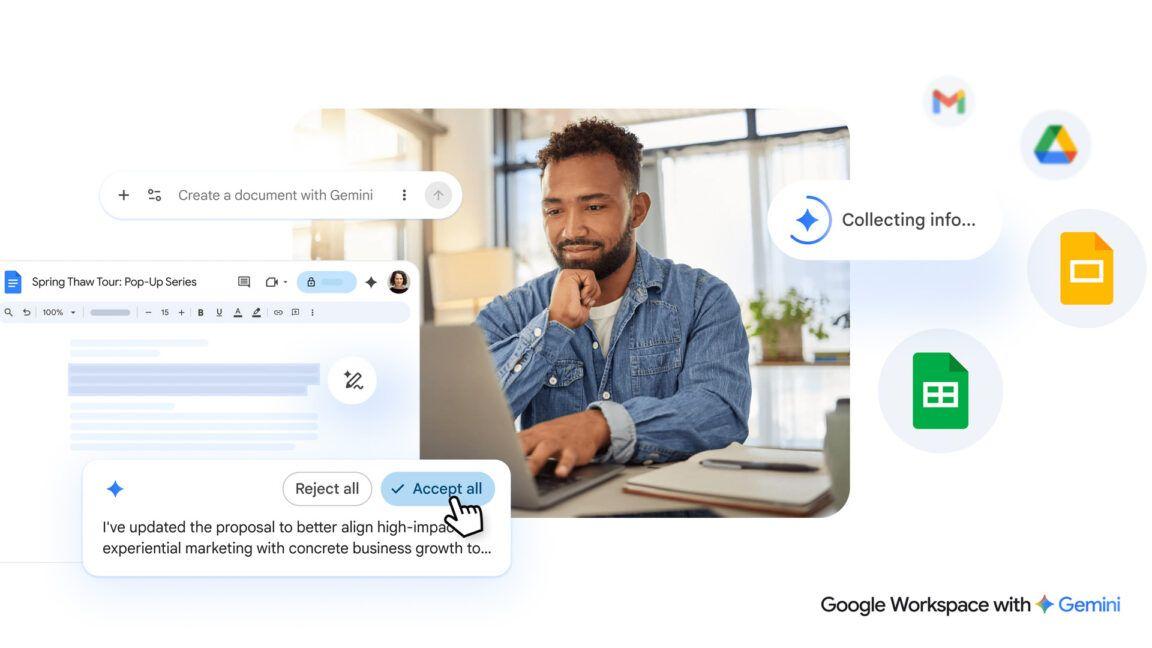
Source: Ars Technica
The AI capabilities in Google Docs extend beyond initial drafts. Once you have a first draft, Gemini can refine specific sections without regenerating the entire document
2
. A new "Match writing style" feature helps unify documents when multiple people are working on a draft with differing voices and tones, suggesting edits to make the tone and voice consistent throughout2
. Additionally, a "Match the format" tool lets you mirror the structure and style of another document, such as filling in a travel itinerary template with your own trip details by pulling information from flight confirmations, hotel bookings, and rental car reservations2
.Automated Spreadsheet Generation Tackles Data Entry
The most impressive new Gemini capabilities appear in Sheets, where Google claims the AI's spreadsheet capabilities are nearing those of humans in recent testing
1
. With a single prompt, Gemini will pull relevant data from across Gmail, Chat, and Drive to quickly create a fully formatted spreadsheet2
. Users could ask it to "organize my upcoming move to Chicago. Create a checklist for packing by room, a contact list for utilities, and a spreadsheet to track moving company quotes from my inbox"2
.For more complex tasks, a new "Fill with Gemini" tool can populate tables even faster, instantly generating custom text, categorizing and summarizing data, or pulling in real-time information from Google Search
2
4
. This represents a significant step toward data entry automation. If you're managing college applications, for instance, you can set up column headers for details you need, then let Gemini fill in the table automatically by pulling relevant information from the web, including each school's deadlines and tuition2
.
Source: VentureBeat
AI Slide Creation Matches Your Presentation Theme
Slides is receiving new Gemini capabilities, though not all at once. Users can now have Gemini generate a fully editable slide in their deck that matches the overall theme, drawing on contextual data from files, emails, and the web
2
5
. If you don't like a slide, you can ask Gemini to adjust it by requesting changes like "match the colors to the rest of my deck" or "make this more minimal"2
.In the future, Google plans to give Gemini the ability to create entire presentations with multiple slides from a single prompt, though this won't be available during the initial rollout
1
. When this feature arrives, users will be able to ask Gemini to "create a 5-slide deck for my upcoming Tokyo trip"2
.Related Stories


AI Overviews in Drive Transform File Search
Drive is evolving from a storage platform into an active collaborator. When users search in Drive using natural language, Gemini will surface AI Overviews at the top of results, summarizing the most relevant information from files while citing sources
2
4
. This means you don't need to open a document to find what you're looking for2
.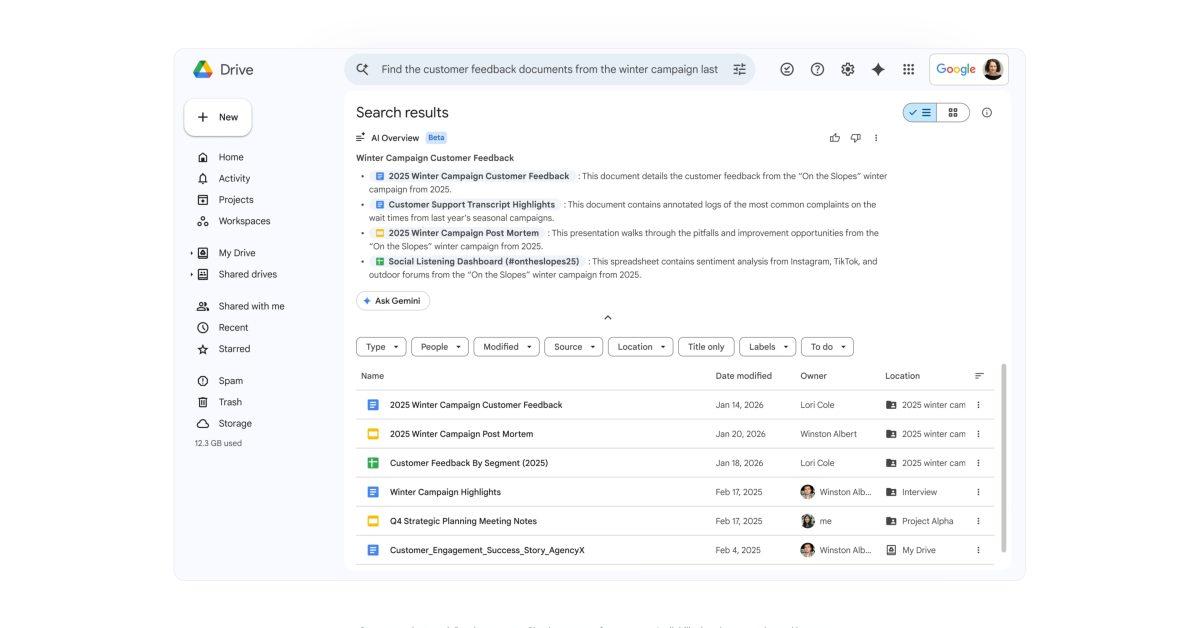
Source: 9to5Google
A new "Ask Gemini in Drive" feature lets users ask complex questions across their documents, emails, calendar, and the web
2
. For example, you could select all your tax-related files and ask, "What should I ask my tax advisor before filing this year's taxes?" and get a detailed answer based on your actual data2
. New Gemini capabilities in Google Workspace apps will cite their sources after each query, showing where it found the information it used, like your flight confirmation email and chats discussing dinner plans4
.Rollout Details and User Concerns
All the new AI features are rolling out in beta today and will first be available to Google AI Ultra and Pro subscribers
2
4
. The Docs, Slides, and Sheets features will roll out gradually over the spring globally, but only in English1
. The Drive search changes will also arrive in the coming months, but this will be limited to the US at first1
.This Google launch is part of a larger trend in 2026, in which major software developers continue to bake generative AI-based features into core user experiences
3
. Testing by WIRED found that AI-powered document creation excels at corporate-speak, raising questions about how these tools might affect workplace communication and creativity3
. Users who don't want these features can disable "Smart Features" in Workspace, though this also turns off things like Gmail package tracking and pulling calendar events from Gmail1
. For Workspace accounts managed by companies, individual users won't be able to turn off AI features individually, as the managing company controls AI access4
.References
Summarized by

Navi
[1]
[2]
[3]
Related Stories
Recent Highlights
1
Apple Plans Major Siri AI Overhaul in iOS 27 With Third-Party Chatbot Integration
Technology

2
OpenAI shuts down Sora after six months, ending Disney's $1 billion licensing partnership
Technology

3
AI chatbots validate you too much, making you less kind to others, Stanford study reveals
Science and Research

Recent Highlights
Today's Top Stories








Your Daily Dose of Curated AI News
Don’t drown in AI news. We cut through the noise - filtering, ranking and summarizing the most important AI news, breakthroughs and research daily. Spend less time searching for the latest in AI and get straight to action.

