Google Mixboard uses Nano Banana Pro to transform ideas into polished AI presentations


4 Sources
4 Sources
[1]
Hate creating presentations? I tried Google's new Mixboard and the results blew me away
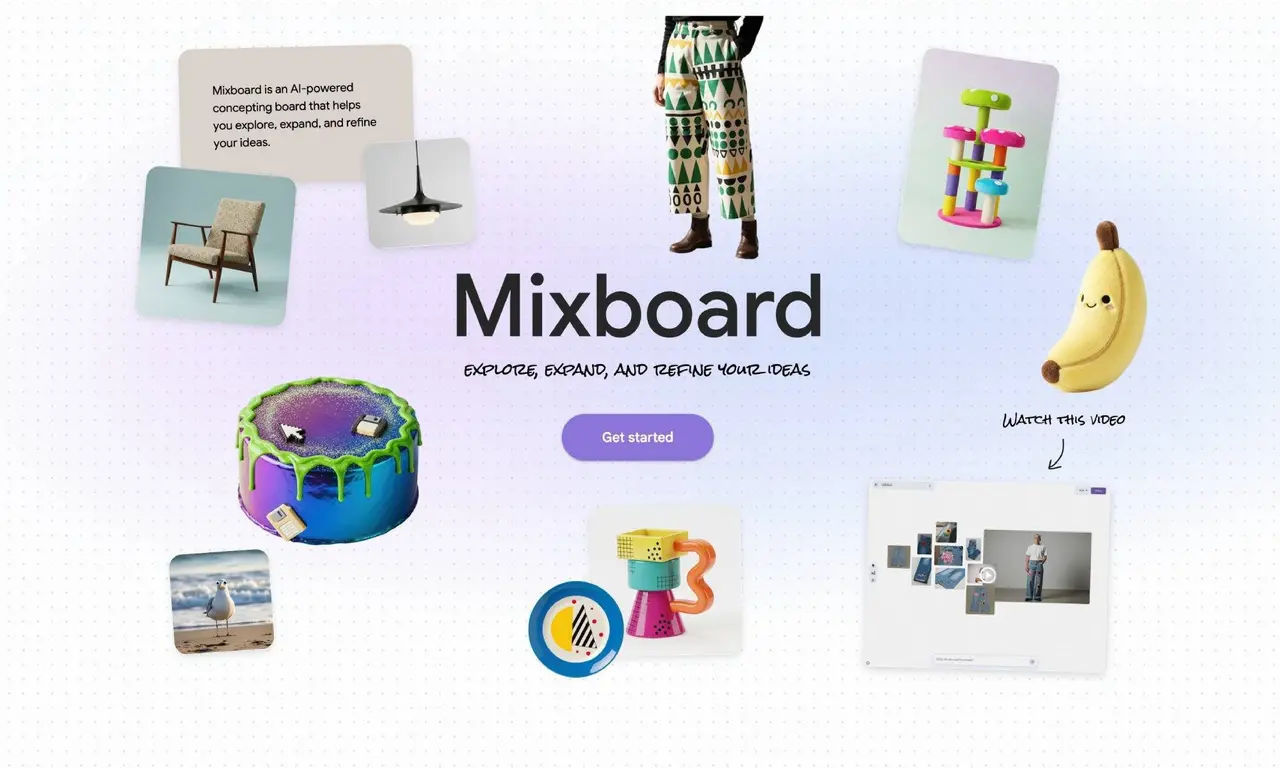
Mixboard simplifies the creation of presentations.The service is compatible with any Chromium-based browser.Currently, Mixboard is in public beta, so it's free to use. Does the task of creating presentations cause you to spiral into a void of stress, fear, and impostor syndrome? And yet, do you often find yourself having to create them for work, school, or other situations? If that sounds like you, Google has a tool that includes Nano Banana Pro to create presentations from your photos and documents. How does this service work? Also: Google's Nano Banana image generator goes Pro - how it beats the original You go to Mixboard, upload photos and documents to a new board, and the service, with the help of AI, converts them into a presentation. This new service by Google is currently in public beta, which means you can use it for free. There is no indication of when it will be officially released or what the pricing tiers will be. I took Mixboard out for a test drive. Open your web browser, ensure you're logged into your Google account, and navigate to Mixboard. On the main page, you can either test it by clicking one of the examples or start fresh by clicking "New project." (Note: Mixboard doesn't work well with Firefox-based browsers, so make sure you're using one based on Chromium, such as Chrome. Also: My top 4 browsers after testing nearly every one (spoiler: Chrome fans may be upset) On the "New project" page, click + near the bottom left corner. Next, you can either select one of the premade examples or type a query to indicate what it is you want to create. For instance, I wanted to create a presentation on the best Linux desktops for new users, so I typed the following: Imagine a presentation that shows the best Linux distributions for new users. Click the right-pointing arrow, and you'll then find yourself on the board where you can begin uploading images and/or documents. I attempted to upload a .docx file, but I found it was unsupported. Instead, I uploaded PDFs, which worked fine. Upload plenty of files related to your project. You'll notice an indicator at the top right that informs you how far you have to go before you've uploaded enough files to generate a presentation. When the indicator says "Ready," you're good to go. Keep in mind that you don't have to upload files because Nano Banana Pro will grab plenty of them based on your prompt. However, if you have specific needs for your presentation, your best bet is to upload what you need. Click Ready, and Mixboard starts churning all that you've uploaded into a presentation. It claims it'll take roughly 20 minutes. Depending on how many files you upload, that estimate could be spot on or way off. Also: Gemini vs. Copilot: I tested the AI tools on 7 everyday tasks, and it wasn't even close When Nano Banana Pro finishes doing its thing, your presentation appears in the same window. You can then download the presentation, view it, or share it with others. One caveat is that you can only download the presentation as a PDF or a selection of images. Of course, you can add the images into a presentation you've created with Office 365, LibreOffice, or whatever tool you prefer. If you're ready for your presentation, you could just open it from within Mixboard and present it directly from there. Mixboard really impressed me. I was surprised at how good the presentation turned out. The only thing I would say is that the accuracy and usability depend on the details of your prompt and/or the files you've uploaded. For example, in my presentation, one slide stated, "Imagine a desktop where every pixel is placed with purpose. This is the world of the Pantheon desktop -- an experience designed to be perfect, right out of the box." Although I agree with the latter half of the statement, I'm not sure what it means by "every pixel is placed with purpose." However, some of the slides were so spot on that my reaction was, "Whoa! That's good." This is AI, so there will be a certain amount of hallucination involved. As a result, your mileage may vary. However, if you need to create a presentation on the spot and are pressed for time, Mixboard could very well save the day. Also: 8 ways I quickly leveled up my Linux skills - and you can too Give Mixboard a try and see if it doesn't become your go-to presentation tool.
[2]
I used Google Mixboard to turn my ideas into a full presentation -- here's why it's a game changer
Bringing ideas to life with Mixboard is easy and incredibly fun. I've been experimenting with the free tool from Google AI Labs a lot lately to brainstorm, visualize and refine my ideas. It's essentially a flexible canvas when you can post images and sketch out anything -- and now you can upload PDFs. Mixboard is ideal for DIY projects, party planning, product ideas, even early drafts for work presentations because with Gemini 3.0 and Nano Banana built in, the story comes to life as you expand, remix and organize everything in one place. I recently tested the newest features with my four-year-old's art and a brain dump of my current writing projects. Here's how it went. Mixboard can now convert an entire board into a polished presentation, complete with structure, design and higher-fidelity visuals. Here's how it works: The result is a full deck built from whatever you've been brainstorming. It's especially useful for design ideas, vision boards, work pitches or anything you want to communicate visually without starting from scratch. I recently tried the presenation feature by uploading my four-year-old's artwork and then allowing Mixboard to add an AI-generated story. Users can add their own, but I let Gemini 3.0 take over this time. Then, I hit 'Transform' and created a unique presentation. I made it shareable, so viewers can click "Presentation" on the top right corner to take a look. For this project, I had images to upload, but for your own presentation if you are lacking visuals, you can prompt Mixboard to create images for you. Plus, a new built-in selfie camera lets you snap quick photos of yourself -- handy for outfit planning or wardrobe inspiration. Imagine putting together a collection of your favorite outfits to refer to season after season? The new ability to add PDFs is a game-changer. I now use it to upload writing projects, important messages from the kids' school and recipes that I want to share with my mom friends. This update offers a wide variety of use cases, especially with Mixboard's expanded board size and new multiple boards inside a single project. And, when you want to make edits, just doodle directly onto the image to guide the edits. Simply draw over the area, describe what you want, and Mixboard will adjust or regenerate that part of the image. You can use the same doodle-based editing on your presentations too. It's ideal for quick tweaks like color changes, adding or removing objects, adjusting layout elements or refining slides before a meeting. Best of all, no design skills required. Mixboard is still an experiment, but it's quickly becoming one of my favorite AI tools within Google Labs. It's certainly one of the most interesting creative tools with AI-power behind the scenes. If you haven't checked it out or are still looking for a reason to try it, take a look and bring your ideas. With presentations powered by Nano Banana Pro, better editing controls and support for multiple boards, it's evolving from a simple idea canvas into a flexible workspace for anything you're building. If you're someone who juggles lots of ideas -- or just wants an easier way to visualize them -- these updates make Mixboard worth a try.
[3]
Google's AI mood board can now turn your idea dump into a slick presentation
Google's recently released AI mood board app, Mixboard, just got a massive upgrade, and it now lets users turn their chaotic idea dumps into polished presentations. Powered by Google's Nano Banana Pro model, the new feature automatically transforms the content on the main board into a structured, visually appealing presentation. According to Google, the new capability "combines the context from your board and your input -- including format, presentation focus and your preferred visual style -- to build beautifully designed presentations." Users get to pick between two formats, specify what they want to convey with the presentation, and select from a couple of different visual styles to customize the final output. The feature then takes a few minutes to generate the presentation, which users can either download, share, or present right within Mixboard. Along with this new feature, Google has expanded the types of content users can upload to Mixboard. The mood board app now includes a new selfie camera that lets users quickly add a photo of themselves, and it has also gained support for PDF, HEIC, and TIFF file types. Additionally, users can now doodle directly on images in the main board to make edits and even mark up presentations to make quick changes. Recommended Videos Mixboard has also received support for multiple boards per project, which allows users to have different boards for different categories or themes. This can be particularly beneficial for complex projects, as it allows users to separate research, references, and final designs into different boards to reduce clutter, while keeping everything linked under the same project. The new Mixboard features and changes are already live, and users can try them out by heading over to the Mixboard website. The app has a few sample boards to get you started and get a feel for the new features.
[4]
Create presentations with Nano Banana Pro in Mixboard and more
Mixboard is an AI experiment from Google Labs designed to help you explore, expand and refine ideas. It offers a canvas for you to visualize different ideas using images or text. Experiment with all kinds of projects, whether that's a DIY project, a product design or the menu and decor for your holiday party. Here are a few recent updates to try: Mixboard can now transform the content from your main board into a compelling presentation. Mixboard combines context from your board and your input -- including format, presentation focus and your preferred visual style -- to build beautifully designed presentations. With Nano Banana Pro, you can elevate your presentation's content to stunning, higher-fidelity visuals and text to easily communicate your ideas.
Share
Share
Copy Link
Google Mixboard, an AI mood board app from Google AI Labs, now creates full presentations using Nano Banana Pro. Upload photos and PDFs, and the AI-powered presentation tool converts them into structured decks with high-fidelity visuals. Currently in public beta and free to use, it supports doodle-based editing and multiple boards per project.
Google Mixboard Transforms Visual Brainstorming into Presentation Creation
Google AI Labs has upgraded its experimental AI mood board app, Google Mixboard, with a feature that automatically generates complete presentations from uploaded content
1
. The AI-powered presentation tool now leverages Nano Banana Pro, Google's advanced image generation model, to transform ideas into presentations with structured layouts and high-fidelity visuals4
. Currently available in public beta, the service is free to use, though pricing details for its official release remain unannounced1
.
Source: Digital Trends
How the AI-Powered Presentation Tool Works
Users can access Google Mixboard through any Chromium-based browser by logging into their Google account and navigating to the platform
1
. The process begins with creating a new project and entering user prompts that describe the desired presentation topic. The idea visualization tool then provides a canvas where users can upload PDFs for presentations, images, and other content related to their project1
. An indicator at the top right tracks progress, signaling when enough material has been uploaded to generate a presentation1
.The service combines context from the board with user input, including format preferences, presentation focus, and visual style, to build beautifully designed presentations
4
. According to testing, the generation process takes approximately 20 minutes, though this varies depending on the volume of uploaded files1
. Users can either upload their own materials or rely on Nano Banana Pro to generate relevant content based on their prompts1
.
Source: Google
New Features Expand Creative Workspace Capabilities
Beyond its ability to create polished presentations, Google Mixboard has introduced several updates that enhance its functionality as a brainstorming tool. The platform now supports multiple file types including PDF, HEIC, and TIFF formats, expanding the range of content users can incorporate
3
. A built-in selfie camera allows users to quickly capture photos of themselves for projects like outfit planning or wardrobe inspiration2
.The introduction of doodle-based editing represents a significant advancement in user control. Users can draw directly onto images to guide edits, describing desired changes that Mixboard will implement by adjusting or regenerating specific parts of the image
2
. This same editing approach applies to presentations, enabling quick tweaks like color changes, adding or removing objects, or refining slide elements without requiring design skills2
. The platform also now supports multiple boards per project, allowing users to organize research, references, and final designs into separate boards while keeping everything linked under one project3
.Related Stories


Real-World Testing Reveals Strengths and Limitations
Hands-on testing of the Google AI Labs experiment has yielded mixed but generally positive results. One user created a presentation about the best Linux distributions for new users and reported being impressed by the quality, with some slides being "spot on"
1
. Another tester used the tool with their four-year-old's artwork, allowing Gemini 3.0 to generate an accompanying story before transforming the mood board into a unique presentation2
.However, accuracy and usability depend heavily on the specificity of user prompts and the quality of uploaded files
1
. As with any AI system, some degree of hallucination occurs, meaning generated content may occasionally include unclear or imprecise statements1
. The completed presentations can be downloaded as PDFs or image collections, which users can then import into other presentation software like Office 365 or LibreOffice, or present directly from within Mixboard1
.Why This Matters for Content Creators and Professionals
For individuals who struggle with presentation creation or face time constraints, this tool offers a practical solution to transform ideas into presentations quickly. The integration of Nano Banana Pro elevates content with stunning visuals and professional layouts that would typically require design expertise
4
. The platform serves diverse use cases, from DIY projects and party planning to product design and work pitches2
.As Mixboard evolves from a simple idea canvas into a flexible creative workspace, it demonstrates how AI can streamline traditionally time-intensive tasks
2
. While still experimental, the tool's ability to handle everything from initial brainstorming to final presentation delivery in one platform represents a shift in how professionals might approach visual communication. Users juggling multiple ideas or seeking easier visualization methods will find the expanded capabilities particularly valuable2
.References
Summarized by

Navi
[2]
Related Stories
Recent Highlights



Recent Highlights
Today's Top Stories






Your Daily Dose of Curated AI News
Don’t drown in AI news. We cut through the noise - filtering, ranking and summarizing the most important AI news, breakthroughs and research daily. Spend less time searching for the latest in AI and get straight to action.

