Google unveils AppFunctions to let Gemini automate tasks across Android apps


3 Sources
3 Sources
[1]
Google details MCP-like 'AppFunctions' that let Gemini use Android apps
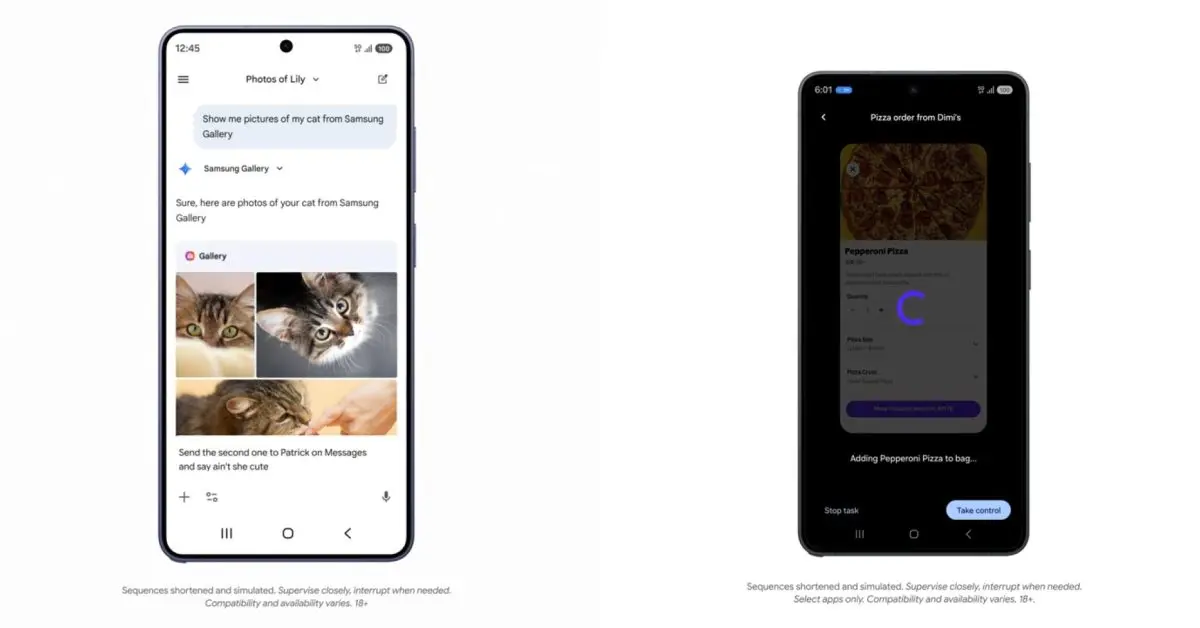
Following the Gemini automation announcement today, Google is detailing how all this works under the hood on Android. Google is "introducing early stage developer capabilities that bridge the gap between your apps and agentic apps and personalized assistants, such as Google Gemini." While we are in the early, beta stages of this journey, we're designing these features with privacy and security at their core as our first step in exploring this paradigm shift as an app ecosystem. Developers detail their app's capabilities as tools that agents and AI assistants (like Gemini) can use. Google equates AppFunctions to the Model Context Protocol (MCP) that's popular for agents and server-side tools. However, these functions happen locally on the Android device. Example use cases are: Below is an example of AppFunctions utilizing the Samsung Gallery app on the Galaxy S26. It's also coming to Samsung devices running OneUI 8.5 and higher. Instead of manually scrolling through photo albums, you can now simply ask Gemini to "Show me pictures of my cat from Samsung Gallery." Gemini takes the user query, intelligently identifies and triggers the right function, and presents the returned photos from Samsung Gallery directly in the Gemini app, so users never need to leave. This experience is multimodal and can be done via voice or text. Users can even use the returned photos in follow-up conversations, like sending them to friends in a text message. Meanwhile, Google says the Gemini app is already using AppFunctions to power its Calendar, Notes, and Tasks integrations in Google apps and OEM defaults. Android is also working on a second approach as seen with the Gemini automation announced for the Galaxy S26 and Pixel 10 series this morning. While AppFunctions provides a structured framework and more control for apps to communicate with AI agents and assistants, we know that not every interaction has a dedicated integration yet. Google is "developing a UI automation framework for AI agents and assistants to intelligently execute generic tasks on users' installed apps." This is the platform doing the heavy lifting, so developers can get agentic reach with zero code. It's a low-effort way to extend their reach without a major engineering lift right now. Google says Android 17 will "broaden these capabilities to reach even more users, developers, and device manufacturers."
[2]
Android 17 could turn Gemini into your personal app butler
New AppFunctions and UI automation previews give a first look at AI that completes tasks for you in the background. Google just gave us a real glimpse of how Android 17 might change the way you use your phone. New developer tools announced Tuesday let AI agents like Gemini dive directly into your installed apps to find photos, manage calendars, or book a multi-stop rideshare while you do something else. The idea is simple. Instead of opening apps one by one, you tell an AI what you need. Google calls this the "agentic future," and it's landing in pieces starting now on the Galaxy S26 series and select Pixel 10 devices. A long press of the power button on those phones lets you hand off complex tasks to Gemini. The AI works across food delivery, grocery, and rideshare apps in the US and Korea to start. Two ways Gemini takes control Google is building this on two tracks. The first is AppFunctions, a framework that lets developers expose specific app features directly to AI. The Samsung Gallery integration on the Galaxy S26 shows how it works. You ask Gemini to "show me pictures of my cat from Samsung Gallery." The AI finds and displays them. You never open the gallery app. It already works for calendar, notes, and tasks on devices from multiple manufacturers. Recommended Videos The second track is broader. For apps without dedicated integrations, Google is testing a UI automation framework. It lets Gemini execute generic tasks. The beta launches on the same devices, supporting a curated set of apps in food delivery, grocery, and rideshare categories. The AI handles the multi-step work using your existing app context. You stay in the driver's seat Letting an AI loose inside your apps sounds like a privacy risk. Google says it designed these features with privacy and security as the foundation. When Gemini runs a task through UI automation, you can watch its progress via notifications or a live view. If something looks wrong, you jump in and take over manually. Sensitive actions get extra guardrails. Gemini alerts you before completing things like a purchase. The actual work happens on your device, not a remote server. Google frames this as user control baked into the experience. The goal is to make automation feel helpful, not creepy. Android 17 and what comes next This is still early. Google is starting with a small set of developers to iron out the experience. The UI automation preview is limited to specific devices and app categories in just two countries. But the roadmap points to Android 17 as the moment these capabilities broaden to more users, developers, and device makers. For now, if you have a Galaxy S26 or a select Pixel 10, you can try the beta when it launches. For everyone else, the takeaway is simple. Your phone is about to get smarter about handling tedious stuff. The shift from opening apps to telling AI what you need is coming. Android 17 later this year will likely be when it starts to feel normal.
[3]
Google details Android roadmap for AI agents and app automation
Google has outlined its vision for an "intelligent OS," introducing new AI-powered capabilities for Android apps in a blog post by Matthew McCullough, VP of Product Management, Android Development. As users increasingly rely on AI assistants to complete tasks instead of navigating apps manually, Android is shifting toward a task-focused model where agents execute actions across applications. The update introduces two core capabilities: AppFunctions, which enables structured AI integration, and an intelligent UI automation framework, designed to support broader app interactions. Both are currently in early beta and built with on-device execution, privacy, and user control in mind. AppFunctions allows Android apps to expose selected data and actions directly to AI agents and assistants. Using the AppFunctions Jetpack library and related platform APIs, developers can define self-describing functions that AI systems can discover and execute through natural language. Similar to backend capability declarations via MCP-style cloud services, AppFunctions applies this model on-device, allowing execution to occur locally rather than on remote servers. Instead of manually browsing albums, users can ask Gemini to display specific photos stored in Samsung Gallery. Gemini processes the request, triggers the relevant AppFunction, and presents the results directly inside the Gemini app without requiring users to switch applications. The interaction supports voice and text input. Retrieved content can also be used in follow-up actions, such as sharing selected images in a message. Through AppFunctions, Gemini can automate actions across multiple categories, including: These capabilities allow users to coordinate schedules, manage reminders, and organize information through a unified assistant interface. For apps that do not yet implement AppFunctions, Android is developing a UI automation framework that enables AI agents to perform multi-step tasks within installed apps. This system does not require developers to add new integrations. The platform performs the automation layer, extending AI-driven task execution without additional engineering effort. Users can delegate complex tasks to Gemini by long-pressing the power button. The feature will be introduced as a beta within the Gemini app. Initially, it will support a curated selection of apps in the following categories: Example tasks include placing customized food orders, coordinating multi-stop rides, and reordering previous grocery purchases. Gemini uses contextual information already available within apps to complete these workflows. Android includes safeguards to maintain user awareness and control during automated actions: These measures are designed to ensure transparency while automation runs in the background. The Samsung Gallery and Gemini integration is currently available on the Samsung Galaxy S26 lineup and is expected to expand to Samsung devices running One UI 8.5 and later. The UI automation preview is launching on the Galaxy S26 series and the Google Pixel 10 devices. It will initially roll out as a beta feature within the Gemini app. Support at launch focuses on select apps in the food delivery, grocery, and rideshare categories, with initial availability in the United States and South Korea. Google plans to expand AppFunctions and UI automation capabilities in Android 17, extending support to additional users, developers, and device manufacturers. The company is currently working with a limited group of app developers to refine integrations before a broader rollout. Further details on enabling agent-based app interactions are expected later this year. With these updates, Android is moving toward a model where AI agents can execute tasks across applications, reducing the need for users to manually navigate between apps.
Share
Share
Copy Link
Google introduced AppFunctions and a UI automation framework that enable Gemini to execute tasks directly within Android apps. Starting with Galaxy S26 and Pixel 10 devices, users can ask Gemini to find photos, manage calendars, or order food without manually opening apps. Android 17 will expand these AI agent capabilities to more users and developers.
Gemini Gets Direct Access to Android Apps Through New Developer Tools
Google announced new developer capabilities that transform how Gemini interacts with Android apps, moving toward what the company calls an "intelligent OS" model. The update introduces AppFunctions, a framework that lets developers expose specific app features directly to AI agents and AI assistants like Gemini
1
. Google equates AppFunctions to the Model Context Protocol (MCP) used for agents and server-side tools, but these functions execute locally on Android devices rather than remote servers3
.The Samsung Gallery integration on the Samsung Galaxy S26 demonstrates how app automation works in practice. Instead of manually scrolling through albums, users can ask Gemini to "show me pictures of my cat from Samsung Gallery." Gemini processes the request, triggers the relevant function, and displays photos directly within the Gemini app without requiring users to switch applications
1
. This multimodal experience supports both voice and text input, and retrieved content can be used in follow-up actions like sharing images in messages.Two Approaches Power the Agentic Future on Android
Google is building this vision on two tracks. AppFunctions provides a structured framework where developers define self-describing functions using the AppFunctions Jetpack library and related platform APIs
3
. The Gemini app already uses AppFunctions to power integrations with Calendar, Notes, and Tasks across Google apps and OEM defaults1
.For apps without dedicated integrations, Google is developing a UI automation framework that enables AI agents to execute multi-step tasks within installed apps. This system requires zero code from developers, as the platform handles the automation layer
2
. Users can delegate complex tasks by long-pressing the power button on supported devices. The beta initially supports curated apps in food delivery, grocery, and rideshare categories in the United States and South Korea3
.User Privacy and Control Built Into On-Device Execution
Google designed these developer capabilities with user privacy and security as foundational elements. When Gemini runs tasks through UI automation, users can monitor progress via notifications or a live view, and take manual control if something appears incorrect
2
. Sensitive actions like purchases trigger alerts before completion. The on-device execution model means actual work happens locally rather than on remote servers3
. These safeguards aim to maintain user control while automation runs in the background.Related Stories

Android 17 Will Expand AI Agent Reach Across Devices
The Samsung Gallery integration is currently available on the Galaxy S26 lineup and will expand to Samsung devices running OneUI 8.5 and higher
1
. The UI automation preview launches on the Galaxy S26 series and Google Pixel 10 devices as a beta feature within the Gemini app3
. Google plans to broaden these capabilities in Android 17 to reach more users, developers, and device manufacturers1
. The company is currently working with a limited group of app developers to refine integrations before a broader rollout, with further details expected later this year3
. This shift from manually opening apps to telling AI what you need represents a fundamental change in how users interact with their phones.References
Summarized by

Navi
[2]
Related Stories
Google Gemini Set to Revolutionize Android 16 with Advanced In-App Task Automation
22 Nov 2024•Technology

Google's Gemini gains screen automation to control Android apps and perform tasks for you
04 Feb 2026•Technology
Android 16 Set to Supercharge Gemini AI with Extensive App Integration
10 Dec 2024•Technology

Recent Highlights


Recent Highlights
Today's Top Stories






Your Daily Dose of Curated AI News
Don’t drown in AI news. We cut through the noise - filtering, ranking and summarizing the most important AI news, breakthroughs and research daily. Spend less time searching for the latest in AI and get straight to action.

