Instagram Launches AI Voice Effects for Voice Notes in Direct Messages Across iOS and Android


3 Sources
3 Sources
[1]
Instagram's New AI-Powered Feature Adds Effects to Voice Notes
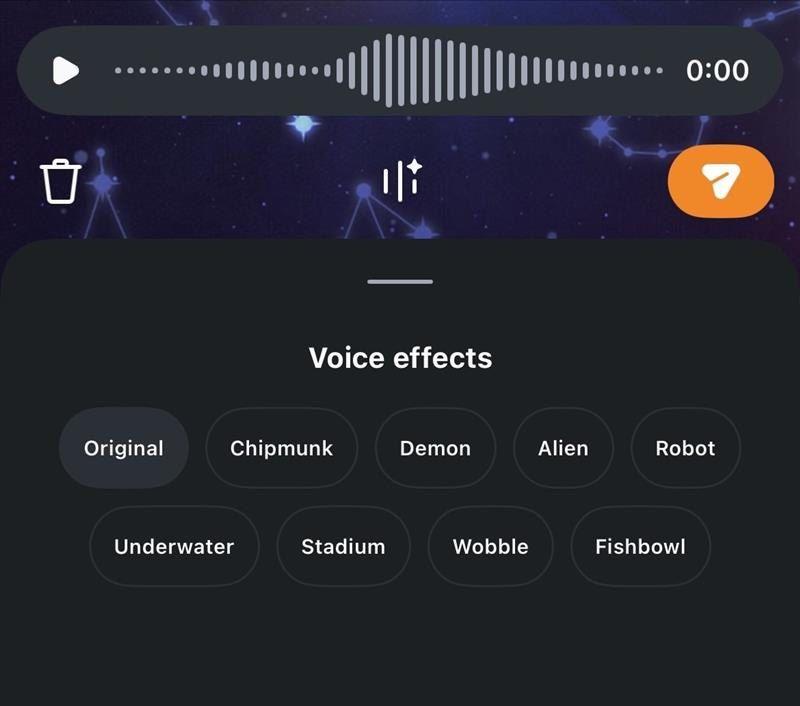
* Instagram AI Voice Effects are now available in India * Instagram brings eight voice effects for voice notes * The new feature appears in chat windows Instagram has introduced the new AI Voice Effect feature for voice notes in direct messages (DMs). The new feature allows users to add filters to their voice notes. There are nearly eight voice effects that a user can choose from. The feature is also live in India now, and can be accessed in any chat window. The new feature is the latest addition to the social media platform's suite of AI features. Recently, a report suggested that Instagram is also working on an AI-powered face swap functionality, which could be called "Create My Likeness" by the company. Instagram Voice Effects Are Now Live in India In a press release, the photo-sharing platform has announced that it has started rolling out a new AI-powered feature, dubbed AI Voice Effects. Users can add filters to their voice notes while sending them to others on the social media platform. Gadgets360 staff members were able to verify that the new AI-backed functionality is currently live in India. Users can also preview Instagram's new AI Voice Effects before sending the voice note Photo Credit: Screenshot/ Instagram Accessed through DMs, users can choose from a list of eight AI voice effects, including "Chipmunk", "Demon", "Alien", "Robot", Underwater", "Stadium", "Wobble", and "Fishbowl". Users can also switch back to the unadulterated version of the voice note by clicking on the Original button. The company added that users can also check the name of the voice filter that was added by clicking on the voice note. The recipients can also tap on it to mimic the AI Voice Effect before sending it. To access Instagram's AI Voice Effects, users should first open Instagram > open any DM thread > tap on the voice note record button > click on the AI Voice Effects button under the voice note > record the voice note. Once recorded, a user can click on one of the AI Voice Effects mentioned above to change the tone of the voice recording. Users can also preview the voice note before they send it to others. As previously mentioned, this adds to the social media platform's efforts to bring more AI-powered features to its app. Recently, a report highlighted that Instagram is planning to bring an AI-powered face swap feature, dubbed "Create my likeness". The AI-backed tool is said to allow users to write a prompt to generate images and videos using AI, while also reportedly adding the ability to generate content based on someone else's likeness.
[2]
Instagram rolls out AI voice effects for Direct Messages
Instagram has updated its Direct Messages (DMs) with a new feature called AI Voice Effects for Voice Notes. This addition allows users to apply various character-style audio modifications to their recorded voice messages before sending them to other users on the platform. The AI technology is designed to alter the sound of the user's voice while maintaining the original recording's rhythm, tone, and underlying emotion. Furthermore, the feature includes an interactive element for recipients. When a modified voice note is received, the chat interface displays which specific effect was applied. Recipients can then tap this indicator to apply the exact same voice effect to their own audio reply. Users can access and use the new audio feature by following these steps: Once sent, the chosen effect will be visible to the recipient, who can then choose to mimic it for their response.
[3]
How to use AI voice effects in your Instagram DM
The feature is rolling out globally for both iOS and Android devices. Instagram has been silently adding a bunch of new features to its mobile application. Whether it be the new repost feature, the friend maps for locations, or the dedicated Friends tab in the reels section. But this time around, they've integrated something completely new. They've added a new feature that allows you to send voice notes, using multiple different effects that are tuned by Meta AI. Without wasting much time, let's take a deep dive into the new feature and how you can use these new AI voice effects on your Instagram DMs. Also Read: Samsung Galaxy S25 Ultra gets huge price cut on Amazon: Should you buy it? If you're wondering how the AI voice effect features actually work, it's pretty simple. You don't have to do anything special since the feature uses the default voice recorder available on Instagram chats. Additionally, recipients would be able to tap on the voice note to check and see what AI voice effect was used. They would even be able to reply using the different AI voice effects. This feature has been added as part of Meta's focus on making messaging more creative and personalised without much effort. By combining the AI voice effects with easy controls, the platform is aiming to make conversations more engaging. The AI voice effects feature on Instagram is currently rolling out globally and is available on both iOS and Android devices. If you haven't got the update yet, we would recommend updating to the latest version of Instagram on your devices. The features add a bunch of new voice effects, which include options like Chipmunk, Demon, Alien, Robot, Stadium, Underwater, Wobble and Fishbowl.
Share
Share
Copy Link
Instagram has rolled out AI Voice Effects, a new feature that lets users apply eight different audio filters to voice notes in direct messages. Available globally on both iOS and Android, the feature includes effects like Chipmunk, Demon, Alien, and Robot, allowing users to modify their voice recordings while maintaining the original emotion and rhythm.
Instagram Introduces AI Voice Effects for Direct Messages
Instagram has launched AI Voice Effects, a new AI-powered feature that allows users to apply audio modifications to voice notes in direct messages. The feature, now live globally including in India, offers eight distinct voice filters that users can apply before sending voice messages to their contacts
1
. This marks Meta's latest effort to make messaging more creative and personalized without requiring significant user effort3
.
Source: Digit
The new Instagram feature is accessible through any chat window and works seamlessly with the platform's existing voice recording functionality. Users can choose from effects including Chipmunk, Demon, Alien, Robot, Underwater, Stadium, Wobble, and Fishbowl
1
. The AI technology maintains the original recording's rhythm, tone, and underlying emotion while transforming the sound of the user's voice2
.
Source: FoneArena
How to Access and Use AI-Tuned Voice Effects
To use the feature, users need to open Instagram, navigate to any DM thread, and tap the voice note record button. After recording, an AI Voice Effects button appears under the voice note, allowing users to select from the available filters
1
. Users can preview how each effect sounds before sending the message, ensuring they're satisfied with the character-style audio modifications.The feature includes an interactive element for recipients as well. When someone receives a modified voice note, the chat interface displays which specific effect was applied. Recipients can then tap this indicator to apply the exact same voice effect to their own audio reply
2
. Users can also switch back to the unadulterated version by clicking the Original button at any time1
.Related Stories



Global Rollout and Future AI Features
The AI Voice Effects feature is currently rolling out globally and is available on both iOS and Android devices
3
. Users who haven't received the update yet are advised to update to the latest version of Instagram on their devices to access the functionality.This addition represents part of Instagram's broader push to integrate AI capabilities across its platform. Recent reports suggest the company is also developing an AI-powered face swap functionality potentially called Create My Likeness, which would allow users to write prompts to generate images and videos using AI, including the ability to generate content based on someone else's likeness
1
. As Meta continues expanding AI features across its platforms, users can expect more tools designed to enhance how they send voice messages and communicate through voice notes in direct messages.References
Summarized by

Navi
Related Stories
Recent Highlights
1
Google releases Gemma 4 with Apache 2.0 license, enabling unrestricted local AI on devices
Technology

2
AI Models Lie and Deceive to Protect Other AI Models From Deletion, Study Reveals
Science and Research

3
OpenAI closes $122 billion funding round amid fierce AI competition and profitability questions
Startups

Recent Highlights
Today's Top Stories






Your Daily Dose of Curated AI News
Don’t drown in AI news. We cut through the noise - filtering, ranking and summarizing the most important AI news, breakthroughs and research daily. Spend less time searching for the latest in AI and get straight to action.

