Intel XeSS 3 Multi-Frame Generation Brings AI Upscaling to Laptops and Gaming Handhelds


3 Sources
3 Sources
[1]
Intel's Panther Lake CPUs Make the Best Case for 'Fake Frames' in Gaming
The new Core Ultra Series 3 chips and XeSS 3 AI upscaler can juice up frame rates on laptops, but handhelds may benefit the most. If your gaming machine isn't rendering any frames itself, what's the point of having a costly computer at all? I know some of you out there are mumbling resentments, asking that question already knowing the answer. To add to the grumbling, Intel has finally come off the line with its first edition of Panther Lake CPUs, dubbed Core Ultra Series 3, and a new version of its existing upscaler promising to push gaming on lightweight devices. I've already tested it out on the Asus Zenbook Duo. It's a great laptop with a great chip. Now here comes the nitty-gritty of what that actually means for players desperate for one machine to finally do it all. Which brings me to the elephant in the room. Along with Panther Lake, Intel is offering players the chance to test multi-frame generation -- aka "fake frames" -- for themselves without needing an increasingly expensive Nvidia or AMD GPU. Intel's head of Arc graphics, Tom Petersen, previously told Gizmodo he's used it in multiple games, and he doesn't even mind the odd graphical glitches it creates. The more important thing for him, he recently told Digital Foundry, is a general sense of smoothness for gaming -- mostly cutting down on CPU timings to eliminate awkward in-game stuttering. I can compromise on some things for a good gaming experience, but not on others. I'm hardly the crabbiest stickler for graphical purity. Frame generation is one of those software sleight-of-hand tricks that PC gamers have come to loathe. For some players, the barest concept of "fake frames" drives them mad, especially since they're paying thousands of dollars for a gaming-capable PC. This latest rendition won't change their minds. Why is Intel's frame generation different from the rest? Intel's latest XeSS 3 model is one of several AI upscalers that take an image rendered at a lower resolution and then use AI to massage those pixels into something resembling the promised resolution. This enhances frame rates at the cost of some visual fidelity. To the PC purists' chagrin, many modern PC games enable upscalers such as Nvidia's DLSS (Deep Learning Super Sampling) and AMD's FSR (FidelityFX Super Resolution) by default. Every major gaming console from Sony, Microsoft, and Nintendo all includes some upscaling capabilities. While Nvidia's DLSS 4.5 and AMD's FSR Redstone are both locked to proprietary hardware, Intel's XeSS (Xe Super Sampling) is device agnostic (though AMD's open FSR 3 and 3.5 models remain active on many existing titles). Either way, XeSS multi-frame gen uses AI to inspect the scene to create multiple frames, which are then interpolated in between two fully rendered frames. XeSS had access to 2x frame generation before. Multi-frame generation only exacerbates the promise and problems inherent to frame interpolation. Intel touted the gaming abilities of the Core Ultra Series 3's chips, and they are enticing. There are two varieties of these CPUs among the 14 offerings the chipmaker showed off earlier this year. The versions with an "X" in their name, namely the Intel Core Ultra X7 and X9, include the extra 12Xe3 GPU cores. These graphics cores based on the Arc B390 microarchitecture are supposed to offer strong performance for tasks like rendering and gaming, all without pushing these laptops' total power package into the stratosphere. What does frame generation look like on an Intel PC? While XeSS is hardware agnostic, it does come with certain advantages on an Intel machine. Like Nvidia, Intel has special software to override in-game graphics settings to ensure they're using the latest XeSS 3 model. You can set universal XeSS settings or frame generation to 2x, 3x, or 4x on a per-game basis. Unfortunately, the software sometimes fails to recognize which games are actually installed. A title like Cyberpunk 2077 can get close to 50 fps when running on "Ultra" settings at 1080p on the Asus Zenbook Duo. You'll only maintain around 36 fps in benchmarks with the Zenbook Duo's max 2,880 x 1,800 resolution. Once you enable XeSS, the frame rate can jump to closer to 45 fps, more or less depending on if you opt for "performance" or "quality" settings. If you want to play with any ray tracing at all, you can only expect playable frame rates with XeSS. Cyberpunk 2077 running on an Asus Zenbook Duo with ray tracing "low" settings and max resolution. It can still hit that frame rate without frame gen thanks to XeSS upscaling. Once frame generation comes online, that's when I can start to play the game at near 60, near 80, and closer to 90 fps with 2x, 3x, or 4x frame generation, respectively. But here's the major caveat. Frame generation causes two major issues: latency and visual artifacts. The game running at 4x frame gen feels noticeably floatier -- though not unplayable. I could notice how when flicking the camera quickly, I would see ghostly flickering of streetlights and screens over the streets of Night City. What Intel doesn't tell you is that to avoid any visual glitches, you want as close to 60 fps as possible already before you enable frame generation. If I drop Cyberpunk 2077 down to 1080p, then I can edge closer to 40 fps to keep ray tracing going and see less odd flickering. There were fewer problems with the existing 2x frame gen, in any case. In a game like Hogwarts Legacy, I can net more than 90 fps indoors when the laptop is only rendering less than 30 fps. When running around, I noticed numerous graphical glitches with creeping shadows that climbed up the player character's robes. Here you can see Hogwarts Legacy without and with frame generation. The game runs fairly well even without generated frames. Without frame generation, with Intel XeSS on balanced settings, I can hit a solid 40 fps to 50 fps in indoor environments and between 30 fps and 40 fps outdoors with all the graphics cranked up to max. Do I need 60 fps? I may as well reduce some graphics settings rather than make excuses for awkward graphical artifacting. So what if we go truly ludicrous and try and play Cyberpunk 2077 with 4x frame gen with ray tracing settings set to ultra? Sure, I can get more than 60 fps in the game when the actual generated frame rate is close to 20 fps at the Zenbook Duo's highest, 3K resolution. All I can say is that the laptop is doing its best, but there are some obvious and glaring visual artifacting that even the most tolerant player would find hard to excuse. Maybe I'll like frame gen more on a handheld Gamers are no monolith. Some players may not care about reducing their resolution to half of what their screen actually supports if it means a playable game. I'm one of those players who cannot stand to look at fuzzy textures and reduced UI detail for the sake of higher frame rates. I would rather reduce graphics settings than reduce my resolution. Mind you, those base frame rates I can get in games without frame generation are still impressive. On a Zenbook Duo, games like Cyberpunk 2077 are indeed playable and visually stunning in scenes. It's the closest we've seen to the single-chip performance of AMD's Strix Halo chips and at a much lower TDP (thermal design power) and without AMD's touted GPU architecture. And there's the rub. You'll need to sacrifice something for gaming on a mobile Intel Panther Lake device. For smaller, cheaper devices, upscaling and -- yes -- even frame generation make much more sense. It's worth a look on a laptop (even one as expensive as the $2,300 Asus Zenbook Duo), though I wouldn't hinge my hopes on it. Intel has already called its shot by promising we'll see a handheld-specific chip, dubbed Intel Core G3. We may even see Intel-based handheld gaming PCs from companies like Acer and MSI later this year, or so we hope. There, 1080p gaming is the norm. When gaming on a smaller screen, it's much harder to spot any visual inconsistencies. For the sake of playable frame rates on the go, Intel may already be kicking in AMD's teeth on its way through the door. For now, Intel's fake frames on laptops will still be a mixed bag. Some who buy an expensive laptop with one of Intel's higher-end GPU chips may not care about floatier controls or awkward visuals if they can push their frame rate to near the max of what their display is capable of. Others may be more gun-shy, and rightfully so.
[2]
I tested Intel's XeSS 3 multi-frame generation on my Core Ultra X9 388H laptop, and Nvidia should be worried about the future of gaming laptops
Just when I thought Intel Core Ultra Series 3 couldn't get any better, Team Blue just dropped XeSS 3 multi-frame generation in a new graphics driver. And after testing it on my Asus Zenbook Duo with Intel Core Ultra X9 388H, my mind is blown. Nvidia should be nervous because integrated graphics just caught up in a big way to DLSS 4.5. By adopting the same AI trickery to scale the resolution and fill the space between rendered frames with AI-generated frames, you get seriously impressive gaming on ultraportable notebooks. Of course, raw horsepower-wise, Team Green keeps the lead -- it has a dedicated GPU after all. But for most players, what you're getting here is more than enough, and you get that additional benefit of vastly improved battery life, too! So rather than rant on, I'll answer the questions you have about it: how good are the frame rates now? Any latency worries? Any telltale signs of AI at work (like jagged edges and ghosting around objects)? I decided to do this by putting it in one helluva mismatch of a competition -- facing it off against the Acer Predator Triton 14 AI with RTX 5070. And the results? Well, there's a lot here for Nvidia to get nervous about. Let's get into it. What is XeSS 3? Think DLSS, but Intel's version. XeSS (Xe Super Sampling) 3 brings frame generation and resolution scaling together to make games run a lot smoother than you could've done on just the GPU itself. Nvidia, AMD and Intel all learned a while ago that instead of stuffing graphics cards with more and more transistors to work harder in rendering computer graphics directly on the card, they could work smarter and introduce AI into the mix to bring more efficient generational performance gains. In Intel's case, two things are at play here: * Multi-frame generation: For every one frame of gameplay rendered by the GPU, AI can generate up to an extra three. * Super Resolution: Your GPU will render the game at a lower resolution to save power, and then use AI to upscale that image to the resolution you want to play at. By the numbers Running around Night City in Cyberpunk 2077 was already decent enough at our initial results of 67.1 FPS with XeSS 2. To watch that number increase to 217 FPS with one flick of a switch in Intel's Graphics software is frankly mind-bending. And don't get it twisted -- this is on an Asus Zenbook Duo running at a total power of 45 watts. There is a "burst" option that can go up to 80 watts for short durations, but for gaming, it stays largely at 45. For context, the Nvidia gaming laptop I'm running these comparisons against (the Acer Predator Triton 14 AI with RTX 5070) goes up to a combined power of 140W. So with that in mind, here's what I was getting. As you can see, the Predator Triton 14 AI takes a clear lead here -- turning on multi-frame generation brings things too close than any integrated GPU should get to dedicated. And at these high levels of frames, only the most enthusiastic of esports competitors need to really worry about that higher number. And it is the key to jumping ahead of AMD, but that's an unfair comparison given the Ryzen AI Max silicon is definitely stronger than Intel. That being said, though, this does put AMD way on the back foot, and given the rumors that Team Red could be stuck on RDNA 3.5 iGPU architecture until 2029, it could stay that way for years... Yikes. Visual impressions OK, so the frames are good. Let's pixel peep it. Let me put some comparisons up with no names: Now, for a question for my fellow gamers. Got your answer locked in? You best not have been peeping at the answer! ...answered? OK, click to reveal the truth below. What about latency? Multi-frame generation may be a bit of a breakthrough to many reading this, but it's not all rosy. Fitting additional AI-generated frames in between rendered frames can introduce latency. And if your GPU is already chugging along at a slow frame rate, you'll feel that latency more when the gameplay is smoother. That's why I'd always recommend tweaking your game's graphics settings to ensure you're getting 45-60 FPS before fiddling with multi-frame generation. With this base level, your latency should be low enough that you won't feel it impact your gameplay -- particularly in single player titles. In competitive multiplayer, where every frame counts, I'd keep it turned off. That being said, though, Nvidia has improved DLSS quite a lot in this area, and Intel's just rocked up with something mighty impressive. On average, you're getting about 2ms more latency than you'd find compared to DLSS 4 MFG's 42ms (4X mode). So 44ms on average, and at these levels of latency, the vast majority of you are going to have a perfectly fine gaming experience on this system -- which I should remind you is INTEGRATED GRAPHICS. The future So the present is looking incredibly bright for Intel's XeSS 3. Without this tech already in there, the Zenbook Duo I've been testing has been a marvel for iGPU gaming, while bringing a huge battery life increase over your standard gaming laptop. And now, this mini breakthrough just made things a whole lot more intriguing. With gaming laptops furnishing those who are chasing the absolute best performance and nothing else, Intel Core Ultra X series chips now pose a better balance for most players. But where does it go in the future? Well, as Tony Polanco confirmed, Intel has told Tom's Guide that multi-frame generation is coming to the Intel Arc B580 desktop GPU. And with that, my favorite budget GPU just became the one I'd recommend to everyone, given the RAM price crisis has just made all Nvidia GPUs skyrocket in cost. Next, if I could make a quick wish, it would be to take a couple of learnings from Nvidia. Dynamic frame generation would be significant not just on-laptop performance, but also plugging into monitors and TVs. And finally, there's one area that Team Green has had the lead for years that Intel needs to catch up on -- game compatibility. Don't get me wrong, they're working on it and all 50+ XeSS 2 titles support XeSS 3. But we need more titles on this list! Follow Tom's Guide on Google News and add us as a preferred source to get our up-to-date news, analysis, and reviews in your feeds.
[3]
Turns out Intel's XeSS 3 upscaling works on MSI Claw handhelds, so I'd pop it on your portable ASAP for Multi-Frame Generation tomfoolery
I'm not entirely surprised to hear Intel's XeSS 3 works on more than just Panther Lake chipsets, as support for B580 GPUs has already been confirmed. However, impatient fans have already sussed out how to get multi-Frame generation working on more devices ahead of schedule, and it could make all the difference in my never-ending quest to boost fps using the best gaming handheld options out there. First shared to r/IntelArc by user Aggressive-Camel8166, a short clip shows off Multi-Frame Generation in Cyberpunk 2077 via a B580 GPU. A reply by onehoon reveals that to get XeSS 3 working, you apparently only have to extract two DLL files included with the latest driver update, then reinstall using the extracted folder. This means dabbling with tools that were previously exclusive to Nvidia's best graphics card contenders is now possible on Arc GPUs and even the MSI Claw 8 AI+ and other Intel-based handhelds. Comment from r/IntelArc The handheld scene has a funny relationship with AI upscaling tools, as even the punchy ROG Xbox Ally X is currently lacking the same tricks afforded to the latest GPUs. Yes, it can tap into AMD's FSR 3 and driver-level "Fluid Motion Frames" tech, and for what it's worth, the feature does provide a nice boost in many scenarios. But, having access to specific Multi-Frame Generation via XeSS 3 could help ramp up perceivable performance way beyond what is either natively possible or doable using AMD's current approach. I don't have an Intel Arc GPU or an MSI handheld with a chipset to hand right now, so I'll need to report back on whether XeSS 3 makes a meaningful difference. I am particularly keen to see if switching Multi-Frame Generation on can help the Claw 8 AI+ outpace the Xbox Ally X without caveats like potential latency, artifacts, or glitchy visuals. There's certainly a conversation to be had regarding whether tools like DLSS, FSR, and now XeSS are relying on "fake frames" to boost performance, and companies like Nvidia are trying to push for AI upscaling to become a norm. Yet, while handhelds arguably have the most to gain from using tools like Multi-Frame Generation due to their low specs, Intel is about to be the only company actively making use of the tech for portable PC purposes, even if fans are getting ahead of themselves with mods. * More gaming handhelds at Amazon * Intel Arc graphics cards at Amazon Looking to play some oldies? Swing by the best retro handhelds and best retro consoles for emulation devices and more.
Share
Share
Copy Link
Intel launched XeSS 3 with multi-frame generation technology, enabling ultraportable laptops to achieve frame rates previously reserved for dedicated GPUs. Testing on the Asus Zenbook Duo showed Cyberpunk 2077 jumping from 67 FPS to 217 FPS with the AI-powered upscaling technology. The feature also works on MSI Claw handhelds, potentially reshaping the future of gaming laptops and portable gaming.
Intel XeSS 3 Brings Multi-Frame Generation to Lightweight Gaming Devices
Intel has released Intel XeSS 3, an AI upscaling technology that introduces multi-frame generation capabilities to its Core Ultra Series 3 processors and Arc B580 GPUs. The technology allows gaming laptops and handhelds to generate up to three additional frames for every single frame rendered by the GPU, dramatically improving perceived performance without requiring expensive dedicated graphics hardware
1
. Unlike Nvidia's DLSS 4.5 and AMD's FSR Redstone, which are locked to proprietary hardware, Intel's approach is device agnostic, though it delivers particular advantages on Intel machines1
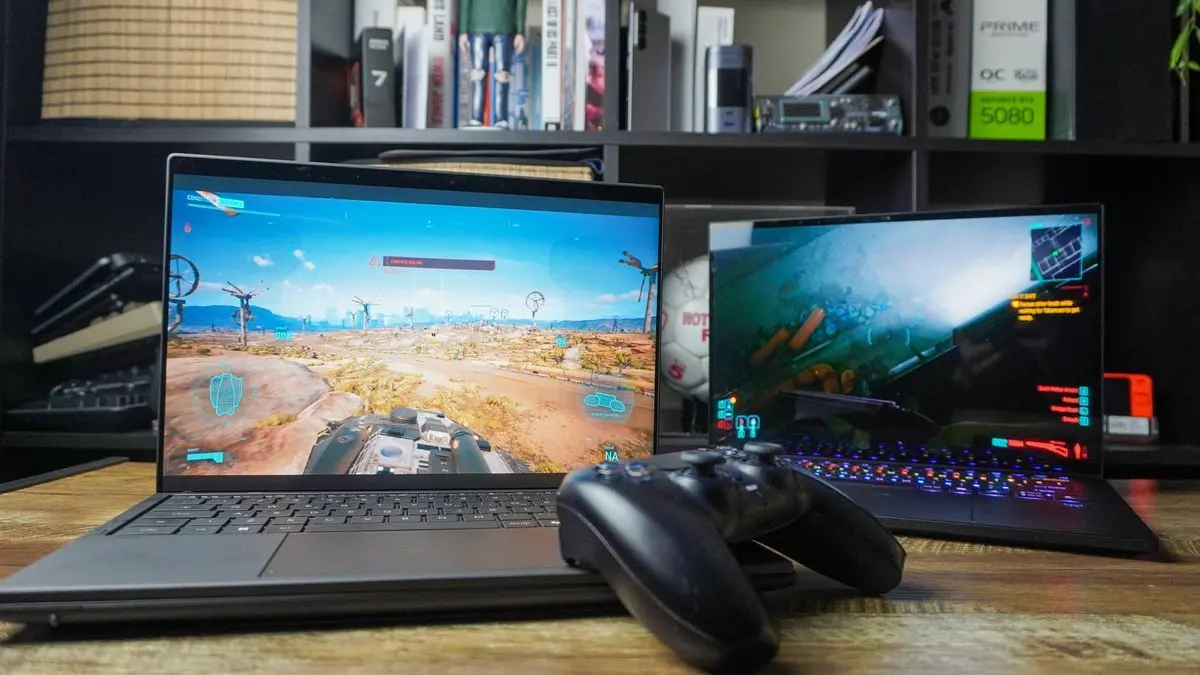
.Testing on the Asus Zenbook Duo equipped with Intel's Core Ultra X9 388H processor revealed remarkable performance gains. In Cyberpunk 2077, the system achieved 67.1 FPS with XeSS 2, but this number jumped to 217 FPS when multi-frame generation was enabled through XeSS 3
2
. What makes this particularly impressive is that the Zenbook Duo operates at just 45 watts of total power, compared to gaming laptops with dedicated GPUs like the Acer Predator Triton 14 AI with RTX 5070, which consumes up to 140W2
.
Source: Tom's Guide
How AI-Powered Upscaling Technology Works and Why It Matters
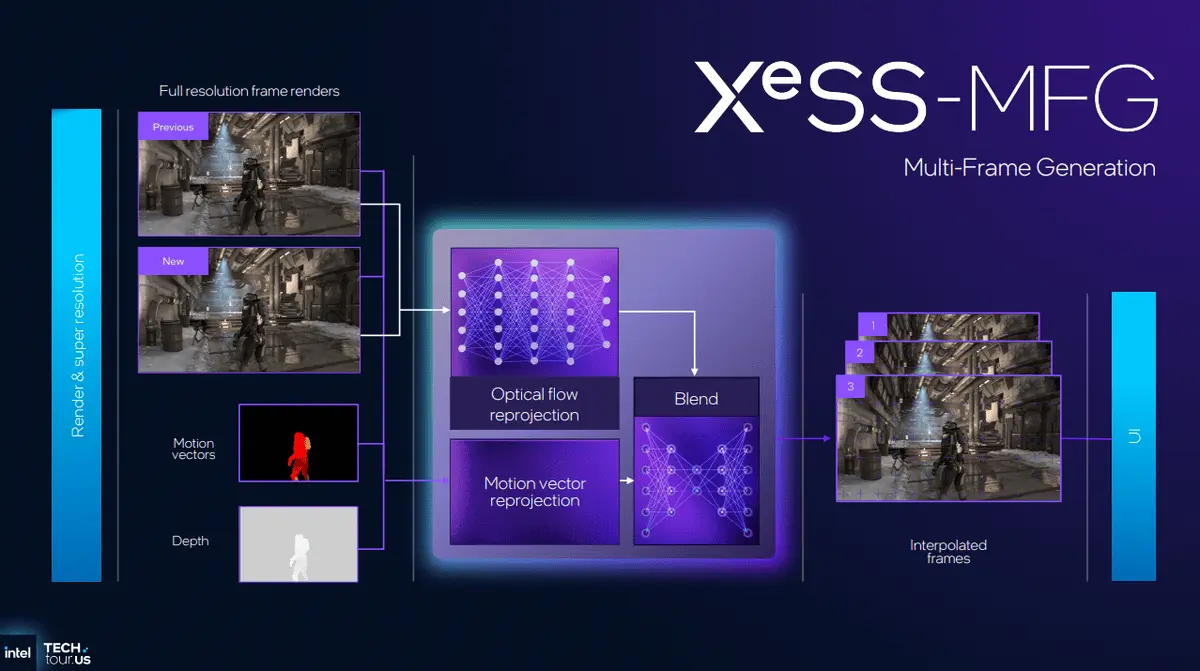
The Intel XeSS 3 system combines two key technologies to boost gaming frame rates. Multi-frame generation uses AI to inspect game scenes and create multiple interpolated frames between two fully rendered frames, offering 2x, 3x, or 4x frame generation options
1
. Super Resolution renders games at lower resolutions to conserve power, then uses AI to upscale images to the desired display resolution2
.This approach addresses a fundamental challenge in mobile gaming: delivering smooth performance without draining battery life or requiring bulky cooling solutions. Intel's head of Arc graphics, Tom Petersen, emphasized that the technology focuses on creating a general sense of smoothness by cutting down on CPU timings to eliminate in-game stuttering
1
. For ultraportable devices and integrated graphics gaming scenarios, this represents a significant shift in what's possible without dedicated GPU hardware.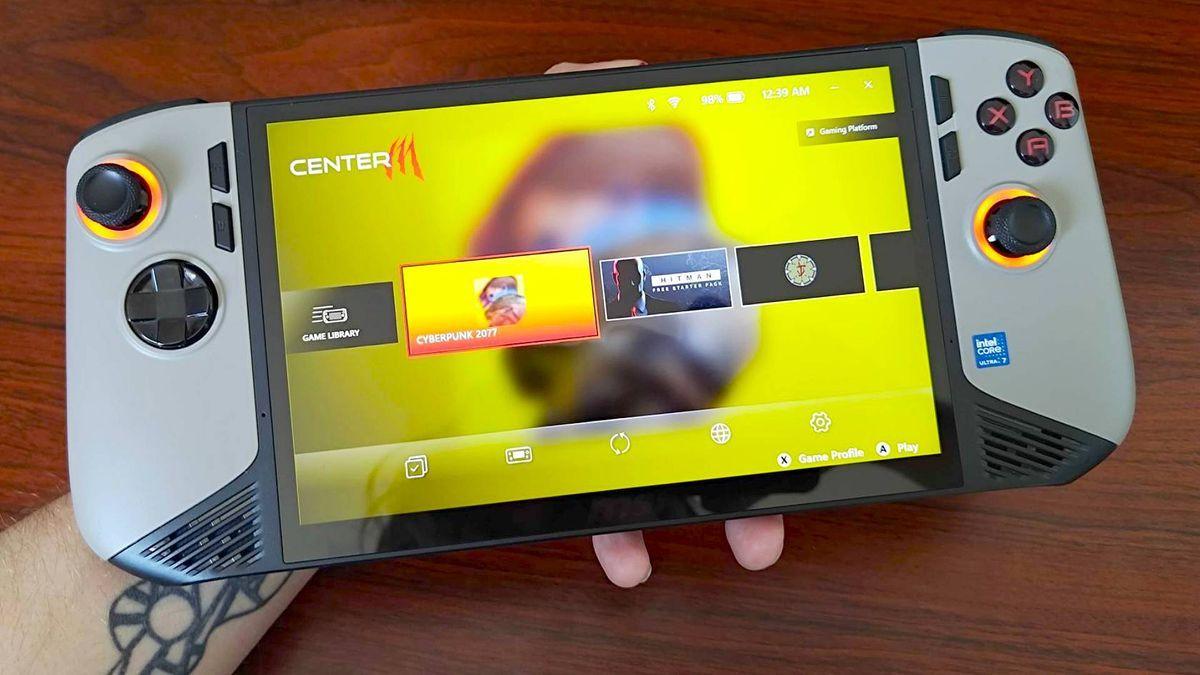
Source: GamesRadar
Addressing Concerns About Fake Frames in Gaming and Visual Quality
The concept of fake frames in gaming remains controversial among PC enthusiasts who question the value of AI-generated content versus natively rendered frames. Testing revealed that while multi-frame generation delivers impressive frame rate numbers, it does introduce trade-offs. At 4x frame generation, games can feel noticeably "floatier" due to increased latency, and rapid camera movements can produce ghostly artifacts
1
.Latency measurements show Intel XeSS 3 averaging around 44ms in 4x mode, compared to DLSS 4's 42ms
2
. For single-player gaming, this latency remains imperceptible to most players, though competitive multiplayer enthusiasts may prefer disabling the feature. Visual quality comparisons between native rendering and XeSS 3 upscaling showed minimal perceptible differences, with artifacts largely absent during normal gameplay2
.Related Stories
MSI Claw Handhelds Gain Early Access Through Community Modifications
While Intel's Panther Lake CPUs and Arc B580 GPUs officially support XeSS 3, enthusiasts have discovered methods to enable the technology on additional devices ahead of official rollout. Users on r/IntelArc shared that extracting two DLL files from the latest driver update and reinstalling using the extracted folder enables multi-frame generation on MSI Claw handhelds and other Intel-based portable devices
3
.This development positions Intel as the only company actively delivering multi-frame generation technology for handheld gaming purposes, even as Nvidia and AMD focus primarily on desktop and laptop GPUs. The ROG Ally X, powered by AMD hardware, currently relies on FSR 3 and driver-level "Fluid Motion Frames" technology, but lacks the specific multi-frame generation capabilities that XeSS 3 provides
3
. For handheld gaming devices with inherently limited specs, AI upscaling tools offer the most significant potential performance gains.What This Means for the Future of Gaming Laptops and Portable Devices
The implications for integrated graphics gaming extend beyond immediate performance numbers. Intel's Core Ultra series chips, particularly the X7 and X9 variants with their 12Xe3 GPU cores based on Arc B390 microarchitecture, deliver gaming capabilities that challenge the traditional dominance of Nvidia and AMD in the laptop gaming market
1
. With rumors suggesting AMD may remain on RDNA 3.5 iGPU architecture until 2029, Intel could maintain a substantial technical advantage in the ultraportable gaming segment for years2
.For consumers weighing gaming laptop purchases, XeSS 3 suggests that integrated graphics solutions can now deliver playable frame rates in demanding titles like Cyberpunk 2077 with ray tracing enabled, something previously impossible without discrete GPUs. The technology's ability to maintain 45-60 FPS base performance before applying frame generation ensures latency remains manageable for most gaming scenarios. Watch for broader game support as developers integrate XeSS 3 into upcoming titles, and monitor whether Nvidia and AMD respond with similar device-agnostic solutions for their competing technologies.References
Summarized by

Navi
Related Stories
Intel Unveils XeSS 3 with Multi-Frame Generation: A Game-Changer in AI-Powered Graphics
09 Oct 2025•Technology

Intel Unveils XeSS 2: A Major Leap in AI-Driven Gaming Performance
04 Dec 2024•Technology

Intel's XeSS 2 AI-Powered Graphics Technology Expands to More Games, Boosting Performance and Reducing Latency
07 May 2025•Technology

Recent Highlights
1
Tennessee Teens Sue Elon Musk's xAI Over Grok AI-Generated Child Abuse Images
Policy and Regulation

2
Pentagon designates Palantir Maven AI as core US military system in major defense shift
Technology

3
Supermicro Co-Founder Indicted in $2.5 Billion Nvidia AI Chip Smuggling Scheme to China
Policy and Regulation

Recent Highlights
Today's Top Stories










Your Daily Dose of Curated AI News
Don’t drown in AI news. We cut through the noise - filtering, ranking and summarizing the most important AI news, breakthroughs and research daily. Spend less time searching for the latest in AI and get straight to action.

