Microsoft embeds Copilot into Windows 11 taskbar and File Explorer with AI agents


3 Sources
3 Sources
[1]
Copilot Creeps Into File Explorer and the Taskbar on Windows 11
Microsoft has demonstrated new AI capabilities in Windows 11, including integrating its Copilot AI tool into File Explorer and the taskbar. In the taskbar, you'll be able to press the "@" key within the Windows 11 search bar to bring up a selection of AI agents you can prompt directly. In one example, Jeremy Chapman, Microsoft 365 Director, asks the Researcher agent to "compare public sentiment with our design principles," which seems pretty vague, but Copilot happily gets to work on it any way. When the task is finished, he gets a notification, and pulls up the lengthy report. Chapman quickly scrolls through it, and assures us it's well-researched and comprehensive. I'd probably want to do a more in-depth read through of it to confirm, personally. In File Explorer, files now have a little Copilot button next to them; click to prompt Copilot to interact with the document. In this case, Chapman uses it to summarize a finding from the document without opening the file. To enjoy all these swanky new capabilities you'll need a Windows 11 PC with a Microsoft 365 Work or School account and access to Copilot. For anyone with a Copilot+ PC, there are also new voice-transcribing capabilities, contextual screenshotting, improved natural language searching, and enhanced text generation for any app with a text input field. Microsoft appears to be at a bit of a crossroads with Copilot. It's been looking for ways to boost Copilot adoption in recent months, as only a reported 3.3% of Copilot users pay for the tool. However, internal teams are also beginning to push back against excessive integration, so Microsoft might dial it back a bit, Windows Central reports.
[2]
Microsoft tests new Windows AI in the taskbar and File Explorer
Serving tech enthusiasts for over 25 years. TechSpot means tech analysis and advice you can trust. Ripple effect: Microsoft's latest Windows experiment hints at a shift in how GenAI will surface across the operating system. Instead of relying on standalone new apps or flashy new interfaces, plans to embed small, conversational AI tools into places people already use every day - most notably the taskbar and File Explorer. At the center of this effort is a new feature called Ask Copilot, which effectively turns the traditional Windows search bar into a gateway for Microsoft 365's AI services. Once enabled, it replaces Windows Search and introduces an @ command syntax that feels closer to tagging someone in a chat than issuing a system query. Type something like @researcher, and Windows can spin up specialized AI agents designed to work over longer stretches of time, handling tasks such as gathering background information or summarizing dense technical documents. Some of these jobs can run for 10 minutes or more, with real-time progress indicators shown directly in the taskbar - a familiar visual borrowed from Windows' file download behavior. This suggests Microsoft's broader AI ambitions for Windows never really went away, despite public messaging that hinted at dialing back its "AI everywhere" approach. Instead of front-loading the experience with intrusive prompts or dedicated apps, the company appears to be embedding assistance tools into common workflows, encouraging users to interact with them as part of everyday computing. Beyond the taskbar, Windows 11's File Explorer is gaining its own Copilot integration. A new button inside the app lets users generate context summaries and document insights without leaving the file view. These real-time AI annotations draw from Microsoft 365's connected services, giving workers a quick overview of shared documents or synced projects without switching between applications. For Microsoft, this gradual layering of AI points to a design mindset that treats intelligence as infrastructure rather than a headline feature. Each integration targets small efficiencies: modest boosts to speed and clarity that compound over the course of a workday. While the company hasn't disclosed how far these integrations will go, it says Ask Copilot will begin rolling out to Windows 11 users in the coming weeks. The result is a quieter but more pervasive form of AI, a framework that could eventually redefine the role of the desktop assistant. Instead of asking users to open Copilot, Windows itself becomes Copilot.
[3]
Copilot is coming to your Windows taskbar and File Explorer
Microsoft's AI can now summarize documents, find specific data, and handle voice commands without switching apps. Microsoft is bringing Copilot to the Windows 11 taskbar and File Explorer. The update turns the plain old search box into something that actually understands how you ask questions. Type "When is my performance review due?" and the system pulls the answer from your calendar, emails, and local files. No more digging through folders. The taskbar becomes a kind of mission control for AI. The search field now connects your local PC with your Microsoft 365 data. It knows who you work with and what documents you touch most. The taskbar is now a command center for AI agents Hit the @ symbol in the taskbar search and you get a menu of AI agents that run in the background. These aren't the kind that disappear into browser tabs. They sit on your taskbar so you can see their progress while you do other stuff. A researcher agent might spend 10 minutes comparing public sentiment against internal design guides. You watch its status on the taskbar icon like a download bar. Green checkmark means it's done. Hover for a summary. Click for the full report with sources. Voice works too. Hold the Copilot key or hit Windows key + C. Tell it "Find the file Robin shared" and it checks your emails and meetings to figure out which Robin you mean. File Explorer gets Copilot Control for instant document insights File Explorer now shows your SharePoint and OneDrive files right alongside local ones. Recent docs, shared stuff, favorites, all in one view. But the Copilot Control is the real trick. You can ask questions about a file without opening it. Recommended Videos Need a stat buried deep in a design doc? Ask for it. Copilot pulls out something like "over 70% of employees prefer sustainable materials" and shows you the context immediately. You never leave the File Explorer window. Over on Android, Google is doing something similar with its Files app. Gemini now automatically offers to analyze PDFs when you open them, letting you ask questions about a document without importing it into a separate AI tool. What this means for your workflow The updates are rolling out now. Which ones you get depends on your hardware. Standard Windows 11 machines handle the cloud stuff. Copilot+ PCs with NPUs unlock the offline tools like Fluid Dictation and Click to Do. Bottom line? You search less and find more. The taskbar starts acting like a coworker who remembers where everything lives. File Explorer becomes a window into your documents, not just a list of folders. Keep an eye out for the Copilot icons in the coming weeks.
Share
Share
Copy Link
Microsoft is embedding Copilot deeper into Windows 11, adding AI agents to the taskbar and document summarization to File Explorer. The new Ask Copilot feature transforms the search bar into a conversational AI interface, while only 3.3% of users currently pay for the tool. The updates roll out to Microsoft 365 users in coming weeks.
Microsoft Expands Copilot Integration Across Windows 11
Microsoft is embedding Copilot deeper into Windows 11, transforming how users interact with the operating system through new AI-powered features in the taskbar and File Explorer
1
. The company demonstrated these capabilities through Jeremy Chapman, Microsoft 365 Director, showing how the conversational AI interface now surfaces in places users already work daily rather than through standalone apps2
.The updates arrive as Microsoft faces a crossroads with user adoption. Only 3.3% of Copilot users currently pay for the tool, prompting the company to explore new integration points while internal teams push back against excessive embedding
1
. This tension shapes the gradual, workflow-focused approach now rolling out to Windows 11 machines.Ask Copilot Transforms the Search Bar into AI Command Center
The new Ask Copilot feature effectively replaces traditional Windows Search, introducing an @ command syntax that turns the search bar into a gateway for Microsoft 365's AI services
2
.
Source: TechSpot
Users can press the "@" key within the Windows 11 search bar to bring up specialized AI agents that handle complex, time-intensive tasks
1
.These AI agents can run for 10 minutes or more, with real-time progress indicators displayed directly in the taskbar—visual feedback borrowed from Windows' familiar file download behavior
2
. In one demonstration, Chapman asked the Researcher agent to "compare public sentiment with our design principles," and the system generated a comprehensive report accessible via taskbar notification1
.The taskbar now connects local PC data with Microsoft 365 information, understanding context about colleagues and frequently accessed documents
3
. Users can ask natural language questions like "When is my performance review due?" and the system pulls answers from calendars, emails, and local files without manual searching3
.Copilot in File Explorer Enables Document Insights Without Opening Files
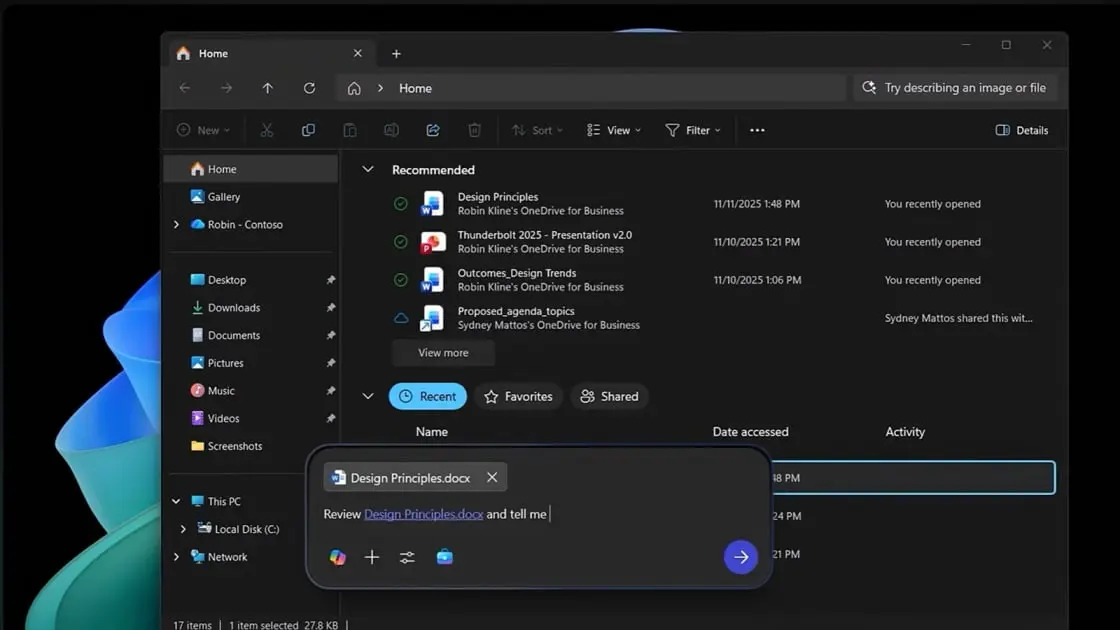
File Explorer gains a Copilot button next to files, allowing users to interact with documents without opening them
1
. This Copilot Control feature provides document summarization and instant data extraction, pulling specific statistics or findings from documents while remaining in the File Explorer window3
.
Source: PC Magazine
The integration draws from Microsoft 365's connected services to generate real-time context summaries and AI annotations of shared documents and synced projects
2
. File Explorer now displays SharePoint and OneDrive files alongside local ones, creating a unified view of recent documents, shared materials, and favorites3
.In a demonstration, Chapman used the feature to extract a finding—"over 70% of employees prefer sustainable materials"—complete with context, without leaving the file view
3
. This mirrors similar moves by Google, which recently added Gemini to its Android Files app for automatic PDF analysis3
.Related Stories

Enhanced Capabilities for Copilot+ PCs and Voice Commands
For Copilot+ PCs equipped with NPUs, additional capabilities include voice-transcribing features, contextual screenshotting, improved natural language searching, and enhanced text generation for any app with a text input field
1
. Offline tools like Fluid Dictation become available on these specialized machines3
.Voice commands work by holding the Copilot key or pressing Windows key + C, allowing requests like "Find the file Robin shared" where the system checks emails and meetings to identify the correct contact
3
.A Quieter but More Pervasive AI Strategy
Microsoft's approach treats generative AI as infrastructure rather than a headline feature, embedding assistance tools into common workflows instead of front-loading the experience with intrusive prompts
2
. This design mindset targets small efficiencies that compound throughout the workday, creating a quieter but more pervasive form of AI that could redefine the desktop assistant role2
.To access these features, users need a Windows 11 PC with a Microsoft 365 Work or School account and Copilot access
1
. The updates begin rolling out in the coming weeks, with specific capabilities dependent on hardware configuration2
3
. The ultimate vision: Windows itself becomes Copilot, rather than asking users to open a separate tool2
.References
Summarized by

Navi
[3]
Related Stories
Microsoft's Copilot Vision: A New Era of AI Assistance in Windows 11
05 Apr 2025•Technology
Microsoft Expands Copilot Integration in Windows 11 with New File Explorer Features and Universal Writing Assistant
21 Nov 2025•Technology

Microsoft's AI Revolution: Transforming Windows 11 with Voice-Activated Copilot
16 Oct 2025•Technology

Recent Highlights
1
AI chatbots validate you too much, making you less kind to others, Stanford study reveals
Science and Research

2
Anthropic's Claude Code Source Leak Reveals Hidden AI Agent Plans and Extensive System Access
Technology

3
Judge blocks Pentagon from branding Anthropic a security risk over AI safety guardrails dispute
Policy and Regulation

Recent Highlights
Today's Top Stories










Your Daily Dose of Curated AI News
Don’t drown in AI news. We cut through the noise - filtering, ranking and summarizing the most important AI news, breakthroughs and research daily. Spend less time searching for the latest in AI and get straight to action.

