Microsoft's Copilot Vision: A New Era of AI Assistance in Windows 11


10 Sources
[1]
Windows 11's Copilot Vision wants to help you learn to use complicated apps
Some elements of Microsoft's Copilot assistant in Windows 11 have felt like a solution in search of a problem -- and it hasn't helped that Microsoft has frequently changed Copilot's capabilities, turning it from a native Windows app into a web app and back again. But I find myself intrigued by a
[2]
Microsoft starts testing Copilot Vision update that can "see" your screen and apps
Tom Warren is a senior editor and author of Notepad, who has been covering all things Microsoft, PC, and tech for over 20 years. Microsoft has started testing a new update to its Copilot app on Windows that will let you share your screen or apps with the AI assistant. Copilot Vision was originally
[3]
Windows 11 tests sharing apps screen and files with Copilot AI
Copilot on Windows 11 is testing OS-level integration that would allow you to share your favourite apps' screen with Copilot. This feature is rolling out to Windows Insiders in the United States, and it might sound like a creepy idea because it basically means Copilot can see what you are doing on
[4]
Windows Copilot aims to be your best friend forever, but can you trust it?
If you're someone who was upset about Windows Recall, look away now. Microsoft Copilot is more than just a tool-it's designed to learn your preferences and tastes, and even anticipate your needs by buying stuff. Whew! That's a big concept to try and get your head around. But that's what Microsoft
[5]

I didn't care about Copilot, but this massive upgrade could make Microsoft's AI the personal assistant I've always wanted
Let me preface this by saying, that when I say I don't care about Copilot, I mean it. I've not owned a Windows PC since 2006, and I've never even installed the Copilot app on my Mac, iPhone, or even Android device. I write about AI for a living, but there are very few AI tools I actually use in my
[6]
Microsoft Copilot is putting eyes on your screen, and I don't mind it - as long as it stays private
Microsoft followed at least one part of my wishlist for its Copilot event when it announced Copilot Vision will be embedded in Windows 11 and the mobile app. Copilot Vision will let the AI actually see what's on your screen and the world around you. Microsoft first toyed with the idea in Edge,
[7]

Microsoft could soon let Copilot see your entire screen, but that's not a bad thing
Microsoft is testing a new feature on Copilot, and this time, it's coming to PC. Copilot Vision, recently made available on mobile, is now available for testing on PC, and the capabilities are both awe-inspiring and a little scary. Microsoft is also giving file search an AI boost. Copilot Vision
[8]

Holy smokes, something that might actually be useful is coming to Copilot on Windows
Forgive me for being surprised by this after the last two years of REM sleep-inducing AI updates and betas, but Microsoft's latest Copilot update seems like it might (*drumroll*) actually be useful. That's because it should finally allow you to search system-wide for contents within files and also
[9]

How to Try Copilot's New 'Vision' and File Search Updates
Copilot can now see more of what you're doing on your PC, if you sign up for the Windows Insider program. Microsoft announced a plethora of Copilot upgrades at the start of the week, and we're now starting to see some of them roll out -- to Windows Insiders, at least. The Copilot app for Windows
[10]

You'll Actually Want to Use Copilot on Windows Thanks to These Search Upgrades
Microsoft is adding two new features to Copilot in the latest Windows Insider Update. This makes it more useful for searching through your files and explaining what you see. Copilot Can Now Read Your Files to Help You Search Through Them The first big improvement is in File search, where the
Share
Copy Link
Microsoft introduces Copilot Vision for Windows 11, expanding AI capabilities to analyze app interfaces and content across the operating system, aiming to revolutionize user assistance and personalization.

Microsoft Unveils Copilot Vision for Windows 11
Microsoft has announced a significant upgrade to its AI assistant, Copilot, for Windows 11 users. The new feature, called Copilot Vision, extends the AI's capabilities beyond web browsing to analyze and interact with any app window on a user's PC
1
2
.Enhanced Functionality and User Assistance
Copilot Vision aims to revolutionize how users interact with complex applications. By allowing users to share their screen or specific app windows with the AI, Copilot can provide real-time guidance, answer questions about app interfaces, and offer insights into content within applications
1
3
.This feature could potentially replace "frantic Googling" when users need to learn new software or navigate unfamiliar interfaces. For instance, it could ease transitions between similar applications like Photoshop and Affinity Photo by explaining differences in workflows and UI
1
.Privacy Considerations and Data Handling
While the new capabilities are impressive, they raise important privacy concerns. To use Copilot Vision, users must share their app window, including all content within it, with Microsoft's cloud-based processing systems
1
3
.Microsoft has addressed these concerns, stating that all data shared during a Copilot Vision session is deleted once the session ends. However, the AI's output is recorded to improve safety systems, and collected data is subject to Microsoft's Privacy Statement
1
4
.Additional Features and Integration
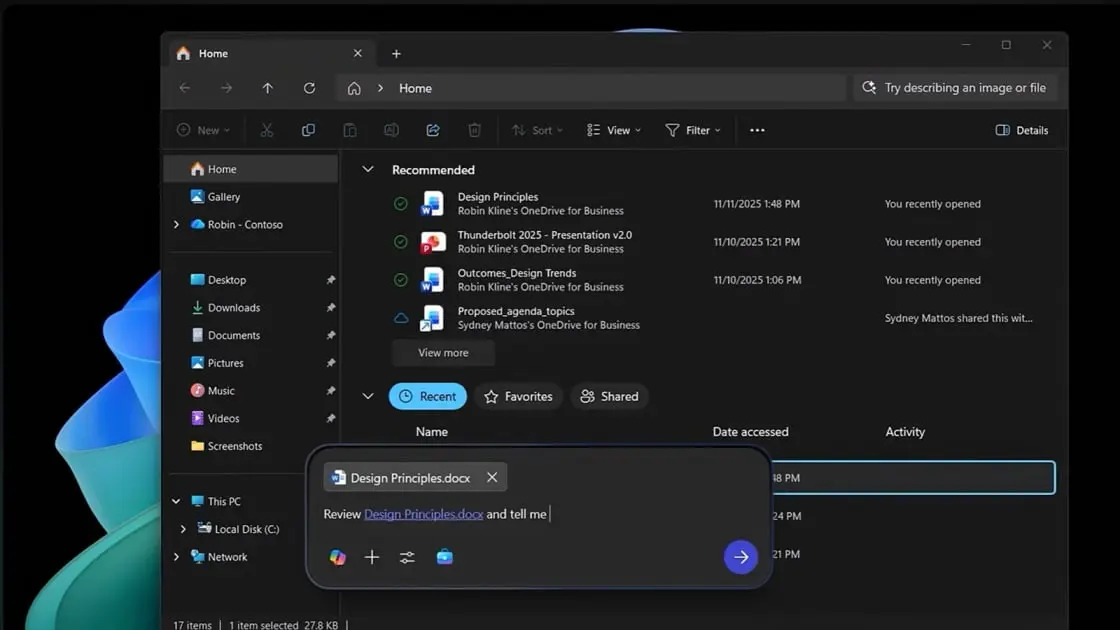
Beyond screen analysis, Microsoft is testing new file searching capabilities within Copilot. Users can ask the AI assistant about the contents of specific file types without opening them, streamlining information retrieval
1
2
.Copilot is also being developed to have a "memory," learning user preferences and potentially anticipating needs. This includes remembering personal details, offering reminders, and even making suggestions for purchases or reservations through partnerships with various service providers
4
5
.Related Stories
Rollout and Availability
The new Copilot features are currently being tested with Windows Insiders, primarily in the United States. Microsoft plans a broader rollout to all Windows 11 users in the coming weeks or months
2
3
.Potential Impact and Future Directions
Microsoft's vision for Copilot extends beyond a mere tool, aiming to create an "AI companion" that can understand and adapt to individual users. This approach could significantly change how people interact with their devices and manage daily tasks
4
5
.However, the success of these features will depend on striking the right balance between helpfulness and potential intrusiveness. As Microsoft continues to develop Copilot, it emphasizes that users will remain in control, able to set boundaries and manage the AI's access to their information
4
5
.As AI integration in operating systems deepens, Microsoft's moves with Copilot could set new standards for personal computing and AI assistance, potentially influencing the direction of the entire tech industry.
References
Summarized by

Navi
[3]
Related Stories
Microsoft Launches Copilot Vision for Windows: AI Assistant Expands Screen Analysis Capabilities
13 Jun 2025•Technology
Microsoft Expands Copilot Vision AI to Analyze Entire Desktop in Windows 11
16 Jul 2025•Technology

Microsoft Enhances Windows 11 Copilot with AI-Powered Semantic File Search
21 Aug 2025•Technology

Recent Highlights



Recent Highlights
Today's Top Stories






Don’t drown in AI news. We cut through the noise - filtering, ranking and summarizing the most important AI news, breakthroughs and research daily. Follow topics that matter to you and stay ahead.


