Microsoft Enhances Windows 11 Copilot with AI-Powered Semantic File Search


5 Sources
[1]
Windows 11 test brings AI file search to the Copilot app
Microsoft is testing out a Windows 11 update that lets you use AI to search through your files and images directly from the Copilot app. This test is currently rolling out to Windows Insiders on Copilot Plus PCs and allows you to use more descriptive language when conducting your search. You can
[2]
You can search for files in Windows using Copilot now - here's how
Microsoft continues to expand the power and reach of its Copilot AI to provide greater assistance, especially to Windows users. A new skill now rolling out will let you use the Windows Copilot app to search for your photos, documents, and other files using natural language. Also: Excel's new
[3]
Microsoft Is Testing Semantic Search for Copilot App on Windows 11
Don't miss out on our latest stories. Add PCMag as a preferred source on Google. Microsoft is bringing semantic search to the Copilot app on Windows 11. With this update, Insiders will be able to search for files and images using natural language. In other words, you can just describe what you're
[4]
Not a fan of the Copilot app in Windows 11? You might change your mind, as Microsoft just beefed up its powers
This introduces a powerful new natural language-based search Windows 11's Copilot app is getting a deeper and more powerful search functionality, and more besides - although this is only in testing for now. The Verge reports that Microsoft is rolling out an update for the Copilot app to Windows
[5]

Copilot+ PCs Will Now Let You Search for a File By Describing It
The feature is currently only available in select languages Microsoft has started testing the semantic file search feature in Windows 11 with a larger user base. On Wednesday, the Redmond-based tech giant announced that two new artificial intelligence (AI) features are now available to all
Share
Copy Link
Microsoft is testing a new AI-powered semantic file search feature in the Windows 11 Copilot app, allowing users to find files and images using natural language queries on Copilot+ PCs.
Microsoft Introduces AI-Powered Semantic File Search in Windows 11
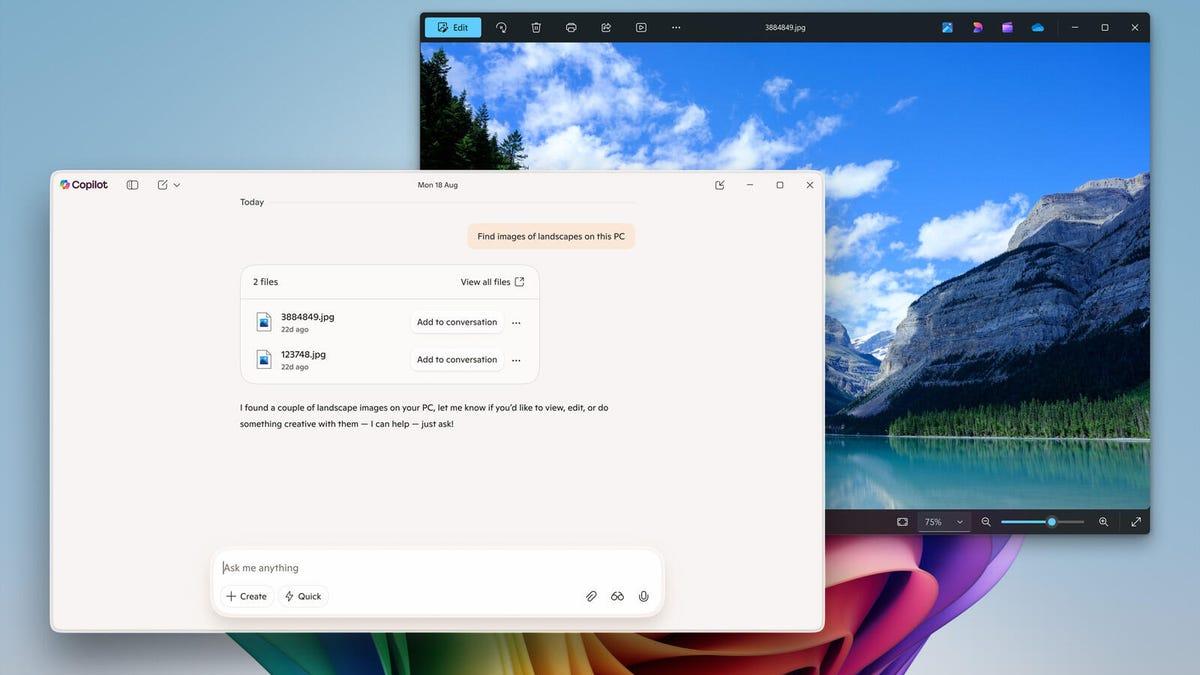
Microsoft is rolling out a significant update to its Windows 11 Copilot app, introducing an AI-powered semantic file search feature. This new capability allows users to search for files and images using natural language queries, marking a substantial improvement in how users interact with their personal files on Windows devices
1
2
.How Semantic File Search Works
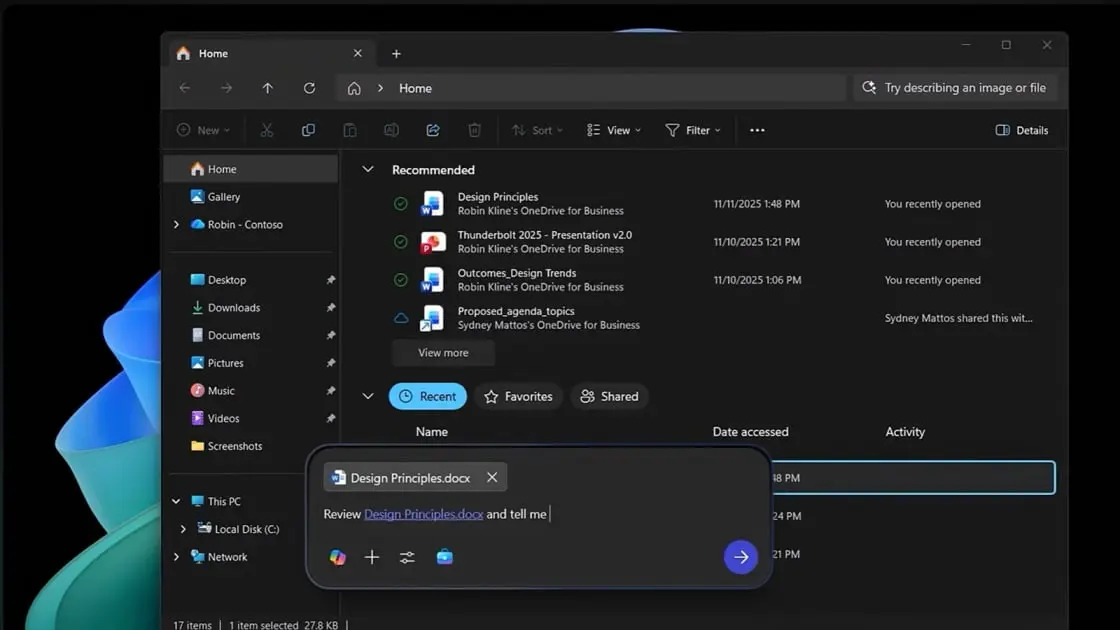
The semantic file search feature leverages AI to understand the context of user queries, enabling more intuitive file discovery. Users can now describe the content they're looking for without needing to remember exact file names or keywords. For example, users can ask Copilot to "find images of bridges at sunset" or "find the file with the chicken tostada recipe"
3
5
.
Source: PC Magazine
This feature currently supports various file types, including images (.png, .jpeg, .svg), documents (.pdf, .docx, .xlsx, .csv), and text files (.txt, .json)
2
. The search functionality is limited to files stored in the Windows "Recent" folder, ensuring that Copilot doesn't scan the entire system4
.New Copilot Home Experience
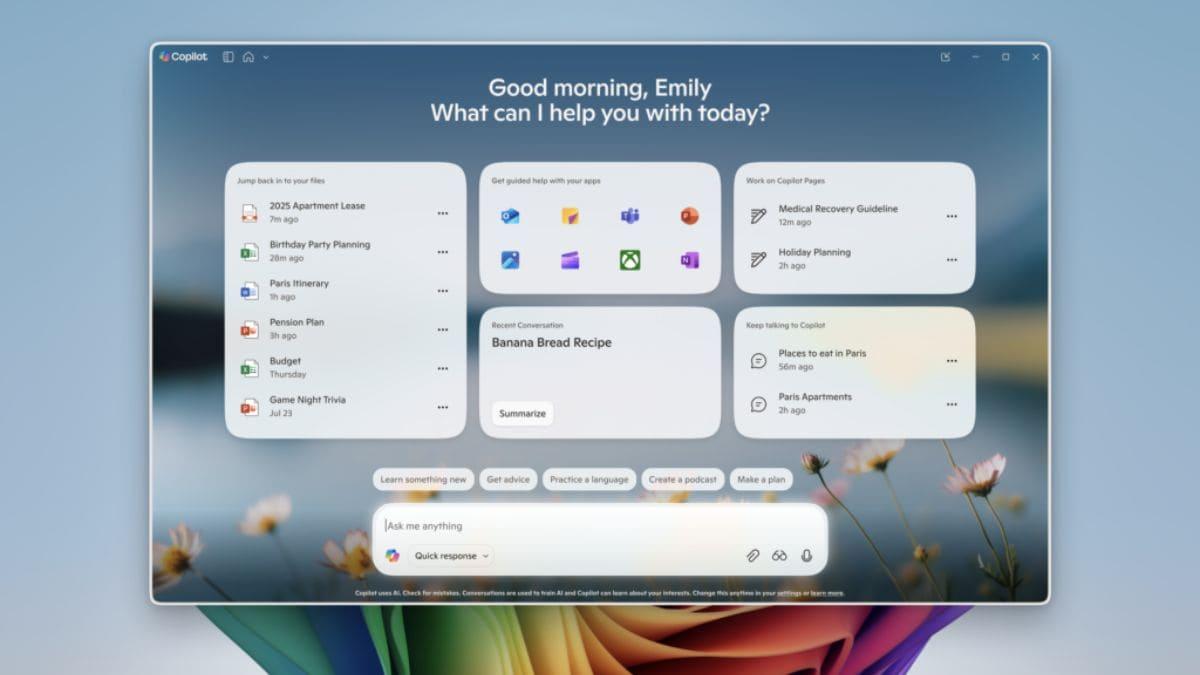
Alongside the semantic search feature, Microsoft is introducing a revamped Copilot home experience. This update surfaces users' recent apps, files, and conversations within the Copilot interface, making it easier to resume previous tasks
3
4
.
Source: Gadgets 360
The new home experience also includes a "Get guided help" section, which initiates a Copilot Vision session when an app is selected. This feature scans the screen and provides step-by-step guidance for using the chosen application
1
3
.Availability and Requirements
Currently, these new features are available to Windows Insiders on Copilot+ PCs. Users need to have the latest version of the Copilot app (version 1.25082.132.0 or higher) installed from the Microsoft Store
3
5
.The semantic search feature is available in multiple languages, including English, Chinese (Simplified), French, German, Japanese, and Spanish
3
.Related Stories



Privacy Considerations
Microsoft has addressed potential privacy concerns by clarifying that Copilot does not scan the entire system or upload files automatically. Users have control over what Copilot can access, retrieve, or read through the Copilot Settings under Permission settings
2
4
.Implications for Windows Search
Source: ZDNet
This update represents a significant step in Microsoft's efforts to integrate AI more deeply into the Windows operating system. Some speculate that these enhancements to Copilot could eventually lead to it taking over all Windows search duties, potentially replacing the traditional Windows search functionality with a more intelligent, AI-driven approach
4
.As Microsoft continues to expand the capabilities of Copilot in Windows 11, these new features demonstrate the company's commitment to leveraging AI to improve user experience and productivity in its flagship operating system.
References
Summarized by

Navi
[4]
Related Stories
Recent Highlights



Recent Highlights
Today's Top Stories






Don’t drown in AI news. We cut through the noise - filtering, ranking and summarizing the most important AI news, breakthroughs and research daily. Follow topics that matter to you and stay ahead.


