Microsoft Expands Copilot Integration in Windows 11 with New File Explorer Features and Universal Writing Assistant


2 Sources
[1]
Windows 11 is about to get a lot more confusing
* File Explorer adds a second Ask Microsoft 365 Copilot entry in Home, creating redundancy and confusion. * Windows now runs two Copilot apps with identical icons, causing users to pick the wrong assistant. * A systemwide AI writing assistant offers real-time rewrites and tones but only on
[2]
Microsoft is making 'Ask Copilot' more prominent in Windows File Explorer
The company is also testing a new AI-powered writing assistant for web text fields. For a while now, it's been possible to right-click on a file in Windows File Explorer and select the Ask Copilot option, which launches the Copilot app with the file in question as part of the prompt. But it seems
Share
Copy Link
Microsoft is testing new Copilot features for Windows 11, including a second AI assistant option in File Explorer and a universal writing assistant for Copilot+ PCs, though the changes may create user confusion.
Microsoft Introduces Dual Copilot Integration in File Explorer
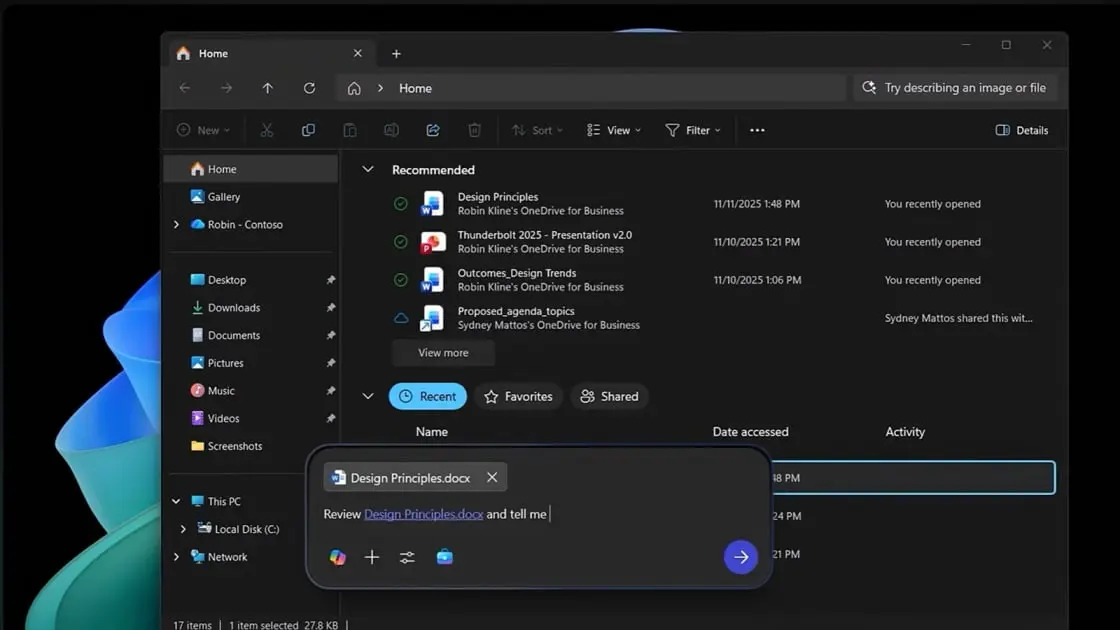
Microsoft is expanding its AI assistant integration in Windows 11 with new features that may simultaneously enhance functionality and create user confusion. The company is currently testing a second Copilot option within File Explorer, adding to the existing AI capabilities already present in the operating system
1
.The new feature, labeled "Ask Microsoft 365 Copilot," will appear specifically within the Home tab of File Explorer. When users hover over files in the "Recommended" or "Recent" sections, this new option becomes visible. Clicking on it sends the selected file directly to the Microsoft 365 Copilot app, which is designed to work within the Microsoft 365 ecosystem and integrates with applications like Word, PowerPoint, and Excel
1
.
Source: How-To Geek
Addressing User Confusion with Multiple Copilot Instances
The introduction of this second Copilot option highlights an existing challenge within Windows 11's AI ecosystem. Microsoft currently operates two separate Copilot instances: the standard Copilot AI chat assistant and Microsoft 365 Copilot, which focuses on productivity applications. Both share identical icons, making them difficult to distinguish and potentially leading users to select the wrong assistant for their needs
1
.File Explorer already includes an "Ask Copilot" option accessible through the standard right-click context menu, designed for general conversational queries about files. The new Home tab integration differs by being specifically optimized for Office files, theoretically providing better context-aware summaries and data extraction capabilities. However, the identical iconography between these features may compound user confusion
1
.Universal Writing Assistant for Enhanced Productivity
Alongside the File Explorer updates, Microsoft is developing a Universal Writing Assistant exclusively for Copilot+ PCs. This system-wide feature detects user interaction with text fields across various applications and platforms, including social media posts, third-party email clients, and system dialogs
1
.When activated, the Writing Assistance feature displays a pop-up that provides real-time proofreading capabilities. Beyond basic grammar and spell-checking, the tool offers generative rewriting functionality, allowing users to adjust their text to match specific tones such as "Concise," "Friendly," or "Professional"
1
.Related Stories

Availability and Implementation Timeline
The Ask Microsoft 365 Copilot feature will be accessible to all Windows 11 users regardless of their processor type, including Intel, AMD, and Snapdragon-based systems
2
. However, the Universal Writing Assistant remains exclusive to Copilot+ PCs, creating a tiered experience based on hardware capabilities.Both features are currently in testing phases, with Microsoft planning to launch them after the end of the year
2
. This development represents Microsoft's continued commitment to integrating AI capabilities throughout its operating system, though the implementation raises questions about user experience and interface clarity.References
Summarized by

Navi
[1]
Related Stories
Microsoft embeds Copilot into Windows 11 taskbar and File Explorer with AI agents
20 Feb 2026•Technology
Microsoft's Copilot Vision: A New Era of AI Assistance in Windows 11
05 Apr 2025•Technology

Microsoft Copilot Expands Capabilities: Document Creation and Third-Party App Integration
10 Oct 2025•Technology

Recent Highlights



Recent Highlights
Today's Top Stories






Don’t drown in AI news. We cut through the noise - filtering, ranking and summarizing the most important AI news, breakthroughs and research daily. Follow topics that matter to you and stay ahead.


