Microsoft removes Copilot branding from Windows 11 apps, but AI-powered features remain intact


9 Sources
9 Sources
[1]
Microsoft Is Scrubbing the Copilot Name From Some Windows 11 Apps
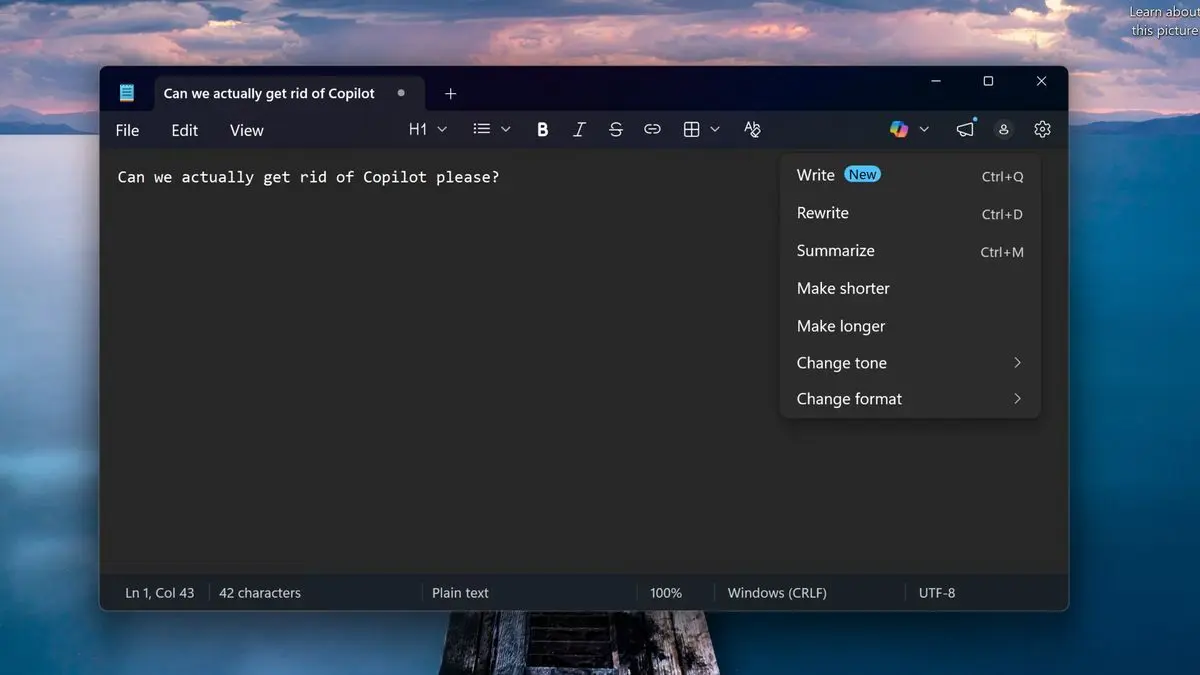
Expertise Smart home | Smart security | Home tech | Energy savings | A/V Tired of seeing the Copilot AI logo appear everywhere in Windows 11? It may be getting at least a little less ubiquitous. Reports this week found the latest Insider version of Windows 11, version 11.2512.28.0, has removed Copilot language from key places such as the computer's Notepad app. Previously, Notepad used Copilot to offer generative writing help, with a button featuring the AI tool's swirly logo on the top right of the toolbar. Options included writing from scratch with prompts, rewriting, changing tone and more. In the latest update, the Copilot language has disappeared from Notepad, and the feature has been renamed "Writing tools." "Writing tools" appears to offer all the same AI features Copilot did, just without the name. The Copilot branding has also vanished from Notepad settings, with AI tools now relegated to the Advanced Features section. This change follows reports from March that Microsoft is quietly backing away from pushing Copilot into so many parts of Windows 11. That's not entirely surprising. AI is one of the least popular things in the US in 2026. Copilot has drawn particular ire on Reddit and other social media sites. Right now, it looks like Microsoft is pausing its Copilot expansion and removing the branding while leaving the AI features themselves intact, at least on Notepad. Other reports suggest that AI features have disappeared entirely from the Windows 11 Snipping Tool. Again, it's only the Insider version of Windows 11 that shows these Copilot changes for now. When I booted up my standard version of Notepad, Copilot was still there. So unless you're signed up for early versions of Windows updates, you'll have to wait for these changes to take effect. Microsoft did not immediately respond to a request for comment.
[2]
Microsoft starts removing Copilot buttons from Windows 11 apps
Microsoft is starting to remove "unnecessary" Copilot buttons from its Windows 11 apps. In the latest version of the Notepad app for Windows Insiders, Microsoft has removed the Copilot button in favor of a "writing tools" menu. The Copilot button in the Snipping Tool app also no longer appears when you select an area to capture. The change is part of "reducing unnecessary Copilot entry points, starting with apps like Snipping Tool, Photos, Widgets and Notepad," that Microsoft promised to complete as part of its broader plan to fix Windows 11. While Copilot buttons are being removed, it looks like the underlying AI features are here to stay, though. The Copilot button has been removed from Notepad, but the writing tools replacement still uses AI-powered features and looks like the identical menu of options that existed before. I still think these features are largely unnecessary in what's supposed to be a lightweight text app, but removing the superfluous Copilot branding is a good first step. I'm now waiting to see if Microsoft decides to remove the Copilot button requirement from laptop keyboards, or whether it will go further and remove the other unnecessary Copilot buttons that it has added into various parts of Windows 11 in recent months.
[3]
Copilot Takes a Backseat in Microsoft's Latest Windows 11 Update
(Credit: Mateusz Slodkowski/SOPA Images/LightRocket via Getty Images) Microsoft is removing Copilot from some less useful locations in Windows 11. The latest preview version of Notepad, version 11.2512.28.0, built for Windows Insiders, removes the Copilot button from the top-right corner. In its place is a pen icon with a submenu called Writing Tools. The AI-powered features remain accessible in Notepad, but they're not Copilot-branded, and there's no big, colorful button. AI options include Change tone, Change format, Make longer, Make shorter, Rewrite, Summarize, and Write. As spotted by Windows Latest, the beta version of Snipping Tool, Microsoft's screenshot app, has also removed its Copilot integration. It used to appear after you selected an area with the Quick markup annotation feature turned on, but now it seems that all AI integrations are unavailable. Pavan Davuluri, president of Windows and Devices, teased these changes late last month in a blog post that detailed how Microsoft had multiple "areas of focus for the year to raise the bar on Windows 11 quality." He said some "unnecessary Copilot entry points" would be removed from apps, including Photos and Widgets, as well as Notepad and Snipping Tool. So far, there's no clear sign of any changes to Photos or Widgets in these latest versions. Davuluri said Microsoft would be "starting" with these apps, suggesting there may be other changes in the works. "You will see us be more intentional about how and where Copilot integrates across Windows, focusing on experiences that are genuinely useful and well‑crafted."
[4]
Microsoft starts removing unnecessary Copilot buttons in Windows 11
Microsoft has rolled out a Notepad update for Windows Insiders that removes the Copilot branding and icon from within the app, Windows Central has reported. The old Copilot menu has been replaced with "writing tools," but it's worth noting that the tools are still powered by AI and are pretty much identical to the selection found in the old menu. Microsoft has just replaced the Copilot button with a pen icon. In addition, the company has removed mentions of AI in the Settings menu and has placed the option to disable the AI-powered writing tools within the "Advanced features" section. The company first announced that it was dialing back its Copilot branding last month, most likely in response to all the criticisms against the AI assistant. It's not very well-liked, with people complaining that Microsoft is forcing them to use the assistant inside all its apps and that Copilot doesn't provide a consistent experience across different applications. "You will see us be more intentional about how and where Copilot integrates across Windows," said Windows and Devices EVP Pavan Davuluri. Microsoft also promised to remove "unnecessary Copilot entry points," starting with Notepad, Snipping Tool, Photos and Widgets. According to The Verge, Microsoft has already stopped showing the Copilot button when selecting areas to capture with the Snipping Tool, as well. Clearly, the company has been making good progress on yanking at least the visual reminders of Copilot from its apps.
[5]

Microsoft starts removing Copilot from Windows 11 -- I'm saying that sarcastically because it's clearly just lip service
Let's be real. Nobody I know has anything good to say about Microsoft Copilot. Shoved down our throats in any way possible in Windows 11, it's turned the OS into a bloated behemoth that consumes the very thing we're all seeing get way more expensive -- RAM. And for what? Some rewriting tools, AI image generation in Paint and a searchable visual timeline of everything you do that's quite a security risk, which is all ignored by users. So it's fair to say that I got a little hyped when I saw the "commitment to Windows quality" blog, which confirms a major update with reduced Copilot features and better efficiency. Microsoft listened...at least that's what I thought. Because what we're actually getting from the first signs of these changes is a simple rebranding. Copilot is still there -- it's just called something different. An AI wolf in sheep's clothing As discovered by Windows Latest, the Notepad app and Snipping Tool are the first signs of Microsoft starting to rollback Copilot in the latest Windows 11 Insider Preview. Copilot logos have disappeared from Notepad and the Snipping Tool. But as is clearly apparent, this is mostly just branding only. Instead of a colorful Copilot button, Notepad gets a "Writing tools" icon, whereas the Snipping Tool is actually AI-free from the looks of it. Being someone who got tired of seeing Copilot everywhere, it's definitely a welcome change. Though, it does make me nervous that the idea of Microsoft being "intentional about how and where Copilot integrates across Windows" may be more like "let's just hide it in plain sight." Outlook That's not to say this Windows 11 commitment is for nothing. We could very well just be seeing a small slither of the wider changes that could reduce AI integration to only where (in Microsoft's words) it's "most meaningful, with craft and focus." But early updates do give us an indication of where Microsoft is thinking of going, and simply changing the presentation rather than removing unnecessary feature sets does not instill confidence here. Taskbar customization, a faster File explorer and reduced Windows Updates disruption are all good things, but if Microsoft doesn't genuinely hit the biggest performance consumer here, then we're right back at square one -- only looking prettier. I hope the company goes harder on the run up to Build 2026. Follow Tom's Guide on Google News and add us as a preferred source to get our up-to-date news, analysis, and reviews in your feeds. Subscribe to Tom's Guide on YouTube and follow us on TikTok.
[6]

Microsoft has begun stripping out AI from Windows 11 -- but it's already being criticized for not going far enough
Al removal blitz is simply a case of 'rebranding to reduce backlash'? * Microsoft's drive to remove AI from Windows 11 has started * The Snipping Tool and Notepad apps have seen some changes * However, the Notepad tweak doesn't remove the AI features, it just rebrands them away from Copilot - and that hasn't gone down well Microsoft has begun the process of removing AI from Windows 11, which is good news on the face of it for many, but the catch is that one of the first moves made here is disappointingly minor in its nature. Windows Latest noticed that Snipping Tool has had Copilot completely removed from it, and this is for all Windows 11 users. On top of that, there's been a change for Notepad, although this is still in testing, and it's where things get more complicated. That's because in the case of the preview version of Notepad, all that's been ditched is the Copilot icon itself. The AI tools remain in the text editor; it's just that they're now called 'writing tools' and are accompanied by a new icon, which is just a generic graphic of a pen (and isn't colored, like the Copilot button, so it is a lot more subtle). In other words, this is about ditching the Copilot branding, but not the actual AI functionality from Notepad (in testing). As you might imagine, the reaction to this has not been favorable. As one Redditor puts it: "So it's still Copilot, just in disguise and called writing tools." Someone else observes: "Yeah, this feels less like removal and more like rebranding to reduce backlash." And another Redditor laments that: "The world is no longer about reality. It's fully shifted to 'optics.'" Others have been, shall we say, far less diplomatic than that, aiming swear-word-laden posts at the company, scattered with the obligatory 'Microslop' digs (which are very much in fashion, of course, among the Windows 11 cynics out there). Here's a more restrained example of one of those comments: "They can rebrand their slop tools all they want, but I already switched to CachyOS a year ago." (CachyOS is a nippy Linux distro, in case you were wondering). Analysis: a half-hearted effort? If Microsoft's idea of stripping out AI from Windows 11 involves simply leaving the actual tools in place and just renaming them away from Copilot, that's clearly not going to be well-received. We don't know if this is the company's plan yet, but what's happened here suggests that AI removal will involve some features being ditched completely (as in Snipping Tool) and some rebranding (as with Notepad). The suggestion that the anti-AI folks are already catching on to, then, is that the campaign to tone down Copilot in Windows 11 could be much more literal than we thought (dropping just the Copilot name and icon in some cases), and therefore that Microsoft isn't fully serious about this task. Hence, the comments about this being more of a marketing exercise for Microsoft than anything else. While I concede that the decision with Notepad here looks somewhat ominous, I'm not about to fly to the conclusion that this is going to be just a PR campaign by Microsoft. After all, this Notepad tweak is still in testing, and there may yet be further changes to come. While it seems unlikely that a wholesale removal of AI from Notepad is in the cards, given what's happened here, we can't rule it out just yet. Or, indeed, maybe Microsoft will switch things around and have the AI off by default. That'd mean the new writing tools icon wouldn't be in the top menu bar at all, unless you went hunting for the AI features in settings and enabled them. For now, you can still disable the AI features in Notepad - whether they're called Copilot or writing tools - and that remains the option to exercise should you never use them (or outright hate AI). However, let's face it: AI haters won't be happy until this feature is completely stripped out of Notepad (which is what many were expecting to happen). The same is true for the more diehard users of Notepad who want the text editor to be more like the streamlined effort that it was back in the day, before Microsoft started bulking (read bloating) it up with more features. All these bits of functionality sit in the background and cumulatively add up to be potential drag factors on performance and overall responsiveness, or that's certainly the concern. Follow TechRadar on Google News and add us as a preferred source to get our expert news, reviews, and opinion in your feeds. Make sure to click the Follow button! And of course, you can also follow TechRadar on YouTube and TikTok for news, reviews, unboxings in video form, and get regular updates from us on WhatsApp too.
[7]

Microsoft begins pulling Copilot out of Windows 11 apps in a major cleanup push
After months of Copilot showing up everywhere in Windows 11 like an overenthusiastic guest who refuses to leave, Microsoft is finally dialing things back. The company has started scaling back Copilot integration in core apps like Notepad and Snipping Tool, replacing flashy AI branding with writing tools and, in some cases, removing AI buttons from the interface entirely. So, it's quite clear that Windows is getting a cleanup, and Copilot is the first thing on the chopping block. Windows 11 Trims Copilot from Notepad and Snipping Tool Let's start with Notepad, the app that somehow went from barely changed in decades to AI-powered creative assistant in record time. In the latest Windows Insider builds, the loud Copilot branding in Notepad has disappeared. That bright, attention-grabbing icon sitting in the corner? Gone. In its place is a much more restrained pen icon labeled "Writing tools." The twist, of course, is that nothing under the hood has really changed. Features like rewrite, summarize, and drafting assistance are still available. They're just no longer wearing Copilot's neon badge while doing it. Even the settings have been reshuffled. What used to be clearly labeled AI-related controls are now tucked under a more neutral Advanced Features section. On the contrary, when users captured a screenshot with markup tools enabled, a Copilot button would appear, nudging them toward AI-powered actions like visual search and enhancements. But now it's just gone.Even more interesting, this removal applies broadly. Unlike Notepad, there isn't even an option to toggle it off. It simply disappeared. For something Microsoft once embedded quite visibly into the app, the silence is kind of loud. Microsoft admits it may have gone too far with Copilot This isn't happening in isolation. Microsoft recently acknowledged in a Windows Insider blog post that it had likely pushed Copilot integration too aggressively across Windows. The company outlined a strategy shift, stating it would reduce unnecessary Copilot entry points across several apps, including Notepad, Snipping Tool, Photos, and Widgets. So, this is definitely a deliberate rollback. Not too long ago, Copilot branding felt unavoidable in Windows 11. It was in system apps, UI elements, and even basic utilities. It was like a personality overlay for the entire OS. Now, Microsoft seems to be rethinking that approach. The focus appears to be shifting away from visible branding toward quieter, background AI functionality -- if it's needed at all. It's easy to interpret this as Microsoft backing away from AI, but that's not really what's happening. The company isn't removing Copilot's capabilities; it's removing its loud presence.
[8]

Microsoft is removing Copilot branding from Photos, Notepad, and more after promising to reduce 'unnecessary Copilot entry points'
If you've ever gone to open up some built-in Windows app and wondered why Microsoft has bothered to add a Copilot button in it, you aren't alone. After hearing community feedback, MS is reducing Copilot branding, starting with the likes of Snipping Tool, Photos, Widgets, and Notepad. As reported by VideoCardz, the latest preview of Notepad (version 11.2512.28.0) is removing the Copilot button up in the top right. Now, it will instead have a pen icon called "writing tools", which then opens up the same AI writing functionality. Effectively, though it will be removing some of its Copilot branding, it won't be removing the tools that come with it. You will still be able to use AI in your apps, it just won't be quite as obnoxiously branded. This change was choreographed in a Windows Blog post last month. In it, writer Pavan Davuluri says, "You will see us be more intentional about how and where Copilot integrates across Windows" and "As part of this, we are reducing unnecessary Copilot entry points." We have seen Snipping Tool remove its Copilot button, but we haven't yet seen the same for Photos, Widgets, and Notepad. One can assume, based on the blog, that they, too, will follow suit. This may be a 'forest through the trees' moment for Microsoft, though, as some users' problems with Copilot aren't just with the name and logo. I, for one, don't particularly want AI tools thrown at me upon bootup, without asking for them. The Windows president said at the end of last year that "Windows is evolving into an agentic OS", which effectively means the plan is to pump it full of so many AI tools that it can just run itself. And yes, an agentic OS would in fact need access to many of your files and would need the ability to rummage through them. Still, there's a level of self-awareness here that Microsoft is demonstrating. Let's just hope it gets the full memo on AI next time. Given its investment in the tech, that seems unlikely, but one can dream nonetheless. Or swap to Linux, I guess.
[9]

Microsoft starts to scale back Copilot integration in Windows 11, starting with the Notepad app
Microsoft seems to be hard at work trying to (finally) improve Windows 11 for the end user. Granted, the move might be a bit late, and Microsoft seems to have already lost the trust of a large section of its user base, but it is still an appreciable step in the right direction. Microsoft has already laid out a major plan to improve Windows 11, and now it seems like the changes are rolling out slowly. We apparently have some movement from Microsoft this week, with Copilot integration being removed from a bunch of Windows apps, such as Notepad, Snipping Tool, Photos, and Widgets. This aligns with Microsoft's earlier promise to scale back unnecessary Copilot integration in its native apps. The change has been rolled out in the latest Notepad preview for Windows Insiders, version 11.2512.28.0. Users of the preview have noted that the Copilot icon has now been replaced with a new pen icon, labeled "Writing tools". Although earlier builds allowed users to disable the Copilot icon, they disliked its placement and wanted it removed altogether. It seems like the AI writing features are still available; however, you can access them from Settings under "Advanced Features". Therefore, this change seems more like a step to make AI features less "in your face", rather than removing them outright. A similar change has been observed in Snipping Tool, where a Copilot button appeared after selecting an area with Quick Markup. Now, it seems the integration has been silently removed from this feature. While these are small changes in the grand scheme of things, it does give us confidence that Microsoft is working to improve the feel of Windows 11. They seem to have accepted that their integration of AI was too heavy-handed and are now working to dial it back. They have also made big promises regarding native apps and Windows Search, so we will be watching closely to see what they can deliver on that front.
Share
Share
Copy Link
Microsoft has begun stripping Copilot branding from Windows 11 applications including Notepad and Snipping Tool in the latest Insider Preview version 11.2512.28.0. The Copilot button in Notepad has been replaced with a neutral "Writing tools" icon, while the AI assistant has disappeared entirely from Snipping Tool. However, the underlying AI-powered features remain largely unchanged, raising questions about whether this represents genuine simplification or merely cosmetic rebranding.
Microsoft Scales Back Copilot Integration Across Windows 11 Applications
Microsoft has started removing Copilot buttons from several Windows 11 applications, marking a significant shift in how the company positions its AI assistant within the operating system. The latest Insider Preview version 11.2512.28.0 shows Notepad with a redesigned interface where the prominent Copilot button has been replaced by a simple pen icon labeled "Writing tools"
1
. The Snipping Tool has also seen changes, with the Copilot button no longer appearing when users select an area to capture2
.
Source: The Verge
This pullback follows mounting user feedback and criticisms about Microsoft forcing Copilot integration across too many parts of the operating system. The AI assistant has drawn particular ire on social media platforms like Reddit, with users complaining about inconsistent experiences and unwanted bloatware
4
. The changes align with broader data showing AI remains one of the least popular technologies in the US in 20251
.
Source: PC Gamer
Writing Tools Replace Copilot Branding in Notepad
The Copilot rebranding in Notepad represents the most visible change for Windows Insiders. Previously, Notepad featured a colorful swirly Copilot logo button in the top-right corner of the toolbar, offering generative writing assistance including options to write from scratch with prompts, rewrite content, change tone, and adjust formatting
1
. The new "Writing tools" menu maintains identical AI-powered features—including Change tone, Change format, Make longer, Make shorter, Rewrite, Summarize, and Write—but without the Copilot branding3
.
Source: Tom's Guide
In Notepad settings, Microsoft has also removed mentions of the AI assistant, relocating the option to disable AI-powered features to the "Advanced features" section rather than prominently displaying them
4
. This subtle repositioning suggests Microsoft aims to make AI tools less intrusive while keeping them accessible for users who find them valuable.Pavan Davuluri Promises More Intentional Copilot Integration
Pavan Davuluri, president of Windows and Devices, telegraphed these changes in a late March blog post outlining Microsoft's commitment to raising the bar on Windows 11 quality. He specifically mentioned removing "unnecessary Copilot entry points" from apps including Snipping Tool, Photos, Widgets, and Notepad
3
. Davuluri emphasized that Microsoft would "be more intentional about how and where Copilot integrates across Windows, focusing on experiences that are genuinely useful and well‑crafted"3
.The executive's language suggests this is just the beginning, with Microsoft "starting" with these apps and potentially planning additional changes
3
. However, early indications from the Insider Preview have sparked debate about whether Microsoft genuinely intends to streamline the operating system or simply hide forced integration behind neutral branding5
.Related Stories

Questions Remain About Scope and Genuine Simplification
While the changes represent progress in reducing visual clutter, critics question whether this constitutes meaningful improvement or mere cosmetic adjustment. The underlying AI-powered features remain intact in Notepad, leading some observers to characterize the update as "an AI wolf in sheep's clothing"
5
. Concerns persist about performance impacts, with complaints that Copilot integration has turned Windows 11 into a bloated system consuming increasing amounts of RAM5
.For now, these changes only affect Windows Insiders testing preview builds. Standard Windows 11 installations still display the full Copilot branding across applications
1
. Microsoft has not yet indicated when the changes will roll out to general users, nor has the company addressed whether it will remove the dedicated keyboard button requirement for Copilot from laptop keyboards2
. The Photos app and Widgets mentioned by Davuluri have not yet shown visible changes in the latest Insider Preview versions3
. Users and industry watchers will be monitoring whether Microsoft follows through with deeper changes to improve user experience and system performance ahead of Build 2025.References
Summarized by

Navi
Related Stories
Microsoft scales back Copilot in Windows 11 apps after user backlash over aggressive AI push
30 Jan 2026•Technology

Microsoft pulls back Copilot AI from Windows 11 apps after users revolt over bloatware
23 Mar 2026•Technology
Microsoft rolls back Copilot AI bloat on Windows 11 after mounting user pushback
16 Mar 2026•Technology

Recent Highlights



Recent Highlights
Today's Top Stories





Your Daily Dose of Curated AI News
Don’t drown in AI news. We cut through the noise - filtering, ranking and summarizing the most important AI news, breakthroughs and research daily. Spend less time searching for the latest in AI and get straight to action.

